De 10 beste redenen om Zoho CRM te gebruiken
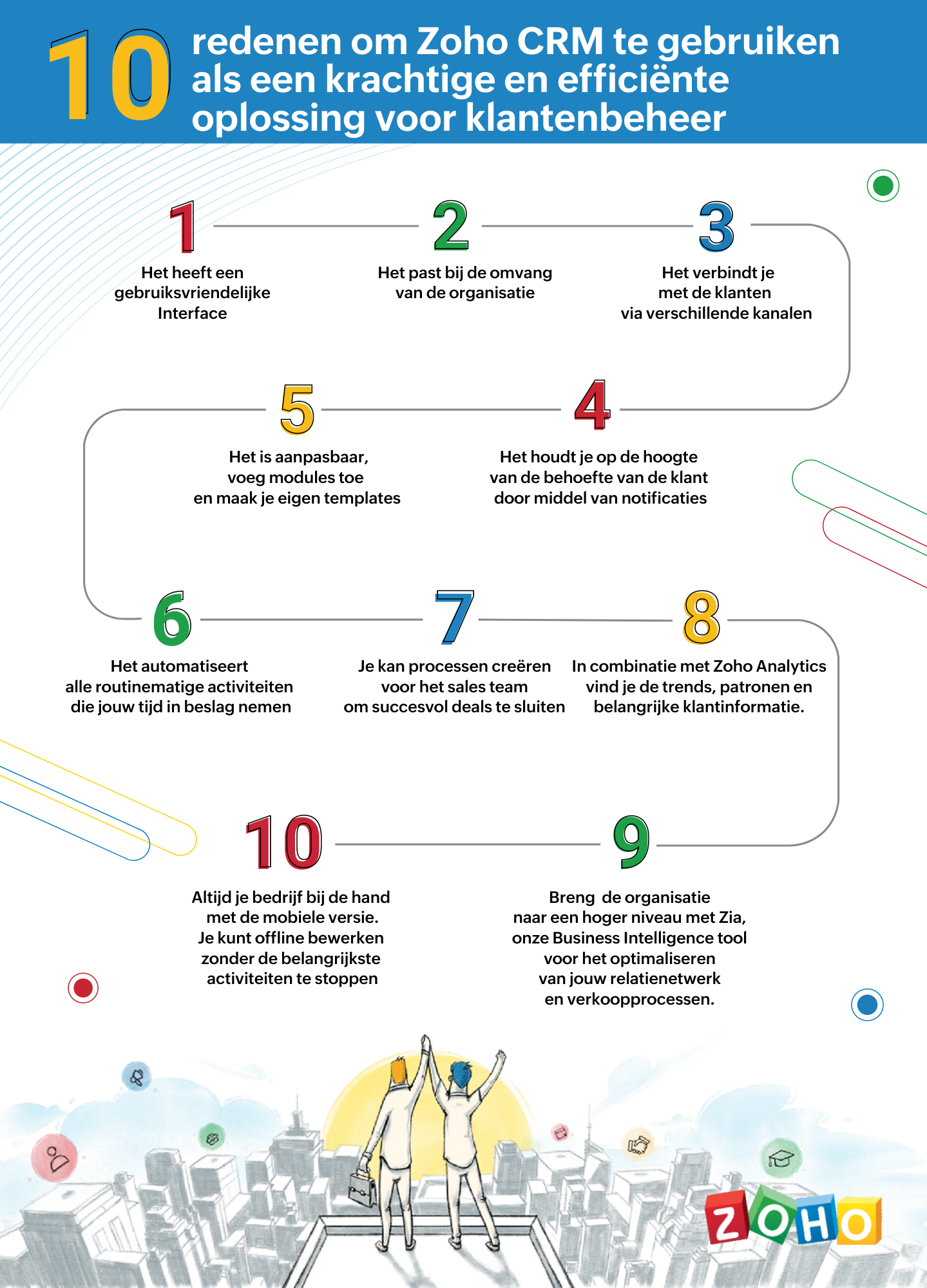
Zoho CRM biedt alles wat je nodig hebt om meer leads te krijgen, sales te vergroten en salesprestaties te meten. Hieronder lees je 10 punten waarom Zoho CRM een krachtige en efficiënte oplossing voor klantbeheer is en hoe je het meeste uit Zoho CRM kan halen.
1. Gebruiksvriendelijke interface
Zoho CRM heeft een eenvoudige, gebruikersinterface waarvoor een minimaal leercurve nodig is. Breid de gebruikersinterface van jouw Zoho CRM-account uit, door naadloos in realtime widgetapps te koppelen die werken met Zoho CRM-gegevens en workflows.
2. Passend bij de omvang van uw organisatie
Of je nu een klein bedrijf of een grote onderneming hebt, één ding blijft hetzelfde. Jouw succes hangt af van de relaties die je met je klanten ontwikkelt. Naarmate je bedrijf groeit, groeien je eisen ook en worden deze complexer. Je CRM moet een groeiende groep gebruikers kunnen ondersteunen, je salesproces kunnen opschalen, complexere bedrijfsprocessen kunnen implementeren en kunnen worden geïntegreerd met meer applicaties van derden. Met Zoho CRM beschik je over een robuuste, veilige en schaalbare CRM-oplossing voor bedrijven.
3. Verbind met je klanten via meerdere kanalen
Met Zoho CRM kan je via meerdere kanalen connecten met je klanten. Voer gesprekken in realtime met klanten en prospects. Ontvang een melding wanneer iemand communiceert met jouw merk, of ze nu je website bekijken, een e-mail lezen of over je merk praten via social media.
4. Blijf op de hoogte door middel van notificaties
Ontvang alerts, reminders en suggesties voor de beste contactmomenten met je leads op basis van eerdere succesvolle interacties.
5. Pas je CRM aan naar jouw wensen
Weergeef gegevens die jij wilt zien binnen het CRM. Pas modules aan en creëer maatwerk velden die van belang zijn voor jouw bedrijf. Tevens kan je je CRM opnieuw vormgeven met onze nieuwste Canvas-functie. Middels een eenvoudige drag-and-drop editor kan je je eigen sjablonen maken. Klik hier voor onze meest recente webinar of Canvas.
6. Routinematige activiteiten automatiseren
Automatiseer routinematige verkoop-, marketing- en supportfuncties die waardevolle werktijd in beslag nemen, zodat je meer tijd hebt om te concentreren op je klanten. Creëer workflows waarmee je handmatige gegevensinvoer kunt verminderen en je proces kunt versnellen.
7. Creëer processen voor het sales team voor het sluiten van deals
Maak regels in je CRM op basis van echte salesprocessen. Wijs leads toe aan de juiste verkoper, keur kortingen goed en valideer salesgegevens op basis van jouw criteria. Je kan tevens een goedkeuringsproces invoeren om binnenkomende informatie te beoordelen en deze met de juiste opmerkingen goed te keuren of af te wijzen op basis van de kwaliteit.
8. Analyseer CRM-gegevens met Zoho Analytics
Maak een visuele analyse van je CRM-gegevens. Maak inzichtelijke rapporten en dashboards om je CRM sales-KPI's te volgen. Deel rapporten en werk samen met je collega's tijdens het maken en analyseren van rapporten. Analyseer en volg je bedrijfsstatistieken. Klik hier voor meer informatie over Zoho Analytics.
9. Zia ons BI tool voor het optimaliseren van jouw verkoopprocessen
Zia is de AI-assistent binnen Zoho CRM die je helpt je CRM op intelligente wijze te beheren. Zia kan de gewenste informatie ophalen, aantekeningen maken wanneer je dicteert, de uitkomst van slalesactiviteiten voorspellen, afwijkingen detecteren, alledaagse taken automatiseren en nog heel veel meer!
10. Zoho CRM Mobiele App
Met de mobiele apps van Zoho CRM kan je salesteam onderweg contact houden met hun leads, belangrijke prospectinformatie registreren en openen, hun KPI's bijhouden en onderweg doordachte beslissingen op basis van gegevens maken. Klik hier voor meer informatie over de Zoho CRM mobiele app.
Topic Participants
Yannick de Vries
Sticky Posts
Virtual Community Meetup over Canvas voor Zoho CRM
Beste Community leden, Wij nodigen jullie graag uit voor de Virtuele Community Meetup over Canvas voor Zoho CRM! Met Canvas kun je de gebruikersinterface van Zoho CRM herontwerpen tot een gebruiksvriendelijke en dynamische tool. Deze oplossing vereenvoudigtTips & Tricks #01 Top 10 Zoho CRM Integraties
Wij helpen jou graag om het beste uit je CRM te halen. Zoho CRM ondersteunt verschillende Apps en Add-ons die jouw efficiëntie kunnen verbeteren wanneer je met sales leads, prospects en klanten werkt. Integratie is mogelijk met een uitgebreide set aanWebinar - Nieuwe Canvas Functie voor Zoho CRM
Wij nodigen jou graag uit voor de Webinar over de nieuwe Canvas-functie van Zoho CRM! Tegenwoordig zien alle CRM-softwares er hetzelfde uit: rijen met data op een witte achtergrond met een contrasterende kleur bovenaan en aan de randen. Dat is NU verledenAsk the Experts #1 Online Forum Q&A over Canvas voor Zoho CRM
Beste Community leden, Zoals jullie weten lanceerde Zoho CRM deze maand Canvas, de eerste CRM Designstudio in de branche! Met Canvas is het mogelijk om creatieve en praktische ontwerpen te creëren zonder enige kennis van programmeren te hebben. Het isOntdek onze nieuwe Canvas functie voor CRM
Het gehele Zoho team is verheugd om onze nieuwe Canvas functie te introduceren, de enige functie binnen de branche die u in staat stelt om het ontwerp van uw CRM aan te passen! Canvas is een ingebouwde designstudio in Zoho CRM, waarmee u uw gebruikersinterface
Nederlandse Hulpbronnen

Recent Topics
Unwrapping the best practices for the Zoho Desk mobile app: Part 1
In focus: Empowering the field and frontline customer support representatives Imagine having to carry your computer everywhere to respond to customers, handle escalations, and update your process. This series presents you with efficient tips to handledealing with post dated cheques
Hi, can you help me please the best way to deal with this We sell an item of three months duration that is paid for with post dated cheques in monthly stages example - item is sold £3000 Cheque 1 is for £1000 due at time of sale (say Sept) cheque 2 is dated 25th of next month (Oct) cheque 3 is dated 25th of next month +1 (Nov) Now, with invoice number one it's simple - i send a standard invoice as usual But with the other two here's what i want zoho to do next month i want it to send an invoice onIs there a way to sell in a practical method multiple subscriptions of the same product? i.e. domain names
In evaluating Zoho Billing, a hurdle to adopting it is that Zoho Billing does not seem designed to support businesses that sell multiple subscriptions of the same product. In our case, we need to sell and manage several domain names per client. Am I rightPaid Support Plans with Automated Billing
We (like many others, I'm sure) are designing or have paid support plans. Our design involves a given number of support hours in each plan. Here are my questions: 1) Are there any plans to add time-based plans in the Zoho Desk Support Plans feature? TheBug Report: "Name A-Z" sorting fails when Note titles start with an Emoji
Hello, I recently migrated from Evernote (~2600 notes across 23 notebooks). I use emojis at the start of my note titles for visual organization. The Issue: When I set the view to Sort by: Name (A to Z), the sorting logic breaks for any note starting withCopy & Paste not working
I could create and save 10 new documents but when I go to copy and paste content (just text) into them, only 1 of 10 would save the content. It would appear to save the content but when I go back into the documents, they are empty.Currency for Petty Cash
Currencies for Petty Cash should be availableediting/applying online payments
We have customers who pay part or all of an invoice and then cancel their service and want the payment as a credit to future work. It would be ideal if we could make it an excess payment and then void the invoice. I can't make it an excess payment becauseContacts per department
Hello, Is it possible to limit Contacts to a Department? ThanksThis site can’t be reached mail.zoho.com took too long to respond
In my office at any system, we couldnt able to login zoho email. it shows " This site can’t be reached mail.zoho.com took too long to respond". please fix it soon.Can send email from zoho mail, but can't receive any.
Hi, My domain is sattvameditationresort.com. I've updated MX records with those of Zoho. But i can't send any mails to this email id from gmail. I have checked the MX status with MXTOOLS, its showing the correct entry either. The error is as shown below:My domain did not activate
Hi, my domain (apsaindustrial.com.ar) did not activate, and the phone verification message never arrived. Please would you solve this problem? Thanks.Host not found?
Howdy! So i'm trying to add my custom domain for with the mail server. I have 100% control of my DNS and have tried every single option (TXT, CNAME, and even HTML) multiple times, ensuring i did it properly, to no luck. I get the same error message everyEmails are going to notification folder and not in inbox
emails are going to notification folder and not into inboxError AS101 when adding new email alias
Hi, I am trying to add apple@(mydomain).com The error AS101 is shown while I try to add the alias.Auto End Chats After Customer Inactivity
Hello Everyone, I may be missing something, but is there a way to auto-end chats when a customer has been inactive for an amount of time? I have several operators (we use a shared set of account with schedules for people... that's another story) but atReport on opportunities showing only the last note added.
Hi I need to create a report that shows the most recent note added to each opportunity. This is so management can see what the latest update is according to the assigned salesperson. One workaround is to use the status field but this implies added manual work and mistakes as the salesperson would have to copy the existing status to a note before adding the latest status... otherwise the activity history would be lost. My current workaround is a report on Notes with Opportunities as the related module.Please add Zelle as an online payment option
Hello, I would like to request Zelle be added to the online payment service providers for Zoho Invoice. Considering how ubiquitous Zelle has become as a way to pay people via the major banking institutions, I feel like many freelancers would benefit fromThis user is not allowed to add in Zoho. Please contact support-as@zohocorp.com for further details
Hello, Just signed up to ZOHO on a friend's recommendation. Got the TXT part (verified my domain), but whenever I try to add ANY user, I get the error: This user is not allowed to add in Zoho. Please contact support-as@zohocorp.com for further details I have emailed as well and writing here as well because when I searched, I saw many people faced the same issue and instead of email, they got a faster response here. My domain is: raisingreaderspk . com Hope this can be resolved. Thank youGetting Project Template List using the REST API
I am trying to confirm that I can use the REST API to create a project using a project template. The API documentation indicates this is possible by providing the Template ID, but it is not clear at all how to get a list of available Project TemplatesHow to display the CONTACT ID in the Contact page
Hi, I've seen this conversation below and it is exactly the same question I'm raising now, but unfortunately the last message is not solved https://help.zoho.com/portal/community/topic/show-contact-id-while-editing-contact-form I need to show the ContactId and I don't know how to do this. The last message included in the conversaton shows the way but not it is not completed. "I am sorry by default we do not have the option to show the record ID for the contacts in the field in a record. When youHow to change margins in templates
Hi, I'm new to Zoho Campaigns, and am trying to figure out how to adjust the margins within an email template. The default margins make the text go all the way to the edges of the page. Please advise.Create Canvas list view templates from images powered by Zia
Currently available for all paid editions of Zoho CRM in the US, EU, IN, JP & CN DCs. Designing a personalized CRM interface just got even easier. In today’s fast-evolving digital landscape, AI is transforming the way we work by automating complex tasksPainfully Slow Zoho mail
Since yesterday Zoho Mail seems to have starting functioning very slowly and having a few bugs. It's slow to open mails, slow to send, slow to change between email accounts. Sometimes clicking on a particular folder (eg Sent folder) stops working and"Wrong password or login" Problem to configure Zoho on MAIL App on my Macbook
Hi, I'm having problems to configure my e-mail on my MAIL App(Macbook pro). My e-mail is hari@trespontoum.net Actually was working perfectly, and still working on my Iphone. My MAIL App prompt me that my login or password is wrong. I tried to change 3"User already exist in your org"
Hello, I've just read a discussion about this issue, which didn't solve my problem. I'm trying to add the following emails: sales@kiss-my-boutique.co.uk returns@kiss-my-boutique.co.uk orders@kiss-my-boutique.co.uk I'm getting an error message each time I try and add them. None of them are primary or secondary emails and none of them have been created as users before. I know this as when I try and login and do 'forgot my password' all I get is an error message saying 'user invalid'. Please advise.Operation Not Permitted
Hi, I have problem in adding user after verifying the domain but it seems like error appeared which is "operation not permitted". For your information, I had delete other domain before did it.Email forwarding setup fails
I'm trying to set up email forwarding from my Zoho email to my gmail address. I followed the directions to set up email forwarding here: https://www.zoho.com/mail/help/email-forwarding.html. I did only steps 1-6. After doing this, rather than settingShopify store email issues- Not getting emails
Hi We have migrated from Microsoft outlook to Zoho back in March, we have a shopify store, the domain is hosted on namesilo, not shopify, I have seen some people here complaining about not getting emails from customers who fill out the contact form onHow do I fix this? Unable to send message; Reason:554 5.1.8 Email Outgoing Blocked.
How do I fix this? Unable to send message; Reason:554 5.1.8 Email Outgoing Blocked.Invoice Discount Account
Is there a way to change the account used for Discounts applied to an invoice? The current Discount account (ZB native account) type is an "Income" type. I would like to change it to "Other Income", but that is not possible, I am assuming because it containsNeed Inactive accounts to be visible in Reports in Zoho Books
I N=need Inactive accounts to be visible in Reports in Zoho Books to do recons of the accounts but when i see the same they are not visible in the Accountant - Account Transactions reportjavax.mail.authenticationfailedexception 535 authentication failed
Hi, I am facing 535 authentication failed error when trying to send email from zoho desktop as well as in webmail. Can you suggest to fix this issue,. Regards, RekhaPhantom Opening Balance
While experimenting w/ creating a composite item, Zoho added funds to Petty Cash and added Bank Account equal to previous day's balance. I'm unable to undo the adding of funds. Attaching screenshots of both bank account and petty cash transactions.Importing customer comments and multiple shipto addresses
I am evaluating Zoho Books and have most of my data imported with two exceptions: (1) Import customer comments - in my current system I have several comments of different types, and I need to bring these into Zoho. Preferably Books customer records, butDetailed Account Reports - Add Running Balance
When one clicks into an account from a report (say P/L or Balance Sheet), the default reports have the Debit, Credit, and then the Amount. The Amount column (last one) is duplicate information. It would be far better and fit more peoples' use cases ifHow to Billed from two different GST Numbers
How to Billed from two different GST Numbers. Suppose ABC & Co had GST registration in Delhi and Haryana and Zoho account is created with Delhi GST Registration number. Now i also want to issue invoice from Haryana GST Registration number. How can i proceed ?Zoho IP blocked by SpamHaus
ERROR CODE :550 - 5.7.0 Your server IP address is in the SpamHaus SBL-XBL database, byeIMAP Communication Problems - IMAP Down Again
We are experiencing the same problems over the last week or so that were supposedly 'solved' according to this thread. Zoho Imap Down Again This is affecting attempts to use IMAP on multiple ISPs and users so is definitely narrowed down to Zoho problems.Can't login to Zoho mail
I'm logged into Zoho but when I try to go in zoho mail I get: Invalid request! The input passed is invalid or the URL is invoked without valid parameters. Please check your input and try again. I just set up my mx records and stuff with namecheap a fewNext Page