Integrate with WooCommerce using Wordpress Plugin

Integrate with WooCommerce using Wordpress Plugin


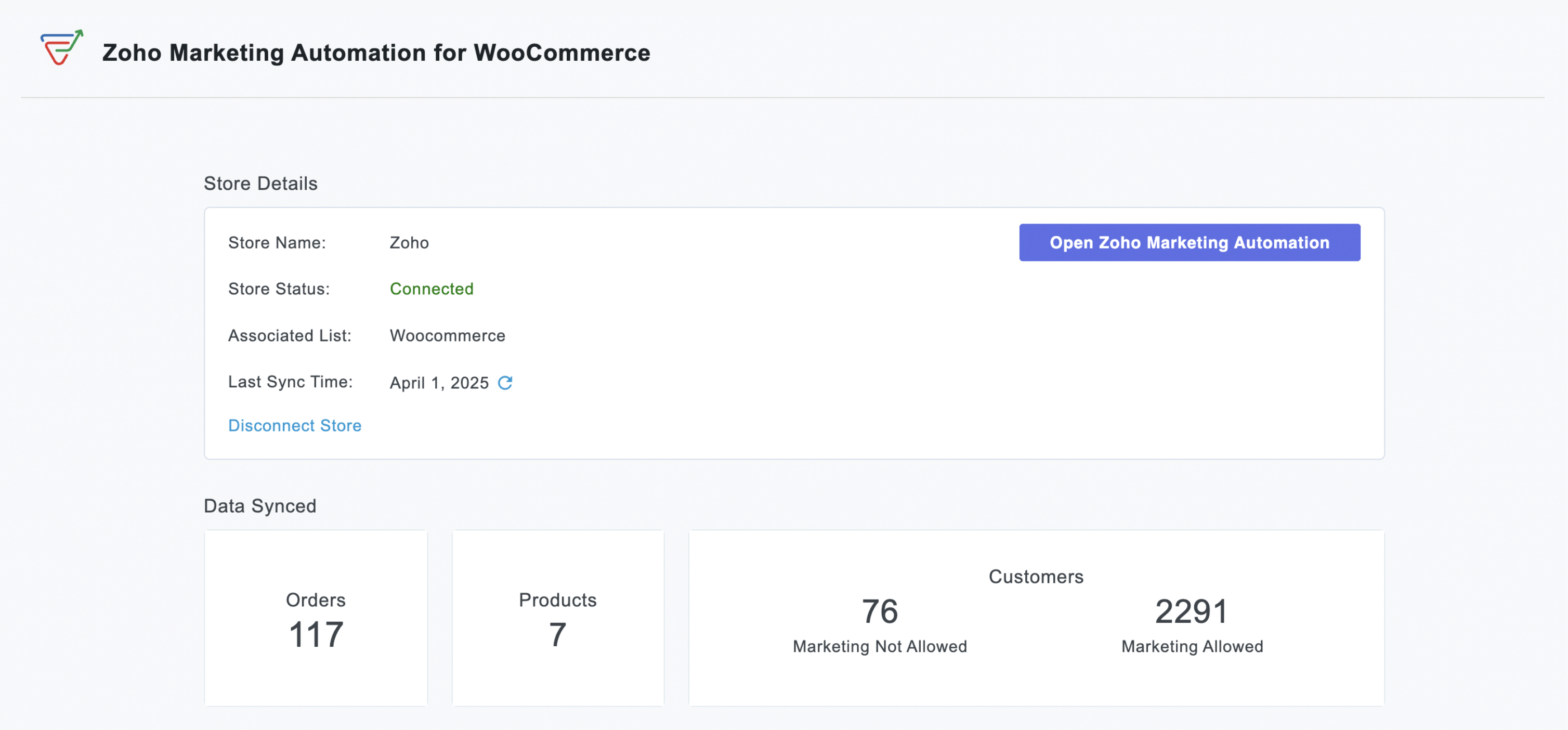
We’re thrilled to announce a powerful update to the Zoho Marketing Automation WordPress plugin with WooCommerce integration! This enhancement enables new possibilities for businesses running online stores using WooCommerce, empowering them to merge seamless marketing strategies with e-commerce operations.


What’s New?

Previously, our WordPress plugin offered tools like the Web Assistant and signup forms to help you engage with your website visitors. Now, we've significantly expanded its capabilities with:


WooCommerce Integration
:

  • Seamless Data Sync: Automatically import customer data, order details, and customer segments into Zoho Marketing Automation for a comprehensive view of your audience.  
  • Targeted Campaign Automation: Launch automated emails for cart abandonment, post-purchase follow-ups, or personalized product recommendations based on buying behaviour.  
  • Purchase-Based Segmentation: Create dynamic lists using purchase data to deliver hyper-relevant promotions or loyalty programs.  
  • ROI Measurement: Measure how marketing efforts directly impact sales by linking campaigns to WooCommerce transactions.  


Signup Forms:

  • Effortless Lead Capture: Capture leads directly on your WordPress site with high-converting signup forms.

  • Customizable Design: Design beautiful, brand-aligned forms to match your website's look and feel.

  • Easy Embedding: Embed forms anywhere on your site effortlessly using simple shortcodes.

  • Automatic Lead Sync: Captured leads sync automatically to Zoho Marketing Automation for immediate follow-up.

  • Visibility Control: Easily control form visibility with a simple on/off toggle.


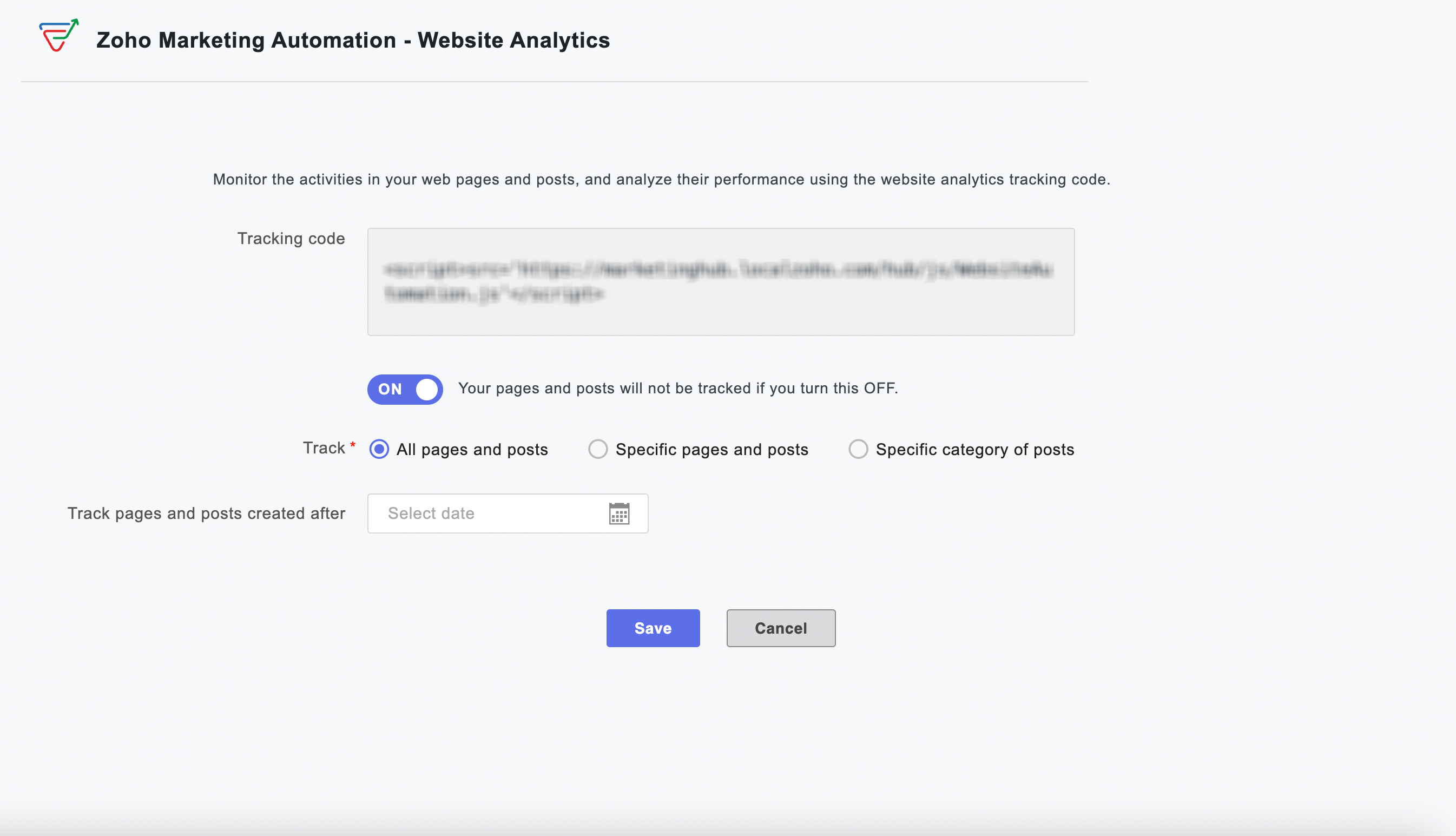
Web Analytics:

  • Visitor Behavior Insights: Gain powerful insights into how visitors interact with your website.

  • Engagement Tracking: Track time spent on pages and engagement patterns across your site.

  • Granular Tracking: Track all pages, specific content, or designated categories for detailed analysis.

  • Time-Based Analysis: Implement time-based tracking to focus on specific periods or new content.

  • Instant Activation: Activate or deactivate website tracking instantly from your WordPress dashboard.


Why this matters to your WooCommerce store

For every WooCommerce store owner, this integration represents a significant step towards unifying your marketing and sales efforts. Imagine the possibilities of automatically nurturing new customers with tailored content after their very first purchase, or re-engaging shoppers who have left items lingering in their cart, all happening automatically.

By leveraging real-time, actionable data from your WooCommerce store, you can craft highly personalized and effective marketing campaigns that are proven to drive conversions, significantly boost customer retention, and ultimately maximize your roi. This integration empowers you to move beyond generic marketing and create meaningful connections with your customers that translate directly into business growth.


Enhanced Capabilities, Simplified Workflow  

Setting up is effortless—activate the integration within your WordPress dashboard and watch your store and website data flow into Zoho Marketing Automation.

Quick and easy plugin installation

    • From your WordPress dashboard, navigate to Plugins > Add New.

    • Search for "Zoho Marketing Automation" and click Install Now.

    • Click Activate.


We are confident that this powerful WooCommerce integration will be an invaluable asset for your business, enabling you to build stronger customer relationships, drive more sales, and achieve your e-commerce goals.

Happy marketing!

Best regards
Zoho Marketing Automation Team


    • Sticky Posts

    • Marketer’s Space - Automating CRM Actions with Journeys – Part 2

      Hello marketers! Welcome back to another post in Marketer’s Space. In our previous post, we explored how CRM actions in Journeys help marketing and sales teams work together by nurturing CRM leads and pushing only engaged prospects back to sales. If you
    • Introducing automation and utility conversations in WhatsApp marketing

      We’re excited to announce the addition of two new features to our WhatsApp integration: Automation and Utility conversations. These enhancements will allow you to streamline your marketing efforts and engage with your customers more effectively by automating
    • Tip of the week 02 - The art of 'seeing' your leads

      What's the last page that your lead visited before signing up for your brand? What was the page that first convinced your lead to explore more about you? Where are your leads coming in from? Well, these are some perennial questions today's marketers live upon. And, knowing the answers to these questions is crucial, considering the vitality of leads in every business. In the journey of finding lead opportunities, it's important to understand that every detail about a lead is useful. While the channels
    • Zoho Marketing Automation Update: Topics, Contacts, and List Management

      At Zoho Marketing Automation, our highest priority is making it easier for you to use our product to accomplish your business goals. With that in mind, we are updating three of our pivotal features: Topic, Contacts, and List Management.   These existing
    • Important: Zoho MarketingHub is now Zoho Marketing Automation

      Hello Everyone,   We hope you all are doing well. We'd like to notify you that we have rebranded Zoho MarketingHub to Zoho Marketing Automation. We'll discontinue using the term "MarketingHub" from May 26, 2021. However, there will be no changes in the

    Nederlandse Hulpbronnen


      • Recent Topics

      • Filter contacts based on selected category in Zoho Desk ticket

        Hello community, I’m setting up the Tickets module in Zoho Desk and I need help implementing the following: When a category is selected in a ticket, I want the Contact field to be filtered so that it only displays contacts that are related to that category.
      • Mapping a new Ticket in Zoho Desk to an Account or Deal in Zoho CRM manually

        Is there any way for me to map an existing ticket in Zoho desk to an account or Deal within Zoho CRM? Sometimes people use different email to put in a ticket than the one that we have in the CRM, but it's still the same person. We would like to be able
      • Introducing Multi-Asset Support in Work Orders, Estimates, and Service Appointments

        We’re excited to announce a highly requested enhancement in Zoho FSM — you can now associate multiple assets with Work Orders, Estimates, and Service Appointments. This update brings more clarity, flexibility, and control to your field service operations,
      • Assign Income to Project Without Invoice

        Hello, Fairly new user here so apologies if there is a really obvious solution here that I am just missing... I have hundreds of small deposits into a bank account that I want to assign to a project but do not want to have to create an invoice every time
      • Tracking Non-Inventory Items

        We have several business locations and currently use zoho inventory to track retail items (sales and purchase orders). We were hoping to use zoho inventory to track our non-inventory items as well (toilet paper, paper towels, etc). I understand that we
      • Profile Page View Customization

        I need to change the fields, sections from the profile view of an emplyoyee.
      • Zoho Desk Android app update: Filter, Sort and Saved filters Enhancements

        Hello everyone! We are excited to introduce the below features on the Android version Zoho Desk mobile app: 1. Filter & Sort support has been introduced for the Contacts and Accounts modules. 2. Sort options is now available in Custom Modules as well.
      • Zoho CRM Meetings Module Issues

        We have a use-case that is very common in today's world, but won't work in Zoho CRM. We have an SDR (Sales Development Rep) who makes many calls per day to Leads and Contacts, and schedules meetings for our primary Sales Reps. He does this by logging
      • How to filter Packages in zoho inventory api

        Hi Team, I want to perform some tasks in a schedular on the packages which are in "Shipped" state. I tried to use filter_by in my api call but in return I get response as {"code":-1,"message":"Given filter is not configured"} My Api request is as follows
      • Accessing shared mailboxes through Trident (Windows)

        Hi, I have a created a couple of shared mailboxes. The mailboxes are showing up on the browser based Zoho workplace, but I cannot seem to figure out how to access my shared inboxes through Trident (Windows). Am I missing something or is this feature not
      • Can I re-send the Customer Satisfaction Survey after a ticket closure?

        Hello, Some customers does not answer the survey right after closure, is it possible to re-send after a few days or weeks? Best Regards!
      • Feature Request: Ability to set Default Custom Filters and apply them via URL/Deluge

        I've discovered a significant gap in how Zoho Creator handles Custom Filters for reports, and I'm hoping the Zoho team can address this in a future update. This limitation has been raised before and continues to be requested, but remains unresolved. The
      • Closing the Loop: Why Lookup Asymmetry is Harming Data Integrity in Creator

        TL;DR: Lookup fields allow users to add new related records inline via the "+" icon, but there's no equivalent ability to edit an existing related record without navigating away and losing form context. Adding a native "Edit" icon—with automatic User
      • Syncing with Google calendar, Tasks and Events

        Is it possible to sync Zoho CRM calendar, task and events with Google Calendar's tasks and events. With the increasing adoption by many major tool suppliers to sync seamlessly with Google's offerings (for instance I use the excellent Any.do task planning
      • filtering lookup field options based on information in another module.

        In our CRM system. We have the standard Accounts and Deals modules. We would like to introduce the ability to classify Accounts by Sector. Our desired functionality is to have a global list of all sectors that an Account can select, with the ability to
      • Really want the field "Company" in the activities module!

        Hi team! Something we are really missing is able to see the field Company when working in the activities module. We have a lot of tasks and need to see what company it's related to. It's really annoying to not be able to see it.🙈 Thx!
      • Cliq iOS can't see shared screen

        Hello, I had this morning a video call with a colleague. She is using Cliq Desktop MacOS and wanted to share her screen with me. I'm on iPad. I noticed, while she shared her screen, I could only see her video, but not the shared screen... Does Cliq iOS is able to display shared screen, or is it somewhere else to be found ? Regards
      • Service op locatie organiseren met Zoho FSM: waar lopen organisaties tegenaan?

        Bij organisaties met service teams op locatie merken we vaak dat de complexiteit niet zozeer in de planning zelf zit, maar in wat er rond die planning gebeurt. Denk aan opvolging na interventies, consistente servicerapporten, en het bijhouden van installaties
      • Workflow Down/Bug

        We have a workflow that sends an email to one of our internal departments 10 minutes after a record is created in a custom module. The workflow actually works correctly. However, we have now noticed that on January 8, between 3:55 p.m. and 4:33 p.m.,
      • Introducing Assemblies and Kits in Zoho Inventory

        Hello customers, We’re excited to share a major revamp to Zoho Inventory that brings both clarity and flexibility to your inventory management experience! Presenting Assemblies and Kits We’re thrilled to introduce Assemblies and Kits, which replaces the
      • Automate pushing Zoho CRM backups into Zoho WorkDrive

        Through our Zoho One subscription we have both Zoho CRM and Zoho WorkDrive. We have regular backups setup in Zoho CRM. Once the backup is created, we are notified. Since we want to keep these backups for more than 7 days, we manually download them. They
      • Does the ability exist to make tax on the customer profile mandatory?

        I am reaching out to inquire about the possibility of making the "Customer Tax" field mandatory when creating a new customer in Zoho. We want to ensure that all customers have their tax information recorded to maintain compliance with our internal processes.
      • CRM gets location smart with the all new Map View: visualize records, locate records within any radius, and more

        Hello all, We've introduced a new way to work with location data in Zoho CRM: the Map View. Instead of scrolling through endless lists, your records now appear as pins on a map. Built on top of the all-new address field and powered by Mappls (MapMyIndia),
      • How to apply customized Zoho Crm Home Page to all users?

        I have tried to study manuals and play with Zoho CRM but haven't found a way how to apply customized Zoho CRM Home Page as a (default) home page for other CRM users.. How that can be done, if possible? - kipi Moderation Update: Currently, each user has
      • Send Whatsapp with API including custom placeholders

        Is is possible to initiate a session on whatsapp IM channel with a template that includes params (placeholders) that are passed on the API call? This is very usefull to send a Utility message for a transactional notification including an order number
      • IMAP mail after specify date

        Hi My customer's mail server is on premise and mail storage is very huge. So It never finish sync. and finally stop sync. Cloud CRM have a option like zoho mail sync mail after some date.
      • email association with CRM

        Why is it 2024 (almost 2025) and Zoho has not figured out how to integrate email with CRM? It is so inconsistent at associating emails within CRM. I am an attorney. I have clients and work with other attorneys. Attorney John Doe is associated with multiple
      • Fix the speed

        It takes ages to load on every step even though my dataset is quite small.
      • Credit Note for Shipped and Fatoora pushed invoices

        We have shipped a Sales Order and created an Invoice. The Invoice is also pushed to Fatoora Now we need to create a credit note for the invoice When we try it, it says we need to create a Sales Return in the Zoho Books, we have already created a Sales
      • Whatsapp Connection Status still "Pending" after migration

        Hello, I migrated my WhatsApp API to Zoho from another provider a day ago. So far the connection status is still “Pending”. There is a problem? How long does it usually take?
      • FSM - Timesheet entires for Internal Work

        Hi FSM Team, Several of my clients have asked how they can manage internal timesheets within Zoho FSM. Since their technicians already spend most of their day working in FSM, it would be ideal if they could log all working hours directly in the FSM app.
      • Add a way of clearing fields values in Flow actions

        It would be great if there was an option to set a field as Null when creating flows. I had an instance today where I just wanted to clear a long integer field in the CRM based on an action in Projects but I had to write a custom function. It would be
      • Role Management

        I am creating an analytics dashboard for a company that will be utilized by its various departments such as Finance, Marketing, and HR. My goal is to design the dashboard with separate tabs for each department. Additionally, I plan to implement role-based
      • Link Contacts to Billed Accounts

        Hello, I want to do a survey on all my customers of 2025. For that I want to select all contacts linked to accounts who where billed in 2025. How to I create this link to I can then use Zoho Survey with this database of contacts?
      • Highlight a candidate who is "off limits"

        Hello: Is there a way to highlight a candidate who is "off limits"?  I would like to have the ability to make certain candidate and / or Client records highlighted in RED or something like that.   This would be used for example when we may have placed a candidate somewhere and we want everyone in our company to quickly and easily see that they are off limits.  The same would apply when we want to put a client or former client off limits so no one recruits out of there. How can this be done? Cheers,
      • Announcing new features in Trident for Windows (v.1.37.5.0)

        Hello Community! Trident for Windows just received a major update, with a range of capabilities that strengthen email security and enhance communication. This update focuses on making your mailbox safer and your overall email experience more reliable.
      • Early Payment Discount customize Text

        Hi, I’m currently using Zoho Books and am trying to customize the standard “Early Payment Discount” message that appears in the PDF invoice template. I’ve reviewed the documentation here: https://www.zoho.com/books/help/invoice/early-payment-discount.html
      • Automatic Matching from Bank Statements / Feeds

        Is it possible to have transactions from a feed or bank statement automatically match when certain criteria are met? My use case, which is pretty broadly applicable, is e-commerce transactions for merchant services accounts (clearing accounts). In these
      • Deprecation of SMS-based multi-factor authentication (MFA) mode

        Overview of SMS-based OTP MFA mode The SMS-based OTP MFA method involves the delivery of a one-time password to a user's mobile phone via SMS. The user receives the OTP on their mobile phone and enters it to sign into their account. SMS-based OTPs offer
      • How to Customize Task Creation to Send a Custom Alert Using JavaScript in Zoho CRM?

        Hello Zoho CRM Community, I’m looking to customize Zoho CRM to send a custom alert whenever a task is created. I understand that Zoho CRM supports client scripts using JavaScript, and I would like to leverage this feature to implement the alert functionality.
      • Next Page