Introducing Radio Buttons and Numeric Range Sliders in Zoho CRM

Introducing Radio Buttons and Numeric Range Sliders in Zoho CRM

Info
Release update:
1. 2 March 2026: Currently out for CN, JP, AU and CA DCs (Free and standard editions). 
For other DCs, this will be released by mid-March.
2. 26 March 2026:
CA, SA, AU, JP, CN DCs - Free, Standard, Professional, Enterprise, Ultimate, CRM Plus, ZohoOne
IN DC -  Free, Standard
EU, US DCs - Free, Standard, Professional, Enterprise.
3. 30 April 2026: Rolled out for all users!

Hello everyone,

We are pleased to share with you that Zoho CRM's Layout Editor now includes two new field formats— Radio Buttons and Sliders for Numeric Fields. These additions will make it easier for your users to fill out forms across all your modules, given the convenience they offer, as well as visual appeal.


Let's take a closer look at how these new elements work.

Radio Buttons


Radio Buttons
are ideal when a user has to input a single choice from a minimal set of options that are presented upfront, making selection clearer and faster.

Here are some common use cases where Radio buttons work the best:

  • Billing cycle, such as Monthly or Yearly

  • Subscription plan, such as Basic, Pro, or Enterprise

  • Property type in real estate, such as 1 BHK, 2 BHK, or 3 BHK
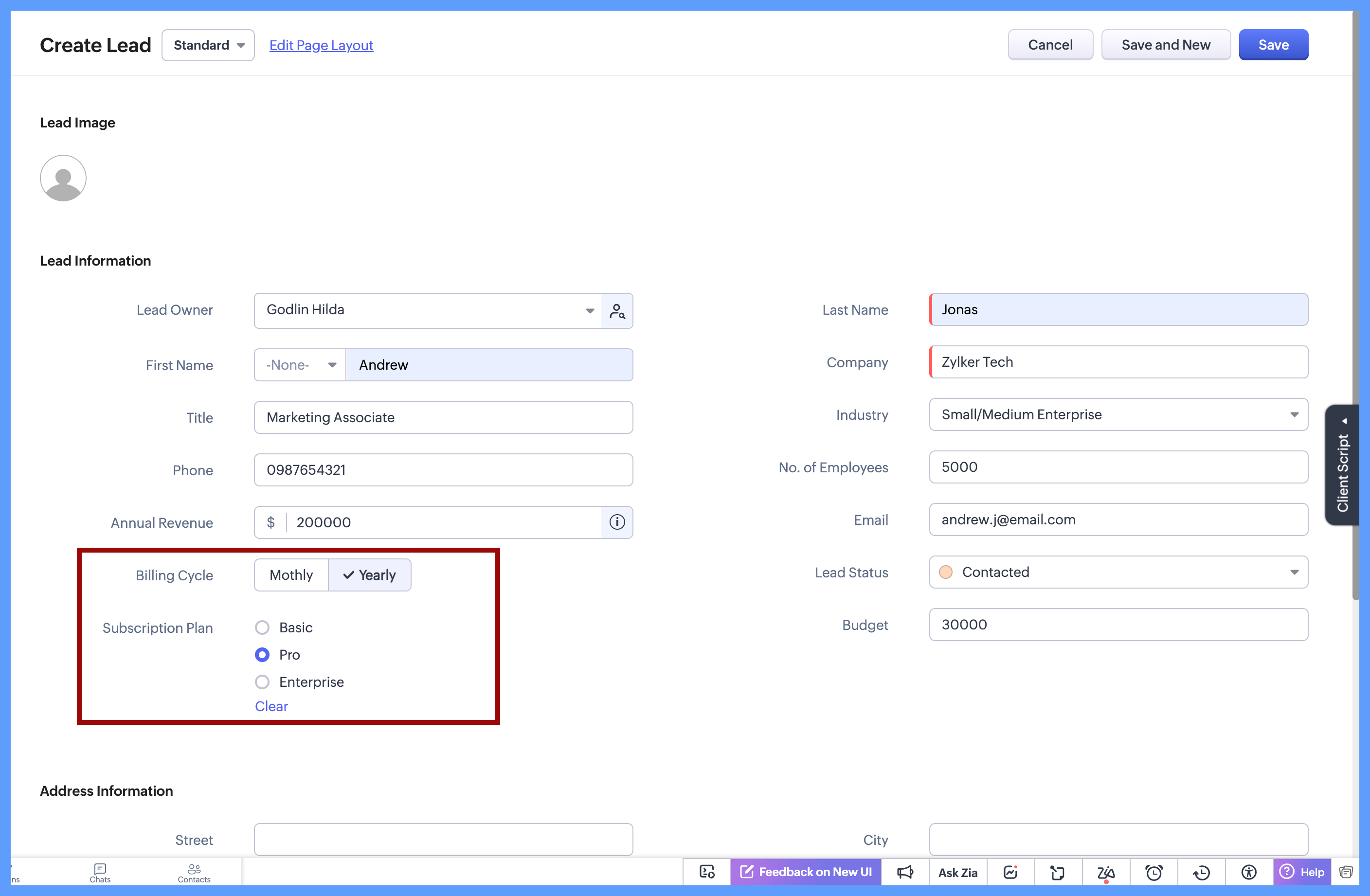


In each of these cases, the choices are limited to 2 or 3 options which are clearly defined, and the user needs to select just one option. Since all options are visible upfront, there’s no need to open a dropdown or scroll, making the selection quick and effortless.

Here's how to configure a radio button on the module's layout page:
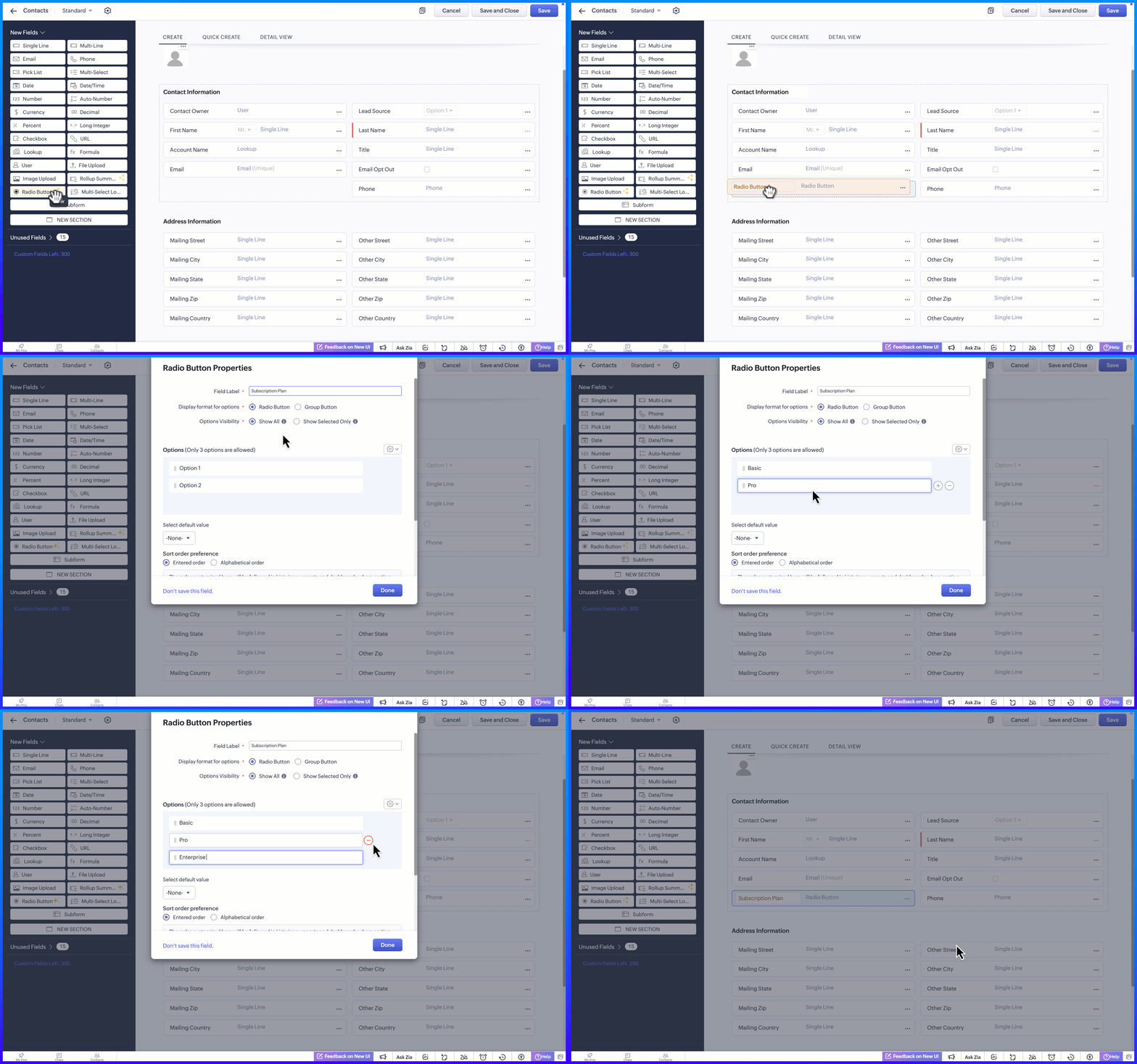


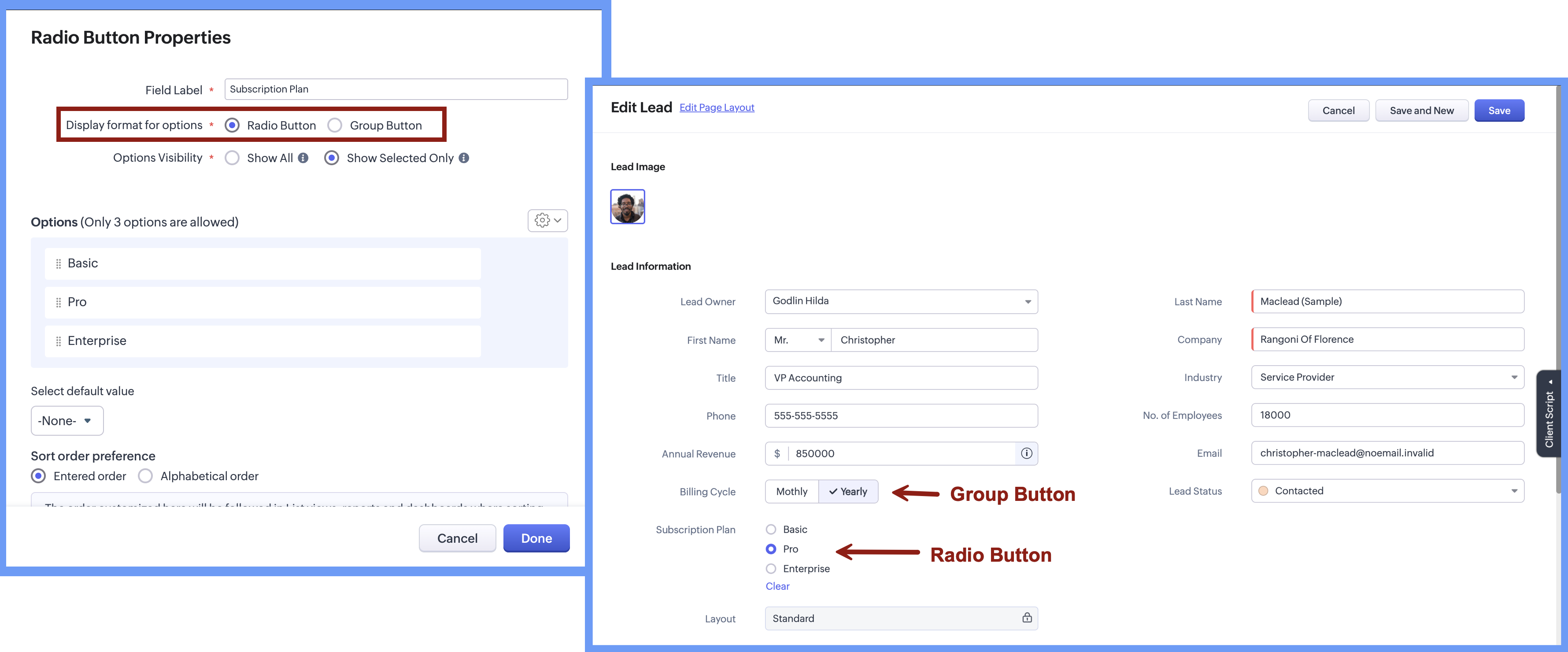
Display Format for options

When adding the radio button, the Radio Button Properties pop-up lets you choose how the options appear on the screen. Rather than using a fixed format, you can select a display style that best suits the field, making it easier for users to see and choose from the available options.


There are two display format options:

  • Radio button, where options are listed one below the other.

  • Group button, where options appear as a compact set of selectable buttons.

This flexibility helps you design forms that feel clear and easy to use, while letting users quickly understand their choices and select the right option.


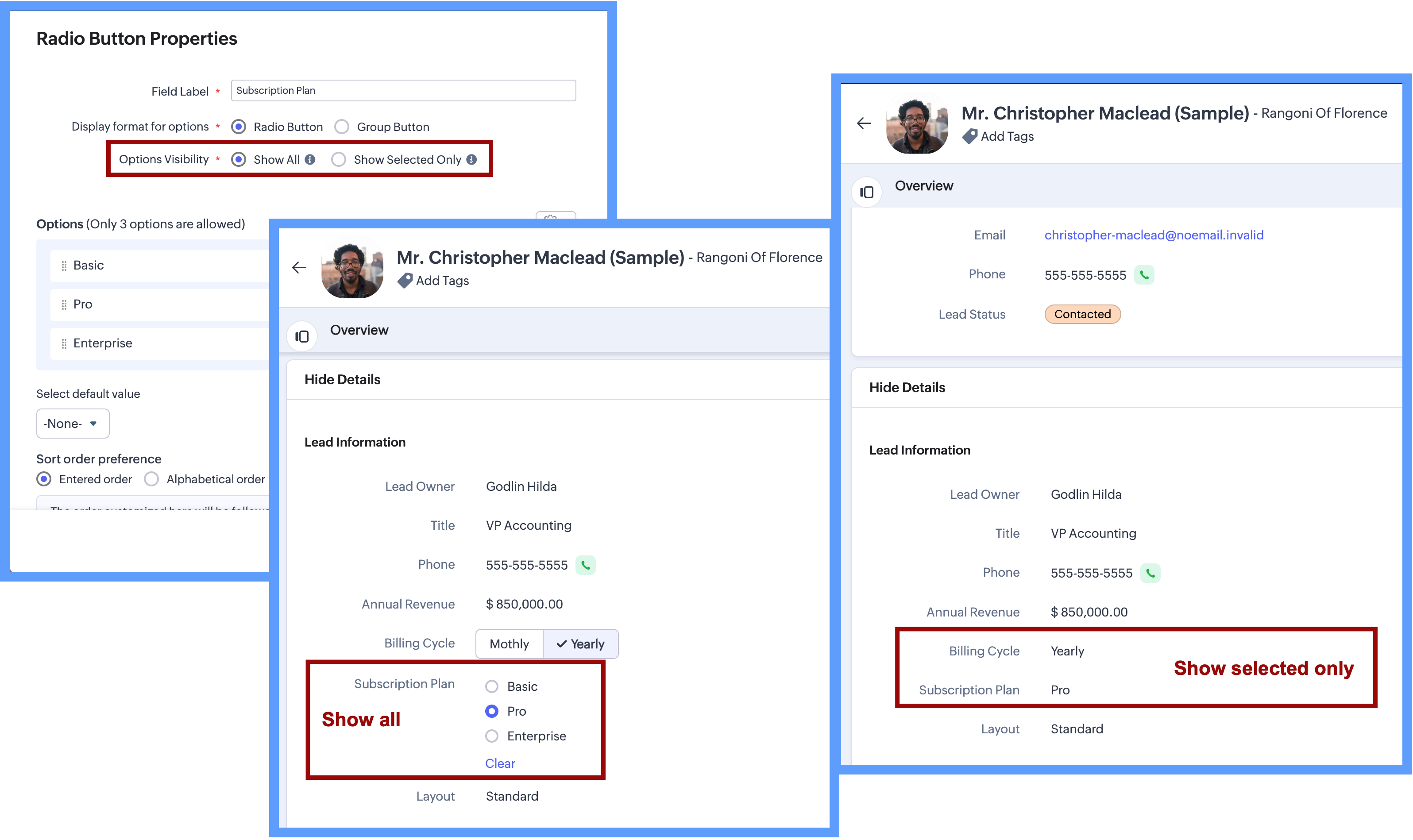
Option Visibility

The Option Visibility setting helps you decide how much information users need to see after a value is selected.

  • Show all: If users need to view all available options at all times and quickly update their choice on the go, you can select Show All. This keeps every option visible on the screen, making it easy to compare options and change the selection whenever needed.

  • Show selected only: If the field is mainly required during record creation and showing all options later adds little value, you can choose Show Selected Only. In this case, only the chosen value is displayed after selection, keeping the details page clean and focused while still capturing the required input.

NotesImportant Notes:
  1. Consistent data, every time - Once a Radio Button field is configured with a fixed set of options, users can select only from those defined values while creating or updating records from any source. Any value outside the configured options is not accepted by the system, ensuring clean and consistent data across all records.

  2. Options limit - 3 options per field in each layout. (Excluding Unused options)

  3. Field Limits - This field is included under Text Field limits.

  4. Edition Availability - In all editions except Free.

  5. Modules Supported - Supported in all Modules, except Users.


Range and Sliders for Numeric Fields


Earlier, defining a default range for numeric fields was not straightforward. Users were not aware of what range was expected or acceptable until they saved the form. Let's say, for example, a Customer Satisfaction Score is being captured after a sales interaction. If the score is meant to be recorded on a scale of 1 to 5, there was previously no direct way to enforce or clearly communicate this range upfront.


Now, as we bring the setting of range for numeric fields, you will be able to define the minimum and maximum value for numeric fields. This sets clear boundaries on the values that can be entered, so the users know the expected range before they add any data.


Sliders
are another prominent aspect that will help users to visually select a value within a defined range. When you choose to display sliding scale, the user can simply click on any interval or drag the slider to choose a value directly, making the selection more visual and guided.
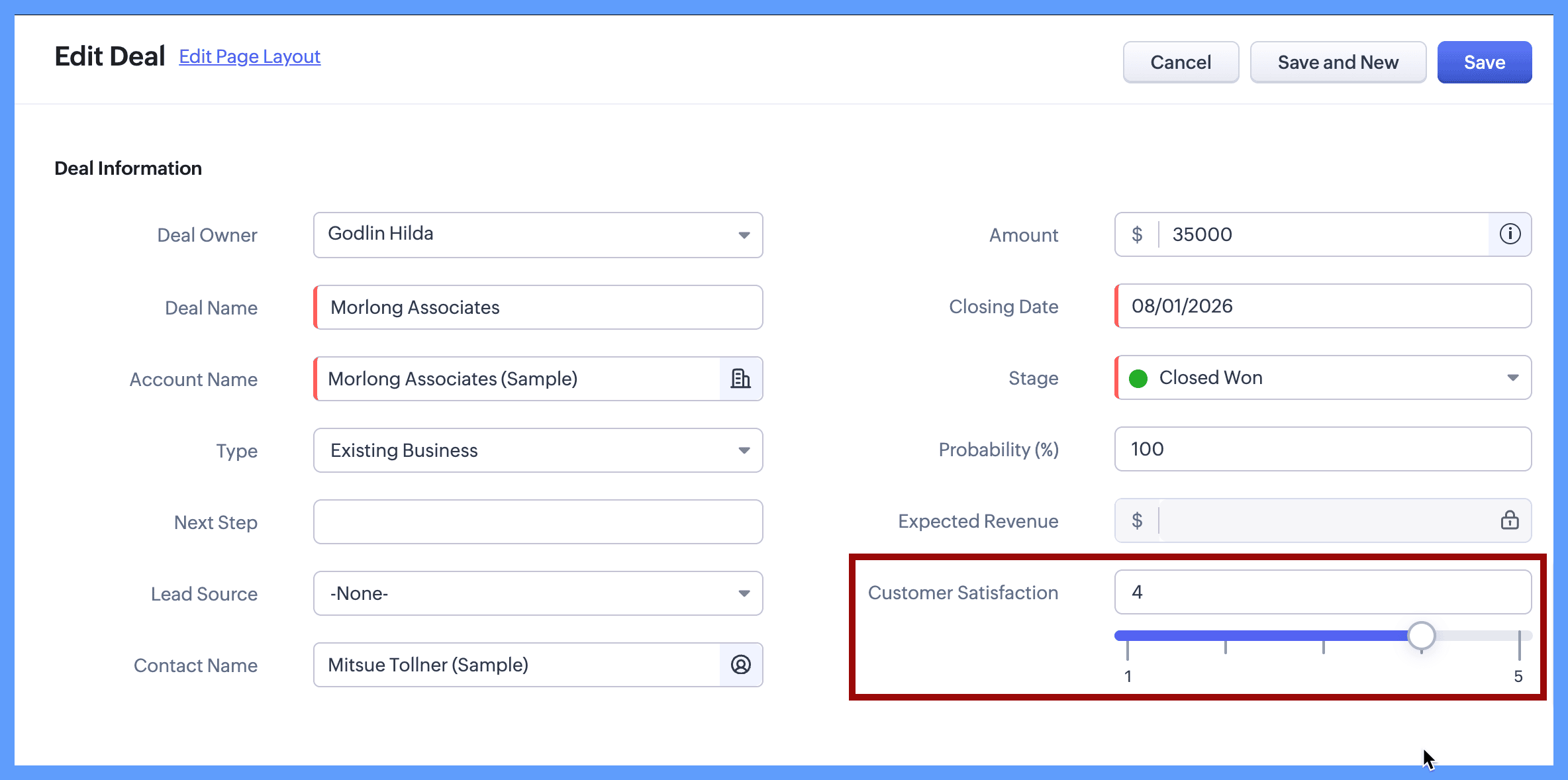


Continuing with the same example, you can define the customer satisfaction score by setting its minimum value to 1 and maximum value to 5. When the users create or edit a new record, they will clearly see that the value must fall within this range and can either type a number or use the sliding scale to select the score visually. The spaced intervals help users quickly understand the scale and choose the right value with confidence.

The same approach works well for other controlled scales, such as:

  • Setting a budget

  • Defining a probability range such as 10% to 100%

  • Defining priority levels on a numeric scale

Here's how to configure a sliding scale for a numeric field on the module's layout page:
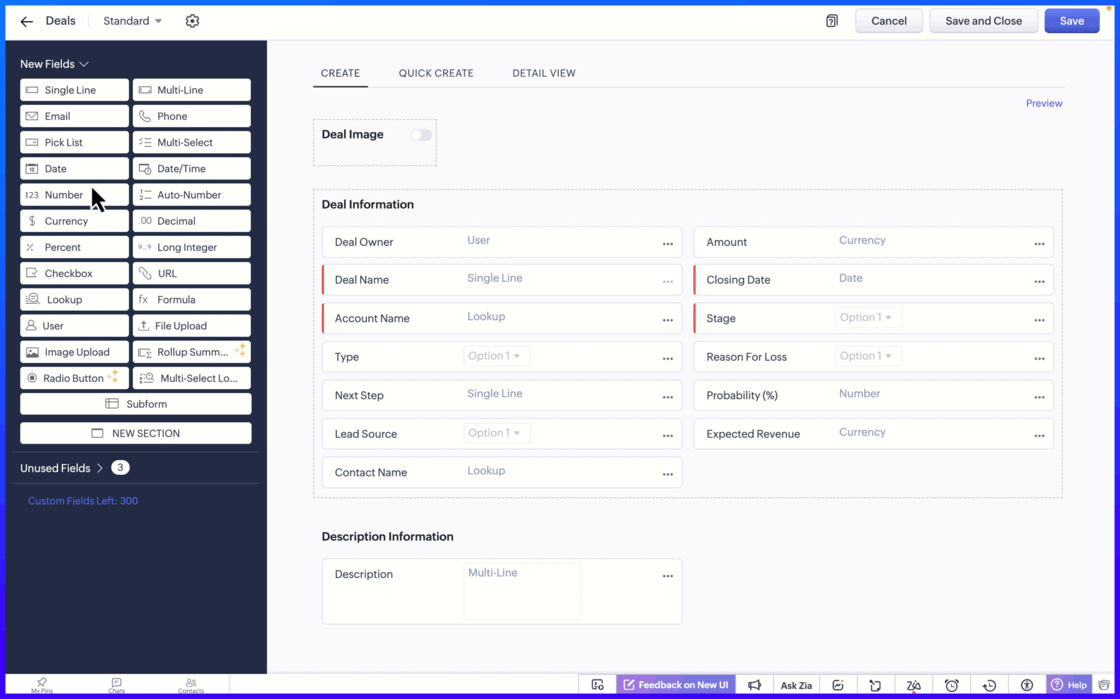


Setting the minimum and maximum limit values ensure that users can only enter values within an allowed range.

Notes

Important notes:

  1. Sliding Scale depends on Limit Values: When you enable the Sliding Scale, you must define minimum and maximum liit values. However, Limit Values can be used on their own. If you do not need a Sliding Scale, you can simply set the limits to restrict the allowed range.
    If the user tries to enter a value outside the allowed limits, an error message appears, preventing incorrect entries. This helps to keep the data accurate and consistent across records.

  2. Fields Supported: Number, Long Integer, Decimal, Percent, Currency.

  3. Edition Availability: All editions

  4. Module Availability: All Modules

  5. Sliding Scale is not supported for Subforms.

We hope you find this update helpful!

To learn more check out our help resource here.

    Nederlandse Hulpbronnen


      • Recent Topics

      • Cliq iOS can't see shared screen

        Hello, I had this morning a video call with a colleague. She is using Cliq Desktop MacOS and wanted to share her screen with me. I'm on iPad. I noticed, while she shared her screen, I could only see her video, but not the shared screen... Does Cliq iOS is able to display shared screen, or is it somewhere else to be found ? Regards
      • How to Delete, Disable, or Remove Streams from the Mail App?

        Is there a way to remove Streams from the mail app sidebar? I get too many notifications, it doesn't add any value to Zoho's functionality (especially since you can just make comments inside an email), and is distracting. I do not want notifications/alerts
      • Remove the mandatory Name Card buttons (or at least make them optional)

        Please remove the mandatory Name Card buttons (or at least make them optional) A recent change to the Name Card in Zoho SalesIQ (currently affecting WhatsApp) introduced mandatory buttons before a visitor can provide their name. I believe this change
      • Zoho Wont Login

        Can anyone tell me why my password stops logging in all the time? Is it a ploy to make you change your password? I have to use OTP all the time. I dont want to change passwords all the time. Over the last couple of years I've found myself using Zoho (as
      • Setting checkbox value on template in Sign from Creator

        Good day, Please help me understand how do I set a tick from a checkbox in Creator into a checkbox on a Sign template. Below is the only values on the Sign template and the code from Creator, "field_boolean_data": {}, "field_date_data": {}, "field_radio_data":
      • Frustrated with Zoho Assist QuickSUpport

        Trialling Zoho Assist and I have a variety of clients. A lot are computer illiterate. Some have poor vision. The current support sessions are using apps which have desktop icons for the appropriate apps. I either connect on demand then the client approves
      • What's New in Zoho Inventory | April & May 2026

        Hello users, We're excited to roll out the latest Zoho Inventory updates for April and May 2026. These enhancements are designed to make your daily operations smoother and more efficient, from advanced inventory management and flexible pricing to automated
      • Gemini Action - Add "inineData" Support

        Thank you guys for adding a Gemini action. I like Gemini models for the "grunt work" of AI, as they have the cheapest tokens of the trustworthy providers One thing that's missing in the action, though, is the ability to pass file data. If you pass a base64-encoded
      • HR Helpdesk Cases

        We have Zoho One Enterprise. I'm trying to find HR Helpdesk Cases, but my UI does not match the documentation. I'm not sure how to move forward.
      • CRM x WorkDrive: We're rolling out the WorkDrive-powered file storage experience for existing users

        Release plan: Gradual rollout to customers without file storage add-ons, in this order: 1. Standalone CRM 2. CRM Plus and Zoho One DCs: All | Editions: All Available now for: - Standalone CRM accounts in Free and Standard editions without file storage
      • Zoho CRM Copilot Connector

        Hello, Are there plans to release a connector for Zoho CRM and Copilot? I'm in the early research stages of potentially switching our CRM solution to Microsoft Dynamics because of its out of the box integration with Copilot. The advantage being that we
      • Zoho Projects - Will there ever be a send email feature in Zoho Project?

        Hi team, Are there plans to or will there ever be a sendemail feature in Zoho Projects, brining it in line with other similar platforms like Asana, ClickUp and Monday? I know that you can add comments via email to a specific task, but I believe this only
      • Introducing Microsoft Word Integration in Zoho Contracts

        We are excited to announce a new feature that brings contract authoring and negotiation in your familiar environment — the Microsoft Word Integration. What This Integration Brings The Microsoft Word Integration connects Zoho Contracts with the Microsoft
      • Share Video Response Card ion Zobot

        I am using the zobot codeless bot builder in SalesIQ. I want to share a video but delay the next response card until after the video has finished playing or has been stopped. Is this possible?
      • Customer image field

        I created a custom image field for estimates, and it works as expected. The only issue I have is that I want to be able to place the custom image field in the estimate invoice. Is there a way I can do that, the field does not give the option to display
      • Sub Folders

        It would be great if there could be sub-folders in reports. We have a ton of individual reports and folders that would be easier to navigate this way 
      • Goals API - Zoho People

        Hi Team, I would like to get the API details for retrieving organisation-wise Goals from Zoho People. Currently, I am able to retrieve individual employee goals using the following API: https://people.zoho.com/api/v3/performance/goal/{emp_id} However,
      • Question and responses disapear

        I have a form where several people have had issues where the questions, responses or submission simply disappear when trying to complete the form. It seems to be random with no pattern of question, browser or OS. Hopefully there is a fix in the platform
      • Unable to send message;Reason:553 Relaying disallowed. Invalid Domain

        Hi, Now when I try to reply to an email, I see the Unable to send message;Reason:553 Relaying disallowed. Invalid Domain voicemessagedownloader.com error. I tested sending an email when I set it up in the past and it worked. I have checked the Zoho Organization
      • Guide customers to the right booking page with routing forms

        Greetings from the Zoho Bookings team! We're excited to introduce Routing Forms in Zoho Bookings. Routing forms let you collect information from customers before they schedule an appointment and automatically direct them to the most appropriate booking
      • Analytics Dashboard User Filters Default Value

        User Filters on Dashboard do not allow Unknown to be set as a default filter value. I have to include NULL values in my dashboard among other values but I can't include NULL/Unknown by default in Dashboard User Filters.
      • Horrible download speed

        Using a trial of Zoho Assist and downloading a 316 MB file on a 500/500 fibre connection to a remote computer on the same network took 7 mins to complete. On AnyDesk it took 1 min or so.
      • How to Backup Zoho to PST?

        I'm looking for a simple way to backup Zoho Mail emails to PST format. I tried the IMAP method with Outlook, but it seems slow and complicated for large mailboxes. I need a solution that can: Export Zoho emails to PST Preserve attachments and folder hierarchy
      • Zoho Books | Product updates | August 2026

        Hello users, July has been an exciting month for Zoho Books! This month, we're excited to introduce HTML PDF Templates, Placeholders as Pills, expanded approval workflows for Sales Returns and Journals, and significant compliance updates across the India,
      • Action required: WhatsApp now uses BSUID as the primary identifier

        Important If your support team uses WhatsApp to engage with customers, there is an important platform change you need to know about. BSUID support is now mandatory for all WhatsApp Business Platform partners and businesses. WhatsApp is introducing usernames,
      • Tip #83- Give Customers a Faster Way to Reach You with the Quick Support Plugin – 'Insider Insights'

        Hello Zoho Assist Community! Think about the last time a customer needed urgent support. They emailed in, waited for a response, got a session link, couldn't find it in their inbox, called back, and by the time the session actually started, a good chunk
      • Final Notice: Migrate Your ASAP Mobile SDK by August 31

        Alert August 31, 2026 is the deadline. After this date, older ASAP Mobile SDK versions will no longer work with the ASAP Help Widget. If your app hasn't been migrated to a supported SDK version, users will no longer be able to access the ASAP Help Widget
      • Approval Process configuration is now more flexible and fully customizable

        Hello everyone! Zoho CRM's Approval Process is back with a better user experience that makes it easier to add rules to your processes. This enhancement includes some UI updates that help you create highly structured approval stages—and more. Let's look
      • Kaizen #255 - Building a Real-Time Operational Dashboard with Zoho CRM Queries

        Hello Everyone, Welcome back to another edition of the Kaizen series, where we uncover powerful ways to extend and customize Zoho CRM. In the previous Query Kaizens, we explored how Queries can retrieve CRM data, invoke REST APIs, and even update CRM
      • 【Zoho CRM】キオスクに「ループ機能」が追加|同じ処理を繰り返し実行可能に

        ユーザーの皆さま、こんにちは。 コミュニティグループの中野です。 Zoho CRMのキオスクに、同じ処理を繰り返し実行できる「ループ機能」が追加されました。 これまでは、同じ処理を複数回実行したい場合、同じ設定を繰り返し作成する必要がありました。 ループ機能を使うと、処理を一度設定するだけで、指定した回数や 取得したデータ数に応じて自動的に繰り返すことができます。 目次 ループ機能とは 設定方法 注意点 1. ループ機能とは ループ機能を使うと、キオスク内の画面や処理を指定した条件に応じて繰り返し実行できます。
      • Es posible cambiar el lenguaje de los modulos del ASAP?

        Es posible cambiar el lenguaje de estos textos? Tengo Zoho configurado en español pero aun así me muestra estos textos en ingles:
      • Where do I edit the "Welcome to [portal name]" message

        I am looking for a way to edit the "Welcome to" part of the message that is seen on the landing page (ex: https://help.zoho.com/portal/en/home). When I use the French interface, it doesn't make sense... I want to change it from "Bienvenue chez" to" Bienvenue au". Thanks!
      • Zoho ERP | Product updates | July 2026

        Hello users, We're back with another round of updates to help you streamline your operations. This month's release brings new features and enhancements designed to help you work more efficiently. Read on to discover everything that's new in Zoho ERP this
      • Automate Backups

        This is a feature request. Consider adding an auto backup feature. Where when you turn it on, it will auto backup on the 15-day schedule. For additional consideration, allow for the export of module data via API calls. Thank you for your consideration.
      • Shared Snippets Everyone

        Hi, Now that the Shared Snippets have been released and I think will be the most used feature implemented in 2023 :) Creating and Using Snippets in Ticket Responses - Online Help | Zoho Desk Maintain consistency in ticket responses with shared snippets
      • Multi-currency and Products

        One of the main reasons I have gone down the Zoho route is because I need multi-currency support. However, I find that products can only be priced in the home currency, We sell to the US and UK. However, we maintain different price lists for each. There
      • Remove "Subject" as a required field on quotations

        Not sure why, but Zoho has made 'Subject' a system defined required field. I'm not entirely sure why subject would be required as a key field (i.e. you cannot deactivate it or change it from required). It doesn't make much sense on many product quotations,
      • Displaying only unread tickets in ticket view

        Hello, I was wondering if someone might be able to help me with this one. We use filters to display our ticket list, typically using a saved filter which displays the tickets which are overdue or due today. What I'd really like is another filter that
      • Best way to setup Inventory bin tracking for products with multiple boxes/crates

        Hi - we need some advice from the community on setting up Items in the Inventory for products with multiple crates. We have large products in our warehouse where the product is delivered as two large (double pallet) crates. We've setup the Items for these
      • Can't find field from ZCRM for a trigger

        Hello, Currently I am revamping our CRM system and we have created second layouts from to try out new processes while not disrupting the old one. Moreover, we want to use different layouts for different processes. The issue is that when creating the ZCRM
      • Next Page