Introducing spam detection for webforms: An additional layer of protection to keep your Zoho CRM clean and secure

Introducing spam detection for webforms: An additional layer of protection to keep your Zoho CRM clean and secure

Greetings all,

One of the most highly anticipated feature launches—Spam Detection in webforms—has finally arrived!

Webforms are a vital tool for record generation, but they're also vulnerable to submissions from unauthenticated or malicious sources, which can lead to the collection of spam records that clutter CRM systems and reduce data quality. 

Zoho CRM's new spam detection capability provides an additional security layer and minimizes dependencies on the basic options such as captchas and double opt-ins, ultimately improving data quality of webform submissions. Users no longer have to check potential spam records from webforms manually.

Let's dive into how Spam Detection restricts suspected spam records from webforms and helps users keep their CRM clean and organized.

What does spam detection do?

Spam detection offers the following advantages:
  1. Simplifies the manual review of potential spam in webform submissions.
  2. Detects potential spam submissions by identifying invalid or suspicious email addresses and scoring them to indicate spam probability.
  3. Holds these possible spam records for manual approval from users.
  4. Automatically blocks spam records to keep them out of the CRM account.

What happens to webform submissions?

All webform submissions are evaluated against predefined criteria and screened for spam detection. Let's say you've received several webform submissions for the Leads module from your website visitors.

Clean, non-suspicious records that originate from verified IP addresses—and are therefore deemed likely to be genuine and valid—are fed into the Leads module (unless approval has been set for all webform submissions).

In contrast, suspicious submissions are flagged as potentially spam and held back for manual approval in the usual record approval page called, Awaiting Leads (previously known as Approve Leads). These records are assigned a Spam Possibility Score based on the identified suspicious factors. 

The new Record Source column provides details related to the submission's source—for example, the submission's IP address, the webform name, and the URL—when you hover over the info icon. 

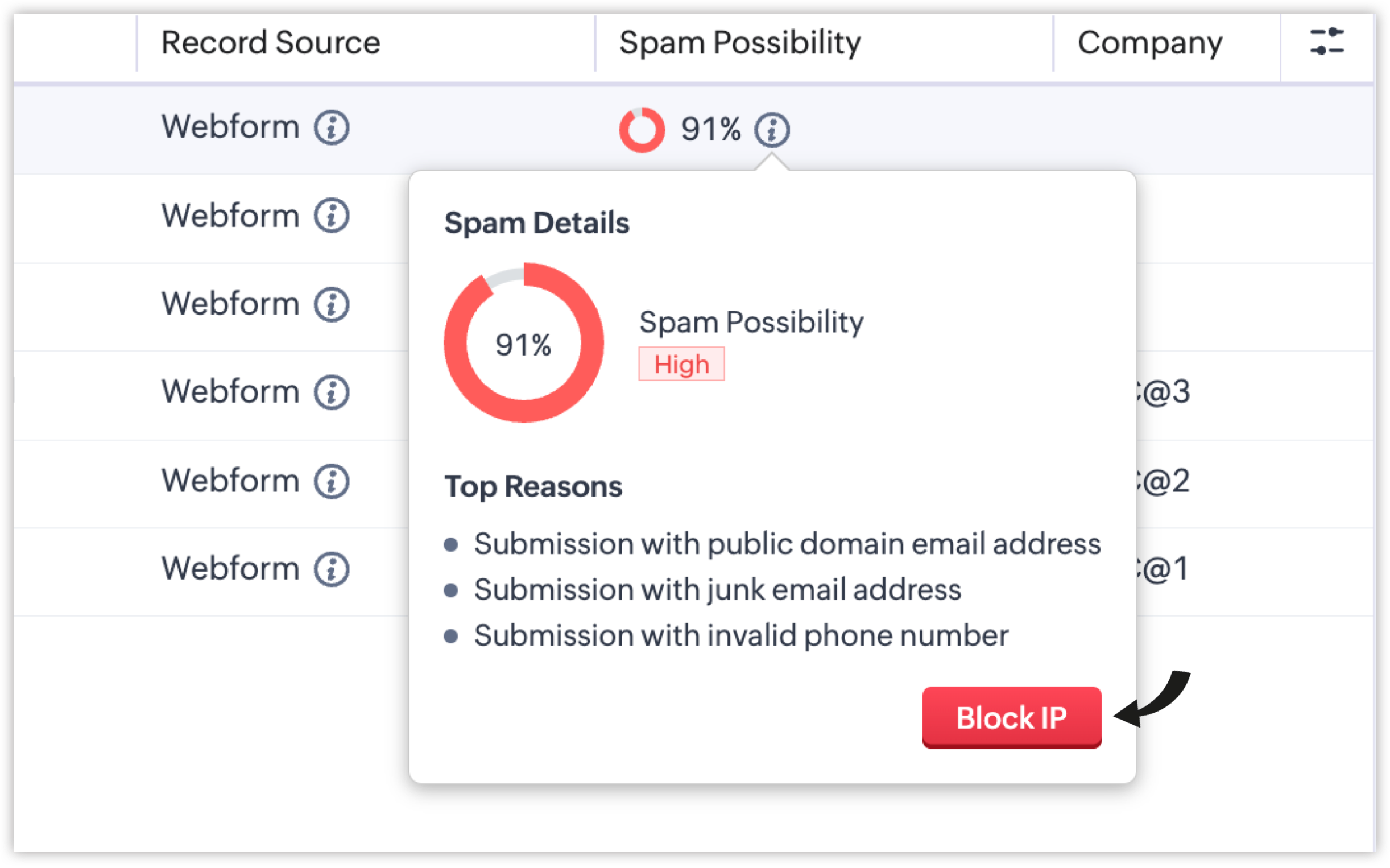
The new Spam Possibility column indicates the spam probability for each record as a percentage. You can also view the top reasons behind the scores of the spam record by hovering over the info icon beside it. 
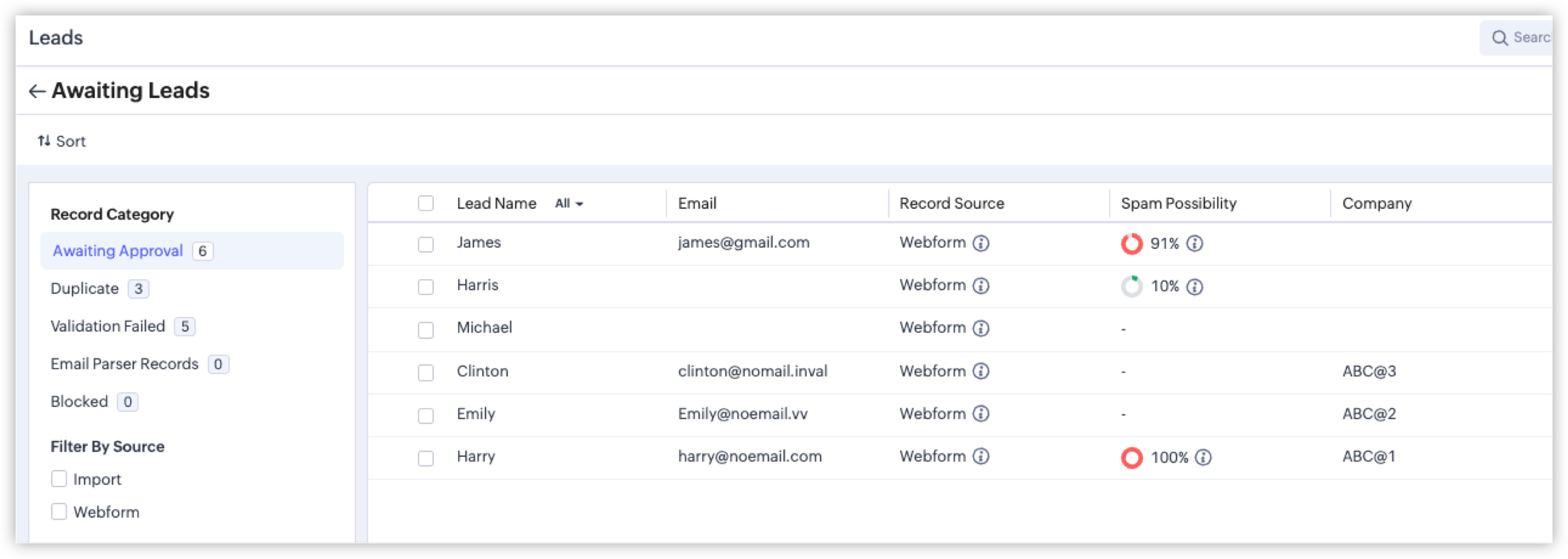

Each reason identified contributes to the score, and the sum is calculated to determine the final Spam Possibility Score for the record. Some of the reasons are listed below:
  1. Submission from bots/crawlers: If a bot or crawler fills and makes a submission via your hosted webform, the Spam Detection layer will automatically identify this malicious submission.
  2. Submission with invalid phone numbers: If a form respondent shares an incorrect phone number, a toll-free number, or a junk contact number, it will be flagged as an invalid phone number.
  3. Submission with invalid email addresses: If the submitted email address originates from a spam source, an unauthorized domain, or a temporary mailbox, it will be flagged as an invalid email address.
We're also introducing an advanced security layer: Honeypot Field, which is a cybersecurity mechanism that identifies bots by detecting submissions made to invisible form fields that genuine users don't interact with. If the submission comes with values filled in the hidden fields, the system flags the entry as likely being a spam submission.

Spam Detection has more parameters like these to detect spam submissions and assign appropriate scores. For quick probability recognition, the following colors represent the severity of spam possibilities:
  1. Green: 1% - 20%
  2. Orange: 21% - 70% 
  3. Red: 71% - 100%

How spam detection helps handle records awaiting approval

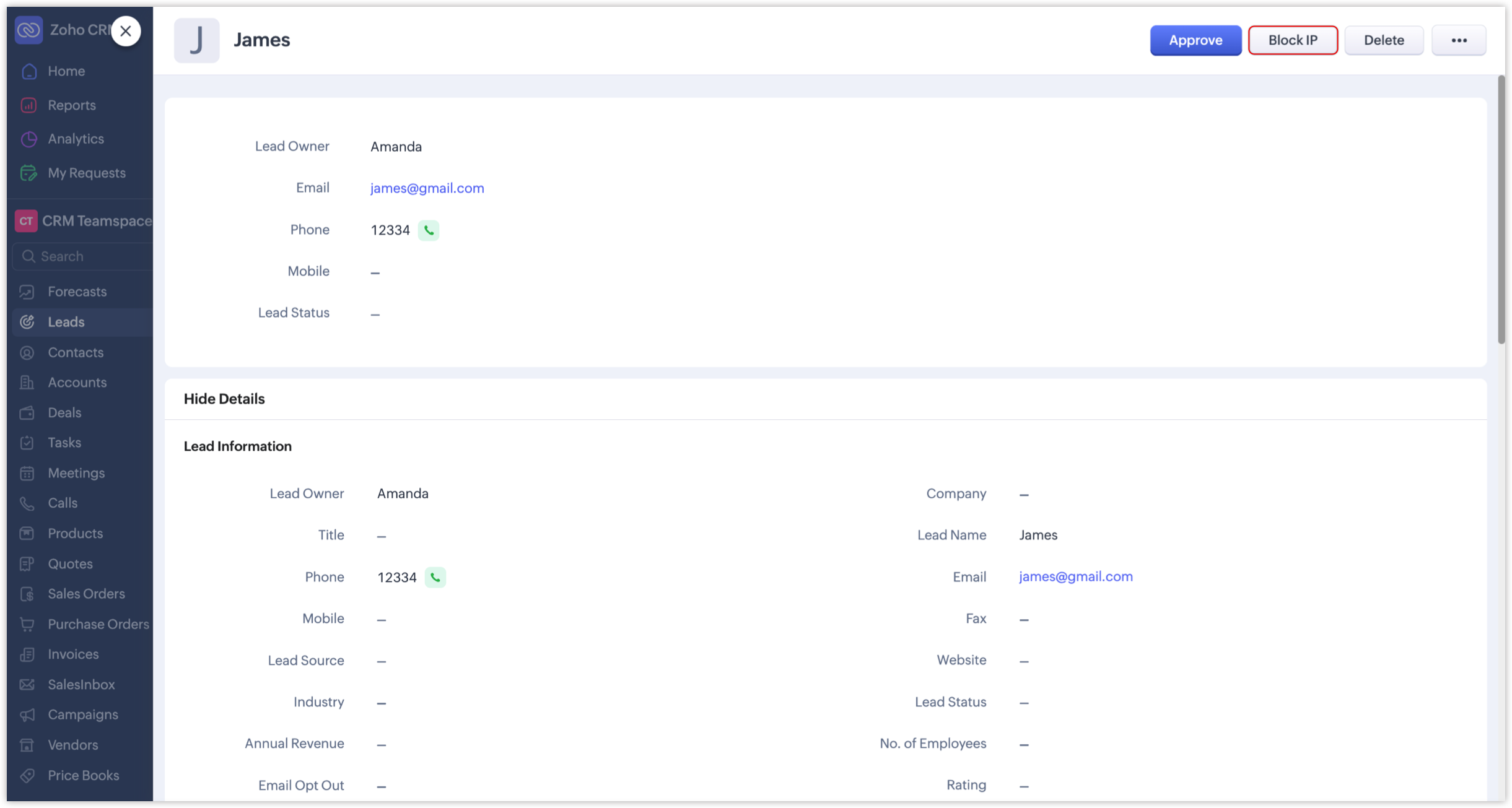
Previously, records that awaited approval were evaluated manually and then approved, merged, resolved, or deleted accordingly. In addition to these traditional actions, and with the introduction of Spam Detection, administrators can now optionally block IP addresses of records with high spam possibility scores if they want to restrict further submissions from them.

  1. The Block IP button is available, along with the other buttons like Merge, Approve, or Resolve.
  1. Admins can also directly block an IP by using the Block IP button available when hovering over the info icon.
Record submissions from such blocked IPs will be categorized under the new Blocked record category.
Additionally, Zoho's system internally maintains a set of blacklisted IPs based on security assessments. Records submitted from those IPs will be automatically and permanently blocked by the CRM.
Notes
Note: Records under the Blocked category will be deleted in 60 days.

How to enable Spam Detection for your webforms

While setting up a webform, you'll see the Spam Detection section where you can adjust the Spam Possibility Score slider to set the threshold at which records should be flagged for manual review.

A score range of 90% to 100% will be set by default for all webforms as the tolerance level, which the webform owner can change anytime based on their preferences.

NotesNote: Records whose spam possibility scores fall within the set range will be held for approval, along with the relevant percentages and reasons. If, say, the chosen range is 80 to 100%, only those records with spam possibility percentages between 80 and 100 will be listed. Submissions with lower percentages will not be held as spam.

We've revamped the record approval page to provide a better UI experience and make it easier to manage and review spam records. Let's look at the changes in detail.

Revamped record approval page

  1. In modules like Leads, the "Approve Leads" field under Actions has been renamed to "Awaiting Leads". This change extends to other modules as well.
  2. The approval page has been redesigned to make it easier to switch between categories and review all records. This enhancement applies to all webform-supported modules and team modules.
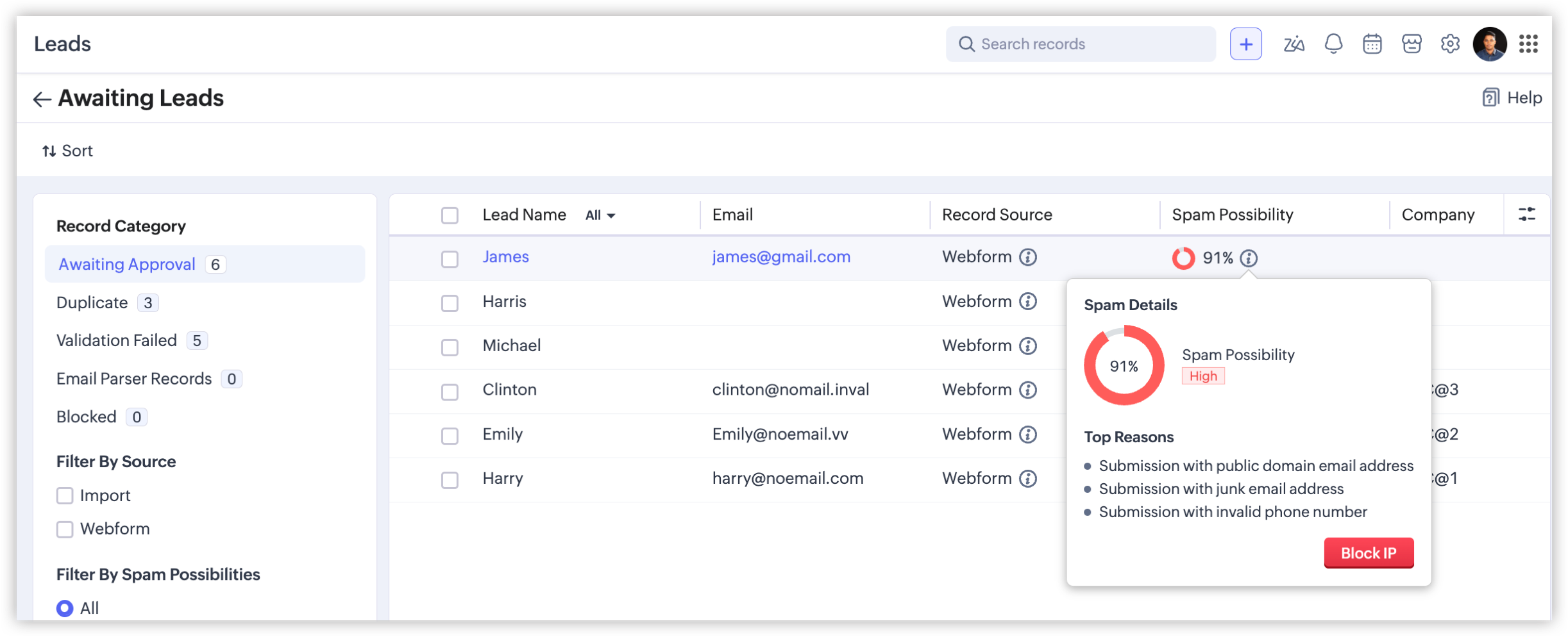
  3. The number of records in each category displayed prevents users from overlooking records that are awaiting approval.
  4. You can also filter these records using the new filters in the left panel on the Awaiting Leads page.
    1. Filter By Source: Filters records based on the source—webform or import.
    2. Filter By Spam Possibilities: Choosing the Webform option will enable this filter to list records based on the spam possibilities.
    3. Filter By Fields: Lists records based on these fields: Created Time and Record Owner.
    4. Filter By IP - Webform: Filters blocked possible spam entries based on whether a given record is blocked manually by a user or automatically by the system. This filter is available only under the Blocked category.
That concludes everything about spam detection in webforms. Feel free to share your thoughts and suggestions in the comments.

Info
Availability 

Editions: All paid editions, including the developer edition (except for the paid trial edition)
DC: All DCs
Release Plan: We've released this feature for partners across all DCs, and for customers up to the Professional edition across all DCs. We'll roll it out to higher editions in a few more days. [Updated on July 9, 2026]

Regards,
Fiona

    Nederlandse Hulpbronnen


      • Recent Topics

      • Zoho Books - France

        L’équipe de Zoho France reçoit régulièrement des questions sur la conformité de ses applications de finances (Zoho Books/ Zoho Invoice) pour le marché français. Voici quelques points pour clarifier la question : Zoho Books est un logiciel de comptabilité
      • Zoho ERP | Product updates | July 2026

        Hello users, We're back with another round of updates to help you streamline your operations. This month's release brings new features and enhancements designed to help you work more efficiently. Read on to discover everything that's new in Zoho ERP this
      • Zoho CRM

        Cuándo voy a adjuntar un archivo .pdf en un registro en el campo Archivo obtengo el siguiente error:
      • Can I hide some products from a particular customer

        HI I want ot give a customer access to the portal but I need to hide some products from them that are not available for them to buy- is this possible ?
      • Dashboard/Component filter by probability

        Hi all Can I request the ability to add a Component or Dashboard filter for Deal Probability? Would be useful to be able to see data of deals more than 60% probable. Olly
      • Admin Logging in as another User

        How can a Super Admin login as another user. For example, I have a sales rep that is having issues with their Accounts and I want to view their Zoho Account with out having to do a GTM and sharing screens. Latest Update (27th April 2026): With the early
      • OpenAI Is Moving to the Responses API: Here's What It Means for SalesIQ

        OpenAI has deprecated its Assistants API and is moving to the Responses API. If you're using OpenAI Assistants with SalesIQ, you may be wondering if you need to make any changes to your existing setup. You don't. SalesIQ has already taken care of the
      • Free webinar: Zoho Sign for Microsoft apps

        Hello, Did you know Zoho Sign works right inside the Microsoft apps you already use? A signature request shouldn't mean leaving Teams for another tab, or downloading an Outlook attachment just to sign it. Zoho Sign integrates with Microsoft 365, Teams,
      • Billing Status and WO Status Field Colors -

        Hello Team, I noticed that the colors of the Billing Status and WO Status fields in the WO module have been changed. (Org ID:170000078905) This is not urgent to correct, but I wanted to bring it to your attention so you can check whether this is a system
      • Introducing throw statements in Deluge

        Hello everyone, We're introducing a powerful addition to Deluge that gives you more precise control over error handling in your scripts. Whether you're calling an external API, validating user input, or enforcing a business rule, there are moments when
      • Zoho Notebook、実はこんなところから使えます

        ユーザーの皆様、こんにちは。ゾーホージャパンの田村です。 前回に続き、今回もZoho Notebookをご紹介します。 関連情報 メモの保存場所、見直しませんか?― Zoho Notebookで始める情報管理 仕事中、「この内容、メモに残してあとで見返したいな」と思う瞬間はありませんか? 会議中の一言、お客様とのやり取り、CRMで見つけた気づき、 ほんの数秒で終わる内容だからこそ、「あとで書こう」と思って、そのまま忘れてしまうこともあります。 そこで今回は、PCやスマートフォンはもちろん、普段お使いのZoho製品からもすぐにアクセスできるノートアプリ「Zoho
      • I have been looking for CVID to get segmate list where & how can fnd it?

        I am trying to get segment details from the Zoho API. The API documentation says that the CVID is a mandatory parameter, but I cannot find the CVID in the "getmailinglists" API. Can you tell me where to find the CVID?
      • How do I increase the email attachment size in Zoho CRM ?

        It looks like I'm limited to 10MB when sending an attachment using the email widget on a record in Zoho CRM. Is there a way to increase the size? Or can I use some other tool? From what I'm reading online, I'm maxed out at 10MB. Any insight would be greatly
      • Introducing Incentives for Zoho CRM: Build, automate, and track sales commissions

        Dear Customers, We are here with an amazing news! We built a direct solution to help manage your commission provisioning activity in your business. From creating commission plans to issuing payouts, this application leverages your sales reps’ performance
      • Subforms and automation

        If a user updates a field how do we create an automation etc. We have a field for returned parts and i want to get an email when that field is ticked. How please as Zoho tells me no automation on subforms. The Reason- Why having waited for ever for FSM
      • Cannot format "start date" field in Zoho Flow

        I am trying to recreate a flow that connects Inventory package creation to Zoho projects (where a task is created in a defined project). I've been able to troubleshoot everything EXCEPT the date fields; specifically the "start date" - which is quite important
      • Dynamic Signature - Record owner

        Hi everyone, I’m using Zoho Writer merge templates from Zoho CRM and have two questions: Owner signature: How can I automatically insert the CRM record owner’s signature in the merged document? I’m not sure where this signature is stored or how to reference
      • Add ZeptoMail to Zoho One

        Hi Zoho Team, I would like to request that ZeptoMail be added as a fully included application within Zoho One. Why this is important Zoho One is positioned as a unified business operating system that brings the applications an organization needs under
      • GETTING THERE THANKS

        So we are still testing thanks to the great Zoho team for firstly getting pricelists working (essential) and writing some code to hide delivery and pickup options. Brilliant. So price lists are a definite mainly because of VAT. We run our Zoho books with
      • Time Zone is incorrect

        Time zone is not working properly...I've checked it twice. I'm eastern U.S. time it's currently 12:22 pm EST. CRM shows 3:22 pm EST.
      • CRM wants to access other apps and services on this device (Documents area)

        Did anyone else see this today? It only seemed to popup in the Documents area. Blocking it did not stop the ability to upload files there... Why is this coming up and what apps/services is it requesting in the background? Also, is it applicable elsewhere
      • Custom module - change from autonumber to name

        I fear I know the answer to this already, but thought I'd ask the question. I created a custom module and instead of having a name as being the primary field, I changed it to an auto-number. I didn't realise that all searches would only show this reference.
      • How can I populate dropdown data with information from another source or app?

        I want to maintain a list of items in another app (say in excel or another database) and sync those as items in a drop down menu, instead of copy pasting to import. Is this kind of a feature available?
      • Dynamic Field Folders in OneDrive

        Hi, With the 2 options today we have either a Dynamic Parent Folder and lots of attachments all in that one folder with only the ability to set the file name (Which is also not incremented so if I upload 5 photos to one field they are all named the same
      • Zoho Tables is now available in Zoho One!

        Hello Zoho One users, We’re excited to announce that Zoho Tables is now included as a part of Zoho One suite! As teams grow, managing projects, approvals, inventories, campaign trackers, and operational workflows across multiple spreadsheets become difficult.
      • Getting there -thanks

        So we are still testing thanks to the great Zoho team for firstly getting pricelists working (essential) and writing some code to hide delivery and pickup options. Brilliant. So price lists are a definite mainly because of VAT. We run our Zoho books with
      • Automatically remove commas

        Team, Please be consistent in Zoho Books. In Payments, you have commas here: But when we copy and paste the amount in the Payments Made field, it does not accept it because the default setting is no commas. Please have Zoho Books remove commas autom
      • #3 Making it look like my business

        Day 3: Meera had created her first invoice. The numbers were right, but something still felt unfinished. Her studio name was there, but the address did not look the way she wanted. Her logo was missing, and the invoice did not really feel like it came
      • Scan & Fill with double quote key/value pairs

        Hi, An old Ticket moved to a Topic/Idea: I love the idea of the new Scan & Fill as it nearly covers my previous request for a QR Scanner to read a multi-part QR Code. My QR Codes are hard-coded as below: {"key1":"value1","key2":"value2","key3":"value3"}
      • Increase the "Maximum Saved Entries per User" Options Limit

        Hi, You can create lots of saved entries, yet the Limit when you apply one is 25, we may often expect 32 to be in draft, and therefore want to enforce that, can we increase the limit of this field from 25 to 100 (As you can just turn it off and have more
      • HEIC File Type Viewer

        Hi, It would be nice to be able to click on the images in the All Entries/Reports Tables which are HEIC the same as JPG, PNG, etc. so they open in a viewer from Zoho or the Attachment Service, today HEIC requires you to download each image and open it
      • Map Dependency Upgrades in Zoho CRM

        Map Dependency Fields enhancements are now available across all DCs. Hello everyone, We’ve introduced a set of enhancements to Map Dependency Fields to make setup simpler, faster, and more intuitive. Map Dependency helps control how values appear across
      • Specific ListView Canvas on Canvas Home Page Always Loads Most Recent ListView, Not the One Specified

        I had mentioned this to ZOHO, but I mainly wanted to see if others in the Community are also facing this problem. I created a Canvas ListView for a Custom Module, and then created a Canvas Home page (technically on a tab item, but I'm not sure if that
      • Programmatic Itemized Expenses?

        It does not appear that it is possible to create itemized expenses programmatically (via the API)? Is this correct, or am I misunderstanding the situation?
      • Zoho Forms Submission URL

        Hi Zoho, It would be great to have a URL which can take us to specific form entries. For example: https://forms.zoho.eu/ACCOUNTNAME/report/FORMNAME/records/UNIQUE-REF I currently have a use case where I want to use Zoho Flow to create a module entry in
      • Optional Parameter in Deluge Sendmail function to link email to record

        I love sendmail - it offers flexibility (and, with standalone functions, commonality with minimal maintenance) over the years the templates hadn't offered. I understand the templates have come a long way, but I still prefer sendmail most days. That said...
      • Zoho CRM Functions: Redesigned Interface, Rich Analytics, and Multi-Language Support

        Hello everyone! We have given Functions in Zoho CRM a major overhaul with a new interface that makes it easier to build, organize, monitor, and troubleshoot your functions throughout their lifecycle. As part of this revamp, we have also introduced a unified
      • 📣 And the Bigin Customer Award winners are...

        50+ entries. Customers from across the globe. So many great Bigin stories. And now, it's time to celebrate the people who stood out. We launched the Bigin Customer Awards to see how businesses are using Bigin in their own unique ways, and you did not
      • Report Configuration - Unable to select "File_Upload" under Supporting Document

        Good day everyone. I encounter this issue whereby i have difficulty to select "File_Upload" under Supporting Document when i configuring my report. Ps: I have create Supporting Document in Zoho creator form as subform and the add this "File Upload" inside
      • Zoho CRM Multi-select values not translated

        Hello! I have some issue with translate custom multi-select fields in zoho CRM in other language. I download export file, but it has all my custom fields and picklist values exept multi-select fields picklist values.  Please, help me to undestand, is
      • Next Page