Create static subforms in Zoho CRM: streamline data entry with pre-defined values

Create static subforms in Zoho CRM: streamline data entry with pre-defined values

Alert
Last modified on (9 July, 2025):
  • This feature was available in early access and is currently being rolled out to customers in phases. 
  • Currently available for users in the the AU, CA, and SA DCs.
  • It will be enabled for the remaining DCs in the next couple of weeks.

Info
Update (26th September 2025):
This feature is now enabled for all the users in the US DC.

Hello everyone,

Traditionally, Zoho CRM's subform capabilities have enabled users to dynamically add, edit, and manage additional data linked to their main records. However, until now, all subform fields were subject to data entry or updates, both on the record's page and through the API.

What's new?

We're excited to introduce the static subform option, designed to offer a more controlled and consistent approach to data entry in Zoho CRM. Administrators can now pre-define certain fields and the exact number of rows in a subform.

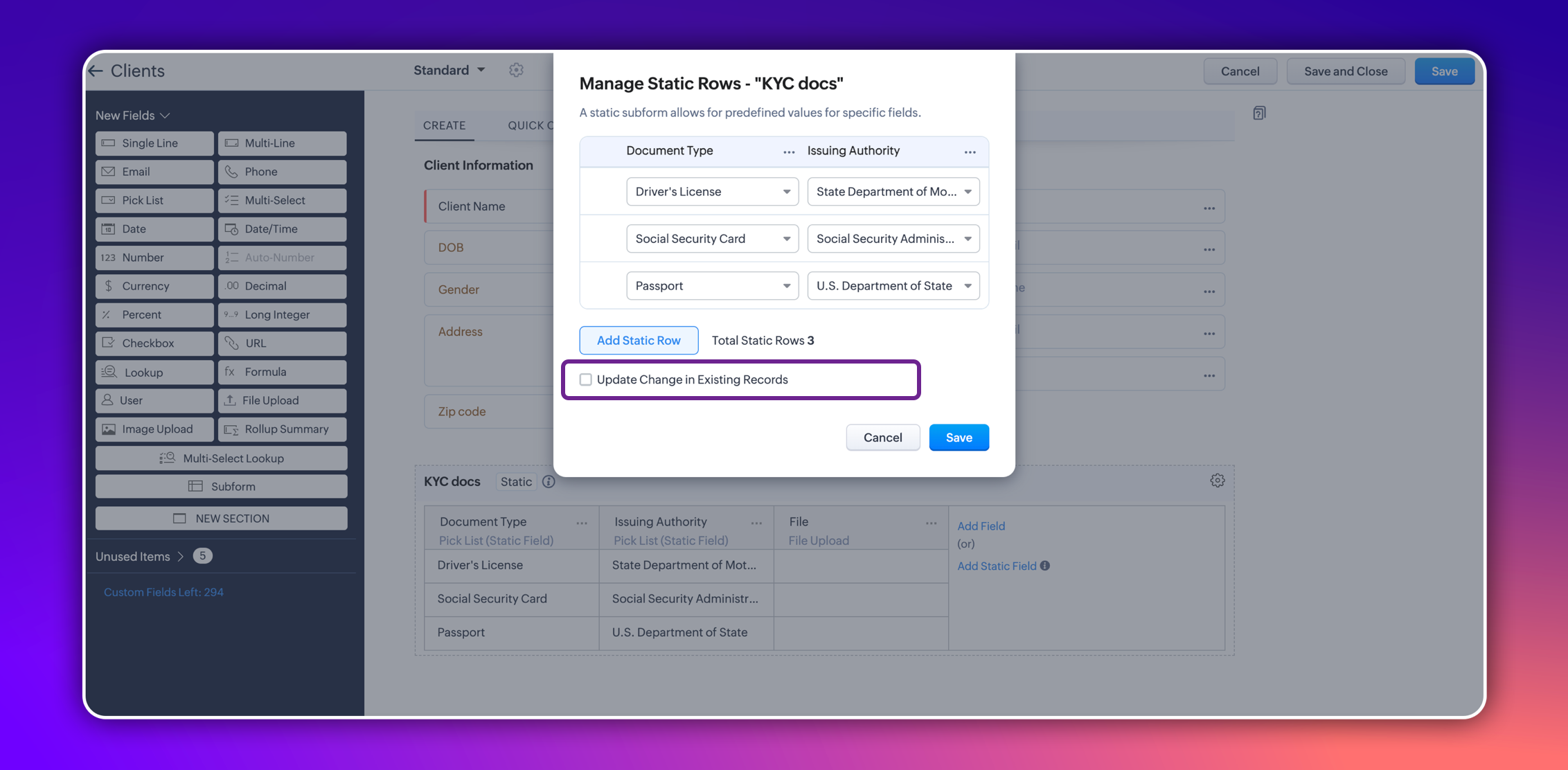
In certain scenarios, a subform should maintain a fixed number of rows with fixed values across all records. For example, a subform could be set up to include specific columns consistently, such as "Document Type" and "Issuing Authority." The rows for these columns could remain constant and feature values like "Driver's License," "Social Security Card," and "Passport" for "Document Type," and "State Department of Motor Vehicles," "Social Security Administration," and "U.S. Department of State" for "Issuing Authority." Unlike a standard subform, where users can dynamically add or remove rows, a static subform ensures these rows are consistent across all records.


This ensures consistency and eliminates the need for users to manually enter or maintain these rows in each record, thereby saving time.

How does static subform address this need?

Static subforms enable administrators to define specific fields and a fixed number of rows within a subform.

For example, consider the aforementioned use case of a client's details in KYC records, which might always consist of documents like a driver's license, passport, and social security card. Other fields within the subform may vary, which allows for customization as needed when creating or editing records.


Consider job applications, for example. With static subforms, HR departments can standardize the collection of essential documents such as resumes/CVs, educational certificates, and proofs of residence. This ensures that every applicant's profile is complete and consistent, making the data management process more efficient and reliable.


This approach not only streamlines the application process but also ensures companies receive thorough and consistent candidate profiles.

Key highlights
  • Administrators can easily set up a static subforms by configuring rows with static values.
  • Admins have the option to automatically update all existing record entries with static values while mapping the static values in the configuration pop-up.


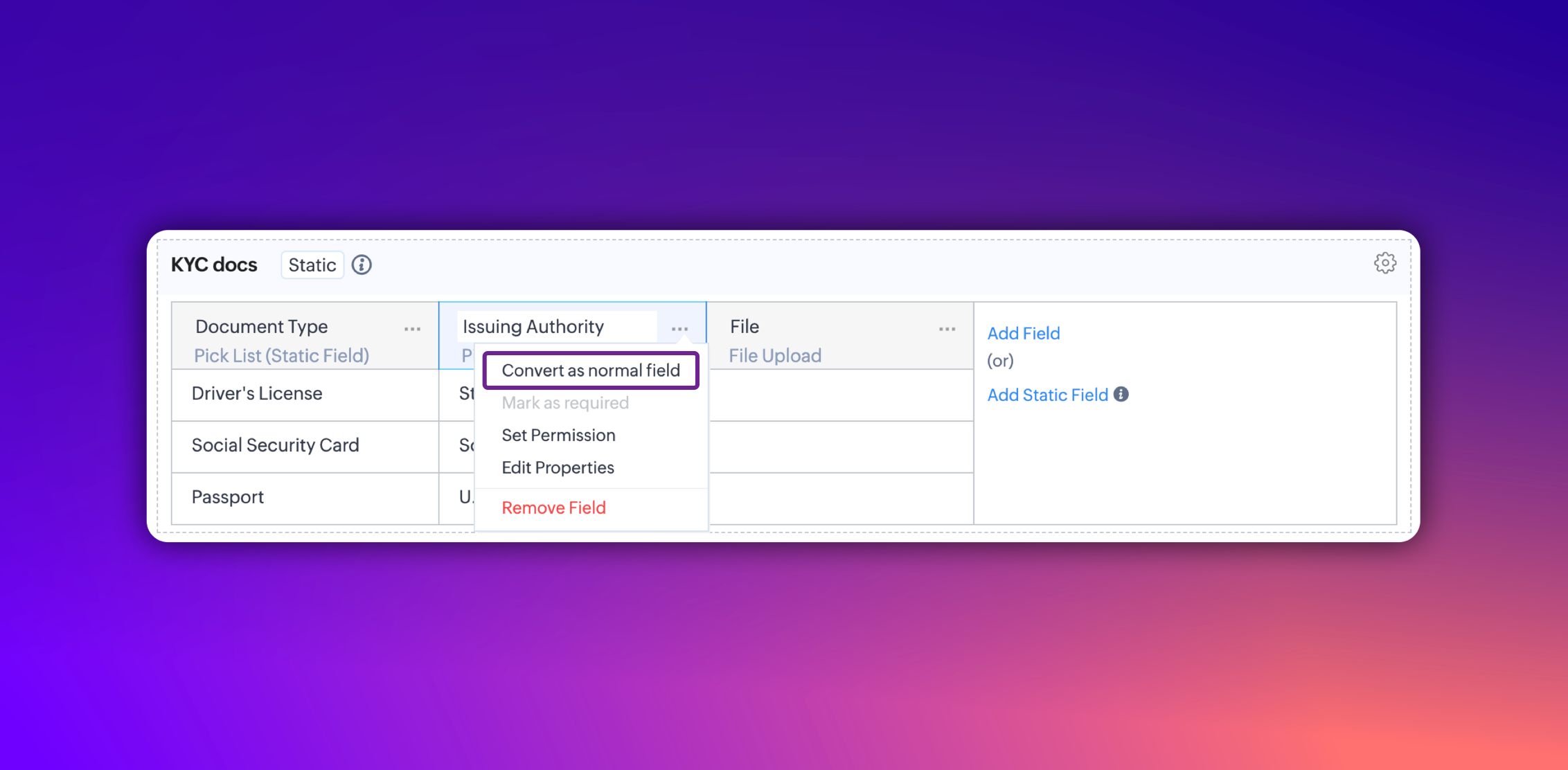
  • Additionally, you can convert a static subform field into a normal field at any point. However, it's not possible to convert a normal subform into static subform.

Notes
Notes:
  • These fields are static across all the layouts in a module and synced across all associated records.
  • Changes will be applied to all existing records only if the admin checks the option to update existing records in the static value mapping pop-up.
  • Transforming regular subform fields into static fields is not possible.
  • Once a subform is designated as static, its type cannot be changed.
  • Static subform feature is currently available only in web. They're unavailable on mobile devices and for API versions below 5.1.

Thanks,
Nizamuddin

    Nederlandse Hulpbronnen


      • Recent Topics

      • Automatically Update Form Attachment Service with Newly added Fields

        Hi, When I have a Form Setup and connected to a 3rd Party Service such as OneDrive for Form Attachments, when I later add a new Upload Field I have to remove and redo the entire 3rd Party Setup from scratch. This needs to be improved, such as when new
      • Facing Issues with Sites Mobile font sizes

        my page renediaz.com is facing issues mobile view, when i try to lower font sizes in home page, instead of changing the size, it changes the line space
      • Analytics : How to share to an external client ?

        We have a use case where a client wants a portal so that several of his users can view dashboards that we have created for them in Zoho Analytics. They are not part of our company or Zoho One account. The clients want the ability to have user specific,
      • Payroll and BAS ( Australian tax report format )

        Hello , I am evaluating Zoho Books and I find the interface very intuitive and straight forward. My company is currently using Quickbooks Premier the Australian version. Before we can consider moving the service we would need to have the following addressed : 1.Payroll 2.BAS ( business activity statement ) for tax purposes 3.Some form of local backup and possible export of data to a widely accepted format. Regards Codrin Mitin
      • Zoho Desk API - Send Reply to CUSTOMERPORTAL

        Hello! I'll try to send a reply to Customer Portal, But the response is 500 (INTERNAL_SERVER_ERROR in service response). {"Error":"{\"errorCode\":\"INTERNAL_SERVER_ERROR\",\"message\":\"An internal server error occurred while performing this operation.\"}"}
      • Python - code studio

        Hi, I see the code studio is "coming soon". We have some files that will require some more complex transformation, is this feature far off? It appears to have been released in Zoho Analytics already
      • Dheeraj Sudan and Meenu Hinduja-How do I customize Zoho apps to suit my needs?

        Hi Everyone, I'm Meenu Hinduja and my husband Dheeraj Sudan, run a business. I’m looking to tweak a few things to fit my needs, and I’d love to hear what customizations others have done. Any tips or examples would be super helpful! Regards Dheeraj Sudan
      • From Zoho CRM to Paper : Design & Print Data Directly using Canvas Print View

        Hello Everyone, We are excited to announce a new addition to your Canvas in Zoho CRM - Print View. Canvas print view helps you transform your custom CRM layouts into print-ready documents, so you can bring your digital data to the physical world with
      • Zoho Books Payroll

        How am I supposed to do payroll and pay my employees with Zoho Books? I think it's pretty strange that an accounting software doesn't have the ability to perform one of the most common functions in business; paying your employees. Am I missing something,
      • Layout Rules Don't Apply To Blueprints

        Hi Zoho the conditional layout rules for fields and making fields required don't work well with with Blueprints if those same fields are called DURING a Blueprint. Example. I have field A that is used in layout rule. If value of field A is "1" it is supposed to show and make required field B. If the value to field A is "2" it is supposed to show and make required field C. Now I have a Blueprint that says when last stage moves to "Closed," during the transition, the agent must fill out field A. Now
      • validation rules doesn't work in Blueprint when it is validated using function?

        I have tried to create a validation rule in the deal module. it works if I try to create a deal manually or if I try to update the empty field inside a deal. but when I try to update the field via the blueprint mandatory field, it seems the validation
      • Sort Legend & stacked bar chart by value

        I'd love to see an option added to sort the legend of graphs by the value that is being represented. This way the items with the largest value in the graph are displayed top down in the legend. For example, let's say I have a large sales team and I create
      • Is It Possible to Convert a Custom Module to a Quote?

        I recently created a custom module in our CRM environment for RFQs so that our sales team can submit quote requests directly in Zoho rather than by email/phone. This allows for a cleaner overall process, minimizing potential errors and potentially encouraging
      • All new Address Field in Zoho CRM: maintain structured and accurate address inputs

        The address field will be available exclusively for IN DC users. We'll keep you updated on the DC-specific rollout soon. It's currently available for all new sign-ups and for existing Zoho CRM orgs which are in the Professional edition. Latest update
      • How can Data Enrichment be automatically triggered when a new Lead is created in Zoho CRM?

        Hi, I have a pipeline where a Lead is created automatically through the Zoho API and I've been trying to look for a way to automatically apply Data Enrichment on this created lead. 1) I did not find any way to do this through the Zoho API; it seems like
      • Client Side Scripts for Meetings Module

        Will zoho please add client side scripting support to the meetings module? Our workflow requires most meeting details have a specific format to work with other software we have. So we rely on a custom function to auto fill certain things. We currently
      • Proposal: Actionable API Error Messages to Reduce Support Ticket Volume

        I've encountered a long-standing frustration with how Zoho Creator's API communicates errors to developers, and I'm hoping the Zoho team can address this in a future update. This issue has persisted for over 9 years based on community discussions, and
      • Zoho CRM - Option to create Follow-Up Task

        When completing a Zoho CRM Task, it would be very helpful if there was an option to "Complete and Create Follow-Up Task" in the pop-up which appears. It could clone the task you are closing and then show it on the screen in edit mode, all the user would
      • Dynamic Field Folders in OneDrive

        Hi, With the 2 options today we have either a Dynamic Parent Folder and lots of attachments all in that one folder with only the ability to set the file name (Which is also not incremented so if I upload 5 photos to one field they are all named the same
      • Drag 'n' Drop Fields to a Sub-Form and "Move Field To" Option

        Hi, I would like to be able to move fields from the Main Page to a Sub-Form or from a Sub-Form to either the Main Page or another Sub-Form. Today if you change the design you have to delete and recreate every field, not just move them. Would be nice to
      • File Conversion from PDF to JPG/PNG

        Hi, I have a question did  anyone every tried using custom function to convert a PDF file to JPG/PNG format? Any possibility by using the custom function to achieve this within zoho apps.  I do know there are many third parties API provide this with
      • Allocating inventory to specific SO's

        Is there a way that allocate inventory to a specific sales order? For example, let's say we have 90 items in stock. Customer 1 orders 100 items. This allocates all 90 items to their order, and they have a back order for the remaining 10 items which could
      • Cliq iOS can't see shared screen

        Hello, I had this morning a video call with a colleague. She is using Cliq Desktop MacOS and wanted to share her screen with me. I'm on iPad. I noticed, while she shared her screen, I could only see her video, but not the shared screen... Does Cliq iOS is able to display shared screen, or is it somewhere else to be found ? Regards
      • Pull cells from one sheet onto another

        Hello all! I have created an ingredients database where i have pricing and information and i want to pull from that database into a recipe calculator. I want it to pull based on what ingredient I choose. The ingredients database has an idea and i want
      • Closing the Loop: Why Lookup Asymmetry is Harming Data Integrity in Creator

        TL;DR: Lookup fields allow users to add new related records inline via the "+" icon, but there's no equivalent ability to edit an existing related record without navigating away and losing form context. Adding a native "Edit" icon—with automatic User
      • Add the ability to Hide Pages in Page Rules

        Hi, We have Field Rules to show and hide fields and we have page Rules, but we can't hide a page in Page Rules so it isn't completed before the previous page (And then have the Deny Rules to prevent submitting without both pages completed), we can only
      • Enable Free External Collaboration on Notecards in Zoho Notebook

        Hi Zoho Notebook Team, I would like to suggest a feature enhancement regarding external collaboration in Zoho Notebook. Currently, we can share notes with external users, and they are able to view the content without any issue. However, when these external
      • using the Client script on the load of the form if service no is empty means then i want to make issue relate to is Service

        using the Client script on the load of the form if service no is empty means then i want to make issue relate to field is Service if Purchae no is empty means then i want to make issue relate to is Purchase
      • Changes to the send mail Deluge task in Zoho CRM

        Hello everyone, At Zoho, we continuously enhance our security measures to ensure a safer experience for all users. As part of our ongoing security enhancements, we're making an important update on using the send mail Deluge task in Zoho CRM. What's changing?
      • Work Order wont mark as Completed

        I have a couple of work orders that won't mark as completed even when I've marked the Service Appointments as completed fully.
      • Item name special charaters <>

        Im trying to input speical characters such as < and > into item name and item description but comes up with following error: Invalid value passed for Item Name and Invalid value passed for Item Description How do i allow speical characters?
      • Zoho Analytics Dashboard - How to hide the user filter

        I am using the same dashboard template across different external clients and applying a user filter to the data by site URL. How can I hide the user filter in View Mode so the external client won't see the list of other clients in the drop-down menu?
      • Customer Parent Account or Sub-Customer Account

        Some of clients as they have 50 to 300 branches, they required separate account statement with outlet name and number; which means we have to open new account for each branch individually. However, the main issue is that, when they make a payment, they
      • Cannot get code to work with v2.mergeAndStore!

        Please can someone help me pass subform items into a repeating mail merge table row using v2.mergeAndStore? I have a mail merge template created in Writer and stored in Workdrive. This template is referenced by a custom CRM function which merges all of
      • Kaizen #229: Email-Deal Associations in Zoho CRM

        Hi All, Welcome back to another week of Kaizen! Emails are a core channel for customer communication in any CRM system. In Zoho CRM, emails can be associated with records across multiple modules. In this post, we will focus on email associations with
      • Deprecation of the Zoho OAuth connector

        Hello everyone, At Zoho, we continuously evaluate our integrations to ensure they meet the highest standards of security, reliability, and compliance. As part of these ongoing efforts, we've made the decision to deprecate the Zoho OAuth default connector
      • Action Required: Update Microsoft SQL Server Security Settings Before February 2026

        Dear Users, We recently deployed security updates in Zoho Analytics that inadvertently caused connection failures for a few customers using Microsoft (MS) SQL Server hosted on older Windows versions (Windows Server 2012, 2012 R2, and 2014). To restore
      • Contacts limit in basic vs standard - what counts? Are customers contacts?

        I’ve been using books for a number years for my small business. I only ever work with 20 clients at any given time. I do purchase services from a number of vendors to run my business, so there are some comtacts there too. I used to use the basic package,
      • Saving issue

        First problem I opened a MS word file in writer. after the work is done, it does not save instantly, I waited for like 10min and it still did not save. second problem When I save a file, then file gets saved as another copy. I just did save, not save
      • Automating Employee Birthday Notifications in Zoho Cliq

        Have you ever missed a birthday and felt like the office Grinch? Fear not, the Cliq Developer Platform has got your back! With Zoho Cliq's Schedulers, you can be the office party-cipant who never forgets a single cake, balloon, or awkward rendition of
      • Next Page