Introducing the locking option for CRM records
Last modified on 06/04/2023: Record locking option in CRM is now available for all Zoho CRM users in all DCs. Note that it was an early access feature available only upon request.
Hello All,
Hope you're doing well!
We're thrilled to introduce our latest enhancement to CRM—record locking.
Certain business scenarios demand that records in your organization's modules be safe from editing or deletion once they reach a certain stage in your sales process or satisfy specific conditions.
For example, if a deal has reached the final stage—"closed won" or "closed lost"—then perhaps it shouldn't be further edited or deleted.
Alternatively, let's say a record is in its proposal or review stage. During such a stage, the details of the record need to be verified, and even though a sales rep may be the record's owner, you can't allow them to update the record while the review is ongoing.
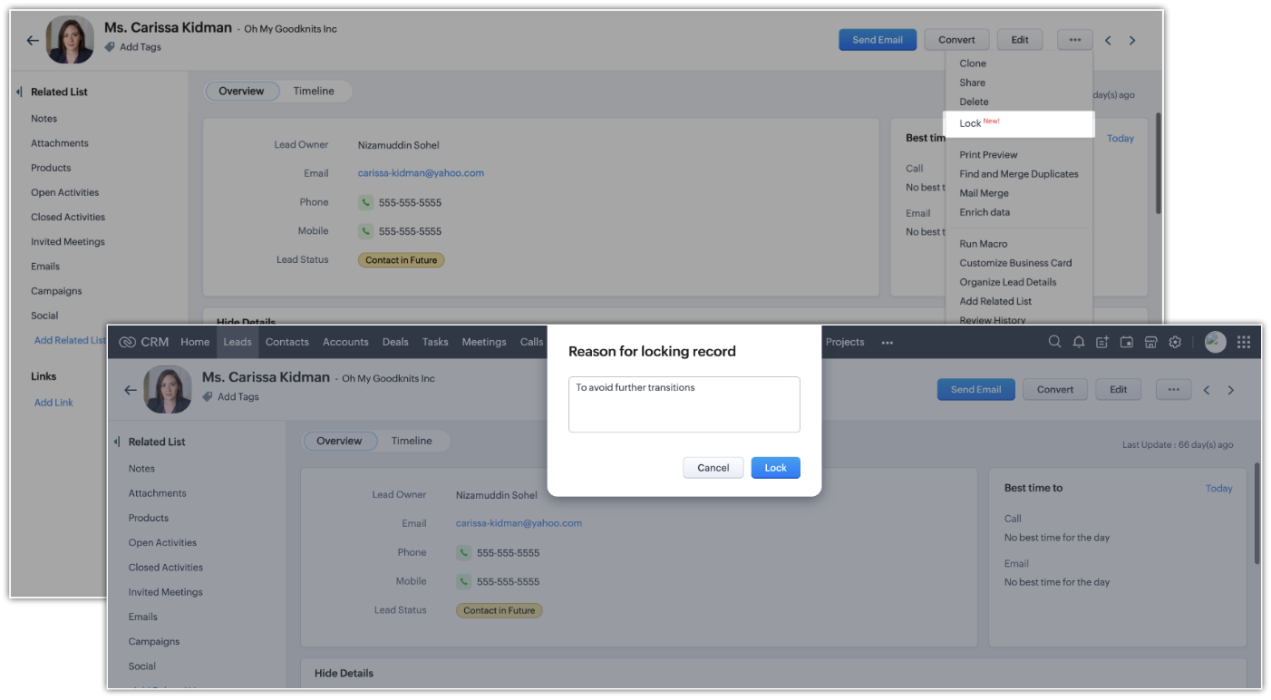
There might also be situations where the record doesn't match certain criteria, but the user dealing with the record might want to lock the record to avoid changes. For example, when a sales rep is in touch with a prospect, they may want to temporarily lock the record while prospecting is in progress to prevent other reps from adding incorrect information to the record.
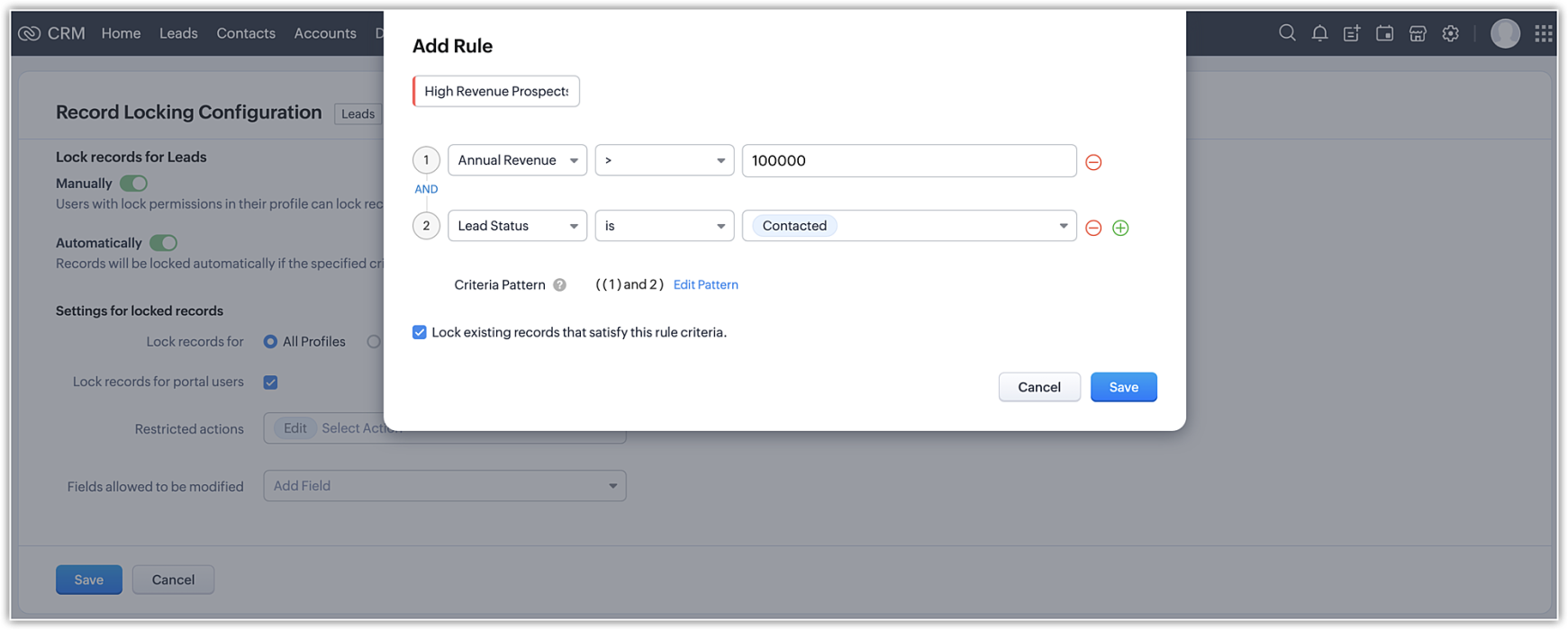
Zoho CRM's record-locking feature enables you to lock records manually or automatically when certain conditions are met.
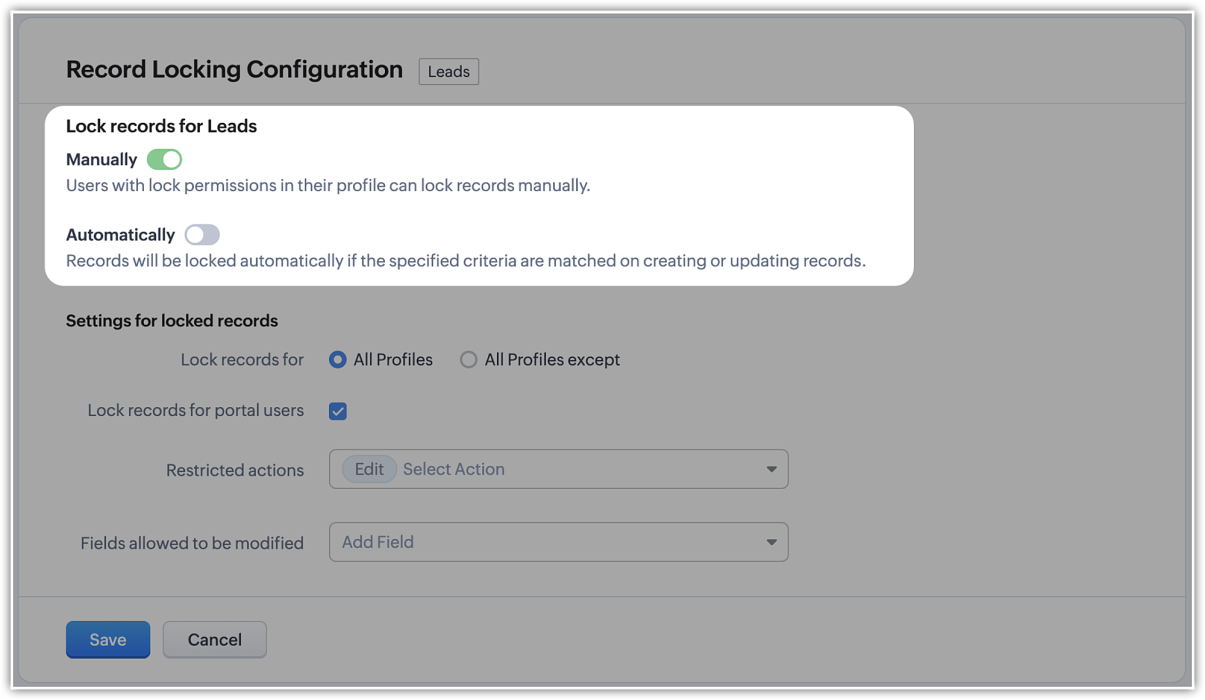
NOTE (added on 02/03/23): The locking configuration must be set up separately for each module. You can navigate to the specific module in Modules and Fields under Customization in your setup page, and you will find the Record Locking Configuration tab.
Record locking configurations
Now that we've established why locking records can be useful or necessary, let's take a quick look at the different configuration options available:
Now that we've established why locking records can be useful or necessary, let's take a quick look at the different configuration options available:
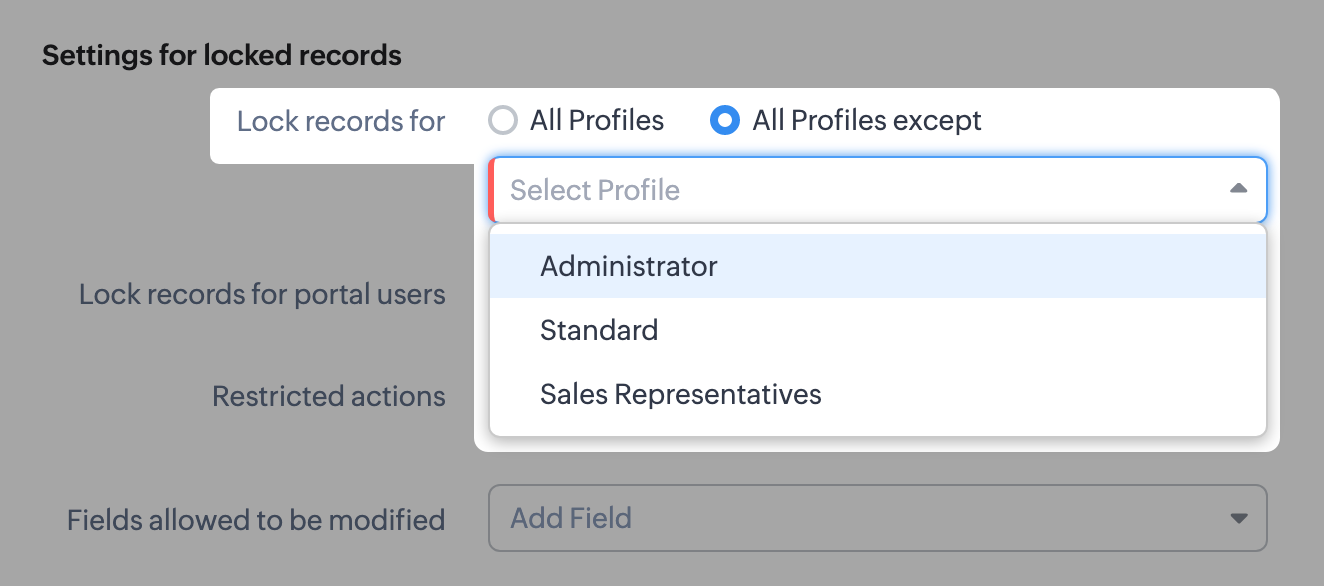
- There might be scenarios where, say, you want members of the accounts team to be able to edit quotes, but not other profiles. You can simply lock the records for all profiles except those belonging to members of the accounts team, any other set of exceptions using the multi-select menu. Additionally, you can also choose to lock records for all profiles.
- You can lock the records that are accessible to your portal users.
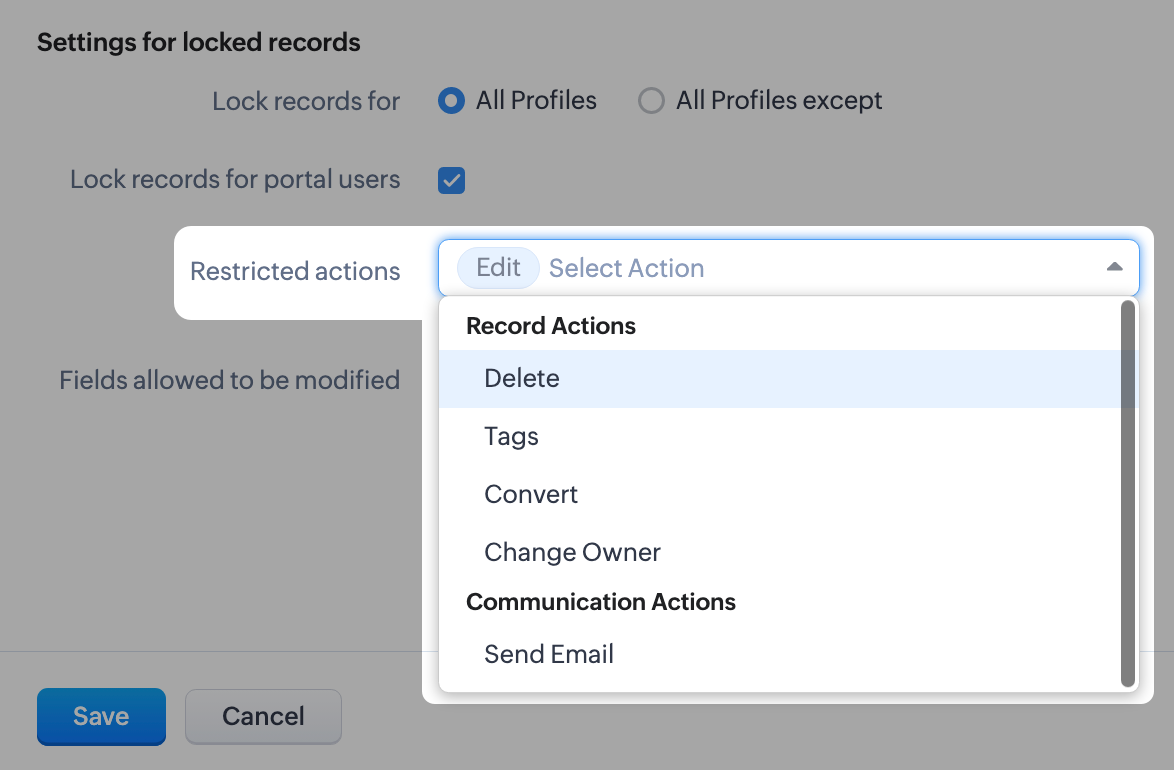
- For locked records, the edit action is disabled by default, but you can restrict other types of native actions, as well as custom buttons.
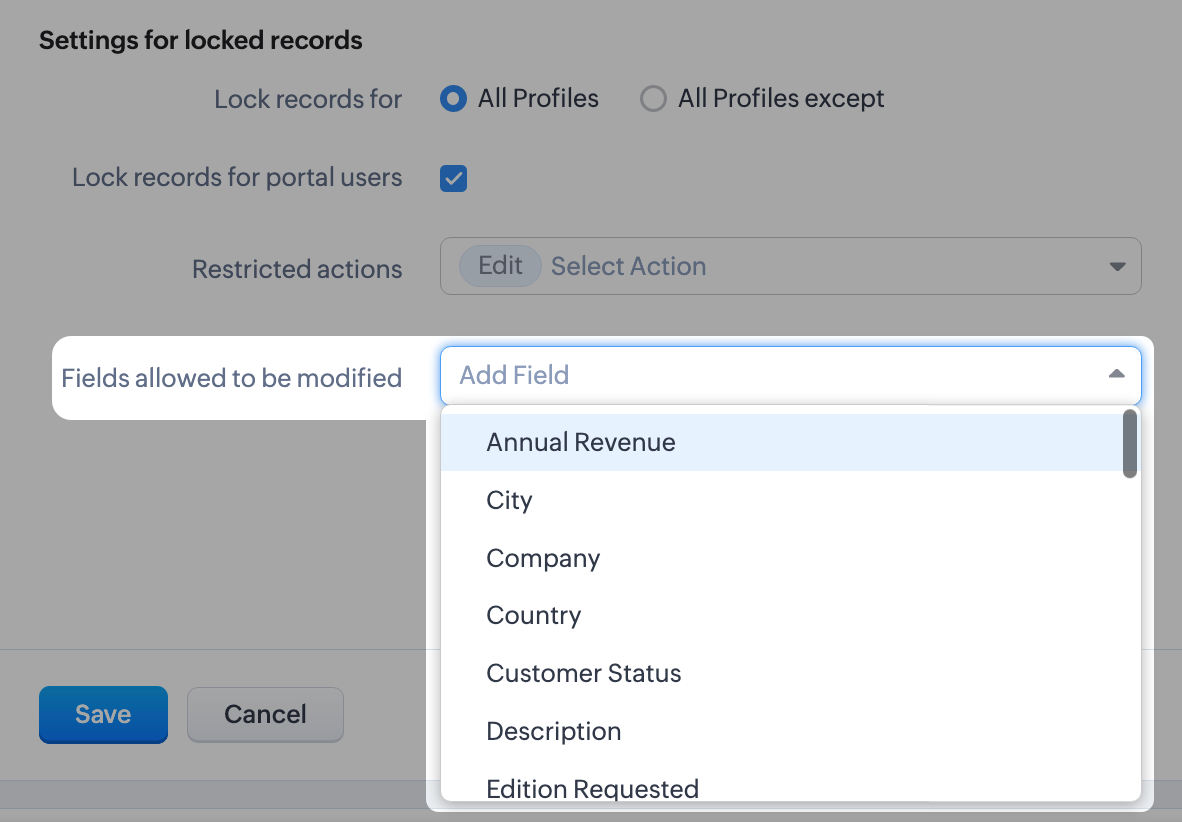
- Even when a record is locked, you can configure certain fields which don't affect your business process to remain editable. For example, you might want the Description or comment fields to remain editable. You can leave a maximum of 15 fields unlocked.
What happens when a record is locked?
Once a record is locked, you will see the lock icon on the record image and in the UI of the record detail page itself. Only fields you've enabled will be available to edit.
Once a record is locked, you will see the lock icon on the record image and in the UI of the record detail page itself. Only fields you've enabled will be available to edit.
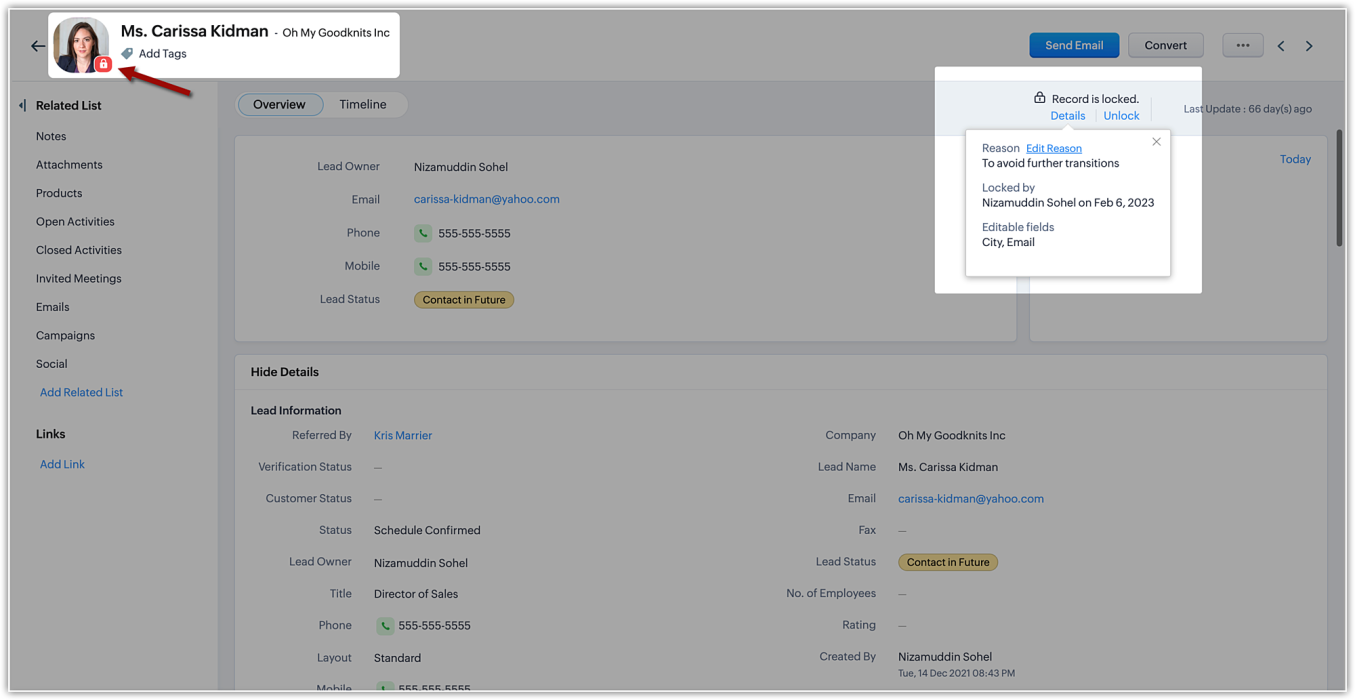
The details of the locking, such as the reason (i.e., the locking condition), locking date, and the fields available for edit will be shown on the details button available on the record detail page.
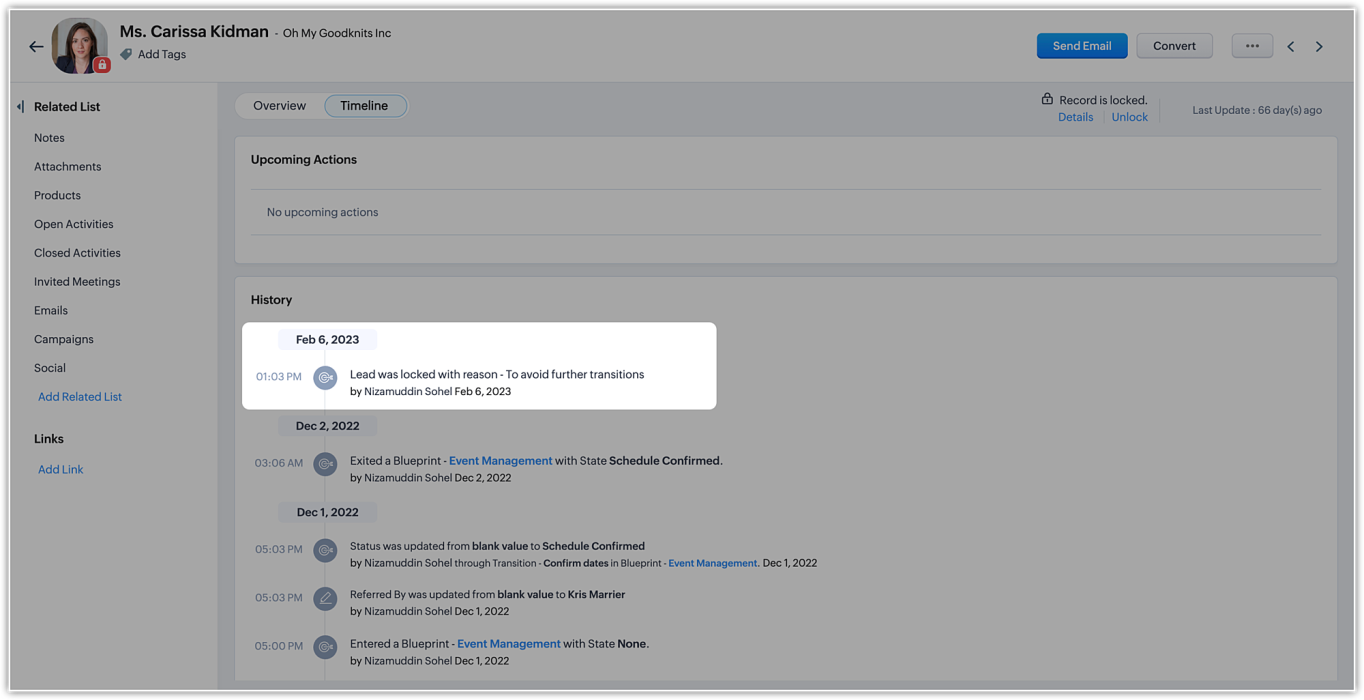
In the record's timeline, you can also see timestamped details like when the record was locked and the condition that was followed.
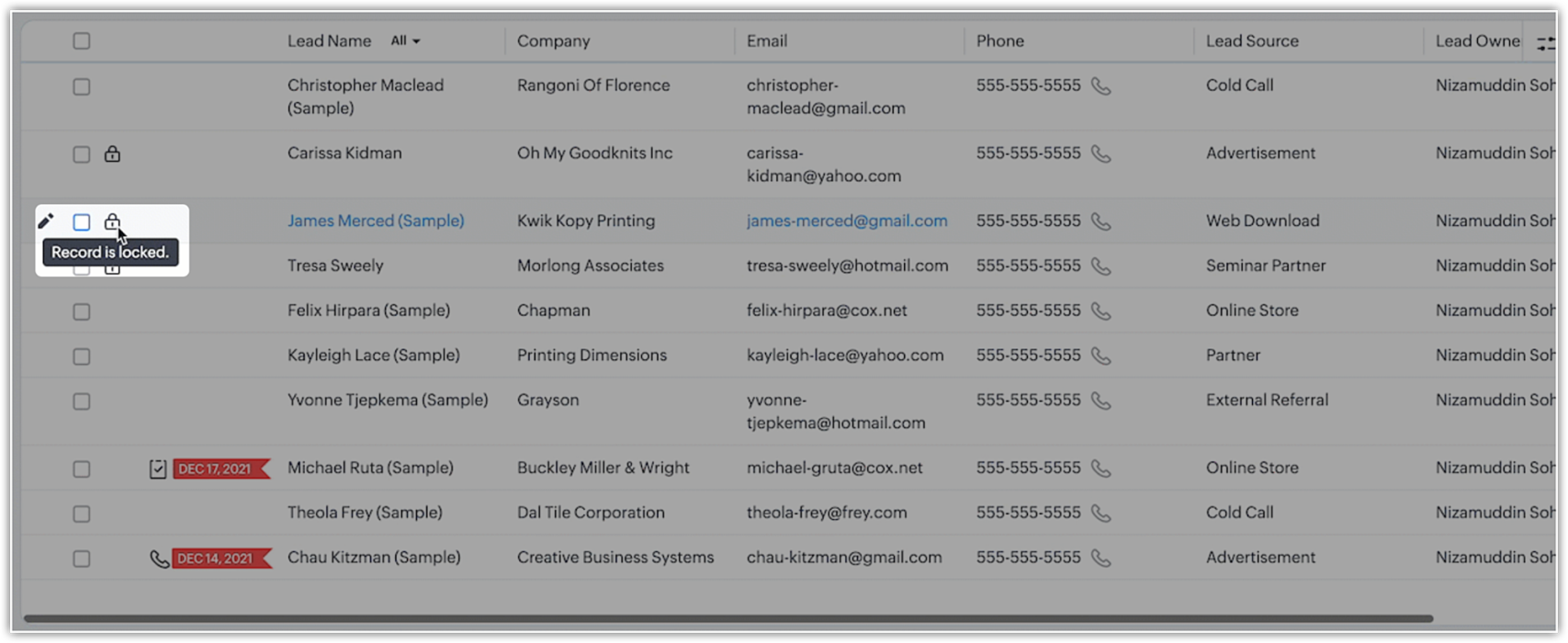
On the record list view, locked records are indicated by a lock icon.
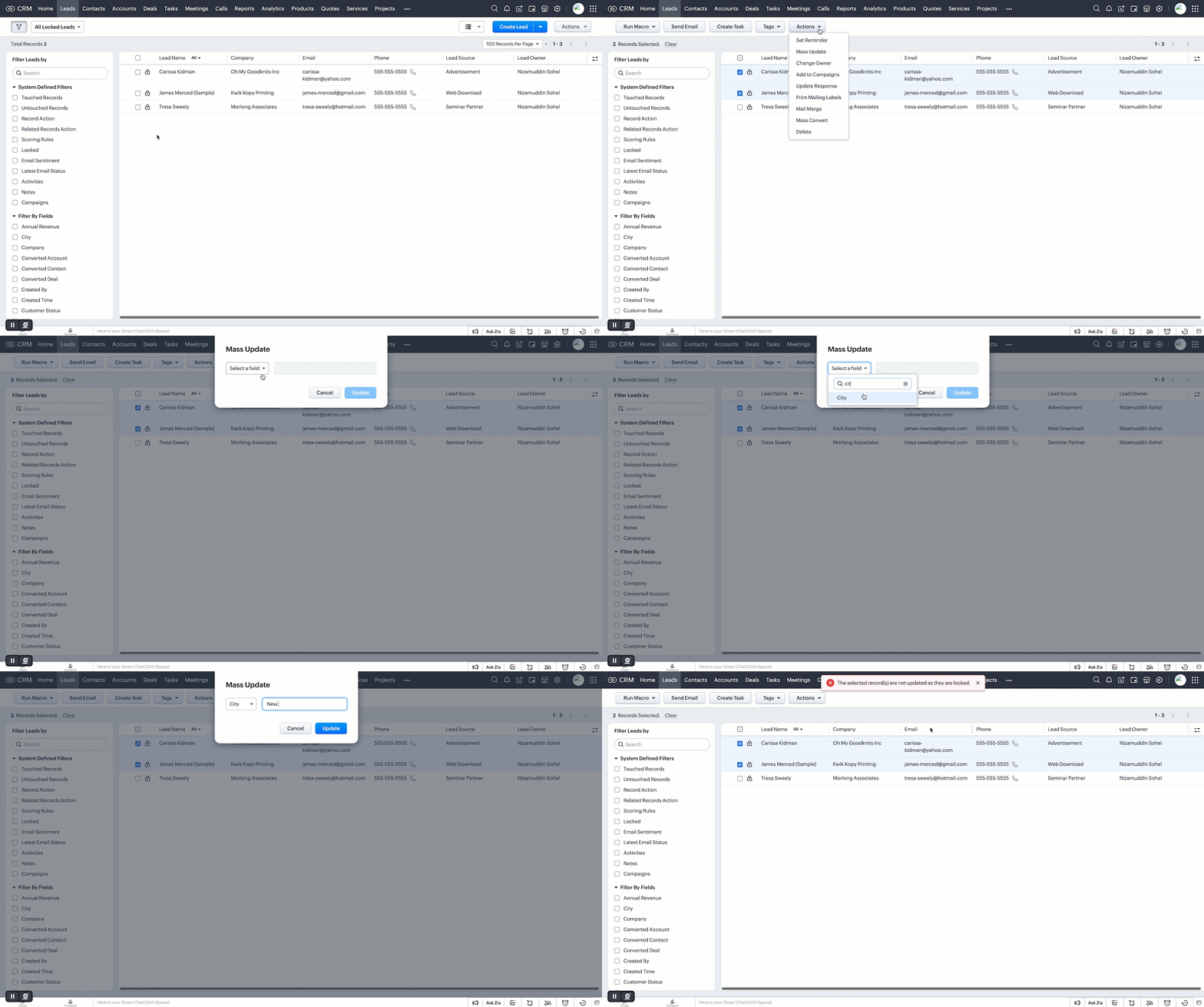
Additionally, you can filter records in the list view based on the pre-defined filter option, as well as based on the system-defined custom view.
Who can unlock records and how is it done?
If a user locks a record manually, they can unlock it themselves. Admins can unlock records, too. On the other hand, automatically locked records will be unlocked only when they're no longer subject to the lock conditions or criteria.
However, deleting a rule or locking configuration will automatically unlock all records the rule or condition had previously locked.
Additional notes
- Set up to five rules per module. Each rule will have a name that is displayed on the record detail page when a record is locked.
- System actions like automation and integration syncs will still be performed on locked records, even when a user who is excluded from locking triggers those processes.
- Locked records are still displayed in list views. However, bulk actions done from list views are not allowed if the respective action is restricted under the record locking configuration.
- Record locking configuration is available for enterprise and ultimate editions of Zoho CRM. If an user downgrades from enterprise edition, locking configurations will be ineffective and all records will be unlocked.
Locked status can not be regained upon upgrading back.
That's all for this exciting new enhancement. Read more about the record locking configurations and its usage in our help doc.
Thanks and have a good one!
Note:
- Manual locking/unlocking of records is not available for the mobile app as yet.
- Auto-locking of records will get reflected on the mobile app, and locked records cannot be updated from mobile app also.
- The locking configuration must be set up separately for each module.
Topic Participants
Saishree T K
Lane Von Pinkston
Jordan Talmor
Amit
Piyush Goyal
Sticky Posts
Announcing Early Access to "Zoho CRM for Everyone" — A new and exciting update to Zoho CRM
Update : Zoho CRM For Everyone's Nextgen Interface gets an upgrade! Hello everyone, We’ve updated the Zoho CRM for Everyone Nextgen interface based on your feedback. The UI is now simpler with a unified sidebar, a more visible global search and features[Early Access] Voice of the Customer (VoC) for Zoho CRM
Happy new year, everyone! We have an exciting addition to our suite of features and would like to introduce you to VoC (Voice of the Customer) for Zoho CRM, powered by Zia. 2023 is definitely the best time to be a customer with rapid innovations and advancementsAdding calls as a channel in Voice of the Customer
Dear All, We hope you're well! It's been almost a year since we opened Zoho CRM's Voice of the Customer solution up for early access. We are grateful for the reception and support you have been showing us with regards to its adoption and feedback. Since
Nederlandse Hulpbronnen

Recent Topics
Evolução do modelo de ambientes: Dev, Homologação e Produção com pacotes versionados
Hoje o Zoho CRM já oferece Sandbox, o que é um avanço importante para organizações que trabalham com customizações mais complexas. No entanto, na prática, o modelo atual ainda apresenta limitações significativas quando múltiplas equipes ou consultoriasPermissões granulares por usuário além do modelo baseado exclusivamente em perfis
Atualmente, o modelo de segurança do Zoho CRM é fortemente baseado em perfis. Embora funcional, esse modelo apresenta limitações quando equipes possuem variações individuais de acesso dentro do mesmo grupo operacional. Em cenários reais, é comum que usuáriosAdd or update lookup field values during Blueprint transition
Hello everyone, During blueprint transition users can add or modify the value of a lookup field. For instance, if the Tickets module includes a lookup field that connects it to records in the Assets module, agents can link the ticket to the correct assetCan you limit SEO penalties by delaying the appearance of a pop-up?
Google is not keen on pop-ups and has got even less keen on them with the new Core Web Vitals updates. But I like using pop-ups. If you delay the pop-up so it only appears 10 seconds after the page loads, do you avoid Google’s penalties?Adding bank details to the contact through API
How to add bank-related information to the contact while creating it using API? The account number needs to be encrypted before sending it through API but not sure how to encrypt and get those values. Please guide me in this.Restrict Payment Methods
Allow us to restrict certain payment methods specific for each customer.Clone Banking Transaction
Why is there no option to CLONE a Transaction in the Banking module?? I often clone Expenses (for similar expense transactions each month) so I would also like to clone Income transactions. But there is no option in Banking to clone an existing IncomePDF limit
Hello everyone, We have received an e-mail that we have reached our PDF limit. (see screenshot) However, I cannot find any reference to a PDF limit in our tariff plan (Premium). (see screenshot). What is the maximum number of PDFs that can be generatedHow can I see content of system generated mails from zBooks?
System generated mails for offers or invices appear in the mail tab of the designated customer. How can I view the content? It also doesn't appear in zMail sent folder.Credit Card Pre-Authorization with later Capture/Settlement
We really enjoy the convenience of being able to pay off a customer's invoice using our Auth.Net integration with Zoho Books. Unfortunately, we can only take advantage of this feature with a small percentage of our customers as it leaves a gaping holeZoho Projects and CRM Integration in Analytics
Hi Team, In Zoho CRM, I’ve integrated CRM with Zoho Projects and associated a project within the CRM. The integration is visible under the Deals module. However, I’m unable to find this data in Zoho Analytics. Does anyone know where this information isAccessibility in Zoho CRM: Not just a feature—a way to empower
For instructions on setting up these controls, please check this help document: Configuring accessibility controls. Hello everyone, Today (December 3, 2024), on the International Day of Persons with Disabilities, we begin our journey towards a CRM thatAutomation Series #1: Round Robin vs Direct Assignment in Zoho Desk
Direct Assignment vs Round Robin: Choosing the right routing method in Zoho Desk This post is part of the "Desk Automation Series," Chapter 1. Through this series, we will help you choose the right automation type in Zoho Desk by comparing commonly confusedInvalid tax authority ID.
How do I correct this ?Pay Pal Paylater button
I am testing the paypal setup to have my customers pay invoices with paypal and credit cards. But it seems to have two options. Paypal and Pay later. I don't want my customers access to pay later feature. How can I turn that part off.. My other integrationZoho Workshops are coming to the Netherlands - Join us on 14-16 April in Amsterdam!
Dear Zoho Community Members, After succesful recent editions in the UK and Scandinavia, we’re pleased to invite you to the upcoming Zoho Benelux Workshop 2026, taking place 14–16 April 2026 in Amsterdam. This three-day, in-person event at the Park PlazaHow to install Widget in inventory module
Hi, I am trying to install a app into Sales Order Module related list, however there is no button allow me to do that. May I ask how to install widget to inventory module related list?Sub form auto field population based on parent form
I have a parent form called "Sites" with a text field called "Site". I have a subform called "Design Comments" (actual form name "Review Comments") with a lookup field name "Sites1" that looks up from the Sites form. I want the Sites1 lookup field toBuilding Toppings #7 - Using schedules and workflow functions
Hello Biginners, In our previous forum post, we explored install and uninstall actions and learned how to trigger custom logic the moment a topping is added or removed from an organization. In this post, we'll look at how to automate actions during regular,Simplify scripting with Zia assistant bot
Hello everyone, Building automation using Deluge custom functions gives users flexibility and control. Traditionally, creating these functions required writing scripts, testing the logic, and validating the configuration before using it. With Zia assistantZoho Sprints iOS app update: Global view, screen capture control, file encryption, tags enhancement
Hello everyone! We are excited to introduce new features in the latest version(v2.1) of the Zoho Sprints iOS app update. Let’s take a quick look at what’s new. 1. Global view Global view brings all your project items into one centralised space. You canResource Management System built using Zoho CRM, Creator, Projects, and People:
In a Resource Management System built using Zoho CRM, Creator, Projects, and People: CRM Deal Closed → Creator Allocation Engine → Zoho Projects Task Assignment What is the recommended architecture to handle dynamic reassignment when: an employee goesRequest to Remove LinkedIn Verification from My Emai
I would like to submit a complaint regarding my Zoho Mail account. I previously used this email address to verify a LinkedIn account, but that LinkedIn account has now been closed. I need to remove or cancel the verification associated with the closedPin multiple columns and adjust column widths in CRM subforms
Hello all, Subforms act as secondary forms or tables in which you can associate multiple line items to a primary record and thereby ensure more structured and comprehensive data organization. We've made some recent enhancements to subforms. Here's what'sRemoving To or CC Addresses from Desk Ticket
I was hoping i could find a way to remove unnecessary email addresses from tickets submitted via email. For example, a customer may email the support address AND others who are in the helpdesk notification group, in either the TO or CC address. This resultsFrom Zoho CRM to Paper : Design & Print Data Directly using Canvas Print View
Hello Everyone, We are excited to announce a new addition to your Canvas in Zoho CRM - Print View. Canvas print view helps you transform your custom CRM layouts into print-ready documents, so you can bring your digital data to the physical world withAnnouncing Kiosk 1.1 - Customize screen titles, configure new fields & actions, use values from your Kiosk to update fields, and more.
Hello all We are back again with more enhancements to Kiosk. So what's new? Enhancements made to the Components Add titles for your Kiosk screens and adjust its width to suit your viewing preferences. Three new fields can be added to your screen: Percentage,CRM Percent custom fields: When will it show the % symbol and behave like %?
1. Actually Percent custom fields fail to show the % symbol. 2. When in formulas Percent fields work like number: 100 x 5% = 5 ideal world 100 x 5% = 500 what happens actually 3. When importing Percent fields the % symbol has to be removed and the dataIntroducing Color Coding of Picklist Values
Dear Everyone, Greetings!! Zoho CRM is uplifting the user experience. Recently, we had some notable aesthetic improvements in CRM like Kanban View UI enhancement, New List view UI enhancement, color coding of tags, and color coding of picklists in meetings.Where can I find the best mail backup tool for Windows?
Later this evening I found Mail Backup Tool in google. Actually I was looking for a solution to download/save emails to my local drive. As I had plenty of important data stored in my email account. So i was not in a mood to take this thing lightly. This made me curious to found any software which can help me to backup my data to hard drive. Then I found the above application which was like a gem. A complete email backup solution for Zoho Mail, Gmail, Yahoo Mail, Office 365 and more than 40+ emailMailbox storage showing incorrect usage
My mailbox shows 4.99 GB used out of 5 GB. However, actual mailbox usage is only around 394 MB. Trash and Spam are already empty. IMAP/POP is not enabled. WorkDrive is not in use. This appears to be a storage calculation issue. Please help to recalculateSuper Admin Logging in as another User
How can a Super Admin login as another user. For example, I have a sales rep that is having issues with their Accounts and I want to view their Zoho Account with out having to do a GTM and sharing screens. Moderation Update (8th Aug 2025): We are workingEs posible cambiar el lenguaje de los modulos del ASAP?
Es posible cambiar el lenguaje de estos textos? Tengo Zoho configurado en español pero aun así me muestra estos textos en ingles:Option to Automatically Publish Job Openings to the Career Website via API or Workflow
Currently, when creating Job Openings using the Zoho Recruit API, the records are successfully inserted into the system. However, there is no way to automatically publish these Job Openings to the Career Website. In the Job Opening field data, there areEvaluate applicants faster: Profile Summary and Skill Sets now in Applications
Evaluating applicants often requires switching between modules to understand their skills and background. With this update, we’ve extended two capabilities directly to the Applications module: Skill Sets and Profile Summary. You can now review applicantsFree webinar: How to use passkeys with Zoho Vault
Hi everyone! Passkeys are transforming the way we sign in—making authentication safer, faster, and completely passwordless. No more memorizing complex passwords or worrying about credential theft. With Zoho Vault, you can securely manage both passwordsAdding Markdown text using Zoho Desk API into the Knowledge Base
Hi Zoho Community members, We currently maintain the documentation of out company in its website. This documentation is written in markdown text format and we would like to add it in Zoho Knowledge Base. Do you know if there is REST API functionalityIs it possible to embed Zoho Bookmarks in the Cliq sidebar?
Is there any way that each Zoho user can access their bookmarks (that live in https://bookmarks.zoho.eu/ which is technically a part of Zoho Mail) directly within Cliq? As a widget, or an item in the sidebar? My team does not use Mail, it uses Cliq allEnhancing Zia's service with better contextual responses and article generation
Hello everyone, We are enhancing Zia's Generative AI service to make your support experience smarter. Here's how: Increased accuracy with Qwen One of the key challenges in AI is delivering responses that are both contextually accurate and empathetic whileLet us add Lookup fields in the Blueprint Transitions
We are unable to add Lookup Fields in the blueprint transitions in Zoho Desk, we wanted to make it a requirement for our workflow but since it's not available in the transition we cannot. The lookup field exists in the Layout: But it cannot be added/selectedNext Page