Kaizen #111 : Set default values based on Page Layouts using Client Script
Hello everyone!
Welcome back to another interesting Kaizen post.
In this post, let us discuss how to set default values for fields based on different layouts using Client Script.
In this Kaizen post,
- What are Page Layouts?
- Client Script is specific for each layout
- Use Case
- Solution
- Summary
- Related Links
1. What are Page Layouts?
Page layouts in Zoho CRM enables you to manage the organization and display of fields, sections, and associated details on a record's page. These page layouts are instrumental in personalizing the user interface and optimizing the data entry process to align with your organization's unique requirements. You can assign layouts to user profiles based on your business requirements.
2. Client Script is specific for each layout
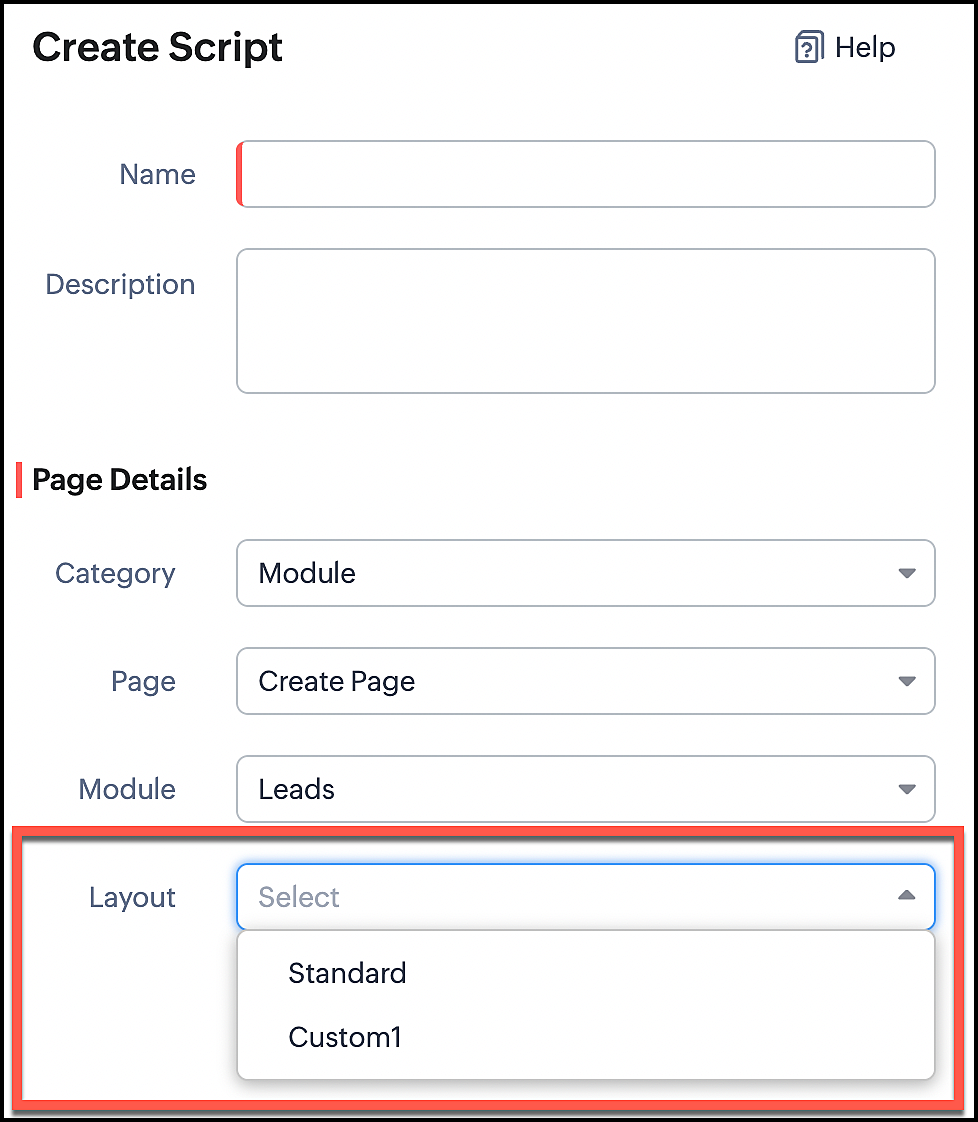
Whenever you create a Client Script, you should mention the layout for which the Client Script should work. So whenever you want to perform actions specific to a particular layout, you can easily accomplish it using Client Script.
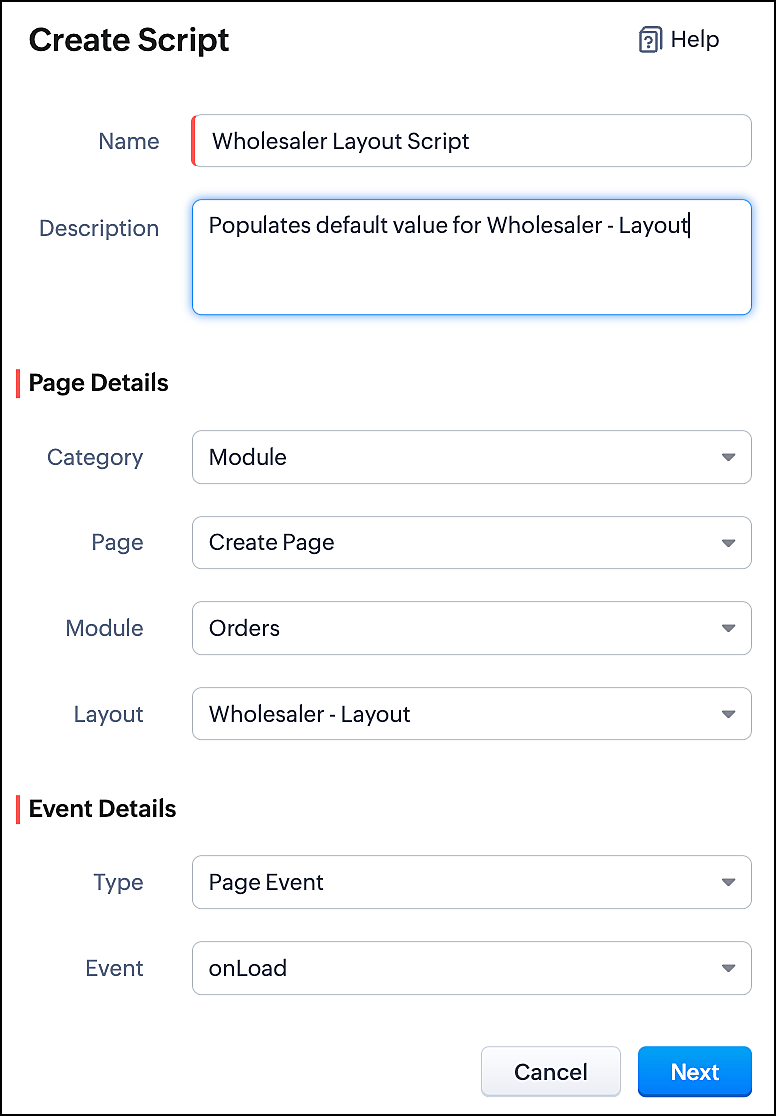
In the image below, you can observe that selecting a layout name is a necessary step for configuring a Client Script.
3. Use Case
Consider that Zylker is a manufacturing Company. The customers include both Wholesalers and Retailers. For this purpose, Zylker has two Page Layouts in a custom module named as Orders. One is the Wholesaler-layout and the other is the Retailer-layout. The Wholesaler-layout is assigned to the wholesaler profile and the Retailer-layout is assigned to the retailer profile.
1. Whenever a customer with retailer profile creates an order, the read-only field Account Type should be auto-populated as Retailer. In the Create page of the Orders module, when the value entered in the field "Number of pieces" is more than 100, then the Payment Method should get populated as Prepaid and should be read-only.
2. Whenever the customer with wholesaler profile creates an order, the read-only field Account Type should be auto-populated as Wholesaler and the Payment Method should be populated as Prepaid and should be read-only.
4. Solution
For a particular module, the number of Client Scripts to be created differs based on
The page for which you want the script to work.
The events that should trigger the script.
The layouts for which you want the script to work.
To accomplish this requirement, you need to create three Client Scripts, one for each layout.
- Client Script for Retailer Layout with onLoad Page event
- Client Script for Retailer Layout with onChange Field event
- Client Script for Wholesaler Layout with onLoad Page event
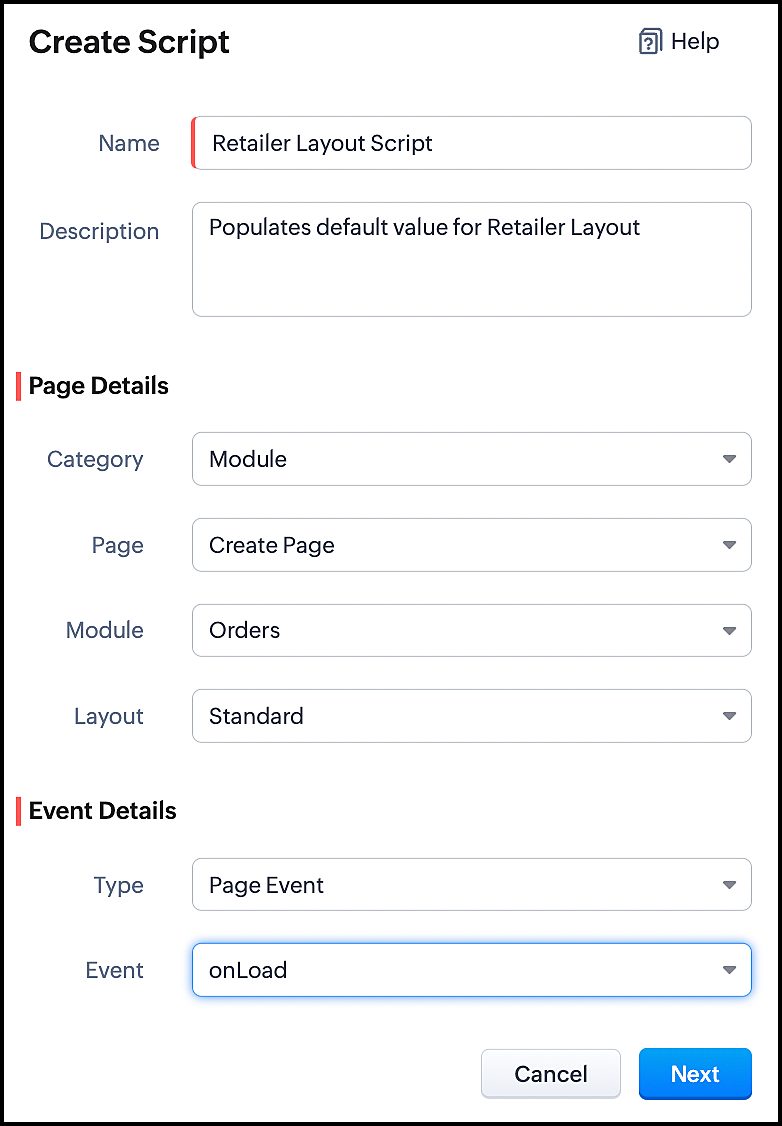
1. Client Script for Retailer Layout with onLoad Page event
- Go to Setup > Developer Space > Client Script. Click +New Script.
- Specify the details to create a script and click Next.
- Enter the following script and click save.
//To populate default value for Account Type var acc_type = ZDK.Page.getField("Account_Type"); acc_type.setValue("Retailer"); // To make the field "Account Type" read-only acc_type.setReadOnly(true); |
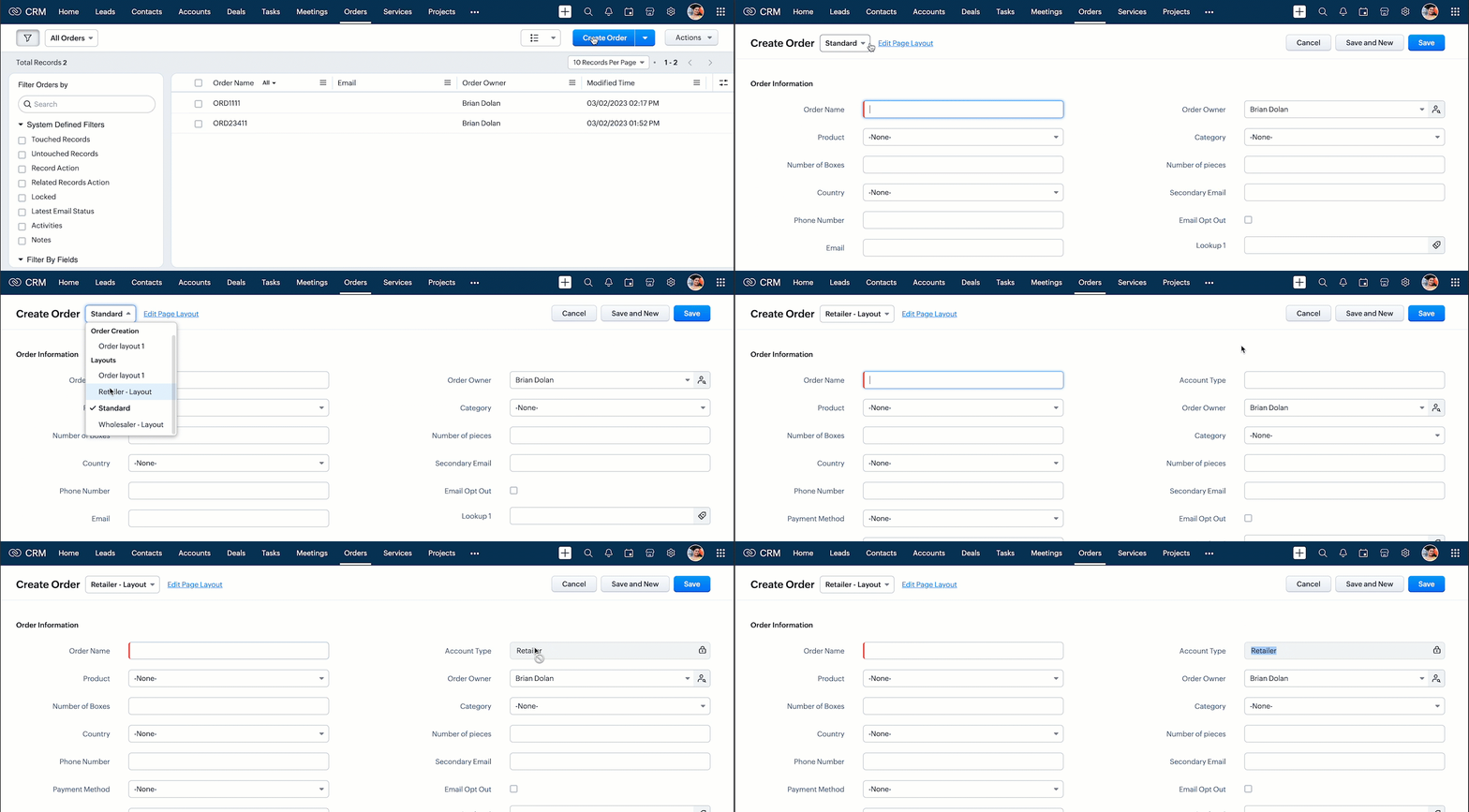
- This script gets executed whenever the Retailer - Layout, Create Page of Orders module gets loaded. The getField ZDK fetches the object details about the field Account Type. The value, Retailer can be populated to this field using setvalue(). You can make Account Type field read-only using setReadOnly().
- Here is how this Client Script works.
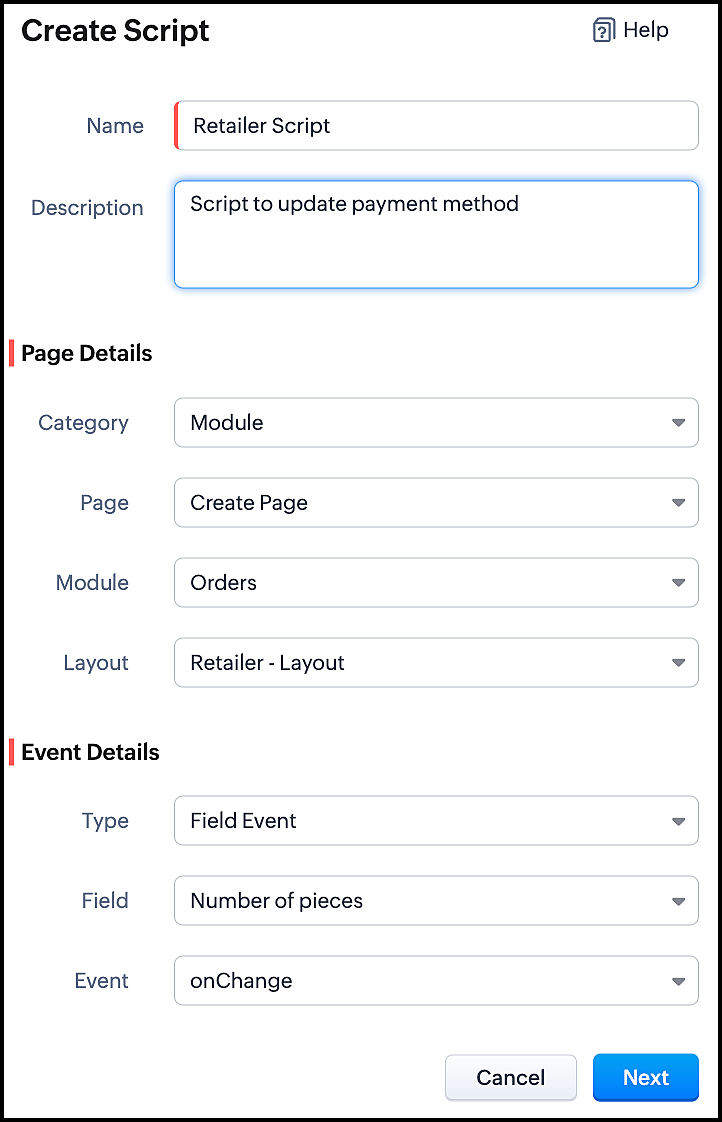
2. Client Script for Retailer Layout with onChange Field event
- Go to Setup > Developer Space > Client Script. Click +New Script.
- Specify the details to create a script and click Next.
- Enter the following script and click save.
//To populate Payment Method when the quantity is more than 100 var no_of_pieces = ZDK.Page.getField("Number_of_pieces"); var payment_method = ZDK.Page.getField("Payment_Method"); if (no_of_pieces.getValue() > 100) { payment_method.setValue("Prepaid"); // To make the field "Payment Method" read-only payment_method.setReadOnly(true); } |
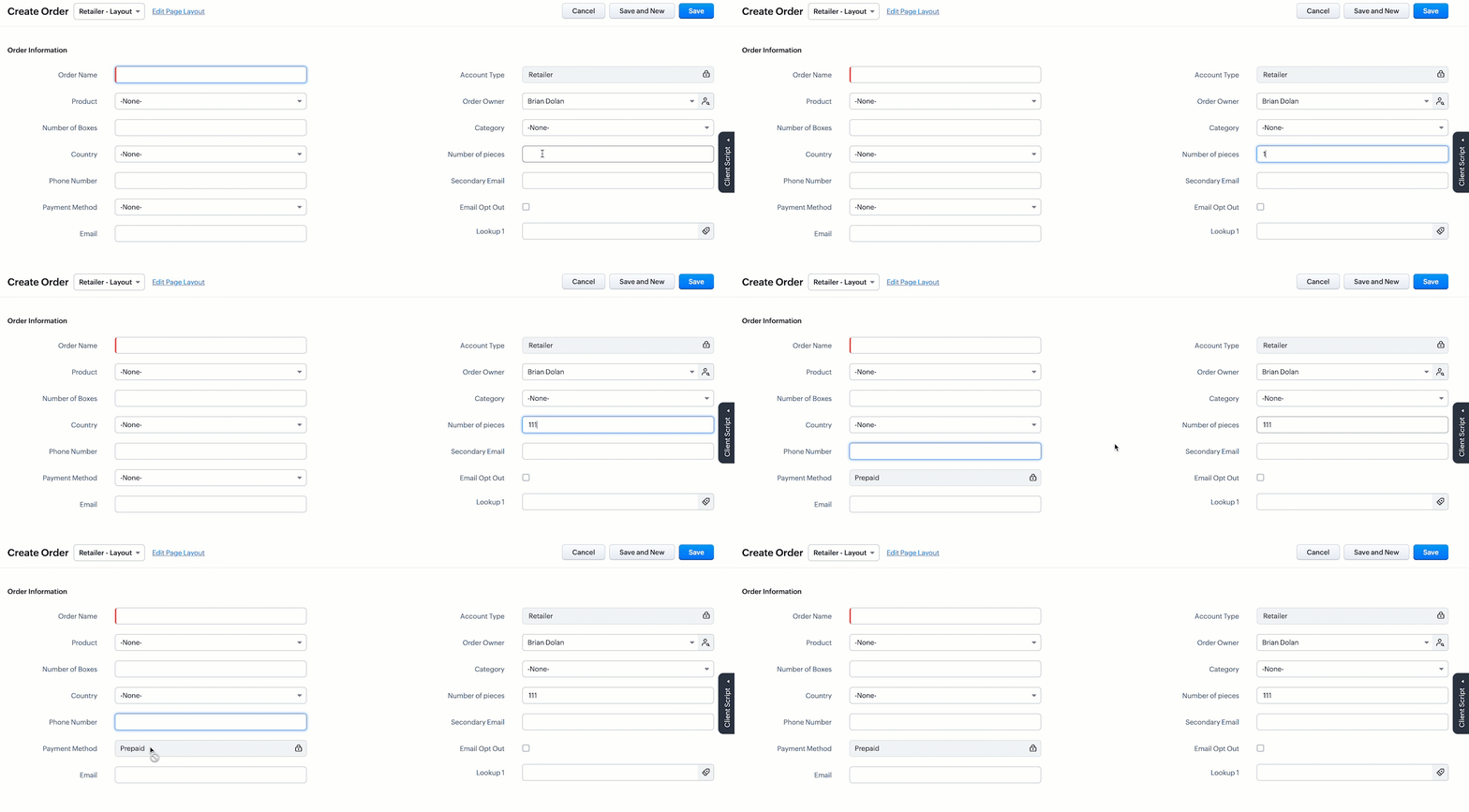
- This script gets executed whenever the user enters a value in the Number of Pieces field in the Retailer - Layout's Create Page of Orders module. The getField ZDK fetches the object details about the fields Number of Pieces and Payment Method. The value, Prepaid will be populated to Payment Method using setvalue(), whenever the value entered in the Number of Pieces is more than 100. You can use getvalue() to get the value entered in a field. You can make this field read-only using setReadOnly().
- Here is how this Client Script works.
3. Client Script for Wholesaler Layout with onLoad Page event
- Go to Setup > Developer Space > Client Script. Click +New Script.
- Specify the details to create a script and click Next.
- Enter the following script and click save.
//To populate default value for Account Type var acc_type = ZDK.Page.getField("Account_Type"); acc_type.setValue("Wholesaler"); // To make the fiels "Account Type" read-only acc_type.setReadOnly(true); //To populate default value for Payment Method var payment_method = ZDK.Page.getField("Payment_Method"); payment_method.setValue("Prepaid"); // To make the fiels "Payment Method" read-only payment_method.setReadOnly(true); |
- This script gets executed whenever the Wholesaler - Layout, Create Page of Orders module gets loaded. The getField ZDK fetches the object details about the fields Account Type and Payment Method. The value, Wholesaler and Prepaid can be populated to the corresponding fields using setvalue(). You can make Payment Method field read-only using setReadOnly().
- Here is how this Client Script works.
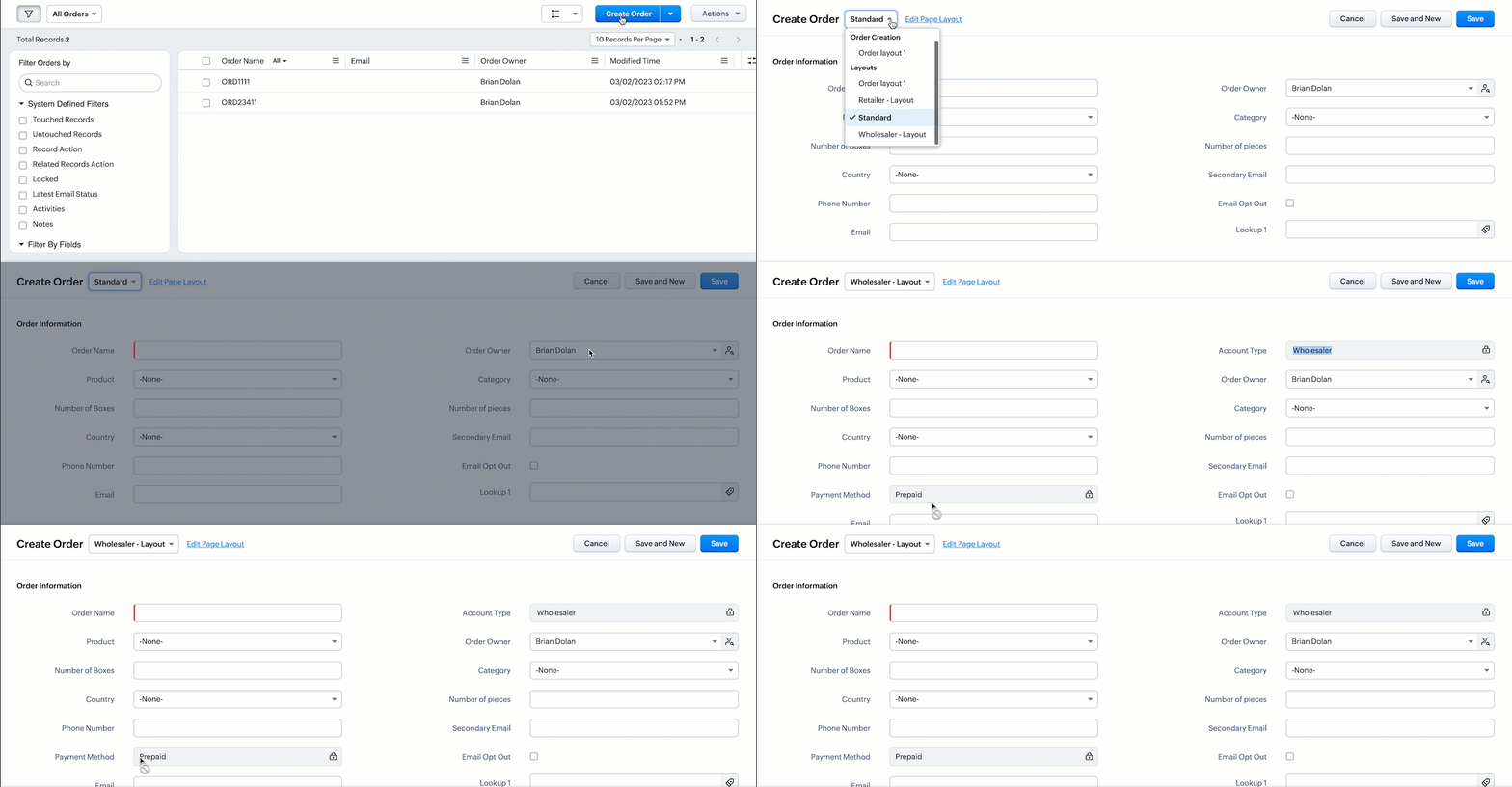
- Thus using Client Script, you can populate different default values for the same fields located in different page layouts, based on custom conditions.

Note :
Alternatively, you can achieve this using workflow rules. However, if you want instant actions i.e., before updating or saving a record, or if you have exceeded the workflow limit, you can implement this using Client Script.
5. Summary
In this post, we have discussed,
1. Configuring Client Script based on Layout.
2. Choosing the type of Event for a requirement.
3. Using setValue & setReadOnly for the ZDK.Page.getField().
We hope you found this post useful. We will meet you next week with another interesting topic!
If you have any questions let us know in the comment section.
Click here for more details on Client Script in Zoho CRM.
6. Related Links
Please take a look at our Kaizen collection here.
Cheers!
Previous Kaizen - Kaizen #110 Record Locking APIs in Zoho CRM
Topic Participants
Maadhari M
Vigneshwaran K
varun
Anamika Prasanth
Ishwarya SG
Sticky Posts
Kaizen #222 - Client Script Support for Notes Related List
Hello everyone! Welcome to another week of Kaizen. The final Kaizen post of the year 2025 is here! With the new Client Script support for the Notes Related List, you can validate, enrich, and manage notes across modules. In this post, we’ll explore howKaizen #217 - Actions APIs : Tasks
Welcome to another week of Kaizen! In last week's post we discussed Email Notifications APIs which act as the link between your Workflow automations and you. We have discussed how Zylker Cloud Services uses Email Notifications API in their custom dashboard.Kaizen #216 - Actions APIs : Email Notifications
Welcome to another week of Kaizen! For the last three weeks, we have been discussing Zylker's workflows. We successfully updated a dormant workflow, built a new one from the ground up and more. But our work is not finished—these automated processes areKaizen #152 - Client Script Support for the new Canvas Record Forms
Hello everyone! Have you ever wanted to trigger actions on click of a canvas button, icon, or text mandatory forms in Create/Edit and Clone Pages? Have you ever wanted to control how elements behave on the new Canvas Record Forms? This can be achievedKaizen #142: How to Navigate to Another Page in Zoho CRM using Client Script
Hello everyone! Welcome back to another exciting Kaizen post. In this post, let us see how you can you navigate to different Pages using Client Script. In this Kaizen post, Need to Navigate to different Pages Client Script ZDKs related to navigation A.
Nederlandse Hulpbronnen

Recent Topics
WorkDrive and CRM not in sync
1/ There is a CRM file upload field with WorkDrive file set as the source: 2/ Then the file is renamed in WorkDrive (outside CRM): 3/ The File in CRM is not synced after the change in WorkDrive; the file name (reference) in CRM record is not updated (hereIs Zoho Communityspaces now part of Zoho One?
Is Zoho Communityspaces now part of Zoho One?Bigin’s 2025 Evolution: Highlights from 2025 and What’s Ahead in 2026
Dear Biginners, Wishing you a very happy New Year! As we stand at the cusp of endless possibilities in 2026, we would like to take a moment to reflect on what we achieved together in 2025. Your continued support, thoughtful feedback, and kind words ofSend Supervisor Rule Emails Within Ticket Context in Zoho Desk
Dear Zoho Desk Team, I hope this message finds you well. Currently, emails sent via Supervisor Rules in Zoho Desk are sent outside of the ticket context. As a result, if a client replies to such emails, their response creates a new ticket instead of appendingZoho Desk - Change Time Zone for all users and set default for new user
Hi, Is there a way to set a default time zone so that when user creates an account via the Zoho Desk invitation, they don't need to select the time zone via the hundreds of choice? And, for already created users, can we edit the incorrect time zone selected by the user at the account creation ? Thanks ! FredIntroducing WhatsApp integration in Bigin
Greetings! In today's business landscape, messaging apps play a significant role in customer operations. Customers can engage with businesses, seek support, ask questions, receive personalized recommendations, read reviews, and even make purchases—allAllow Manual Popup Canvas Size Control
Hello Zoho PageSense Team, We hope you're doing well. We would like to request an enhancement to the PageSense popup editor regarding popup sizing. Current Limitation: Currently, the size (width and height) of a popup is strictly controlled by the selectedWhy does Zoho’s diff viewer highlight parts of unchanged lines?
Hi everyone, I’ve noticed something odd in the Zoho editor’s diff view. When I delete a single line, the diff doesn’t just mark that line as removed. Instead, it highlights parts of the next line as if they changed, even though they are identical. Example:CRM x WorkDrive: File storage for new CRM signups is now powered by WorkDrive
Availability Editions: All DCs: All Release plan: Released for new signups in all DCs. It will be enabled for existing users in a phased manner in the upcoming months. Help documentation: Documents in Zoho CRM Manage folders in Documents tab Manage filesIntroducing Assemblies and Kits in Zoho Inventory
Hello customers, We’re excited to share a major revamp to Zoho Inventory that brings both clarity and flexibility to your inventory management experience! Presenting Assemblies and Kits We’re thrilled to introduce Assemblies and Kits, which replaces theAutomating Employee Birthday Notifications in Zoho Cliq
Have you ever missed a birthday and felt like the office Grinch? Fear not, the Cliq Developer Platform has got your back! With Zoho Cliq's Schedulers, you can be the office party-cipant who never forgets a single cake, balloon, or awkward rendition ofAdd deluge function to shorten URLs
Zoho Social contains a nice feature to shorten URLs using zurl.co. It would be really helpful to have similar functionality in a Deluge call please, either as an inbuilt function or a standard integration. My Creator app sends an email with a personalisedform data load issue when saving as duplicate record is made
Hello. I have a form with a lookup when a value is selected the data from the corresponding record is filled into all of the fields in the form. But the form is loaded in such a state that if any value is changed it will take all of the values pre loadedRecurring Tasks and Reminders in Projects
Recurring tasks are tasks that are created once, and then recreated automatically after a designated time period. For example, the invoice for your billable tasks is due every week. You can set that task to recreate itself every week. Also, the futureUnable to remove the “Automatically Assigned” territory from existing records
Hello Zoho Community Team, We are currently using Territory Management in Zoho CRM and have encountered an issue with automatically assigned territories on Account records. Once any account is created the territory is assigned automatically, the AutomaticallyImproved Contact Sync flow in Google Integration with Zoho CRM
Hello Everyone, Your contact sync in Google integration just got revamped! We have redesigned the sync process to give users more control over what data flows into Google and ensure that this data flows effortlessly between Zoho CRM and Google. With thisImproved Functionality PO Bill SO Invoice
Hello, I need to enter over 100 items, it's frustrating to scroll a few item rows and wait for more to load, then scroll again. It would be nice to have buttons that scroll to the top or bottom with one click. Furthermore, these items I'm adding are VATWishes for 2026
Hello, and a happy new year 2026! Let's hope it's better for everyone. I'd like to share some thoughts on Zoho One and what could be useful in the short, medium, and long term. Some things are already there, but not applied to Zoho One. Others seem likeHow to Integrate Zoho Books with Xero (No Native Connection Available)
Hi everyone, I’m currently facing an issue with integrating Zoho Books invoices with Xero, as I’ve noticed Zoho does not provide a native integration with Xero at this time. I would like to ask: What are the common or recommended solutions for syncingZohoSalesIQ.Chat cannot send messages
Chat cannot send messages. Our app implements the customer service chat window functionality by integrating the Mobilisten SDK. Recently, we encountered an issue: after successful SDK initialization and visitor registration, when the `startWithQuestion`error while listing mails
I can't access email in any of my folders: Oops, an error occurred - retry produces the second error response: error while listing mails (cannot parse null string). I've signed in and out of Zoho, restarted my iMac.Critical Issue: Tickets Opened for Zoho Support via the Zoho Help Portal Were Not Processed
Hi everyone, We want to bring to your attention a serious issue we’ve experienced with the Zoho support Help Portal. For more than a week, tickets submitted directly via the Help Portal were not being handled at all. At the same time no alert was postedHide/Show Subform Fields On User Input
Hello, Are there any future updates in Hide/Show Subform Fields "On User Input"?Cloning Item With Images Or The Option With Images
Hello, when I clone an item, I expect the images to carry over to the cloned item, however this is not the case in Inventory. Please make it possible for the images to get cloned or at least can we get a pop up asking if we want to clone the images asCustom validation in CRM schema
Validation rules in CRM layouts work nicely, good docs by @Kiran Karthik P https://help.zoho.com/portal/en/kb/crm/customize-crm-account/validation-rules/articles/create-validation-rules I'd prefer validating data input 'closer to the schema'Adding Default Module Image into mail merge field
As with most people finding their way to these forums i have a specific requirement that doesn't seem to be supported by Zoho I have created 2 custom modules to suit my purpose 1 is an inventory type module that lists aluminium extrusions, and all relevantIs it possible to roll up all Contact emails to the Account view?
Is there a way to track all emails associated with an Account in one single view? Currently, email history is visible when opening an individual Contact record. However, since multiple Contacts are often associated with a single Account, it would be beneficialFree Training - Explore What’s New in Zoho One 2025
Greetings! We hope you have all had a chance by now to get hands-on with the new features and updates released as part of ZO25. Yes, we understand that you may have questions and feedback. To ensure you gain a comprehensive understanding of these updates,Good news! Calendar in Zoho CRM gets a face lift
Dear Customers, We are delighted to unveil the revamped calendar UI in Zoho CRM. With a complete visual overhaul aligned with CRM for Everyone, the calendar now offers a more intuitive and flexible scheduling experience. What’s new? Distinguish activitiesQuick way to add a field in Chat Window
I want to add Company Field in chat window to lessen the irrelevant users in sending chat and set them in mind that we are dealing with companies. I request that it will be as easy as possible like just ticking it then typing the label then connectingHow to create a two way Sync with CRM Contacts Module?
Newbie creator here (but not to Zoho CRM). I want to create an app that operates on a sub-set of CRM Contacts - only those with a specific tag. I want the app records to mirror the tagged contacts in CRM. I would like it to update when the Creator appZoho Sheet for Desktop
Does Zoho plans to develop a Desktop version of Sheet that installs on the computer like was done with Writer?How to import data from PDF into Zoho Sheet
I am looking to import Consolidated Account Statement (https://www.camsonline.com/Investors/Statements/Consolidated-Account-Statement) into zoho sheet. Any help is appreciated. The pdf is received as attachment in the email, this document is passwordZoho Projects Android app: Integration with Microsoft Intune
Hello everyone! We’re excited to announce that Zoho Projects now integrates with Microsoft Intune, enabling enhanced security and enterprise app management. We have now added support for Microsoft Intune Mobile Application Management (MAM) policies throughCant't update custom field when custom field is external lookup in Zoho Books
Hello I use that : po = zoho.books.updateRecord("purchaseorders",XXXX,purchaseorder_id,updateCustomFieldseMap,"el_books_connection"); c_f_Map2 = Map(); c_f_Map2.put("label","EL ORDER ID"); c_f_Map2.put("value",el_order_id); c_f_List.add(c_f_Map2); updateCustomFieldseMapAbout Zoneminder (CCTV) and Zoho People
Hi team I would like to implement a CCTV service for our branches, with the aim of passively detecting both the entry and exit of personnel enrolled in Zoho Peeple, but my question is: It is possible to integrate Zoho People with Zoneminder, I understandAdmin asked me for Backend Details when I wanted to verify my ZeptoMail Account
Please provide the backend details where you will be adding the SMTP/API information of ZeptoMail Who knows what this means?Kaizen #223 - File Manager in CRM Widget Using ZRC Methods
Hello, CRM Wizards! Here is what we are improving this week with Kaizen. we will explore the new ZRC (Zoho Request Client) introduced in Widget SDK v1.5, and learn how to use it to build a Related List Widget that integrates with Zoho WorkDrive. It helpsSet connection link name from variable in invokeurl
Hi, guys. How to set in parameter "connection" a variable, instead of a string. connectionLinkName = manager.get('connectionLinkName').toString(); response = invokeurl [ url :"https://www.googleapis.com/calendar/v3/freeBusy" type :POST parameters:requestParams.toString()Possible to connect Zoho CRM's Sandbox with Zoho Creator's Sandbox?
We are making some big changes on our CRM so we are testing it out in CRM's Sandbox. We also have a Zoho Creator app that we need to test. Is it possible to connect Zoho CRM's Sandbox to Zoho Creator's Sandbox so that I can perform those tests?Next Page