Let's Talk Recruit: Exploring AI in the Zoho Recruit mobile app
Ever had to look up a candidate's details right before a meeting? Or wanted to check your hiring pipeline while you're away from your desk? Recruiters are constantly on the move, and keeping up with everything can be a challenge.
That's where mobile recruiting comes in. With the Zoho Recruit mobile app for iOS and Android, you can do more than just keep tabs on your hiring activities. From AI-powered search and candidate matching to quick summaries and content generation, you have more ways to keep your recruitment workflow moving.
Let's take a look at what's possible and how these features can make a difference to your day.
A little more help with everyday recruiting
Zia Search: A quicker way to find what you need
Imagine your hiring manager asking for an update on all the open positions while you're away from your desk. Instead of navigating through multiple screens and applying filters, you can simply use Zia Search.
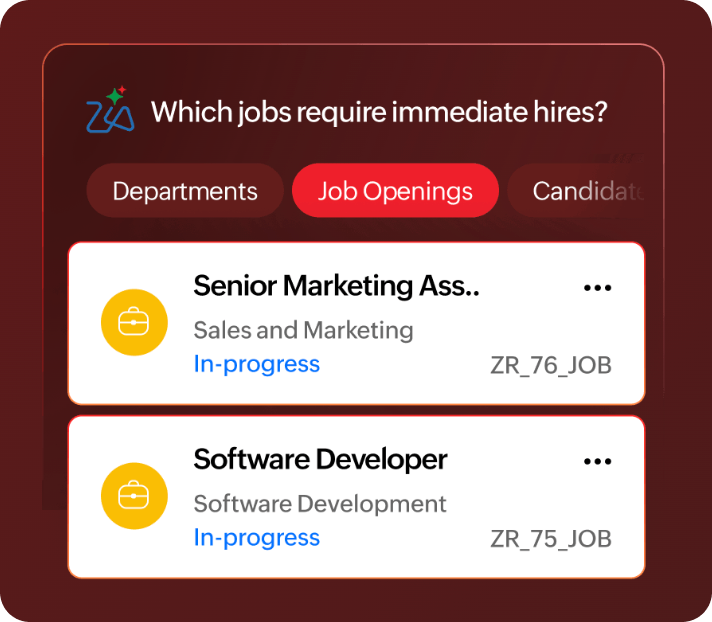
It's a more conversational way to explore your recruitment data, without the usual back-and-forth between screens.
Zia Matches: Find the right talent, wherever you are
You've got a job opening to fill, but where do you start looking for candidates?
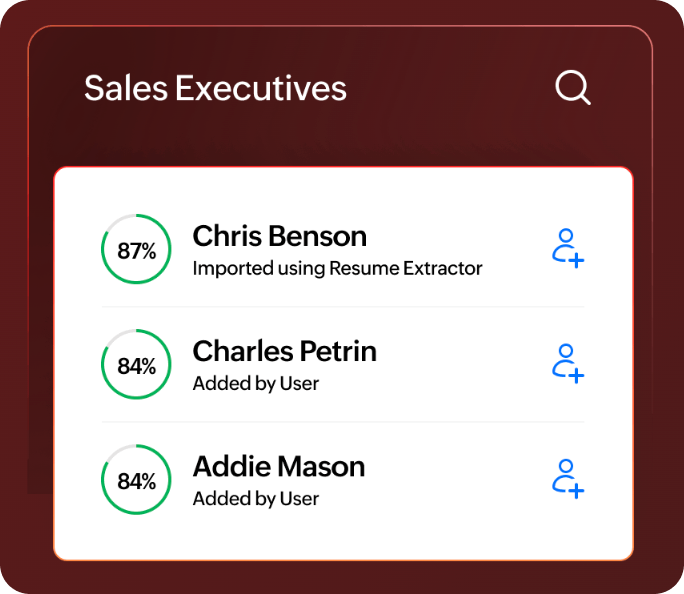
Zia Matches helps you discover candidates based on how closely their profiles match a job's requirements. You can review match scores, refine your results, and identify potential candidates right from your mobile device.
Instead of spending time sifting through profiles, you can focus on evaluating candidates who match your requirements.
Zia Assist: Making everyday writing easier
Writing job descriptions and refining content can take up more time than expected, especially when you're juggling multiple openings.
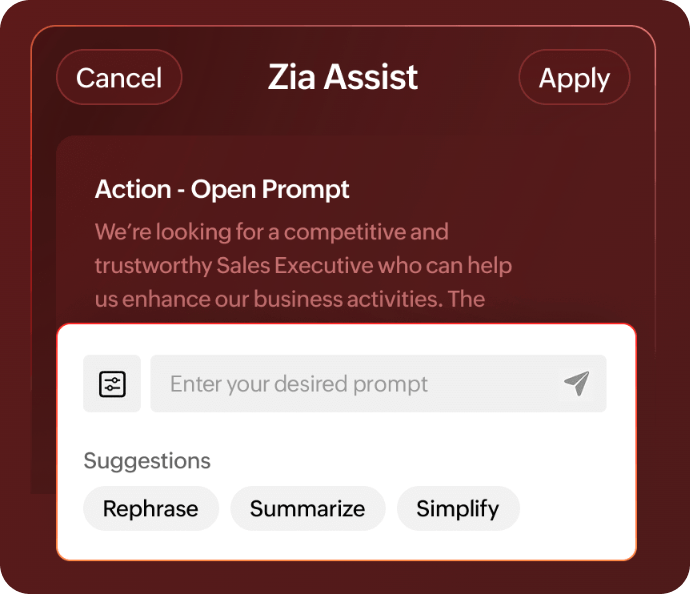
Zia Assist helps you generate job descriptions using key fields from your records. You can also refine existing content with prompts such as Rephrase, Summarize, and Simplify.
Whether you're starting from scratch or polishing an existing draft, you can get your content ready without having to begin every time.
Ask Zia: Get answers without leaving your records
Sometimes, you know exactly what information you need but don't want to spend time looking for it.
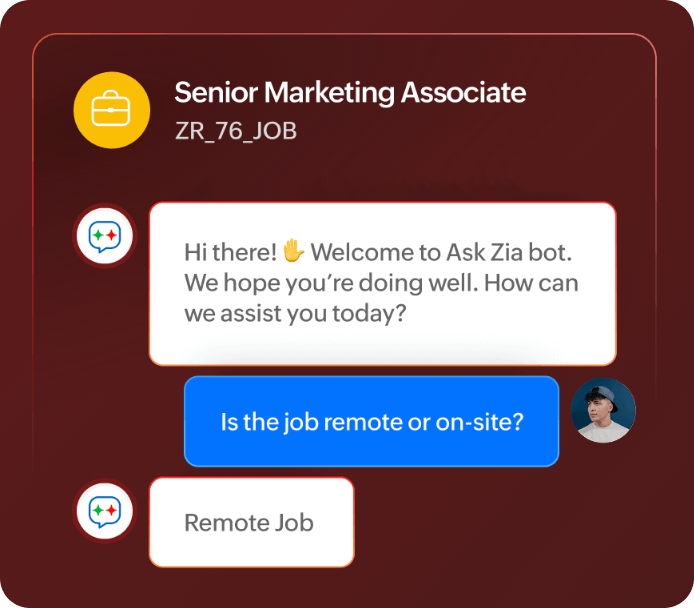
That's where Ask Zia comes in. You can ask questions directly from the records you're viewing and get answers about your recruitment data through a conversation.
Whether you're checking a job opening or looking for specific record details, Ask Zia helps you find the information you need without interrupting your workflow.
Zia Summary: The essentials, without the long read
Whether you're reviewing a candidate's profile, catching up on a record, or going through your notifications, summaries can help you get the information you need without reading through everything.
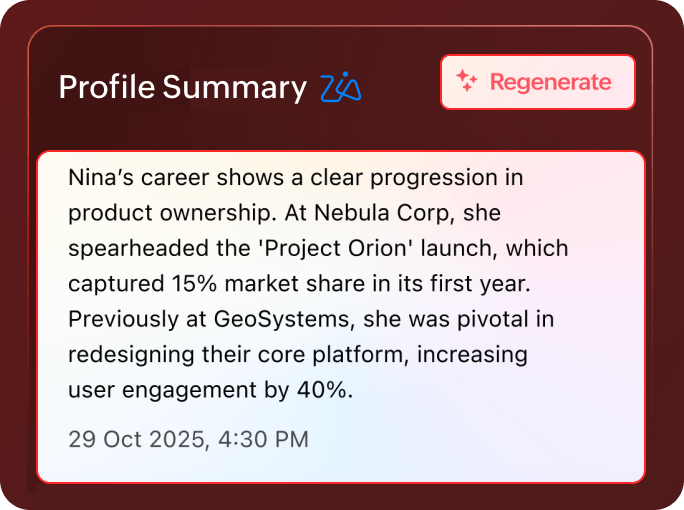
With Zia Profile Summary and Record Summary, available on both iOS and Android, you can quickly understand candidate profiles and get an overview of key information in your records.
On iOS, you also have Email Summary and Notification Summary, which help you catch up on lengthy emails and notifications without having to go through them individually.
Together, these summaries help you stay informed and spend less time catching up, whether you're at your desk or on the move.
A refreshed experience, built for iOS 27
While the AI capabilities help you get more done on mobile, iOS 27 brings a refreshed experience to Zoho Recruit, making it easier to stay on top of your daily activities.
Here's what's new:
On-device Notification Summaries: Catch up on notification summaries right from your device and quickly see what needs your attention.
Your to-dos, at a glance: Keep your daily recruiting tasks within reach with the new portrait widget.
Fits the way you work: Work across different window sizes with layouts that adapt to your device.
Refreshed Liquid Glass Interface: Explore the new translucent, dynamic interface for a refreshed look and feel.
These enhancements are specific to the iOS experience, complementing the AI capabilities available across the mobile app.
Let's Talk Recruit
From finding candidates and understanding profiles to creating content and keeping track of daily tasks, Zoho Recruit brings these capabilities to your mobile device, whether you're using iOS or Android.
With Zia on mobile and the refreshed iOS experience, you can spend less time navigating your recruitment data and more time focusing on the people and decisions that move hiring forward.
Let's hear from you! Which of these features would make the biggest difference to your day as a recruiter? Is there an AI feature you'd particularly like to see on mobile? Let us know in the comments.
Topic Participants
Akshaya P
Sticky Posts
Zoho Recruit Community Meet-up - India (Venues Finalised)
Zoho Recruit Community Meet-up - India (Venues Finalised) Namaste, India. 🙏🏼 The Zoho Recruit team is hitting the road—and we're absolutely excited behind the scenes. Join us for the Zoho Recruit India Meet-up 2026, a morning designed to make your recruitingZoho Recruit Community Meetup - London 🇬🇧 (Venue Finalised)
Hello Recruiters! We’re excited to announce that the Zoho Recruit team is coming to the UK for an in-person Zoho User Group (ZUG) Meetup in London! This is your chance to connect with fellow Zoho users, learn from experts, and walk away with actionableAn update to improve email delivery | Email Authentication & Relay
Update Rollout Latest Update: Enterprise users (8th July, 2025) This update is now live for Enterprise plan users in all regions. This includes People Plus, but not Zoho One, which will be covered in an upcoming update. Professional users (31st May 2025)Zoho Recruit User Group Meet-up | INDIA 2025 (Venue Finalised)
Hello Zoho Recruit users from India, We’re pleased and excited to announce our 2025 edition of Zoho user group meet-up in India in five cities! In this meet-up, our team of experts will help you understand the intricate nuances to use Zoho Recruit better,Zoho Recruit is coming to the UK | Zoho Community Learning Series
Customers from the United Kingdom, Exciting news: We will be in London for the Zoho Recruit user meet up. Our team will help you better understand the intricate nuances of Zoho Recruit to help you hire faster, inform about new and upcoming features, and
Nederlandse Hulpbronnen

Recent Topics
Zoho Forms API
Is there any way to get all form entry list using API? Looking forward to hear from youBNZ Bank Feeds No Longer Available
The BNZ (New Zealand) bank feeds are still failing and it's been months since they last worked! Uploading bank statements (CSV's) mean waiting to the end of the month when they become available. It is unacceptable to keep my clients waiting for paymentHow can I connect Zoho CRM with Power BI with no Rest API ?
Hello, My version of Power BI does not accept Rest API with Zoho. I have a module "Deals" in Zoho CRM that I want to connect to Power BI to exchange Data. I want to be able to automatically exchange data from Power BI to Zoho CRM (CRUD), and from ZohoMCP is now easier to access and configure in Bigin
Greetings! We hope you're all doing well. We've previously introduced Zoho MCP for Bigin, which lets you connect Bigin with AI tools and interact with your Bigin data using natural language. Now we're making MCP easier to access and configure directly[ZohoDesk] Improve Status View with a new editeble kanban view
A kanban view with more information about the ticket and the contact who created the ticket would be valueble. I would like to edit the fields with the ones i like to see at one glance. Like in CRM where you can edit the canvas view, i would like to editLaunch agents from more custom button locations and attach files in Ask Zia
Hello all, Your agents now meet your team where the work happens. You can add agents to custom buttons in list views, create and edit pages, and related lists, so users launch them without leaving the page they’re on. What’s new Agents in more customPhone system to integrate with Zoho CRM
I am looking for phone software that would allow my agency to do the following within Zoho CRM: Make calls from zoho Track calls and notes Leave pre-recorded messages after reaching voicemail of lead Only 2 members, so need company who will allow justIntroducing PRM: Build, manage, and scale your partner ecosystem
Growing a partner ecosystem is a good problem to have. What starts as a handful of partners can quickly turn into a maze of spreadsheets, emails, and disconnected processes. More partners mean more opportunities, greater reach, and new ways to growZoho Projects connector with Zoho CRM (Related List module) features
Hi community, I use Zoho Projects connected to Zoho CRM, where we associate Projects with Deals, clients, etc.. I am looking to change/edit the fields that are available in the integration. Currently it shows Project Status, Project Completion, Milestones,Feature Request: Render Markdown (.md) files in Zoho Cliq
Hi, We regularly share Markdown (.md) files in Zoho Cliq. However, when we open these files in Cliq, the content does not render as Markdown—it displays as plain text. This forces us to copy/paste the content into an external Markdown viewer to read itFree webinar: Zoho Sign for Microsoft apps
Hello, Did you know Zoho Sign works right inside the Microsoft apps you already use? A signature request shouldn't mean leaving Teams for another tab, or downloading an Outlook attachment just to sign it. Zoho Sign integrates with Microsoft 365, Teams,Users can now notify the contact while adding a 'Resolution' to the ticket.
Hello, In the latest version of the Desk iOS mobile app (v2.6.4), users can now notify the contact while adding a 'Resolution' to the ticket. Also, the 'Resolution' UI has been tweaked to support edit and delete option. Please update the app eitherBetter Time Tracking
We need better time tracking customization for IT MSPs. We also need reporting that is built in, rather than having to try and fumble with creating custom reports. We also need to be able to mark whether a ticket has been billed or not, I don't thinkIntroducing Custom Fonts for Career Sites
Your Careers page is often the first place candidates interact with your organization. From exploring job opportunities to submitting applications, a consistent visual experience helps candidates recognize and connect with your brand. To give you moreNeed help with importing expenses
I'm using the template downloaded from the application. When I try to import my expenses, I get the message: Duplicate entry in the Expense Date column. Ensure it contains unique values. None of the rows will import. There are duplicate dates, but theytime tracking on zoho crm cases
Is there a time tracking feature in zoho crm cases? I need calculate time spent in calls, tasks and events Thanks in AdvanceIntegrate with Power BI
Hi, How to connect Zoho CRM dashboards & reports with POWER BI ?Error creating an XML file
I am creating an xml as string in the function Employee.generatePartA_XML_String, and then I want to save it as a file to the field "Part_A_XML", but I get the response: {"code":3700,"message":"Unable to upload a file. Please check and try again."} HowUnbundle feature for composite items
We receive composite items from our vendors and sell them either individually or create other composite items out of them. So, there is a lot of bundling and unbundling involved with our composite items. Previously, this feature was supported in formTrident Missing
No way you guys get so close to having trident complete for over a year then just kill it off. Wow just wowZoho Recruit: Time to Step Up Your AI Game!
I've been using Zoho Recruit for many years and I love it. But let's be honest, it's starting to feel a bit like a relic from the pre-ai era. I recently tried out new systems that have ai resume screening and ai interviewing capabilities, these systemsZoho mail app throwing network error
Zoho mail app is throwing network error and I do not know how to fix the issue.Cannot unblock account
Hi, I have recently been travelling for work and now my mail account has been locked due to suspicious activity (I guess login attempts from different countries) however when I go into my admin panel it won’t let me unblock and asks me to contact support.WorkDrive Desktop Sync Is Being Deprecated: Move to WorkDrive TrueSync for a Smarter Experience
Hi everyone, We are excited to share a better, smarter way to access and manage your files directly from your computer! We’re transitioning from our legacy Desktop Sync app to WorkDrive TrueSync, designed to give you faster performance,greater flexibility,Time logging issues
I am losing times tracked on tasks. The problem is that it is not clear when the time is logged, when the timer is stopped or when the task is closed? I've done both and neither works. Whats more when the task is closed, the tracked time disapperas (i guess bc it shouldve been logged) but when it's not logged you've just lost your tracked time. The bigger problem is the UN-NATURAL way this time logging is set up. On every other plat form that tracks time, it is made clear to save timer or log whenStart/Stop Timmer in Chrome Extension
The chrome extension is great and allows you to do allot however one of the most common things employees working on projects need to do is track their time. Having an easy start/stop timer to track time would be great.Employee Logged Hours Report
Hi Team, We are looking at having all Employees logged hours report, but different staff uses diferent modules to log their time. Is there anywhere that we can get a report that captures every time entered through all Zoho modules? Thank you.Time Log Report Across Zoho Apps?
Currently there are at least 4 different apps in Zoho where users can book time. Projects Desk Books People In our case for instance, the same user may book time against both Projects and Desk Tickets. So we have no way to see a simple timesheet for aZoho Time tracking option with automated screen shots.
Time tracking option with automated screen shots would be an exceptionally good feature, any plans to develop something like that? Please do the needful. Thank you, Raj RajincDetailed time tracking (for productivity/accountability). How to?
Hello everyone! I read an interesting article about accurately tracking your time in 15 mins intervals and after some time analyzing it in order to improve your productivity. I'd like to give this a try myself. I would like to use Zoho apps. (How) could I do this? Thanks for the tips!Time Tracking Needed in Zoho
It seems lots of people request a Time Tracking Zoho Desktop App, that is only problem I have with working with Zoho. People need to know how much time they spend on specific tasks. Is Zoho planning to do this sometime in the future?emails?
Why can't I send emails from my account anymoreErase function in Zoho PDF editor does not truly redact
Using the "erase" function in the Zoho PDF editor online does not redact the text underneath when opening the file in Adobe. When I used the erase function to whiteout the areas I didn't want to be seen, I opened the supposed redacted files in Adobe.Backorder For Composite Items
Hello If i released SO for composite item and use backorder feature of zoho inventory then it should backorder child item items of composite and not composite item.This is basic of backordering.I conveyed this to zoho call center but no solution yet.Global Constants / Variables
It would be great if there were a Global Constant feature. The idea here is for managing constants that are used in multiple Flows and Subflows, but might change over time. The idea is that the change could be made in one place and cascade to all futureDeal Activity Tracking - By Time
Hello, I am trying to figure out a way to implement a time tracking ability within the CRP that will provide a line item on the final invoice in books. Would the Cases module be of good to use in this scenario? Want to integrate into Books as well. ITime Card Tracking For Employees
Does ZOHO have an add-on or app that my employees can use to clock in & out on a daily basis. In the past we had used a third party solution, but it was hard to use and pricey. We would really like to use your time tracking feature if you have one......ifLogging time within Time Tracking
At the moment I use the call logging feature of CRM to log time spent on clients work. Its nice to be able to start, stop and pause the timer and record how many hours I need to bill the client. Any chance of implementing this in Zoho Invoice's time tracking feature The same interface as CRM would be great or a simple start/stop/pause/restart timer.3rd Party/Easy Time Tracking Integration with Zoho
We are new customers using Zoho One with Zoho Project/CRM/Desk being the 3 big applications we will use. The majority of our work is done in the field and we need accurate and easy time tracking for our workers on mobile phones. aka TSheets type functionality. but tied to Zoho. Zoho is outstanding overall so I am surprised at how laborious, inefficient and disconnected time tracking is mobile devices. Adding time to a project task on a mobile phone can be a 10+ click task and that's not an exaggeration!TrueSync for Windows 5.16+ breaks Excel save in "Shared with Me" (temp file writes fail) – workaround: pin 5.15.1
Hi all, After TrueSync for Windows auto-updated past 5.15.1, some of our users can no longer save Excel files that live under "Shared with Me". We isolated it to a client-side regression and found a workaround. Sharing in case it saves someone a few hoursNext Page