Let’s Talk Recruit: LinkedIn Cheatsheet

Let’s Talk Recruit: LinkedIn Cheatsheet


Welcome to the first edition of Let’s Talk Recruit for 2026. We are kicking off the year by revisiting one of the most asked about topics in Zoho Recruit.

Quote
How our LinkedIn integrations actually work and how recruiters can get the most value from them.

LinkedIn continues to be a critical sourcing and application channel for recruiters. But when it connects with an ATS, the experience depends heavily on how features are activated and used. In this post, we break down LinkedIn integrations in Zoho Recruit, explain when to use each option, and show you how to set them up the right way.

Understanding Our LinkedIn Integrations

Zoho Recruit’s LinkedIn integrations fall into two clear categories. One helps you publish jobs on LinkedIn and the other helps you capture applications from LinkedIn. Understanding this split helps you choose the right setup for your hiring process.
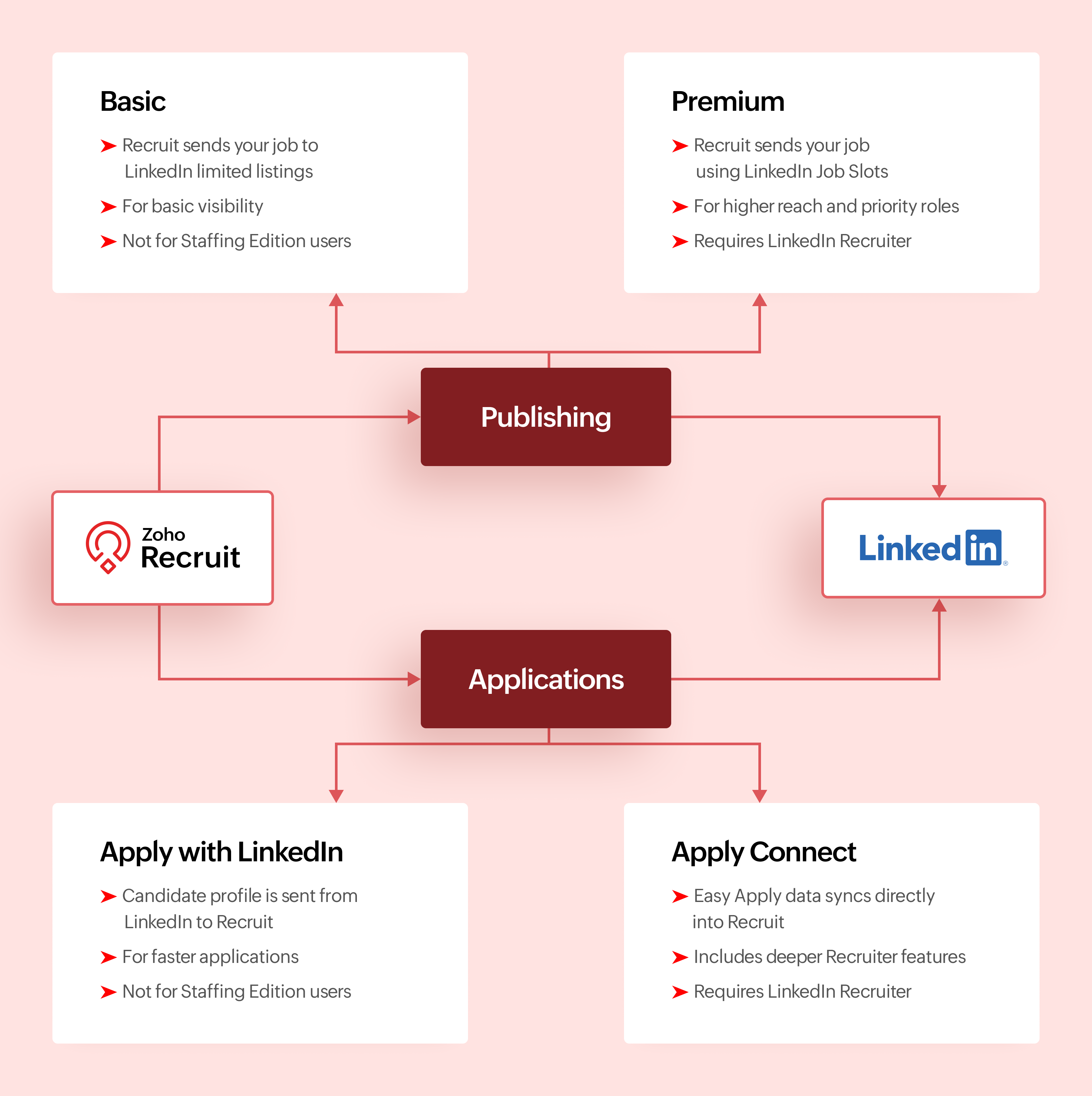

Activation Checklist

Use this checklist to set up LinkedIn with Zoho Recruit so jobs and Easy Apply applications flow correctly.

Step #1: Connect LinkedIn Easy Apply to Zoho Recruit

  1. Connect your LinkedIn account to Zoho Recruit
  2. Turn on Apply Connect so Easy Apply applications are sent directly to Zoho Recruit
Info
Why this matters
This ensures candidates who apply through LinkedIn Easy Apply appear automatically in Zoho Recruit.

Step #2: Choose how you post jobs on LinkedIn

  1. Decide how jobs will be posted from Zoho Recruit.
  2. If you use LinkedIn Job Slots, enable Premium Job Posting
  3. If you do not use Job Slots, enable Basic Job Posting
  4. Do not post the same job manually on LinkedIn outside Zoho Recruit
Info
Why this matters
Posting jobs from Zoho Recruit keeps LinkedIn jobs and ATS records in sync.

Step #3: Test Easy Apply and start hiring

  1. Post a test job to LinkedIn from Zoho Recruit
  2. Apply using LinkedIn Easy Apply
  3. Confirm the candidate shows up in Zoho Recruit
Once verified, please continue posting jobs and managing applications only from Zoho Recruit.

Comparing Integrations

Feature
Basic Job Posting
Premium Job Posting
Apply with LinkedIn
Apply Connect
Primary purpose
Publish jobs
Publish jobs with higher visibility
Simplify applications
Deep LinkedIn and Recruit integration
Category
Job publishing
Job publishing
Application capture
Application capture
Publishes jobs from Recruit
Yes
Yes
No
No
Captures applications into Recruit
No
No
Yes
Yes
Requires LinkedIn Job Slots
No
Yes
No
No
Requires Recruiter contract
No
No
No
Yes for advanced features
Available for Staffing Edition
No
Yes with Job Slots
No
No
Supported with self serve job posts
Yes
No
Yes
No
Candidate applies using LinkedIn profile
No
No
Yes
Yes
In ATS LinkedIn profile widgets
No
No
No
Yes
Applicant notifications
No
No
No
Yes
Best suited for
Standard visibility
High priority roles
Faster applications
End to end LinkedIn sourcing

Make the most of LinkedIn and Recruit together

LinkedIn delivers the best results when it is part of a connected hiring process.

Use Premium Job Posting for roles where visibility directly impacts hiring speed. Combine Apply with LinkedIn or Apply Connect with clear application stages in Zoho Recruit. Track candidate sources to understand where LinkedIn performs best. Keep candidate records clean so
LinkedIn data enriches your database instead of creating duplicates.

When LinkedIn sourcing and Zoho Recruit work together, recruiters spend less time managing tools and more time hiring the right talent.

What's Next?

Recruiter System Connect (RSC) is coming to Zoho Recruit. This upcoming capability will further strengthen how LinkedIn Recruiter data connects with Zoho Recruit, especially for teams that spend significant time sourcing inside LinkedIn Recruiter.

Why wait for RSC? 

  1. Everything in one place
    Post jobs, receive applications, and manage candidates directly in Zoho Recruit without switching tools.
  2. Cleaner data, better tracking
    Candidate profiles come in structured, making it easier to track sources and analyze hiring performance.
  3. Made for consistent hiring
    RSC supports repeat hiring on LinkedIn with reliable workflows and better visibility for recruiting teams.
More updates will be shared soon.

Let’s Talk!

LinkedIn can support hiring in many ways, but the real value comes from choosing the right integration for your Zoho Recruit setup and using it intentionally.

If you are already using any of these features, share what is working well for you. If you are exploring these integrations for the first time, tell us what you would like to learn next.

Questions? Suggestions? Leave a comment below or drop an email to support@zohorecruit.com

    • Sticky Posts

    • Zoho Recruit Community Meet-up - India (Venues Finalised)

      Zoho Recruit Community Meet-up - India (Venues Finalised) Namaste, India. 🙏🏼 The Zoho Recruit team is hitting the road—and we're absolutely excited behind the scenes. Join us for the Zoho Recruit India Meet-up 2026, a morning designed to make your recruiting
    • Zoho Recruit Community Meetup - London 🇬🇧 (Venue Finalised)

      Hello Recruiters! We’re excited to announce that the Zoho Recruit team is coming to the UK for an in-person Zoho User Group (ZUG) Meetup in London! This is your chance to connect with fellow Zoho users, learn from experts, and walk away with actionable
    • An update to improve email delivery | Email Authentication & Relay

      Update Rollout Latest Update: Enterprise users (8th July, 2025) This update is now live for Enterprise plan users in all regions. This includes People Plus, but not Zoho One, which will be covered in an upcoming update. Professional users (31st May 2025)
    • Zoho Recruit User Group Meet-up | INDIA 2025 (Venue Finalised)

      Hello Zoho Recruit users from India, We’re pleased and excited to announce our 2025 edition of Zoho user group meet-up in India in five cities! In this meet-up, our team of experts will help you understand the intricate nuances to use Zoho Recruit better,
    • Zoho Recruit is coming to the UK | Zoho Community Learning Series

      Customers from the United Kingdom, Exciting news: We will be in London for the Zoho Recruit user meet up. Our team will help you better understand the intricate nuances of Zoho Recruit to help you hire faster, inform about new and upcoming features, and

    Nederlandse Hulpbronnen


      • Recent Topics

      • Zoho Books' 2025 Wrapped

        Before we turn the page to a new year, it’s time to revisit the updates that made financial management simpler and more intuitive. This annual roundup brings together the most impactful features and enhancements we delivered in 2025, offering a clear
      • How to list WorkDrive folder contents using API

        I'm trying to read folder contents using a Deluge script. The code below returns {"errors":[{"id":"F6016","title":"URL Rule is not configured"}]}". I've tried using the search API and seen similar errors. I have proved that the connection works by creating
      • Speed (again!)

        Same old story again: impossible to work at this "speed". Category NOTES!
      • Need to set workflow or journey wait time (time delay) in minutes, not hours

        Minimum wait time for both Campaigns workflows and Marketing Automation journeys is one hour. I need one or the other to be set to several minutes (fraction of the hour). I tried to solve this by entering a fraction but the wait time data type is an integer
      • sending email with another account

        Hello there, i write there for an our costumer request. They want to send email from CRM with a different email (confirmed and added to zoho profile). For example they use account@zilium.com but with this account they want to send (not only with email
      • All new Address Field in Zoho CRM: maintain structured and accurate address inputs

        Availability Update: 29 September 2025: It's currently available for all new sign-ups and for existing Zoho CRM orgs which are in the Professional edition exclusively for IN DC users. 2 March 2026: Available to users in all DCs except US and EU DC. 24
      • Comments aren't visible in shared spreadsheet

        I would like to send a spreadsheet to people who can use it to help solve a problem as a one off use unique to them. They will have to enter data in the sheet. I have comments attached to some of the cells to explain the purpose of the data being collected.
      • Custom button for list page

        Why is my 'List Page - Bulk Action Menu' button in the Packages module not autopopulating the List argument with selected record IDs?
      • Ask the Experts - Live Q&A webinar

        Hello Community, We’re excited to host our very first Ask the Experts session! Join us on 7 April 2026 from 11 a.m. to 12 p.m. (IST) for this live webinar Q&A session, where you will have an opportunity to connect directly with our product experts, gain
      • Designing Multi-Step Workflow System in Zoho Creator + Deluge (Startup Build – Exploring Advanced Architecture + Partnerships)

        Hi everyone, I’m currently building a Zoho-based system as part of an early-stage startup, and I’m looking to connect with others who have experience designing more advanced workflows in Creator + Deluge. This started as a standard application, but it’s
      • Bin Tracking with eBay integration

        When trying to setup bin tracking on items that are linked to eBay listings using the built-in Zoho eBay integration, I keep getting this error: "Storage Tracking cannot be enabled for items that are manually fulfiled or for serial/batch items tracked
      • Removing To or CC Addresses from Desk Ticket

        I was hoping i could find a way to remove unnecessary email addresses from tickets submitted via email. For example, a customer may email the support address AND others who are in the helpdesk notification group, in either the TO or CC address. This results
      • Update to CRM Custom Buttons: Collect Users' Location

        Hello everyone! Buttons in Zoho CRM allow you to extend the default CRM capabilities for your bespoke business needs. It provides the flexibility to connect to any third-party application to perform necessary actions. Wouldn't it be better, if those buttons
      • Is it possible to make tags "required"

        We would like to be able to make the tag field a requirement for agents before they can close a ticket. This would help with monthly reporting, where a lot of tickets end up with no tag, causing manual work to go back and add the correct tag for each
      • Prevent Automatic Milestone Inheritance for Newly Created Task Lists

        Hello Zoho Projects Team, We hope you are doing well. We would like to request an enhancement regarding how new task lists inherit Milestone association in Zoho Projects. Current Behavior: At the moment, when a new task list is created below an existing
      • I would like to know wich person viewed the file

        I have a franchise and my Operative Manual is in WorkdriveI, the user can´t download but despite I know How many views the file had, I would like to know wich person viewed the file Is it possible? thank you
      • Can I write a check in Zoho Books with no associated bill?

        This currently does not seem possible, and I have a client that desperately needs this function if I am able to convert them with Quickbooks. Thank you in advance for your reply. 
      • Cloning Module Customizations in Zoho FSM

        Hello Latha, I have two Zoho FSM accounts, each in a different data center. I would like to know if it is possible to clone the module customizations I have already completed in one account to my new account in the UAE from the backend. In other words,
      • Ordering of Teams

        Hi there, Currently, we cannot order Teams in Zoho Desk. Teams are ordered as they were created. It would be really helpful if we could customise the order of Teams. For example: We have the following Teams: Shipping Customer Service Sales Compliance
      • Estimate Module - Contact Field.

        Hello Latha and Team, Is it possible to make the Contact field optional in the Estimate module? Best regards, Chethiya.
      • Item with name in different languate

        Hello, is there a way to have an item with its name in different languages? For example: I sell an item in different markets and I'd like to have a Proposal and the Invoice with the Item Name in a specific language. Rino Bertolotto Zoho Specialist, STESA srl
      • How to keep track of bags, cans, drums of inventory?

        We buy and sell products that are packaged in bags 🛍️, cans🥫, drums🛢️, etc. with batch numbers. When we get a shipment of one of the products, how do we track we received (say) 10 cans each of 5L of a product and maybe we received 10 cans of another
      • This version of app doesn't support this notecard type Error

        So this problem is happening for any notes created within the last week, as well as any note recently edited on Android. I can open them on my phone fine, but they don't open on the website version. They DO work on the desktop app version. It's just web
      • PDF's Give Unsupported Type Error Message

        Many of the pdf files I add to Notebook work fine but in some cases when I try to open them on the Android App I get a message saying "Unsupported Type. Psst! You are using an older version of the app which does not support this note format. Please update
      • Cliq iOS can't see shared screen

        Hello, I had this morning a video call with a colleague. She is using Cliq Desktop MacOS and wanted to share her screen with me. I'm on iPad. I noticed, while she shared her screen, I could only see her video, but not the shared screen... Does Cliq iOS is able to display shared screen, or is it somewhere else to be found ? Regards
      • I am not able to check in and checkout in zoho people even location access allowed

        This issue i am facing in mackbook air m1, I allowed location in chrome browser and i also tried in safari but getting similar issue. Please have a look ASAP.
      • Is multiple invoice e-mailing possible?

        I wonder if following is possible: When you are in the invoice view, assume you have five invoices to five different customers that are pending (you have just created them, but not sent them away yet by email.) To the left of every invoice in the overview
      • Multiple packages in one shipment

        Guys we have been asking for this for years. we want to be able to ship multiple packages for one customer in the same shipment, so as to avoid entering shipping info repeatedly, and avoid customer getting multiple tracking emails. When does this arise?
      • I can't add a new customer in Zoho invoice? Anyone had this issue before?

        Ive been using Zoho invoice for over 6 years. Today I wanted to add a new customer to send an invoice to but it doesn't save when I try to access it from the pulldown menu when you go to send a new invoice.
      • set up an opportunity progress bar in canva

        Hi, set up an opportunity progress bar in canva I need help to set to reproduce the progress bar or equivalent of the opportunity steps in canva as in standard view (see capture ) Thank you in advance Amadou
      • Which Tool Is Best to Import MSG Files to HostGator?

        The best tool to import MSG files to HostGator is the MacGater Mac MSG Converter. This professional utility is specifically designed to simplify the migration of Outlook MSG files into web-based email services, including HostGator. It supports direct
      • Recurring event sync via Microsoft 365 Meetings

        I believe syncing Recurring through the Microsoft 365 Meetings integration is already in the works but I couldn't find a reference in the community to track the progress of this work.
      • What's New in Zoho Invoice | April - June 2025

        Hello everyone! We're excited to share the latest feature updates and enhancements we've made to Zoho Invoice from April to June 2025. In this, you will learn more about the following features: New Integrations via Zoho Marketplace Add Images to Email
      • Client Script | Update - Client Script Support For Custom Buttons

        Hello everyone! We are excited to announce one of the most requested features - Client Script support for Custom Buttons. This enhancement lets you run custom logic on button actions, giving you greater flexibility and control over your user interactions.
      • import customers

        Is there a way to bulk import customers? I'm moving from Acuity and would rather not have to enter everyone manually.
      • What's New in Zoho POS - February 2026

        Hello everyone, Welcome to Zoho POS’s monthly updates, where we share our latest feature updates, enhancements, events, and more. Let’s take a look at how February went. Purchase and sell items on different units We have introduced a unit conversion functionality
      • Batch Tracking custom function

        Hi fellow zoho users, We have our ecommerce site setup to shopify. I have some products I want to add batch tracking too, my only issue is that it breaks our shopify workflow (create sales order, invoice, payment, package) because it requires us to manually
      • Kaizen #236 - Using Client Script Support in Quick Create to Automate Manual Data Entry

        Welcome to another post in the Kaizen Series! In this post, we explore how Client Script support in the Quick Create form can be used to automate data entry. This solution addresses a common business scenario where Zylker Furniture sells sofas, wardrobes,
      • Serial Numbers.

        I generated serial numbers for items and there is no way to generate more serial numbers that the number of items being "sold" or created. This is annoying as how does one know what serial number they left off with when they go to receive or sell this
      • Ensure every user starts right with Welcome Email Templates

        Adding a new user to your organization extends beyond account creation–it requires delivering the right information at the right time to ensure a productive start. New users typically require key details upon joining, such as login instructions, security
      • Next Page