Native QuickBooks integration for Zoho CRM: Connecting sales and finance

Native QuickBooks integration for Zoho CRM: Connecting sales and finance

Alert
Updated on July 7th, 2026:
You can now download Quotes, Invoices, and Purchase Orders as PDF files directly from Zoho CRM, eliminating the need to switch to QuickBooks. Learn more.

Greetings,

I hope all of you are doing well. We're excited to announce Zoho CRM's integration with QuickBooks Web, which is designed to synchronize your CRM data with your QuickBooks accounting records and bridge the gap between sales and finance.


This integration addresses a challenge many organizations face today: Every customer conversation—just like every closed deal—eventually finds its way into finance. But in many organizations, that journey isn't seamless.

Sales teams spend their days in Zoho CRM, moving deals forward and building relationships. Finance teams work out of accounting systems, where they track invoices, payments, and revenue. Data is forced to move in between these systems via spreadsheet imports, manual re-entry, or third-party connectors.

Over time, this disconnect leads to:

  • Duplicate records across sales and finance systems

  • Sync delays between CRM and accounting data

  • Limited visibility into invoice and payment status for sales teams

  • Increased time spent reconciling data instead of focusing on customers

Today, we're taking a meaningful step toward changing that.

With Zoho CRM's native integration with QuickBooks Online, sales and finance teams are no longer separated by systems and workarounds. This integration is built to connect both teams through a single, continuous flow, where customer data, financial records, and workflows move together.

What's new with the native Zoho CRM and QuickBooks integration

With this integration, we focused on making data sync and automation feel seamless between Zoho CRM and QuickBooks Online, while fully using CRM's native modules. The idea was simple: Everything should work where teams already spend their time.

We've built in flexible data synchronization so information stays consistent without extra effort. Core record modules like Contacts, Accounts, Vendors, and Products sync both ways, while key financial document modules like Estimates, Invoices, and Purchase Orders flow one way from QuickBooks into Zoho CRM. This keeps customer and product data aligned across both systems, without confusion about what lives where.

Another big priority for us was visibility. Sales teams can now view QuickBooks financial documents directly in Zoho CRM, with all relevant details clearly available on each CRM record's detail page. When necessary, a QuickBooks Record Link is also provided, which allows users to open and view the corresponding record directly in QuickBooks.


Also, because this is a native CRM integration, all synced fields are available across workflows, blueprints, reports, and notifications. That means teams can build automation around real financial events, like invoice status changes, estimate acceptance, or overdue payments, and manage sales and finance processes end to end—without ever leaving CRM.

Now that we've covered what the integration enables, let's take a quick look at how it works in practice.

Connect Zoho CRM with QuickBooks and configure your sync

Start by installing the QuickBooks integration from the Zoho CRM Marketplace and authorizing your QuickBooks account.

During installation:

  1. Go to Marketplace > Integrations > QuickBooks > Install.

  2. Authorize your QuickBooks account; if you have multiple QuickBooks companies, select the one you want to connect

  3. Choose the CRM modules you want to sync.


Next, configure how data flows between the two systems:

  1. Set the sync direction:

    1. Two-way sync: Contacts, Accounts, Vendors, Products

    2. One-way sync (QuickBooks > CRM): Estimates, Invoices, Purchase Orders

  2. Map fields between QuickBooks and Zoho CRM.

  3. Create new CRM fields directly from the mapping screen if required.


Outcome: Zoho CRM is connected to the right QuickBooks company, with full control over which data syncs and how it appears in CRM.

Create, track, and automate financial records from CRM

Once the integration is in place, sales teams can start working with QuickBooks data directly from Zoho CRM.

When a user clicks Create Estimate / Create Invoice / Create Purchase Order:

  • They're redirected to QuickBooks.

  • The record is created and saved in QuickBooks.

  • It automatically syncs back to Zoho CRM and appears as read-only (locked).


Any changes must be made directly in QuickBooks. For example, if you update the quote status in QuickBooks, the change will automatically be reflected in Zoho CRM.


Outcome: Zoho CRM becomes the central hub for sales operations and financial visibility, allowing teams to act on real-time data without switching systems.

What this means for sales teams

Sales teams no longer need to toggle between multiple systems to track post-deal activity.

From within Zoho CRM, they can now:

  • View the status of invoices and estimates in real time.

  • Create financial documents directly from CRM.

  • Trigger follow-ups automatically based on financial events.
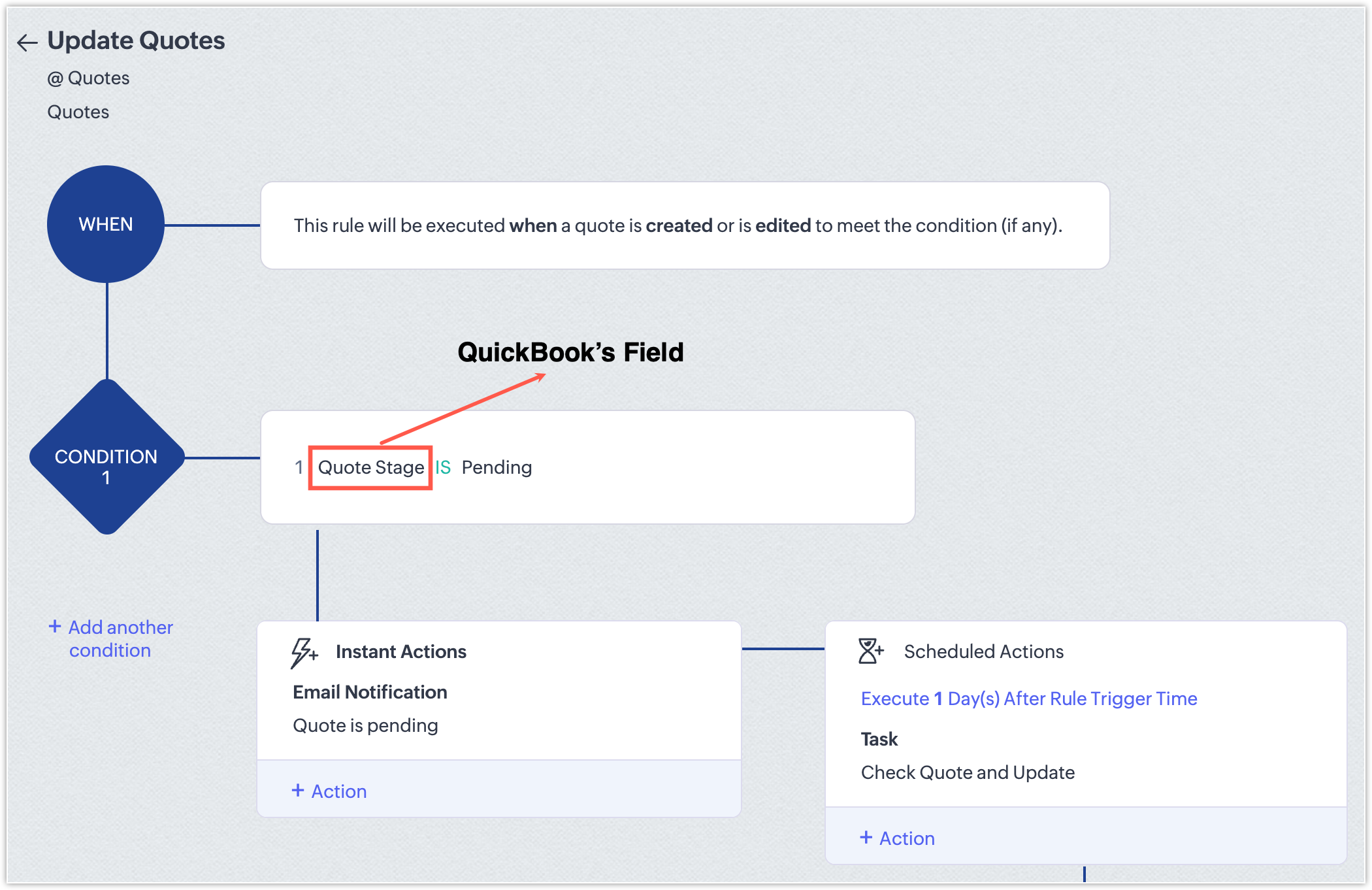
  • Generate reports that combine pipeline and billing information.

With this integration, CRM evolves beyond a simple pipeline tracker; it becomes a central hub for revenue operations that gives teams full visibility and control over sales and finance workflows.

NotesPoints to be noted
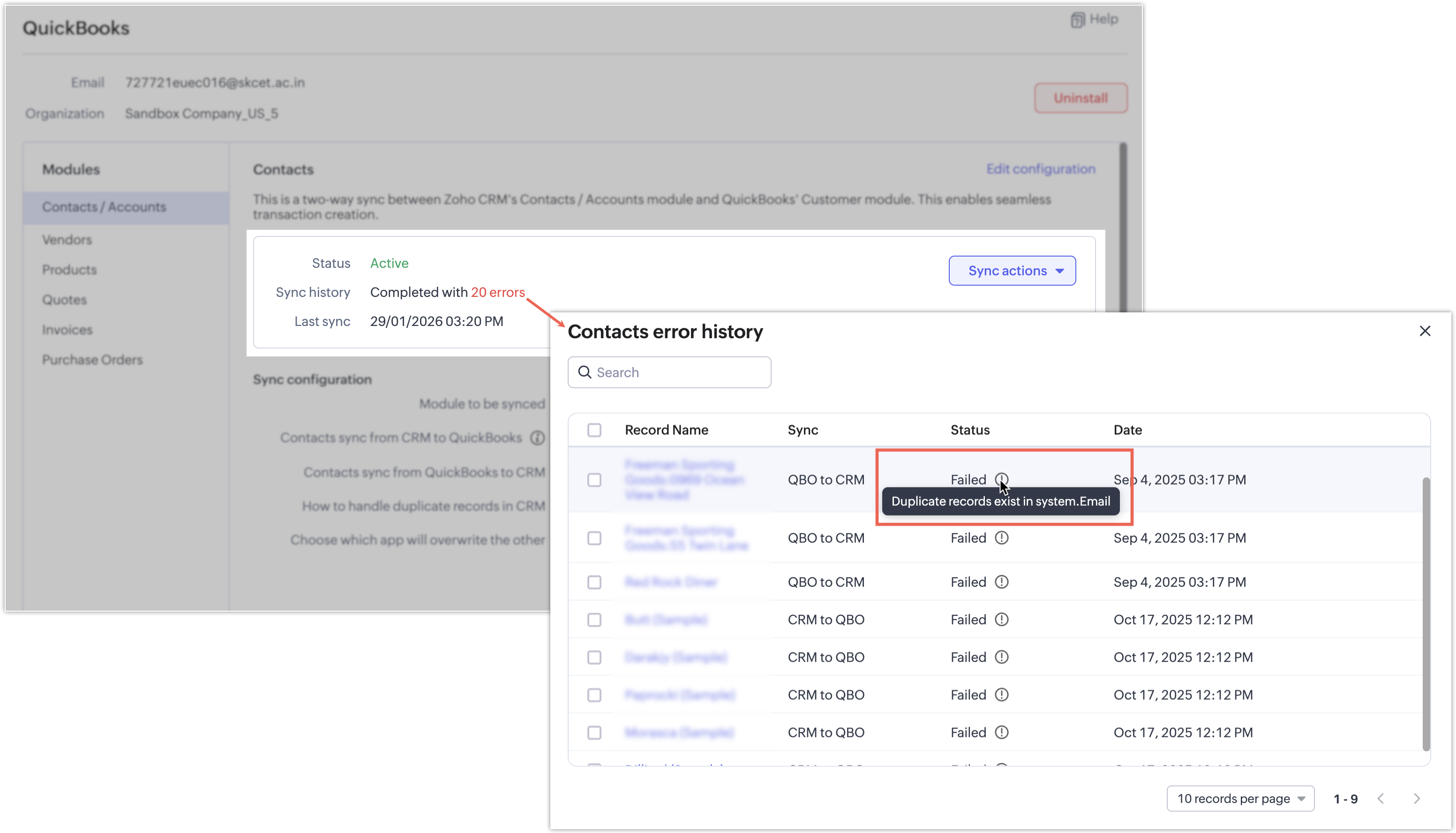
  • If a synchronization attempt fails, the record won't be synced and a clear error message will indicate the reason for the failure.
    Notes

InfoAvailability and pricing
  • Editions: Supported for Enterprise and above editions of Zoho CRM.

  • Pricing: The integration is currently available at no additional cost. Pricing may be introduced in the future.

That's all for this enhancement! We hope this integration helps you manage your sales and finance operations more efficiently. Please give it a try and share your feedback in the comments below.

Thanks and have a great day!

Nizamuddin

Alert
P.S: We're releasing this integration in a phased manner and it's currently available for users across the US, AU, CN, JP, and CA data centers.


    Nederlandse Hulpbronnen


      • Recent Topics

      • How can I add a Custom Field (or Customer_name) to a picklist?

        Our workflow is Shopify-->SO -->Picklist-->Package-->Shipment. We would like to have the Picklist template to include a custom field "Customer_Notes" (we have created this field already). This way we get alerted when a customer has notes on their account.
      • AI Calling

        Hi, does anyone have experience or any thoughts on AI Calling. Getting AI to make calls on behalf of your company. We are looking into it, but are finding it difficult to get info and providers that can assist.
      • Zoho Sheet as KB Document

        It would be nice if Zia Agents could take Zoho Sheets as part of the knowledge base. The use case here is that it's infinitely easier for humans to maintain a spreadsheet table than any .md / TAML / JSON document. For situations where humans are responsible
      • Ask the Experts: Five-hour live Q&A session with Zoho WorkDrive product experts

        Have questions about WorkDrive 5.0? Let’s talk! We recently launched Zoho WorkDrive 5.0, packed with powerful updates to help your team work smarter, stay secure, and get more value from your business content. From content-centric workflows and AI-powered
      • Automating CRM backup storage?

        Hi there, We've recently set up automatic backups for our Zoho CRM account. We were hoping that the backup functionality would not require any manual work on our end, but it seems that we are always required to download the backups ourselves, store them,
      • Zoho Community Digest - September 2026 | Part 3

        Hi everyone, and welcome back! Zoho CRM launches PRM for partner management, Bigin builds this year's Apple AI updates into the app, and Snapchat is now a connected channel in Zoho Social. There are also three notices worth reading, including WhatsApp
      • Change from OST to PST on Windows 10/11 Using Free Method

        There is an advantage in converting OST files to PST format if you need to access your Outlook data on a different computer, want to keep a local copy, or are trying to recover items from an old Outlook profile. The good point is that users of Windows
      • ERROR: This user is not allowed to add in Zoho. Please contact support-as@zohocorp.com for further details

        I can add new user for mail, i received message error about; This user is not allowed to add in Zoho. Please contact support-as@zohocorp.com for further details Try creating user name; instagram@eficaztecnologia.com.br
      • Support for Custom Fonts in Zoho Recruit Career Site and Candidate Portal

        Dear Zoho Recruit Team, I hope you're doing well. We would like to request the ability to use custom fonts in the Zoho Recruit Career Site and Candidate Portal. Currently only the default fonts (Roboto, Lato, and Montserrat) are available. While these
      • Ability to filter services and parts based on a field in the Work Order

        Hell FSM team, We have a customer with 2 value streams using Zoho FSM. Each value stream uses different products, at different price point. Currently, all of the products are accessible when creating a work order and modifying a service appointment, which
      • SubTotaks for Item Headers in Estimates

        Hi, Apparently, one can add Item Headers in Estimates in Zoho Books. Is this feature like an Estimate section with a SubTotals for each Item Header/Section? Or is the Item Header just a Title and cannot be SubTotalized? Thank You
      • Sync of products and orders between Zoho Inventory, Zoho Books and Shopify

        Good Day I migrated from QuickBooks to Zoho Books and Zoho Inventory at the beginning of this year. The migration team assisted with importing my data, but I am currently experiencing multiple issues affecting syncing between Shopify and Zoho. 1. SKU
      • Best practices for importing phone numbers

        I've recently found a problem with my phone provider, integrated with Zoho CRM, where a phone number that starts with 00 instead of + won't work. The problem has no solution: they tell me to replace all 00 with + I've always preferred using 00 instead
      • [Request] Pivot filter date option : from set date to relative value ie from 01Jan to LastMonth

        I don't think I can currently do this... but it's worth asking if it's possible. My use case is concerning annual leave which is calculated from the beginning of the calendar year (01Jan) then each month I want to have details of leave taken etc... In
      • Copy + Paste in Notes: Text color and text background are not retained

        I've recently started using Zoho Notebook as an Evernote replacement. When copying and pasting text within Zoho Notes, I notice that the formatting of the text (text color and background color) is not retained when pasting. Only the attributes "Bold"
      • Add Comprehensive Accessibility Features to Zoho Writer

        Hello Zoho Writer Team, We hope you are doing well. We would like to submit a feature request to enhance Zoho Writer with a full set of accessibility tools, similar to the accessibility options already available in the Zoho Desk agent interface. 🚧 Current
      • MAKING ENTRY TIME MORE USER FRIENDLY AND FASTER O PREVENT TAB TIME

        I AM CURIOUS TO KNOW IF WE CAN MAKE IT MORE USER FRIENDLY WHILE MAKING BILLS , I MAJORLY USE OVER DESKTOP SO I AM SUGGESTING TO REMOVE TAB TIME WHILE ENTERING BILL OR MAKING INVOICE DIRECT JUMP TO ONLY REGULAR PARTS OF THE BILL . YOURS RAKESH 782866
      • Email Forwarding to Zoho Desk Failing After Migration from Gmail to Outlook (Microsoft)

        We recently migrated from Gmail to Microsoft Outlook. Since the migration date, emails sent by our customers are no longer being received by Zoho Desk. I tried setting up the email forwarding rules in Outlook similar to what we had in Gmail, but it still
      • Shopify B2B Integration: Option to Match Customers by Company Name

        It would be great if the Shopify integration could include Company Name as a customer matching option. At the moment customers can only be matched by: Email Name Email and Name Phone For businesses using Shopify B2B, the company is often the customer
      • How does Zoho handle the daylight savings time change in Alberta?

        Alberta has just made the decision to get rid of daylight savings. This means that as of November 1, 2026 we remain on UTC-6 year-round. We have timing errors in meetings scheduled after that For example, we scheduled meetings in late November at 9:00
      • Free Methods to Convert PST to MBOX on Mac & Windows

        Converting PST files to MBOX is often needed when moving Outlook mailbox data to email clients such as Thunderbird, Apple Mail, or other MBOX-supported applications. The process can be different on Windows and macOS, and free methods may involve several
      • Zoho Payroll: Product Updates - Q3, FY2026

        Over the past quarter, Zoho Payroll has added several updates to make payroll easier to process, configure, and manage. The most notable improvements cover bank integrations, reimbursement support, payslip enhancements, employee exit documentation, payroll
      • Print checks for owner's draw

        Hi.  Can I use Zoho check printing for draws to Owner's Equity?  This may be a specific case of the missing Pay expenses via Check feature.  If it's not available, are there plans to add this feature?
      • Deliver exceptional customer experience with Field Service Management in Zoho Service Plus

        The advent of automation and personalization in the AI era has raised customer expectations exponentially for faster resolution of issues with less tolerance to friction in the process. Fast, accurate, and intelligent service that understands customer
      • Zoho Extensions 101: Building extensions for Zoho People

        Hello developers! Welcome to our new video series on building extensions for Zoho People! If you're new to extension development or looking for guidance on building extensions for Zoho People, you're in the right place. We've curated a series of videos
      • Build A Happier Workforce With Zoho People

        The success of an organization depends on its people. Therefore, a comprehensive and cloud-based HRMS software is an integral part of the IT ecosystem for the business. With a wide number of key modules to define the structure of an organization, manage
      • Record Payment - Auto Populate Amount as payments are selected

        When recording payments you have the option of clicking on "Pay in Full" next to the bill which automatically adds the total at the bottom of the page next to "Amount used for payments" but this should also auto populate / update the total at the top
      • How to import PST files in Office 365?

        You can import PST files into Office 365 using native Outlook applications, the Microsoft Purview network upload method, or specialized third-party migration tools. Choosing the right method depends on whether you are migrating a single mailbox or executing
      • Project Change Orders and Additions

        We are in the process of migrating from QuickBooks Online to Zoho Books. We have Zoho One and like the ability to sync all of our data across everything. And I like that projects work in a way that's less dumb than QuickBooks. I'm trying to figure out
      • Support Recording Payments in a Different Currency Than the Invoice Currency

        We would like to request the implementation of a feature that allows users to record customer payments in a currency different from the currency of the original invoice. Current Limitation in Zoho Books Currently, if an invoice is issued in USD, Zoho
      • Customer Statement Showing Incorrect Negative Balance Due to Unused Advance

        Dear Zoho Support Team, We are facing an issue with the Customer Statement in Zoho Invoice related to customer advances/mobilization advances. The issue is that when a customer has made an advance payment that has not yet been fully utilized against invoices,
      • My "trigger" panel disappear from my workflow ...

        Hello, I want to add a trigger to an email sequence, but the "trigger" panel has disappeared when I want to modify ...I used a predefined template to create this sequence, is that because of that? Thank you. I have attached a screenshot to you
      • 【10/15・残席わずか】Zoho Championに学ぶ!Zoho Campaigns メール配信の基礎・活用勉強会

        皆さま、こんにちは。ゾーホージャパンの中野です。 10月15日(木)、Zoho コミュニティ初となる「Zoho Campaigns メール配信の基礎・活用勉強会」をオンラインで開催します! 今回の登壇者は、Zoho の導入・活用支援に豊富な経験を持つZoho Champion の岡安 裕一さんです。 「一斉配信はできるけれど、現在の設定や運用が正しいか自信がない」 「Zoho CRMとZoho Campaignsのどちらから配信すればよいか分からない」 「リストとセグメントの違いや、配信停止の扱いを整理したい」
      • WorkDrive API: allow the modification time to be set when updating an existing file (x-last-modified-date is honoured on create, ignored on update)

        Hi, I contribute to the Zoho WorkDrive backend of rclone, the open-source sync/copy tool. I would like to raise one specific, narrow API gap that currently makes reliable syncing to WorkDrive impossible, and ask whether it can be addressed. What already
      • WhatsApp Coexistence

        Hello, please implement WhatsApp Coexistence, we need to track staff whatsapp chats on their PC and they need to be able to use WhatsApp on their mobile in around the office and warehouse, as we video call customers and send them product pictures. Thank
      • Kiosk / CRM Timezone Oddity

        I grant you this is much easier to see than to explain, and snapshots here won't help much and I don't want to snapshot my record anyway in a forum, so bear with me... Effectively... As there had been discussions on times coming through in different timezones
      • Restricted Account - "This user is not allowed to add in Zoho" - citbinvestment.com.

        Hi Zoho Support Team, I am attempting to set up user mailboxes for my domain citbinvestment.com, but I am receiving the following error: "This user is not allowed to add in Zoho. Please contact support-as@zohocorp.com for further details." > My MX, SPF,
      • 👍 Zoho CRM's Notes now gets Reactions and a new look

        Available in SA and JP DCs. Rolling out to other DCs in phases. Hello everyone, Notes help users capture important updates, collaborate with teammates, and maintain context for records. Now with Note Reactions, users can quickly acknowledge updates, express
      • Contact Sharing: Hide email alias from global address list

        As the superadmin, I would like to hide my domain aliases from appearing in the global address list. Currently, my end users can see all my aliases. The aliases also appear as type-in addresses when composing a new email. This is a potential security
      • Zoho Projects - Linking CRM Deals to Projects via API without sending customer contact email invitation to project portal

        We are using the Zoho CRM and Zoho Projects APIs to automatically create a project in Zoho Projects and then associate that project with the relevant Deal in Zoho CRM. The API process is working in that the project is created successfully and appears
      • Next Page