Quickly send emails and sync conversations with custom email addresses in CRM

Quickly send emails and sync conversations with custom email addresses in CRM

Editions: All editions
DCs: All DCs
Release plan:
This enhancement has been released for customers in all DCs except IN and US. We will be enabling it for IN and US DC customers soon.
[Update on 22 May 2024] This enhancement has been released for all customers in all DCs.

Help doc: Custom email fields preferences

Hello folks!

A quick update regarding custom email fields in CRM.

In many situations, multiple email addresses are used by a single person. For example, a customer may have multiple email addresses for various purposes, such as personal communication, online shopping, work-related correspondence, project discussions, financial transactions, and more. The reasons for having multiple email addresses can range from personal preferences to legal compliance. The CRM already supports custom email fields to help list multiple email addresses in a record (in addition to the primary and secondary email fields).

You now have the ability to easily send emails to and sync conversations with such custom email addresses within the CRM to ensure a comprehensive view of your email communications. Please note that this is not enabled by default.

In order to enable this support for custom email addresses, admins can:
  • Navigate to Setup > Channels > Email.
  • In the Email Configuration tab, select Custom Email Preference.
  • Enable Custom email fields preferences.


The following will be enabled based on the preference set by the CRM admin:
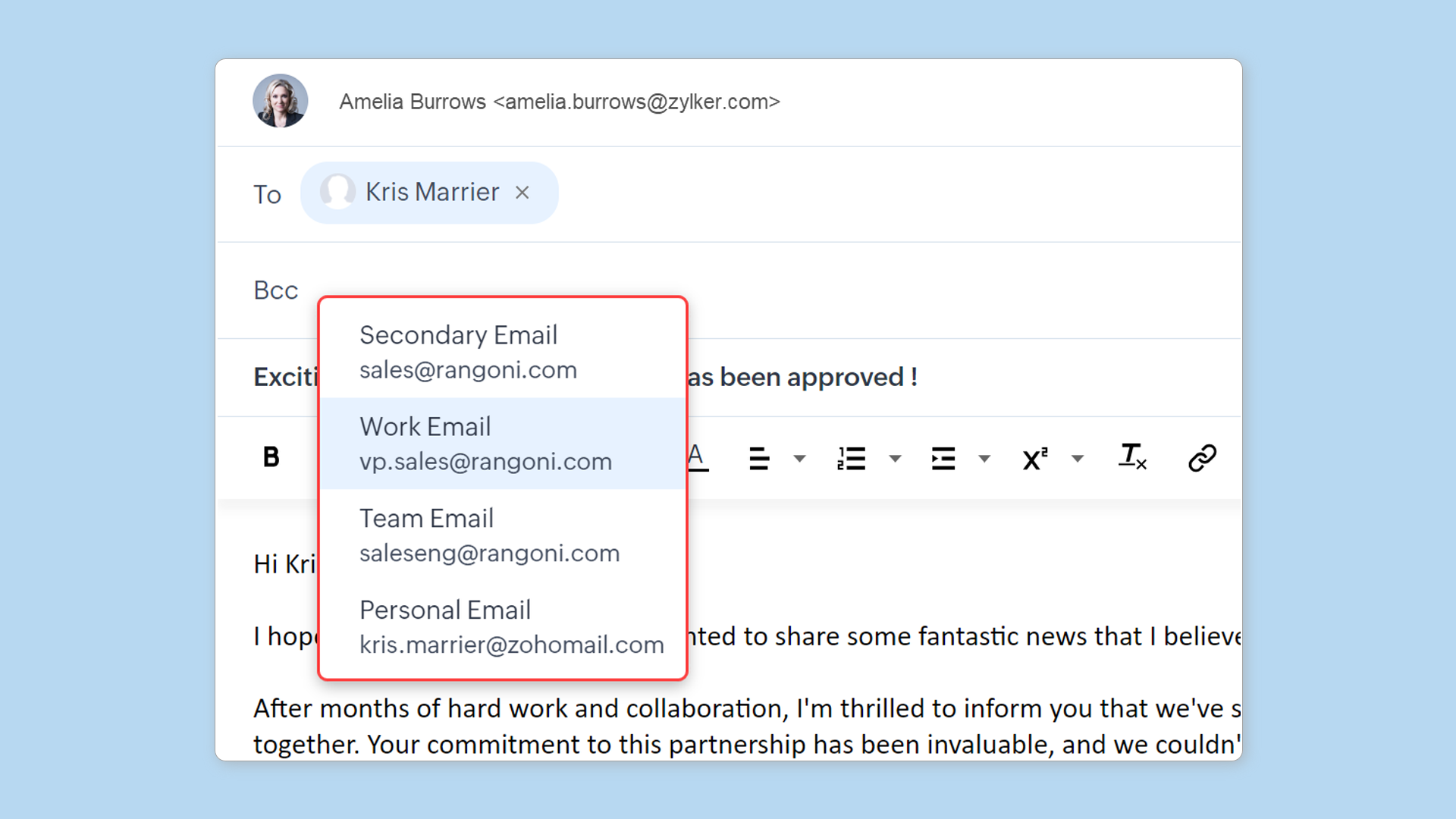
  • The addresses stored in custom email fields will be available as quick suggestions and autocomplete suggestions in the email composer.
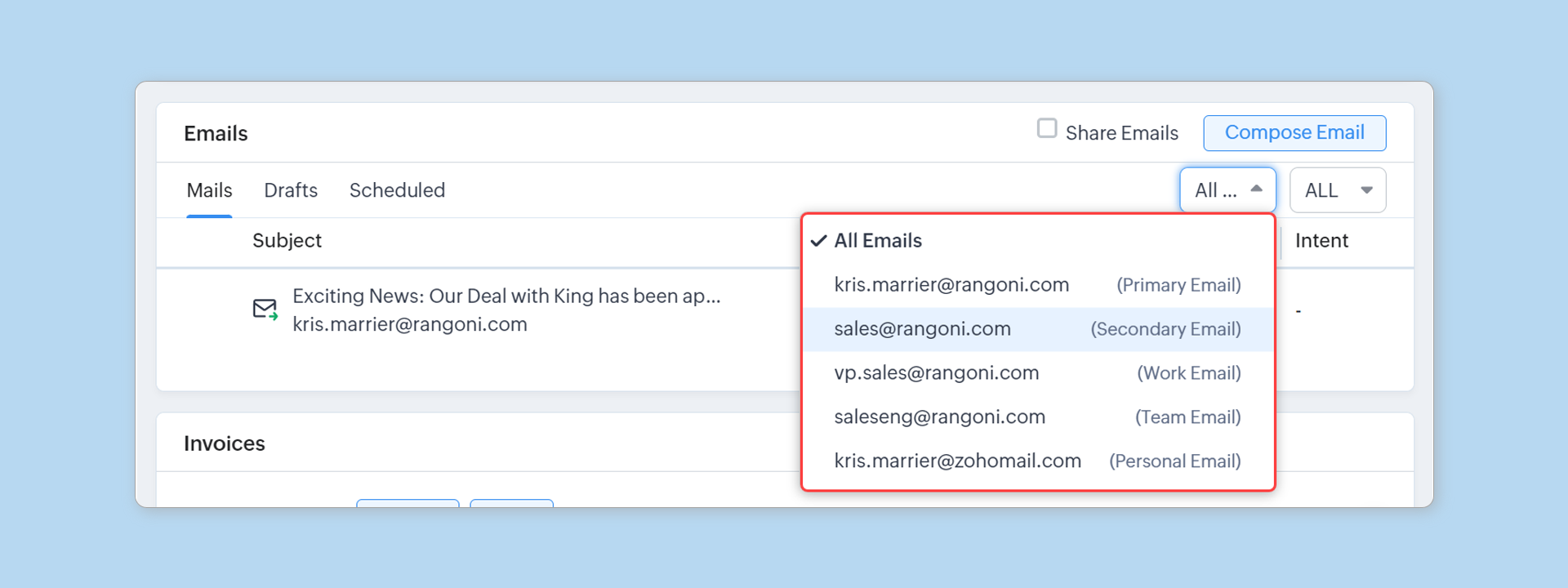
  • Emails sent and received from email addresses (stored in custom email fields) will be synchronized in the email related list. The filters have been improved to help you concentrate on the necessary conversations. If you wish to have an overview of all communication with a person, you can choose the All Emails view. This will display all email discussions linked to the primary, secondary, and custom email fields.
  • The Latest email status filter will consider conversations with custom email field addresses, along with primary and secondary email addresses, to display relevant records.
  • Email conversations with custom email field addresses will be included in reports.
Points to remember
  • Custom email field preference applies for Leads, Contacts, Vendors, and custom modules.
  • The All Emails view will be available only when the total number of filled-in email fields (including system-defined fields) is five or fewer.
  • If the total number exceeds five, you will be provided with an All emails - Sent from CRM view instead of the All Emails view.
  • The email sharing settings configured for the primary and secondary addresses will also apply for custom email addresses.
  • The custom email fields preferences can be enabled only when all the users in an organization are in the latest email configuration.
  • This is currently supported for IMAP and POP3 users only.
  • If any org has an active Gmail API integration, for now they cannot enable this preference. This will be supported in few months.
  • This feature is not available in mobile apps currently.

    Nederlandse Hulpbronnen


      • Recent Topics

      • Remove Powered by Zoho at the footer

        Hi, I've read two past tickets regarding this but it seems that the instructions given are outdated. I assume the layout keeps on changing, which makes it frustrating for me to search high and low. Please let me know how exactly do I do this now? Th
      • Client Script | Update - Client Script Support For Custom Buttons

        Hello everyone! We are excited to announce one of the most requested features - Client Script support for Custom Buttons. This enhancement lets you run custom logic on button actions, giving you greater flexibility and control over your user interactions.
      • Export all of our manuals from Zoho Learn in one go

        Hi, I know there's a way to export manuals in Zoho Learn, but I want to export everything in one go so it won't take so long. I can't see a way to do this, can I get some assistance or is this a feature in the pipeline? Thanks, Hannah
      • Automation#31: Automate Splitting Names for New Contact Records

        Hello Everyone, This week, we present to you a custom function, which allows you to split the first and last names from the user's email ID based on the separator used in the ID. Having grown into a large firm, Zylker Techfix aims to optimize its processes,
      • WhatsApp IM in Zoho Desk always routes to Admin instead of assigned agent

        Hello Zoho Experts, I connected WhatsApp IM to my Zoho Desk account. I only assigned my Customer Service (CS) agent to the WhatsApp channel, and I did NOT include Admin in this channel. However, every new WhatsApp conversation automatically gets assigned
      • Automatically remove commas

        Team, Please be consistent in Zoho Books. In Payments, you have commas here: But when we copy and paste the amount in the Payments Made field, it does not accept it because the default setting is no commas. Please have Zoho Books remove commas autom
      • Can not add m365 outlook account to zohomail.

        I am attempting to use zoho mail as an imap client to add my outlook.com m365 account. In the m365 exchange admin center i have made sure the imap is enabled. In zoho mail i go to settings, mail accounts, add account, add imap account, i select "outlook",
      • Email was sent out without our permission

        Hi there, One customer just reached out to us about this email that we were not aware was being sent to our customers. Can you please check on your end?
      • local file csv import problem

        The issue occurs when I upload a CSV file via Databridge. In the preview, everything looks correct — the values are in the proper columns. However, after clicking Import, the first column becomes empty, and the values from that column appear in a new
      • Error AS101 when adding new email alias

        Hi, I am trying to add apple@(mydomain).com The error AS101 is shown while I try to add the alias.
      • Transfer ownership of files and folders in My Folders

        People work together as a team to achieve organizational goals and objectives. In an organization, there may be situations when someone leaves unexpectedly or is no longer available. This can put their team in a difficult position, especially if there
      • ZOHO Desk - Description of slave ticket disappeared after Merge

        Dear Support, On Zoho Desk the description of a ticket disappeared after merging two ticket. The one which was the slave one completely disappeared. The problem that in this description there was an image which i had only on Desk in that ticket. Could
      • How do I insert a cross-reference link to a different section within one Knowledge Base article using Zoho Desk?

        I would like to insert a link within a Knowledge Base article to a different section of that same article. The section I want to link to is formatted with the Heading 3 style and is displayed within my TOC. However, I do not see any way to add a link
      • Problem Adding Facebook Account

        Hi, I'm new here, I'm having trouble setting up my Facebook account as a social channel. I think the issue is down to how my Facebook is set up, which is pretty confusing. I have a personal Facebook account (let’s called it A) which is my main Facebook
      • Zoho Desk Teams App is not loading

        Hi Zoho Desk support. Need an assistance on the Zoho Desk Teams app. Once I click View Ticket, it isn't showing anything. Kindly refer to attached: ZohoDesk Teams App_View Ticket Error.jpg For our Dashboard, we are still experiencing the same issue. Kindly
      • About Meetings (Events module)

        I was working on an automation to cancel appointments in zoho flow , and in our case, we're using the Meetings module (which is called Events in API terms). But while working with it, I'm wondering what information I can display in the image where the
      • Add Ticket button in Home view

        When I go to the My Tickets or the Knowledge Base view in our Help Centre, the Add Ticket button is available, but not in the Home view. I would really like for it to be displayed in the Home view as well. Is this possible? Thanks.
      • Zoho CRM for Everyone's NextGen UI Gets an Upgrade

        Hello Everyone We've made improvements to Zoho CRM for Everyone's Nextgen UI. These changes are the result of valuable feedback from you where we’ve focused on improving usability, providing wider screen space, and making navigation smoother so everything
      • Cliq iOS can't see shared screen

        Hello, I had this morning a video call with a colleague. She is using Cliq Desktop MacOS and wanted to share her screen with me. I'm on iPad. I noticed, while she shared her screen, I could only see her video, but not the shared screen... Does Cliq iOS is able to display shared screen, or is it somewhere else to be found ? Regards
      • Zoho People - Retrieve the Leave Details - get("LeaveCount")

        Hi, Zoho People I need to collect all of an employee's leave requests for the calendar year and check how many half-days they have taken. If I run the script on the query he just modified, I can retrieve the information related to that query and use the
      • Contact data removes Account data when creating a quote

        Hi, Our customer has address fields in their quote layout which should be the address of the Account. They prefill the information, adding the account name - the address data is populated as per what is in the account - great. However when they then add
      • Mapping a new Ticket in Zoho Desk to an Account or Deal in Zoho CRM manually

        Is there any way for me to map an existing ticket in Zoho desk to an account or Deal within Zoho CRM? Sometimes people use different email to put in a ticket than the one that we have in the CRM, but it's still the same person. We would like to be able
      • I need to know the IP address of ZOHO CRM.

        The link below is the IP address for Analytics, do you have CRM's? IP address for Analytics I would like to know the IP address of ZOHO CRM to allow communication as the API server I am developing is also run from CRM.
      • Which WhatsApp API works seamlessly with Zoho CRM?

        I’m exploring WhatsApp API solutions that integrate seamlessly with Zoho CRM for customer communication, lead nurturing, and automation. I would love to hear insights from those who have successfully implemented WhatsApp within Zoho CRM. My Requirements:
      • Allow people to sign a zoho form by using esign or scanned signature

        Allow people to sign a zoho form by using esign or scanned signature
      • Button to Reapply Filters on Sheet(s)

        I wrote a macro that I attached to a button to reapply the filters on all my sheets and it says it works, but it doesn't actually do anything. What is wrong with it? Is there another way? Or even make it work for one sheet? Sub UniversalFilterRefresh()
      • Outlook - Zoho CRM Calendar Integration

        I'm facing an issue integrating Outlook with Zoho CRM. Has anyone successfully connected their Outlook to Zoho, and are all your meetings and emails being captured correctly in the CRM? Any insights or troubleshooting tips would be appreciated
      • Zoho OAuth Connector Deprecation and Its Impact on Zoho Desk

        Hello everyone, Zoho believes in continuously refining its integrations to uphold the highest standards of security, reliability, and compliance. As part of this ongoing improvement, the Zoho OAuth default connector will be deprecated for all Zoho services
      • How to drag row(s) or column(s)?

        Hi. Selecting a row or column and then dragging it to a new position does not seem to work. Am i missing something or this is just not possible in Zoho Sheet? Cheers, Jay
      • Flexible Partial-Use Coupons (Stored Value Credits)

        Subject: Feature Request: Ability for users to apply partial coupon balances per transaction Problem Statement Currently, our coupons are "one-and-done." If a user has a $50 coupon but only spends $30, they either lose the remaining $20 or are forced
      • Unable to Assign Multiple Categories to a Single Product in Zoho Commerce

        Hello Zoho Commerce Support Team, I am facing an issue while assigning categories to products in Zoho Commerce. I want to assign multiple categories to a single product, but in the Item edit page, the Category field allows selecting only one category
      • How do I add todays date to merge field

        I don't see any selection of todays date when creating a letter. Surely the date option of printing is standard? John
      • Polish signer experience to compete with docusign

        I would like to suggest that someone spend the little bit of time to polish the signer experience, and the email templates to more of a modern professional feel. They are currently very early 2000s and with some simple changes could vastly improve the
      • Add RTL and Hebrew Support for Candidate Portal (and Other Zoho Recruit Portals)

        Dear Zoho Recruit Team, I hope you're doing well. We would like to request the ability to set the Candidate Portal to be Right-to-Left (RTL) and in Hebrew, similar to the existing functionality for the Career Site. Currently, when we set the Career Site
      • Uplifted homepage experience

        Hello everyone, Creating your homepage is now much easier, more visual, and more impactful. Until now, your homepage allowed you to display custom views, widgets, analytic components, and Kiosk. With the following improvements, the homepage is now a smarter,
      • Add an background image to an email template in CRM

        Hi all, We wants to put an background image behind all our email templates. Is there a way to import this thru html. If i put the option background image in <body style="background-image:...</body> and i look to the preview it shows our background, but
      • Tracking Emails sent through Outlook

        All of our sales team have their Outlook 365 accounts setup with IMAP integration. We're trying to track their email activity that occurs outside the CRM. I can see the email exchanges between the sales people and the clients in the contact module. But
      • Whats that

        Price?
      • Crossbeam

        Does anyone use Crossbeam with their Zoho CRM? I'm looking for a way to import Crossbeam partner leads into Zoho CRM. If so: - What's your experience been like? - Are you able to automatically import Crossbeam leads > Zoho CRM? How? - What doesn't work
      • The same Contact associated to multiple Companies - Deals

        Hi, I would like to know if there is an option to associate the same contact with multiple companies (two or more) deals, using the same contact details for all. This is because we have contacts who are linked to different companies or branches of the
      • Next Page