Building extensions #1: Creating and testing extensions for Zoho Finance Suite applications
Hello developers!
We're excited to announce a new series called "Building extensions" to assist developers in creating efficient extensions for Zoho Finance Suite products. We'll support and guide you through the process of creating an extension and using the features offered in the developer portal.
What are extensions?
Extensions are installable plugins or add-ons that help enhance the existing functionality of your Zoho product or seamlessly integrate and interact with third-party applications for data transmission.
How can you build extensions?
Zoho offers a developer platform called Zoho Developer that allows you to build different types of applications. Sigma is a platform offered within Zoho Developer that is specifically designed for creating extensions for various Zoho products. Throughout this series, we'll look at how to create and develop extensions for the Zoho Finance Suite applications using Sigma.
Get to know all about extensions and building them further in detail.
Sigma extension support
The Zoho Finance Suite consists of seven applications: Zoho Books, Zoho Inventory, Zoho Expense, Zoho Invoice, Zoho Billing, Zoho Checkout, and Zoho Payroll. Currently, the Sigma platform supports creating and building extensions for these five Zoho Finance applications:
- Zoho Books
- Zoho Inventory
- Zoho Expense
- Zoho Invoice
- Zoho Billing
Creating an extension
- Log in or sign up at developer.zoho.com.
- Go to Sigma and access your workspace.
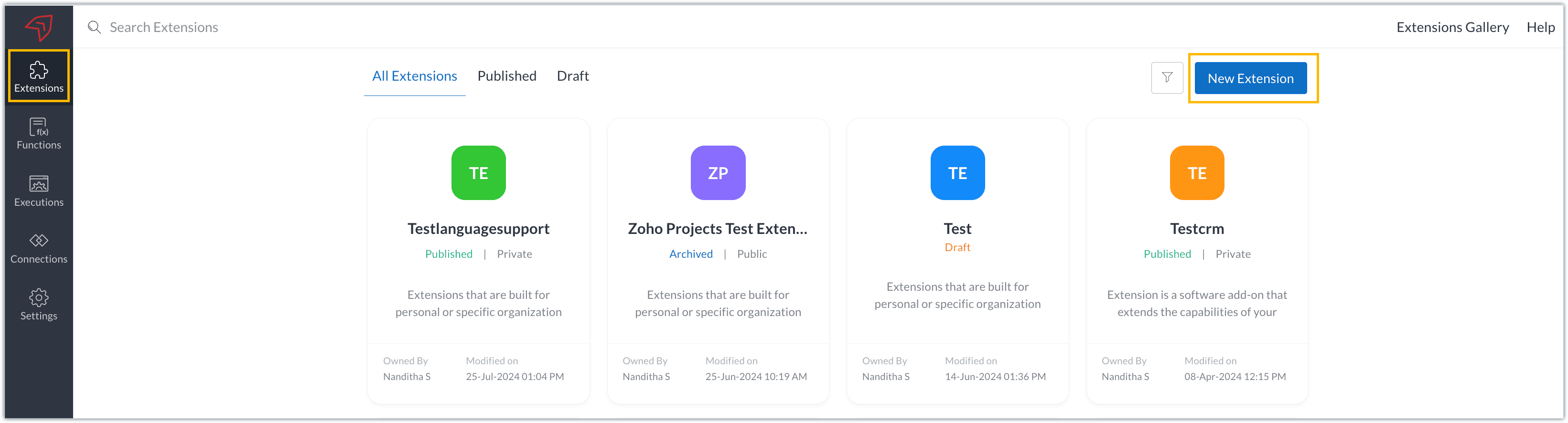
- Once you enter your workspace, you'll be taken to the Extensions section in Sigma.
- Click the New Extension button to start building an extension.
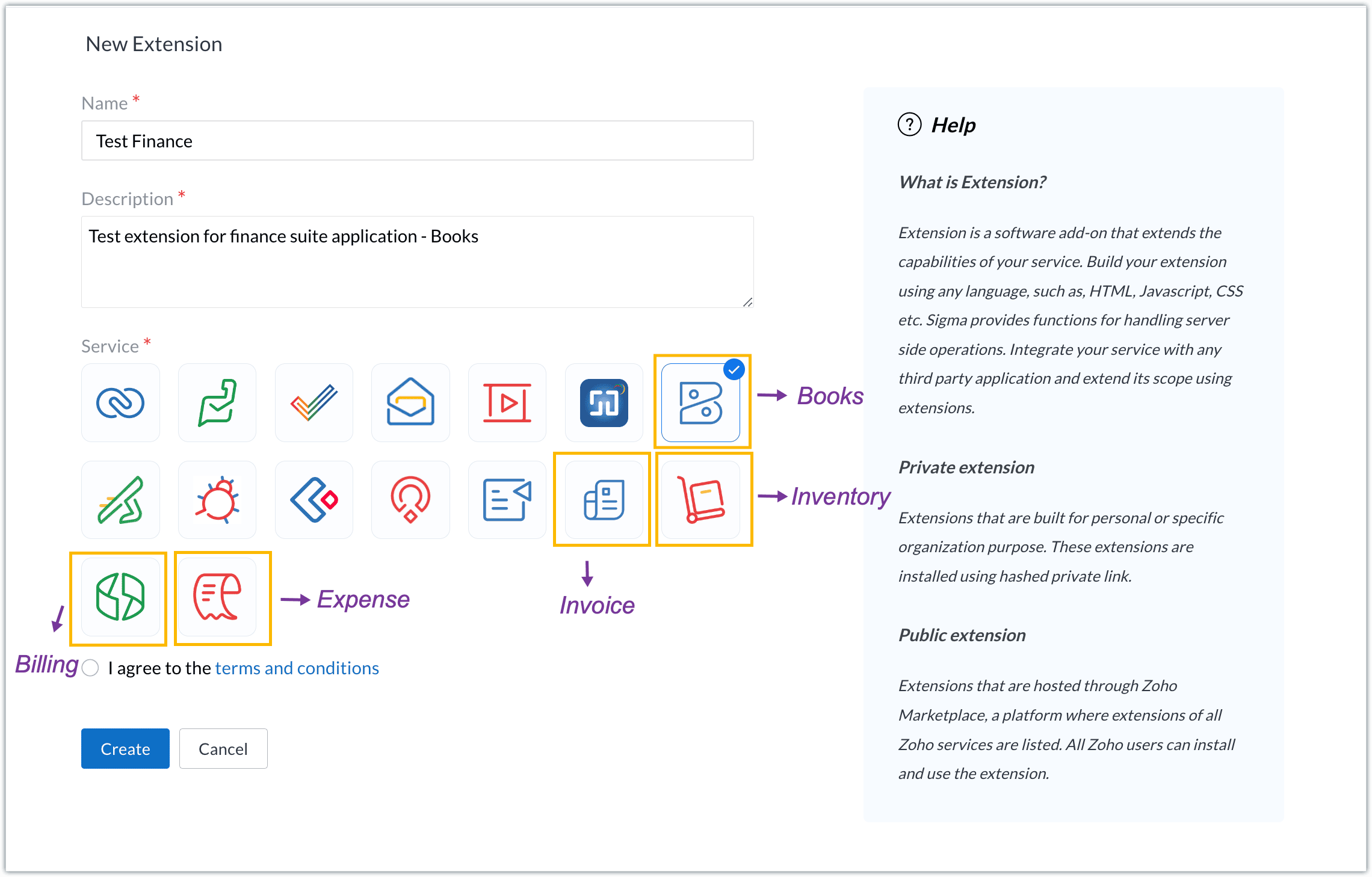
- Enter a name and description for the extension and choose the service you want to build the extension for. As mentioned earlier, Sigma offers support for Zoho Books, Zoho Invoice, Zoho Inventory, Zoho Billing, and Zoho Expense.
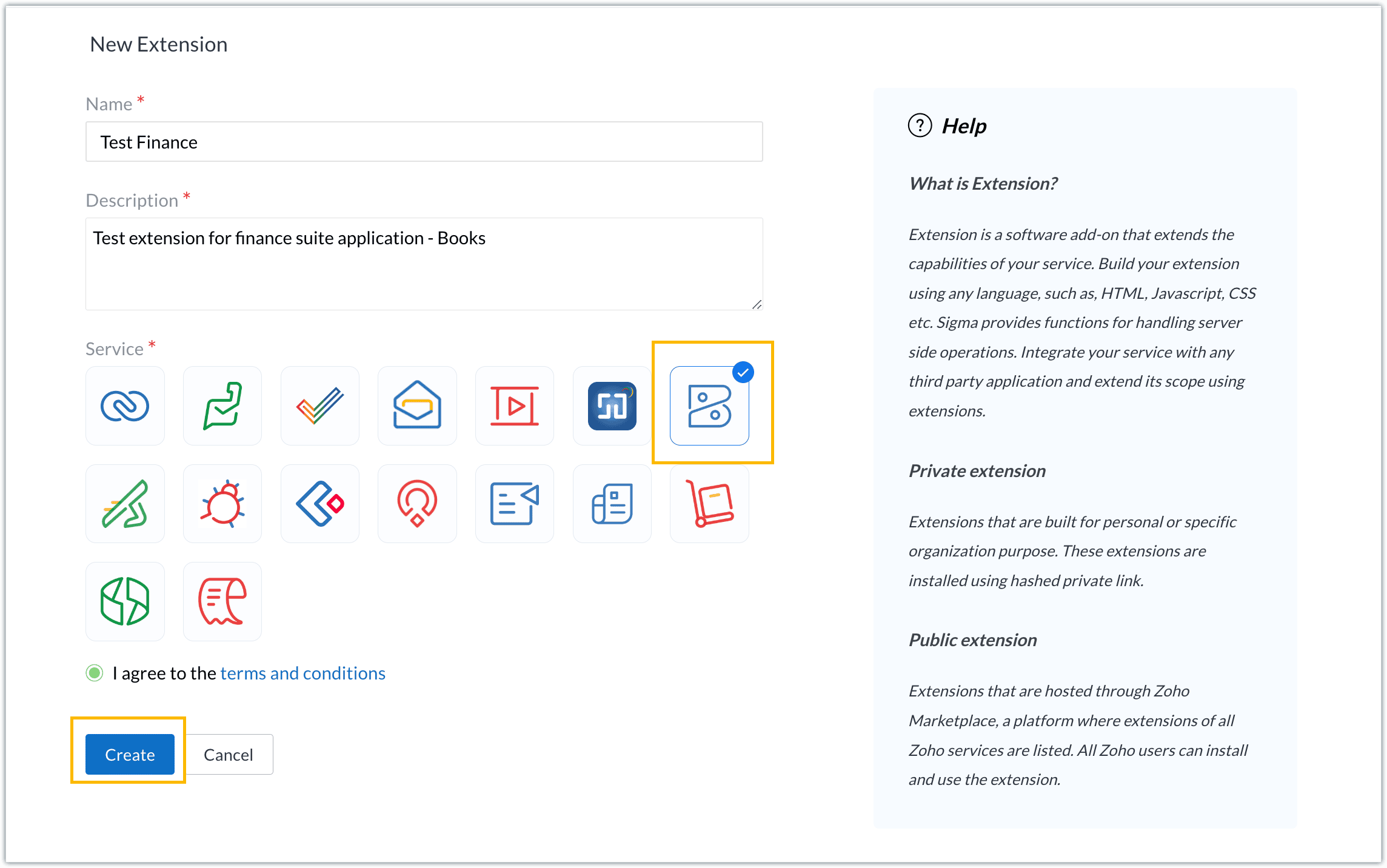
- For our demo, let's choose the service as Zoho Books. Accept the terms and conditions, and then click Create.
- The extension is successfully created. You can click the Extension Details icon to see an overview of the extension.
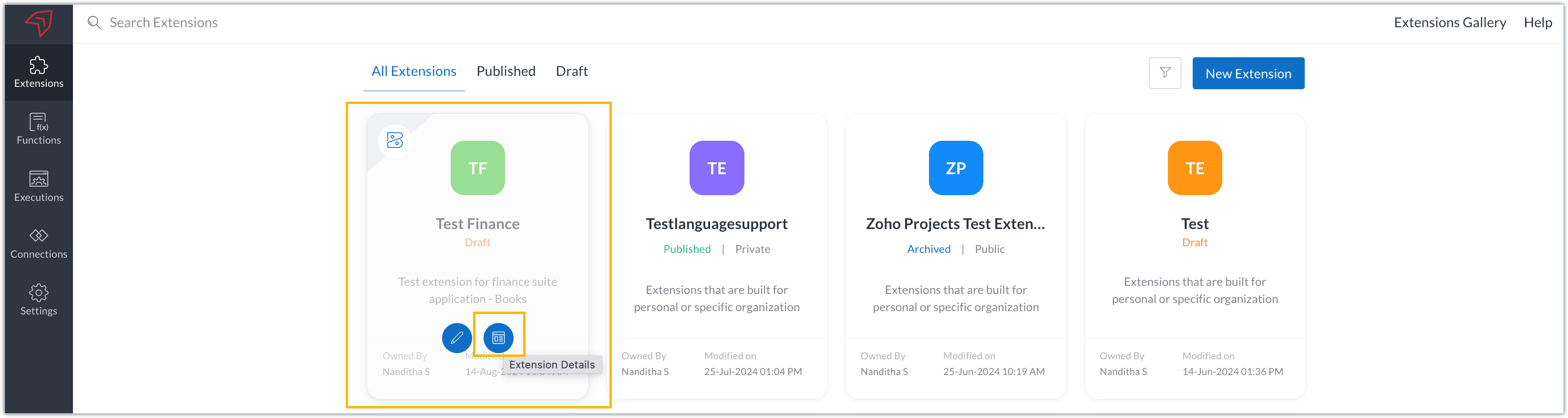
The extension details page shows the general details of the extension, such as creation date, creation time, and version, and allows you to associate developers with the extension.
- Click the Edit Extension icon to start developing the extension.
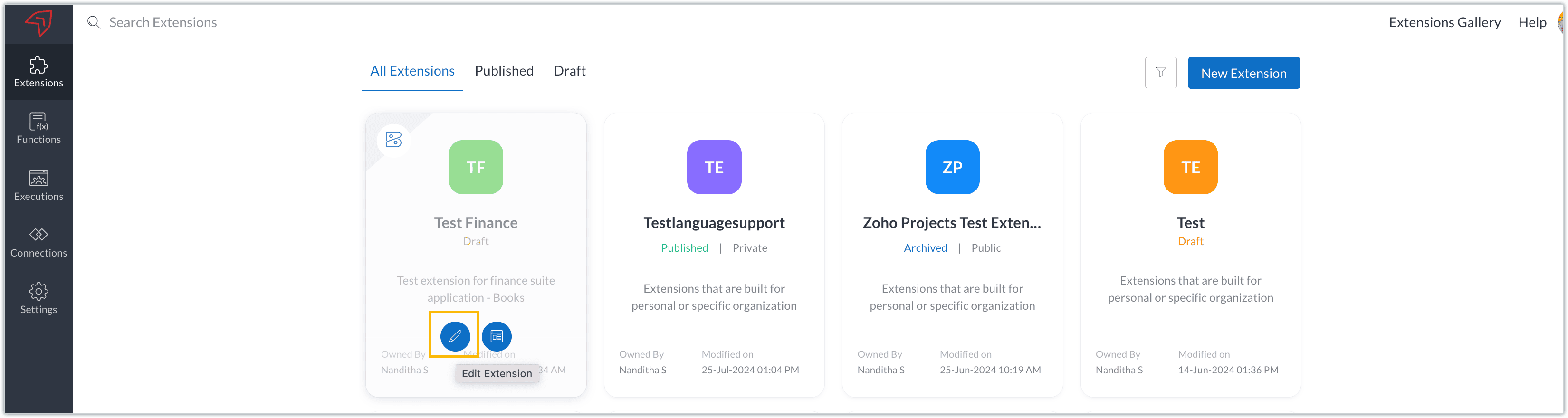
- The Zoho Books Developer Portal opens with the options and native features available to customize, curate, and develop your extension.
Zoho Books Developer Portal sections
The developer portal has four different sections to help customize and build your extension.
Learn: This section lists the native Zoho Books capabilities that can be used to create and develop extensions. Clicking the Set up Now button next to each feature will take you to the feature's development setup page.

Build: This is the development setup section, which includes customization, automation, and components like connections, widgets, schedules, webhooks, and signals. You can customize your extension preferences, establish connections to integrate with other applications, and design custom interfaces to enhance user experience.

Configure: This section assists with handling your extension's required configurations, whether they are generic settings or customizations required from the user. You can add global fields, which can be incorporated as either variables that store static data or through custom widgets that retrieve user inputs. You can also define functionalities that happen during installation and uninstallation.

Publish: Once the extension has been built and configured, you can use this section to publish it for either private or public use. In both cases, the Zoho Books team will review the extension; for public extensions listed on Zoho Marketplace, the Zoho Marketplace approval team will also review them. You can share your privately published extension with other users using the Shared List option.

We will explore more about each of these sections and their features in upcoming posts.
Testing an extension
The Zoho Books Developer Portal offers a dedicated testing environment for each extension, allowing you to test and validate it before publishing.
As a developer, you can use the Test Your Extension option in the top right corner of the portal to access your extension's sandbox environment.

This will redirect you to the sandbox testing environment for the extension you're developing, which is similar to Zoho Books and contains relevant modules to test with.

You can populate necessary data and test your extension functionality. Once everything is validated, you can go ahead and publish your extension for private or public use.
For support or questions related to Zoho Finance Suite extension development, you can email developer@zohofinance.com.
We hope you found this guide useful. Keep following this space for more information!
Topic Participants
Nanditha Somasundaram Somasundaram
Sticky Posts
Building extensions #5: Creating custom connections for extensions
In our previous post, we discussed the significance of connections, identified their types, developed a predefined connection, and demonstrated how it can be integrated with Zoho Books using an example. In this post, we'll walk through the process ofBuilding extensions #4: Integrating Zoho Books with applications using connections
In our last post, we looked at an overview of the key features available for creating a Zoho Books extension, including connections. In this post, we'll go over connections in depth, including their types and applications. What are connections? "Connections"Building extensions #3: Fundamental features of a Zoho Books extension
In our earlier posts, we covered how to create, test, and publish an extension for Zoho Finance suite applications. Moving forward, we'll look specifically at instances relating to one of the products from the Zoho Finance suite: Zoho Books. In this post,Building extensions #2: Publishing an extension
Hello developers, Welcome to our next post about building extensions for Zoho Finance Suite applications. In our previous post, we looked at extensions, their purpose, and how to create and test them. To recap, extensions are installable plugins or add-onsBuilding extensions #1: Creating and testing extensions for Zoho Finance Suite applications
Hello developers! We're excited to announce a new series called "Building extensions" to assist developers in creating efficient extensions for Zoho Finance Suite products. We'll support and guide you through the process of creating an extension and using
Nederlandse Hulpbronnen

Recent Topics
Zoho Recruit Community Meet-up - India (Venues Finalised)
Zoho Recruit Community Meet-up - India (Venues Finalised) Namaste, India. 🙏🏼 The Zoho Recruit team is hitting the road—and we're absolutely excited behind the scenes. Join us for the Zoho Recruit India Meet-up 2026, a morning designed to make your recruiting[Webinar] Solving business challenges: Secure, real-time, and external collaboration
Hi Zoho Writer users, We are excited to announce Zoho Writer's webinar for March 2026: Solving business challenges: Secure, real-time, and external collaboration. Zoho Writer supports real-time collaboration by allowing teams to work together in documents.Table dimensions
I try changing the dimensions of the table on my computer but it doesn't change. Do I have to be a premium member or does it only work on the app?Zoho CRM Community Digest - January 2026 | Part 2
Hello Everyone! Here’s the second part of January’s Zoho CRM Community Digest, rounding up the remaining highlights from the month. From newly rolled out updates to thoughtful implementation questions and practical solutions, the community once againFind and Merge Duplicates to trigger webhook
My sales team uses the Find and Merge Duplicates feature often to cleanup records in the CRM. We use webhooks to signal to our internal tools database when new Contacts are created, updated, or deleted, in order to keep our DB in sync with Zoho CRM. However,Introducing WhatsApp integration and quick editing capabilities in Zoho Sign
Hi there, Zoho Sign already helps users collect signatures via email and SMS, and we're happy to announce that you can now send documents and authenticate recipients right through WhatsApp. Some of the key benefits include: Communication with recipientsDynamic Field Folders in OneDrive
Hi, With the 2 options today we have either a Dynamic Parent Folder and lots of attachments all in that one folder with only the ability to set the file name (Which is also not incremented so if I upload 5 photos to one field they are all named the sameLogging Out of FSM
I have tried to log out of FSM app of the last person and it will not let me do so. I need to log in to my account.Enhancement in Zoho CRM: Control who gets to participate in a forecast by customizing the user hierarchy
Include only users from the sales function; exclude the rest Dear Customers, We hope you're well! We started this year with a series of exciting enhancements to Zoho CRM and to this list, we are thrilled to add an enhancement to forecasting. Let's talkMultiple Zoho One accounts
Hello. I'm searching for a solution to run multiple organizations under 1 Zoho One account or have a different Zoho One account for each organization and still be able to easily login to each. Currently Zoho One doesn't allow the same email address toTips and tricks #63: Hold and Drag to select elements in the Show app for iOS
Hello everyone! Welcome to another tips and tricks article. In today's article, we will learn about the Hold and Drag function in the Show app for iOS. The Hold and Drag option lets you select multiple elements on a slide quickly. Once they are selected,Organize and manage PDFs with Zoho PDF Editor's dashboard
Hello users, Zoho PDF Editor's dashboard is a one-stop place to upload, sort, share PDF files, and more. This article will explore the various capabilities that Zoho PDF Editor's dashboard offers. A few highlights of Zoho PDF Editor's dashboard: UploadPossible to generate/download Quote PDF using REST API?
See title. Is there any way after a quote has been created to export to a PDF using a specified template and then download it? Seems like something that should be doable. Is this not supported in the API v2.0?Free Webinar - AI for email: Helpful or Hype?
Hello, Zoho Mail community! 👋 We're kicking things off with a webinar you won't want to miss—and yes, we're going there: Is AI in email actually useful, or is it all hype? In this session, two of our experts will have an open, no-fluff conversation aboutBalancing access, security, and productivity with Email Policy
An organization typically includes multiple user groups, such as leadership, sales, and support, each with different email usage patterns and security needs. Administrators must balance flexibility and control, thereby ensuring email usage aligns withIs it possible to update multiple work items at once?
Hi, Is it possible to update the statuses/release tags of multiple work items at once? I came across this thread that says it's not possible at the moment, but it was related to the Sprints mobile app. Does this feature not exist in the website as well?See Every IM Conversation as It Happens
Instant messaging moves fast. Customers expect quick replies and smooth conversations across WhatsApp, Instagram, Facebook, and live chat. But without real-time visibility, small issues become big problems. A session stays open longer than expected. ARelease Notes | January 2026
We have rolled out a set of powerful new enhancements across Zoho Vertical Studio that bring several long-awaited capabilities to your applications. These updates focus on deeper customization, smarter automation, better reporting, and improved usabilityProduct Request: Send email to Secondary email
Guys, we should be able to send the campaign to the secondary email too. Is this on the plans for Zoho Campaign? It looks like I can map the secondary email from the CRM to the Campaigs, but can not send the message.Franchise
Is there a solution of how to organize global franchise organisations?Holidays
Hi; For defining Holidays, you need to add logic to handle the year as well as the month & day. We need to be able to enter Holidays for the next year. I need to add a holiday for January 2, 2017, but I can't until January 1st, which is a Sunday and weComposite Product (kit) - Dynamic Pricing
I am setting up Composite Products for item kits that I sell. I also sell the items from the kit individually. Problem is when pricing changes on an individual part, the Composite Product price does not change meaning when the cost of item # 2 in theUrgent: Slow Loading Issue on Zoho Commerce Website
Dear Zoho Support Team, I am experiencing slow loading times on my Zoho Commerce website, which is affecting its performance and user experience. The issue persists across different devices and networks. Could you please investigate this matter and provideNeed help with importing expenses
I'm using the template downloaded from the application. When I try to import my expenses, I get the message: Duplicate entry in the Expense Date column. Ensure it contains unique values. None of the rows will import. There are duplicate dates, but theySearch not working!
I have items in my notebook tagged but when I search for a tag nothing comes up! Any fix for this?ERROR CODE :550 - 550 5.1.1 Invalid email recipients
This message was created automatically by mail delivery software. A message that you sent could not be delivered to one or more of its recipients. This is a permanent error. mustafa.ashraf@techlink-eg.net, ERROR CODE :550 - 550 5.1.1 Invalid email recipientsWhat's New in Zoho POS - February 2026
Hello everyone, Welcome to Zoho POS’s monthly updates, where we share our latest feature updates, enhancements, events, and more. Let’s take a look at how February went. Purchase and sell items on different units We have introduced a unit conversion functionalityCan i integrate bigin with google voice?
I make all my calling through google voice to seprate my personal line from business. I want to log my calls with customers automatically but i domt see anywhere where i can do that. Any help? Im pretty sure i wont be able to. SadPOP/SMTP access authentication failed
I am unable to log setup outlook for my zoho mail account. I am using these settings poppro.zoho.com port 995 SSL smtp.zoho.com port 587(tls)/465(ssl) username/password works on mail.zoho.com but not with POP access. Can you help?Our Review Of Zoho CRM after 60 Days
The purpose of this is to just share with Zoho why I love their product, but ultimately why I could not choose Zoho CRM for our next CRM. About two months ago we begun a CRM exploration process for our financial planning firm, based in Texas. We alreadyThis domain is not allowed to add. Please contact support-as@zohocorp.com for further details
I am trying to setup the free version of Zoho Mail. When I tried to add my domain, theselfreunion.com I got the error message that is the subject of this Topic. I've read your other community forum topics, and this is NOT a free domain. So what is theAllow Admin to Configure Report > More Options Button
As an Admin, I want to configure the options of the Report > More Options button to improve UX and reduce Developer overhead. See attached screenshot. Original question posted here: https://help.zoho.com/portal/en/community/topic/modify-standard-repGenerate a link for Zoho Sign we can copy and use in a separate email
Please consider adding functionality that would all a user to copy a reminder link so that we can include it in a personalized email instead of sending a Zoho reminder. Or, allow us to customize the reminder email. Use Case: We have clients we need toYou cannot send this campaign as there is no contact in the selected mailing list.
We have synced contact lists and sent campaigns just fine prior to today. Now no matter what list I upload when I go to send the campaign it gives an error "You cannot send this campaign as there is no contact in the selected mailing list." And now itPivot Report Formula - using a today() variable
Is it possible for me to use a value of today() in a formula on a pivot table? I'm trying to identify where the end date of a project is greater than the current date if("10. Projects (Zoho Projects).End Date" > today(), 'Yes', 'No') I get the error thatCannot connect IMAP to outlook
Hello I have followed the instructions to connect my zoho account to Outlook IMAP but get this message: Session Id: bba118fb-151c-824f-9512-3ad1e91b109d Timestamp: 1708976566964 Error code: INVALIDCREDENTIALS INTERACTIONREQUIRED I'm using the exact configerationDepartment Overview by Modified Time
We are trying to create visuals to show the work our agents do in Zoho Desk. Using Zoho Analytics how can we create a Department Overview per modified time and not ticket created time? In order for us to get an accurate view of the work our agents areEnhance Sign CRM integration
Hello all, I'm working on a custom Deluge script to enhance the integration between Zoho CRM and Sign by using a writer merge template for additional flexibility. I want to replicate the post-sign document integration that exists between CRM and SignZoho Workdrive download was block by security software
Hi Team, Recently workdrive download was blocked by huorong security. Could you please advise how to put zoho workdrive as white list? every time we put "*.zohoexternal.com" or "workdrive.zohoexternal.com", the warning msg will still pop in next dowChoosing a portal option and the "Unified customer portal"?
I am trialling Zoho to replace various existing systems, one of which is a customer portal. Our portal allows clients to add and edit bookings, complete forms, manage their subscriptions and edit some CRM info. I am trying to understand how I might bestNext Page