Tip #10: Various time zone settings on the bookings page
Tip #10: Various time zone settings on the bookings page

Managing appointments across different time zones has become an integral part of our daily lives. Whether you're arranging a global business meeting or expanding your consultations to other countries, the ability to adapt to various time zones is crucial.


Let's assume you are an IT consultant who works with clients in multiple countries. To schedule appointments and avoid any time-zone related complications, your booking platform should provide automatic time zone conversion. Additionally, your clients should have the option to select their preferred time zones for appointments. This feature can greatly benefit consultants who frequently travel or meet clients and experience varying time zones on different days.


Likewise, a yoga studio can effortlessly arrange online sessions for its global clients, regardless of their time zones.


Time zone settings in Zoho Bookings

Zoho Bookings offers a range of time zone settings, simplifying the appointment scheduling process regardless of service provider and customer location.

Benefits

  • Minimized errors: Automatic time zone conversion reduces the risk of scheduling errors caused by manual time zone calculations.

  • Time zone selection control: Admins can determine whether the time zone option on the booking should be displayed, hidden, or made editable, offering greater flexibility that is tailored to specific needs.

  • Time zone-based notifications: Email notifications will be sent to both the staff and customers, according to their preferred time zones. For instance, if the staff works in an Australian time zone and the customer books in an American time zone, appointment emails will be sent to each party based on their selected time zones.
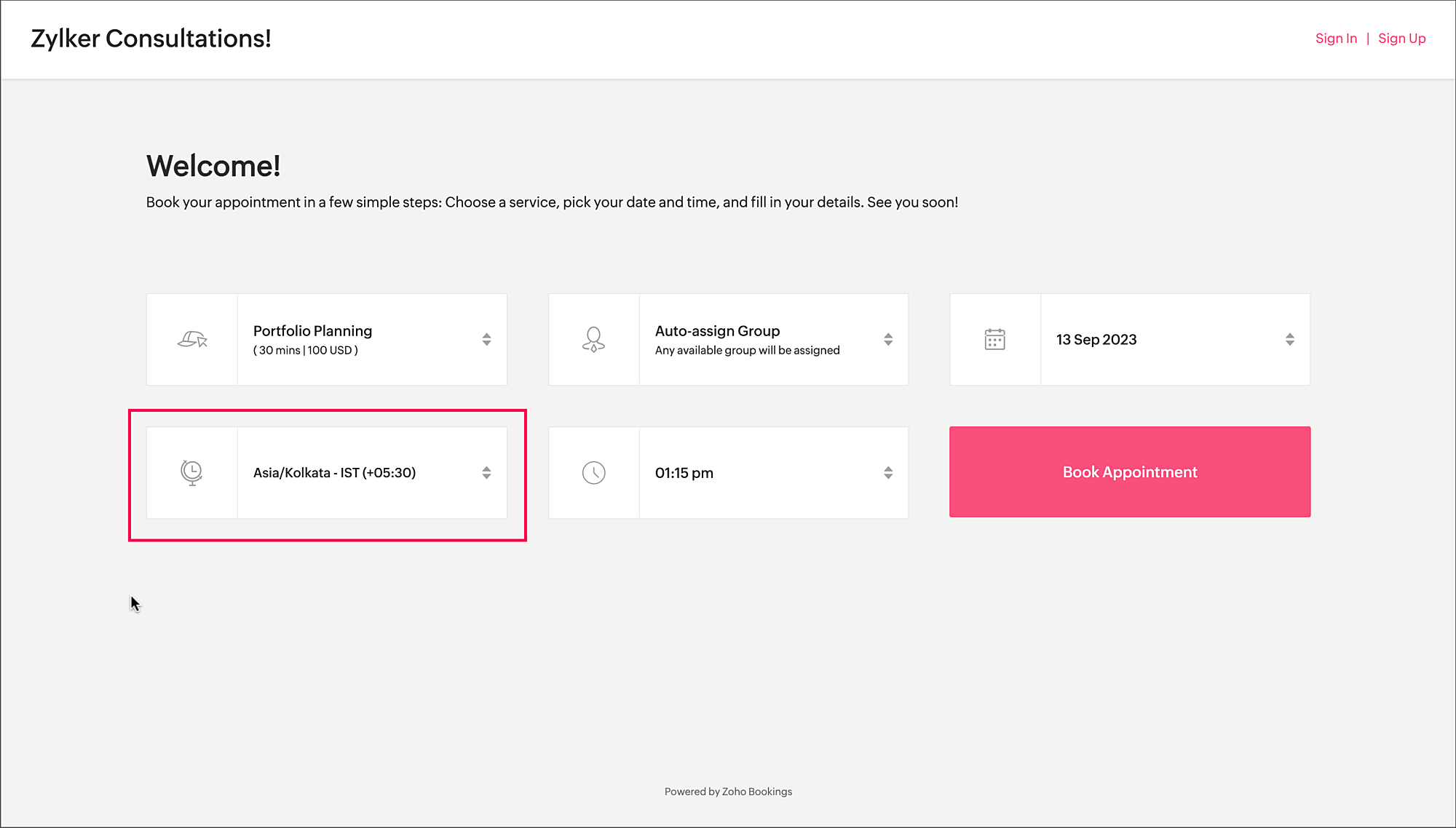

Time zone on the booking page


To access the time zone settings

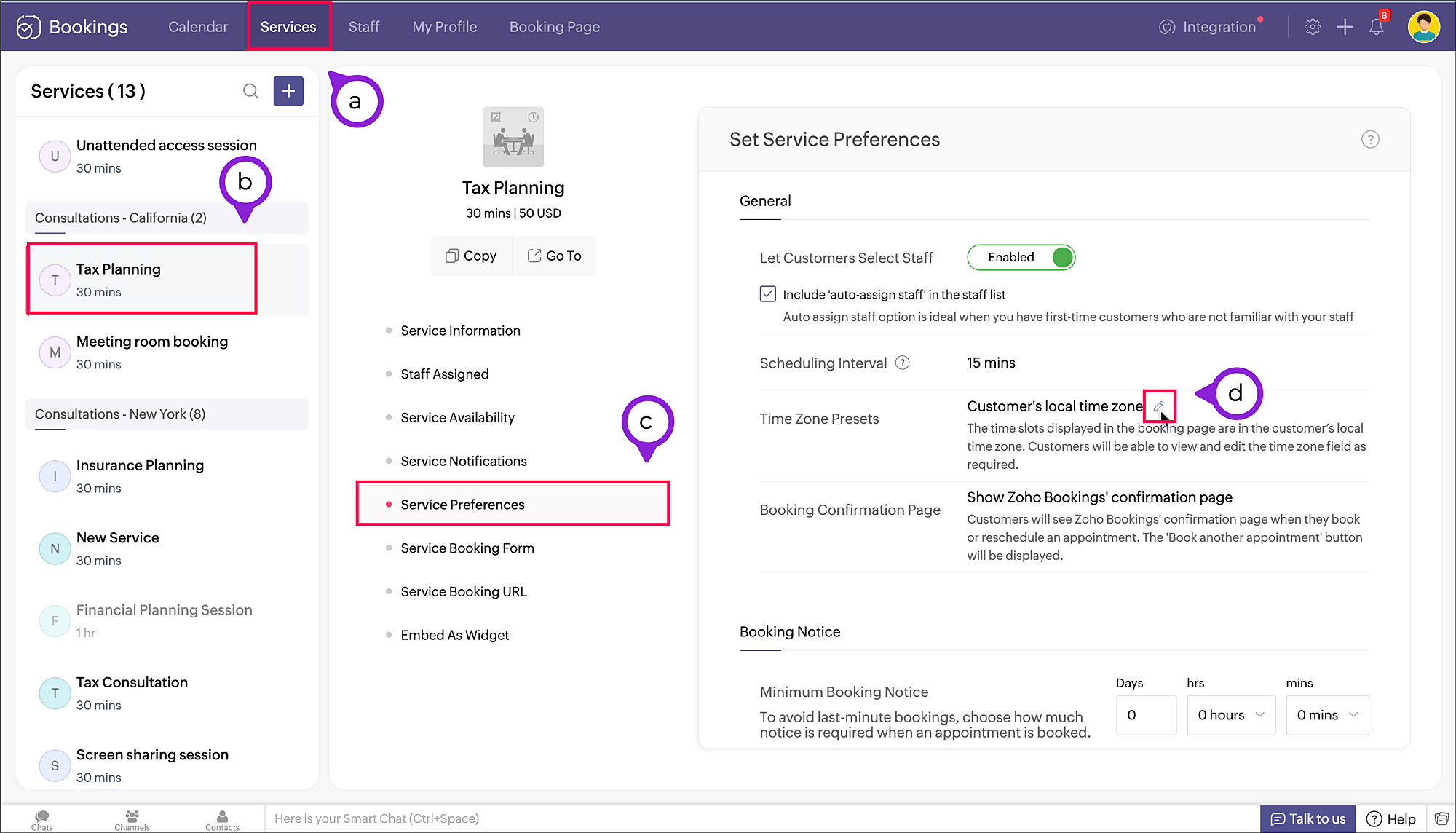
  1. Navigate to Services > Select the required service > Service Preferences.
    Note: For group and resource booking, the time zone settings can to be configured under Workspaces > Policies and Preferences.

  2. Under General section, click the edit icon against Time Zone Presets.


  3. A pop-up appears where you can configure the time zone settings.
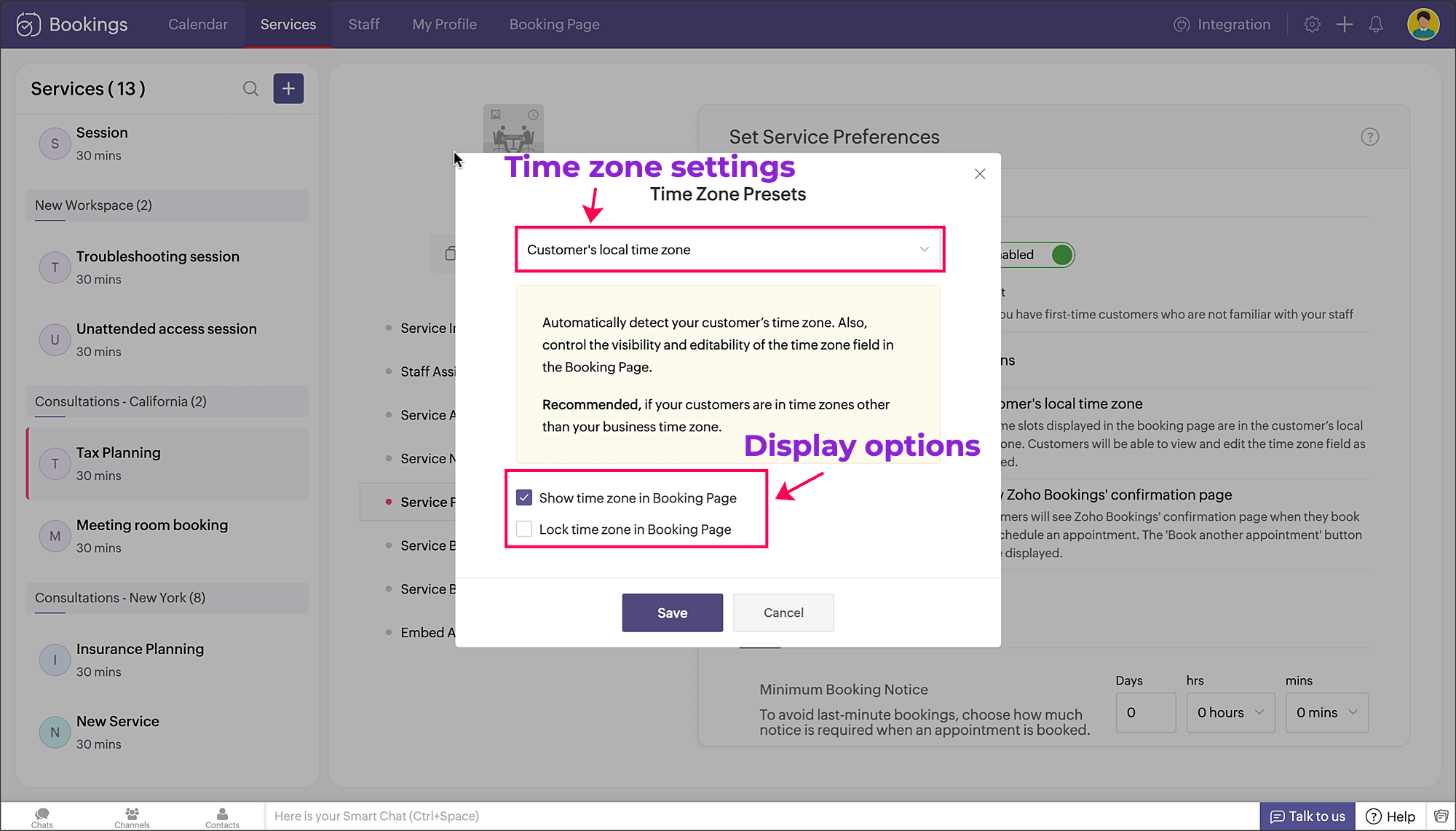


     a. Time zone settings: The first dropdown is for choosing the time zone on the booking page. You have three options to choose from.
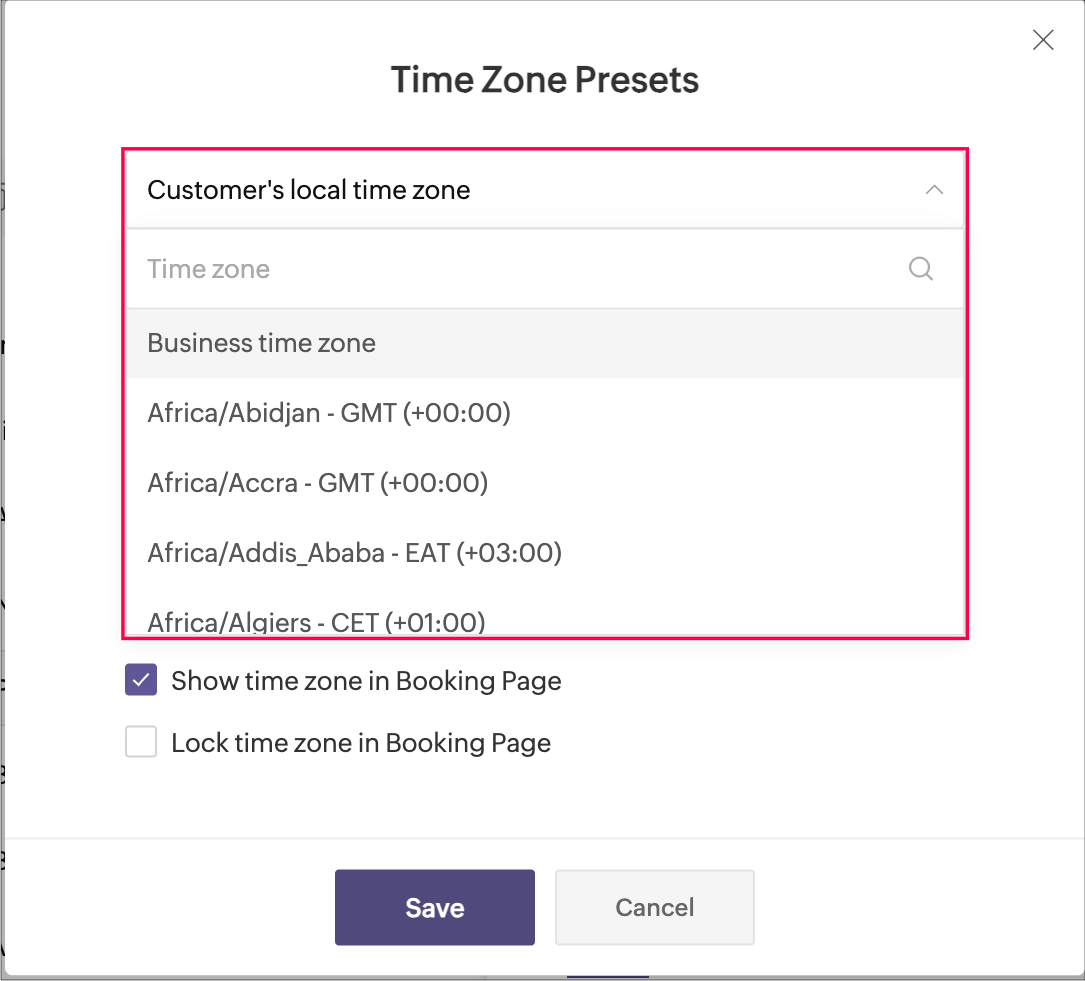


  • Customer's local time zone: By choosing this, the customer's location will be detected and the corresponding time zone will be shown on the booking page.
  • Business time zone: By choosing this, the default time zone of the business will be shown. This can be accessed under Settings > General > Basic Information > Time Zone.
  • Any other time zone: You can choose any other time zone from the list of all time zones.
        
      b. Display options: The checkboxes below provide display options, which involve visibility and locking of time zone on the booking page.


          Visibility options:
  • Show time zone: To show the time zone option on the booking page, select the checkbox next to Show time zone in Booking Page. This displays the time zone which is selected in the above pop-up.

  • Hide time zone: To hide the time zone dropdown option on the booking page, deselect the checkbox next to Show time zone in Booking Page.
    This means that the time zone selected on the above pop-up is suitable for the appointment. However, it's essential to ensure that all parties involved are on the same page regarding the appointment's timing, which might require additional communication or clarification.

          Locking options:

  • Lock time zone: To prevent the customer from changing the time zone, you can select the checkbox next to Lock time zone in Booking Page.
    Here, the booking system displays the specified time zone without the option for customers to modify it. This can be beneficial when strict scheduling adherence is crucial, ensuring that all appointments are synchronized according to a predetermined time zone.

  • Unlock time zone: To allow the customer to edit/change the time zone, you can deselect the checkbox next to Lock time zone in Booking Page. 
    This option provides flexibility, allowing customers to select their preferred time zones, which can be particularly useful for businesses with a global customer base. It empowers customers to book appointments that align with their local time, reducing confusion and scheduling errors.

Combining the visibility and locking options, there are three display options as shown below.

Show

Lock

Result

Shows the time zone and allows customer to modify the time zone on the booking page

Shows the time zone but restricts the customer from modifying the time zone on the booking page

N/A

Hides the time zone


To conclude, implementing time zone settings and providing visibility or locking options on the booking page can greatly enhance user convenience, minimize scheduling errors, and ensure a smoother experience for both customers and service providers.

Hope this tip is useful, let us know your thoughts in the comments section.

Happy scheduling!


    • Sticky Posts

    • Tip #13: Identify where your bookings come from with Source Tracking

      Source tracking is the practice of identifying where your bookings originated. This is important, because online bookings come from a wide variety of sources like social media platforms, your website, email and ad campaigns, partner websites, organic
    • Tip #17: How to mandate partial payment for your appointments

      When you require partial payments during the booking process, customers can only schedule with you after paying a certain amount in advance. This deposit acts as a commitment between both parties. Apart from that, it has many more advantages. Benefits
    • Tip #18: Organize a group workshop in a few steps

      It's the season for workshops—they're everywhere, catering to diverse interests and needs. Whether for more professional goals like leadership development or creative endeavors like painting, there's an abundance of workshops offered every day. A scheduler
    • Tip #16: Custom labels for staff, service, and resources

      Every industry uses its own jargon. Take healthcare, for example; when you visit a doctor, it's not just an appointment, it's a consultation. The people who provide consultations are the providers. Similarly, in the tranquil world of a spa, a massage
    • Tip #15: Customize service prices for each staff member

      It's common practice for a service to be priced differently based on the staff member providing it. For example, an experienced hair stylist may charge more for a haircut compared to the other stylists. This pricing strategy allows businesses to charge

    Nederlandse Hulpbronnen


      • Recent Topics

      • Where is the settings option in zoho writer?

        hi, my zoho writer on windows has menu fonts too large. where do i find the settings to change this option? my screen resolution is correct and other apps/softwares in windows have no issues. regards
      • Zoom Phone SMS Integration

        Requesting Zoom SMS capabilities to be integrated by Zoho CRM to capture a related SMS conversation logged to the lead, contact etc..
      • Passing the CRM

        Hi, I am hoping someone can help. I have a zoho form that has a CRM lookup field. I was hoping to send this to my publicly to clients via a text message and the form then attaches the signed form back to the custom module. This work absolutely fine when
      • File emails in Shared email folder

        Hi, I am unable to allow users to collaborate in Shared email folders: User 1 shares a folder let's say "SharedTopic" with full permissions Users 2 and 3 can see this folder but are unable to add emails to this folder or search in this folder. For example,
      • No funcionan correctamente el calculo de las horas laborales para informe de tickets

        Hola, estoy intentando sacar estadísticas de tiempo de primera respuesta y resolución en horario laboral de mis tickets, pero el calculo de horas en horario laboral no funciona correctamente cree los horarios con los feriados : Ajusté los acuerdos de
      • How create a draft via workflow?

        I wish to create a workflow rule for specific emails that creates a draft response - not an automatic email reply, but just a draft with a set response ready to be verified by an agent who can then manually select recipients. Alternatively, the workflow
      • Ticket layout based on field or contact

        Hi! I want to support the following use-case: we are delivering custom IT solutions to different accounts we have, thus our ticket layouts, fields and languages (priority, status field values should be Hungarian) will be different. How should I setup
      • This user is not allowed to add in Zoho. Please contact support-as@zohocorp.com for further details

        Hi Team, when I,m trying to create a email account (imagixmidia.com.br) it's showing this error >>  This user is not allowed to add in Zoho. Please contact support-as@zohocorp.com for further details plz help me  thanks
      • How to manage task lists in Zoho Desk?

        Hello, I use Zoho Desk for IT customer support. I have a list of standard operating procedures (SOPs), including SOPs for onboarding new users, offboarding users, losing a device, etc. These are lists of tasks to be performed depending on the situation.
      • Zoho → ShipStation Integration – Sales Order–Driven Fulfilment Workflow

        Hello All, I’m reaching out to explore the best way to integrate a shipping tool into our inventory which will speed our process up. We are looking to integrate ShipStation into our existing order-to-fulfilment workflow, as we’re keen to standardise on
      • Business Day Logic Update: More Accurate Scheduling for Your Workflows

        Hello everyone, We’re improving how business-day calculations work in workflows, especially when triggers happen on weekends. This update ensures that offsets like +0, +1, and +2 business days behave exactly as intended, giving you clearer and more predictable
      • Convert Lead Automation Trigger

        Currently, there is only a convert lead action available in workflow rules and blueprints. Also, there is a Convert Lead button available but it doesn't trigger any automations. Once the lead is converted to a Contact/Account the dataset that can be fetched
      • Default Tagging on API-generated Transactions

        If one assigns tags to an Item or Customer, those tags get auto-populated in each line item of an Invoice or Sales Order when one creates those documents. However, if one creates the Sales Order or Invoice via the API (either directly coding or using
      • User

        If user is already part of manage engine endpoint central , what hapens when i try to add them to another Zoho org / directory? Are these users added as external users?
      • Adding a new section to the related details sidebar when creating a new ticket.

        Hello, I was wondering if you can add a new section to the related details sidebar when creating a new ticket. I was wanting to have it to where it also shows the account information related to the contact chosen as well. This is the section I am referring
      • Posibility to add Emoticons on the Email Subject of Templates

        Hi I´ve tried to add Emoticons on the Subject line of Email templates, the emoticon image does show up before saving the template or if I add the Emoticon while sending an Individual email and placing it manually on the subject line. Emoticons also show
      • Displaying only unread tickets in ticket view

        Hello, I was wondering if someone might be able to help me with this one. We use filters to display our ticket list, typically using a saved filter which displays the tickets which are overdue or due today. What I'd really like is another filter that
      • Holidays - Cannot Enter Two Holidays on Same Day

        I have a fairly common setup, where part-time employees receive 1/2 day's pay on a holiday and full-time employees receive a full day's pay. Historically, I've been able to accommodate this by entering two separate holidays, one that covers full-time
      • CRM project association via deluge

        I have created a workflow in my Zoho CRM for closing a deal. Part of this workflow leverages a deluge script to create a project for our delivery team. Creating the project works great however, after or during the project creation, I would like to associate
      • How to compare a subform lookup field that allows multiple entries when edited

        I have a form with a subform with multiple fields. One of the fields is a lookup field that allows a multi select. On edit validation, I want a workflow to execute only when the entries in that subform field has changed. The old. function is not working
      • Is Zoho Shifts included in the Zoho One plan?

        In case the answer is no: there's any plan to make it available via One? Thank you
      • Creating a Chart from a Report

        In Zoho Analytics, is it possible to create a chart from a Pivot View report? We are looking to use Zoho Analytics to replace Excel for Sales reports and would like to be able to show both the table and the chart together.
      • Zoho Tracking Image location

        So we've been having an issue with tracking email opens. Specifically in Gmail. Our emails are not that long either, maybe 4 sections of image/250 characters of text/button per section.  But all my test accounts I used via Gmail we're showing opens. But then come to find out the tracking image is at the very bottom of the email. So If the message is clipped (It always just clips our social icons on the bottom) and the user doesn't click the show more button it never tracks the open.  Looking at other
      • Is there a plan to integrate zoho voice with zoho books?

        Hello, Is there a plan to integrate zoho voice with zoho books? Right now we are using the Twilio SMS integration into zoho books, but have recently decided to switch to zoho voice for calls and sms. Is there a plan to integrate zoho voice natively into
      • Zoho Tables is now live in Australia & New Zealand!

        Hey everyone! We’ve got some great news to share — Zoho Tables is now officially available in the Australian Data Center serving users across Australia and New Zealand regions! Yes, it took us a bit longer to get here, but this version of Zoho Tables
      • Delivery and handling of documents e-stamped using Zoho Sign

        Hello everyone! Zoho Sign makes it easy to pay non judicial stamp duty online and automatically attach the digitally generated e-stamp challan to electronic documents. We also manage the delivery of physical e-stamped papers. We periodically receive these
      • Introducing Dedicated Modules for Plans, Addons, and Coupons in Zoho Billing

        We’ve enhanced the way you manage Plans, Addons, and Coupons in Zoho Billing. Previously, all three grouped together under Subscription Items. Now, each one has its own dedicated module, giving you a cleaner and more intuitive experience. This update
      • Sortie de Zoho TABLE ??

        Bonjour, Depuis bientôt 2 ans l'application zoho table est sortie en dehors de l'UE ? Depuis un an elle est annoncée en Europe Mais en vrai, c'est pour quand exactement ??
      • Zoho Forms API

        Is there any way to get all form entry list using API? Looking forward to hear from you
      • Issue with WhatsApp Template Approval and Marketing Message Limit in Zoho Bigin

        We are facing issues while creating and using WhatsApp message templates through Zoho Bigin, and we request your clarification and support regarding the same. 1. Utility Template Approval Issue Until December, we were able to create WhatsApp templates
      • How to install Widget in inventory module

        Hi, I am trying to install a app into Sales Order Module related list, however there is no button allow me to do that. May I ask how to install widget to inventory module related list?
      • Zoho Social - Feature Request - Reviewer Role

        Hi Social Team, I've come across this with a couple of clients, where they need a role which can review and comment on posts but who has no access to create content. This is a kind of reviewer role. They just need to be able to see what content is scheduled
      • Zoho Social - Feature Request - Non-US Date Format

        Hi Social Team, I have noticed that there is no option to change the date format from US mm/dd/yyyy to others like dd/mm/yyyy. It would be great to see this added as the platform matures. Thanks for considering this feedback.
      • Drop Down Value

        Hi, May I know why Zoho Flow treat this drop down as number and not as string. If so, how can I fetch the right value for filtering. This field is from Creator, in Creator upon checking by default it is a string since it's not a lookup field.
      • Zoho CRM's mobile apps: A 2025 Recap

        2025 marked a year of steady progress for Zoho CRM's mobile apps. We rolled out several updates and features to improve usability and make everyday CRM work a lot easier to manage. Here’s a look back at some of the key releases from 2025. Android releases
      • Dependent / Dynamic DropDown in ZohoSheets

        Has anyone figured out a way to create a Dropdown, the values of which is dependent on Values entered in the other cell ?
      • Facebook follower count doesn't match FB Analytics

        Hi all, I am wondering if anyone else has issues with follower counts for Facebook not matching FB's native analytics tool. On the Zoho dashboard, it's showing 1,007, but FB shows 1,060. All the other channels match up. Any insights are much appreciated!
      • Unable to mass update a picklist field

        Hello, I have the records within our Accounts module divided between two account types: Parent Accounts & Member Accounts. I am attempting to mass update accounts from one picklist value to the other (within other specific criteria in our custom fields)
      • Meta and Facebook data report discrepancy

        I have been currently gathering manually facebook follower data thru meta. In zoho marketing plus the social media reporting only allows for page likes, and so there is a discrepancy with the data. please the difference in files attached. Is there way
      • Develop and publish a Zoho Recruit extension on the marketplace

        Hi, I'd like to develop a new extension for Zoho Recruit. I've started to use Zoho Developers creating a Zoho CRM extension. But when I try to create a new extension here https://sigma.zoho.com/workspace/testtesttestest/apps/new I d'ont see the option of Zoho Recruit (only CRM, Desk, Projects...). I do see extensions for Zoho Recruit in the marketplace. How would I go about to create one if the option is not available in sigma ? Cheers, Rémi.
      • Next Page