Tip #13: Identify where your bookings come from with Source Tracking
Tip #13: Identify where your bookings come from with Source Tracking


Source tracking is the practice of identifying where your bookings originated. This is important, because online bookings come from a wide variety of sources like social media platforms, your website, email and ad campaigns, partner websites, organic traffic from search engines, and recommendations from previous clients. Understanding where your bookings come from enables you to make better decisions about where to focus your marketing efforts. If you can identify which channels are generating the most bookings, you can adjust your strategy accordingly and make more informed choices about pricing and promotions.


Use case

For example, if a hotel discovers that the majority of their bookings come from a certain online travel agency, they can engage in negotiations to secure better terms and discounts for their customers. This strategic move could result in more bookings from that channel, contributing to overall revenue growth.


In Zoho Bookings, you can implement source tracking by adding a hidden field to the booking form. Use a unique URL for each channel to specify the channel name in the hidden field. When customers book using those links, you'll be able to easily identify which channels are generating the most new customers and bookings.

Steps to implement source tracking:

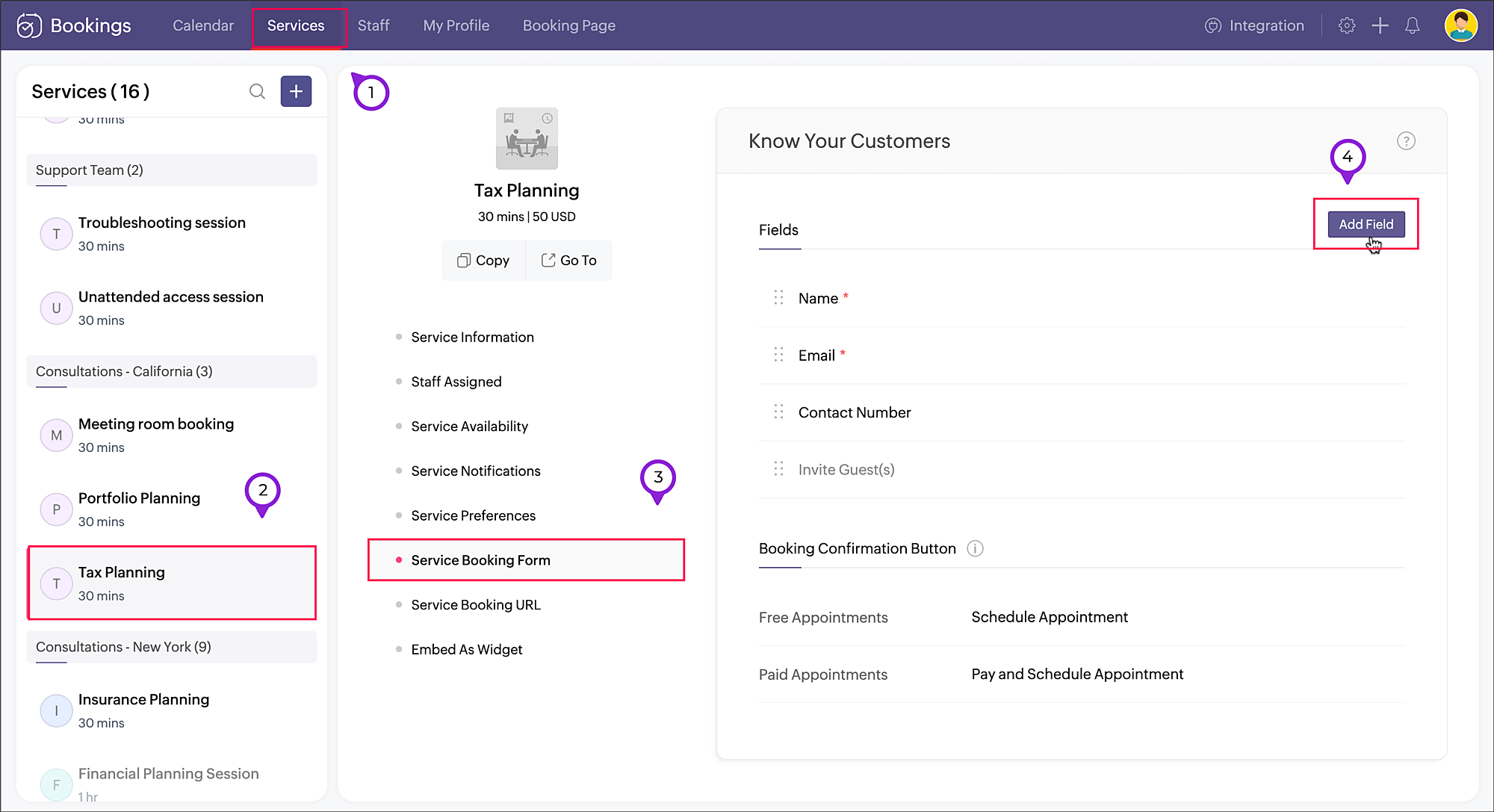
  1. Navigate to Services, select the required service, and click Service Booking Form. 
  2. Click Add Field in the right corner of the Fields section.


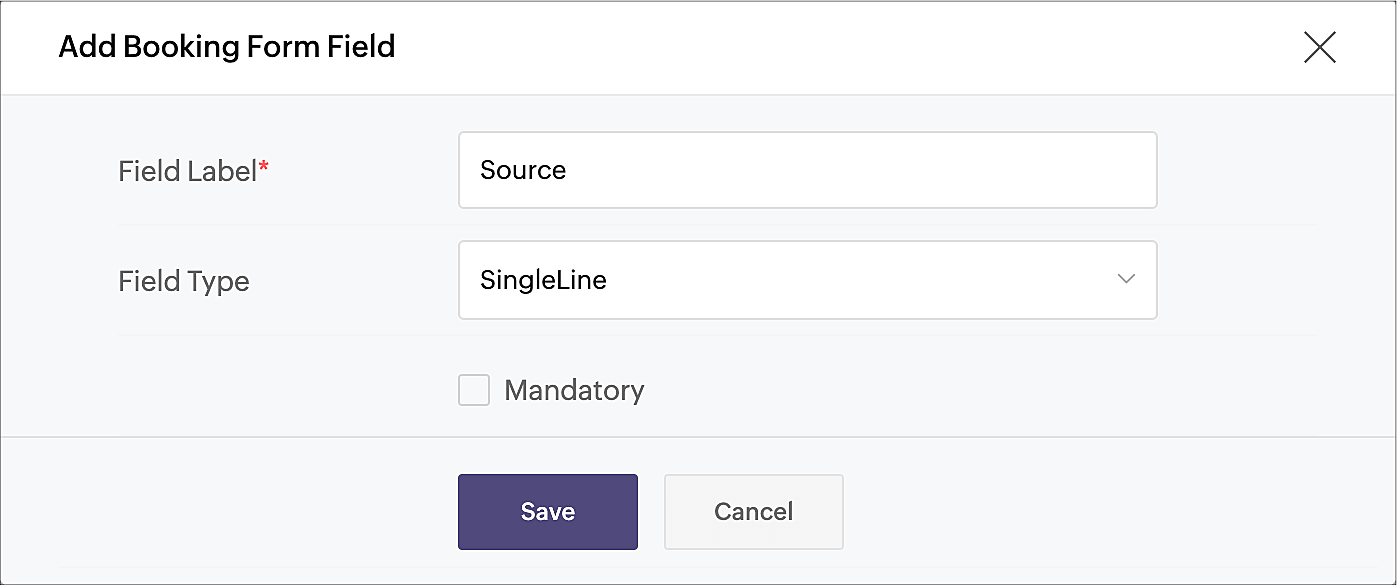
  3. A pop-up window will appear. Enter the Field Label as "Source" (or use any name of your choice). Choose SingleLine in Field Type, as we'll be using a limited amount of text in this field. Click Save


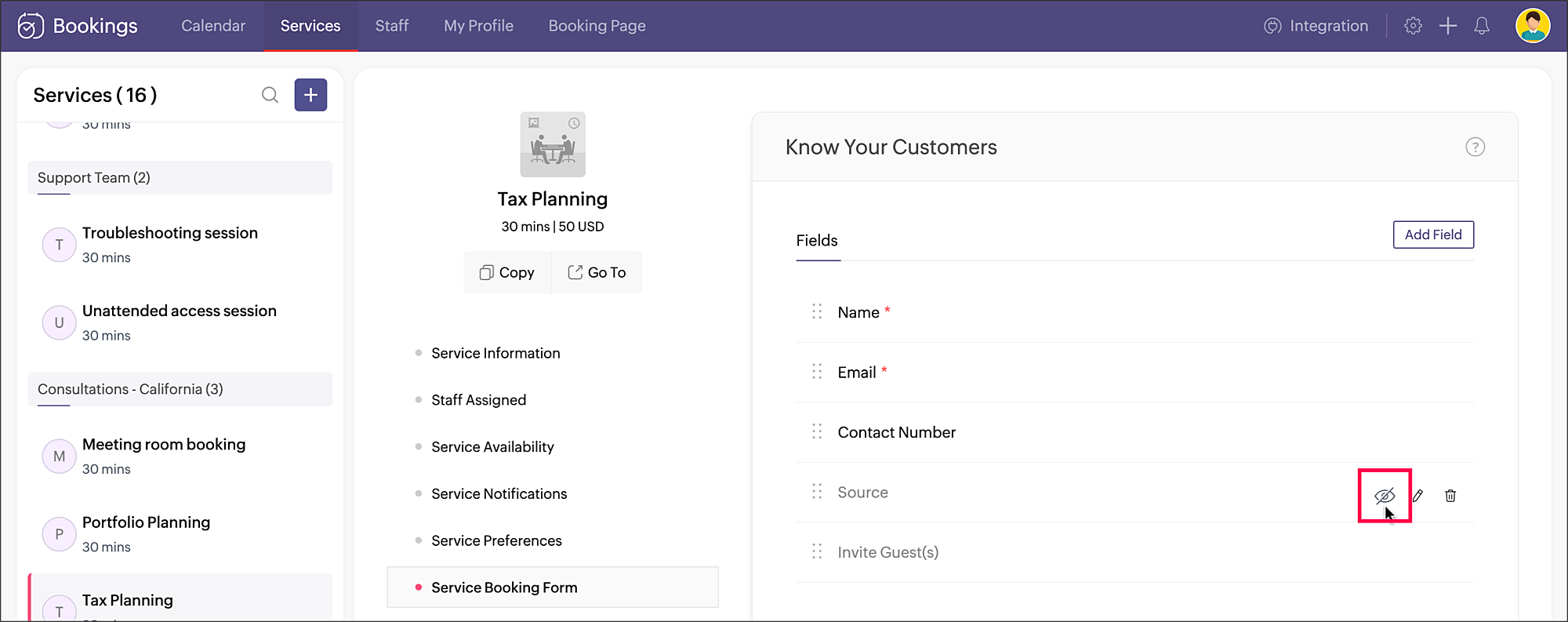
  4. Click the eye icon next to the Source field that you just created and make the field hidden in the booking form.


    Your source tracking is all set. When you share the service booking page link, add the source name accordingly. You can include the source value as a query parameter to the booking URL in the below format:
    <service_booking_page_URL>?source=<source_name>

    For example, lets say the above service Tax planning has the booking page link: https://business.zohobookings.com/#/customer/4050029000003367030.

    When this link is shared on Facebook, the source name can be added at the end: https://business.zohobookings.com/#/customer/4050029000003367030?source=facebook
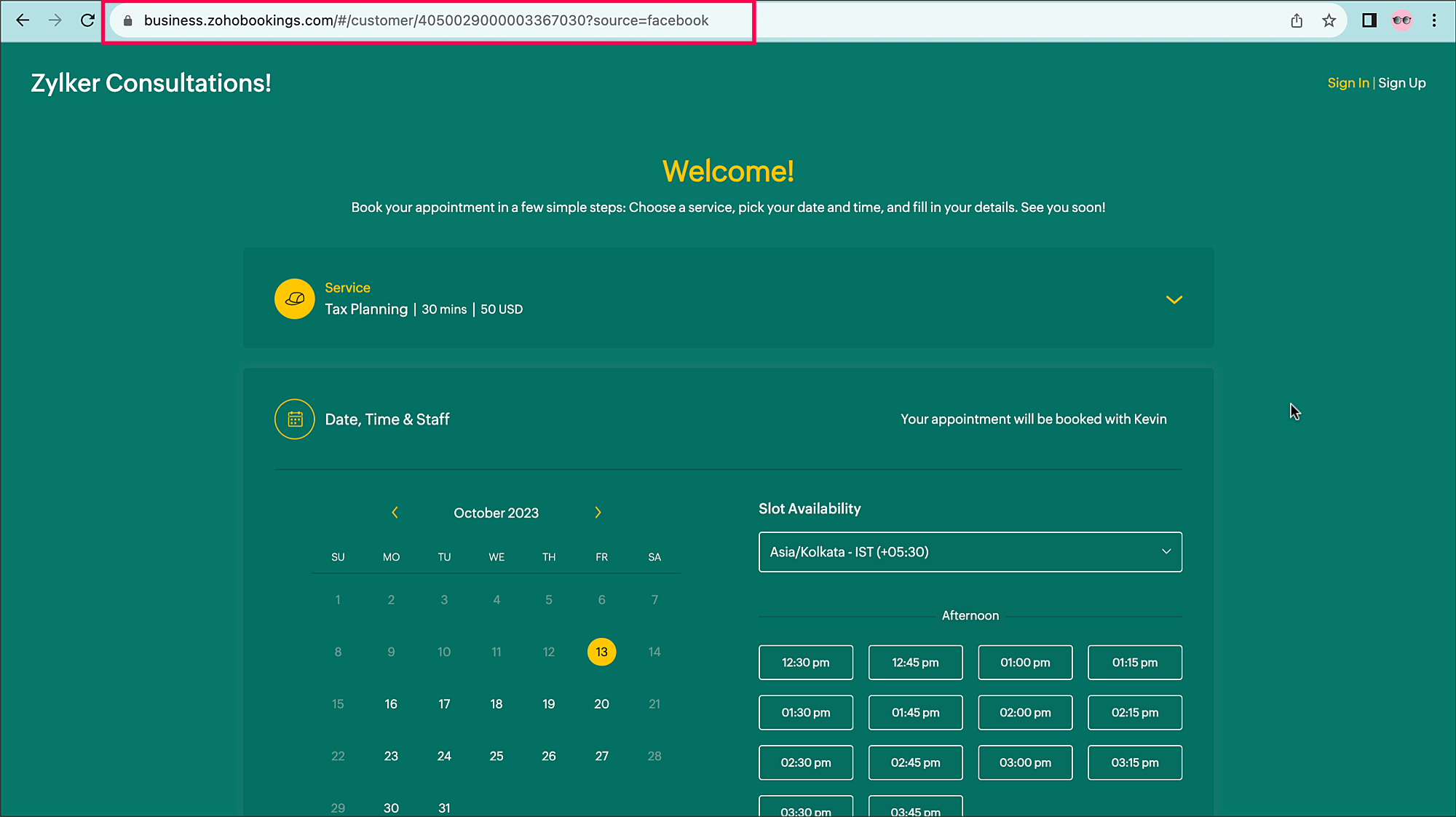


    You can easily add additional sources, such as:
    ?source=official_website
    ?source=partner
    ?source=email_campaign


    When an appointment is booked, the source name can be seen in the
    Appointment Summary under Additional Info.
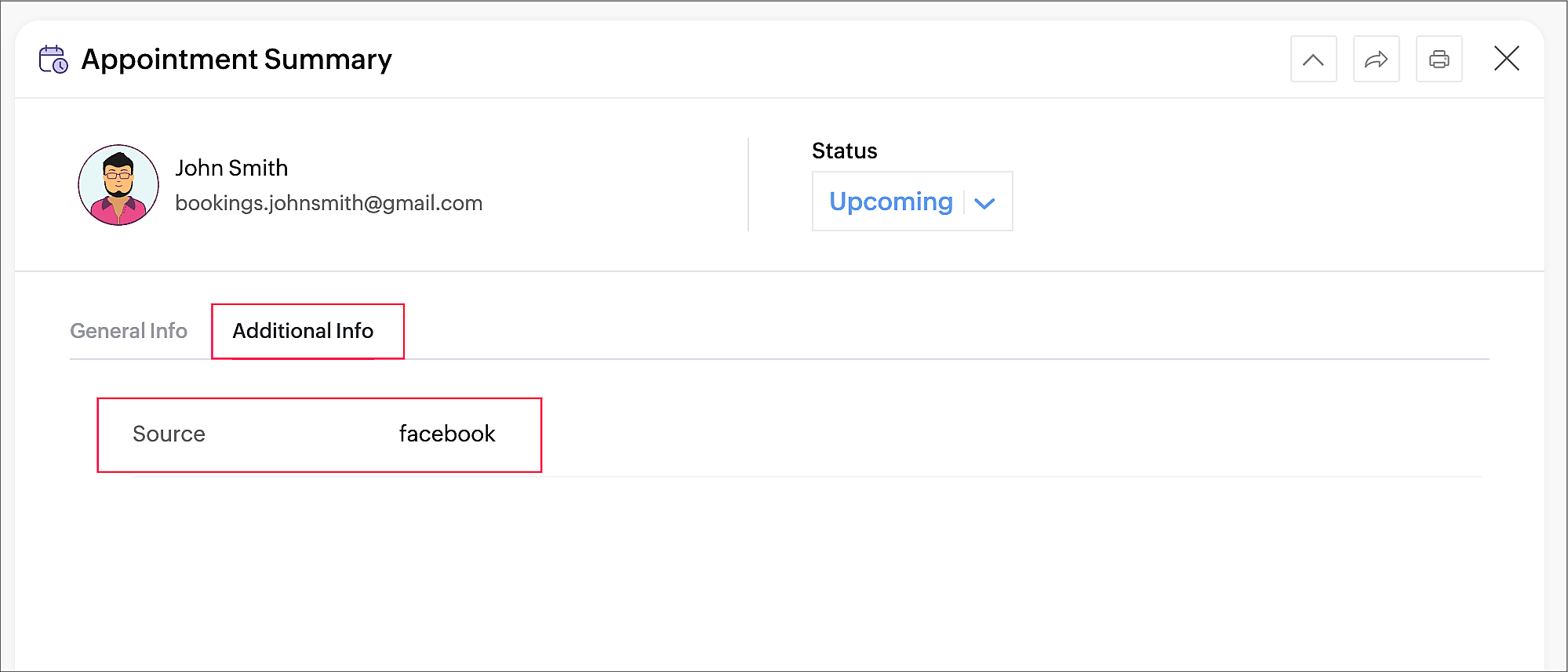
     

Tracking the sources of your bookings can help you identify which channels are effective for acquiring new customers and contribute the most to your revenue, so you can implement more targeted marketing and customer engagement strategies.

Thanks for reading! Please watch this space for more tips about online appointment scheduling.


Related Topics

Service Booking Form

    • Sticky Posts

    • Tip #13: Identify where your bookings come from with Source Tracking

      Source tracking is the practice of identifying where your bookings originated. This is important, because online bookings come from a wide variety of sources like social media platforms, your website, email and ad campaigns, partner websites, organic
    • Tip #17: How to mandate partial payment for your appointments

      When you require partial payments during the booking process, customers can only schedule with you after paying a certain amount in advance. This deposit acts as a commitment between both parties. Apart from that, it has many more advantages. Benefits
    • Tip #18: Organize a group workshop in a few steps

      It's the season for workshops—they're everywhere, catering to diverse interests and needs. Whether for more professional goals like leadership development or creative endeavors like painting, there's an abundance of workshops offered every day. A scheduler
    • Tip #16: Custom labels for staff, service, and resources

      Every industry uses its own jargon. Take healthcare, for example; when you visit a doctor, it's not just an appointment, it's a consultation. The people who provide consultations are the providers. Similarly, in the tranquil world of a spa, a massage
    • Tip #15: Customize service prices for each staff member

      It's common practice for a service to be priced differently based on the staff member providing it. For example, an experienced hair stylist may charge more for a haircut compared to the other stylists. This pricing strategy allows businesses to charge

    Nederlandse Hulpbronnen


      • Recent Topics

      • Importing Tasks

        Few suggestions that would make creating project templates more efficient.   1. Having the ability to import tasks from a spreadsheet within the Project Template Task section.  You can do this when creating a "new project." 2. When importing Tasks from a spreadsheet, to be able to associate a milestone to a tasklist, just as I can associate a tasklist to a task.  This would alleviate a very tedious, time consuming process. 3. Another feature that would be very helpful is rather than a start and end
      • GSTIN Public Search API

        Does zohobooks have an api using which i can search GST numbers and get their details?
      • Zoho Books | Product updates | April 2026

        Hello users, Welcome to our April 2026 product updates roundup! Highlights include profit margin for sales transactions, insights in reports, recording deposits from undeposited funds in banking, and faster production workflows with improved assembly
      • Deleted User Emails

        I need to delete a user as I need to re-use their license, but I'd like to keep all their emails that are attached to various contacts in the CRM. Their emails are hosted externally on an M365 license. Anyone any idea how best to engineer this? TIA
      • Spell Check Red Underlines Keep Appearing Even After Disabling

        Hello Zoho Support, I'm facing an issue in Zoho Writer where red spell-check underlines keep appearing even after I disable Spell Check. I have already: Turned OFF Spelling Errors Turned OFF Grammar Turned OFF Writing Quality Turned OFF browser spell
      • Its 2022, can our customers log into CRM on their mobiles? Zoho Response: Maybe Later

        I am a long time Zoho CRM user. I have just started using the client portal feature. On the plus side I have found it very fast and very easy (for someone used to the CRM config) to set up a subset of module views that make a potentially extremely useful
      • Truco del mes: Zoho Desk - Cómo mostrar tarjetas de producto en tu chatbot

        ¡Hola a todos! Si utilizas Conversaciones Guiadas (Guided Conversations) en Zoho Desk para ayudar a los clientes a encontrar productos, probablemente te hayas encontrado con este problema: el bot ofrece una lista de opciones, pero los clientes siguen
      • Cliq iOS can't see shared screen

        Hello, I had this morning a video call with a colleague. She is using Cliq Desktop MacOS and wanted to share her screen with me. I'm on iPad. I noticed, while she shared her screen, I could only see her video, but not the shared screen... Does Cliq iOS is able to display shared screen, or is it somewhere else to be found ? Regards
      • Retail Payment Receipt

        Hi, So "payment receipts" have a "Retail" template for thermal printers, but the template is configured at A4 paper size!!! How is this retail guys? On the other hand, Invoices have 3 Retail templates which have 3 and 4 inch paper size, perfectly fitting
      • Assign default Location + warehouse to Customer / Vendor

        Hello there. With the introduction of Locations I'm having to enter the warehouse for every single transaction which is getting really tiring and causes errors (easy to fix, but still). Does anybody know if there's a way to assign a default Location and
      • SalesIQ : Allow Operators to Manually Set Company Names in Visitor Info

        Hi SalesIQ Team. We have identified an issue where the Company name displayed in Visitor Info is sometimes incorrect or not displayed at all. Currently, there is no way for operators to manually edit or specify the company a visitor belongs to. I understand
      • How to charge Convenience fee OR payment gateway charges to the end client who is paying the invoice?

        Hello, I am creating this topic after having discussions with various sets of users and have understood that with people moving more and more to digital payments, it is important for the client to enable the "Convenience fee" kind of scenario. I have
      • 404 error at checkout

        Our customers are getting a 404 error at checkout. Anyone else with the same problem?
      • Enhancement in Zoho CRM: Introducing New Return Types for String Fields Based on Character Length

        Dear Customers, We hope you’re well! In Zoho CRM, formula field with string return type is used in various scenarios where text is involved like concatenating customers’ first and last names, trimming characters from texts, performing find and replace
      • BUG and HANGUP - Add Row with Fields DOUBLES the amount of rows instead of Adding Just 1 Row

        As it says in the title, there is a bug with forms generated with Zoho Writer where the Add Row With Fields ends up DOUBLING the amount of rows instead of Adding just 1 row.
      • Import and Export of website.

        Hi, i have raised this ticket regarding challenges i am facing while importing a website on zoho sites. I have created my website on Squarespace and now i want to move it to zoho sites so i want to know what i am supposed to do whats the correct step
      • Zoho Analytics "Esc" key problem

        I frequently use the Escape (Esc) key while building dashboards, reports, and writing SQL queries. Since the recent updates to Zoho Analytics, the Esc key no longer behaves as expected. When writing SQL queries, pressing Esc to dismiss a suggestion now
      • Client Script | Update - Client Script Support For Custom Buttons

        Hello everyone! We are excited to announce one of the most requested features - Client Script support for Custom Buttons. This enhancement lets you run custom logic on button actions, giving you greater flexibility and control over your user interactions.
      • All new Address Field in Zoho CRM: maintain structured and accurate address inputs

        Availability Update: 29 September 2025: It's currently available for all new sign-ups and for existing Zoho CRM orgs which are in the Professional edition exclusively for IN DC users. 2 March 2026: Available to users in all DCs except US and EU DC. 24
      • Error when subscribing to any iCal feed in Group Calendar

        When I try to add any iCal URL via Settings → Calendar → Calendars → Group Calendars → Manage → Subscribed by Group, Zoho pops up an ‘Internal Server Error’ and nothing is added in the ‘Subscribed by Group’ list. But - the feed then appears under my personal
      • Record Limit on Report

        I have set up a report that I'm putting on a "page". I have filters set up to only show the records with deadlines in the next 45 days. But I only want the report to show the first 3 records (and if possible have a pagination option at the bottom to access
      • Re-Apply SLA When Ticket Reopened from Closed Status?

        If you have an SLA applied, timers are deactivated when going to "On Hold" status type and reactivated when going back to an Open status type. What we discovered is when a customer replies to a closed case and it reopens, the SLA is not applied and timers
      • Check printing alignments always changes

        Hello, We have a frustrating problem with printing checks. We use Quickbooks voucher checks, which works okay for us. The problem is the printing alignment for the check's "Date, Pay to the Order of, Amount, and Amount in Words" changes every time we
      • Problem with the blueprint flow.

        Scenario: 3 departments in a single environment: A-B-C agents from department 1 D-E-F agents from department 2 G-H agents from department 3 Since we've been using Zohodesk (2023), agents can assign tickets to the correct department using the blueprint
      • Zoho ERP | Product updates | June 2026

        Hello users, We launched Zoho ERP on January 23, and since then, our goal has been to help businesses streamline and manage their operations with greater efficiency, flexibility, and control. Since the launch, we've continued to enhance the platform every
      • Kaizen #125 Manipulating Multi-Select Lookup fields (MxN) using Zoho CRM APIs

        Hello everyone! Welcome back to another week of Kaizen. In last week's post in the Kaizen series, we discussed how subforms work in Zoho CRM and how to manipulate subform data using Zoho CRM APIs. In this post, we will discuss how to manipulate a multi-select
      • Zoho CRM upload files error

        Since today, we have been experiencing issues with uploading photos to opportunities. The message indicates that the storage is full, but as far as I can see, there is still plenty of space available. Could there be an issue or a bug?
      • "Make online" not clearing previously downloaded files from disk

        I downloaded a large folder via "Make offline" so I could copy it to another location. This worked. When I was done I hoped that "Make online" would restore it to the previous state where those files are not stored locally in TrueSync. This did not work—Finder
      • Please Make Zoho CRM Cadences Flexible: Allow Inserting and Reordering Follow-Up Steps

        Sales processes are not static. We test, learn, and adapt as customers respond differently than expected. Right now, Zoho Cadences do not support inserting a new step between existing follow-ups or changing the type of an existing primary step. If I realize
      • WhatsApp Calling Integration via Zoho Desk

        Dear Zoho Desk Team, I would like to request a feature that allows users to call WhatsApp numbers directly via Zoho Desk. This integration would enable sending and receiving calls to and from WhatsApp numbers over the internet, without the need for traditional
      • Introducing Custom Columns in Forecasts in Zoho CRM

        Hello all, Forecasts in Zoho CRM help sales representatives, managers, and business stakeholders evaluate performance and plan future sales activities. While standard metrics such as Target, Achieved Amount, and Pipeline Amount provide a baseline view,
      • Zoho Books - France

        L’équipe de Zoho France reçoit régulièrement des questions sur la conformité de ses applications de finances (Zoho Books/ Zoho Invoice) pour le marché français. Voici quelques points pour clarifier la question : Zoho Books est un logiciel de comptabilité
      • Let's bring Manufacturing Resource Planning (MRP), Material Requirement Planning (MRP), and Production Planning/Management module / feature in Zohobooks

        Let's bring Manufacturing Resource Planning (MRP), Material Requirement Planning (MRP), and Production Planning/Management module / feature in Zohobooks
      • Will I see emails sent via campaigns in CRM?

        It would be useful for people to be able to see emails sent via campagins in Zoho CRM is that possible?
      • Zoho Forms - Failed CRM Sync Improvement

        I'd like to suggest an enhancement to the Zoho Forms and Zoho CRM integration. Currently, once a form entry has been submitted, there is no simple way to push that individual entry to CRM again if needed. Before anyone mentions it, I am aware that the
      • Zoho ZUGs Meetups 2026 en España: Descubriendo nuevas posibilidades con Zoho

        ¡Hola, Español Zoho Community! Hemos celebrado una nueva edición de los Zoho User Groups (ZUGs) en España (Madrid, Barcelona & Valencia), una excelente oportunidad para reunirnos, formarnos y descubrir nuevas formas de sacar más partido a nuestras herramientas
      • What is MCP and How Does It Connect to Zoho Invoice?

        If you've ever wished you could just tell your invoicing software what to do, without clicking through menus, pulling up reports manually, or switching tabs every five minutes, that's exactly what the Zoho MCP server is built for. MCP stands for Model
      • DYK 7 - Set dependency from Gantt and List view

        Did you know task dependencies in Zoho Projects can be managed across different task views? In a project, multiple teams work together towards the same goal but team members prefer accessing data with different perspectives depending on their responsibilities.
      • Goods In Transit

        Hi I was wondering if anyone had any tips or work-around to show goods in transit as a liability? We raise a PO with our supplier in China and when the goods are shipped and are invoiced, hence they are a liability of the business. However I can't convert
      • Accounts Payable and receivable

        I'm currently creating my accounts and noticed that I cannot create any more accounts payable or receivable. Is there any way to create more of this accounts and associate them to the default one available?
      • Next Page