Tip #4 - Status Timeline
This week let's have a quick understanding of the interesting enhancement in Zoho Sprints. Did you happen to see something called 'Status Timeline' in your work item details section? - Yes? - Then you are ready to know what it actually does. No? - Quickly navigate to your work item details page and click Status Timeline from the top navigation bar.
What does it do?
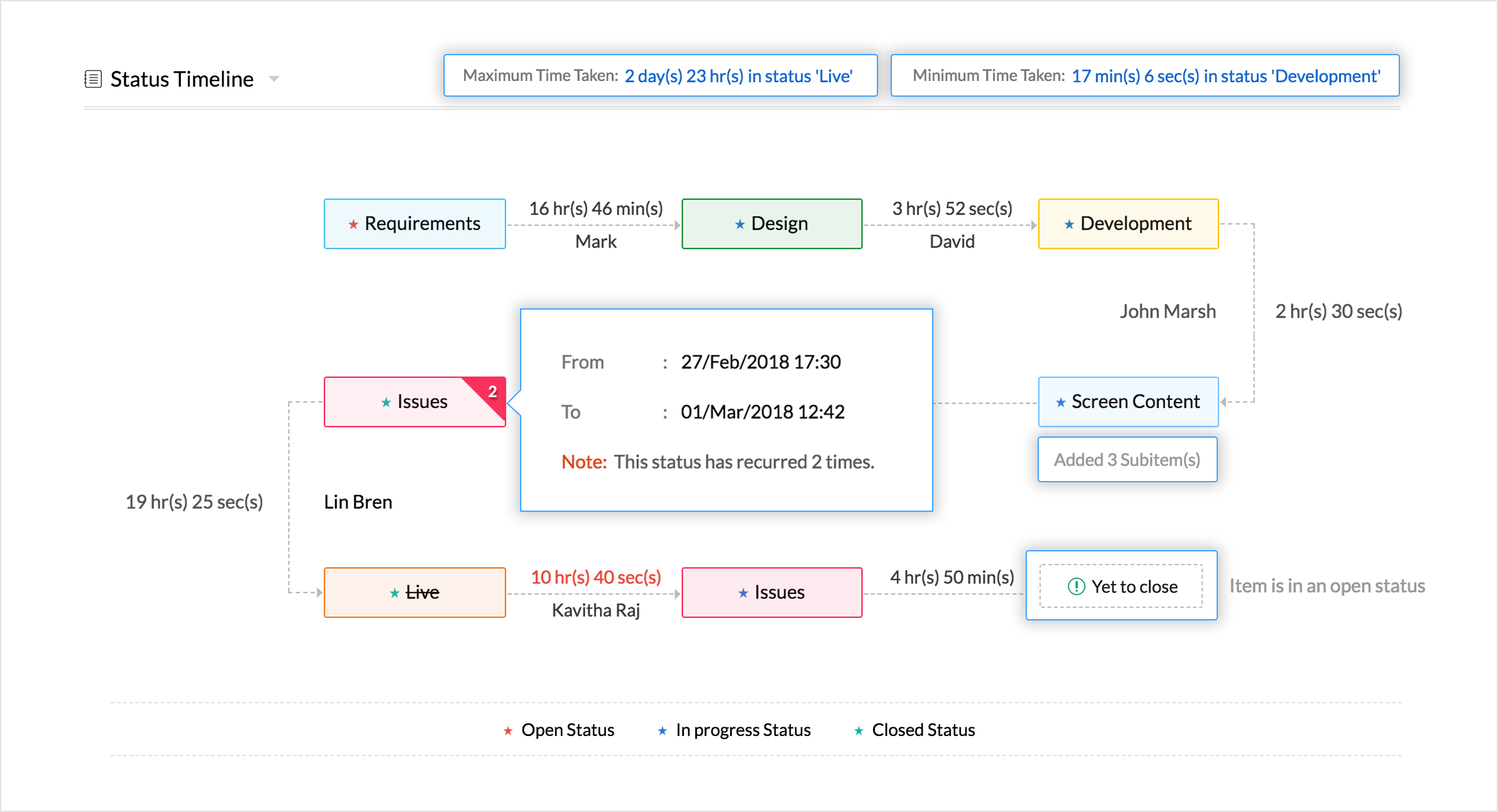
Tracks the time taken by a work item to move across statuses on the scrum board. It also helps you know the number of days the work item was idle in a particular status. Apart from this, it also tracks the maximum and minimum time the work item remained in a particular status.
When to view?
The ideal time to view your status timeline is when the work item is not delivered on the actual end date. What if the admin or sprint owner wants to know the actual reason for the delay? They can directly navigate to the status timeline and view the work item's progress across statuses.
How does it benefit?
- You can track the status in which the user has spent the maximum and minimum time.
- If the work item is assigned to multiple users, you can track the user who has moved the item to a different status.
- Track the recurrence of the status if the work item is transitioned multiple times to the same status.
- It also indicates a 'Yet to close' status if the item is yet to be moved to any of the closed statuses in the sprint.
- If it's a parent item you can check the number of subitems added to it in a particular status.
- You can also view the status timeline for each individual subitem.
Use the status timeline to know the complete workflow of your work item, so that you can never miss any bottlenecks that hinder the progress. Check out our
resource center
and email to
support@zohosprints.com
for any queries.
Topic Participants
monica
Sticky Posts
Tip #28 - Plan less and deliver more using WIP limit in Zoho Sprints
Hello, It's been a while since we met with a quick, interesting tip. As the saying goes, "Too much of anything is good for nothing", today the focus is on delivering your outcomes with the right amount of planning. Your plan should be practical, calculative, and achievable for driving a qualitative success. Laura's plan Laura has a habit of planning her project deliverables before assigning work to her team-mates. Once the plan is finalized, she schedules a general meeting with her team andTip # 3- Working on the Scrum board
Continuing from our Tip #2 on leading to a sprint, let's see how to manage the work items on the Scrum board. Once you start the sprint your work items are automatically displayed on the Scrum board where you will actually manage the work items. It is a snapshot of the backlog items identified for the current sprint. The layout of the Scrum board Simply put, the scrum board is just like a physical board with sticky notes on which the work items of the active sprint are displayed. The scrum boardTip#2- Leading you to a Sprint
Product Backlog After the user stories are written and finalized, they are sorted to create the Product Backlog for the project during the Backlog Grooming meeting. This is a master list of all the work items that have been identified for the project and sorted by priority. Requirements are not constant during this period.The Product Backlog is dynamic and is an ongoing process. Every user story in the Product Backlog is customer centric. The Product Backlog includes: User centric stories based onTip #1- Why swimlanes?
Lanes define a clear path to reach your destination. In Agile, swimlane is one such concept that sets a simple and clear process of the work that you do. The concept of swimlane can be related to the pool, where the swimmers gather in their respective lanes to start off. Similar to the pool, work items are grouped in different categories. Each category is referred as a lane and is displayed in horizontal format. Swimlanes are effective in categorizing the work items with respective to specific
Nederlandse Hulpbronnen

Recent Topics
Enrich your contact and company details automatically using the Data Enrichment topping
Greetings, I hope you're all doing well. We're happy to announce the latest topping we've added to Bigin: The Data Enrichment topping, powered by WebAmigo. This topping helps you automatically enhance your contact and company records in Bigin. By leveragingEasier onboarding for new users with stage descriptions
Greetings, I hope all of you are doing well. We're happy to announce a recent enhancement we've made to Bigin. You can now add descriptions to the stages in your pipeline. Previously, when creating a pipeline, you could only add stages. With this update,Zoho Books Invoices Templates
It would be really helpful to have more advanced features to customise the invoice templates in Zoho Books. Especially I´m thinking of the spacing of the different parts of the invoice (Address line etc.). If you have a sender and receiver address inCan add a colum to the left of the item in Zoho Books?
I would need to add a column to the left of the item column in Books. When i create custom fields, i can only display them to the right of the item.Verifying Zoho Mail Functionality After Switching DNS from Cloudflare to Hosting Provider
I initially configured my domain's (https://roblaxmod.com/) email with Zoho Mail while using Cloudflare to manage my DNS records (MX, SPF, etc.). All services were working correctly. Recently, I have removed my site from Cloudflare and switched my domain'sAI Bot and Advanced Automation for WhatsApp
Most small businesses "live" on WhatsApp, and while Bigin’s current integration is helpful, users need more automation to keep up with volume. We are requesting features based on our customer Feedbacks AI Bot: For auto-replying to FAQs. Keyword Triggers:Improved Contact Sync flow in Google Integration with Zoho CRM
Hello Everyone, Your contact sync in Google integration just got revamped! We have redesigned the sync process to give users more control over what data flows into Google and ensure that this data flows effortlessly between Zoho CRM and Google. With this2025 Ask the Experts sessions wrap-up : Key highlights from the experts
Here is a rewind journey of our Ask the Experts (ATE) Sessions, where we brought you expert insights and practical best practices together in one place. This recap highlights the key takeaways, learnings, and best practices from all these sessions soHow to disable the edit option in subform
How to disable the edit option in subformAdding non-Indian billing address for my Zoho subscription
Hey Need help with adding a non-Indian billing address for my Zoho subscription, trying to edit the address to my Singapore registered company. Won't let me change the country. Would appreciate the help. Regards, RishabhMove record from one custom module to another custom module
Is it possible to create a button or custom field that will transfer a record from one custom module to another? I already have the 'Leads' module used for the Sr. Sales department, once the deal is closed they convert it to the 'Accounts' module. I would like to create a 'Convert' button for a custom module ('Locations') for the department that finds locations for each account. Once the location is secured, I want to move the record to another custom module called 'Secured Locations'. It's basicallyConvert Lead Automation Trigger
Currently, there is only a convert lead action available in workflow rules and blueprints. Also, there is a Convert Lead button available but it doesn't trigger any automations. Once the lead is converted to a Contact/Account the dataset that can be fetchedNotes Not Saving
Hello, My notes are continuously not saving. I make sure to save them, I know the process to save them. It is not operator error. I go back into a Leads profile a while later and do not see the previous notes that I have made. I then have to go back and do unnecessary research that would have been in the notes in the first place. Not a good experience and it is frustrating. Slows me down and makes me do unnecessary work. Please resolve. As a quick heads up, deleting cookies is not a fixIntegration between "Zoho Sprints Stories" and "Zoho Projects Tasks/Subtasks"
We have two separate teams in our organization using Zoho for project management: The Development team uses Zoho Sprints and follows Agile/Scrum methodology. The Infrastructure team uses Zoho Projects for traditional task-based project management. InPrefill form with CRM/Campaigns
I created a form in zForms and created prefill fields. I added this to the CRM and selected the fields so when sending from the CRM, the form works great. However, I want to use the same form in Campaigns and I want it to pull the data from CRM (whichTriggering a campaign automation from a Form
I used Forms to create a lead form that is accessed by a button on my website. The field information flows into the CRM. However, I am trying to figure out how to use Campaign automations to start a workflow (series of campaign emails) that is triggeredName changed in settings for mailbox but still not changed when typed in To field
In the email account secretary@ i have updaetd the new staff members details but the old members name still appears when I type secretary@ in the To field. I cant work out where Zoho is finding the old name from. I have deleted the browser cache. If IEmployee Appraisal Applicability - Why is Date of Joining Hard-Coded?
In the new (to me, at least) Performance Appraisal Cycle wizard, it's possible to set criteria to determine for whom the appraisal process should apply. This makes sense on its face. However, one MUST use the Date of Joining criterion as a filter. WhyFormula fields
Zoho People now supports formula fields. This post illustrates it. Formula fields are fields whose value is calculated instead of being entered by the user. Using this, number, decimal and date manipulations can be done. The value of this field could be numeric or date depending on the output of the formula. In date manipulations, the result will be given in milliseconds, which you can format as per you need. The operators we support are +, - , *, /. Formula fields get recalculated automaticallyCopy paste from word document deletes random spaces
Hello Dear Zoho Team, When copying from a word document into Notebook, often I face a problem of the program deleting random spaces between words, the document become terribly faulty, eventhough it is perfect in its original source document (and withoutIs it possible to use module field filters via URL parameters?
It would be really convenient if I could quickly link to a filter. For reference, this is the filter functionality I'm referring to: https://help.zoho.com/portal/en/kb/crm/customize-crm-account/advanced-filters/articles/advanced-filters For example: MyTransitioning FESCO Bill Project to Zoho Sheets and Integration Options
Hello Zoho Support, I'm considering transitioning my FESCO bill project from Google Sheets to Zoho Sheets and wanted to know if there are integration options to seamlessly migrate our existing work. You can view our platform here, any guidance would beSupport for Custom Fonts in Zoho Recruit Career Site and Candidate Portal
Dear Zoho Recruit Team, I hope you're doing well. We would like to request the ability to use custom fonts in the Zoho Recruit Career Site and Candidate Portal. Currently only the default fonts (Roboto, Lato, and Montserrat) are available. While theseLightbox Pop-up form
I would like to embed my form using the lightbox pop up. I don't want it to load automatically. I want it to load when some clicks the button. I can see this option, however when I use the "show pop-up launch button" on the website, the button automaticallyData Processing Basis
Hi, Is there a way to automate the data processing for a candidate every time an application arrives from job boards, without requiring manual intervention? That is, to automatically acquire consent for data processing. I've seen a workflow that allowsLightbox Pop-up form
I would like to embed my form using the lightbox pop up. I don't want it to load automatically. I want it to load when some clicks the button. I can see this option, however when I use the "show pop-up launch button" on the website, the button automaticallyZoho CRM for Everyone's NextGen UI Gets an Upgrade
Hello Everyone We've made improvements to Zoho CRM for Everyone's Nextgen UI. These changes are the result of valuable feedback from you where we’ve focused on improving usability, providing wider screen space, and making navigation smoother so everythingCustomer Management: #5 Never Let the Customer Slip
When Rahul started Knight's Watch Consulting, his focus was simple: deliver good work and keep clients happy. He offered one-time consulting projects, monthly advisory retainers and usage-based support for growing clients. Business was steady, and customers10GB Email Storage Limits in Zoho CRM
We’ve had Zoho One for almost 5 years and have always synced our emails from Gmail via IMAP… As of late, we’ve run into issues with our emails not syncing, due to being over the 10GB storage cap… What’s very odd is that we haven’t changed a thing? I knowZoho Projects Android and iOS app update: Mobile device permission based on user profiles
Hello everyone! We have brought in support for mobile device permissions based on the user profiles which are configured in organization level. Administrators can now configure the permissions on the web app(projects.zoho.com) by following the steps mentionedUnlocking New Levels: Zoho Payroll's Journey in 2025
Every year brings its own set of challenges and opportunities to rethink how payroll works across regulations and teams. In 2025, Zoho Payroll continued to evolve with one clear focus: giving businesses more flexibility, clarity, and control as they grow.Zoho Projects Android and iOS app update: Timesheet module is now renamed as 'Time Logs', delete option has been renamed to 'Trash'.
Hello everyone! We have now renamed the Timesheet module as Time Logs and the delete option as 'Trash' on the Zoho Projects Android and iOS app. Time Logs Android: Time Logs iOS: Trash option Android: Trash option iOS: Please update the app to the latestZoho Mail app update: Manage profile picture, Chinese (Traditional) language support
Hello everyone! In the latest version (v3.1.9) of the Zoho Mail app update, we have brought in support to manage profile picture. You can now set/ modify the profile picture within the app. To add a new profile picture, please follow the below steps:Reminders for Article Approval
Is there a way to send reminders for approvers to review articles and approve/deny them? I'm not seeing that option anywhere.To print Multiple delivery notes in batches
In Zoho Books, we can print a Delivery Note from an Invoice using the Print Delivery Note option, but it is non-editable and always prints all line items from the invoice. Our requirement is to deliver invoiced items in batches and print delivery notesAdd Full-Screen Viewing for Quartz Recordings in the Client Interface
Hi Zoho Team, We would like to request an enhancement to the Zoho Quartz client interface when viewing submitted recordings. Current Limitation: When viewing a Quartz recording from the client (user) interface, there is currently no option to switch the2025 Recap: A Year to Remember | Zoho Inventory
Important Update : Pipedrive deprecated fields no longer supported in Zoho Analytics
Dear Pipedrive users, We would like to inform you about a recent update related to your Pipedrive integration with Zoho Analytics. The Pipedrive team has deprecated certain fields from their application. You can find more details in the official PipedriveProduct Updates in Zoho Workplace applications | November 2025
Hello Workplace Community, Let’s take a look at the new features and enhancements that went live across all Workplace applications this November. Zoho Mail Format comments easily using Slash Commands With Slash commands, you can easily format text, insertRight-Click Pipeline to Open in New Tab
Please add the ability to right-click on a pipeline to open it in a new tabNext Page