Tip #89 – Access, print, and manage remote files from your local printer with Remote Printing – 'Insider Insights'
A team member working from home urgently needs a document that's sitting on the office system. The office is locked and nobody is around to access it. Emailing the file means routing a sensitive document through external channels, and that's not something the compliance team will sign off on. They're stuck waiting until someone can physically get to the office to retrieve and print it.
There's a faster, safer way to handle this.
What is Remote Printing?
Remote Printing in Zoho Assist lets you access, print, and manage files located on a remote computer from your local printer, regardless of your physical location. Whether you're working from home, traveling, or supporting a client on the other side of the world, you can print documents from a remote desktop to any printer connected to your local machine, without transferring files or leaving the session.
To enable Remote Printing navigate to Settings > Preferences > Technician Console and then enable Native Viewer by selecting it. Once enabled, connect to your remote desktop.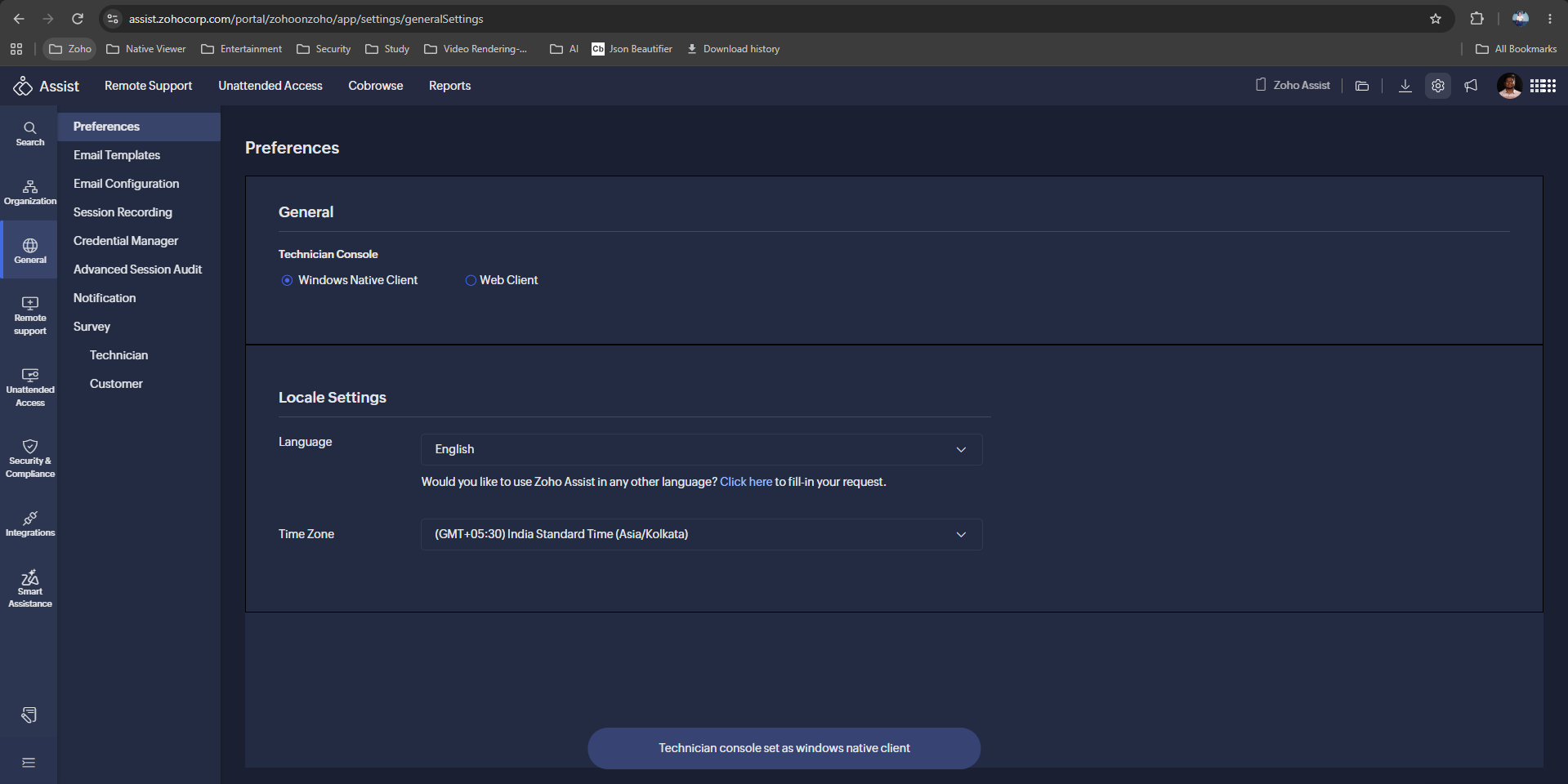
How to print from a remote session
Launch a remote support or unattended access session via the Native Viewer viewer.
Select the Remote Print option from the Session tab.
Download and run the remote printing driver.
Open the document you want to print, choose your preferred remote printer, and print.

The need for physical documents hasn't disappeared, but the need to be physically present to print them has. Remote Printing in Zoho Assist bridges that gap without adding complexity to your workflow.

Note: Remote Printing is currently supported only on Windows-to-Windows devices and is available exclusively when using the Native Viewer.
Have you used Remote Printing in your sessions? We'd love to hear how it's helping your team. Share your experience in the comments below!
For help or questions, reach out to us at support@zohoassist.com. We're always happy to help!
Topic Participants
Amali Steffi Raj J
Nederlandse Hulpbronnen

Recent Topics
Cannot unblock account
Hi, I have recently been travelling for work and now my mail account has been locked due to suspicious activity (I guess login attempts from different countries) however when I go into my admin panel it won’t let me unblock and asks me to contact support.WorkDrive Desktop Sync Is Being Deprecated: Move to WorkDrive TrueSync for a Smarter Experience
Hi everyone, We are excited to share a better, smarter way to access and manage your files directly from your computer! We’re transitioning from our legacy Desktop Sync app to WorkDrive TrueSync, designed to give you faster performance,greater flexibility,Time logging issues
I am losing times tracked on tasks. The problem is that it is not clear when the time is logged, when the timer is stopped or when the task is closed? I've done both and neither works. Whats more when the task is closed, the tracked time disapperas (i guess bc it shouldve been logged) but when it's not logged you've just lost your tracked time. The bigger problem is the UN-NATURAL way this time logging is set up. On every other plat form that tracks time, it is made clear to save timer or log whenStart/Stop Timmer in Chrome Extension
The chrome extension is great and allows you to do allot however one of the most common things employees working on projects need to do is track their time. Having an easy start/stop timer to track time would be great.Employee Logged Hours Report
Hi Team, We are looking at having all Employees logged hours report, but different staff uses diferent modules to log their time. Is there anywhere that we can get a report that captures every time entered through all Zoho modules? Thank you.Time Log Report Across Zoho Apps?
Currently there are at least 4 different apps in Zoho where users can book time. Projects Desk Books People In our case for instance, the same user may book time against both Projects and Desk Tickets. So we have no way to see a simple timesheet for aZoho Time tracking option with automated screen shots.
Time tracking option with automated screen shots would be an exceptionally good feature, any plans to develop something like that? Please do the needful. Thank you, Raj RajincDetailed time tracking (for productivity/accountability). How to?
Hello everyone! I read an interesting article about accurately tracking your time in 15 mins intervals and after some time analyzing it in order to improve your productivity. I'd like to give this a try myself. I would like to use Zoho apps. (How) could I do this? Thanks for the tips!Time Tracking Needed in Zoho
It seems lots of people request a Time Tracking Zoho Desktop App, that is only problem I have with working with Zoho. People need to know how much time they spend on specific tasks. Is Zoho planning to do this sometime in the future?emails?
Why can't I send emails from my account anymoreBackorder For Composite Items
Hello If i released SO for composite item and use backorder feature of zoho inventory then it should backorder child item items of composite and not composite item.This is basic of backordering.I conveyed this to zoho call center but no solution yet.Global Constants / Variables
It would be great if there were a Global Constant feature. The idea here is for managing constants that are used in multiple Flows and Subflows, but might change over time. The idea is that the change could be made in one place and cascade to all futureDeal Activity Tracking - By Time
Hello, I am trying to figure out a way to implement a time tracking ability within the CRP that will provide a line item on the final invoice in books. Would the Cases module be of good to use in this scenario? Want to integrate into Books as well. ITime Card Tracking For Employees
Does ZOHO have an add-on or app that my employees can use to clock in & out on a daily basis. In the past we had used a third party solution, but it was hard to use and pricey. We would really like to use your time tracking feature if you have one......ifLogging time within Time Tracking
At the moment I use the call logging feature of CRM to log time spent on clients work. Its nice to be able to start, stop and pause the timer and record how many hours I need to bill the client. Any chance of implementing this in Zoho Invoice's time tracking feature The same interface as CRM would be great or a simple start/stop/pause/restart timer.3rd Party/Easy Time Tracking Integration with Zoho
We are new customers using Zoho One with Zoho Project/CRM/Desk being the 3 big applications we will use. The majority of our work is done in the field and we need accurate and easy time tracking for our workers on mobile phones. aka TSheets type functionality. but tied to Zoho. Zoho is outstanding overall so I am surprised at how laborious, inefficient and disconnected time tracking is mobile devices. Adding time to a project task on a mobile phone can be a 10+ click task and that's not an exaggeration!TrueSync for Windows 5.16+ breaks Excel save in "Shared with Me" (temp file writes fail) – workaround: pin 5.15.1
Hi all, After TrueSync for Windows auto-updated past 5.15.1, some of our users can no longer save Excel files that live under "Shared with Me". We isolated it to a client-side regression and found a workaround. Sharing in case it saves someone a few hoursPurchase Requisition in Zoho Books
I want to understand if Zoho Books is having the following workflow: PR ( Purchase Requisition ) >> PO ( Purchase order) >> GRN/SRN ( Goods/Services receipt note) >> BillEnhancement Request: Preserve Canceled Zoho Bookings Meetings in CRM
I recently worked with Zoho Support on ticket 170383788 regarding what happens in Zoho CRM when an appointment is canceled in Zoho Bookings. Support confirmed that the current behavior is intentional: when a Bookings appointment is canceled, the correspondingIntroducing the Markdown editor in Zoho Learn
Hello everyone, We're excited to announce the release of the Markdown editor in Zoho Learn. With Markdown editor, you can create and import articles as Markdown. You can write content using simple Markdown syntax and see how it looks with the built-inWhen will Bigin's latest AI features be available in Europe?
Hi, As I previously raised this question in the post “Introducing Bigin's latest AI features, built for the way you work!”, but received no response, I am bringing it up again here. It has now been five months since the announcement, and these AI featuresFunction #50: Send Mass emails to your customers
Hello everyone, and welcome back to our series! We have reached a milestone of 50 Functions, which means that we have automated 50 different tasks in Zoho Books. Every Friday, we have shared a nifty function aimed at either automating a task or streamliningTime tracking
Hi there We are looking for a simple, intuitive but powerful time track application. We bill our clients by the time we spend, and so need to link Clients<>Projects<>Tasks or Activities<> Time spent. Is there an app in Zoho we could use? Many thanks.. MorriStaff Tracking in
Hi , I would like to see what activity my staff does over Zoho CRM and over Zoho Mail . I need to know which deals in CRM haven't been touched or had an activity on by a particular staff member . Basically need to establish what work.gets done by WFHReport: avg time to visit each lead
We are on zoho one. our sales team visits leads using the ZohoCRM app. They track their hours using the zoho books timer. So the results in zoho books look like this: -total hours worked: 8 In ZohoCRM we have a custom date/time field in each lead recordCreating a Stop Start Timer for Custom Moduel
Hello, I am trying to track Maintenance of internal Assets through Zoho CRM (I have tried the FSM, Projects, Inventory apps nothing is working the way I need it to). I have it all built in the CRM where I have internal work orders where i can keep trackLogging time to a Sales Lead in CRM
Hi, Is there a way to log time against a Sales Lead / Deal in CRM before it is won and becomes a project? Our employees often do work for sales opportunities and need to log time against them at any point of the sales cycle, before it is won. Thanks, AtifHourly Billing in Zoho CRM Deals, Books, and Projects?
We bill on an hourly basis and need that time added into a client's invoice in Books. A client might have multiple deals open with us that we are working on, and billing separately, and thus need separate invoices for each. The functionality of ProjectsTime taken on a task
I notice that you can record the length of a call, but not an event or a task. When a potential progresses from beginning to end it is just a series of tasks/calls/events in a process. I have most of it automated depending on the type of sale and triggered by updating the sales cycle field. It follows that you should be able monitor the time of each of them so that you actually know how much time you spend on each potential. This gives an idea of profitability of each potential. I would think thisTimesheets from Deals
Hi Guys, new Zoho One customer here with only a few employees. I run a small software company and currently our small number of employees are creating manual timesheets in excel. There is a column for a job number (that relates to a Zoho Deal) and they just put in the time taken to perform the work. As an example, they might spend 1 hour running some barcodes for a particular client (and deal). Then they may do a support all for another client and that takes 2 hours (This client would have a yearlyTimesheet option in zoho crm
Recording a timesheet against a job is very crucial for every business because it will help them in billing the client accordingly and also it keeps a track on how much time a user is exactly taking in marking the job as cloed. Currently in crm therePortal access is now available in the Zoho CRM mobile app
Hello everyone, Zoho CRM Portals provide a secure space for sharing selected records with people outside your organization. These portal users can include customers, vendors, partners, or anyone who needs access to specific CRM data. Previously, portalMultiple locations
I have many customers (accounts) that have multiple locations, like bank branches. How can I manage them under one account?Calendar won't load
I run into this problem about once a week, where I try to open my Zoho calendar in a web browser, and it just gets stuck, waiting forever to load (see attached screenshot). I'm usually using Edge or Duck-Duck-Go browser. Sometimes it loads just fine,Tip: #14 Save words and phrases in Writer for faster writing!
As you start working with more documents everyday, you'd find yourself using certain words and phrases across documents quite often. In this week's tip, let's discuss two easy ways to train Writer to remember your commonly used words—equipping you toZoho ERP | Product updates | October 2026
Hello users, A new month, a fresh set of updates in Zoho ERP. This month brings Netting, enhancements across our verticals, and more updates to help streamline your everyday work. Explore this month’s updates and see what’s new. Compliance with RevisedZoho Forms - Feature Request - Embed iFrame or Dynaic URLs in Description fields
Hi Zoho Forms team, I'm working with a client who uses Zoho Forms internally to collect information over the phone from potential work placement candidates. At the end of the form, the candidate needs to be booked in for an induction, which we've configuredBANK FEED - MAYBANK , provider from YODLEE IS NOT WORKING
As per topic, the provider YODLEE is not working for the BANK FEED. It have been reported since 2023 Q3, and second report on 2023 Q4. now almost end of 2024 Q1, and coming to 2024 Q2. Malaysia Bank Maybank is NOT working. can anyone check on this issue?Digest Octobre - Un résumé de ce qui s'est passé le mois dernier sur Community
Bonjour chers utilisateurs, Bienvenue dans ce nouveau digest de la communauté Zoho France ! Vous y trouverez les discussions marquantes, les nouveautés produits, les conseils pratiques partagés et bien sûr les événements à venir. Le mois dernier, nousBank feeds - still a problem
I'm really frustrated that the bank feeds only "sometimes" work. I raised this problem once before and was advised that Zoho used Yodlee and feeds were only updated once a day. That's fine but it only "sometimes" seems to work. Eventually transactions appear but they sometimes seem to take days. I know of other programs (Xero) that another business I am involved with uses Yodlee and they do not have this issue. My bank feeds are active, I tried to manually refresh however Zoho tells me thatNext Page