Updates - October, 2019
Hello App Creators,
After a short wait we’re here with the first set of features mentioned in our September, 2019 announcement.
The following are now available in Zoho Creator 5:
- Time field and 12-hour format
- Record comments
- Search element in pages
- New UI for the record template builder
Quick references:
- - - - - - - - -
Time field and 12-hour format
Welcome to the new Time field and the 12-hour time format. These also bring some improvements to the Date-time field.
- Your app can now display time in the 12-hour format. Learn how
- Time field sports a time-picker and enables your users enter a valid time value. Learn more

- Minutes interval: The field property determines the choices that'll be available in the "minutes" part of the time picker. It’s also available for the date-time field.
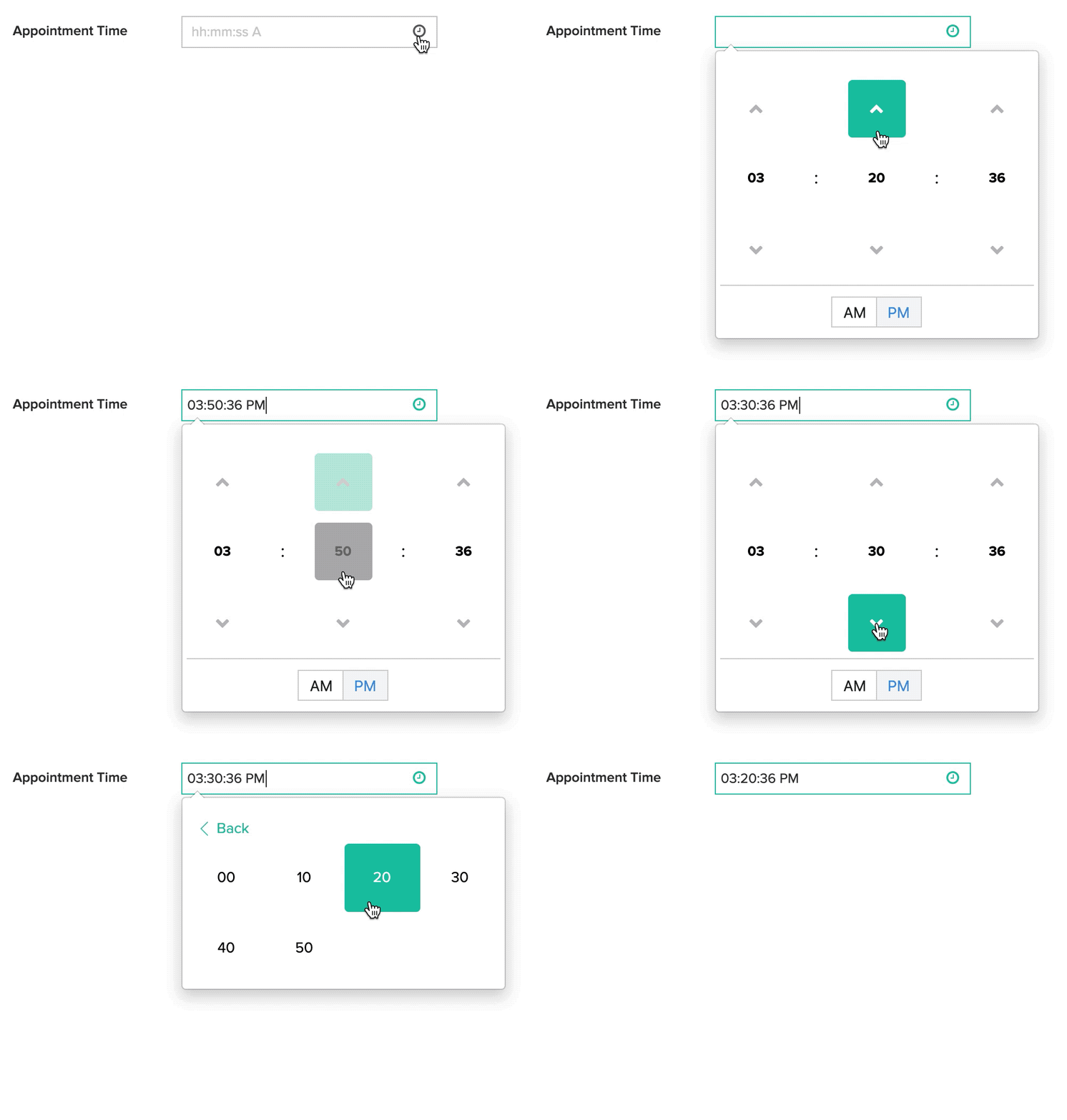
- Show seconds: The field property determines if the "seconds" part is displayed by the time picker. It's also available for the date-time field. When Show seconds is disabled, the time field will store the "seconds" part as 00.
- Both Minutes interval and Show seconds are properties that control the time picker's display in forms. When a user accesses the time field from a web browser, they can:
- Type a time value where the "minutes" are not as per the minutes interval
- Type the seconds part in the time field
- - - - - - - - -
Record comments
Availability: Premium and above subscriptions from our latest pricing
You can enable your users—by giving them permission—to add comments to records. This is available in the detail view of a report. Learn more
- Comment permissions are form-specific. They are enabled by default for the app admin.
- Two permissions are available: Read comments and Write comments. Awarding the write comment permission automatically awards the read permission to that user.
- Shared users can add comments, reply to comments, and delete their own comments. The app admin can additionally delete all comments.

- - - - - - - - -
Search element in pages
The Search element in pages enables your users to search data in your Zoho Creator apps. Search results are shown by opening a pre-configured report or page, which will be filtered using the search input. Learn more
Below is a page that sports the search element. Upon search, it redirects to another page where the search results are displayed:

- - - - - - - - -
New UI for record template builder
- Auto-save is now supported — the changes you make to the template will now be automatically saved, so we've removed the Save button from the builder
- The Elements and Fields tabs have been introduced:
- All template elements such as Header, Paragraph, and Image, have been moved from the top of the builder to the Elements tab on the left
- The Spacer element has been introduced
- All fields that can be added to the template will now be displayed under the Fields tab on the left
- The Size, Orientation, Padding, Margin, Show header, and Show footer settings have been brought out of Properties and placed at the top of the builder

- - - - - - - - -
Let us know what you think about these updates in the comments below!
Best,
Lakshman | Zoho Creator Team