Uploaded files are not included when using "Include user submitted data" in Email Notification

Uploaded files are not included when using "Include user submitted data" in Email Notification

In Send Email notification workflow in Zoho Creator, there is an option called "Include user submitted data" which allows the email to contain all the form submission details.
However, when this option is enabled, files or images uploaded through File Upload or Image fields are not included in the email.

Additionally, when attempting to manually add fields using the Insert fields option in the email editor, File Upload or Image fields are not available to insert into the email content.

For example, in a Student Assignment Submission form, there are fields such as Image and Files that allow users to upload images or documents.
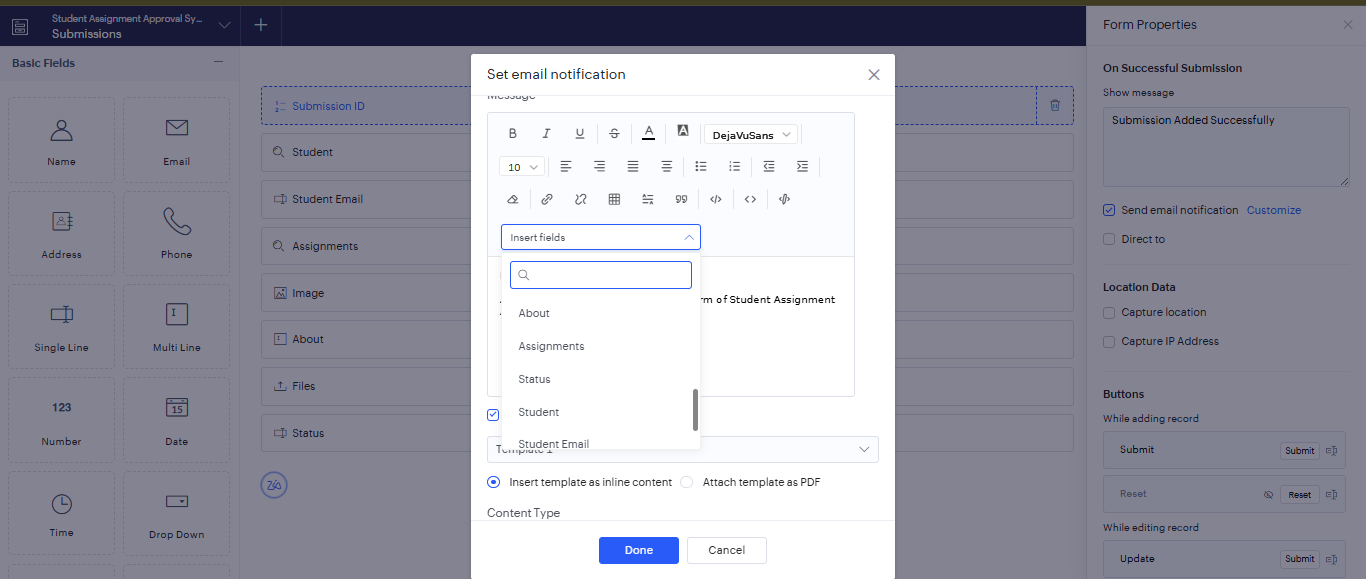

When configuring the Email Notification for this form, there is an option in the message editor called Insert fields, which allows form fields to be inserted into the email content. However, in this list, the Image and File Upload fields do not appear as selectable options, even though they are part of the form and contain submitted data.

Ideally, when Include user submitted data is selected, all submitted data including uploaded files or images should also be included or attached in the email, as they are part of the form submission.


Currently:
  1. Uploaded files are not automatically attached to the email.
  2. File/Image fields are not available in the Insert Fields list.
  3. The only way to send them is by using Deluge scripting (send mail task with attachments)


It would be helpful if uploaded files or images were also automatically included or attached in the email when "Include user submitted data" is enabled, since they are part of the submitted form data.

    • Sticky Posts

    • Share your success story

      We would like to hear from our passionate users how much Zoho Creator has changed the way you work and benefited you. If you would like to share your story to us and be featured as a proud user of Zoho Creator, then this is for you. Fill up the form below and if you want to be included in a case study, we will get in touch with you to get further details. So what are you waiting for? Tell us your story. Charles
    • Merge and Store v1 API depreciation

      Hi Zoho Writer users, The Merge and Store v1 API allows you to store the merged document in Zoho WorkDrive. The response of this API will be returned with the document's ID only after the merge is complete. In Deluge, the maximum timeout for operation
    • Zoho Creator Developer's Conference 2017 !!!

      We welcome all our Creator Developers! You're invited to join us for our annual Zoholics Developers conference August 29th–31st! This is your chance to get training and guidance on Zoho Creator from our most knowledgeable custom app builders.       Zoholics Developers is a three-day event where you'll participate in interactive workshops to hone your app-building skills, get questions answered by Creator experts with personal one-on-one sessions, and connect with other Creator developers from around

    Nederlandse Hulpbronnen


      • Recent Topics

      • Add a way to connect Log360 Cloud logs with Zoho analytics

        Hi, Several month ago Log360 Cloud was added to zoho one - and this is great. But as far as I see there is no prebuilt way to connect Zoho analytics to the logs we have in Log360 Cloud. Please add a prebuilt connection like we have for so many other zoho
      • Extend GitHub Commit Integration to Tasks in Zoho Projects

        Hello Zoho Projects Team, We hope you are doing well. We would like to submit a feature request regarding the current GitHub integration in Zoho Projects, specifically the ability to link commit information. Current Limitation: As of now, Zoho Projects
      • Enable Screen Recording in Zoho WorkDrive Mobile Apps (Android & iOS)

        Hi Zoho WorkDrive Team, How are you? We are enthusiastic Zoho One users and rely heavily on Zoho WorkDrive for internal collaboration and content sharing. The screen-recording feature in the WorkDrive web app (similar to Loom) is extremely useful- however,
      • Zoho Project - Total Forecasted Hours

        Does anyone know an easy way to get a total of all the forecasted hours across the portfolio? I'm aware trying to create a custom report that can generate this figure for each task and the total up but the completion percentage doesn't seem to come back
      • Bank Fees - Allow User to Choose Expense Account

        Bank fees from Customer Payments can only be debited against the system Bank Fees account due to hard-coding. The user should be able to select which expense account those fees are debited against. The use case is pretty straightforward. A business like
      • Attendance Kiosk Mode for all Employees

        Is it possible to assign a tablet (ios/android) so that all employees can check in or out using a simple QR code? If not would it be possible to integrate attendance with a web app that also has a tablet app that works in kiosk mode? If yes can anyone recommend such an app?
      • How can we get payment status updates for payment links in Zoho Books using webhooks?

        When we create and share a payment link in Zoho Books, is there a way to know when the payment is updated? Can we use webhooks to get real-time updates for payment link status instead of checking manually?
      • Update to CRM Custom Buttons: Collect Users' Location

        Hello everyone! Buttons in Zoho CRM allow you to extend the default CRM capabilities for your bespoke business needs. It provides the flexibility to connect to any third-party application to perform necessary actions. Wouldn't it be better, if those buttons
      • Introducing note actions and dynamic visibility in Kiosk Studio

        Hello all, We are introducing enhancements to Kiosk Studio that will improve the product scope and meet your custom needs more precisely. What's new? Add notes as Actions: You can add notes to CRM records as kiosk Actions, as well as insert merge fields
      • CRM x WorkDrive: We're rolling out the WorkDrive-powered file storage experience for existing users

        Release plan: Gradual rollout to customers without file storage add-ons, in this order: 1. Standalone CRM 2. CRM Plus and Zoho One DCs: All | Editions: All Available now for: - Standalone CRM accounts in Free and Standard editions without file storage
      • Challenges with data consistency when integrating Zoho with other systems

        In setups where Zoho (CRM/Inventory) is connected with external systems like eCommerce platforms, maintaining consistent and reliable data across systems can be challenging. Some common issues that tend to come up: Product data mismatches (variants, pricing
      • Logging Calls not working

        For some reason, logging calls is not working anymore. Description of problem: On a Lead's record, in the "Open Activities" block, clicked on "Add New" Clicked on "Call", clicked on "Log a call" Nothing happens. If I click on "Schedule a call" nothings
      • How to transfer files from Creator file upload fields to CRM file upload fields

        This article describes how to transfer files from Zoho Creator file upload fields to Zoho CRM file upload fields. I'm posting it here because the current documentation does not fully and accurately describe how to do this with certain file types (PDF,
      • Announcing Zoho Sheet desktop app for macOS and Windows (Beta)

        Hello Sheet users, We know you’ve been waiting for this one. It has always been the top priority on our roadmap to provide a single native desktop app for macOS and Windows that works both online and offline. Today, we are excited to announce that the
      • Zoho Mail Android app update: UI revamp

        Hello everyone! We are excited to share that the first phase of the Zoho Mail Android UI revamp is now live. In this update, we have redesigned navigation bar at the bottom to quickly access the Email, Calendar, Contacts, and Settings modules. Also, the
      • Records Per Page

        Can we get max number of records per page increased from 100 to 250 and 500 please? Or alternatively allow us to use the Zoho Sheet View for all records and not just the max 100 showing on the page? thanks.
      • This campain is on hold

        Trying to start a Zoho Campaign for our company but the error message when we try to send it out it this: This campaign is on hold Our compliance team needs additional information about your sender domain address. They'll reach out to you shortly via
      • Blueprint transitions on locked records

        We use the ability to automatically lock records (quotes, sales orders, etc.) based on criteria, such as stage. For instance, if a quote has been sent to a client, the quote is then locked for further edits. Our ideal quote stage process is: Draft>Sent>Won.
      • Whatsapp Limitation Questions

        Good day, I would like to find out about the functionality or possibility of all the below points within the Zoho/WhatsApp integration. Will WhatsApp buttons ever be possible in the future? Will WhatsApp Re-directs to different users be possible based
      • Sales Ordes removes TAX at random for some or all prodcuts, even after creating it

        Hi at Zoho CRM, in the Sales Orders section, when Creating, Cloning or editing any Sales Orders the TAX of one or all products gets "unchecked" at random. All of our products ALWAYS must have the same TAX selected automatically. At least it used to be
      • Turning off self view in Zoho Meeting

        Hi Is it possible to turn off/hide self view in meetings?  Cant see any options for it. Thanks
      • CRM to Desk Contact Sync Issues?

        Hello, I noticed none of the contact changes in CRM are being transferred over to Desk. Anyone else experiencing this? I checked the sync history in desk and it confirms it - it doesn't show "X Contacts Synced" like it normally does.
      • Please add Deluge code editing for Forms

        Assuming Forms is built on the same codebase as Creator, etc., it would be wonderful to be able to edit form code, cut and paste form elements across different forms, share code with other users, and so on.
      • Is there any workaround or method to restrict user login to a particular device

        Hi, I want to restrict my CRM user from accessing the Zoho CRM/Zoho One application to the company provided devices only. As far as I have explored there is no direct way to do this. Is there any workarounds that will allow me to do this. I want to ensure
      • Email from CRM being Blocked or Marked as Spam by Google (and maybe more)

        In the past 24 hours we’ve noticed that emails sent via Zoho CRM are being blocked or flagged as phishing, particularly by Google. The issue seems to occur specifically when emails contain links. URLs like www.domain.com or www.example.com are automatically
      • Introducing SlyteUI : From Idea to a Working Interface in Minutes

        Hello everyone! Are you spending hours building basic UIs? Does even the smallest customization feel like a major task? CRM customization should feel intuitive and straightforward, not time consuming or exhausting. SlyteUI makes this possible by simplifying
      • All new Address Field in Zoho CRM: maintain structured and accurate address inputs

        Availability Update: 29 September 2025: It's currently available for all new sign-ups and for existing Zoho CRM orgs which are in the Professional edition exclusively for IN DC users. 2 March 2026: Available to users in all DCs except US and EU DC. 24
      • Zoho Tables - Form default entry

        How so I set a form field to be populated with an entry from another table? I created a view on my source table limiting the results to just the one thing I want to see. When adding a Client via my Add Client form, I want the Client Type field to already
      • Payment Card or Identity form-fill from Vault?

        Hello! I'm working on replacing Bitwarden with Vault and one issue I've run into is that I can't find any option to fill address and payment forms from Payment Card or Identity info that has been saved in Vault. Is there a way to do this? Is it a planned
      • Introducing Bin Locations In Zoho Inventory

        Hello users, We are excited to let you know that your wait for the Bin Locations feature has now come to an end! Yes, you heard us right! We are here to introduce the much-awaited Bin Locations now in Zoho Inventory. But before we dive into the feature
      • Add Actionable “Smart Commits” for GitHub Integration

        Hi Zoho Projects Team, I am submitting a feature request to introduce Smart Commits support for the GitHub integration in Zoho Projects. The Current Limitation: Currently, Zoho Projects offers a "passive" integration. Including a Task ID in a commit message
      • Item Details Field - New Barcode / Document option?

        Is this a new feature??? its in both books and inventory.
      • Items attribute questions

        Many of my items have attributes, such as size and color. How can I add new fields to the "New Items" screen to capture that in my Purchase Orders, Items, and Sales Order pages? I only see these attribute fields when adding an Item Group. Also, on the
      • SEO recommendation of H1 tag for website tittle

        The exact words are “ It is good practice to place the page title inside the H1tag.” Now I already have one H1 tag on my website but it is not website tittle. In the SEO recommendation that is clear too that I have h1 tag on my page. Now I don’t know
      • Anyone Building AI-Based SEO Dashboards in Zoho Analytics?

        Hey everyone, I’m currently working on an SEO reporting dashboard in Zoho Analytics and looking to enhance it with AI-based insights—especially around AI visibility, keyword trends, and traffic sources. The goal is to track not just traditional metrics
      • Knowledgebase SEO

        We have a custom-domain mapped help center that is not restricted via login. I have some questions: a) will a robots.txt file still allow us to control indexing? b) do we have the ability to edit the sitemap? c) do category URLs get indexed by search
      • Marketing Tip #15: Rank better with keyword-rich URLs for product pages

        Your product page URL is a small detail that can make a surprisingly big difference. Clean, readable URLs help in two ways: They’re easier for customers to trust and remember (no one likes clicking a link that looks messy or random). They help search
      • Marketing Tip #26: Optimize product images for SEO

        Product images can do more than make your store look good. They can also help customers discover your products through search. Since search engines can’t "see" images, they rely on text signals to understand what an image is about. Two small actions make
      • Zia Agents in Zoho CRM: a better way to set up digital employees

        Hello everyone, If you've been using Zia Agents in Zoho CRM, so far using Connections was the only deployment method you're familiar with. You create an agent in Zia Agents (define its objective, write instructions, use tools, add knowledge base) and
      • Cross Module Filtering – Use Fields from Lookup modules in Custom Views criteria and Advanced Filters

        Hello everyone, Zoho CRM now enables you to achieve deeper filtering of records in a module, using fields of a lookup, thereby enhancing your data management experience manifold. This filtering based on lookup module fields is now available in advanced
      • Next Page