Weekly Tips: Insert frequently used phrases in a jiffy using Hotkeys

Weekly Tips: Insert frequently used phrases in a jiffy using Hotkeys

You often find yourself using similar phrases in an email —like confirming appointments or providing standard information. Constantly switching between the mouse and keyboard interrupts your flow and slows you down.Instead of typing the same phrases over and over, you want to quickly insert those common phrases to save time. What if you could instantly perform these actions and insert frequently used phrases without breaking your typing rhythm?    
                                           

Hotkeys in Zoho Mail help you get through your emails faster and more efficiently without repetitive clicking or typing the same content repeatedly, Ex:- As soon as possible - ASAP.

HotKeys

You can create custom text shortcuts using Hotkeys in Zoho Mail. Hotkeys can be used to expand and replace easy abbreviations of your choice with full words and phrases as you type in the mail composer.

Create Hotkeys

  1. Login to your Zoho Mail account.
  2. Click on the Settings icon.
  3. Navigate to Mail > Hotkeys section.
  4. Click + Add a Hotkey.
  5. Provide the Hotkey of your choice and its replacement text in the appropriate fields.
  6. Click Save to add the hotkey.
You can also use the Import Hotkeys from a csv or json file option to import your existing hotkeys into Zoho Mail.

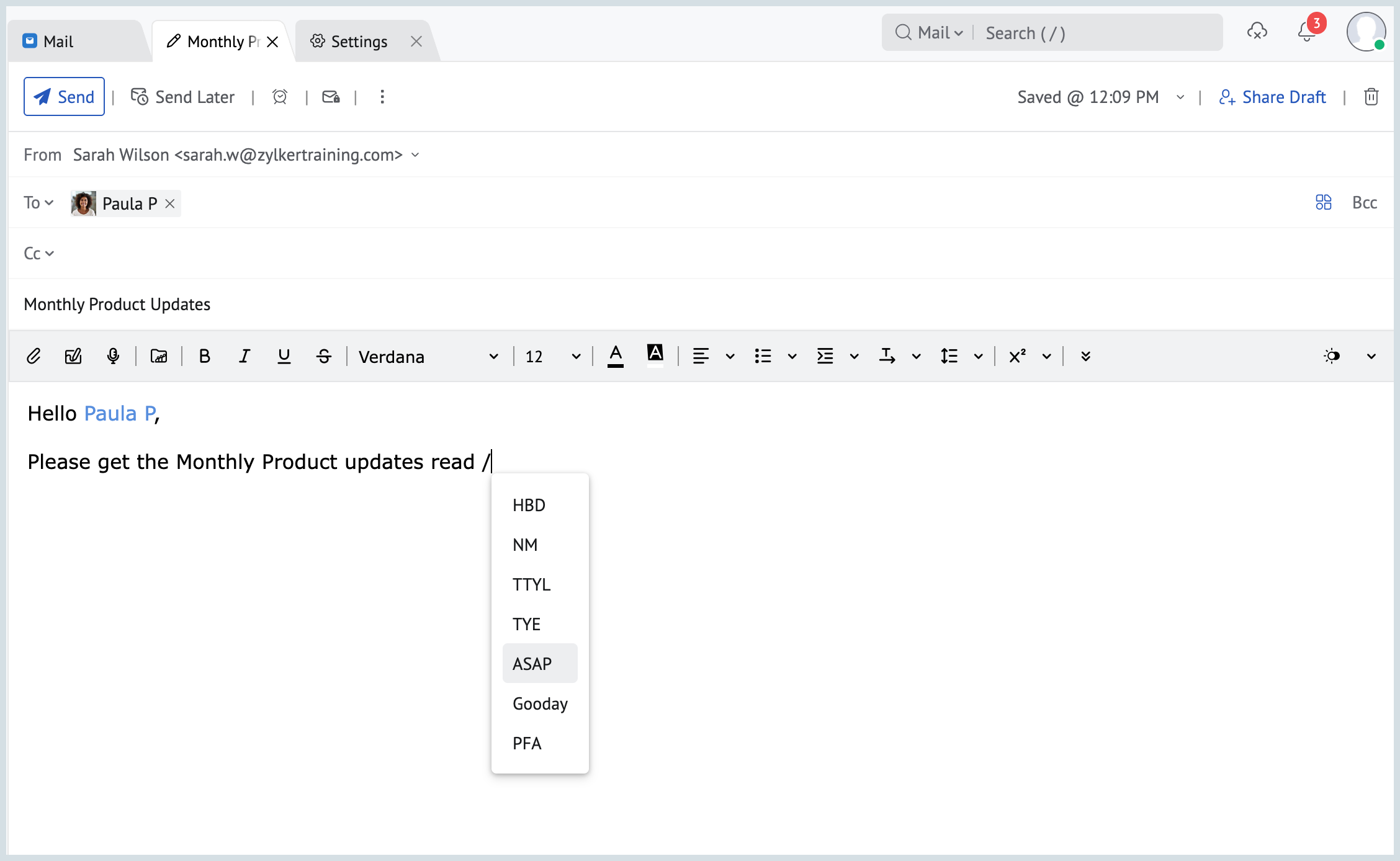
To use Hotkeys, in the composer, type '/' to see all your Hotkeys and their text replacements. Select one to insert the Hotkey.

    • Sticky Posts

    • Weekly Tips : Save Time with Saved Search

      Let's assume your work requires you to regularly check emails from important clients that have attachments and were sent within a specific time period. Instead of entering the same conditions every time—like sender, date range, and attachments included—you
    • Weekly Tips: Protect Confidential Information with PGP in Zoho Mail

      We deal with confidential information almost every day, whether it is being sent out or received. Though emails sent using Zoho Mail are encrypted both during transit and at rest, attempts to access and steal your sensitive data are always a threat that
    • Get Holiday ready with Zoho Mail's Templates

      As the holiday season approaches, it’s time to step away from work and unwind. You may not be able to respond to every email or send individual messages to wish everyone holidays greetings—but It is still important to stay connected. How do you send thoughtful
    • Weekly Tips: Secure your attachment downloads with Zoho Mail

      Safety is one of our main concerns, whether it’s about device security or online protection. We use tools like fingerprint scanners, facial recognition, and two-factor authentication to keep our devices and email accounts secure. We use methods like OTP
    • Get Holiday ready with Zoho Mail's Offline mode

      With the holiday season right around the corner, this is the perfect time to get ready to unplug, relax, and enjoy a well-deserved break. In addition to preparing yourself, you can also make sure your organization members are set for their time away from

    Nederlandse Hulpbronnen