Weekly Tips : Make your email content error free with Spell check in Zoho Mail

Weekly Tips : Make your email content error free with Spell check in Zoho Mail

As someone who writes multiple emails a day, we are bound to make both grammatical and spelling errors. Most of them we may not even notice, and even if we do, we may not have the time to correct each one individually when we are in a hurry. So how do you make sure your content is error-free without breaking your writing flow? 

With Zoho Mail’s Spell checker, your work becomes much easier. It detects all your errors as you write and provides quick suggestions to correct them.

Spell check

Zoho Mail has an inbuilt enhanced Spell checker to correct your spelling and grammar errors on the go. After composing your email, click the Spell check icon. The misspelt words or grammar errors in your email content will be highlighted. Simply click the highlighted words to see a list of possible words with the nearest correct spelling or alternative words. You can also add a word to your custom Dictionary by clicking the Add to dictionary icon so that it doesn't get flagged the next time you spell-check an email.

Enable Spell check

  1. Log into your Zoho Mail account.
  2. Navigate to Settings > Compose > Spellcheck option.
  3. Click on the Checkbox Spell check as you type.
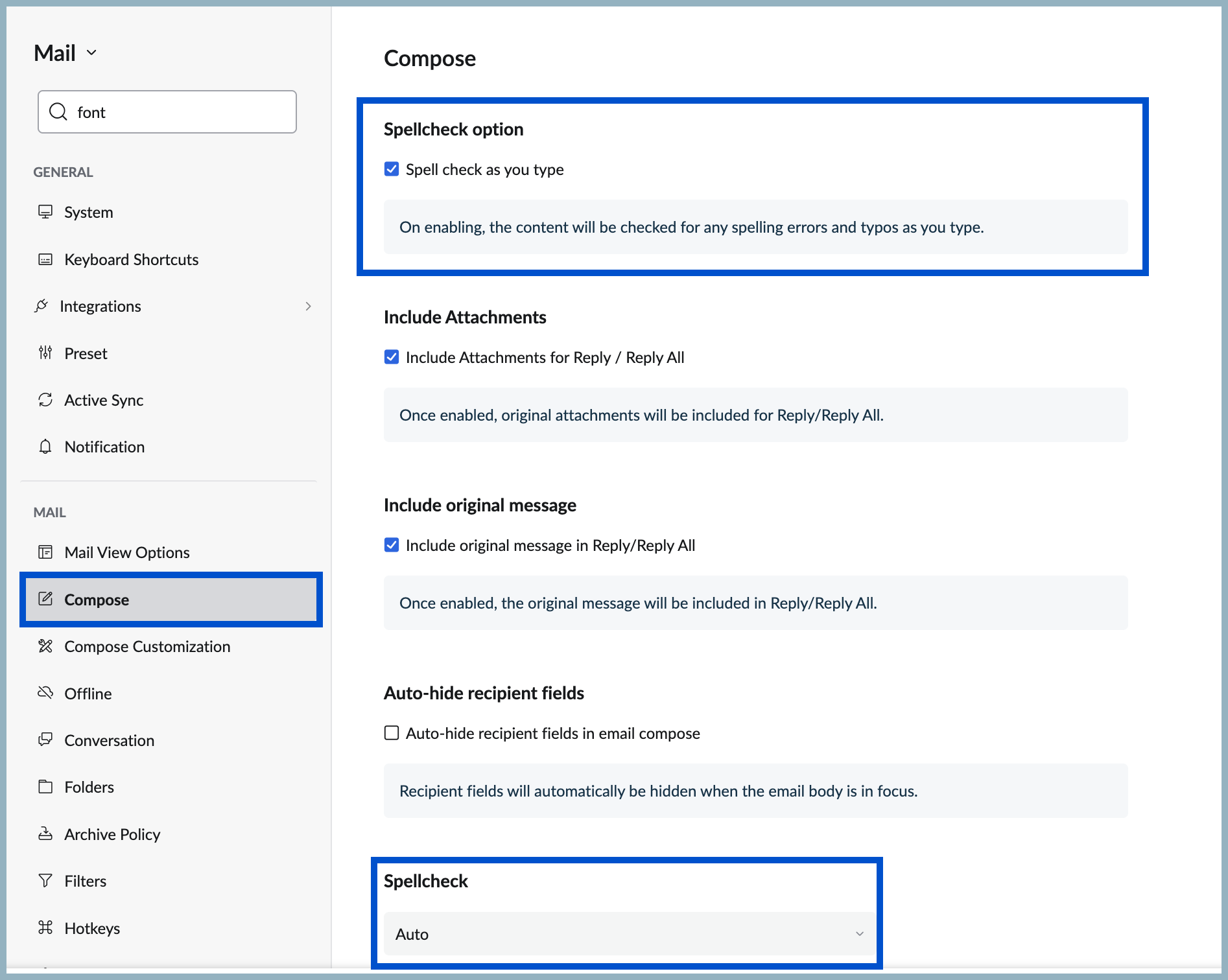
  4. Scroll down to Spellcheck to apply spell check for other languages in Compose.
  5. Then select your preferred language from the options in the Spellcheck drop-down.
No more typos or overlooked mistakes, ensure your content is error free without breaking the writing flow with Spellcheck in Zoho Mail.
    • Sticky Posts

    • Weekly Tips: Insert frequently used phrases in a jiffy using Hotkeys

      You often find yourself using similar phrases in an email —like confirming appointments or providing standard information. Constantly switching between the mouse and keyboard interrupts your flow and slows you down.Instead of typing the same phrases over
    • Weekly Tips : Save Time with Saved Search

      Let's assume your work requires you to regularly check emails from important clients that have attachments and were sent within a specific time period. Instead of entering the same conditions every time—like sender, date range, and attachments included—you
    • Weekly Tips: Protect Confidential Information with PGP in Zoho Mail

      We deal with confidential information almost every day, whether it is being sent out or received. Though emails sent using Zoho Mail are encrypted both during transit and at rest, attempts to access and steal your sensitive data are always a threat that
    • Get Holiday ready with Zoho Mail's Templates

      As the holiday season approaches, it’s time to step away from work and unwind. You may not be able to respond to every email or send individual messages to wish everyone holidays greetings—but It is still important to stay connected. How do you send thoughtful
    • Weekly Tips: Secure your attachment downloads with Zoho Mail

      Safety is one of our main concerns, whether it’s about device security or online protection. We use tools like fingerprint scanners, facial recognition, and two-factor authentication to keep our devices and email accounts secure. We use methods like OTP

    Nederlandse Hulpbronnen


      • Recent Topics

      • Draft quotes, sales orders, and raise invoices for services in CRM

        Create Quotes, Sales Orders, and Invoices for Services in Zoho CRM You can now draft Quotes, and Sales Orders as well as raise Invoices for services in Zoho CRM. And how is that possible? By filling out the Service subform in your Quotes, Sales Orders
      • Canva Integration

        Hello! As many marketing departments are streamlining their teams, many have begun utilizing Canva for all design mockups and approvals prior to its integration into Marketing automation software. While Zoho Social has this integration already accomplished,
      • Admin Logging in as another User

        How can a Super Admin login as another user. For example, I have a sales rep that is having issues with their Accounts and I want to view their Zoho Account with out having to do a GTM and sharing screens. Latest Update (27th April 2026): With the early
      • Action Required: Allowlist New IP Ranges for the EU Data Center

        Dear Users, We are adding new IP ranges for the Zoho Analytics EU data center (https://analytics.zoho.eu). If you import data into Zoho Analytics from cloud databases (such as Amazon RDS, Amazon Redshift, or Microsoft Azure) or use Live Connect, you must
      • Tips & Tricks #3: Zoho CRM - Agentes en la página de inicio

        Hola a todos, Vuestros Agentes realizan un trabajo muy útil. Encuentran información como clientes potenciales importantes, oportunidades de venta y actualizaciones relevantes. Sin embargo, hasta ahora no era posible ver esa información directamente en
      • Pricelists

        So we have them in books but I cannot find them in commerce?
      • Automating CRM backup storage?

        Hi there, We've recently set up automatic backups for our Zoho CRM account. We were hoping that the backup functionality would not require any manual work on our end, but it seems that we are always required to download the backups ourselves, store them,
      • 'Pinned' notes feature of a pipeline record

        Hi team, Could you please implement a feature which will allow users to pin different notes so that they will appear at the very top of the notes tab in a pipeline record. Sometimes we have a wide range of notes on a record which means more important
      • Associate emails from both primary and secondary contacts to deal

        We need to associate emails from multiple contacts to a deal. Please advise how this can be achieved. At present, only emails from primary contacts can be associated. Thanks
      • Custom Button Creation from Layout Editor in Zoho CRM

        Hello All, Buttons in Zoho CRM act as triggers that perform a specific action when clicked. Zoho CRM includes a set of system buttons that help you carry out common actions with a single click. Beyond these, your organization can create custom buttons
      • #PitStop3: Share & Collect Payment using Zoho Invoice

        We have reached another milestone in our journey. Post #15 to #20 weren't just about sharing invoices, they were about building a payment workflow that works for you, your customers and your business. Here's a quick wrap of what we covered in this segment:
      • Suggestions for Improving the Deluge Development Experience

        Hello, I would like to share some ideas that could significantly improve the Deluge development experience, especially for partners and developers building larger solutions across the Zoho ecosystem. Some key areas that would add a lot of value: Deluge
      • Enhancement announcement: Mitigate mailbox clutter using the new field: "Sync emails from"

        Dear Customers, We hope you're well! We are here with a minor enhancement in email integration in Zoho CRM. Emails have become the primary mode of communication these days. Because of which mailboxes are getting overly cluttered day after day. To help
      • Zoho CRM Sandbox now supports integrations

        Hello everyone, We are now expanding Zoho CRM Sandbox to support integrations with other Zoho products. You can connect, configure, and validate the behavior of your integrated tools within a safe, isolated environment - testing end-to-end without touching
      • Building Toppings #8 - Using widgets to extend the Bigin UI

        Hello Biginners, In our previous forum post, we explored schedules and workflow functions and learned how to automate real-time and time-based actions inside a topping. In this post we'll look at how to embed custom UI components inside Bigin using widgets.
      • Tip #81 – Turn every session into a story with Session Highlights – 'Insider Insights'

        Hello Zoho Assist Community! Picture this: your team wraps up dozens of remote support sessions every week. Each one involved troubleshooting, tools, fixes, and back-and-forth with customers. But when it's time to review what actually happened across
      • Zoho CRM APIs

        Hello, I think as a developer, it is very important to have the ability to manage, develop, and execute functions directly from my local development environment (for example, VS Code). Zoho CRM should have a way to create, deploy, and manage functions
      • 🎙️ Ask The Experts: Get Your Bigin Questions Answered Live

        We've seen so many thoughtful questions from our #BiginnersClub community over the years. While we're always happy to help here, we're excited to introduce a new way for you to connect with us directly. Join us for Ask The Experts, a one-hour live fireside
      • Postcode problems

        So we were very pleased to see we could limit shipping with postcodes. Brilliant. Unfortunately we have discovered It does not seem fit for purpose. In the UK we write postcodes in various ways Examples BH217NL BH21 7NL Bh217nl bh217NL and many more ways
      • Certain items certain shipping

        Me again it would be helpful to have different shipping for different categories. Our example are salt. Delivery is free but have a minimum delivery. Pickup is cheaper so it has its own category- pickup.
      • Cookies Consent Management in Webforms

        Hello Everyone! We are excited to introduce Cookie Consent Management for webforms. Read on to learn more. Webforms are online forms embedded on websites that allow users to submit data and create records in Zoho CRM. These forms utilize cookies to track
      • Payment links in Bigin just got supercharged

        Greetings, We're happy to announce major enhancements to the Payments feature in Bigin. As you may already know, Bigin supports Payments integration, which enables you to create and send payment links directly from Bigin to your customers. It also allows
      • Disable Spam filter

        Hi Support Team, Please disable spam filter for https://desk.zoho.in/support/keboli. Some spam ticket ids: #102, #103, #104
      • I just signed up

        Hi, I have just signed up for the domain griffithcgenterprises.com. I would like to make two adjustments: If possible, I would prefer a 5 GB hosting/email plan instead of the current 10 GB option, as I believe that should be sufficient for my needs at
      • History tab stuck loading indefinitely on Android (v2.22.0)

        History tab stuck loading indefinitely on Android (v2.22.0) — server returns 500 on visitorhistoryviews Hi all, I'm running into an issue where the History tab in the SalesIQ Android app (v2.22.0) never loads — it just spins indefinitely. Screenshots
      • Não consigo enviar e receber e-mail

        Estou tendo problema de envio e recebimento de e-mail (meu e-mail é ands....lisi.com.br) Esta mensagem foi criada automaticamente pelo software de entrega de e-mails. Uma mensagem que você enviou não pôde ser entregue a um ou mais destinatários. Este
      • إلغاء الإشتراك

        أريد إلغاء الإشتراك نهائياً.
      • Opening two notes at once in the Mac app

        Just like the title says - I want two notes open the same time on my Mac Air. AI search seems to think I have the option to open one window, then click on a second one. But of course if one window is open I can't see the others. It also recommended using
      • Introducing the Employee Portal for internal job posting

        Employee referrals and internal applications are one of the most trusted hiring channels. But in many organizations, employees only hear about openings through messages, word of mouth, or after the role has already been open for a while. When employees
      • Department Customization Copy/Paste

        Hello! I love the new customization of the layouts, rules and templates! However, we have several "departments" that operate similar and as I'm updating either ticket layout or workflow rules, I'm finding that I have to do it in each department. I would
      • How do you import mail from Thunderbird into ZOHO mail

        Hi, We have Thunderbird on our Apple Macs and want to transfer the emails from this to our shiny new Zoho mail account. I know using Outlook on a PC you can zip the .eml files up and upload them into specific folders on your ZOHO mail account using this form: mail.zoho.com/mail/jsp/importFolder.jsp However as Thunderbird use mbox files I'm not sure how to do it. Can anyone let me know if they have migrated mail from Thunderbird to Zoho mail and how they did it. I have many folders and emails to transfer
      • How to Open .mbox file in Gmail with Attachments?

        Gmail offer users to backup INBOX folder in .mbox file format via Google Takeout Feature. Howver there is no such option to Restore Gmail MBOX. Thus I would like to suggest you to choose an alternate approach i.e. MBOX to Gmail Wizard. This utility will open .mbox file in Gmail with attachments.  Steps to open MBOX file in Gmail are; Run MBOX to Gmail Wizard Click Add File and add .mbox file. Enter your Gmail login credentials. Click Convert button. Finished! This is how you can open MBOX file in
      • Poor Zoho Support

        Been trying to reach support via telephone and email. The support has always been slow to respond but now its been two weeks without a return call. I have even sent them screen shots of the problem I've having with no results. Is anyone had the same problem.
      • Desk Contact Name > split to First and Last name

        I am new to Zoho and while setting up the Desk and Help Center, I saw that new tickets created or submitted from the Help Center used the Contact Name field. This would create a new Contact but put the person's name in the Last Name field only. The First
      • SalesIQ operators will not receive any messages if customers do not answer the Pre-Chat questions in Flow Controls.

        Hi Zoho SalesIQ Team, I am reaching out to report a issue regarding the Brands > Flow Controls SalesIQ operators will not receive any messages if customers do not answer the Pre-Chat questions in Flow Controls and continue sending messages without completing
      • SalesIQ's Summer '26 Release: For The Moments That Matter

        Every customer journey is made up of moments. The moment someone discovers your business. The moment they need help. The moment you decide to reach out. The moment a simple chat turns into something more. And the moments that continue long after the conversation
      • Add Comprehensive Accessibility Features to Zoho Writer

        Hello Zoho Writer Team, We hope you are doing well. We would like to submit a feature request to enhance Zoho Writer with a full set of accessibility tools, similar to the accessibility options already available in the Zoho Desk agent interface. 🚧 Current
      • Copying a Document with its Citations

        When I copy a document that contains citations using File>Make a Copy from the document's menu the text copies but the citations do not (according to Google they should). Is this the correct way to make a complete copy of a document with its citations
      • Bing ads integration and tracking

        Hi, Is there any way to track Bing ads in the same way that we are able to track google adwords?  It is important for us to be able to determine the conversion rate of our Bing ads.  If this is not possible now, will this feature be added in the future?
      • #20 Your Business Shouldn't Stop Just Because You Do

        Imagine you are on a well-deserved vacation. Your clients are expecting invoices at the beginning of the month, recurring customers are due for billing, and payments are still coming in. Do you carry your laptop everywhere, hoping you don't miss a billing
      • Next Page