Weekly Tips : Save Time with Saved Search

Weekly Tips : Save Time with Saved Search

Let's assume your work requires you to regularly check emails from important clients that have attachments and were sent within a specific time period. Instead of entering the same conditions every time—like sender, date range, and attachments included—you want a quick way to access this exact group of emails immediately when you log in. This helps you save time and ensures you never miss urgent messages or important documents.

Use the Saved Search feature in Zoho Mail to avoid the extra hassle of entering email search filters every time you want to view a specific set of emails.

Saved Search

Zoho Mail provides you with an option to save such 'Searches' for future use using the Saved Search feature. You can name the Search, and such saved searches are listed as a separate section. This feature is particularly useful in cases where you want emails with specific search criteria to be available for accessing easily without undergoing the same set of searches.

How to Save a Search

  1. Log into your Zoho Mail account.
  2. Type in the keywords relating to your search in the search box.
  3. After setting your search conditions, the relevant emails get listed on your screen.
  4. Click the Save this Search option on the top of the screen.
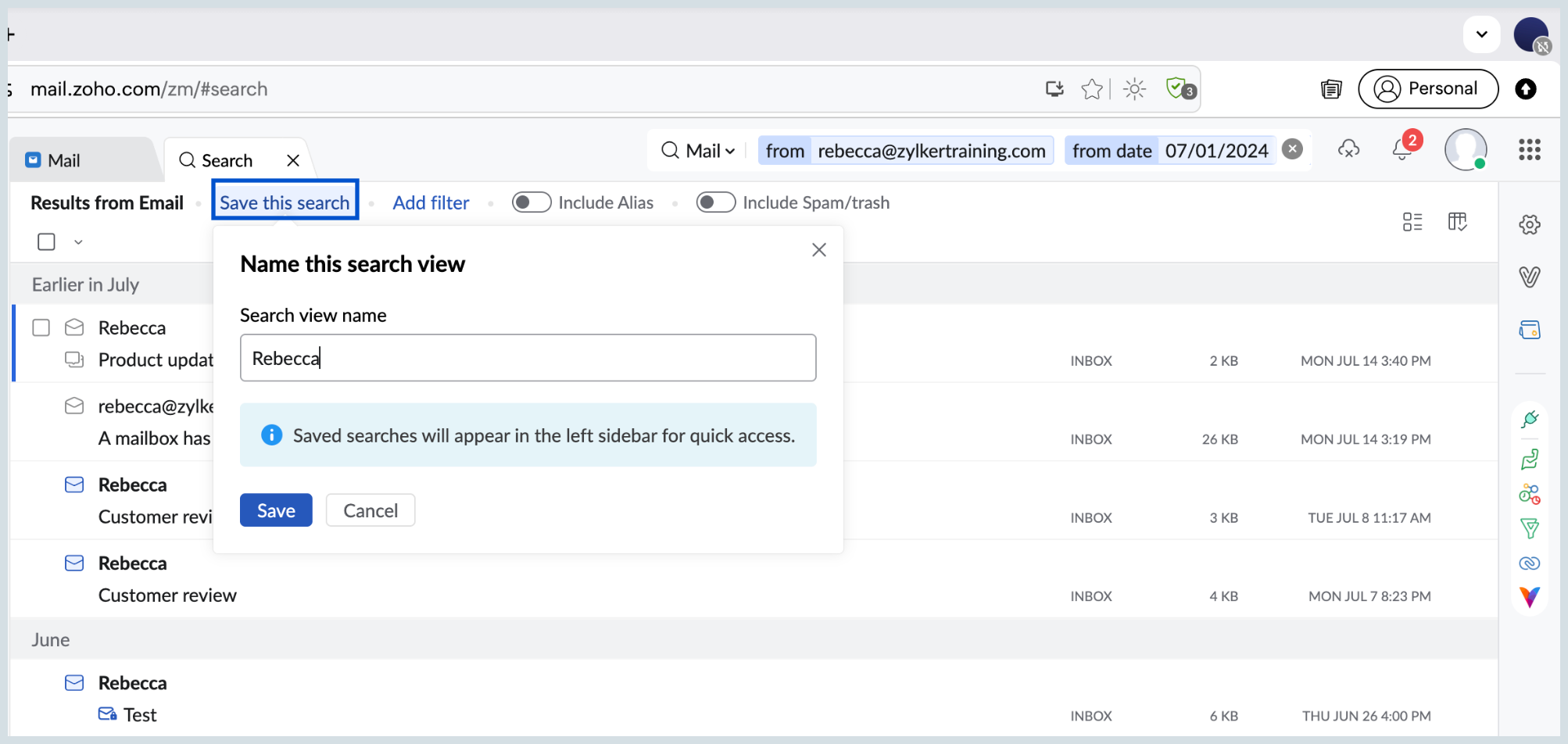
  5. Enter the Search View name and click Save.
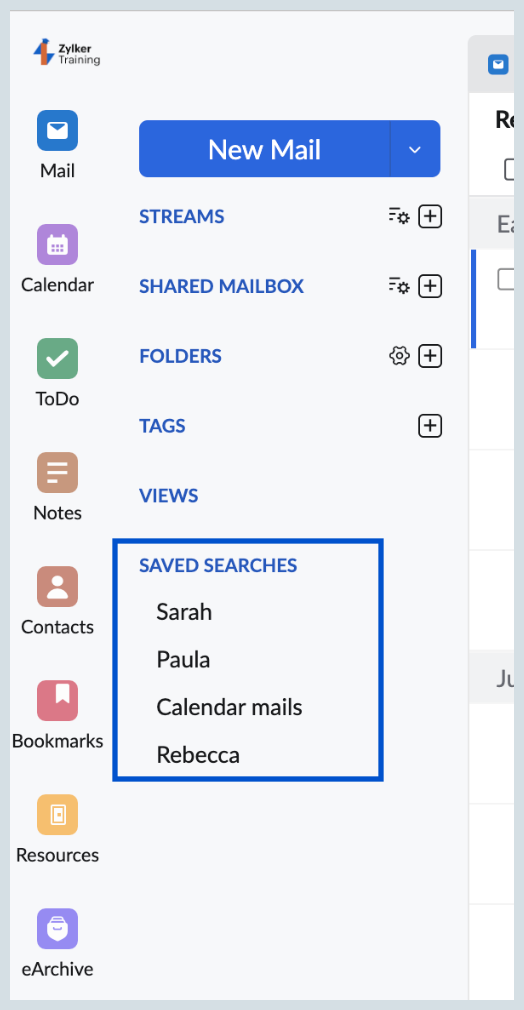
Once you have saved the search, you can easily access those saved searches in the 'Saved Searches' section in the left pane.  Every time you select the Search Condition, a new search is performed, and the results would include the newer emails also.

    • Sticky Posts

    • Weekly Tips: Insert frequently used phrases in a jiffy using Hotkeys

      You often find yourself using similar phrases in an email —like confirming appointments or providing standard information. Constantly switching between the mouse and keyboard interrupts your flow and slows you down.Instead of typing the same phrases over
    • Weekly Tips : Save Time with Saved Search

      Let's assume your work requires you to regularly check emails from important clients that have attachments and were sent within a specific time period. Instead of entering the same conditions every time—like sender, date range, and attachments included—you
    • Weekly Tips: Protect Confidential Information with PGP in Zoho Mail

      We deal with confidential information almost every day, whether it is being sent out or received. Though emails sent using Zoho Mail are encrypted both during transit and at rest, attempts to access and steal your sensitive data are always a threat that
    • Get Holiday ready with Zoho Mail's Templates

      As the holiday season approaches, it’s time to step away from work and unwind. You may not be able to respond to every email or send individual messages to wish everyone holidays greetings—but It is still important to stay connected. How do you send thoughtful
    • Weekly Tips: Secure your attachment downloads with Zoho Mail

      Safety is one of our main concerns, whether it’s about device security or online protection. We use tools like fingerprint scanners, facial recognition, and two-factor authentication to keep our devices and email accounts secure. We use methods like OTP

    Nederlandse Hulpbronnen


      • Recent Topics

      • The All New Attendee App | Zoho Backstage

        The Zoho Backstage attendee app is the primary touchpoint for attendees, speakers, exhibitors, and sponsors during an event. It helps participants access event information, manage their schedules, connect with other participants, engage with exhibitors
      • Department Customization Copy/Paste

        Hello! I love the new customization of the layouts, rules and templates! However, we have several "departments" that operate similar and as I'm updating either ticket layout or workflow rules, I'm finding that I have to do it in each department. I would
      • Ticket status does not update upon layout change

        Hi team, I'm encountering an issue with ticket layouts and Blueprints in Zoho Desk and would like to understand whether this is expected behavior or a bug. Scenario I have two ticket layouts: Helpdesk Integration The Integration layout has its default
      • Assign account to a ticket created with WebToCase

        We use Zoho Desk. Our large client uses WebToCase form to submit tickets. I have two workflow rules: When a contact is created and its email ends with example.com, it runs a custom function, which assigns the new contact the right account Example with
      • The 3.1 biggest problems with Kiosk right now

        I can see a lot of promise in Kiosk, but it currently has limited functionality that makes it a bit of an ugly duckling. It's great at some things, but woeful at others, meaning people must rely on multiple tools within CRM for their business processes.
      • "code":3001 ["Failed to update data."]

        I would like to seek your expertise - I might be wrong on my approach also.. I highly appreciate your advice. 1 problem remains is when a new row was added on the existing one [from another form that trigger upon Successful form submission ], it gets
      • Zoho Team Inbox - roadmap

        Hi, would be good to understand the Teaminbox roadmap, in particular: 1. API / Zoho Deluge connections. We have a process where the each email needs to be either tagged or assigned daily. It would be great if we could automate a 5pm alert for any exemptions
      • Displaying only unread tickets in ticket view

        Hello, I was wondering if someone might be able to help me with this one. We use filters to display our ticket list, typically using a saved filter which displays the tickets which are overdue or due today. What I'd really like is another filter that
      • Zia Agents looks promising, but I still cannot deploy my first agent or connect WhatsApp after weeks of support tickets

        Hi Everyone, I am posting here because I am stuck and need practical help from someone who has successfully deployed a Zia Agent with WhatsApp. Zia Agents looks like a very promising product. I have watched the platform expand quickly, and I have noticed
      • Application-Level Save copy of sent emails

        It would be really helpful to be able to turn on/off the Save copy of sent emails at a per application level, so some applications can save in the sent folder and others don't.
      • how to get transcripts with speaker and time marks?

        Hello, I downloaded the transcript of a recent meeting and noticed that the TXT file does not bring the speaker name and the time mark. Is there any way to make it happen using ootb resources from Zoho Meeting? best
      • [IDEA] Bring Layout - Conditional Rules and Client Scripts to Zoho Books

        The problem We run Zoho Books with two e-invoicing integrations: myData (Greek tax authority, AADE) and PEPPOL (EU e-invoicing). Between the two, our Invoice form carries a large number of custom fields — document type codes, VAT exemption categories,
      • Don't send customer email when creating a ticket

        Hi Is there an easy way to stop the system sending an email to the customer when we manually create ticket.
      • You do not have sufficient permissions to perform this operation. Contact your administrator.

        When I attempt to log a call I initiate the +New Call and Start Calling and I click Answered Call in the popup dialog box that follows. Any attempt to save or close this dialog box results in "You do not have sufficient permissions to perform this operation. Contact your administrator." The only way I can get the popup to disappear is to refresh the page and it will go away. I have found others reporting this issue when they attempt to run reports.  Any suggestions? Thank you in advance for taking
      • Zoho CRM Layout Rules: Nine New Actions, Profile-Based Execution, and Interactive Preview

        Hello everyone, Availability: This feature is now available for customers in the JP and SA DCs. It is planned to be released for other customers in soon. We’re excited to announce powerful new enhancements to Layout Rules in Zoho CRM - a feature built
      • Zia Agents: quando a Inteligência Artificial do Zoho para de sugerir e passa a agir

        Decidi criar um artigo com um panorama prático sobre o que são os agentes do Zia Agents, como funcionam de verdade dentro do ecossistema Zoho e o que aprendi implementando um agente de qualificação de leads em produção. De onde veio a idéia do artigo?
      • Zoho Desk Android app update: Manage Custom Module records, View Record Counts for Sub Modules.

        Hello everyone! We have introduced an option to add, edit and delete Custom Module records within the Zoho Desk Android app. Now, you can also view the record counts for sub modules (Time Entry, Attachments, Activities) in the ticket details screen. Please
      • Automating CRM backup storage?

        Hi there, We've recently set up automatic backups for our Zoho CRM account. We were hoping that the backup functionality would not require any manual work on our end, but it seems that we are always required to download the backups ourselves, store them,
      • How to preserve Lead Creation Date, UTM parameters, and custom fields during Lead Conversion?

        We are optimizing our MQL journey. When converting leads to contacts/deals, we need to ensure that the original system Lead Creation Date and UTM tracking parameters (Source, Medium, Campaign) are not lost or archived, as our teams require them for accurate
      • Problem with currency field in Zoho CRM

        Hi Guys Zoho Books has a feature in currency fields that automatically converts decimal numbers with commas ( , ) to period format ( . ) when pasting them. For example: R$ 2,50 --> R$ 2.50 Is this behavior available in Zoho CRM? I couldn't find any configuration
      • Sub-projects

        Hi,  Can we create a sub-project.   Client1 1. project1     1.1 sub-project1    1.2 sub-project2 2. project2    2.1 sub-project1    2.2  sub-project2
      • Using Items from Books as product/plan Add-Ons

        Hey, It'll be great to use Items from Books as product/plan Add-Ons. Ed
      • Inspection Table

        Hello Latha, We created a job sheet that includes the new table (Inspection Table) which was introduced recently. However, agents are not able to see the rows in the inspection table. Could you please investigate this issue and get back to us? Please
      • Custom Button Creation from Layout Editor in Zoho CRM

        Hello All, Buttons in Zoho CRM act as triggers that perform a specific action when clicked. Zoho CRM includes a set of system buttons that help you carry out common actions with a single click. Beyond these, your organization can create custom buttons
      • Automatic login options for customer portal

        The customer portal is nice for zoho subscriptions, but there are no options to automatically login to it, so if a user is logged into their account inside of my product, I can't create a link that will let them login to their dashboard. Could we have
      • Square Payments for Subscriptions

        I'd love to be able to use Square Payments for Subscriptions with my customers. I already use it for Zoho Books Please have this considered. It would really help my business
      • Admin Logging in as another User

        How can a Super Admin login as another user. For example, I have a sales rep that is having issues with their Accounts and I want to view their Zoho Account with out having to do a GTM and sharing screens. Latest Update (27th April 2026): With the early
      • Add a MATRIX field to the forms creation

        Same as Zoho forms, we need a Matrix field in Zoho Creator forms, is very usefull
      • Discount Per Line Item

        We are a phone company. Sometimes, when we sign up customers, our sales team would like to provide recurring discounts on certain addons. Presently, we have no way of doing this so when we provide discounts, we are forced to simply reduce the price of
      • Introducing template migration: Move your Docusign templates to Zoho Sign in minutes

        Moving to a new e-signature tool usually comes with a catch: recreating every template from scratch. For teams that rely on dozens of carefully built templates—each with the right recipient roles, fields, and placements—that manual rework is often the
      • Error Code 2945 , PATTERN_NOT_MATCHED

        Hi, I am trying out Zoho Creator API.  However, I always get the following <response>     <code>2945</code>     <message>PATTERN_NOT_MATCHED</message> </response> However, error code list error as Invalid Ticket. I do not know what is wrong. 
      • Create a list of products and automatically associate them with new deals

        Hello, I have a store with WooCommerce, and I want to import orders into my pipeline. But I haven't found a way to import the order with the associated products. So, do I have to create the deals and then manually add the products to them? That's double
      • List of Mail Merge Templates via Deluge

        Hello, Is it possible to get a list of the mail merge templates I've created in CRM within a custom function? I want to retrieve them and put them in a dropdown list but all I get is a scopes error! Can anyone see where I'm going wrong? Is this even possible?
      • Zoho Advanced Analytics with Team Module support – Now includes teams, notes, and fields in reports & insights

        Greetings all, Advanced Analytics is now accessible via Zoho CRM's team modules, which means you can add team modules—plus their notes and fields—for inclusion in reports, insights, and other analytical functions. Alongside the standard and custom modules
      • WhatsApp conversations are no longer linked to existing threads after reconnecting the channel

        Hi everyone, We have an existing WhatsApp channel in Zoho Desk. We temporarily disabled it, renamed it, and then re-enabled it while reassigning our bot. Since then, all previous WhatsApp conversations are still visible in the history, but we can no longer
      • Zoho Assist Feature Update: July 2026

        Elevate to Admin Mode for iOS devices Technicians can now elevate an active session to Admin Mode directly from the iOS app. This feature lets the technician switch the remote computer from a standard user account to an admin account by entering credentials
      • Bulk deleting Zoho CRM records using Deluge, COQL and CRM API

        Hello everyone, During CRM implementations, data cleanup is a common task, especially after testing, migrations, imports, or integration development. I created a reusable Deluge function that performs bulk deletion using the Zoho CRM API. The approach:
      • Can't connect CalDAV

        ### Issue Summary Can't connect to my calendars using CalDAV and the URL `https://calendar.zoho.eu` ### Steps to Reproduce 1. Tried to connect on multiple devices, on multiple OS's (Android DAVx, Thunderbird, Gnome Calendar, Apple Caneldar). 2. When I
      • CRM x WorkDrive: We're rolling out the WorkDrive-powered file storage experience for existing users

        Release plan: Gradual rollout to customers without file storage add-ons, in this order: 1. Standalone CRM 2. CRM Plus and Zoho One DCs: All | Editions: All Available now for: - Standalone CRM accounts in Free and Standard editions without file storage
      • Guide customers to the right booking page with routing forms

        Greetings from the Zoho Bookings team! We're excited to introduce Routing Forms in Zoho Bookings. Routing forms let you collect information from customers before they schedule an appointment and automatically direct them to the most appropriate booking
      • Next Page