Weekly Tips: Track Email Engagement with Read Receipts in Zoho Mail
While email is a convenient and widely used way to communicate, it doesn't offer the immediate feedback you get from face-to-face conversations or phone calls. When we send an email, there is no way to know for sure if the recipient has acknowledged its content unless they reply. This can leave you wondering whether they have seen your message, especially if there is no response.
But Zoho Mail makes things easier by letting you use the Read Receipts feature.
Read Receipts
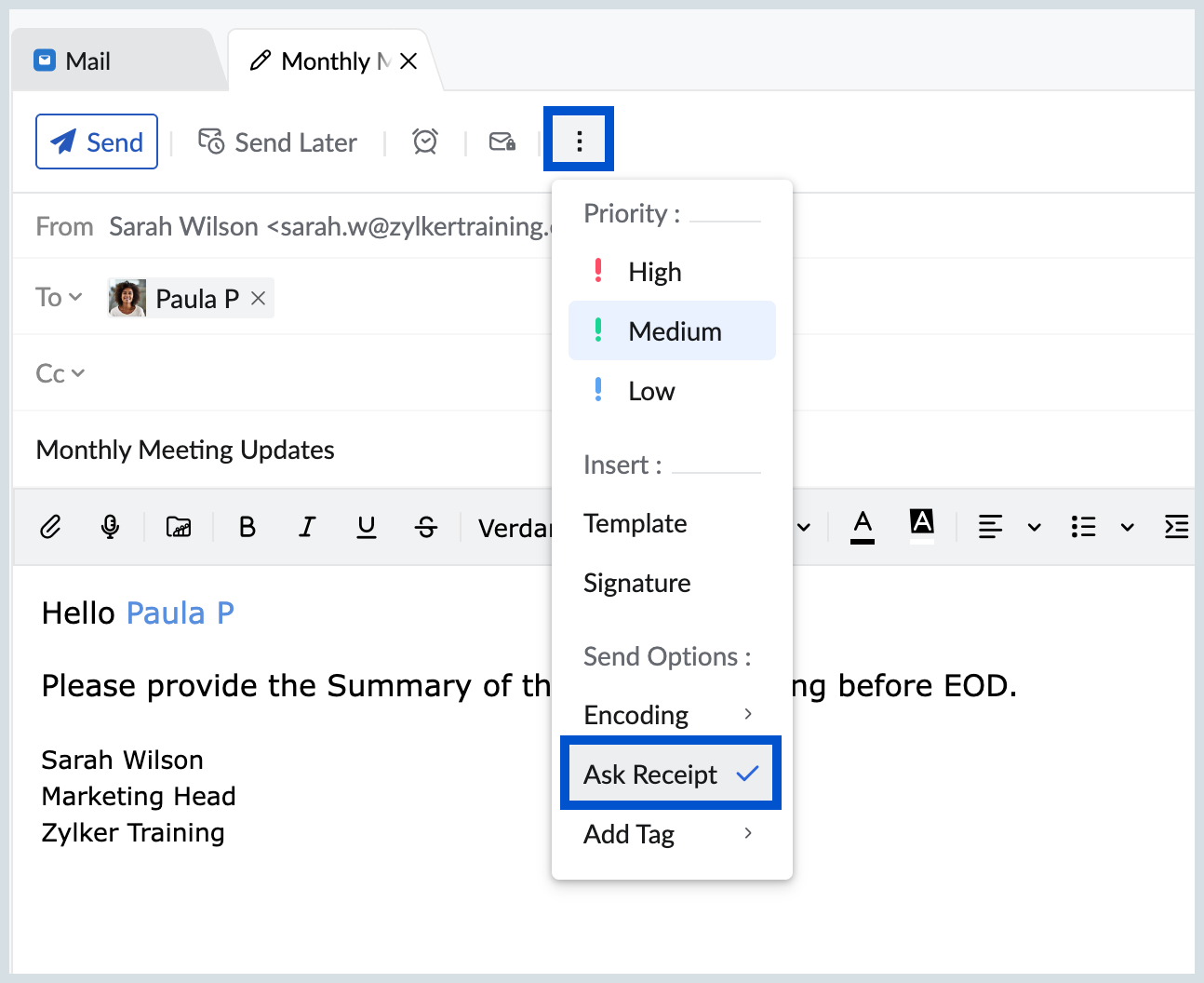
When you send emails, you might need an acknowledgment to know whether the recipient has read the email. In such cases, you can use the Read Receipt feature. When this option is turned on, the recipient will see a pop-up when they open your email, asking if they want to share an acknowledgement of the receipt of the email. If they agree, you will be notified that they have opened your message.
How to Turn on Ask Receipts
- Log into your Zoho Mail account.
- Navigate to Settings >Compose >Read Receipts.
- Click on the Read Receipts Check box.

- All the outgoing emails you send will now ask the recipients for Read Receipts.
Note:
If you prefer not to request read receipts for every outgoing email, you can also choose to request read receipts only for specific emails. Simply click on the Ask Receipt option under More Options while composing your email.
Topic Participants
Sania Sultana H
Sticky Posts
Weekly Tips : Make collaboration effortless with Whiteboard in Zoho Mail
Working with your team often means switching between emails, notes, and other applications just to explain an idea. Maybe you are trying to sketch a layout, plan a workflow, or quickly brainstorm ideas—with text alone, things can get confusing. So howWeekly Tips : Make your email content error free with Spell check in Zoho Mail
As someone who writes multiple emails a day, we are bound to make both grammatical and spelling errors. Most of them we may not even notice, and even if we do, we may not have the time to correct each one individually when we are in a hurry. So how doWeekly Tips: Secure your attachment downloads with Zoho Mail
Safety is one of our main concerns, whether it’s about device security or online protection. We use tools like fingerprint scanners, facial recognition, and two-factor authentication to keep our devices and email accounts secure. We use methods like OTPWeekly Tips : Master Keyboard Shortcuts in Zoho Mail
If you spend a lot of time managing emails, switching between your mouse and keyboard can slow you down. Whether you are replying to clients, organizing your inbox, or searching for messages, every second counts. So, how can you streamline your emailWeekly Tips: Manage External Images in Zoho Mail
When you receive emails every day, whether from clients, newsletters, or services, many of them contain external images that automatically load when you open the message. While this can make emails look more engaging, it can also impact your privacy and
Nederlandse Hulpbronnen

Recent Topics
Thermal Printer Option Needed for Delivery Challan Templates
Currently in Zoho Books, the Delivery Challan template only supports A4 and A5 page sizes. However, in many businesses (especially retail and hardware), we use thermal printers (like 3-inch or 4-inch rolls) to print delivery challans. It would be verySeparate Default Payment Modes for Receipts vs. Payments
Right now, when I set a default Payment Mode via a customer invoice or Payments Received screen, that same mode shows up for vendor payments (Purchases → Payments Made). 🔹 Request: We need different default modes for: Customer receipts (e.g., defaultUpdate/Change GSTIN in GST Settings of zohobooks
We are trying to update our GSTIN under the GST settings section of our Zohobooks account Initially, we had entered a dummy GSTIN (123456789123456) to generate a sample invoice before obtaining our official GST registration. After receiving our actualLink Payment Mode and Paid Through Accounts
For most users, it's very difficult for them to understand that the Payment Mode is totally independent of the Paid Through account when paying bills. It seems (and is) redundant for them to have to select what is basically the same thing twice. The currentLets enable business to choose the default payment mode
Lets enable business to choose the default payment mode so that we do not have choose payment mode again and again for each and every transsctionsSouth African Payment Gateways
Since the "Demise" of Wave many South African users have moved over to Zoho and yet for years users have been requesting Integration with a South African Payment Gateway to no avail. Payfast was the most commonly requested gateway as it supports recurringHas anyone verified if Zoho is PCI compliant?
We are planning on using Zoho to process payments via Authorize.net. We have everything set up and are attempting to complete the PCI DSS SAQ-A requirement for our merchant account. This requires us to prove Zoho has completed the SAQ-D for Service Providers. We need a way to verify compliance, or a copy of an attestation of compliance signed by the appropriate officer at Zoho. I assume I'm not the first person to use Zoho to process payment, and therefore not the first to require this informationBigin Plugin for Outlook
Could we get this added? The Gmail version already exists, and I would like to avoid having to make a switch.Date does not fit the field
Hi There. I am having fun learning zoho sign API. Today I noticed the "Signed Date" field does not fit, or alternatively the font is to large for the auto field space. See screenshot below. The signed date field is created by putting {{Signdate}} on theTip of the Week #69 – Automate your Zoho TeamInbox tasks with n8n integration.
Don’t waste time repeating the same tasks—like sending follow-up emails or adding new contacts. Let automation save the day. With n8n, an open-source automation tool, you can connect your favorite apps and let them handle the busywork for you. You don’tMulti Page/Step Forms in creator
Greetings i was wondering if it's possible to create multipage/step forms on creator similar to what we have on zoho forms. is that possbile? ThanksPackage Geometry
how can i add the dimensions and weight capacity of the available boxes to be default in the system everytime we use it ?How to create a Master Kanban Board that syncs with Child Projects?
Hello, We're currently using Zoho Sprints for managing our interdepartmental teams, and we're looking to enhance our workflow using Kanban boards as part of a company-wide productivity improvement initiative. Our goal is to implement a project structureWriter.. Broken?
Hello, Writer has been really good to me during the months I've used it, up until now. I usually launch the app by tapping the icon and I could immediately pick up where I left off. Now I'm greeted by a loading circle not reaching 100% and I only have the option to create a new account. By pressing that button it now switches to a login screen and I can access my account. However, it seems (only speculating ofc) to be stuck in cell-phone mode? everything looks scrambled. I can't access any ofHow to access Recruit Variables in a Deluge function?
I have set up Recruit Variables in Zoho Recruit, and I would like to know how to retrieve these variables from within a Recruit custom function (Deluge). Could someone please explain the correct way to access them? I tried the following code, but it didUpon De activate a user what name doe sthe contacts candidates go under?
When deactivating a user, does the user name remain the same, as the candidate owner? If not what/who, does it change to? Do I need to change the user name in contacts and candidates before I deactivate the user?Weekly Tips: Customize alerts from your Priority Users
You might receive hundreds of emails daily, but messages from your manager, clients, or team leads often require immediate attention, as they may contain urgent requests or critical updates. How would you ensure you never miss important messages fromMaximum 100 records in Sheet View is limiting. How can I increase this?
Thanks in advance for any help with this. There was a similar post that showed answered but it did not help with increasing the number of records you see in a Sheet View. Editing in the Sheet View is fast and efficient but I have 3500 records and I needRevenue Management: #3 Revenue Recognition Simplified
In continuation of the previous post on how to compute revenue recognition, let's explore a solution that helps businesses handle real-world complexities. While the Accounting Standards provide a clear framework for recognizing revenue, the real challengeTip #40- Strengthen Remote Support with IP-based Restrictions in Zoho Assist– ‘Insider Insights’
Protecting sensitive data and preventing unauthorized access is a top priority for any organization. With IP-based restrictions in Zoho Assist, you can ensure that only users from trusted networks can initiate remote support sessions. Say your IT teamPush Invoices to Xero Manually
Hi guys, I'm wondering if anyone has wanted to do this and has a workaround or knows of an app that may be able to help with this. I sell B2B and B2C. The customers can purchase on our website or through marketplace, all of which send sales to zoho. TheOpenAI error code: 1010 in a Zobot
Please see short linked screen recording. Insights welcome. Please and thank you! https://workdrive.zohoexternal.com/external/f3247ba9c872639157b707700c0300c433c7664aea924a034f4da3c3ad2e355fAbility to Create Sub-Modules in Zoho CRM
We believe there needs to be a better, more native way to manage related records in Zoho CRM without creating clutter. Ideally, Zoho would support "sub-modules" that we can create and associate under a parent module. Our use case: We have a custom moduleInstalling EMAIL Setup in New Domain
Respected Support team, I'm facing an issue with cloudflare in Pakistan, I want to setup Zoho Mail Setup but I Don't know how to enable Zoho mail setup without cloudflare. My Website https://stumbleguymod.com/ is using CF, and I want a different ZohoSignature change
I cannot see how to change signature or out of office details easily now in the new format.Inventory API - Retrieve all uploaded product / item images
I know that I can get the primary image for each product / item or composite item, by using the /image endpoint. https://inventory.zoho.com/api/v1/compositeitems/<item-id>/image?authtoken=<TOKEN> This will return only one photo, even if the item has multiple images uploaded. Is there a way to retrieve all images stored for an item via the Zoho Inventory API?Ebay Integration malfunction
My eBay integration in Inventory has always worked well. It suddenly malfunctioned. It is creating its own parts in Inventory that are unavailable instead of selling the parts I've always sold. Tech help was unable to resolve this. The latest sale attempthow to get all the records in the custom View more than 200 records , Without using the page Concept
how to get all the records in the custom View more than 200 records , Without giveing page as default in the Loop Concept Pls help how We can Achive this void schedule.Lead_Attempt_To_contact_schedule_10_30() { pages = {1,2}; for each pg in pages { query_mapThe way that Users can view the ticket
I have created users. What I would like to achieve is the following: All users under the same company account should be able to view each other’s tickets.Zoho UAE SMS/WHATSAPP
Hello everyone, so I have a question as regards DC and their impact on automation, integration and app usage. For example I am working with a UAE clientniw but each time I tried to connect their WhatsApp and sms then automate their process I tend to receiveLooking to Flag or Tag contacts/ accounts on Zoho Desk?
I am looking for a way to flag certain accounts and make it obvious on the views pages. So for example if a has a certain package or needs extra attention it is clear before even clicking on the ticket. This could be via adding a tag or flag onto an account,setting date-time field from string
hello everyone, i hope someone could help me. i have a date-time field in a form that i want to fill in from two separate fields of date, and time. i need to combine the two fields to a one date-time field but can make it work. i tried to convert theCalendars and CRM Contacts
I'm finding having multiple calendars in Zoho One so confusing. I have a few questions so I can get this straight. We have a meeting room that we have set up as a resource in Calendar. Can this be set up in Bookings and the CRM Calendar? Using Zoho Calendar,Announcing new features in Trident for Mac (v1.23.0)
Hello everyone! Trident for macOS (v.1.23.0) is here with interesting features and thoughtful enhancements to elevate your workplace communication and productivity. Here's a quick look at what's new. Record your meetings. You can now record audio andApplying a record template
Hi all, I can't figure this out. I hope you can help. The scenario: We have learners who have to complete a 'digital' journal with tasks in order to qualify. Those tasks, once completed, need a final signature from their 'Mentor', which will trigger theirQuickbooks invoice with Zoho Creator
Is it possible to push data from Zoho Creator directly to an invoice on QuickBooks? If so, where can I find information on how to do this?Help: Capture full page URL in hidden field when same Zoho Form is embedded on multiple pages (iframe)
Hi all, Goal Use one Zoho Form across multiple pages and record the exact page URL (incl. subdomain + path + hash) where the user submitted it. Example pages: https://www.example.com/cargo/ https://www.example.com/cargo/containers/#contact https://cargo.example.com/auto/Automatically Populate fields - HELP!
There have been many discussions on this but I still can't seem to get it to work for me. I am trying to create a lookup field and have other fields automatically populate. Based on the instructions in the Help Center, I should be using the "on user input". It's just not working, here is the layout... Both forms are in the same application. Current form is called Add Note, form to fetch records from is called Add Client. Lookup field is called Select_Client_ID related field in fetch form is calledPush notifications to portal users
Hi all, it is possible to send push notifications to portal users?Rename the attachment from record template pdf in the sendmail deluge script
Hello Zoho, I urgently need a feature to rename record templates that I send via the sendmail feature. The program I created sends emails to clients with an invoices that have been created in the invoice database. If the user selects 3 invoice numbers,Next Page