What’s New in Zoho Analytics – September 2025

What’s New in Zoho Analytics – September 2025

Hello Users!!
In this month’s update, we’re raising the bar across multiple touchpoints, from how you bring in data, plan and track projects to how you design and brand your dashboards. 
We’ve added the all-new Gantt chart for project visualization, expanded our database integrations, introduced support for modern file formats, redesigned key user experiences with a visual refresh, and a brand new guide for white label solutions.


Let’s dive into what’s fresh this month!

Introducing Gantt Chart 

Manage projects more effectively with the brand-new Gantt Chart in Zoho Analytics. Use it to track tasks, monitor progress, and quickly identify delays in project execution.
You can customize your Gantt charts with:
  • Different chart styles to suit your project needs
  • Color schemes to visually distinguish tasks in progress and completed tasks
  • Flexible date display ranges to match your preferred project view
Click here to learn more.


Database Connectivity

We’ve expanded our support to help you bring in data from more sources, more flexibly.
  • Cassandra 
    You can now import data from Cassandra, a distributed NoSQL database widely used for handling high-volume, high-velocity data. Zoho Analytics automatically normalizes the collections into parent-child table structures, making it easy to analyze your data once imported.
    Learn more about importing from Cassandra.

  • SAP HANA & ClickHouse 
    Now import data directly from cloud-hosted SAP HANA and ClickHouse databases. Alongside local server connection, we’ve added cloud server connection as an additional option to give you more flexibility with how and where you connect.
    Learn more about importing from SAP HANA.
    Learn more about importing from ClickHouse.
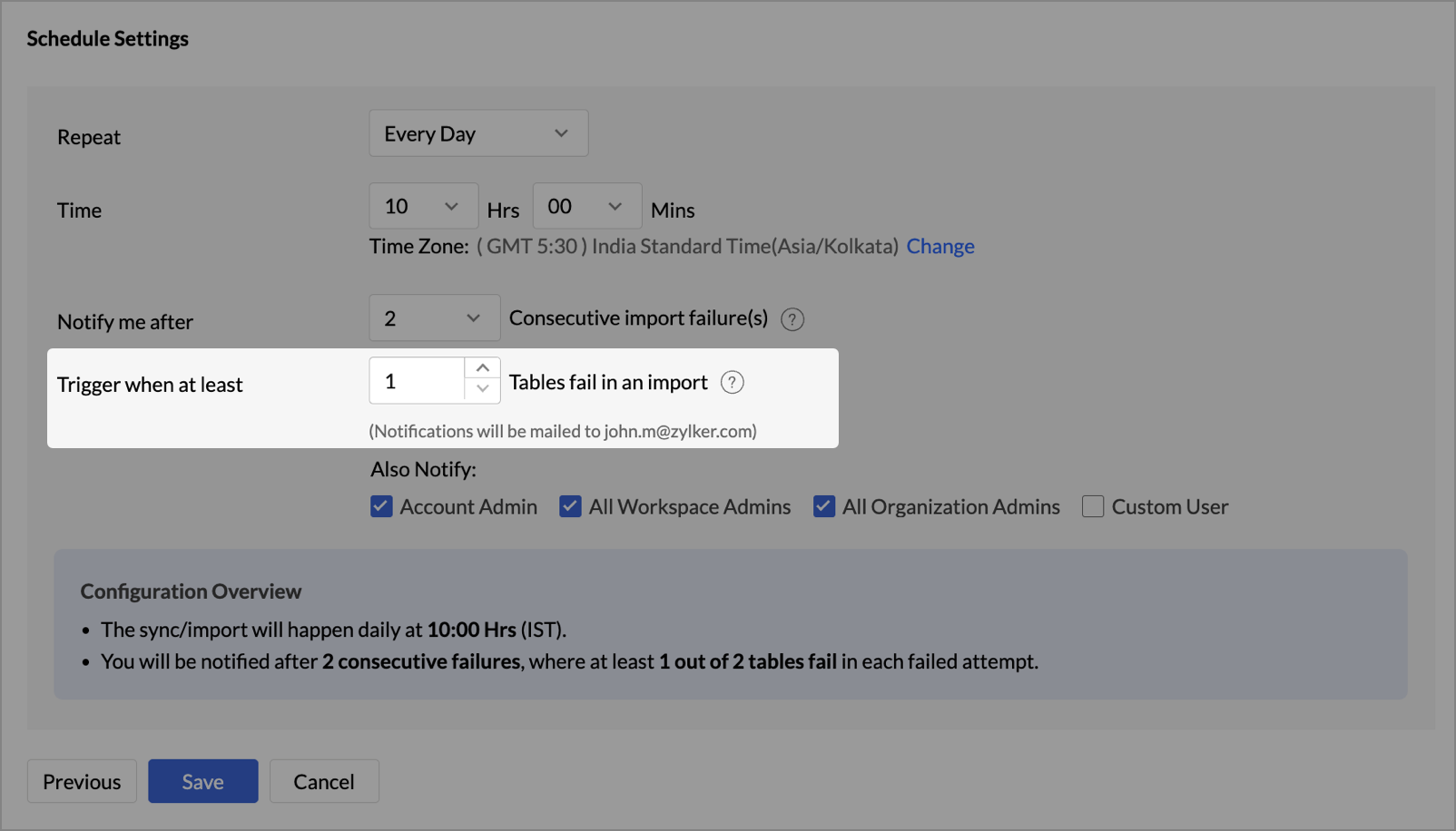
  • Cloud Database Synchronization – Failure Notification Settings 
    You can now configure synchronization settings to trigger a failure notification when a chosen number of table imports fail. Simply set the value for “n” failed tables, and Zoho Analytics will notify you when the condition is met. This gives you more control over monitoring imports and helps avoid missing critical sync issues.
  • Snowflake - New Authentication options
    Zoho Analytics now supports two new authentication methods for connecting to your Snowflake data:
    • Private Key
    • OAuth

These options provide more flexibility and enhanced security when configuring your Snowflake connections.

Learn more about Snowflake integration.

Local File Formats

Working with local files is now more powerful and flexible.
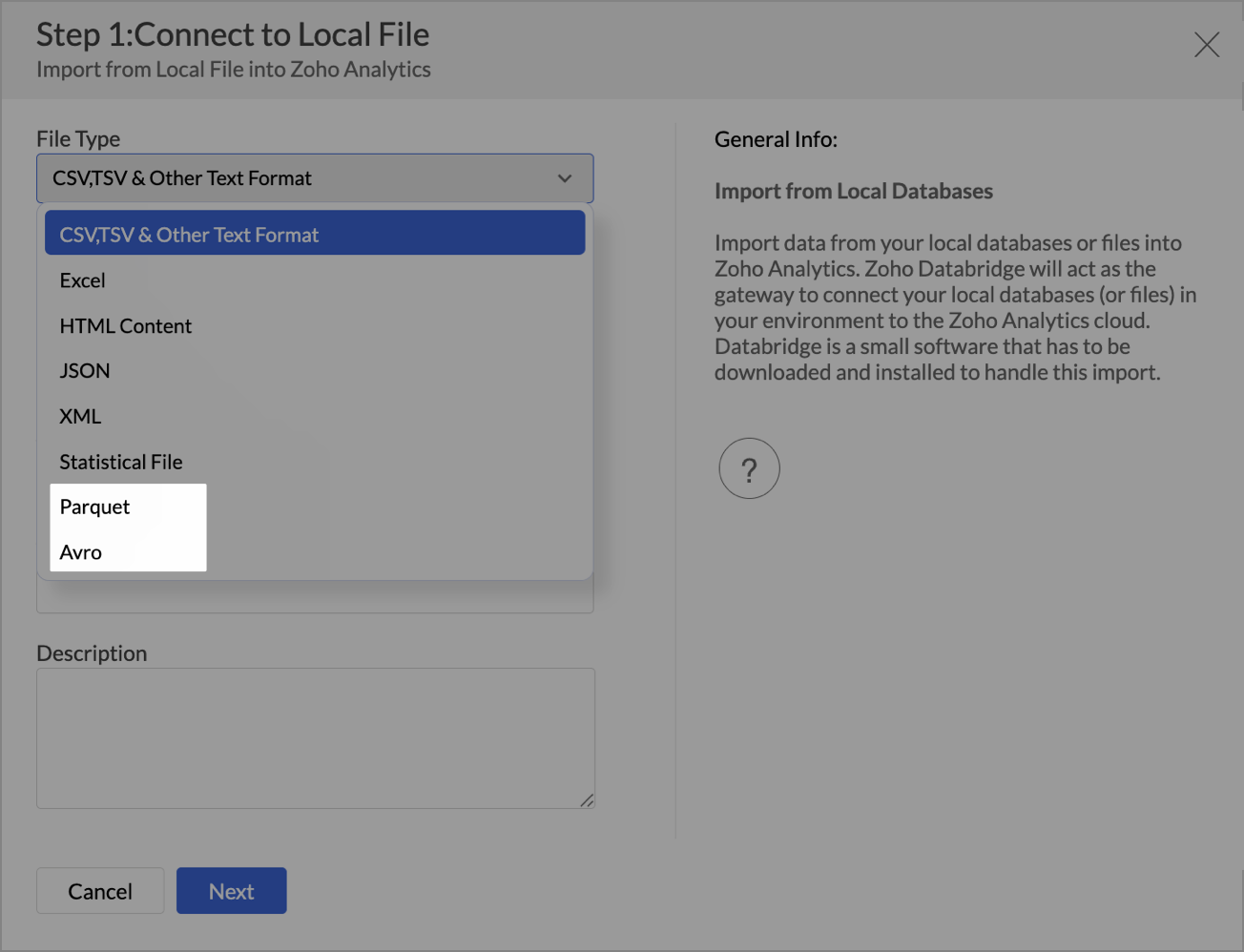
  • New File Format Support - Parquet and Avro

    You can now import Parquet and Avro files. These modern, columnar file formats are optimized for analytical workloads and are commonly used in big data pipelines.

  • Larger file uploads
    Until now, Zoho Analytics supported large file uploads only for CSV files. With this update, you can now upload files larger than 100 MB for the following formats through Zoho Databridge:
    • Excel
    • HTML
    • JSON
    • XML
    • Statistical files
This enhancement removes the hassle of file size limits when working with heavy datasets across multiple formats.
Learn more about local file formats

Invitation-based User Invite Flow

Zoho Analytics now uses an invitation-based model for adding users to your organization.
You can invite users in multiple ways, based on your workflow:
  • From the Organization Settings or Workspace Settings
  • While sharing reports or dashboards using email addresses
  • By adding users to Groups
Invited users will receive an email and must accept the invitation to join. Access to your organization and its shared content will be granted only after they accept the invite. This ensures better control and visibility over user access.

Learn more about inviting users.


Dashboard Background Image Customization

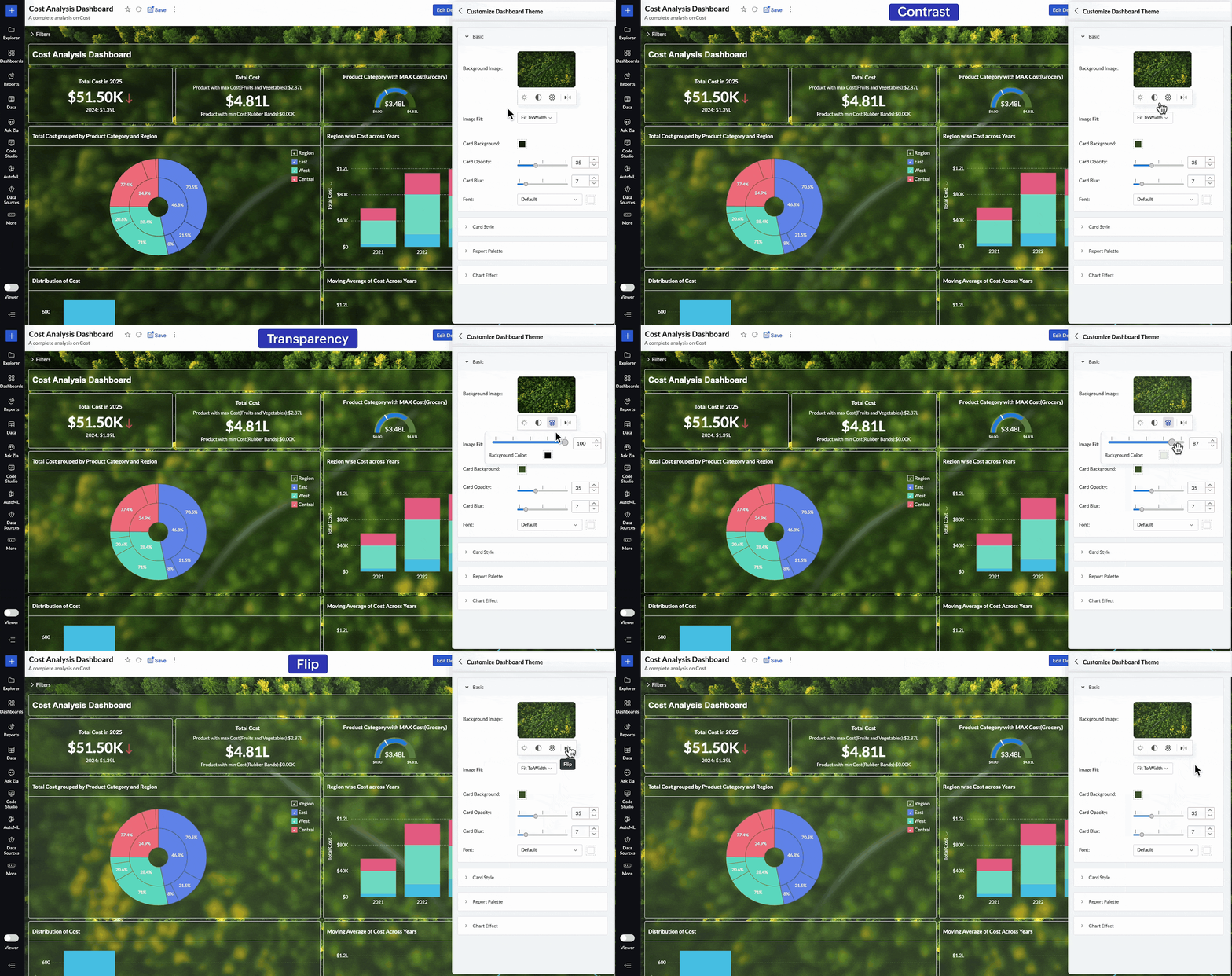
Personalize your dashboards like never before with new background image adjustment options. You now have greater control over how background images appear across your dashboards, helping you fine-tune visual impact and maintain readability.
You can now adjust:
  • Brightness – Lighten or darken the image for visual balance
  • Contrast – Enhance details and visual clarity
  • Transparency – Soften the background to highlight dashboard elements
  • Flip – Mirror the image horizontally for better composition
These controls allow you to create cleaner, brand-aligned dashboards that look professional and feel polished.

Learn more about dashboard customization.

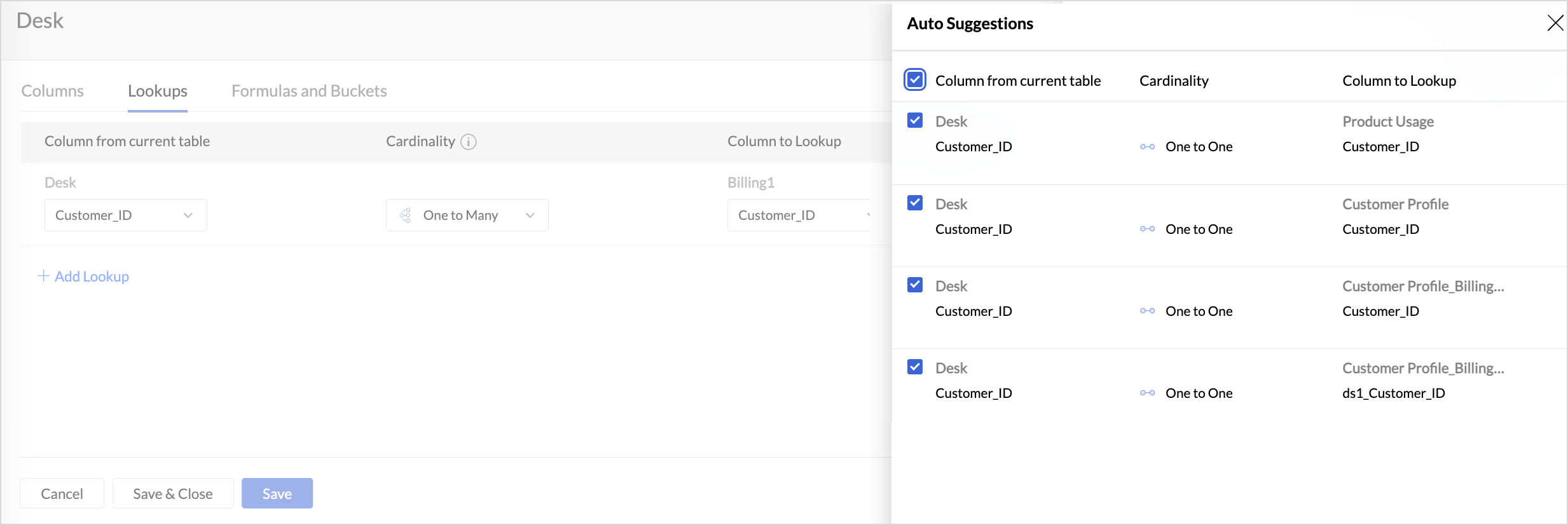
Lookup Suggestions

Creating relationships between tables is now even easier.
Zoho Analytics now offers lookup suggestions based on your table’s metadata. These smart recommendations help you:
  • Quickly identify potential relationships between tables
  • Reduce manual guesswork
  • Simplify your data modelling process
Learn more about Lookup Suggestions

White Label Updates

We have introduced a more modern and consistent experience for white label.
  • Zoho Analytics latest UI is now available for White Label
    Users who opt for white label deployment can now offer the latest Zoho Analytics user interface to their end users. This includes the updated layout, navigation, and overall design, providing a seamless and branded analytics experience.
    Click here to learn more.
  • Dedicated White Label Guide
    To help you make the most of white label capabilities, we’ve introduced a comprehensive guide covering everything from setup to branding best practices. This guide is now available as a separate resource for quick reference.
    Click here to access White Label guide.

Access Log Support for Zoho Analytics Mobile BI App

Zoho Analytics now extends access log tracking to the Mobile BI App, giving admins greater visibility into how users interact with reports and dashboards from mobile devices.

These updates are designed to make your Zoho Analytics experience more connected, customizable, and intelligent.
As always, we’re just a click away if you need help or have feedback to share.
    • Sticky Posts

    • What's New in Zoho Analytics - June 2026

      Hello Users! This month is about meeting your data wherever it lives: reaching it from AI assistants, bringing it in from more sources, and keeping it flowing with less manual effort. Here's what's new across Ask Zia and AI, data import, integrations,
    • What's New in Zoho Analytics - February 2026

      Hello Users! We're back with another round of updates for Zoho Analytics. This month's release focuses on giving you greater flexibility in how you visualize, manage, and act on your data - with new features like custom visualizations, remote MCP server,
    • What's New in Zoho Analytics - May 2026

      Hello Users! We're back with another round of updates for Zoho Analytics. This month's release focuses on giving you greater flexibility in how you visualize, manage, and act on your data. We are introducing richer data visualizations, smarter AI-powered
    • What's New in Zoho Analytics - January 2026

      Hello Users! We are starting the year with a strong lineup of updates, marking the beginning of many improvements planned to enhance your analytics experience. Explore the latest improvements built to boost performance, simplify analysis, and help you
    • What's New in Zoho Analytics - November 2025

      We're thrilled to announce a significant update focused on expanding your data connectivity, enhancing visualization capabilities, and delivering a more powerful, intuitive, and performant analytics experience. Here’s a look at what’s new. Explore What's

    Nederlandse Hulpbronnen


      • Recent Topics

      • Free webinar: Zoho Sign in Q2 2026 - A quick walkthrough

        Hi there, The second quarter of 2026 has flown by, and the Zoho Sign team has been hard at work releasing features to enhance how you send, sign, and manage documents. Join us for our upcoming webinar, where we'll discuss what's new and what's to come.
      • Kiosk Studio + Zia Agents: Automate renewal risk classification in your CRM | Kiosk Studio Session #10

        Renewal management is vital in a recurring revenue business. Your CRM already knows which accounts are at risk; the signals are present in contact titles, deal stages, call logs, account descriptions, and so on. What's missing is something that reads
      • How to Prefill Data in an Additional Form Submission from the First Form Submission

        We need to prefill data in the second form submission based on the previously submitted form (when using the "Add Another Response" option). We have a form which allows customers to send us files via upload. It requires them to provide name, company name,
      • Enable Credit Note creation for Sales Returns BEFORE receiving goods

        Currently, it is not possible to issue a Credit Note linked to a Sales Return until the goods have been officially marked as "received" in the system. In our business, we often need to issue a credit note to our clients immediately upon the initiation
      • Request to Make Billing Company and Service Company Fields Editable.

        Hello Latha, We noticed that once a Request, Estimate, or Work Order is created, we are unable to edit the Billing Company and Service Company details, as these fields become non-editable. Could you please make these fields editable after record creation?
      • Client Script | Update - Client Script Support For Custom Buttons

        Hello everyone! We are excited to announce one of the most requested features - Client Script support for Custom Buttons. This enhancement lets you run custom logic on button actions, giving you greater flexibility and control over your user interactions.
      • Why associate tickets are just one direction?

        When I associated the ticket #A with #B, in ticket #A I can see that exists another ticket associated. However, when I go to ticket #B, there is no reference that ticket #A is associated to #B. Is there a reason for that? Because it is confused and hard
      • Physical Batch Stock by Warehouse

        We have activated batch tracking in Zoho Inventory. To reconcile our inventory with the physical stock reported by our 3PL, we need a report showing the total physical quantity still present in each warehouse, broken down by batch. This quantity is the
      • No "Import Users" option in Zoho FSM

        I recently noticed that there is no option to import Users into Zoho FSM, and this has become a serious challenge for us. When migrating data, especially technicians or other user profiles, we often have hundreds of users to bring into the system. Currently,
      • Elevate your Radar experience: Best practices part 2

        In the Spotlight: Zoho Desk's Radar app Hello Everyone, In part 1 of Zoho Desk’s Radar app best practices, we explored role-based permissions, exceptions handling for critical alerts, daily toasts for a quick view of tickets, and landscape reports for
      • Suggestions for Improving the Deluge Development Experience

        Hello, I would like to share some ideas that could significantly improve the Deluge development experience, especially for partners and developers building larger solutions across the Zoho ecosystem. Some key areas that would add a lot of value: Deluge
      • "Subject" or "Narration"in Customer Statement

        Dear Sir, While creating invoice, we are giving in "Subject" the purpose of invoice. For Example - "GST for the month of Aug 23", IT return FY 22-23", "Consultancy", Internal Audit for May 23". But this subject is not coming in Customer Statement. Only
      • Email journaling is now available in Zoho Mail

        When issues escalate, IT, security, compliance and audit teams rarely need just “the latest email”. They need a dependable record of everything that was sent and received, in sequence, that isn’t affected by inbox clean ups or account changes. Email journaling
      • Ability to Export Field Dependency Structure in Zoho Desk

        Hi Zoho Team, We’d like to request a feature enhancement in Zoho Desk that would greatly improve configuration management for organizations like ours: Requested Feature: The ability to export the full structure of Field Dependencies, especially for multi-level
      • How to use Zoho Billing info in a workflow

        We have Zoho Billing and CRM sync'd and the Billing info appears as expected for each Account in Zoho CRM, including subscription status, plan type etc. But how can we use this in a workflow? Thanks Dylan
      • Recurring Events Not Appearing in "My Events" and therefore not syncing with Google Apps

        We use the Google Sync functionality for our events, and it appears to have been working fine except: I've created a set of recurring events that I noticed were missing from my Google Apps calendar. Upon further research, it appears this is occurring
      • Account Reconciliation via API

        I am suggesting that the Zoho Books team considers making it possible to do an Account Reconciliation via API. The use case I have in mind is specific, but also fairly common: merchant services clearing accounts. Currently, the only way to reconcile an
      • First Day of Work Week selection - Add every day of the week

        It would be very helpful to have every day of the week available as a choice for the start of a work week.  In fact, it would be even MORE helpful if we could select a different work week per Customer. For instance, for one client, I invoice weekly: Friday through Thursday (so the first day of that work week, as far as Zoho is concerned, is Friday).  For another client, I invoice monthly, and would keep the traditional M-F work week.
      • Zoho CRM Error message #2 : Fixing [Invalid Credentials] and [Authentication Fail] while configuring IMAP

        Hi Everyone! As a part of our Zoho CRM Error messages series, we're going to focus on couple of error messages that you might encounter while configuring IMAP and ways to resolve them. These are: [Invalid Credentials] [Authentication Fail] The annoying
      • Unable to add a pick list field to a standard layout.

        Adding a picklist filed this morning to any module causes a grey/unresponsive screen. Inspecting the web console shows a javascript error.
      • Introducing Color Coding of Picklist Values

        Dear Everyone, Greetings!! Zoho CRM is uplifting the user experience. Recently, we had some notable aesthetic improvements in CRM like Kanban View UI enhancement, New List view UI enhancement, color coding of tags, and color coding of picklists in meetings.
      • Finish Line: Reading the Story Your Number Tells

        Three times on this journey, we pulled into a pit stop, a pause to catch our breath before pressing on. This time, this isn't a pit stop. This is the finish line. Over the last five posts, we saw that Zoho Invoice's reports aren't five separate features
      • Detecção facial com Deluge: dominando a task zoho.ai.detectFace

        Fala, pessoal! Hoje quero compartilhar com vocês uma das tasks de Inteligência Artificial mais interessantes do Deluge: a zoho.ai.detectFace. Com ela, conseguimos detectar rostos em imagens diretamente nos nossos scripts, sem precisar de nenhuma API externa
      • Zia Agents no Zoho CRM: quando a IA vira parte do time de vendas?

        Repetimos sempre aqui na Kafnet que tecnologia é meio, não é fim. Os Zia Agents no Zoho CRM provam isso na prática. Não são mais um recurso de automação, são agentes que agem de forma autônoma dentro do CRM e tomam decisão com base no contexto real do
      • Desk Contact Name > split to First and Last name

        I am new to Zoho and while setting up the Desk and Help Center, I saw that new tickets created or submitted from the Help Center used the Contact Name field. This would create a new Contact but put the person's name in the Last Name field only. The First
      • Zoho Flow - Zoho Desk trigger "Ticket created or updated" overrides Department

        Just in case anyone else has this issue. We had a Zoho Flow with the Zoho Desk trigger "Ticket created or updated". In the trigger I had selected a Department (Sales). What happens is that the Department ID (Sales) is submitted as part of the request
      • Zoho campaigns , role based emails.

        Zoho campaigns , is not allowing me to add emails like info@abc.com .  they say its role based email . But many of my subscribers have such email .  Please help . 
      • Save filter support now available for portal users

        Hello all, CRM users have long had the option to save frequently used filters in their module views, so they can switch between filtered views without re-applying criteria every time. Portal users, however, didn’t have this option. Each time a portal
      • Workflow for not getting a "Draft" stamp on the top of my printed invoice?

        I have certain cases where invoices need to be printed and included with material being sent to a client. I have "Show Status Stamp" turned on inside the PDF template, Transaction Details tab. When I create an invoice, I have choices to send, save and
      • Purchase Orders by Warehouse

        Looking for a way to list purchase orders by warehouse. Easiest would be if warehouse was an available field to add to a custom view, but alas... Am I missing something? Does anyone have any tricks or tips that would keep me from having to click into
      • [Live webinar] Learning Table Series: Building industry-based portal solutions with Zoho Creator's AI-powered agents

        Hello everyone, We are excited to invite you to another edition of the Learning Table Series webinar. Building industry-specific portal solutions often requires careful planning, secure user access, role-based experiences, and seamless interactions for
      • Automate your workflows with Connections in Zoho Bookings

        Greetings from the Zoho Bookings team! We're excited to introduce Connections, a new capability that lets you securely authorize supported Zoho services and use them across multiple custom workflows, making it easier to automate actions based on booking
      • Create Custom Module Using AI in Zoho Projects

        Every team has its own way of managing work. While standard modules support common project management needs, many business processes require their own structure, fields, and terminology. With AI-powered Custom Modules in Zoho Projects, users can create
      • Add a MATRIX field to the forms creation

        Same as Zoho forms, we need a Matrix field in Zoho Creator forms, is very usefull
      • Cannot renew the Barclays feed connection

        I have the message that my connection with Token will expire in a few days, but I'm unable to renew the connection to my Barclays account. I go through the process of logging into the bank account via Token as normal, but the account selection flashes
      • Zoho Books for Charities

        We are a UK charity using Zoho Books Standard. Each grant is recorded as a Sales Receipt and every related expense is tagged using a Reporting Tag. Is there a standard report that will show, for each Reporting Tag, the original grant income, all tagged
      • Calendar Booking - Rescheduled and cancelled appointments not deleting in G Suite calendar

        We started using the built in calendar booking feature and are really liking it! However, we are having one issue.  If a client reschedules an appointment using the reschedule feature the original appointment doesn't get deleted out of our g suite calendar
      • Marketing Tip #44: Save time on store admin with Zoho Commerce MCP

        The biggest challenge for most online store owners isn't knowing what to do, but finding the time to do it. Updating SEO descriptions across 50 products, creating a batch of coupons for an upcoming campaign, adjusting shipping rates for a new zone; these
      • Unified customer portal login

        As I'm a Zoho One subscriber I can provide my customers with portal access to many of the Zoho apps. However, the customer must have a separate login for each app, which may be difficult for them to manage and frustrating as all they understand is that
      • Notes of Tasks in Zoho CRM

        Hello, Is there a way to filter the Notes that appear on a Task to only show the notes related to that specific Task and not display all the Notes of the objects related to that Task (Accounts, Contacts, Deal, etc). In essence, our team struggles to understand
      • Next Page