What's New in Zoho Analytics - August 2026

What's New in Zoho Analytics - August 2026

Hello Users!


This month puts you in control of how your analytics moves: promote content safely between workspaces with Deployment Management, govern data access and sign-in more precisely, and make your forecasts smarter with external drivers. There's also faster live data, new connectors, and finer scheduling across the board.


Administration & platform

Bigger control over how your analytics content is built, promoted, and accessed.

Deployment Management 

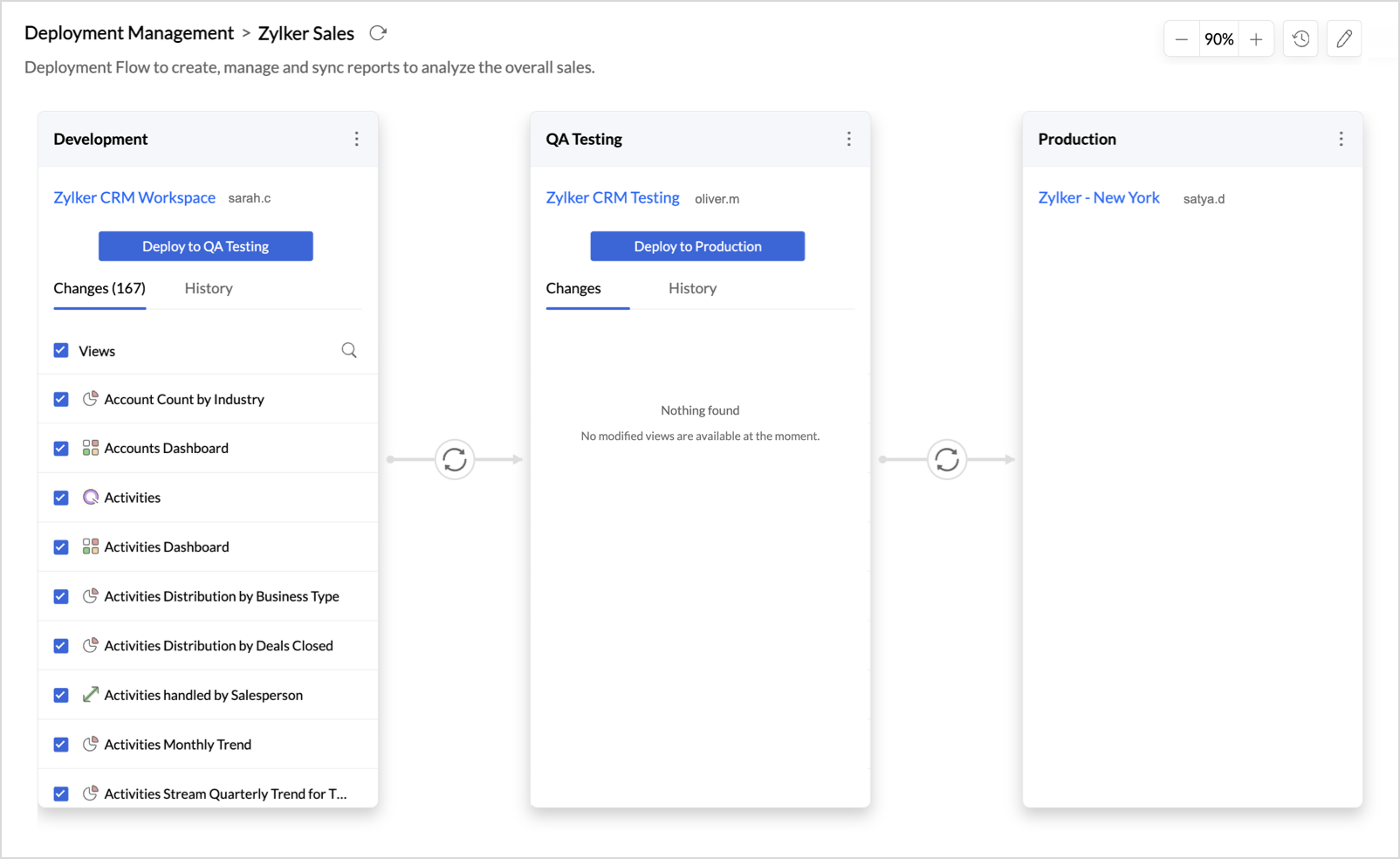
Your analytics content now gets a release pipeline of its own, so you never have to edit reports in a live workspace and hope nothing breaks. Deployment Management connects your workspaces as ordered stages, such as Development, Testing, and Production, letting you build freely, validate at every step, and see exactly what changed before you promote anything. Push to production only when it is ready. Deployments carry only the metadata from one stage to the next, so your live data is never touched, and the full history stays one click away. Head to Organization Settings and create your first deployment flow.

For more information, visit the Deployment Management help document.
Data source permissions for custom roles

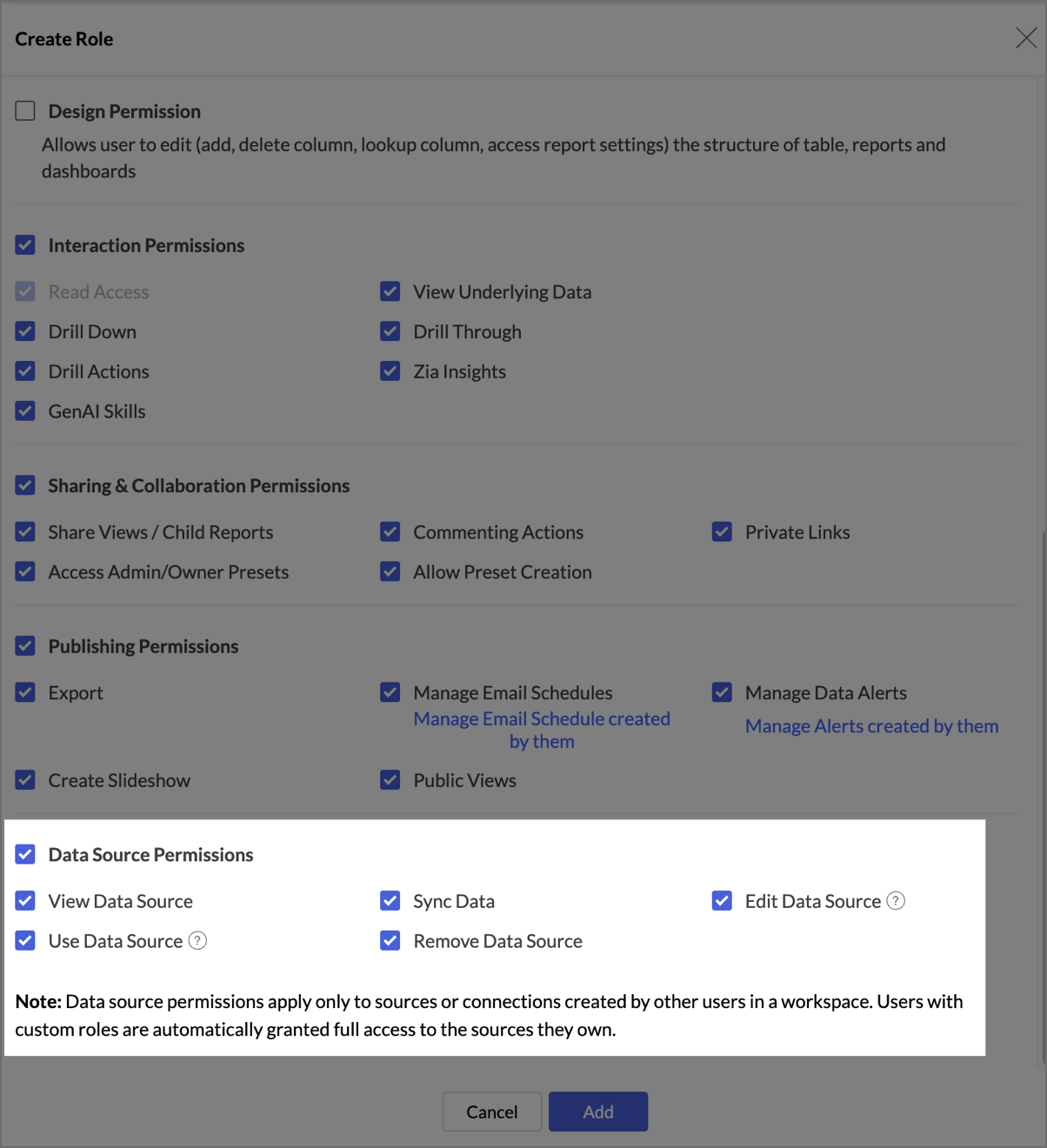
Custom roles with the All Data, Reports And Dashboards access type now include a dedicated set of data source permissions: View, Use, Sync, Edit, and Remove Data Source. Grant exactly the level of data source access each role needs; these permissions apply to essential connectors and to sources created by other users, while users always keep full access to the sources they own.
For more information, visit the Manage custom roles help document.

New sign-in methods for white label portal users

Zoho Analytics now supports social sign-in for your white label portal. Configure Google, Facebook, LinkedIn, or Microsoft from the new Sign-in Methods tab in White Label Settings, and let your users sign in with an account they already use instead of setting up a new password. For more information, visit the Manage Configuration help document.

Multilevel subfolders

You can now nest subfolders deeper within your workspace folders, giving you improved flexibility to organize reports and dashboards the way your team actually works.
For more information, visit the Viewing Workspace help document.

Advanced Analytics

Multivariate forecasting: exogenous variable support

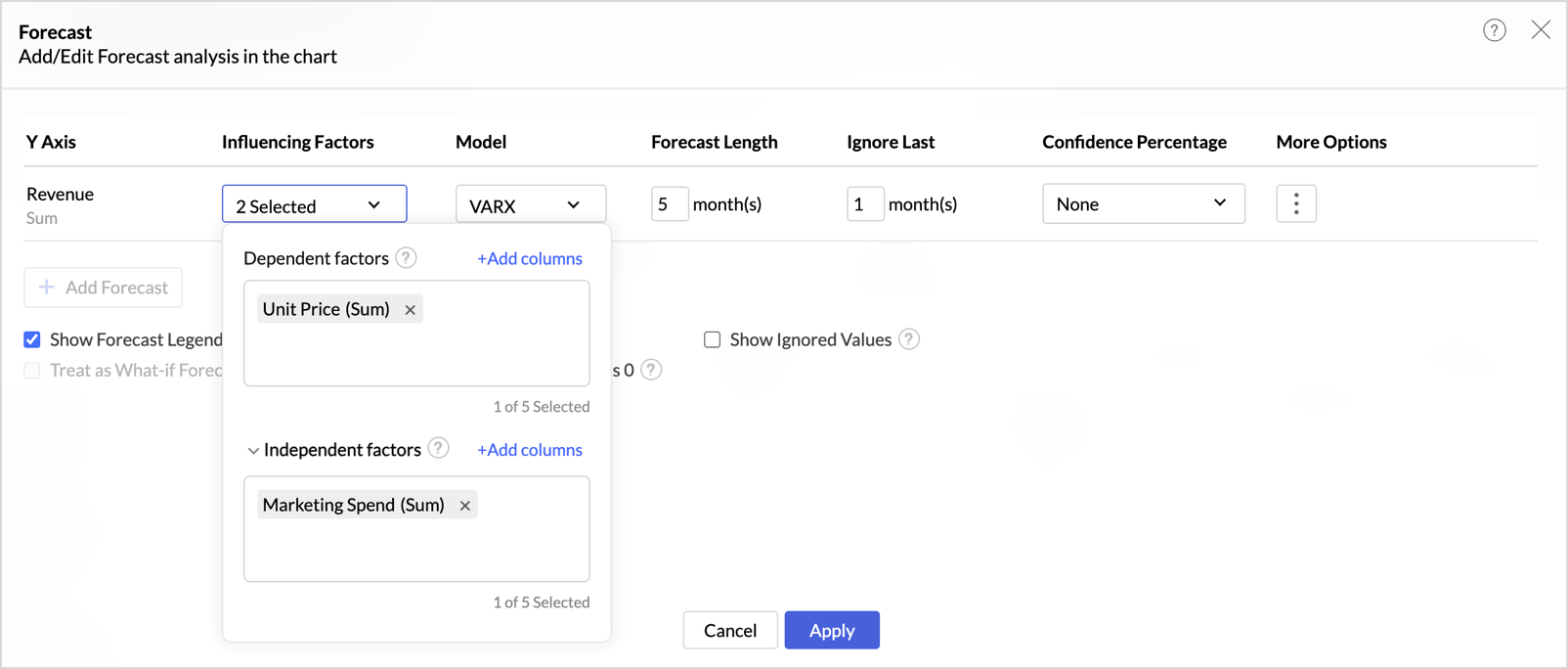
Forecasts can now account for external drivers that influence your metric without being driven by it. When adding influencing factors, you can group them as dependent and independent factors, up to five in total. Dependent factors are endogenous variables that move together with your target, such as revenue or demand when forecasting sales. Independent factors are exogenous variables, such as marketing spend, discounts, or campaign budget, which influence sales but are not driven by it. With dependent factors alone, the VAR model is applied; adding independent factors switches the forecast to VARX (Vector Auto Regression with exogenous variables). The Forecast Model dialog names the model applied and lists the factors used.

For more information, visit the Forecasting help document.

Data import & connectivity

New sources to connect, and faster access to the ones you already have.

Data Cache for Live Connect

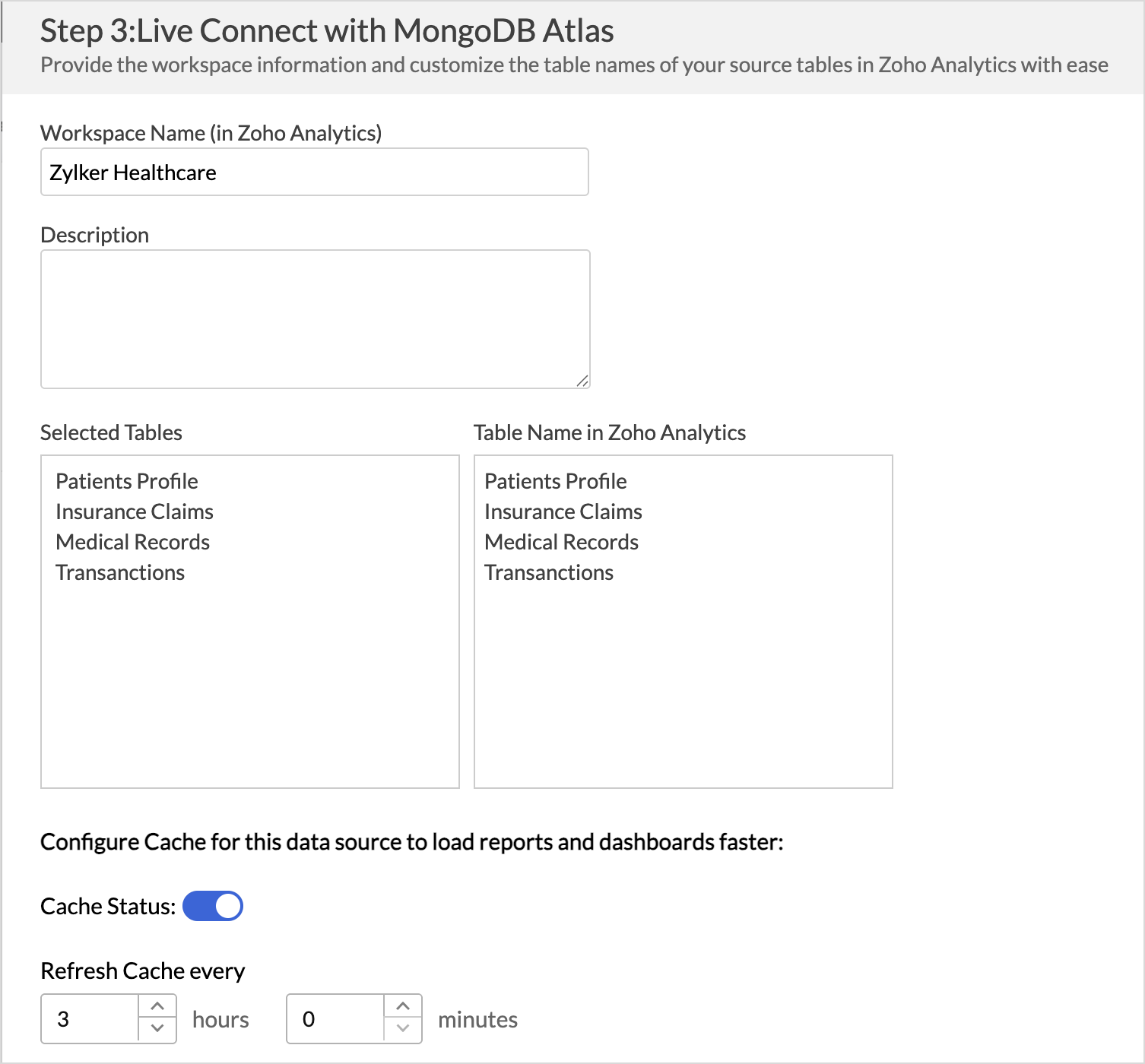
Speed up report and dashboard loading with Data Cache for Live Connect. Zoho Analytics can now cache summary values from your live data source and refresh the cache at an interval you configure, reducing the need to fetch data from the live source for every request. When you need up-to-the-minute numbers, you can still fetch the latest data live whenever needed. For more information, visit the Data Cache for Live Connect help document.

New Connectors

More business apps and databases you can connect to Zoho Analytics this month:
  • Chargebee: Connect your Chargebee data to analyze your subscription billing and revenue. For more information, visit the Chargebee connector help document.
  • Help Scout: Bring in your Help Scout data to report on your customer support performance. For more information, visit the Help Scout connector help documentument.
  • Supabase: Connect to Supabase as a new database source in Zoho Analytics. For more information, visit the Supabase help document.

Reporting & usability

Compare two metrics in a single widget

You can now bring two metrics into the same KPI widget. Until now, each widget paired a single metric with a dimension or date; now two metrics (like say, Sales and Cost) can sit together in one view, saving you from building and reading two separate widgets. Try it on any KPI widget and see the comparison for yourself.

For more information, visit the KPI Widgets help document.

Flexible schedules for Data Alerts

You now have finer control over when Zoho Analytics checks your alert conditions. Monthly schedules let you set an interval of 1 to 12 months, so checks can run monthly, once in two months, or on any longer cycle, and a new Yearly frequency covers annual checks. You can also pick relative-day patterns such as the 1st Sunday or the Last Friday of the month, skip weekends on Hourly and Daily schedules, and set a time zone for each alert.

For more information, visit the Data Alerts help document.

Developer platform

New Action APIs for Custom Visualizations

Four new Action APIs are now available in the Custom Visualizations JS API: invokeViewUnderlyingData, invokeExplainData, invokeDrillThrough, and invokeDrillAction. Each directly invokes the corresponding action for a clicked data point, so your custom visuals can trigger underlying data, explain data, drill through, and drill actions without opening the interaction menu.

For more information, visit the Custom Visualizations page.

That's everything new in Zoho Analytics this August. For the complete list of updates, visit our What's New page.

    • Sticky Posts

    • What's New in Zoho Analytics - August 2026

      Hello Users! This month puts you in control of how your analytics moves: promote content safely between workspaces with Deployment Management, govern data access and sign-in more precisely, and make your forecasts smarter with external drivers. There's
    • What's New in Zoho Analytics - June 2026

      Hello Users! This month is about meeting your data wherever it lives: reaching it from AI assistants, bringing it in from more sources, and keeping it flowing with less manual effort. Here's what's new across Ask Zia and AI, data import, integrations,
    • What's New in Zoho Analytics - February 2026

      Hello Users! We're back with another round of updates for Zoho Analytics. This month's release focuses on giving you greater flexibility in how you visualize, manage, and act on your data - with new features like custom visualizations, remote MCP server,
    • What's New in Zoho Analytics - May 2026

      Hello Users! We're back with another round of updates for Zoho Analytics. This month's release focuses on giving you greater flexibility in how you visualize, manage, and act on your data. We are introducing richer data visualizations, smarter AI-powered
    • What's New in Zoho Analytics - January 2026

      Hello Users! We are starting the year with a strong lineup of updates, marking the beginning of many improvements planned to enhance your analytics experience. Explore the latest improvements built to boost performance, simplify analysis, and help you

    Nederlandse Hulpbronnen


      • Recent Topics

      • Convert OLM to PST on Mac and Windows Using Free Methods

        When your Outlook for Mac data is stored in an OLM file and you want to use it with Outlook for Windows, the simplest approach to transfer your emails and other mailbox information is to convert the OLM file to a PST file. OLM is primarily associated
      • Add Payment Information (like Bank details)

        I am using the Free plan of Zoho Books. I need to add the bank details/ UPI details on the invoice. How can I do that. I have added the details in the Bank Section.
      • Placeholders for Multi-Level Discount

        I am using custom templates for Invoices and all other modules. Since i have activated multi-level discount (an early-access feature from zoho) "discount at line-item and transaction level", I need placeholders for using them in my custom templates. With
      • Running Balance

        Please add automatically Running balance in ledger view. Taking lot of time, every time to add manually
      • Accounting on the Go Series-47: Effortless GSTIN Management- Auto Populate TaxPayer Details in Zoho Books Mobile App

        Hello everyone, Welcome back! Today, we're focusing on a feature specifically designed for our Indian users in the Zoho Books-Indian edition, particularly those who deal with GST compliance regularly. We understand the importance of accurate and efficient
      • URGENT: Stalled DC Migration >72 Hours - Records Locked [Ticket #: 167813877

        The DC migration was started on 1st October at 6 pm and we were informed migration period as 48 hours but even after more than 72 hours, the migration seems still in progress. We sent two emails to check the status but no responses. We need the migration
      • Zoho Webinar - Sharing System Audio (NOT AVAILABLE)

        Hi, We are having a serious problem with Zoho Webinar. In the webinars we run, we very often share the audio from a video we are streaming directly from YouTube or other applications. Until recently we were using Zoom, but as we use other Zoho applications
      • Cash Recipt

        You can not receive cash more than 10000 from one party in a day and two lakh in a year. In statement you can't differentiate cash or bank receipt. zoho does not support this
      • Need to set workflow or journey wait time (time delay) in minutes, not hours

        Minimum wait time for both Campaigns workflows and Marketing Automation journeys is one hour. I need one or the other to be set to several minutes (fraction of the hour). I tried to solve this by entering a fraction but the wait time data type is an integer
      • Concern Regarding Stock Validation in Inventory Management

        Hi Zoho Team, We would like to highlight a concern regarding stock validation in the inventory system. As per standard inventory management practices, if the stock level is zero, the system should not allow users to create a shipment, packing slip, or
      • Change from OST to PST on Windows 10/11 Using Free Method

        There is an advantage in converting OST files to PST format if you need to access your Outlook data on a different computer, want to keep a local copy, or are trying to recover items from an old Outlook profile. The good point is that users of Windows
      • CNIL - Suivi de Pixel

        Bonjour à tous, À la suite de la nouvelle recommandation de la CNIL sur les pixels de suivi dans les e-mails, savez-vous si Zoho Campaigns permet : de conditionner le suivi des ouvertures au consentement de chaque contact ; de proposer un lien permettant
      • Meet PageHealth by Zoho PageSense: a free way to find out what's holding your page back

        We all know the feeling. You've spent days tweaking headlines, moving buttons, and rewriting copy, and you're still not sure why visitors aren't sticking around. Revamping your website is hard, and figuring out what's actually getting in the way is even
      • Important: Whitelist new proxy outgoing IPs for IN, SA, and UAE data centers

        Hello everyone, We're expanding the pool of proxy outgoing IP addresses for our IN, SA, and UAE data centers by introducing new IPs alongside the existing ones. This helps ensure high availability, optimal load distribution, and redundancy for outgoing
      • Zoho Flow Custom Function Issue

        I have a use case where I will be needing to post data to a wordpress site. Specifically to a custom post type with a bunch of ACF fields. I have setup trigger event correctly for Tookan and can receive data from the webhook. In order to post the data
      • How to Open .mbox file in Gmail with Attachments?

        Gmail offer users to backup INBOX folder in .mbox file format via Google Takeout Feature. Howver there is no such option to Restore Gmail MBOX. Thus I would like to suggest you to choose an alternate approach i.e. MBOX to Gmail Wizard. This utility will open .mbox file in Gmail with attachments.  Steps to open MBOX file in Gmail are; Run MBOX to Gmail Wizard Click Add File and add .mbox file. Enter your Gmail login credentials. Click Convert button. Finished! This is how you can open MBOX file in
      • Custom Validation for On Duty

        Hi Team, We would like to have custom validation support for the On Duty form in the Attendance module. We need to apply some restrictions, such as: Limit the number of On Duty requests per month. Restrict On Duty requests on selected days. Allow employees
      • Forms data export bug

        The export csv with a password has changed for the worst. It is less secure by not allowing complex passwords. Just last week and the last year (at least) I was able to use a complex, secure password. Export CSV moreover doesn't even work if I use a simple
      • Integrating FaceBook Ads into MarketingHub

        I would like to track the clicks from a FB Ad campaign into my website via marketinghub.  I cannot currently add a MH form directly to my FB page, as I receive an error telling me I need at least 2000 subscribers on FB to be allows to do that (yikes!) What is the best way to set up MH so I can track which FB are converting well?  I know I can reach the FB reports directly, but these do not track conversions from the MH forms on my website. Best regards, Joe
      • Migration from GoDaddy to Zohomail

        Hi All, I am trying to migrate all the emails from Go Daddy to zohomail account using the migration tool. i tried with imap method, its not working. when i try it with pop method, then only the emails from the go daddy account inbox ( not other folders), is getting transferred, how can i transfer all the folders in the email account from go daddy to zoho. and also the emails which are coming from go daddy are like new unread emails ( is there any where i can differentiate from read and unread emails)
      • How do I migrate from Office 365 to Zoho Mail?

        Check out Advik Email Migration Wizard, this software is specially developed to move mailboxes from Office 365 to Zoho Webmail. In addition you can migrate from Gmail, Yahoo, Rediffmail and 80+ webmail servers to ZOHO MAIL. Isn't it amazing? This is an all in one email migration solution. Steps to export emails from Office 365 to Zoho Webmail are as follows; Run Advik Email Migration Tool in your system. Select Office 365 as source and enter its login credentials. Select mailbox folders and choose
      • How to Backup Zoho to PST?

        I'm looking for a simple way to backup Zoho Mail emails to PST format. I tried the IMAP method with Outlook, but it seems slow and complicated for large mailboxes. I need a solution that can: Export Zoho emails to PST Preserve attachments and folder hierarchy
      • Shopify connector – product cost ("Cost per item") not synced, so COGS/gross margin can't be calculated

        Hi Zoho Analytics team, I use the native Shopify connector in Zoho Analytics (cloud) to build reporting dashboards for Shopify stores. As far as I can tell, the connector does not sync product cost, so there's no way to calculate Cost of Goods Sold (COGS),
      • Zoho Sprints - Q3 Updates for 2026

        Another quarter, another set of productive features. This time our focus was mainly to simplify in-app navigations and control all your work related activities within Zoho Sprints. We delivered 7 major features and 9 enhancements, which include Zoho Sprints
      • Which Zoho CRM tasks would you want an AI assistant to handle?

        I’ve started delegating my Zoho CRM work to AI – and many tasks now take me half the time. It has been so useful that we’re now working to make it available to everyone. Instead of clicking through records and tabs, I simply describe what needs to be
      • How to present an Analytic on a CRM dashboard and filter it on loginuser id

        How to present an Analytic on a CRM dashboard and filter it on loginuser id? I want to display an Analytics pivot table (as a widget) on a CRM dashboard and have the pivot filtered on the loginuser. I want additional user-filters available, such as date,
      • Create a single record from multiple images with ICR

        Hello all, Zia's Intelligent Character Recognition can now create a single record from multiple images. Users can upload up to three images at once, such as an ID, a passport, and a business card, and Zia will extract the relevant information from all
      • The Social Wall: August 2024

        Hi everyone, We're thrilled to bring you the latest updates, features, and improvements to help you get the most out of Zoho Social. Let's see what was new for us at Social in August. Post documents on LinkedIn You can now reach a lot more people and
      • Free PST Password Recovery Tool

        Recoveryfix PST Password Recovery is a specialized standalone utility designed to instantly unlock encrypted Microsoft Outlook PST files . It provides an efficient way to recover, reset, or entirely remove passwords when access credentials are lost or
      • How can I add a Custom Field (or Customer_name) to a picklist?

        Our workflow is Shopify-->SO -->Picklist-->Package-->Shipment. We would like to have the Picklist template to include a custom field "Customer_Notes" (we have created this field already). This way we get alerted when a customer has notes on their account.
      • Cash Flow Statement : Direct Method

        I can not see how can I see the cash flow statement using direct method. AS 3 recommends two formats of cash flow statement. The indirect method is there on Zoho but there report in Direct method. How can I see that by Direct method.
      • ZeptoMail is now Zoho CPaaS!

        ZeptoMail has a new name and it’s expanding beyond email. With ZeptoMail, our focus was simple : help developers and businesses with reliable transactional emails. At the time, email handled a big part of those customer moments. But transactional communication
      • Button Display Conditions

        Hi Guys, Is it at all possible to have extra button conditions? Context: We have data in our deals module which has a custom button which converts the deal into contacts + set up relationships between them. At the end of the conversion we set a field
      • WhatsApp Business Message Pricing Update: Effective October 1, 2026

        Hi everyone, Starting October 1, 2026, Meta is updating how WhatsApp Business messages are charged. This guide explains the new per-message pricing model, how message categories work, and what changes for service messages specifically. How Meta charges
      • Cannot login to Zoho Mail on Mobile App

        Hi, I am the super administrator for our company's email account. I just created 4 new email accounts, and my users have downloaded the zoho mail app. However they are unable to login to their email on the app. It kept saying "User does not exist". Please help! Thank you.
      • Zoho Projects - Linking CRM Deals to Projects via API without sending customer contact email invitation to project portal

        We are using the Zoho CRM and Zoho Projects APIs to automatically create a project in Zoho Projects and then associate that project with the relevant Deal in Zoho CRM. The API process is working in that the project is created successfully and appears
      • Live connection to DS files in Zoho Creator / ChatGPT

        As an idea, we are using ChatGPT to build with Zoho Creator (outside of Zia), which is works brilliantly to assist write deluge, provide test suggesitons etc. Currently we are uploading the DS files which are very point in time, it would be great to have
      • In ZOHO Books, it appears that there is a maximum of 200 Shipping addresses.

        I am using ZOHO Books and what you call a shipping address, we use as a Service address. I have a couple of customers that have Many Many service addresses, I am starting to get an error saying too many shipping addresses. Additionally, is there a way
      • Setting default From address when replying to request

        At the moment, if I want to reply to a request, the From field has three options, company@zohosupport.com, support@company.zohosupport.com, and support@company.com. The first two are really internal address that should never be seen by the customer and
      • Notice to Zoho Community Members: Updated Zoho Community Guidelines

        Hello everyone, We have updated the Zoho Community Guidelines to keep the exchanges original, relevant, and meaningful. The major focus of this update is on AI use, and on sharing apps, extensions or other software in the community. This community works
      • Next Page