What's New in Zoho Payroll 2022 (India)
We are thrilled to bring you all the updates that we were working on over the past months. We have enhanced Zoho Payroll to be intuitive and easy to use so that both employers and employees have a great payroll experience. Here are the significant updates we've brought to Zoho Payroll:
HSBC Direct Deposit
HSBC Direct Deposit
If your organisation has an HSBC corporate account, you can now directly integrate it with Zoho Payroll and deposit salaries directly into your employee bank accounts.
Once you approve the pay run for a particular period, you can initiate the salary payment via HSBC. After the payment is authorized, salaries are transferred to employees immediately. Learn More
Note: NEFT will be the default payment mode for the payments initiated from Zoho Payroll using the HSBC integration. If payments are initiated during non-business hours, the payments will be processed only on the next business day.
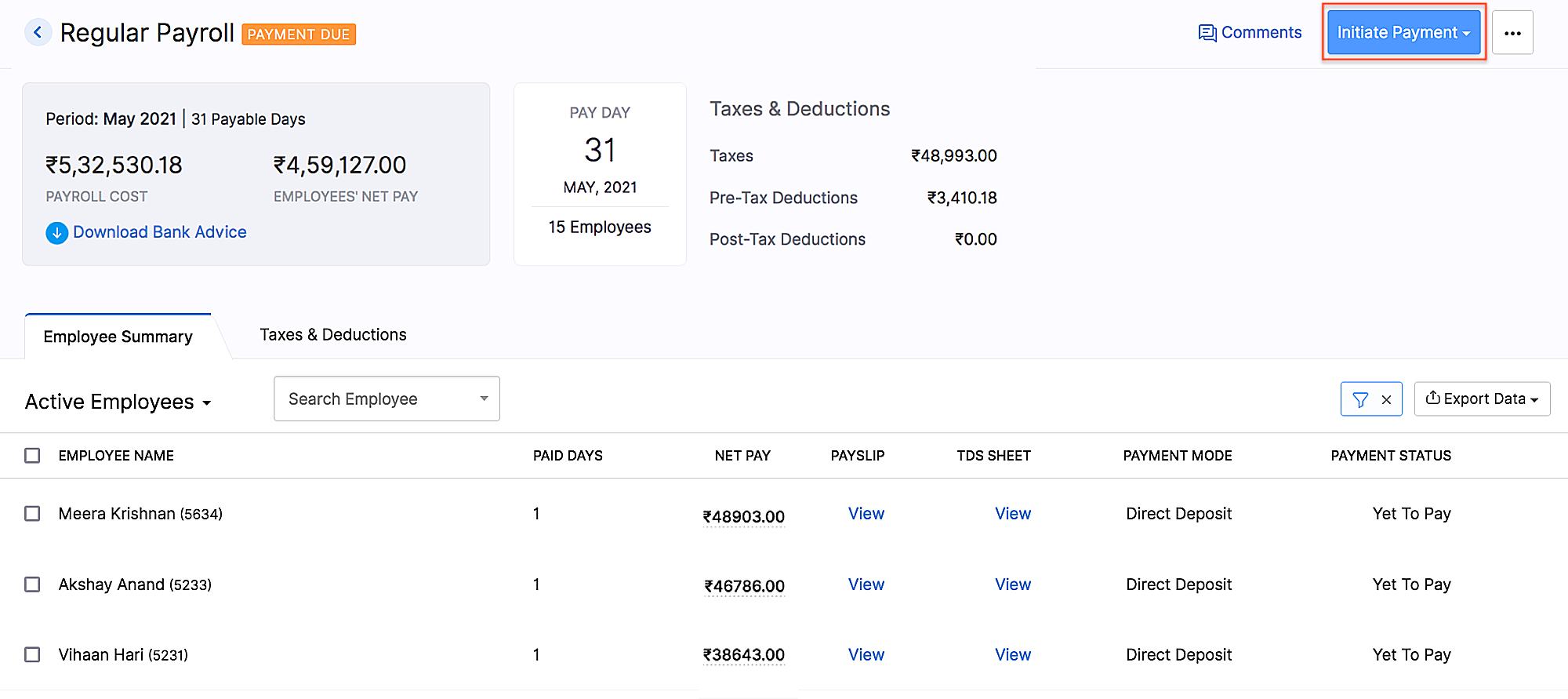 HSBC integration
Add Non-Employee as Tax Deductor
You can now add a person who is not your employee, such as a third-party accountant or auditor, as a Tax Deductor in Zoho Payroll. The tax deductor will be responsible for remitting your tax to the government. Additionally, you will have to provide details such as the Deductor's name and designation.
To add the tax deductor, go to Settings > Taxes > Select Non-Employee as Tax Deductor.
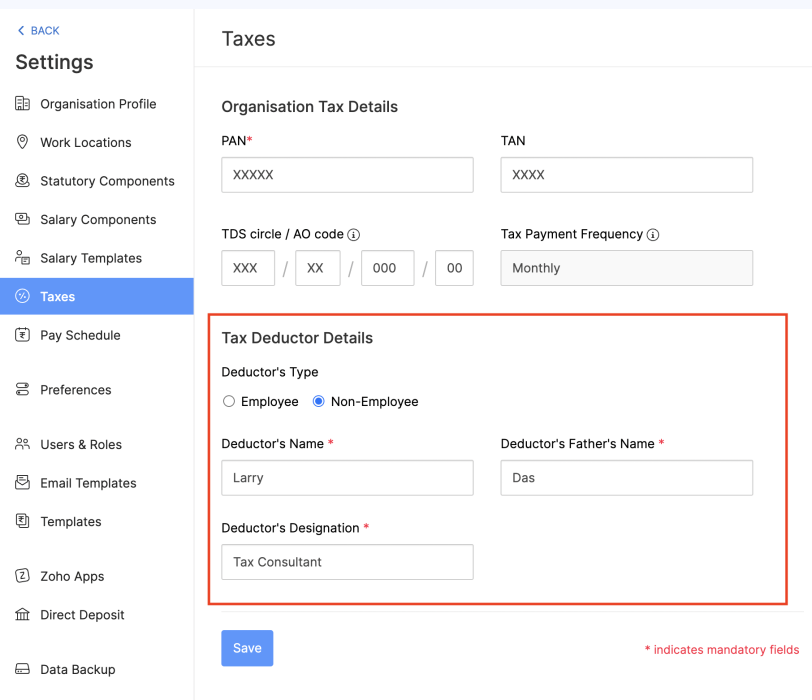 Adding Non-Employee as Tax Deductor
User Permissions for Approvals
Configure permissions such that only users who belong to roles that have approval permissions will be able to access those related modules.
To configure user permissions for approval: Go to Settings > Users & Roles > New Role. Next, select the modules and the level of access you want to provide for the role.
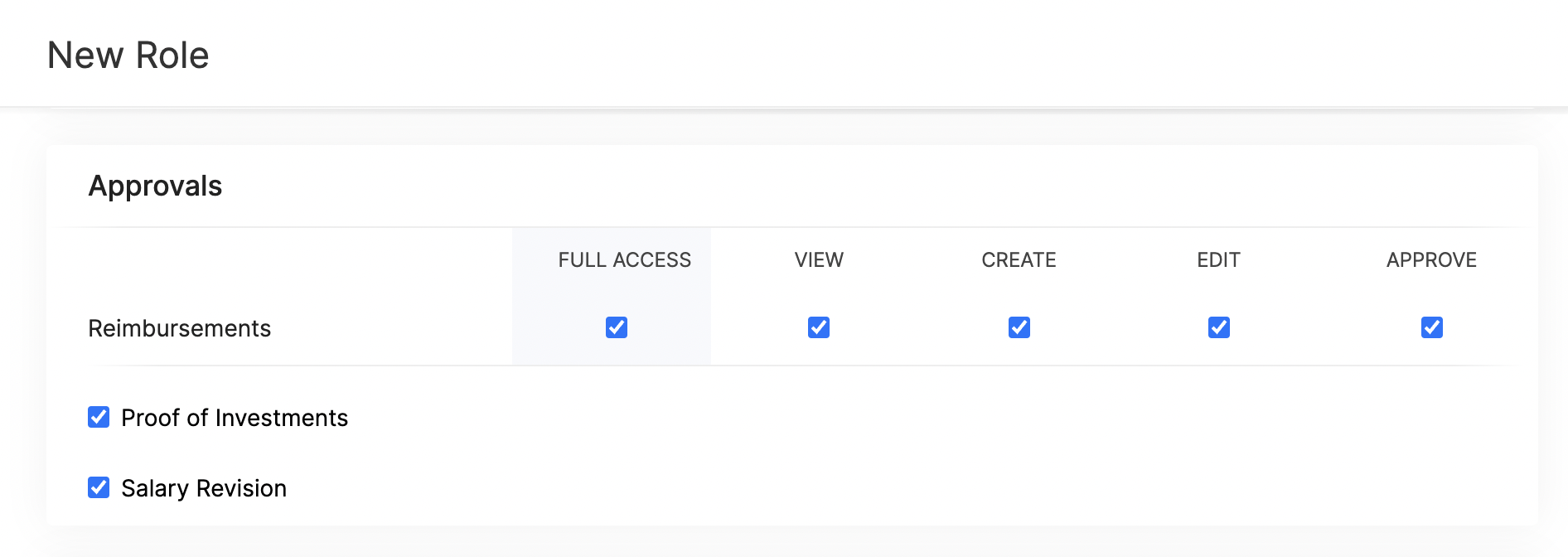 Approval User Permissions
Updates Related to Proof of Investments
- Filter employees who are yet to submit their Proof of Investments. Once you filter the employees, you can also export them in XLS, XLSX, and CSV formats.
- If you want to remind your employees to submit their Proof of Investments, you can now send them a system-generated email reminder.
- Previously, once admins configured the tax regime, they would not have been able to change it. Admins can now switch between the old and new tax regimes while recording the IT declarations and Proof of Investments, provided you've configured preferences to change regimes.
- You can mandate employees to upload attachments while submitting their Proof of Investments.
- In addition to uploading Proof of Investments in other formats, you can also upload .zip files.
New Form 24Q Format
The Central Board of Direct Taxes (CBDT) has introduced a new Format for Form 24Q. Zoho Payroll now supports the new format and the text files will be generated automatically in the new format.
Unique Identifiers for Loans
When you record a loan, Zoho Payroll will automatically assign a unique number to the loan. This number will help you to search and find a particular loan quickly.
If you are importing loans, loan numbers are mandatory. So, ensure the files you upload have loan numbers in them. If the imported loan numbers match the existing loans in Zoho Payroll, the existing loan will be updated with the imported details.
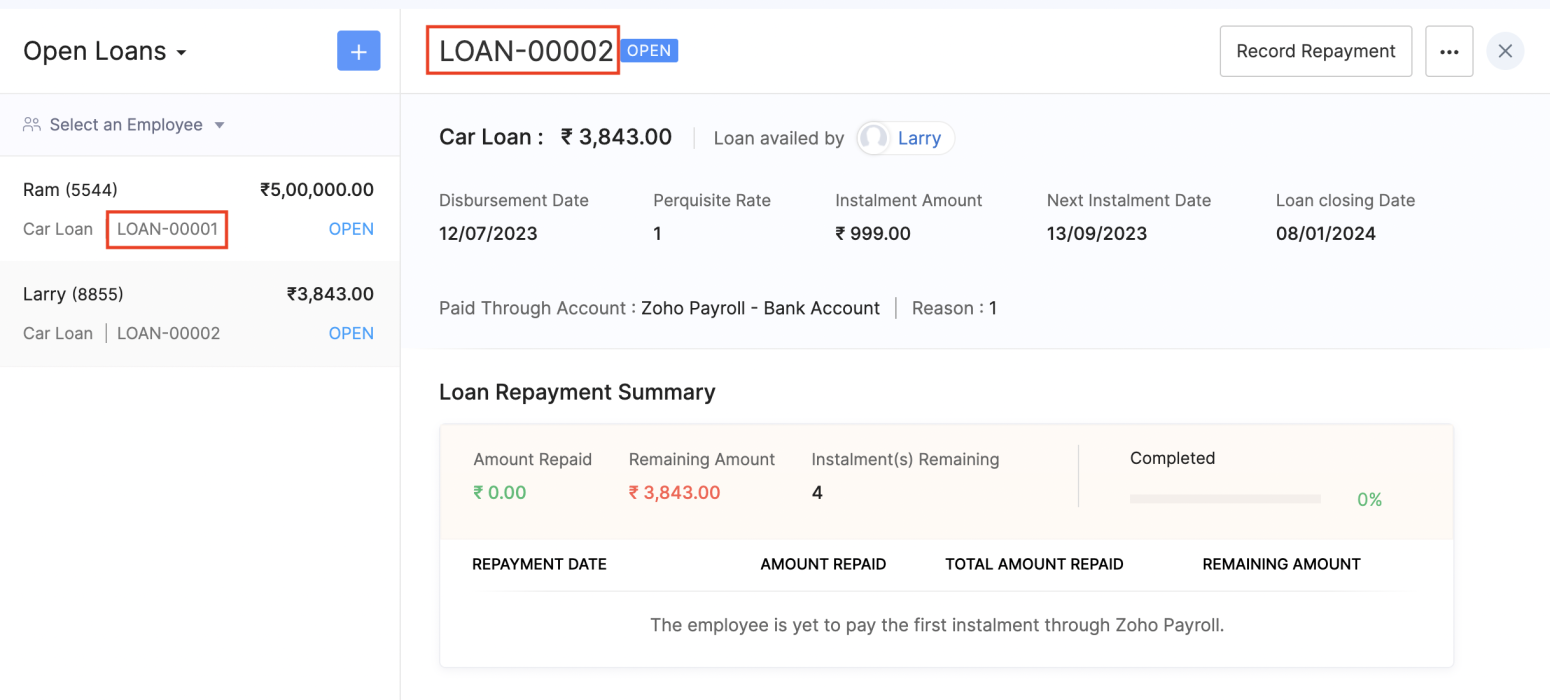 Unique Identifier for Loans
View Vehicle and Driver Perquisites
You can view the vehicle and driver perquisites in the Perquisite section of an employee's Salary Details. In this section, you will be able to view the vehicle and driver perquisite that will be added to payroll every month.
To view vehicle and driver expenses, go to Employee > Salary Details > Perquisites.
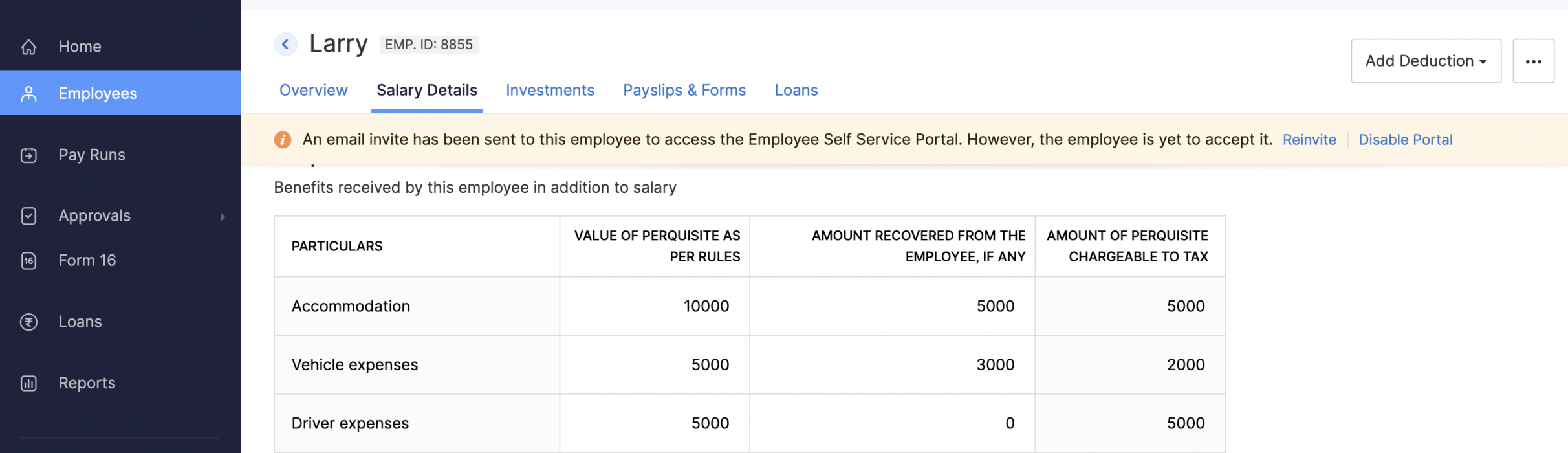 Viewing Vehicle and Driver Perquisites
Updates to Reports
We've added three new reports: the FBP Declaration Report, Investment Declaration Report, and Proof of Investment Report. These reports will help you view employees' declaration and investment details.
- FBP Declaration Report: This report lists the employees who have declared their FBPs. The report also provides the earnings and reimbursement details. You can view the report from any particular date.
- Investment Declaration Report: This report lists the employees who have declared their investments. Additional details such as the Total Chapter VI-A amount, total allowance and HRA income amount, and total Direct Tax amount will also be listed in this report. You can view the report from any particular date.
- Proof of Investment Report: This report lists the employees who have submitted their proof of investments. You can view the report for any given financial year.
Employee Portal Updates
We've made some changes and rearrangements and introduced new modules to enhance your employee portal experience.
- We've now introduced the Documents module in the left sidebar, where your employees can view and download their pay slips and Form 16.
- Your employees can view notifications when Flexible Benefit Plan, Reimbursement Claims, Income Tax Declarations and Proof Of Investments are released or locked and when pay slips are released.
- View the preview of reimbursement when you upload it.
- Employees can now view TDS worksheet and Pay Slip details such as Earnings and Deductions.
- Employees can now add claims for their bills from the home page of the employee portal.
- If you have any queries related to Section 80DDB, you can use the Learn More link in the Investments module for more details.
Note: The product updates listed above are the significant features and enhancements we've released from January 2022 to October 2022. However, you can view all the enhancements from our What's New timeline. From December, we will inform you about the product updates regularly in this space - as and when they happen.
That's a wrap for now! We are always eager to hear your suggestions so we can help you better. If you have a feature request, please share it in the comments below.
If you require assistance, please write to us at support@zohopayroll.com, and we'll get back to you. Stay tuned for more updates from Zoho Payroll!
Regards,
The Zoho Payroll Team
The Zoho Payroll Team
Topic Participants
Bennet Noel L
Nederlandse Hulpbronnen

Recent Topics
Zoho CRMの流入元について
Zoho CRMとZoho formsを連携し、 formsで作成したフォームをサイトに埋め込み運用中です。 UTMパラメータの取得をformsを行い、Zoho CRMの見込み客タブにカスタム項目で反映される状況になっています。 広告に関してはUTMパラメータで取得できているため問題ないのですが、オーガニック流入でフォーム送信の場合も計測したいです。メールやGoogle、Yahoo、directなどの流入元のチャネルが反映されるようにしたいのですが、どのように設定したら良いでしょうか。 また、Error While Sign in on Zoho Work Drive
Dear Team, I hope this email finds you well. I have recently created a Zoho account and started using it. But while I am trying to log in to Zoho work drive it won't log me in its crashing every time I try it. I have tried it on android app, phone browserChoosing a portal option and the "Unified customer portal"?
I am trialling Zoho to replace various existing systems, one of which is a customer portal. Our portal allows clients to add and edit bookings, complete forms, manage their subscriptions and edit some CRM info. I am trying to understand how I might bestTranslation support expanded for Modules, Subforms and Related Lists
Hello Everyone! The translation feature enables organizations to translate certain values in their CRM interface into different languages. Previously, the only values that could be translated were picklist values and field names. However, we have extendedUnified task view
Possible to enable the unified task view in Trident, that is currently available in Mail?Importing data into Assets
So we have a module in Zoho CRM called customers equipments. It links to customers modules, accounts (if needed) and products. I made a sample export and created extra fields in zoho fsm assets module. The import fails. Could not find a matching parentAllow instruction field in Job Sheets
Hello, I would like to know if it is possible to have an instruction field (multi line text) in a job sheet or if there is a workaround to be able to do it. Currently we are pretty limited in terms of fields in job sheets which makes it a bit of a struggleStreamlining Work Order Automation with Zoho Projects, Writer & WorkDrive
Hello Community, Here is the first post in 'Integration & Automation' Series. Use Case :: Create, Merge, Sign & Store Documents in Zoho WorkDrive. Scenario :: You have a standard Work Order template created in Zoho Writer. When a task status is chosenThe dimensions of multilingual power
Hola, saludos de Zoho Desk. Bonjour, salutations de Zoho Desk. Hallo, Grüße von Zoho Desk. Ciao, saluti da Zoho Desk. Olá, saudações da Zoho Desk. வணக்கம், Zoho Desk இலிருந்து வாழ்த்துகள். 你好,来自 Zoho Desk 的问候。 مرحباً، تحيات من Zoho Desk. नमस्ते, ZohoMulti-line address lines
How can I enter and migrate the following 123 state street Suite 2 Into a contact address. For Salesforce imports, a CR between the information works. The ZOHO migration tool just ignores it. Plus, I can't seem to even enter it on the standard entry screen.Accessing Zoho Forms
Hi all, We're having trouble giving me access to our company's Zoho Forms account. I can log in to a Forms account that I can see was set up a year ago, but can't see any shared forms. I can log into Zoho CRM and see our company information there withoutCost of good field
Is there a way we can have cost of good sold as a field added to the back end of the invoicing procedure and available in reports?How to add image to items list in Invoice or Estimate?
Hello! I have just started using Zoho Invoice to create estimates and, possibly to switch from our current CRM/ERP Vendor to Zoho. I have a small company that is installing CCTV systems and Alarm systems. My question is, can I add images of my "items" to item list in Zoho Invoice and Estimates and their description? I would like to show my clients the image of items in our estimates so they can decide if they like these items. And I tell you, often they choose more expensive products just becauseIssue with the Permission to Zoho Form
I am getting an error by signing in to zoho form as it is stated that i don't have permission to access this is admin accountCRM templates
Hello everyone, In my company we use Zoho campaigns where we set up all newsletters and we use Zoho CRM for transactional emails. I have created some templates in Zoho campaigns but from my understanding i cannot use those in Zoho CRM, right?Pending Sales Order Reports
Pending sale order report is available for any single customer, Individual report is available after 3-4 clicks but consolidated list is needed to know the status each item. please help me.Zoho Mail SMTP IP addresses
We are using Zoho Mail and needs to whitelist IP for some redirections from your service to another e-mails. You can provide IP address list for Zohomail SMTP servers?Trying to Add Tasks to Other Users Is Utterly Baffling
As the title says, the process of trying to create a task for someone in my team is so unintuitive and illogical that I have given up trying to do it. This is a feature that I pay for but it is so poorly devised and implemented that my team has givenZoho Campaigns - Why do contacts have owners?
When searching for contacts in Zoho Campaigns I am sometimes caught out when I don't select the filter option "Inactive users". So it appears that I have some contacts missing, until I realise that I need to select that option. Campaigns Support haveemail forwarding not working
Your email forwarding service does not work. I received the confirmation email and completed the confirmation, after that nothing and nothing since no matter what I have tried. Shame as everything else was smooth. I spose it's harder to run one of these web based internet mail services than you guys thought!!! can you fix the email forwarding asap PLEASE!Google Ads Conversions Not Being Tracked in Zoho CRM
We have 3 different conversions created in our Google Ads Account. Only one of the 3 conversion types is tracking in Zoho CRM. Our forms are Elementor Forms that are mapped into Zoho CRM. It apprears to me that all leads are showing up in Zoho CRM, butEnable Locations for Expense
Hi, please enable Locations (ex Branches) for Zoho Expense so that there is consistency between this app and Zoho Books. Thanks in advance.无法发送消息;原因:5545.1.8电子邮件传出被阻止。
求帮助,我的邮箱无法发送邮件,请尽快修复。 我们只是用来做正常的资料寄送,如果贵公司再无理封锁我们的邮箱,我们会改用其他公司的服务。 请尽快解封,ID: 815556404in the Zoho Creator i have File Upload field get the file on submission of the form Get the File and upload to Zoho Books
in the Zoho Creator i have File Upload field get the file on submission of the form Get the File and upload to Zoho Books . how I get the file From zoho creator and upload to Zoho Books . using Api response = invokeUrl [ url: "https://www.zohoapis.com/creator/v2.1/data/hh/l130/report/All_Customer_Payments/"+input.IDGenerate a link for Zoho Sign we can copy and use in a separate email
Please consider adding functionality that would all a user to copy a reminder link so that we can include it in a personalized email instead of sending a Zoho reminder. Or, allow us to customize the reminder email. Use Case: We have clients we need toRate Limiting in Zoho Flow (OpenAI API)
Hi Everyone, We are facing some issues when using Zoho Flow as we have a deluge script running which is making external calls to OpenAI endpoint. Sometimes the response takes more than 30 seconds meaning the script will timeout. We want to implement aPlacing a condition before converting the LEAD
Hi, I need some assistance with Lead conversion. I need to place certain conditions before allowing the user to convert the lead. For example: up until the certain status's doesn't equal "green" don't allow to convert lead. I tried creating this usingit is possible to open a widget via deluge script function
I have one function that is workflow action I call my fucntion I need to call the internal widget it is possible to open or it have to please tell me the solutionCreator - Portal Custom Domain
I will pay $100 in crypto to anyone who can actually get my Creator Custom Domain to function (actually tell me how you got yours to). Domain verifies, Nothing. I've been fighting it a week, multiple chats to customer service. Clearly I'm doing something wrong. Some datapoints Domain name itself unimportant, can be a string of numbers. I need to know what registrars are working for you because GoDaddy does NOT. Do I need hosting? I've tried both ways and nothing works. I pushed through Cloudflaresteps and options to change Domain DNS/Nameservers settings
Please share the options or steps to change Domain DNS/Nameservers settingsEmployees in Leave Policy exceptions
In the Leave Policies we should be able to add specific employees to the exception list So it will be like All Employees except A,B,C in the exception list, currently we can only add departments etcHow get stock name from other column ?
How get stock name from other column ? e.g. =STOCK(C12;"price") where C12 is the code of the stockAdding a developer for editing the client application with a single user license
Hi, I want to know that I as a developer I developed one application and handed over to the customer who is using the application on a single user license. Now after6 months customer came back to me and needs some changes in the application. Can a customerDownload an email template in html code
Hello everyone, I have created an email template and I want to download it as html. How can i do that? I know you can do it via the campaigns-first create a campaign add the template and download it as html from there. But what if i don't want to createAttachment is not included in e-mails sent through Wordpress
I have a Wordpress site with Zeptomail Wordpress plugin installed and configured. E-mails are sent ok through Zeptomail but without the included attachment (.pdf file) Zeptomail is used to send tickets to customers through Zeptomail. E-Mails are generatedUpcoming Changes to the Timesheet Module
The Timesheet module will undergo a significant change in the upcoming weeks. To start with, we will be renaming Timesheet module to Time Logs. This update will go live early next week. Significance of this change This change will facilitate our nextCant update image field after uploading image to ZFS
Hello i recently made an application in zoho creator for customer service where customers could upload their complaints every field has been mapped from creator into crm and works fine except for the image upload field i have tried every method to makeBilling Management: #4 Negate Risk Free with Advances
In the last post, we explored how unbilled charges accumulate before being invoiced. But what happens when businesses need money before service begins? Picture this: A construction company takes on a $500,000 commercial building project expected to lastZoho CRM Inventory Management
What’s the difference between Zoho CRM’s inventory management features and Zoho Inventory? When is it better to use each one?Cannot Enable Picklist Field Dependency in Products or Custom Modules – Real Estate Setup
Hello Zoho Support, I am configuring Zoho CRM for real estate property management and need picklist field dependency: What I’ve tried: I started by customizing the Products module (Setup > Modules & Fields) to create “Property Type” (Housing, Land, Commercial)Next Page