What's New in Zoho Payroll 2022 (India)
We are thrilled to bring you all the updates that we were working on over the past months. We have enhanced Zoho Payroll to be intuitive and easy to use so that both employers and employees have a great payroll experience. Here are the significant updates we've brought to Zoho Payroll:
HSBC Direct Deposit
HSBC Direct Deposit
If your organisation has an HSBC corporate account, you can now directly integrate it with Zoho Payroll and deposit salaries directly into your employee bank accounts.
Once you approve the pay run for a particular period, you can initiate the salary payment via HSBC. After the payment is authorized, salaries are transferred to employees immediately. Learn More
Note: NEFT will be the default payment mode for the payments initiated from Zoho Payroll using the HSBC integration. If payments are initiated during non-business hours, the payments will be processed only on the next business day.
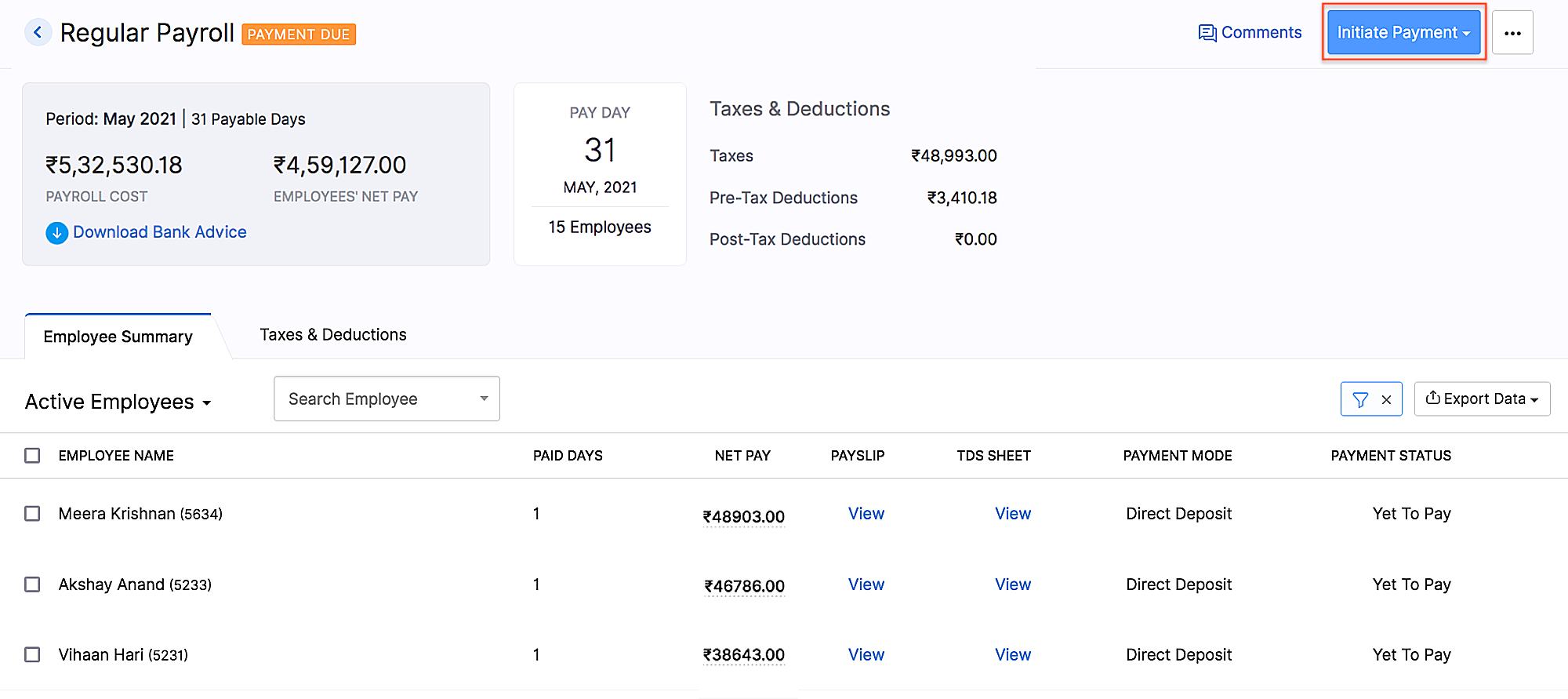 HSBC integration
Add Non-Employee as Tax Deductor
You can now add a person who is not your employee, such as a third-party accountant or auditor, as a Tax Deductor in Zoho Payroll. The tax deductor will be responsible for remitting your tax to the government. Additionally, you will have to provide details such as the Deductor's name and designation.
To add the tax deductor, go to Settings > Taxes > Select Non-Employee as Tax Deductor.
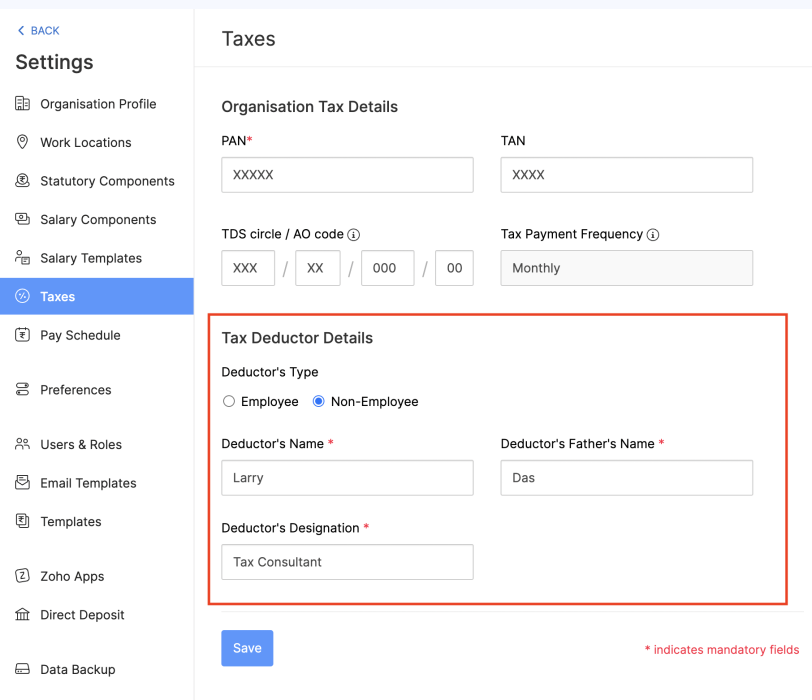 Adding Non-Employee as Tax Deductor
User Permissions for Approvals
Configure permissions such that only users who belong to roles that have approval permissions will be able to access those related modules.
To configure user permissions for approval: Go to Settings > Users & Roles > New Role. Next, select the modules and the level of access you want to provide for the role.
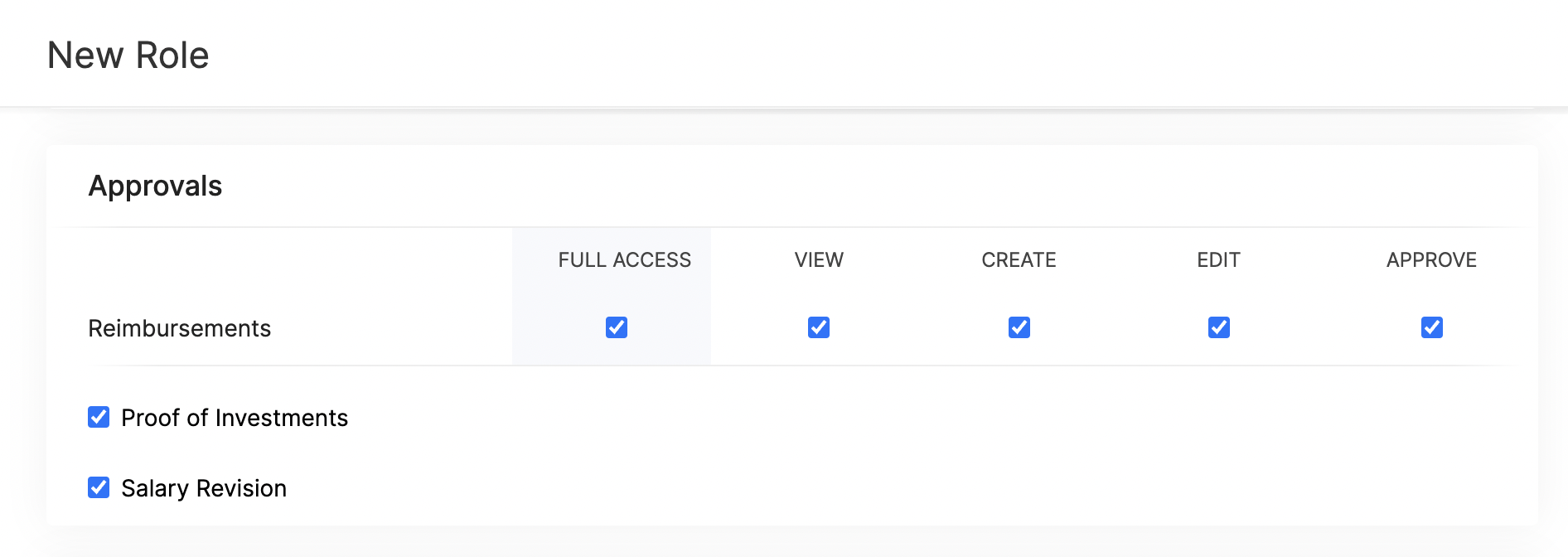 Approval User Permissions
Updates Related to Proof of Investments
- Filter employees who are yet to submit their Proof of Investments. Once you filter the employees, you can also export them in XLS, XLSX, and CSV formats.
- If you want to remind your employees to submit their Proof of Investments, you can now send them a system-generated email reminder.
- Previously, once admins configured the tax regime, they would not have been able to change it. Admins can now switch between the old and new tax regimes while recording the IT declarations and Proof of Investments, provided you've configured preferences to change regimes.
- You can mandate employees to upload attachments while submitting their Proof of Investments.
- In addition to uploading Proof of Investments in other formats, you can also upload .zip files.
New Form 24Q Format
The Central Board of Direct Taxes (CBDT) has introduced a new Format for Form 24Q. Zoho Payroll now supports the new format and the text files will be generated automatically in the new format.
Unique Identifiers for Loans
When you record a loan, Zoho Payroll will automatically assign a unique number to the loan. This number will help you to search and find a particular loan quickly.
If you are importing loans, loan numbers are mandatory. So, ensure the files you upload have loan numbers in them. If the imported loan numbers match the existing loans in Zoho Payroll, the existing loan will be updated with the imported details.
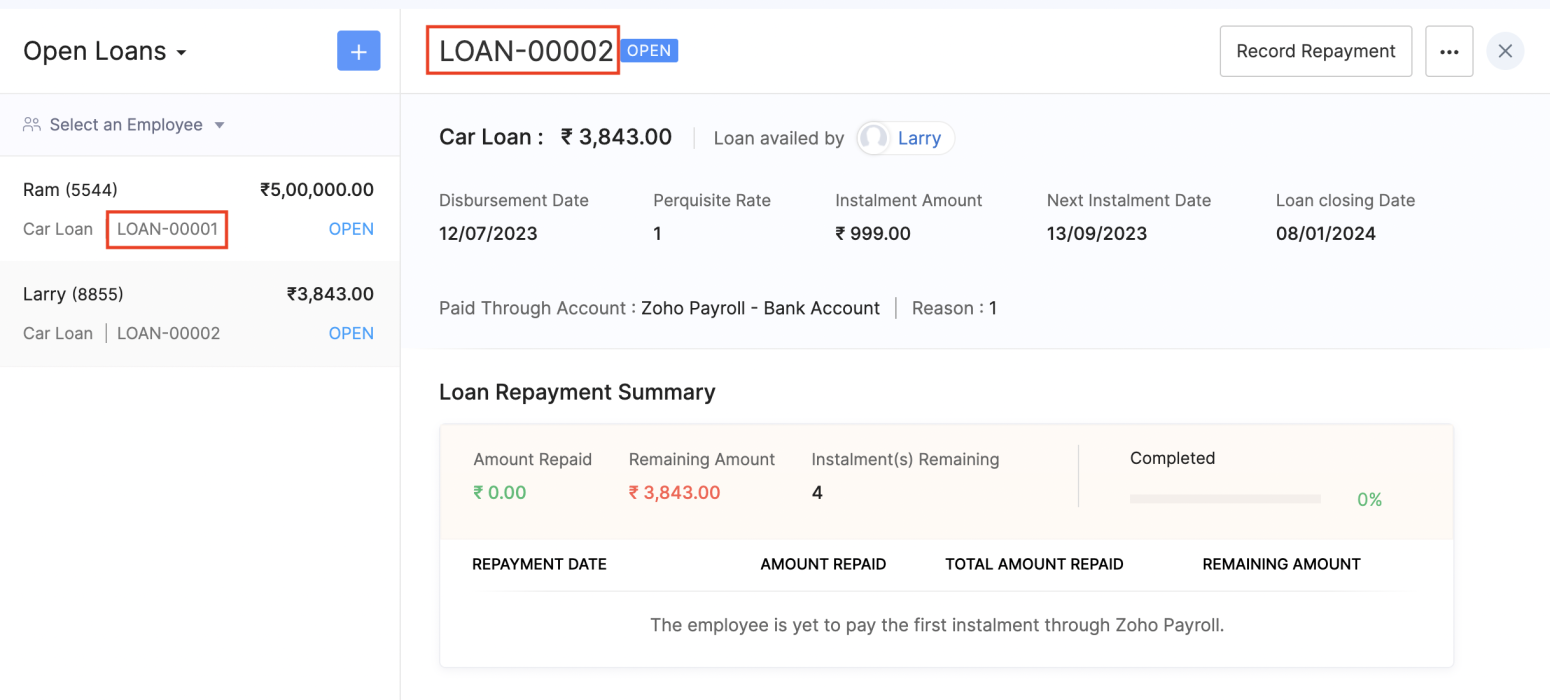 Unique Identifier for Loans
View Vehicle and Driver Perquisites
You can view the vehicle and driver perquisites in the Perquisite section of an employee's Salary Details. In this section, you will be able to view the vehicle and driver perquisite that will be added to payroll every month.
To view vehicle and driver expenses, go to Employee > Salary Details > Perquisites.
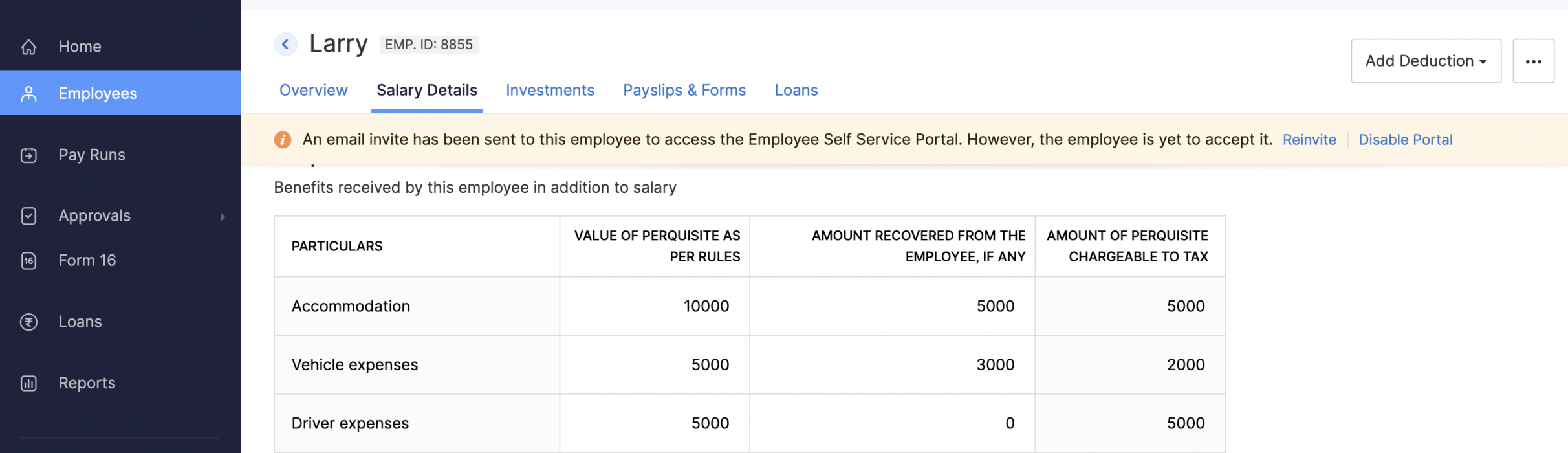 Viewing Vehicle and Driver Perquisites
Updates to Reports
We've added three new reports: the FBP Declaration Report, Investment Declaration Report, and Proof of Investment Report. These reports will help you view employees' declaration and investment details.
- FBP Declaration Report: This report lists the employees who have declared their FBPs. The report also provides the earnings and reimbursement details. You can view the report from any particular date.
- Investment Declaration Report: This report lists the employees who have declared their investments. Additional details such as the Total Chapter VI-A amount, total allowance and HRA income amount, and total Direct Tax amount will also be listed in this report. You can view the report from any particular date.
- Proof of Investment Report: This report lists the employees who have submitted their proof of investments. You can view the report for any given financial year.
Employee Portal Updates
We've made some changes and rearrangements and introduced new modules to enhance your employee portal experience.
- We've now introduced the Documents module in the left sidebar, where your employees can view and download their pay slips and Form 16.
- Your employees can view notifications when Flexible Benefit Plan, Reimbursement Claims, Income Tax Declarations and Proof Of Investments are released or locked and when pay slips are released.
- View the preview of reimbursement when you upload it.
- Employees can now view TDS worksheet and Pay Slip details such as Earnings and Deductions.
- Employees can now add claims for their bills from the home page of the employee portal.
- If you have any queries related to Section 80DDB, you can use the Learn More link in the Investments module for more details.
Note: The product updates listed above are the significant features and enhancements we've released from January 2022 to October 2022. However, you can view all the enhancements from our What's New timeline. From December, we will inform you about the product updates regularly in this space - as and when they happen.
That's a wrap for now! We are always eager to hear your suggestions so we can help you better. If you have a feature request, please share it in the comments below.
If you require assistance, please write to us at support@zohopayroll.com, and we'll get back to you. Stay tuned for more updates from Zoho Payroll!
Regards,
The Zoho Payroll Team
The Zoho Payroll Team
Topic Participants
Bennet Noel L
Nederlandse Hulpbronnen

Recent Topics
Zoho equipment rental - just like Booqable
Hi Zoho Team, is it possible to create a module or a system like booqable? our business starts renting our IT equipment assets that have been recently used for Events and Projects, we are having ZOHO books so its easy to integrate if you create one. BooqableProfit Margin Scheme
I'm a tourism company operating in the aviation and outbound tourism sectors. Typically, taxes are 0% as our operations are outside the country. However, the state has now imposed a tax on the profit margin. This means if the selling price of an airlineVisibility and Enforcement for Outdated Plug Parameters in Zobot Canvas
Dear Zoho SalesIQ Team, Greetings, We’d like to suggest an important usability and quality improvement for working with Plugs inside Zobot. Current Behavior: When we update the code of an existing Plug, any Zobot card using that Plug requires manual resaving.Announcement: Zoho DataPrep to Deprecate Password-Only Authentication for Snowflake Connections on July 31, 2025
As part of our ongoing commitment to security and in alignment with Snowflake's pledge to the Cybersecurity and Infrastructure Security Agency (CISA) Secure by Design initiative, Zoho DataPrep will no longer support single-factor password authentication.Text on Zoho Sign confirmation dialouge is very small compared to text used everywhere else on Zoho Sign.
I've reported multiple times through Zoho's support email that the text on this notification is very small in contrast to all the other text on the Zoho Sign app. I think it's a bug and it just needs the font size to be increased. It's very minor butError Message: None of the rows can be imported
I have been using zoho sheets to download my CSV file for about 2 years now, this month, October 2021, for some reason when I download it to upload to zoho books I get a message saying "None of the rows can be imported". I have been using the same process,Invalid Element place_of_contact, Invalid Element gst_no, Invalid Element gst_treatment
so this is the body contact_name: orderData.customerName, company_name: orderData.customerName, email: orderData.email, contact_type: 'customer', currency_code: 'INR', gst_treatment: 'business_gst', gst_no: 'i using proper gst no i just removed it fromNot able to item an item to non taxable via api, despite sending is_taxable as false
Hi everyone, I'm trying to update an item via books api and even when sending is_taxable as false, the item still shows Taxable in zoho, I get no errors as well when I update, any help appreciated in this!Collection & Payment Mapping Automation
We book Sales Invoices and Purchase Invoices against Same Projects. Both Sales Invoices & Purchase Invoices can have one or multiple Projects mentioning the Project ID. We prefer to Make vendor Payments Once we have received The Collections from ClientsNested Sub-forms (Subform within subform)
Hi Team, Whether there is any possibilities to add sub-form with in another sub-form like Main Form -> Sub form A ->Sub form B If we tried this, only one level of sub form only working. Any one having any idea about this? Thanks Selvamuthukumar RRestore Trashed Records Anytime Within 30 Days
Access the recycle bin from the Data Administration tab under the settings page in Zoho Projects, which gives better control over the trashed data. When records like projects, phases, task lists, tasks, issues, or project templates are trashed, they areAvoiding Inventory Duplication When Creating Bills for Previously Added Stock
I had created several items in Zoho Books and manually added their initial stock at the time of item creation. However, I did not record the purchase cost against those items during that process. Now, I would like to create Purchase Orders and convertApplying EUR Payments to USD Invoices in Zoho Books
Hello, I have a customer to whom I issue invoices in USD. However, this customer makes payments in both EUR and USD. I have already enabled the multi-currency feature in Zoho Books Elite, but I am facing an issue: When the customer makes a payment inHow to prevent users from editing mail merge templates from Zoho crm
We want users to use public mail merge templates. They should not be able to edit templates but only preview data merge and send emails. We did prohibit "manage mail merge template" in the user profile. But they can still edit the template in the zohoCustomer Addresses cannot be edited/deleted in invoices
In the invoices we have an option to change the customer address and add a new address Now I dont know why for some reason if we add an address through this field, the address doesn't appear in the customer module We cannot delete the addresses addedCustom Fields connected to Invoices, Customers, Quotes, CRM
I created the exact same custom fields in Books: Invoices, Customer, Quotes, and in CRM but they don't seem to have a relationship to one another. How do I connect these fields so that the data is mapped across transactions?Accelerate Github code reviews with Zoho Cliq Platform's link handlers
Code reviews are critical, and they can get buried in conversations or lost when using multiple tools. With the Cliq Platform's link handlers, let's transform shared Github pull request links into interactive, real-time code reviews on channels. ShareHeads up: We're going to update the VAT Summary table's visibility (UK and Germany Editions)
Hello users, Note: This change only applies to organisations using the UK and Germany editions of Zoho Books. Currently, if you've enabled the VAT Summary table in a template, it will be displayed only in PDFs sent to your customers whose default currencyPartial payment invoicing
Greetings I have questions related to payments and retainer invoices: 1. When I want to issue a partial payment invoice, I can't specify the portion to be paid or already paid, then balance to be shown as Due. 2. Retainer invoice is only available asInputting VAT Pre-Registration expenses for first VAT Return
Hi Zoho, I've just registered for VAT and am setting up Zoho to handle calculations and VAT return submissions. I'm struggling to figure out how to input the last 4 years worth of expenses into Zoho so that they're calculated in the VAT module. When IAnyone else experiencing very slow loading of pages in Zoho Projects?
I reported this yesterday only to be told there are no issues but is anyone else experiencing stupidly slow loading of pages. On our loading screen, it is taking often as long as 60 seconds to load a page and just stays on this screen for ages! OtherZoho Desk Lookup Field Reporting
Thank you for adding the ability to add additional lookup fields for desk tickets. My question is how do you report against these fields? For example: Associating related accounts to the primary desk ticket account, I am not able to add the lookup fieldsIntegrating asana will cause notification messages to pop up continuously
When I create or edit a task in Asana, the Asana bot keeps updating messages to group chat, which causes the cliq to keep popping up notifications.Entire notebook that had notes has disappeared
I don't know how tf this happened. All I did was uninstall and reinstall the mobile app after fixing a bug I had. After I reinstalled the app, everything was synced back except for one folder which had a bunch of notes in it. None of those notes are inMy site has disappeared from web builder
www.mproperties.uk My site above is still working. However it has completely disappeared from my Zoho sites' web builder. I am therefore unable to edit my site whatsoever. Please help.Trying to trigger email notification based on rollup summary field
Hi there, I'm trying to trigger an email notification via Workflow Rules wherever the rollup summary field "Total Shipments" goes from empty to not empty. However this field is not available from the picklist of options in the Workflow rule. Can anyonezia data enrichment - switch to webamigo Extension
Hello, I have so far used data enrichment via Zia. Now I have installed the Webamigo extension to expand personal data. Unfortunately, nothing has changed after the installation; are there any additional steps needed to switch from the previous methodExport Timeline
With the new Timeline features, it would be really helpful to have the option to export a timeline. When handling customer complaints, having the full breakdown of everything that happens on a module is great but we usually have to send this to anotherInteractions Tab in Zoho CRM: A 360° Omnichannel View of Every Customer Touchpoint
Hello Everyone, Hope you are well! We are here today with yet another announcement in our series for the revamped Zoho CRM. Today, we introduce Interactions Tab a new way to view all customer interactions from one place inside your CRM account. CustomersHow to resubscribe a contact marked as "Unsubscribed (Marked by Recipient)" without using a form?
Hello, I have a question regarding Zoho Marketing Automation functionality. Is there a way for an administrator to change the subscription status of a contact marked as "Unsubscribed (Marked by Recipient)" back to "Subscribed" without using a form? Ideally,Linkedin: when Zoho Social is going serious with it?
Hi, it's been said in the past that Linkedin related features in Zoho Social were well behind those of other social networks because of limitations imposed by the platform. Now that we see around my tools (take taplio.com) frankly outpacing ZSocial on5名限定 課題解決型ワークショップイベント Zoho ワークアウト開催のお知らせ(7/24)
ユーザーの皆さま、こんにちは。Zoho ユーザーコミュニティチームの藤澤です。 7月開催のZoho ワークアウトについてお知らせします。 2ヶ月ぶりに、渋谷にて「リアル開催」します! ▷▷詳細はこちら:https://www.zohomeetups.com/20250724Zoho ━━━━━━━━━━━━━━━━━━━━━━━━ Zoho ワークアウトとは? Zoho ユーザー同士で交流しながら、サービスに関する疑問や不明点の解消を目的とした「Zoho ワークアウト」を開催します。 Zoho サービスで完了させたい設定やカスタマイズ、環境の整備など……各自で決めた目標達成に向け、How to get fields centered in a form?
Is it possible to center fields in a form? Some of my forms do some don't and it is really not aestheticly pleasing? Any help would be greatly appricated. Thanks, Michael McNeillWebhooks and Integration
Hey, I was looking to create automation using webhooks or something equivalent of a trigger based mechanism, to connect it as an integration. But I don't find any relevant APIs to setup these webhooks/notifcations for the "Zoho Books". Can anyone pleaseZoho Books X Zoho Expense
Hello there, Please can you tell me if it is possible to sync from Books to Expense? I much prefer the Expense reports to that of Books and the Credit Card feeds work via expense and not Books for me. However I find books is much better to deal with theABILITY TO LOG INTO CUSTOMER PORTAL
I think it would be very helpful to have a button in Zoho Books to be able to see the customer portal so we can see what they see to help them navigate through the portal. Many times, the customer will call about the portal, but without visibility intoSort, filter & save views for BOOKS PROJECTS
Thanks for all the updates. Our firm uses the module for simple internal project accountancy. This means we do everything from the Projects Section but this isn't user friendly at all. You can't do anything with customized your own fields which basicallyedit input format in custom field - sales order
hi, I want to integrate a custom field (multi line text box) in our sales order. It needs to show upper case and lower case letters, numbers, spaces, hyphens and "/". What do I need to put in the custom format to configure these signs? Thanks, TinaThis transaction type cannot be matched with a line on the statement.
When using the books API https://www.zohoapis.com/books/v3/banktransactions/uncategorized/${transaction.transaction_id}/match I get this error "This transaction type cannot be matched with a line on the statement." What I'm doing is for the uncategorizedTimesheets
I wanted to create the timesheets remainder for our team mates who miss out the weekly timesheet entries. While creating the email templates, I couldn't see anything related to timesheets. Since it shows projects Can you help me find and build a oneNext Page