What's New in Zoho Payroll 2022 (India)
We are thrilled to bring you all the updates that we were working on over the past months. We have enhanced Zoho Payroll to be intuitive and easy to use so that both employers and employees have a great payroll experience. Here are the significant updates we've brought to Zoho Payroll:
HSBC Direct Deposit
HSBC Direct Deposit
If your organisation has an HSBC corporate account, you can now directly integrate it with Zoho Payroll and deposit salaries directly into your employee bank accounts.
Once you approve the pay run for a particular period, you can initiate the salary payment via HSBC. After the payment is authorized, salaries are transferred to employees immediately. Learn More
Note: NEFT will be the default payment mode for the payments initiated from Zoho Payroll using the HSBC integration. If payments are initiated during non-business hours, the payments will be processed only on the next business day.
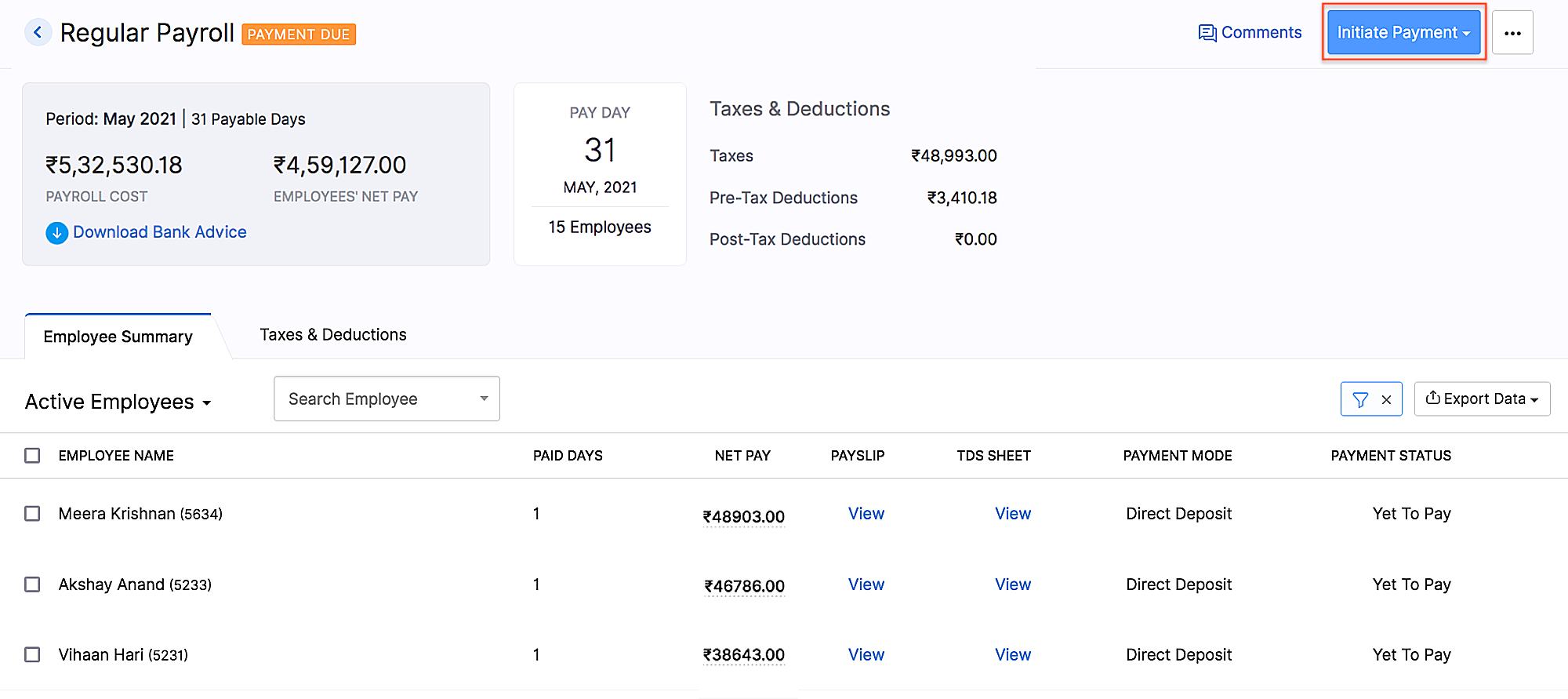 HSBC integration
Add Non-Employee as Tax Deductor
You can now add a person who is not your employee, such as a third-party accountant or auditor, as a Tax Deductor in Zoho Payroll. The tax deductor will be responsible for remitting your tax to the government. Additionally, you will have to provide details such as the Deductor's name and designation.
To add the tax deductor, go to Settings > Taxes > Select Non-Employee as Tax Deductor.
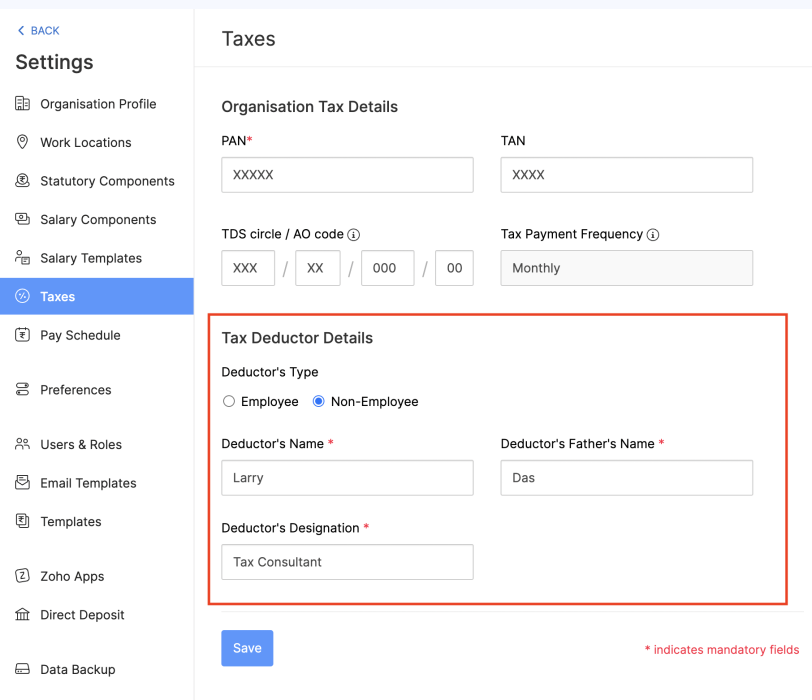 Adding Non-Employee as Tax Deductor
User Permissions for Approvals
Configure permissions such that only users who belong to roles that have approval permissions will be able to access those related modules.
To configure user permissions for approval: Go to Settings > Users & Roles > New Role. Next, select the modules and the level of access you want to provide for the role.
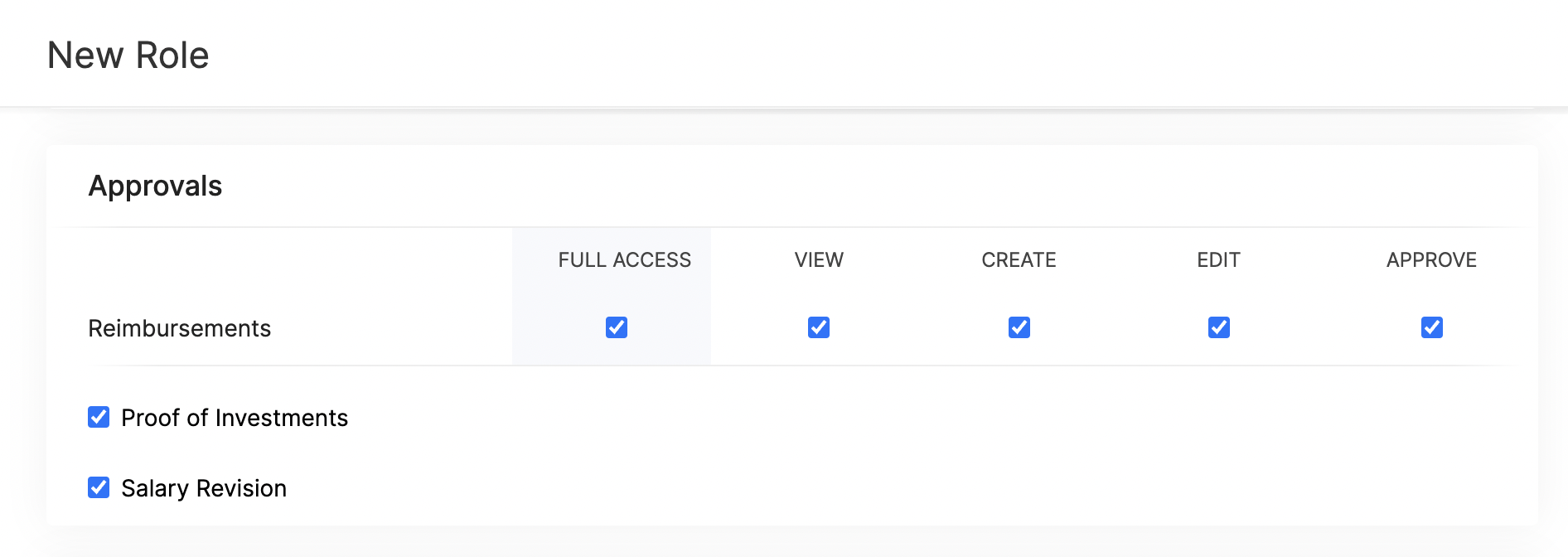 Approval User Permissions
Updates Related to Proof of Investments
- Filter employees who are yet to submit their Proof of Investments. Once you filter the employees, you can also export them in XLS, XLSX, and CSV formats.
- If you want to remind your employees to submit their Proof of Investments, you can now send them a system-generated email reminder.
- Previously, once admins configured the tax regime, they would not have been able to change it. Admins can now switch between the old and new tax regimes while recording the IT declarations and Proof of Investments, provided you've configured preferences to change regimes.
- You can mandate employees to upload attachments while submitting their Proof of Investments.
- In addition to uploading Proof of Investments in other formats, you can also upload .zip files.
New Form 24Q Format
The Central Board of Direct Taxes (CBDT) has introduced a new Format for Form 24Q. Zoho Payroll now supports the new format and the text files will be generated automatically in the new format.
Unique Identifiers for Loans
When you record a loan, Zoho Payroll will automatically assign a unique number to the loan. This number will help you to search and find a particular loan quickly.
If you are importing loans, loan numbers are mandatory. So, ensure the files you upload have loan numbers in them. If the imported loan numbers match the existing loans in Zoho Payroll, the existing loan will be updated with the imported details.
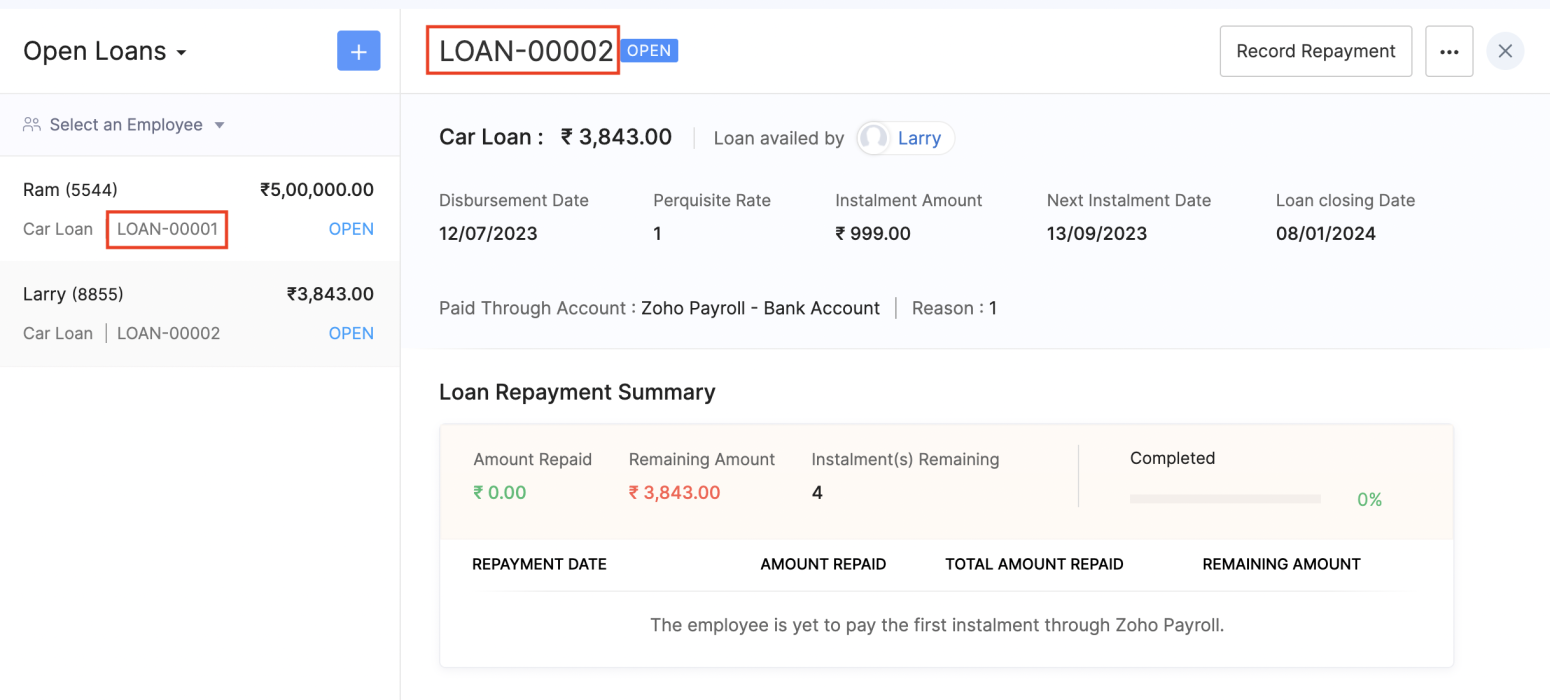 Unique Identifier for Loans
View Vehicle and Driver Perquisites
You can view the vehicle and driver perquisites in the Perquisite section of an employee's Salary Details. In this section, you will be able to view the vehicle and driver perquisite that will be added to payroll every month.
To view vehicle and driver expenses, go to Employee > Salary Details > Perquisites.
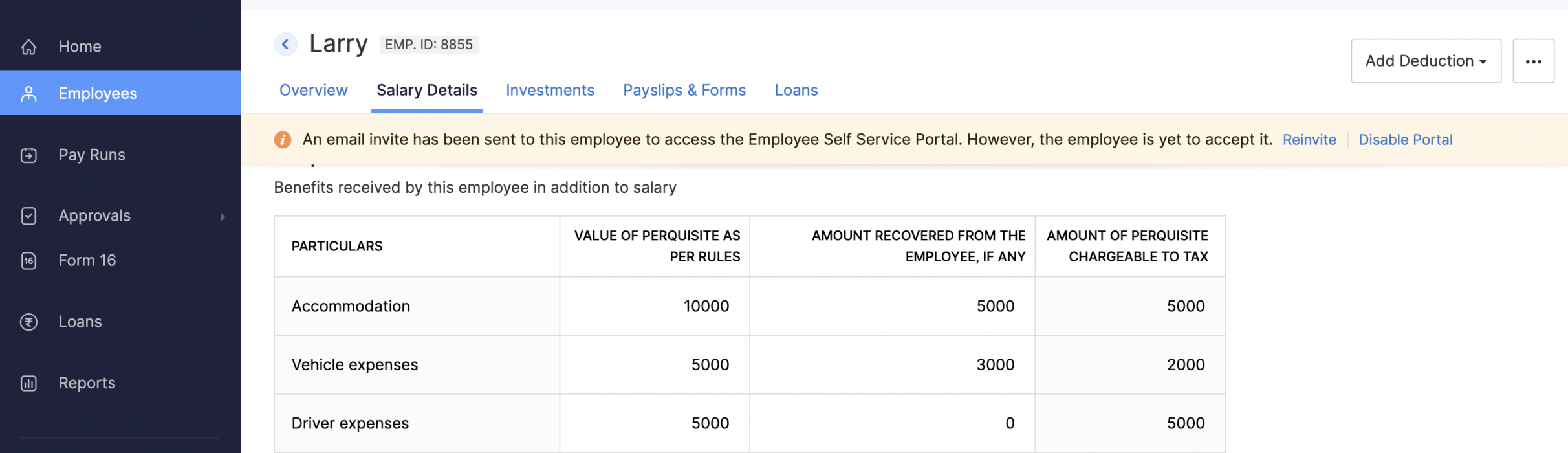 Viewing Vehicle and Driver Perquisites
Updates to Reports
We've added three new reports: the FBP Declaration Report, Investment Declaration Report, and Proof of Investment Report. These reports will help you view employees' declaration and investment details.
- FBP Declaration Report: This report lists the employees who have declared their FBPs. The report also provides the earnings and reimbursement details. You can view the report from any particular date.
- Investment Declaration Report: This report lists the employees who have declared their investments. Additional details such as the Total Chapter VI-A amount, total allowance and HRA income amount, and total Direct Tax amount will also be listed in this report. You can view the report from any particular date.
- Proof of Investment Report: This report lists the employees who have submitted their proof of investments. You can view the report for any given financial year.
Employee Portal Updates
We've made some changes and rearrangements and introduced new modules to enhance your employee portal experience.
- We've now introduced the Documents module in the left sidebar, where your employees can view and download their pay slips and Form 16.
- Your employees can view notifications when Flexible Benefit Plan, Reimbursement Claims, Income Tax Declarations and Proof Of Investments are released or locked and when pay slips are released.
- View the preview of reimbursement when you upload it.
- Employees can now view TDS worksheet and Pay Slip details such as Earnings and Deductions.
- Employees can now add claims for their bills from the home page of the employee portal.
- If you have any queries related to Section 80DDB, you can use the Learn More link in the Investments module for more details.
Note: The product updates listed above are the significant features and enhancements we've released from January 2022 to October 2022. However, you can view all the enhancements from our What's New timeline. From December, we will inform you about the product updates regularly in this space - as and when they happen.
That's a wrap for now! We are always eager to hear your suggestions so we can help you better. If you have a feature request, please share it in the comments below.
If you require assistance, please write to us at support@zohopayroll.com, and we'll get back to you. Stay tuned for more updates from Zoho Payroll!
Regards,
The Zoho Payroll Team
The Zoho Payroll Team
Topic Participants
Bennet Noel L
Nederlandse Hulpbronnen

Recent Topics
Performance is degrading
We have used Mail and Cliq for about three years now. I used to use both on the browser. Both have, over the past 6 months, had a severe degradation in performance. I switched to desktop email, which appeared to improve things somewhat, although initialHow to set page defaults in zoho writer?
hi, everytime i open the zoho writer i have to change the default page settings to - A4 from letter, margins to narrow and header and footer to 0. I cannot set this as default as that option is grayed out! so I am unable to click it. I saved the documentUnable to Send Different Email Templates for Different Documents in Zoho Sign
Hello Zoho Community, I am facing a limitation with Zoho Sign regarding email notifications sent to customers when a document is sent for signing. Currently, whenever I send any template/document for signing, the email notification that goes to the customerEnable History Tracking for Picklist Values Not Available
When I create a custom picklist field in Deals, the "Enable History Tracking for Picklist Values" option is not available in the Edit Properties area of the picklist. When I create a picklist in any other Module, that option is available. Is there a specific reason why this isn't available for fields in the Deals Module?Vault crashes on Android Devices
Vault is continuously closing after entering the master password on my Android device. After several attempts I get a system message that says there is a bug in the app. I've uninstalled and reinstalled the app, and cleared the app cache, but nothing¿Cómo puedo configurar las contraseñas creadas bajo una directiva para que nunca caduquen y no aparezcan como caducadas en los informes?
¿Cómo puedo configurar las contraseñas creadas bajo una directiva para que nunca caduquen y no aparezcan como caducadas en los informes? La razón por la cual contraseña estas no deben caducar es porque su actualización depende de mi cliente y no de mí.Camera access
My picture doesn't appear in a group discussion. (The audio is fine.) The guide says "Click the lock icon on address bar," but I can't find it. Advise, pleaseAre static links available
I'm still using Zoho Meeting in trial mode. My previous webinar software provided a static link, and I made the mistaken assumption that I could send out my link and start a meeting later. Mass confusion, but my fault. With a paid version do you get aWhy is Zoho Meeting quality so poor?
I've just moved from Office 365 to Zoho Workplace and have been generally really positive about the new platform -- nicely integrated, nice GUI, good and easy-to-understand control and customisation, and at a reasonable price. However, what is going onHow to print a label from zoho creator app?
Hello, I would like to print a label from zoho creator app record similar to attached one. Size 74mm x 102mm. I tried record template. It leaves plenty of space around the content and also I couldn't set the height of the page. So it is not printing properly. Could someone please direct me to right direction for this requirement?Integration between "Zoho Sprints Stories" and "Zoho Projects Tasks/Subtasks"
We have two separate teams in our organization using Zoho for project management: The Development team uses Zoho Sprints and follows Agile/Scrum methodology. The Infrastructure team uses Zoho Projects for traditional task-based project management. InWhere can we specify custom CSS in Zoho Forms custom theme ?
I'm using a form with a dark theme. The OTP popup window is unreadable, because for some reason, the OTP popup background fixes color to white, but still takes the font color specified in the custom theme. This ends up as white on white for me, renderingTeam Gamification
Would love to motivate, engage and encourage our team with our social media posts. Would like to include Gamification features of Social Media in Zoho Social or Marketing Automation. And also bring in Social Advocacy tools/tracking/management to these,Sync Data from MA to CRM
Currently, it's a one-way sync of data from the CRM to MA. I believe we should have the ability to select fields to sync from MA to the CRM. The lead score is a perfect example of this. In an ideal world we would be able to impact the lead score of aUpdate CRM record action
Currently, MA only offers a "Push Data" action to push data to a CRM module. This action is built to cover the need to both create a new record and update an existing record. Because it has been implemented this way all required fields on the CRM modulePro Lite Upgrade - Quick Access Tray
Hello, I was going to upgrade to Pro Lite but the Quick Access Tray feature isn't available for Windows. Of the four features not available for Windows, the QAT is what I'm most interested in. Are there plans to add this feature for Windows anytime soon?Boost your CRM communication with new font types, sizes, and default reply-to options while composing emails
Hello Everyone, We’re excited to introduce a series of impactful enhancements to the email composer settings in Zoho CRM. These updates enable you to personalize and optimize your customer interactions with greater efficiency. So what's new? Add customFeature Enhancement Request – Text Formatting Options in Item Description (Zoho Books/Quotes Module)
Dear Zoho Development Team, Greetings from Radiant360 Integrated Technical Services LLC. We would like to bring to your attention a functional limitation we've encountered within the Item Table / Quote Description section of Zoho Books (and Zoho CRM Quotes).3 year sick leave cycle
How do you set up a sick leave cycle for South Africa? In SA the sick works like this for the first 6 months you get 0.83 paid sick days a month, then after 6 months you sick leave balance is reset to 30 days that can be used over a 36 month cycle. ThisWorkDrive and CRM not in sync
1/ There is a CRM file upload field with WorkDrive file set as the source: 2/ Then the file is renamed in WorkDrive (outside CRM): 3/ The File in CRM is not synced after the change in WorkDrive; the file name (reference) in CRM record is not updated (hereIs Zoho Communityspaces now part of Zoho One?
Is Zoho Communityspaces now part of Zoho One?Bigin’s 2025 Evolution: Highlights from 2025 and What’s Ahead in 2026
Dear Biginners, Wishing you a very happy New Year! As we stand at the cusp of endless possibilities in 2026, we would like to take a moment to reflect on what we achieved together in 2025. Your continued support, thoughtful feedback, and kind words ofSend Supervisor Rule Emails Within Ticket Context in Zoho Desk
Dear Zoho Desk Team, I hope this message finds you well. Currently, emails sent via Supervisor Rules in Zoho Desk are sent outside of the ticket context. As a result, if a client replies to such emails, their response creates a new ticket instead of appendingZoho Desk - Change Time Zone for all users and set default for new user
Hi, Is there a way to set a default time zone so that when user creates an account via the Zoho Desk invitation, they don't need to select the time zone via the hundreds of choice? And, for already created users, can we edit the incorrect time zone selected by the user at the account creation ? Thanks ! FredAllow Manual Popup Canvas Size Control
Hello Zoho PageSense Team, We hope you're doing well. We would like to request an enhancement to the PageSense popup editor regarding popup sizing. Current Limitation: Currently, the size (width and height) of a popup is strictly controlled by the selectedWhy does Zoho’s diff viewer highlight parts of unchanged lines?
Hi everyone, I’ve noticed something odd in the Zoho editor’s diff view. When I delete a single line, the diff doesn’t just mark that line as removed. Instead, it highlights parts of the next line as if they changed, even though they are identical. Example:Automating Employee Birthday Notifications in Zoho Cliq
Have you ever missed a birthday and felt like the office Grinch? Fear not, the Cliq Developer Platform has got your back! With Zoho Cliq's Schedulers, you can be the office party-cipant who never forgets a single cake, balloon, or awkward rendition ofAdd deluge function to shorten URLs
Zoho Social contains a nice feature to shorten URLs using zurl.co. It would be really helpful to have similar functionality in a Deluge call please, either as an inbuilt function or a standard integration. My Creator app sends an email with a personalisedform data load issue when saving as duplicate record is made
Hello. I have a form with a lookup when a value is selected the data from the corresponding record is filled into all of the fields in the form. But the form is loaded in such a state that if any value is changed it will take all of the values pre loadedInvoice template, how to change the text under "Notes" and "Terms and Conditions"
In "Invoice templates", there are two text/info sections at the bottom:"Notes" and "Terms and Conditions". It is possible to change the names of these two headings, but how is it possible to change/alter the text under it. As a standard it says "Thank you for your business" under Notes - I need to change it into something different- How? Thank you.Recurring Tasks and Reminders in Projects
Recurring tasks are tasks that are created once, and then recreated automatically after a designated time period. For example, the invoice for your billable tasks is due every week. You can set that task to recreate itself every week. Also, the futureUnable to remove the “Automatically Assigned” territory from existing records
Hello Zoho Community Team, We are currently using Territory Management in Zoho CRM and have encountered an issue with automatically assigned territories on Account records. Once any account is created the territory is assigned automatically, the AutomaticallyImproved Functionality PO Bill SO Invoice
Hello, I need to enter over 100 items, it's frustrating to scroll a few item rows and wait for more to load, then scroll again. It would be nice to have buttons that scroll to the top or bottom with one click. Furthermore, these items I'm adding are VATWishes for 2026
Hello, and a happy new year 2026! Let's hope it's better for everyone. I'd like to share some thoughts on Zoho One and what could be useful in the short, medium, and long term. Some things are already there, but not applied to Zoho One. Others seem likeHow to Integrate Zoho Books with Xero (No Native Connection Available)
Hi everyone, I’m currently facing an issue with integrating Zoho Books invoices with Xero, as I’ve noticed Zoho does not provide a native integration with Xero at this time. I would like to ask: What are the common or recommended solutions for syncingZohoSalesIQ.Chat cannot send messages
Chat cannot send messages. Our app implements the customer service chat window functionality by integrating the Mobilisten SDK. Recently, we encountered an issue: after successful SDK initialization and visitor registration, when the `startWithQuestion`Markup instead of discount??
Is it possible to have the discount field on an invoice or estimate be a markup instead? It's the very same functionality that I am looking for - to be able to markup an individual item by either a $ or a % and have that cost added (instead of subtracted) to the item cost. Currently, I use the tax feature to accomplish this, but it's very awkward to have "Markup 15%" listed after the subtotal. Plus, if I want to markup items at different rates, I end up with several "markup" lines in the totalsPlan switch
I thought I pressed the Free button, but after they set up the account, I see that I am on a Premium trial. Is this usual? How do I get onto the Free version?'Tax registration date'?
The second question in setting up is 'Tax registration date'. My first question: which tax? My second question: why do you need the registration date?What if we don't have an ABN?
Australian business. Setting up. We have no ABN. It's not compulsory. Field not allowed to be blank. What to do?Next Page