What's New in Zoho Payroll 2022 (India)
We are thrilled to bring you all the updates that we were working on over the past months. We have enhanced Zoho Payroll to be intuitive and easy to use so that both employers and employees have a great payroll experience. Here are the significant updates we've brought to Zoho Payroll:
HSBC Direct Deposit
HSBC Direct Deposit
If your organisation has an HSBC corporate account, you can now directly integrate it with Zoho Payroll and deposit salaries directly into your employee bank accounts.
Once you approve the pay run for a particular period, you can initiate the salary payment via HSBC. After the payment is authorized, salaries are transferred to employees immediately. Learn More
Note: NEFT will be the default payment mode for the payments initiated from Zoho Payroll using the HSBC integration. If payments are initiated during non-business hours, the payments will be processed only on the next business day.
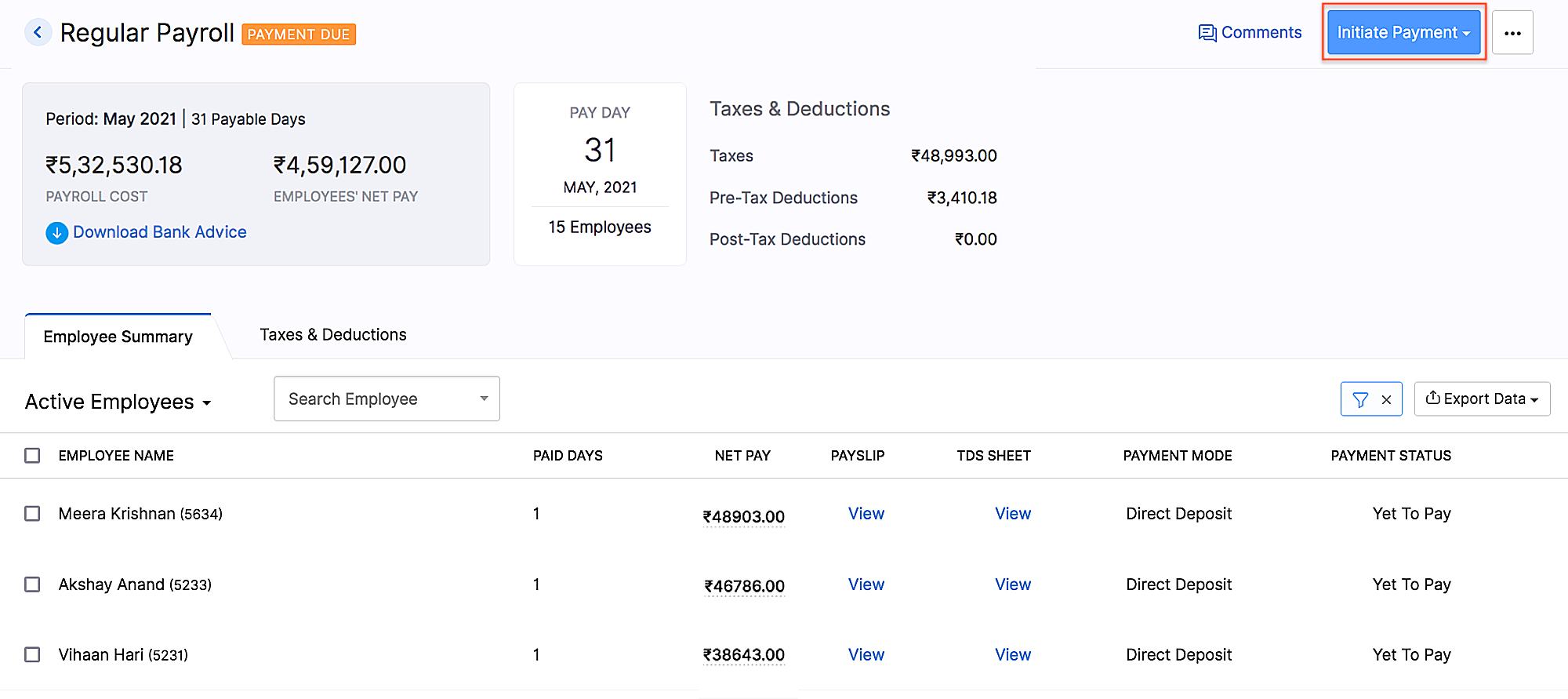 HSBC integration
Add Non-Employee as Tax Deductor
You can now add a person who is not your employee, such as a third-party accountant or auditor, as a Tax Deductor in Zoho Payroll. The tax deductor will be responsible for remitting your tax to the government. Additionally, you will have to provide details such as the Deductor's name and designation.
To add the tax deductor, go to Settings > Taxes > Select Non-Employee as Tax Deductor.
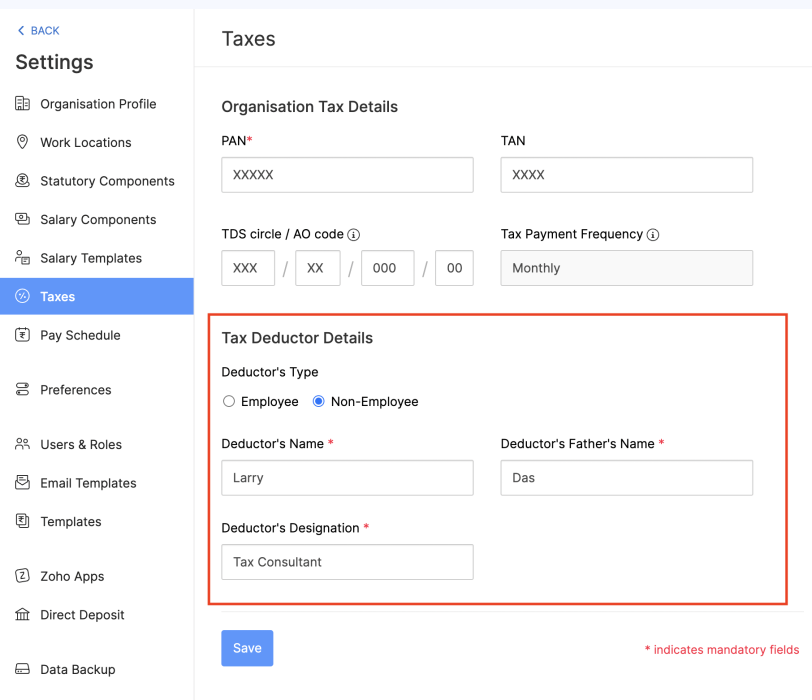 Adding Non-Employee as Tax Deductor
User Permissions for Approvals
Configure permissions such that only users who belong to roles that have approval permissions will be able to access those related modules.
To configure user permissions for approval: Go to Settings > Users & Roles > New Role. Next, select the modules and the level of access you want to provide for the role.
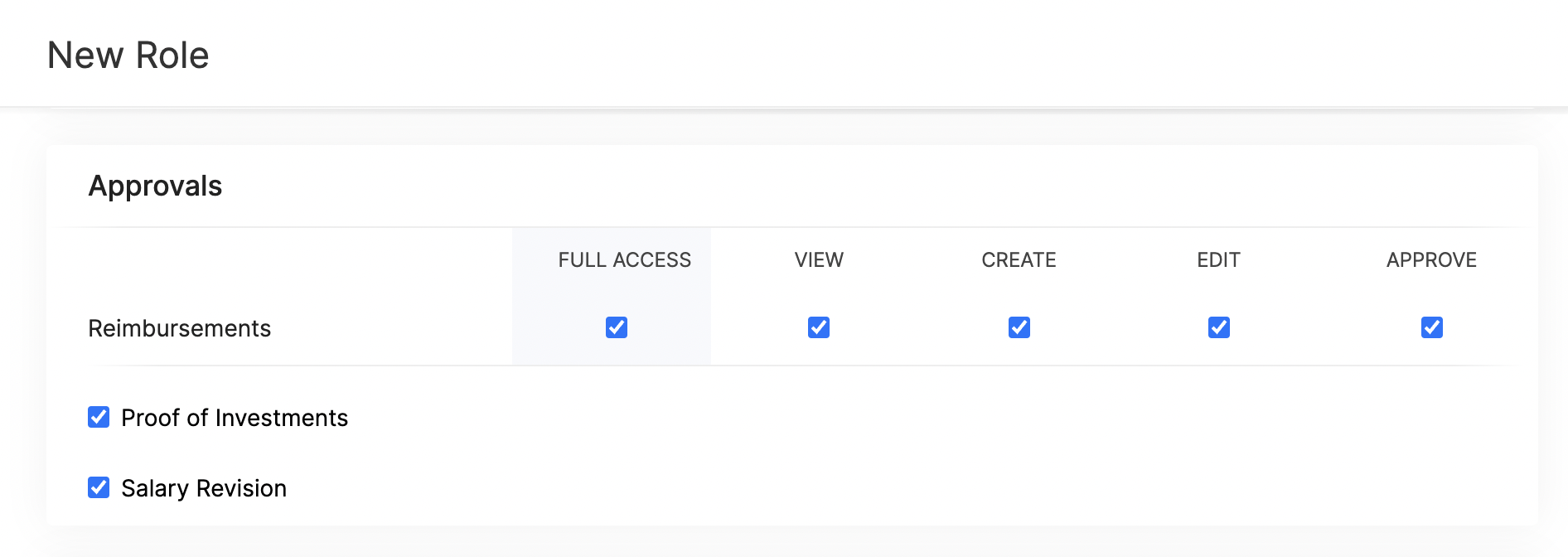 Approval User Permissions
Updates Related to Proof of Investments
- Filter employees who are yet to submit their Proof of Investments. Once you filter the employees, you can also export them in XLS, XLSX, and CSV formats.
- If you want to remind your employees to submit their Proof of Investments, you can now send them a system-generated email reminder.
- Previously, once admins configured the tax regime, they would not have been able to change it. Admins can now switch between the old and new tax regimes while recording the IT declarations and Proof of Investments, provided you've configured preferences to change regimes.
- You can mandate employees to upload attachments while submitting their Proof of Investments.
- In addition to uploading Proof of Investments in other formats, you can also upload .zip files.
New Form 24Q Format
The Central Board of Direct Taxes (CBDT) has introduced a new Format for Form 24Q. Zoho Payroll now supports the new format and the text files will be generated automatically in the new format.
Unique Identifiers for Loans
When you record a loan, Zoho Payroll will automatically assign a unique number to the loan. This number will help you to search and find a particular loan quickly.
If you are importing loans, loan numbers are mandatory. So, ensure the files you upload have loan numbers in them. If the imported loan numbers match the existing loans in Zoho Payroll, the existing loan will be updated with the imported details.
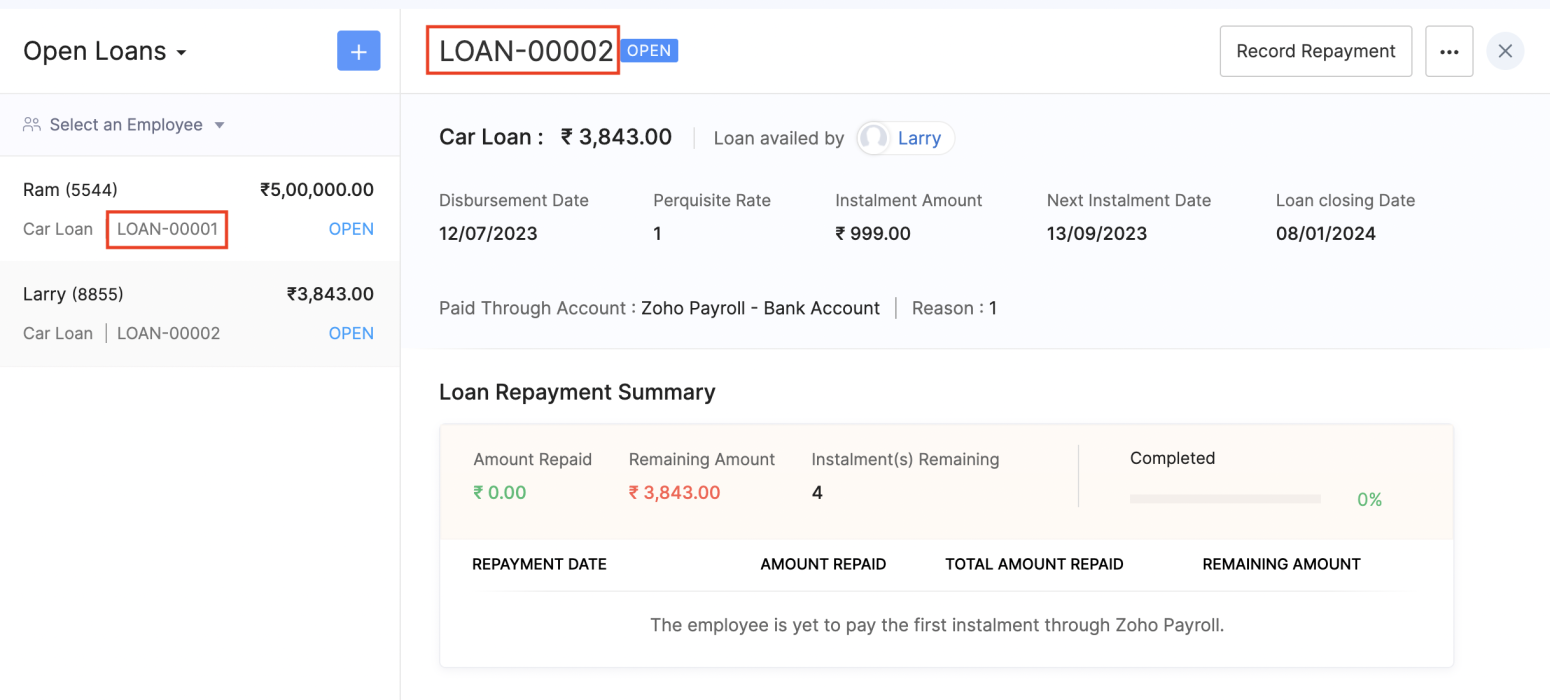 Unique Identifier for Loans
View Vehicle and Driver Perquisites
You can view the vehicle and driver perquisites in the Perquisite section of an employee's Salary Details. In this section, you will be able to view the vehicle and driver perquisite that will be added to payroll every month.
To view vehicle and driver expenses, go to Employee > Salary Details > Perquisites.
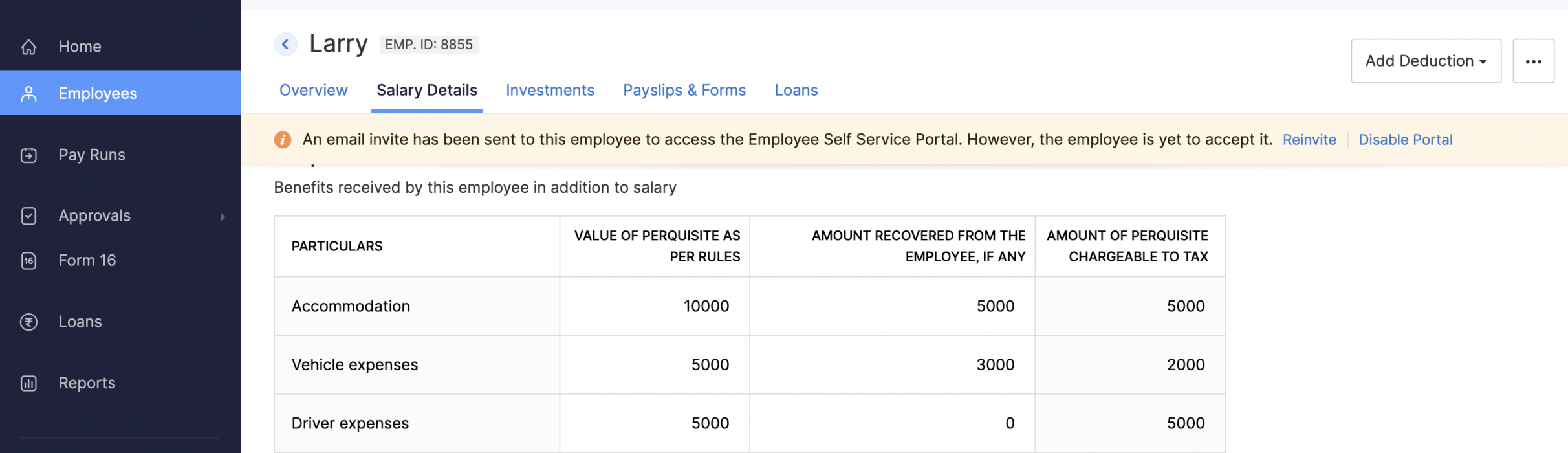 Viewing Vehicle and Driver Perquisites
Updates to Reports
We've added three new reports: the FBP Declaration Report, Investment Declaration Report, and Proof of Investment Report. These reports will help you view employees' declaration and investment details.
- FBP Declaration Report: This report lists the employees who have declared their FBPs. The report also provides the earnings and reimbursement details. You can view the report from any particular date.
- Investment Declaration Report: This report lists the employees who have declared their investments. Additional details such as the Total Chapter VI-A amount, total allowance and HRA income amount, and total Direct Tax amount will also be listed in this report. You can view the report from any particular date.
- Proof of Investment Report: This report lists the employees who have submitted their proof of investments. You can view the report for any given financial year.
Employee Portal Updates
We've made some changes and rearrangements and introduced new modules to enhance your employee portal experience.
- We've now introduced the Documents module in the left sidebar, where your employees can view and download their pay slips and Form 16.
- Your employees can view notifications when Flexible Benefit Plan, Reimbursement Claims, Income Tax Declarations and Proof Of Investments are released or locked and when pay slips are released.
- View the preview of reimbursement when you upload it.
- Employees can now view TDS worksheet and Pay Slip details such as Earnings and Deductions.
- Employees can now add claims for their bills from the home page of the employee portal.
- If you have any queries related to Section 80DDB, you can use the Learn More link in the Investments module for more details.
Note: The product updates listed above are the significant features and enhancements we've released from January 2022 to October 2022. However, you can view all the enhancements from our What's New timeline. From December, we will inform you about the product updates regularly in this space - as and when they happen.
That's a wrap for now! We are always eager to hear your suggestions so we can help you better. If you have a feature request, please share it in the comments below.
If you require assistance, please write to us at support@zohopayroll.com, and we'll get back to you. Stay tuned for more updates from Zoho Payroll!
Regards,
The Zoho Payroll Team
The Zoho Payroll Team
Topic Participants
Bennet Noel L
Nederlandse Hulpbronnen

Recent Topics
Add an external email to the allowed list
I need to allow an external email to raise a ticket on Manage Engine ServiceDesk Plus. The external email is a outside of our domain and is not a domain user. The email address that needs to be allowed to raise a ticket request is noreply@formsatack.com.Display name & account type change
I made a mistake and subscribed with an individual account instead of business, how can I change the account type and enter the details of the business. The other question, if I can't, then I want the display name of our email to be 'Business name' insteadRequest to change display name in Zoho mail
Hello Zoho Mail Support, I am experiencing an issue with changing the display name on my Zoho Mail account. My email address is: info@witchcraftproduction.rs . I have already updated the display name in Settings > Mail Accounts, where it now shows asOutbound IP address SPAM problem.
Hello Zoho Support, We noticed that one of your outbound IP addresses (136.143.188.12), which delivers our domain’s mail, is currently listed on the UCEProtect blacklist. Because of this, our messages are sometimes flagged as spam by recipient servers.Answer Bot and Personalized Questions
Hi there, I have the same problem using the SalesIQ Answer Bot and the Zoho Desk Answer Bot (which really need different names, to be honest, in order to avoid confusion...) Customers that visit our website ask questions in the form of "What do you do?"Forwarding
How can I forward my Zoho account to my gmail account? NoëlAdd a Way to Duplicate Cards in the Same Canvas (Retain All Settings)
Dear Zoho SalesIQ Team, We would like to request a new feature in Zoho SalesIQ: the ability to duplicate an existing card within the same canvas while retaining all of its information and settings, including conditions, configurations, and display preferences.Zoho Mail CC and BCC not working
Zoho Mail CC and BCC not working. I have tried multiple combinations amongst my domain aliases but emails sent as CC or BCC never arrive, not even to Spam. I have checked that the DNS is set up correctly in Cloudflare and have even received a DMARC reportZoho Autoplay Issue
Currently, we run our graphics on a playlist with youtube videos interspersed in our office -- however, when we go to update the playlist (since last Thursday at around 8-9am EST) it no longer saves the autoplay function. We have tried making a new account, manually saving with cntrl+s, making a new show, etc but nothing seems to work. Even with our old program, we can't change it off of autoplay for ones that were created in the past. Another issue is that if we change a slide transition to anythingAdding hyperlinks in CRM emails time automatically
It may just be me, but when I am writing an email to a lead, I find inserting a hyperlink very time consuming. Granted, I can use templates but there are a ton of scenarios where I might want to put a link in to an website that wouldnt require me to go though the effort of creating a template. Ideally, the crm would identify that I that a string of text is a URL and insert the hyperlink automatically, just like microsoft outlook or gmail. Has anyone else had this same experience and found a wayEnhance "Applications Usage" with Date Filters, Historical Analytics & App-Level Breakdown
Hello Zoho Creator Team, We are writing to request a critical enhancement to the Applications Usage section to improve our ability to monitor, analyze, and manage our platform consumption over time. While the current view of today’s usage is helpful forExternal File Share - Allow delete
Hi Team, when I share an external link and give it edit rights the external user can add but not delete files and folders. what am i doing wrong?How to notify all members on any updates to zoho crm?
Hi, I am using the free version of zoho CRM and currently seeing this will work for our company. We are a small company and wanted to be more informed about all the changes in zoho. 1. How do I s et notifications that go to the team for any and all changesHow to change the format for phone numbers?
Mobile phone numbers are currently formatted (###) ###-####. How can I change this to a more appropriate forms for Australia being either #### ### ### or (#)### ### ###?Unattended Access on Android without Play Store
I'm testing Zoho Assist for remote config and maintenance of our IoT devices. The devices are running Android 8.1 and do NOT have Google Play Store installed, nor can it be installed. I've been able to install Zoho Assist on the devices and load the enrollmentIs it possible to embed Zoho Bookmarks in the Cliq sidebar?
Is there any way that each Zoho user can access their bookmarks (that live in https://bookmarks.zoho.eu/ which is technically a part of Zoho Mail) directly within Cliq? As a widget, or an item in the sidebar? My team does not use Mail, it uses Cliq allShow Attachments in the customer portal
Hi, is it possible to show the Attachments list in the portal for the particular module? Bests.Kaizen #142: How to Navigate to Another Page in Zoho CRM using Client Script
Hello everyone! Welcome back to another exciting Kaizen post. In this post, let us see how you can you navigate to different Pages using Client Script. In this Kaizen post, Need to Navigate to different Pages Client Script ZDKs related to navigation A.Navigate with Ease: Announcing Improvements to Your Zoho CRM for Everyone's Setup Experience
Hello Everyone, We’re thrilled to announce new enhancements to the Setup Menu in our Zoho CRM for Everyone system, designed to simplify your workday and streamline your overall experience. What's New? Addition of a Setup Homepage Faster Search in SetupZoho Projects Webhook fails with HTTP Error 0
Hello Zoho Community, I am pulling my hair out over this one. I have setup a very basic http(s) server that always responds "ok" and code 200 to incoming GET requests. It will accept any parameters, and any path. Really, all it does is say "ok," and logZOHO Campaignで表のカラムの幅を調整したい。
表を作成した際、個々のカラムの幅を調整したいのですが、方法が分かりません。 どなたかご存じの方ご教示ください。Kaizen #129 : Client Script Support for Blueprints
Hello everyone! Welcome to another week of Kaizen. Today, let us discuss about how you can use Client Script during a Blueprint transtion to meet your requirements. This Kaizen post will provide solution for the post - Need non-mandatory fields in blueprintSearch Bar Improvement for Zoho Commerce
Hey everyone, I've been using Zoho Commerce for a bit now, and I think the search bar could really use an upgrade. Right now, it doesn't show products in a dropdown as you type, which would make finding items a lot faster. On Shopify, for example, youMaking digital signatures accessible to all: Introducing accessibility controls in Zoho Sign
Hi there! At Zoho Sign, we are committed to building an inclusive digital experience for all our users. As part of our ongoing efforts to align with Web Content Accessibility Guidelines (WCAG), we’re updating the application with support that will goAccount Owner Field From Accounts Module to be Displayed in Contacts module
I have a field in the Accounts Module in the CRM called "Account Owner" i want that field to be also mapped into the Contacts Module custom single line field called "Account Manager".Update a field in the ZOHO Form, basis numeric value in another field in the same form
I am trying to create a questionnaire in ZOHO, where clients need to answer 10 questions, and basis response, values are assigned. I have created a total score field where the sum of the values is stored. But i am unable to create a rule whereby anotherMeet up de Zoho en Bilbao
Buenos días comunidad! Estamos estudiando hacer un Meet up en Bilbao desde zoho y varios Partners. Para que la experiencia sea excelente, queremos saber cuantas pesonas se vendrían a Bilbao al evento. Y para que sea lo mas útil posible, que temas dentroPicklist reference value in REST
picklist options can be configured to have a different reference value than the displayed one, should be helpful in things like multilanguage: https://help.zoho.com/portal/en/kb/crm/customize-crm-account/translations/articles/translations is there a wayIn Zoho inventory Converting sales return to cerdit note from using Api from Creator Error details: {"code":-1,"message":"Invalid Sales Return ID."}
In Zoho inventory Converting sales return to cerdit note from using Api from Creator Error details: {"code":-1,"message":"Invalid Sales Return ID."} this is button Function used in the Creator map Inventory.Create_Credit_note(int CRE_ID) { return_valueMarketing Tip #2: Recover lost sales with abandoned cart emails
Did you know most online shoppers don’t complete checkout? Automated cart recovery emails are an easy way to bring them back. A simple reminder can recover sales you’d otherwise lose. Try this today: Enable abandoned cart emails in Zoho Commerce and setBilling Management: #9 Usage Billing in IoTs
We live in a world where connectivity has become a lifestyle rather than a luxury. From smart thermostats that adjust your home's temperature to GPS trackers monitoring end-to-end fleets and sensors that optimize energy grids, the Internet of Things has{"code":1038,"message":"JSON is not well formed"}
Today this began failing: sales_order_data = zoho.books.createRecord("salesorders",books_organization_ID,order_data); with this error message. {"code":1038,"message":"JSON is not well formed"} This code has been running for two years. Here is the inputHow can I migrate Shared Mailbox from Zoho Mail to Team Inbox?
I am unable to migrate mails from my shared mailbox in Zoho Mail to Team Inbox. I am the super admin of my Zoho One plan and yet I am getting an error saying only admins can do this? I don't understand the issue.Remember all the ways we've posted?
The world celebrates World Postal Day in 2025 with the theme “#PostForPeople: Local Service. Global Reach". The story of the “post” is a story of human connection itself, evolving from simple handwritten notes carried over long distances to instant digitalCan no longer upload my own Notebook cover
I've had Notebook for over a year and have been able to create my own notebook covers, but when I tried to upload my own cover for a new notebook today, the upload feature has suddenly been starred, requiring me to upgrade my account. When did thisZoho Desk - Cannot Invite or Register New User
Hi who may concern, we encountered a problem that we cannot invite user or the visitor cannot register for a user at all through our help center portal, with the snapshot shown as below and the attachement. It always pops up that "Sorry, Unable to processCustom domain issue
I recently changed records for my support area custom domain for a few months, I then wanted to come back to Zoho, but now I can't connect it and I can't login as it's having an SSL issue. I cannot get a good response from support, as I've been notifiedHow do you generate personalized certificates and save them in dynamic folders using Writer's mail merge?
Zoho Writer's mail merge feature can help you enhance the certificate management process. It's a great way to save time and effort! Merge certificates and maintain a well-organised repository with personalised certificates stored in separate folders forZoho Editor
Zoho PDf Editor is not working I am clicking on EDIT PDf then it again bringing me back to the same page. again and again.The present is a "present"
The conversation around mental health has been gaining attention in recent years. Even with this awareness, we often feel stuck; the relentless pace of modern life makes us too busy to pause, reflect, and recharge. In the world of customer support, thisNext Page