What's New - September 2025 | Zoho Backstage

What's New - September 2025 | Zoho Backstage

September has been a different month for Zoho Backstage. Instead of rolling out a long list of new features, we focused on something just as important:

Performance, reliability, and stability

The event season is in full swing, and organizers are running larger and more complex events. Our goal this month was simple: make your experience faster, smoother, and more intuitive. 

That said, we do have a few updates to share with you.


Tax Rules – South Africa

Accurate tax calculation is vital for ensuring compliance and transparency in event management. With the new Tax Rules feature for South Africa, you can now automatically apply the correct VAT rates to your events, making tax management simpler and more efficient. Zoho Backstage automatically configures tax rules based on your organization and event location, ensuring compliance with the South African Revenue Service (SARS) regulations.


This feature supports in-person, hybrid, and virtual events, helping organizers stay compliant while reducing manual tax management.

How do taxes work on South African events?

VAT registration thresholds
  1. Businesses must register for VAT if their annual taxable sales exceed ZAR 1 million.
  2. Businesses may choose to register voluntarily if their taxable sales are above ZAR 50,000.
VAT rates
  1. Standard rate: 15%
  2. Zero rate: 0%
VAT terms
  1. VAT: Value-Added Tax
  2. VAT Registration Number Label: TIN (Tax Identification Number)
  3. VAT Registration Number Format: 10-digit number
In-person and hybrid events
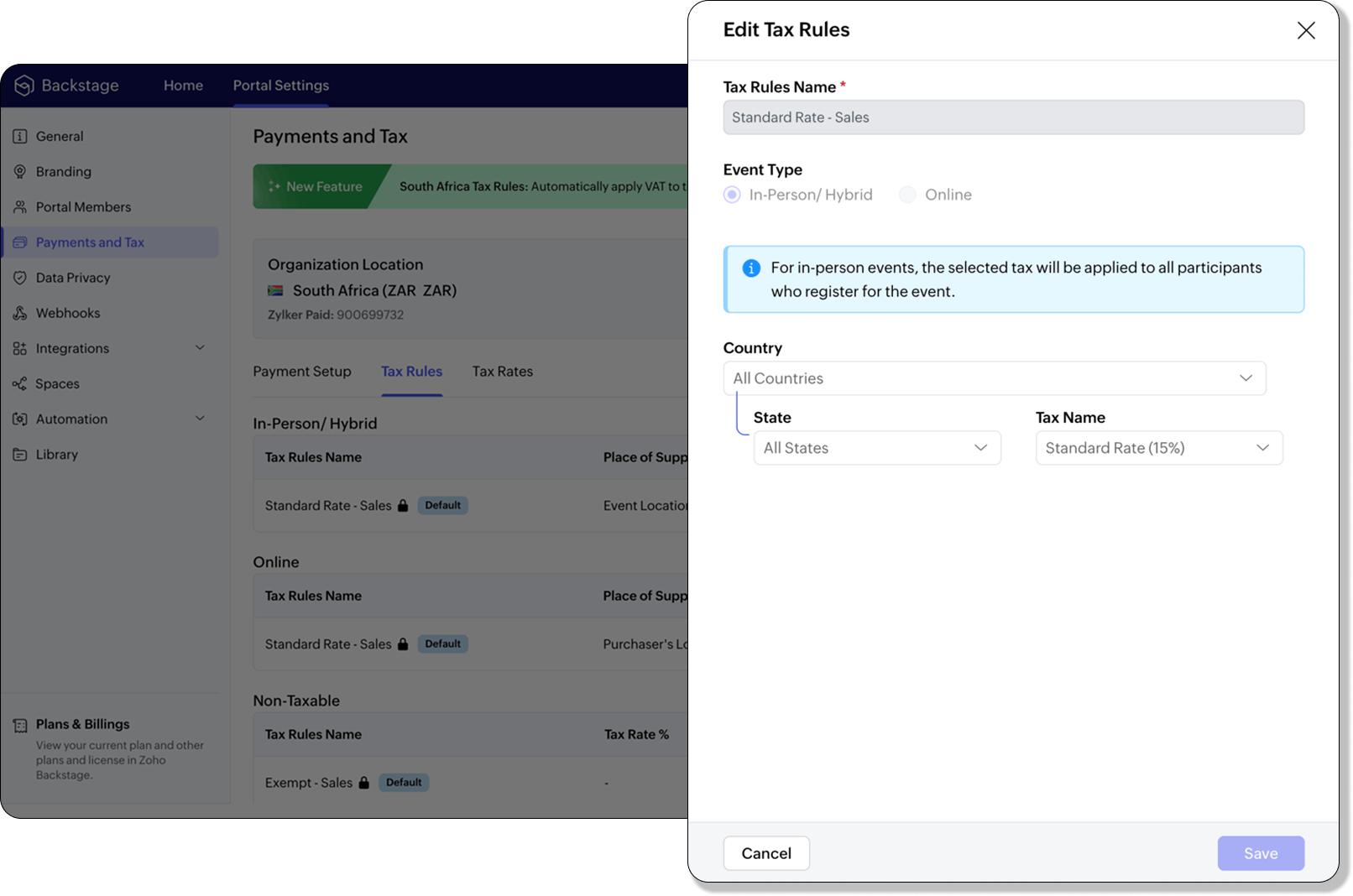


If an event is held in South Africa, the place of supply is considered within South Africa, and 15% VAT must be charged on ticket sales (unless exempt or zero-rated).

Virtual events
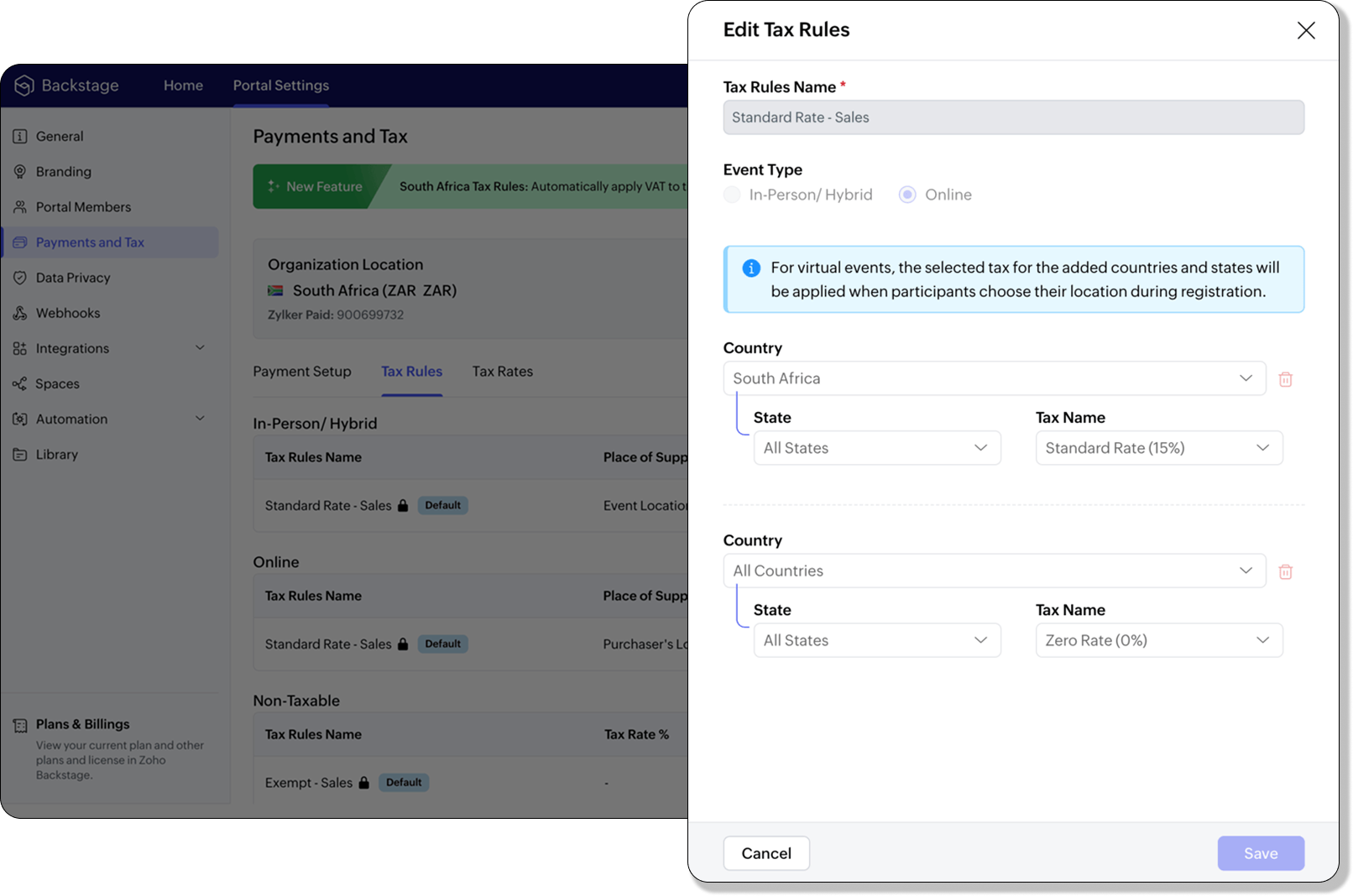


For virtual events, the attendee’s location determines the place of supply. For foreign attendees, the transaction is treated as an export of service and is zero-rated.

How to use

To enable South Africa tax rules, configure your organization’s location:
  1. Navigate to Portal Settings > Payments and Tax.
  2. Select South Africa as the organization location.
  3. The system automatically populates:
    1. 2 default tax rates (15% and 0%).
    2. 4 tax rules (in-person/hybrid, virtual, and two non-taxable rules).
Unlike other countries, South Africa Tax Rules are predefined. You can't edit existing rules or add new ones.

Applying Tax Rules to in-person and hybrid events

When South Africa is selected as the organization location, Zoho Backstage automatically applies the correct VAT (15%) to in-person and hybrid events. This ensures compliance with SARS requirements. A preview of the tax to be applied is shown during event publishing, so organizers know exactly what their attendees will be charged.

Applying Tax Rules to virtual events

For virtual events, Zoho Backstage automatically applies the zero-rated VAT rule for foreign attendees. South African attendees are charged the standard 15% VAT. This setup ensures accurate handling of local and international transactions without manual intervention.
Info
  1. Tax rules in Zoho Backstage are fixed for South Africa. They can't be edited or expanded.
  2. Organizers can change the applied rule during event setup, but updates only affect new transactions. Existing transactions retain their original tax rule.
  3. If the event location is set to any country other than South Africa, South African VAT won't be applied.
Plan availability: Included in the EssentialsPrem​ium, and Ultimate plans


Full page floor plan  

We’ve taken the exhibitor experience to a whole new level with the introduction of the full page floor plan. This enhanced layout gives everyone including organizers, exhibitors, and attendees a more immersive and detailed view of the event venue.


For organizers, the full-page view provides better visibility and control when managing booth layouts and exhibitor placements. Whether you’re reviewing space allocation or showcasing your setup, the new Fit to Screen option lets you adjust the view instantly, making it ideal for large displays and on-site monitors.


Visitors can explore the floor plan in full-screen mode, view the exhibitor list, and discover details about each exhibitor. Signed-in attendees can further filter exhibitors by category and mark their favorites to plan their visit efficiently. Exhibitors can browse the directory or register directly from the same page, making navigation and engagement effortless.
Plan Availability: All plans that include the Exhibitor management module


Date & Time form field 

We’ve enhanced the existing Date field to support time preferences, giving you more flexibility when collecting scheduling details. By enabling the Include Time toggle, you can now capture both date and time within a single field.

Similar to the standalone Time field, organizers can configure properties to accept entries in either 12-hour or 24-hour format and even set restrictions within a specific time range. A default date and time value can also be defined to simplify form submissions.

The default time format for this field automatically aligns with your event’s configuration under Manage > Event Info, ensuring consistent formatting across your forms.

Plan availability: Included in the Ultimate plans


With the event season in full swing, we’re focused on making your experience with Zoho Backstage faster, more reliable, and ready for every challenge. We look forward to bringing you more updates next month.
Info
All the features and enhancements mentioned in this article are available across all Zoho Backstage-supported data centers.
If you need further assistance with our features, please contact support@zohobackstage.com

    Nederlandse Hulpbronnen


      • Recent Topics

      • What's New in Zoho Inventory | June 2026

        Hello users, June 2026 introduces a range of exciting enhancements to Zoho Inventory. With the full rollout of the Zoho Inventory Windows application, the launch of Terminal Payments, and new tracking combinations in Advanced Inventory Tracking, you can
      • Tax/Vat Number Field As Standard - Customer & Vendor

        Hello, when are you'll going to have the customer & vendor tax/vat number as a standard field under the relevant profile pages? I find it strange that after 6 years of using Zoho Inventory that I still have to use a custom field for a tax/vat number,
      • Is there a way to show contact emails in the Account?

        I know I can see the emails I have sent and received on a Contact detail view, but I want to be able to see all the emails that have been sent and received between all an Accounts Contacts on the Account Detail view. That way when I see the Account detail
      • Zoho CRM - Feature Request - Conditional Lead Conversion

        Hi CRM team, My feature request is to allow admins to create some conversion logic in the Lead Conversion settings. It is a common case where we want to convert a Lead to a Commercial or Residential Deal layout. Layout rules are not ideal because the
      • Zoho CRM Approval Process based on Field Update

        Hello, In current structure, Zoho CRM send records to approval based on record creation and edit.  I think, it should be to set approval process trigger based on any field update in record. When the user update any field, the record can assign to approval
      • Free webinar: Automate signature workflows with Zoho Sign and Zoho WorkDrive

        Hi there! Are you still storing and managing physical paperwork before and after signing? This traditional method is bulky, costly, and impractical at scale. Attend our free webinar to learn how you can connect Zoho Sign, our digital signature app, with
      • Global Sets for Multi-Select pick lists

        When is this feature coming to Zoho CRM? It would be very useful now we have got used to having it for the normal pick lists.
      • Introducing the Zoho Projects Learning Space

        Every product has its learning curve, and sometimes having a guided path makes the learning experience smoother. With that goal, we introduce a dedicated learning space for Zoho Projects, a platform where you can explore lessons, learn at your own pace,
      • Leave request problem on mobile phones

        Hello, When any employee attempts to submit a leave request on an Android or iOS phone, the error shown in the attachment appears. How can we solve this problem?
      • [Webinar] Digitizing forms and form-based workflows

        Live webinar on August 13, 2026 | Time: 2 PM IST | 2 PM EDT Hi, Struggling with paper forms, manual data entry, disconnected approvals, and form data that never reaches the apps that need it? Join our live webinar to learn how Zoho Writer's fillable templates
      • Get a realistic picture of your revenue with Forecast Adjustments in Zoho CRM

        #crm25q1 Dear Customers, We hope you're doing well! Today, we're here with an important enhancement for business decision makers: forecast adjustments. Let's get straight to it! With technology on the rise and CX at its core, businesses are constantly
      • Multi-currency and Products

        One of the main reasons I have gone down the Zoho route is because I need multi-currency support. However, I find that products can only be priced in the home currency, We sell to the US and UK. However, we maintain different price lists for each. There
      • Price Book in foreign currency

        We have many customers who buy in foreign currency (USD), where our base currency is our local currency (AUD). It would be normal (it is in Zoho Books, Zoho Inventory etc.) to assign a currency to a price book, but I cannot find this option in Zoho CRM
      • Assign Price Book to Accounts (again!)

        I can see this topic has been bumping about for over 10 years and unfortunately Zoho hasn't seen the need (or use case) in CRM to be able to assign an account to a price book to automate quoting (amongst other things). Strange given they DO assign price
      • Remove "Subject" as a required field on quotations

        Not sure why, but Zoho has made 'Subject' a system defined required field. I'm not entirely sure why subject would be required as a key field (i.e. you cannot deactivate it or change it from required). It doesn't make much sense on many product quotations,
      • Approve records efficiently: Useful enhancements to My Jobs module and Approval process in Zoho CRM

        Dear Customers, As you might know, approval process is a process automation tool that allows you to automate approvals in your organization and My Jobs is where you approve requests from a single point of view. Here's how you'd go about it: You’d add
      • Tip #7 - Siri shortcuts in Zoho CRM

        Hello Everyone, Here is a tip about the 'Siri Shortcuts' feature and how it works in the iOS version of the Zoho CRM mobile app. What are Siri shortcuts? Siri Shortcuts are quick actions across your apps on iOS. They can perform an action automatically
      • Text/SMS With Zoho Desk

        Hi Guys- Considering using SMS to get faster responses from customers that we are helping.  Have a bunch of questions; 1) Which provider is better ClickaTell or Screen Magic.  Screen Magic seems easier to setup, but appears to be 2x as expensive for United States.  I cannot find the sender id for Clickatell to even complete the configuration. 2) Can customer's reply to text messages?  If so are responses linked back to the zoho ticket?  If not, how are you handling this, a simple "DO NOT REPLY" as
      • Introducing parent-child ticketing in Zoho Desk [Early access]

        Hello Zoho Desk users! We have introduced the parent-child ticketing system to help customer service teams ensure efficient resolution of issues involving multiple, related tickets. You can now combine repetitive and interconnected tickets into parent-child
      • Need complete Zoho Commerce theme ZIP example and safe staging workflow

        I want to build a complete custom Zoho Commerce storefront through Edit Code, including: • Global header and footer • Responsive homepage • Category, search and filter pages • Product cards and product-detail pages • Cart and checkout wrapper • Mobile
      • Add Support to Upload Inventory Items with Categories or Enable Separate Upload for Inventory Categories

        Currently, Zoho Inventory does not support uploading new items along with their parent and sub inventory categories using the item import feature. This creates challenges for businesses with structured inventory hierarchies when trying to upload items
      • Error 1011 saving website personalisation — blocking all changes (corrupted "home_page.content" field)

        When trying to save changes under Settings → Brands → MY COMPANY → Website → Personalisation → Messenger, I receive the following error: "Either the request parameters are invalid or absent" upon checking on the developer console of the browser I get
      • HR Helpdesk Cases

        We have Zoho One Enterprise. I'm trying to find HR Helpdesk Cases, but my UI does not match the documentation. I'm not sure how to move forward.
      • i need active of my whatsapp business number in zoho

        i am waiting from 3 days for active of my whatsapp business account in crm ,its too late to configure.its just showing account details i can't able to know its connected or not anything else
      • Sub-Form Padding in CSV Export

        Hi, When you use the Sub-Form, and for example you have a Date Field on the Main Page, then Option 1 and Option 2 fields on the Subform, when you export this to CSV the Date column will only have the Date in 1 row, the first row, it would be nice to pad
      • Integrate your Outlook/ Office 365 inbox with Zoho CRM via Graph API

        Hello folks, In addition to the existing IMAP and POP options, you can now integrate your Outlook/Office 365 inbox with Zoho CRM via Graph API. Why did we add this option? Microsoft Graph API offers a single endpoint to access data from across Microsoft’s
      • Analytics Dashboard User Filters Default Value

        User Filters on Dashboard do not allow Unknown to be set as a default filter value. I have to include NULL values in my dashboard among other values but I can't include NULL/Unknown by default in Dashboard User Filters.
      • Microsoft is retiring Exchange Web Services (EWS): Here's what it means for Zoho Mail users

        Microsoft has officially announced the retirement of Exchange Web Services (EWS) for Exchange Online. If your organization is planning to migrate from Microsoft 365 to Zoho Mail, you may be wondering what this change means for you. The good news is that
      • Zoho Writer page break in a merge repeating region always adds an unwanted blank page

        Hi I'm merging a Zoho CRM record to a Zoho Writer document with a repeating region to display subform records on their own page within the document. When I try to insert a page break in a repeating region, the resulting merge always adds an unwanted blank
      • ZeptoMail account pending review, SMTP blocked with relaying-issues

        Hi ZeptoMail team/community, Our ZeptoMail account has been pending review for more than 3 business days and still shows: “Your account is yet to be reviewed.” I already created a support ticket, but have not received an update yet. Ticket details: Request
      • Zoho ERP | Product updates | June 2026

        Hello users, We launched Zoho ERP on January 23, and since then, our goal has been to help businesses streamline and manage their operations with greater efficiency, flexibility, and control. Since the launch, we've continued to enhance the platform every
      • Tip #83- Give Customers a Faster Way to Reach You with the Quick Support Plugin – 'Insider Insights'

        Hello Zoho Assist Community! Think about the last time a customer needed urgent support. They emailed in, waited for a response, got a session link, couldn't find it in their inbox, called back, and by the time the session actually started, a good chunk
      • How to Open .mbox file in Gmail with Attachments?

        Gmail offer users to backup INBOX folder in .mbox file format via Google Takeout Feature. Howver there is no such option to Restore Gmail MBOX. Thus I would like to suggest you to choose an alternate approach i.e. MBOX to Gmail Wizard. This utility will open .mbox file in Gmail with attachments.  Steps to open MBOX file in Gmail are; Run MBOX to Gmail Wizard Click Add File and add .mbox file. Enter your Gmail login credentials. Click Convert button. Finished! This is how you can open MBOX file in
      • Seperate rating scales for KRA's and Competencies in appraisals

        Is there a way to set-up different rating scales for KRA's and Competencies?? I would like to have; Met/Not met for KRA's and a 1-5 scale for the competencies I know how to set up custom ratings but it spans across both sections and I need them to be
      • Is there a CRM Deluge function available to convert an RTF (rich text field) to plain text (with no formatting tags)?

        I know that we can run reports so that RTF fields can either show as plain text or the text or the text with the formatting fields included (which is wonderful, btw, as it helps me adjust tags when I need to troubleshoot and just see what I need to see
      • How do I set the value of a Lookup field in SlyteUI?

        I am using the "crm-field" component in a SlyteUI project (code attached) https://www.zohocrm.dev/explore/slyteui/ui-components/crm-field/api#Properties The client would like to have this field pre-populated with a value. When I try to input the record
      • Mise à jour de Zoho Books – France

        Chers clients, Merci pour votre patience et votre soutien continu. Avec les évolutions réglementaires à venir en France nous introduisons de nouvelles fonctionnalités dans Zoho Books pour les clients français. Ces mises à jour ont été conçues pour répondre
      • CRM Developer Update: Mandatory field behavior changes in Zoho CRM APIs

        We are planning a few updates to Zoho CRM APIs that are expected to be rolled out by the end of October 2026. These changes are not live yet. We are sharing this early so developers and partners can review the impact and prepare in advance. What is changing?
      • Show Available Stock as a Column in Item Views (Including by Warehouse)

        It would be very useful to have Available Stock as a standard column in the Items list view. Currently Stock On Hand does not show the real picture for businesses managing orders and inventory. Example: Stock on Hand: 100 Committed to Sales Orders: 80
      • What's New in Zoho POS - July 2026

        Hello everyone, Welcome to Zoho POS’s monthly update, where we share our latest feature updates, enhancements, events, and more. Let’s take a look at how July went. Support for Saudi's ZATCA Phase 2 e-invoicing We have added support for ZATCA (Zakat,
      • Next Page