📣📣 Zoho Bookings - Feature Roadmap 2024

📣📣 Zoho Bookings - Feature Roadmap 2024

Hi Everyone,

Thank you for all the support you have been showing Zoho Bookings. We had a fabulous 2023, with a bunch of new features and over 60K new users. In 2024, our prime focus will be on user experience, and we have a few vital features coming in as well.

Below is our projection for the year so far (we'll be adding more items once they're prioritized and slotted for release).

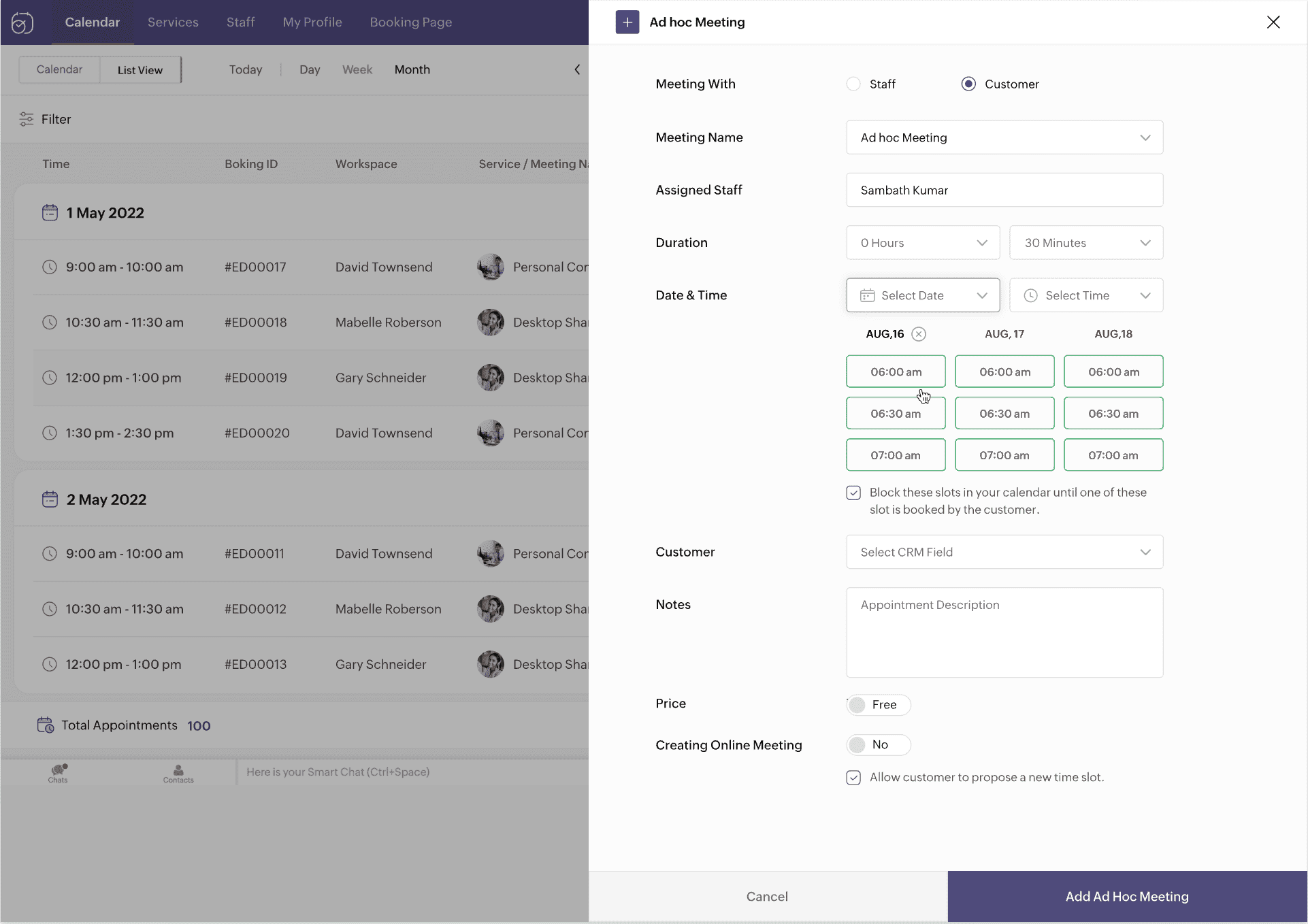
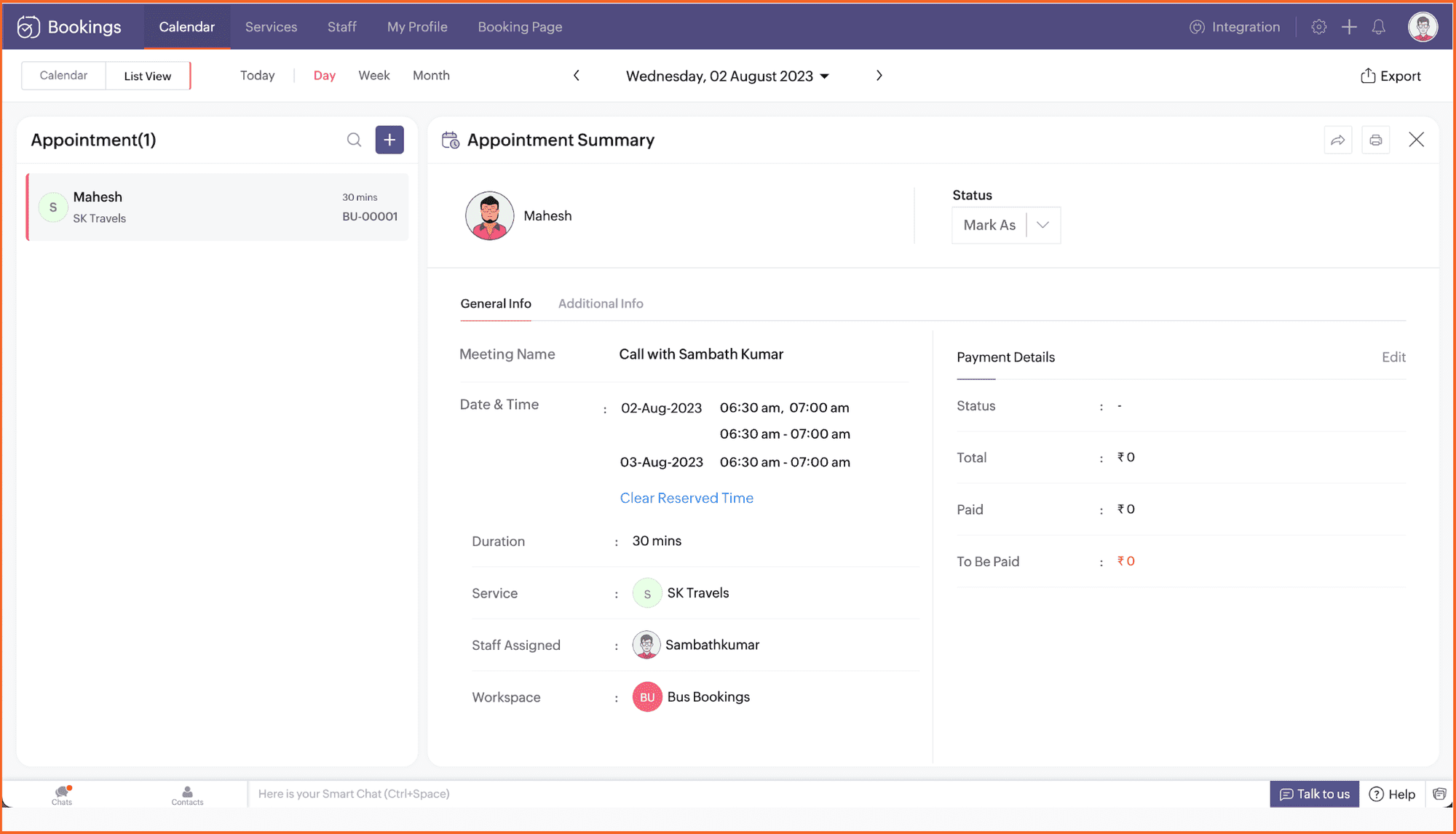
1. Ad-hoc meetings

It's common to get meeting requests outside your schedule. Ad-hoc meetings allow you to reserve time slots and share them with specific clients or prospects you want to meet with.

Not just clients—you can book internal meetings with your own staff too. Plus, keep time slots hidden from the person you're sharing your availability with.


2. Recurring one-on-one meetings

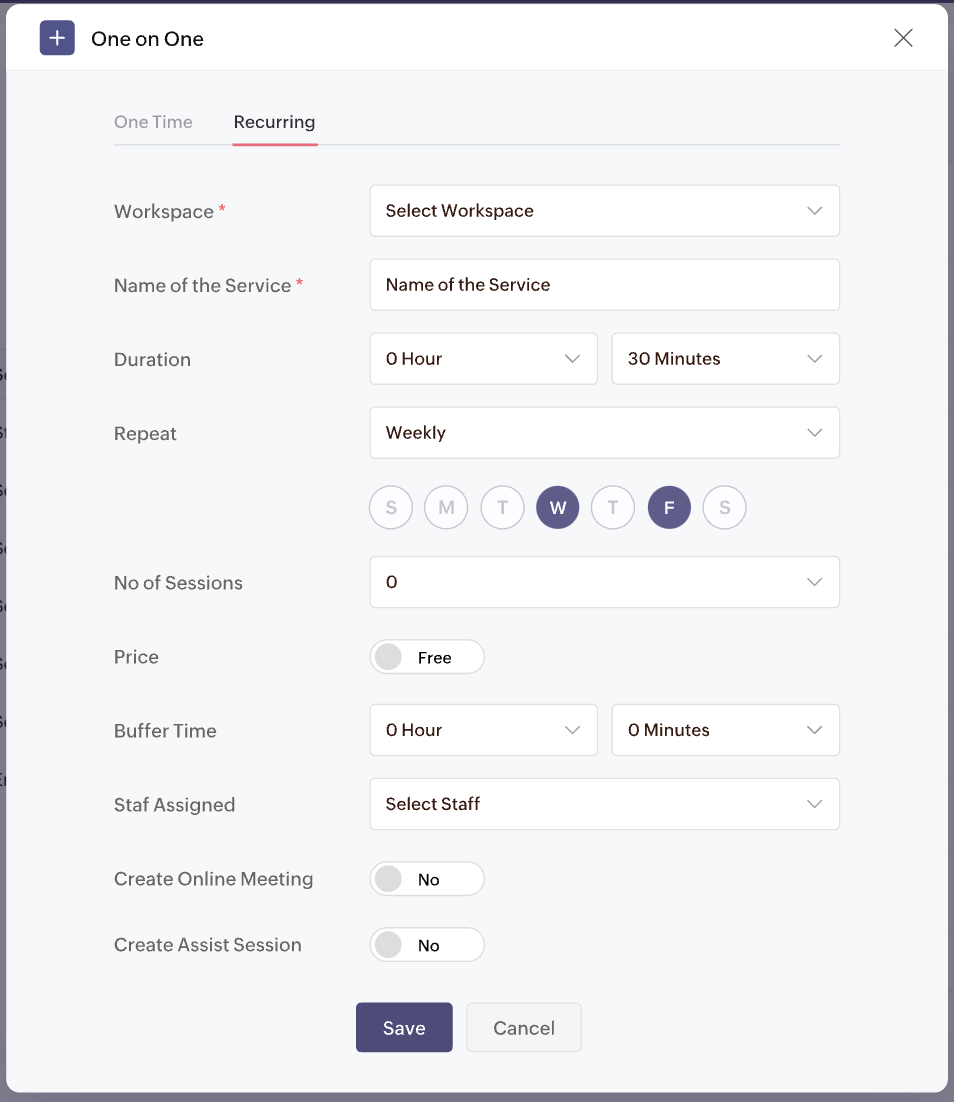
Looking to offer one-on-one meetings on repeat for your clients? Don't book separate appointments.

Set up a package and let your clients choose the desired time slots with recurring one-one-one meetings. 
Customize meetings to recur on desired days and times. Collect payments for all the sessions upfront and have clients show up during the set schedule.


3. Appointment restrictions

Too many appointments a day can really decrease the quality of your work. Take control of your time with appointment restrictions. Restrict the number of appointments you receive for any staff, service, or resource, right down to the customer (using their email address).

Limit appointments for:
  • One-on-one services
  • Collective booking services
  • Group booking services
  • Resource booking services

4. Enhanced browser extension

We recently launched our free Chrome extension so you can book appointments, check your schedule, and book time off right from the browser. Now, we're extending its capabilities to:

  • Copy desired time slots into your Gmail messages
  • Share booking links inside LinkedIn

You can extend your outreach to clients over social media and email with the upcoming features.

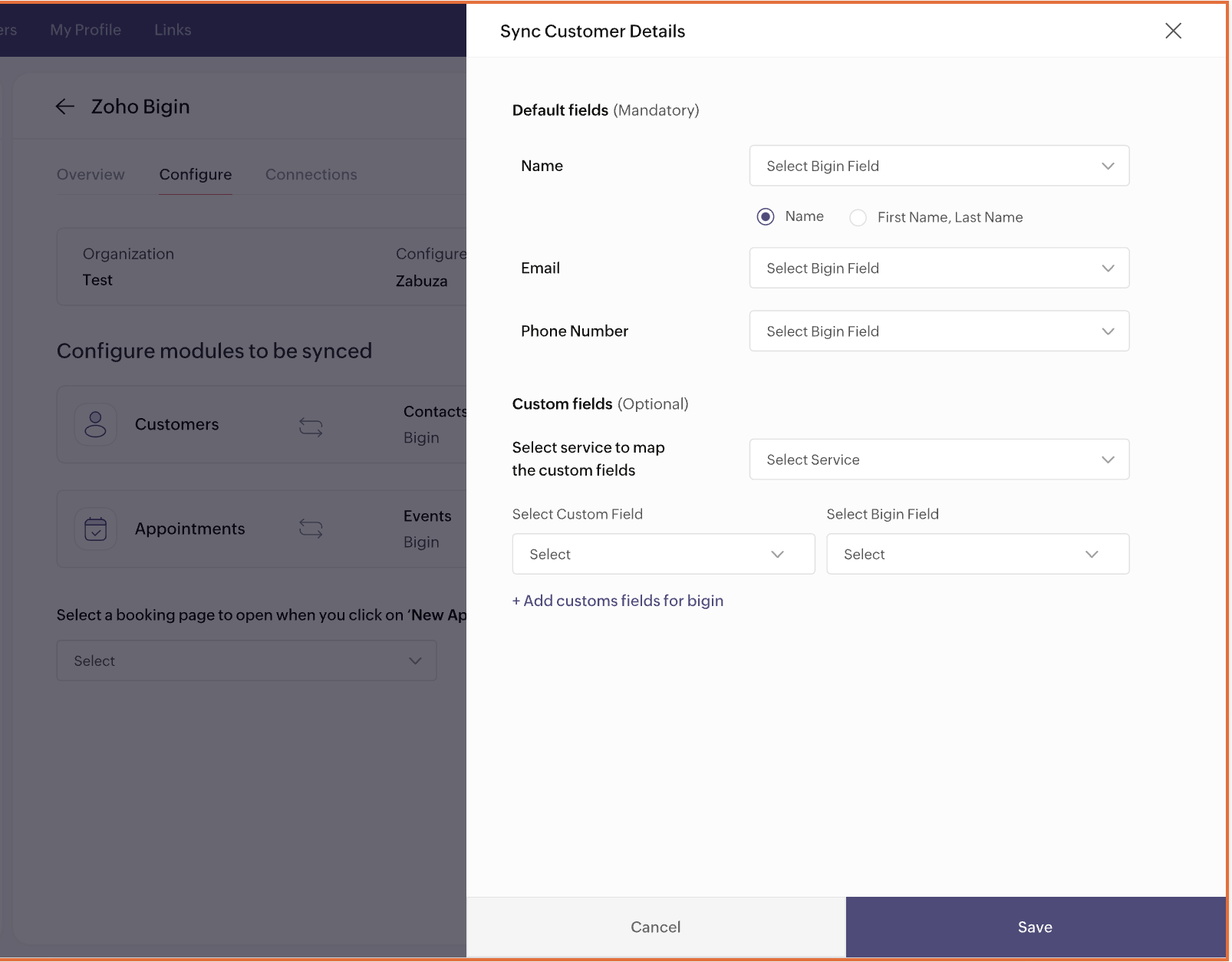
5. Integration with Bigin


Love 
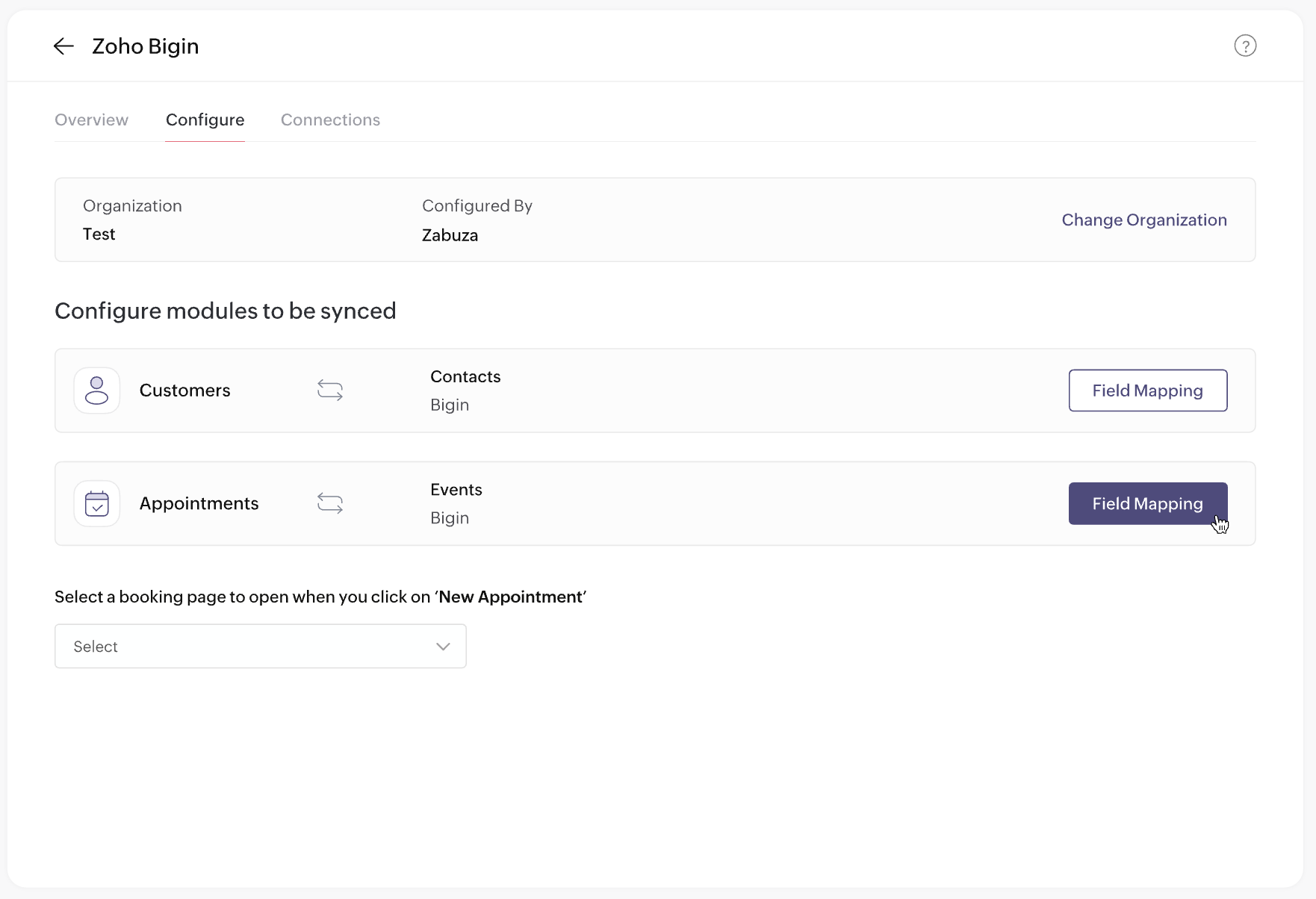
Bigin? You'll love Zoho Bookings too. Automatically collect qualified leads when they schedule with you in Zoho Bookings, and manage those leads using Bigin—the perfect lead-gen and sales machinery for your business!

Plus, book appointments right inside Bigin and manage all your customers from one place.


6. Preview email templates

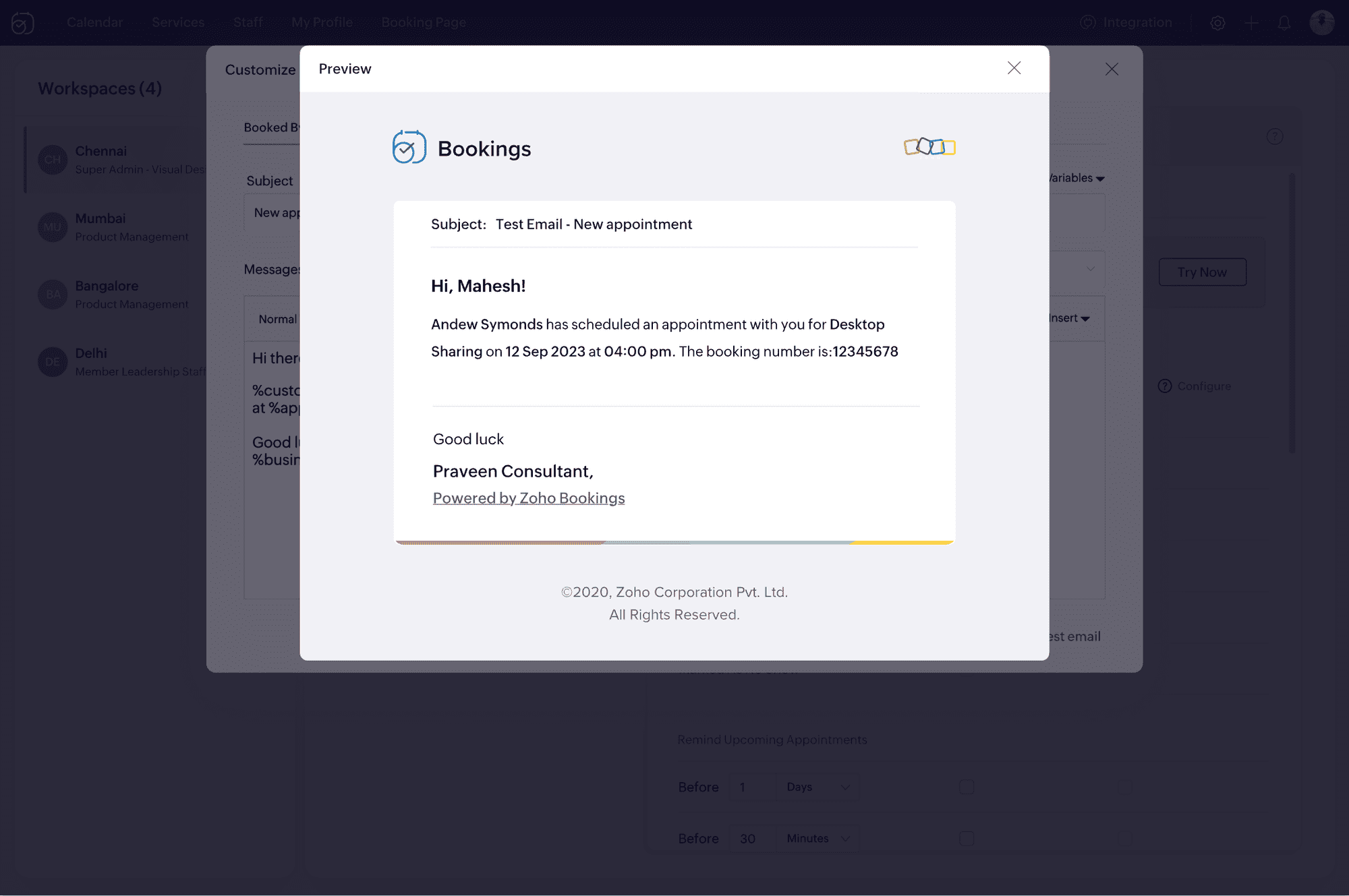
It's important to ensure your email notifications load well with all visual elements in place. Now, you can upload your HTML content and preview your email notifications before sending them to your clients.

No more broken emails!


7. Event title customization


We've heard your requests for customizable event titles on calendar invites. Now, you can use placeholders to add dynamic values like the event name, time, and host in titles. This is expected to be released before March 15, 2024.

8. Extended custom functions


There's a lot you can do with Zoho Bookings when you use custom functions:
  • Create a Cliq notification when an appointment is rescheduled.
  • Send Zoho WorkDrive documents to clients when you mark an appointment as complete.
How do you do it?
  • Pick the Zoho app to integrate with (e.g., Zoho Books, Zoho Cliq)
  • Decide on the desired result (e.g., create an invoice, send a message)
  • Choose a trigger (e.g., booked, canceled, rescheduled)

With custom functions, connecting Zoho Bookings with other Zoho apps will be a breeze. Below is the list of apps you can connect to through custom functions.

Zoho CRM
Zoho Invoice
Zoho Books
Zoho Docs
Zoho Sign
Zoho Recruit
Zoho Cliq

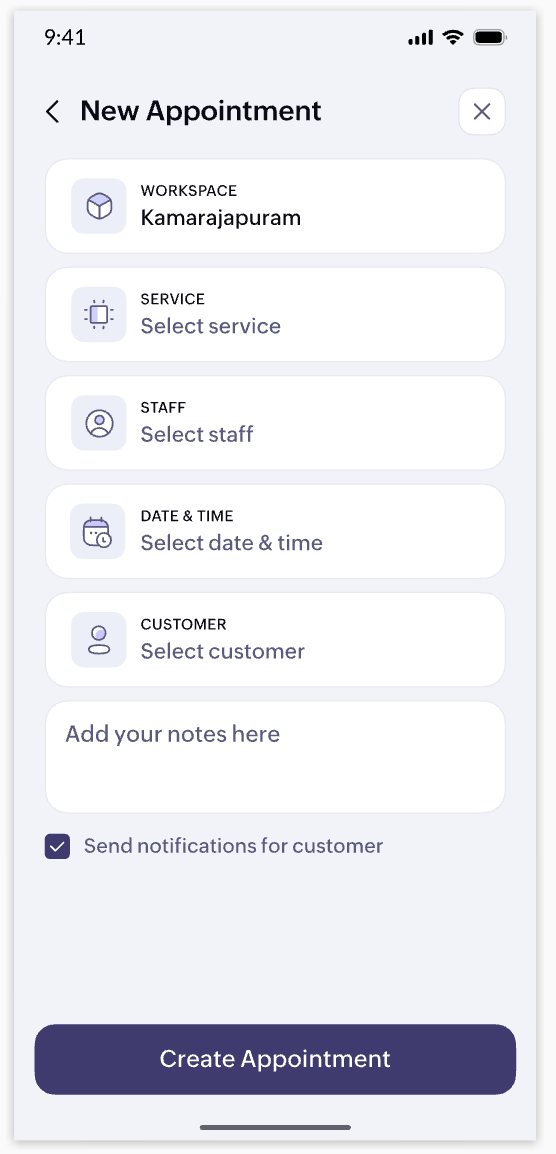
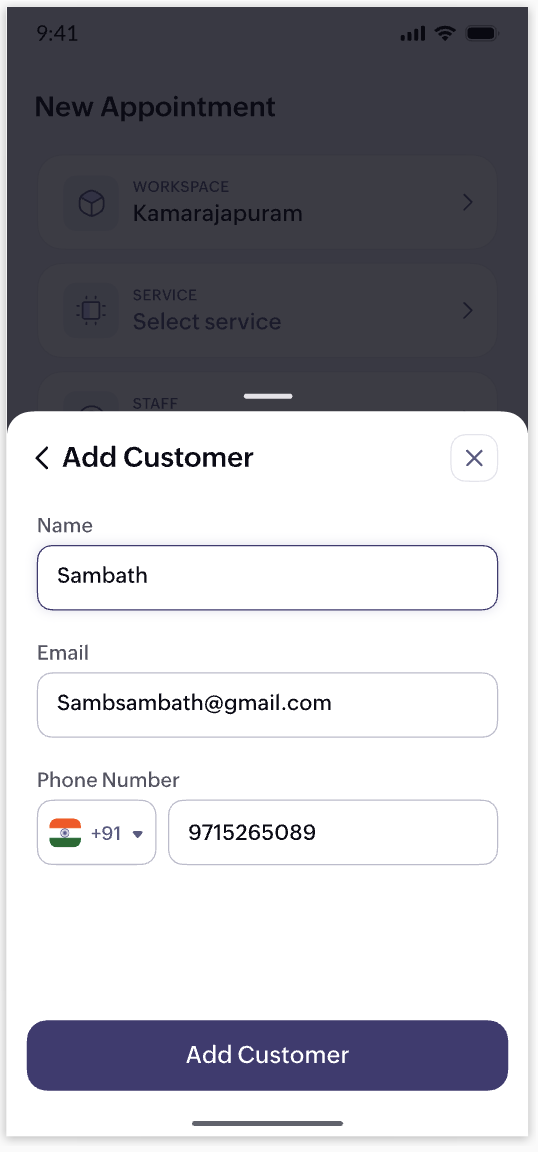
9. Mobile app revamp


Your business staff should be able to access appointment details, check availability, and book time-offs on the go. That's why we're launching a completely revamped Zoho Bookings app (both iOS and Android) with a fresh UI and enhanced user experience. Here's a teaser of some of the screens.
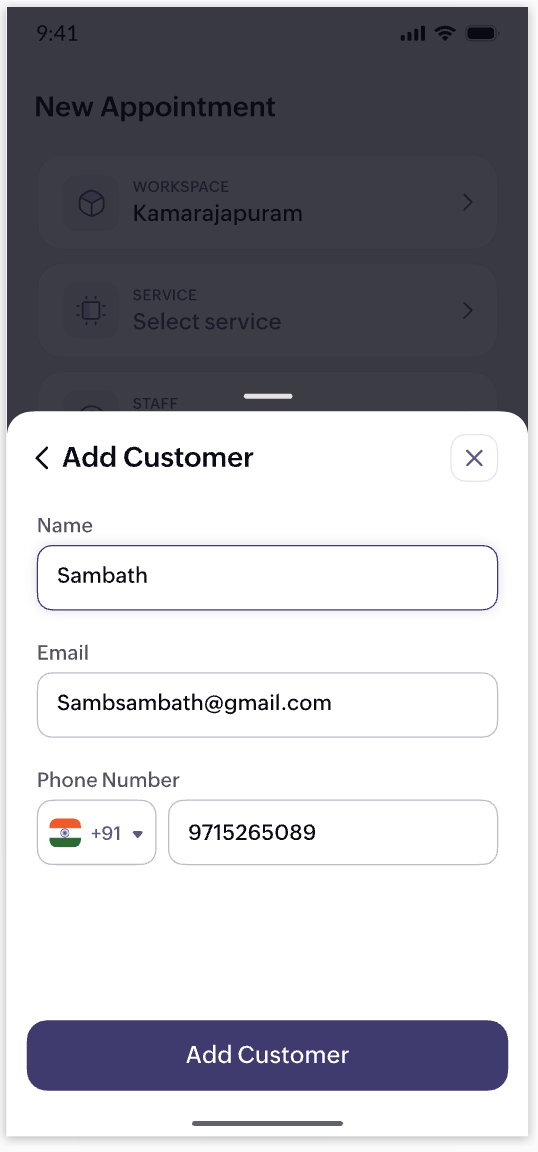
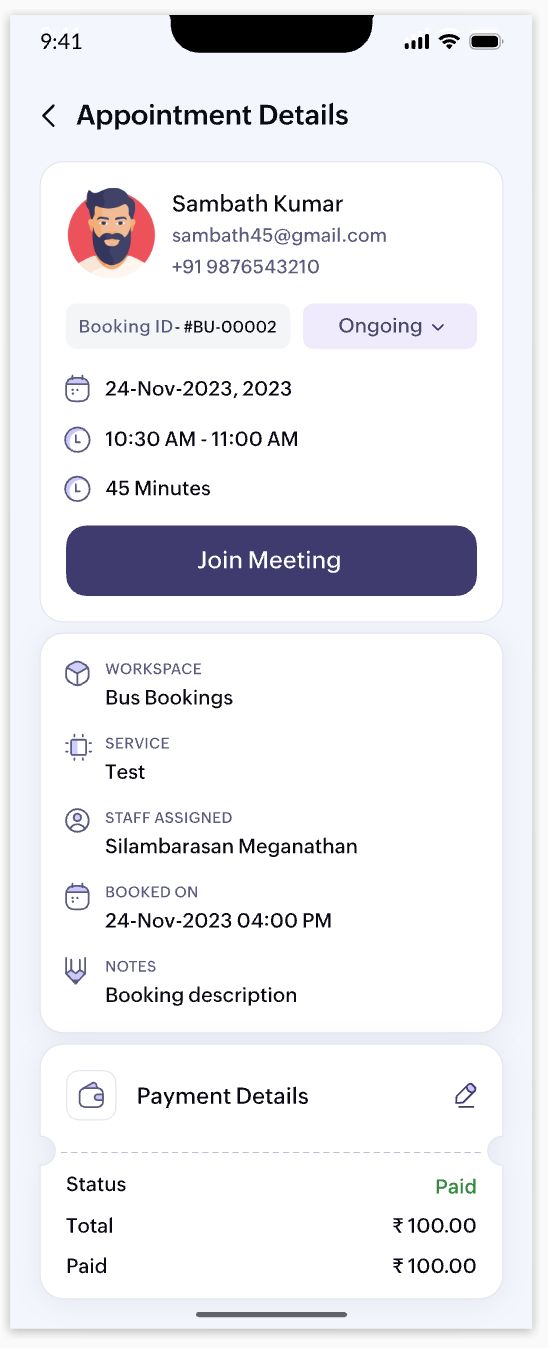
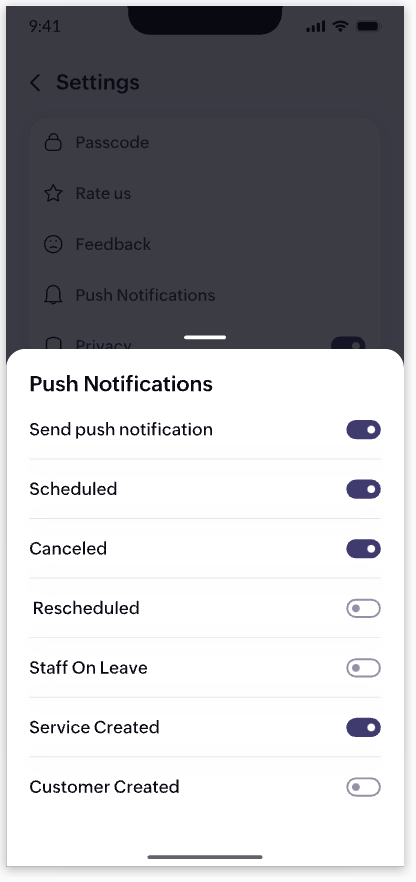


10. UI/UX enhancements


We've identified areas in the web app where we can elevate your user experience. We are doing a major revamp of the look and feel of the web app to complement the changes we're bringing to our mobile app.

Note that the items listed above are in no particular order for our projected roadmap, 2024. We'll make announcements when they're live and when there are new additions to our planned updates. Have a great year ahead!

Cheers,
The Zoho Bookings Team

    • Sticky Posts

    • 📣📣 Zoho Bookings Schedulathon 2025 is here!

      Hey Zoho Bookings fam, We're excited to invite you to our first-ever hackathon: Yes, Zoho Bookings Schedulathon 2025 is live now. This is a virtual event and you can participate anywhere from the world. Businesses should be able to set up meetings from
    • 📣 [Webinar] Spikra shows how businesses leverage Zoho Bookings to increase revenue

      [Webinar] Spikra shows how businesses leverage Zoho Bookings to increase revenue Hi all, Service-based businesses need to be on top of their client experience game to stay ahead. Spikra, one of our Advanced Zoho Partners, has been helping businesses deliver
    • 📣📣 Zoho Bookings - Feature Roadmap 2024

      Hi Everyone, Thank you for all the support you have been showing Zoho Bookings. We had a fabulous 2023, with a bunch of new features and over 60K new users. In 2024, our prime focus will be on user experience, and we have a few vital features coming in
    • Attention: Important updates to the payment gateway integrations

      Greetings from the Zoho Bookings team! We have a few important updates to the payment gateway integrations that allow you to collect online payments for your appointments. The following payment gateways will be updated, and we encourage you to make the
    • Attention: Scheduled Maintenance at US DC on Dec 19, 2024

      Dear Bookings users, We would like to inform you that we've scheduled maintenance activity at our US data centers on Thursday, December 19th, 2024, from 5:30 PM to 5:45 PM PT. During this period, Zoho Bookings will be completely unavailable for the accounts

    Nederlandse Hulpbronnen


      • Recent Topics

      • Cliq iOS can't see shared screen

        Hello, I had this morning a video call with a colleague. She is using Cliq Desktop MacOS and wanted to share her screen with me. I'm on iPad. I noticed, while she shared her screen, I could only see her video, but not the shared screen... Does Cliq iOS is able to display shared screen, or is it somewhere else to be found ? Regards
      • Role Management

        I am creating an analytics dashboard for a company that will be utilized by its various departments such as Finance, Marketing, and HR. My goal is to design the dashboard with separate tabs for each department. Additionally, I plan to implement role-based
      • Schedule Zoho CRM reports only on Business Days

        Hello, Is it possible to schedule reports only on business days ? We currently get daily sales reports on weekend which has no value since the sales team doesn't work on weekends. Thanks
      • Missing the "Find & Merge Duplicates" choice

        Hi, I am missing the "Find & Merge Duplicates" choice. I looked under the "More Actions" menu in Contacts, Accounts, Vendors, and Leads and it is not there.  I have full permissions.  Please assist me on finding this feature. Thanks!
      • How to install Widget in inventory module

        Hi, I am trying to install a app into Sales Order Module related list, however there is no button allow me to do that. May I ask how to install widget to inventory module related list?
      • Improved Contact Sync flow in Google Integration with Zoho CRM

        Hello Everyone, Your contact sync in Google integration just got revamped! We have redesigned the sync process to give users more control over what data flows into Google and ensure that this data flows effortlessly between Zoho CRM and Google. With this
      • Cannot see Application from Lookup field

        Hi all, I am trying to access data for an application on our account via a lookup field; however, the application doesn't appear in the dropdown at all. Can anyone shed any light on this, please? I have asked Zoho support; however, they're just as confused,
      • Deluge Error Code 1002 - "Resource does not exist."

        I am using the following script in a Custom Button on a Sales Return. Basically, the function takes the information in the sales return (plus the arguments that are entered by the user when the button is pushed) and creates a return shipping label via
      • How to track a contact or customer's past product purchases in Bigin Premiere?

        Hello there. I am the sole user of Bigin for a small company (chess club), and would like to track current and past purchases made by a contact (player) or company (family which includes the player). Players may register for multiple tournaments, take
      • LENTITUD EN RECIBIR MAIL

        Buenas tardes, Estamos experimentando lentitud en la recepción de correos electrónicos.
      • Items should display under specific warehouse

        I have configured the multi warehouse but it show all the items under all warehouse which is not correct according to our business logic, so i want that items should only display under that specific warehouse not under all the warehouses not even with zero quantity. Some items should be common but not all so is there any option for that purpose so i can specific the items to its warehouse. Regards
      • Tracking Non-Inventory Items

        We have several business locations and currently use zoho inventory to track retail items (sales and purchase orders). We were hoping to use zoho inventory to track our non-inventory items as well (toilet paper, paper towels, etc). I understand that we
      • Partial refunds

        I am trying to process refund for a one item invoice, however the refund is partial: i am getting this error while creating credit note, can anyone share some wisdom about this
      • Best practice importing items and matching assemblies

        Hi, I was wondering what would be the best practice to import items and composite items (assemblies) From my backup, what should I import first? The items or the composite items? I am on Zoho one, using inventory and books. Kind regards, Sabine
      • Bulk Fill In & Edit PO/Bill/SO/Invoice

        Hello, I am adding stock in bulk on a PO, the system is automatically populating the Rate (price) and Tax from the item data. Problem is that the bill rate is different from the rate on the item data, so I have to manually erase each and enter the price.
      • Separate Items & Services

        Hi, please separate items and services into different categories. Thank you
      • Items Below Reorder Point Report?

        Is there a way to run a report of Items that are below the Reorder Point? I don't see this as a specific report, nor can I figure out how to customize any of the other stock reports to give me this information. Please tell me I'm missing something s
      • Allocating inventory to specific SO's

        Is there a way that allocate inventory to a specific sales order? For example, let's say we have 90 items in stock. Customer 1 orders 100 items. This allocates all 90 items to their order, and they have a back order for the remaining 10 items which could
      • Cancelled Transfer order problem

        Hello, We've canceled a transfer order, and we can't add the related items to a new Transfer Order. The system tells us that the bin doesn't have the required quantity, but when we check the item, it indicates that there are 2 units in the bin. It also
      • Creating a Chart from a Report

        In Zoho Analytics, is it possible to create a chart from a Pivot View report? We are looking to use Zoho Analytics to replace Excel for Sales reports and would like to be able to show both the table and the chart together.
      • iOS App doesn't refresh for Document Creation

        Hello Zoho team, I have created a workflow to be used on a mobile iOS device which starts in Zoho Creater and ends with a murge and store function that then opens the newly created document within the Zoho Writer app. This process is working great however
      • Zoho Books Sandbox environment

        Hello. Is there a free sandbox environment for the developers using Zoho Books API? I am working on the Zoho Books add-on and currently not ready to buy a premium service - maybe later when my add-on will start to bring money. Right now I just need a
      • Client Portal ZOHO ONE

        Dear Zoho one is fantastic option for companies but it seems to me that it is still an aggregation of aps let me explain I have zoho books with client portal so client access their invoice then I have zoho project with client portal so they can access their project but not their invoice without another URL another LOGIN Are you planning in creating a beautiful UI portal for client so we can control access to client in one location to multiple aps at least unify project and invoice aps that would
      • Email Insights included in Bigin emals are marked as SPAM everywhere

        Today I noticed that email recipients who use Office 365 never receive emails sent from Bigin. Further examination showed that all Email Insights links in email headers are marked as spam/phishing by Office 365. Example screen included. The problem is
      • Data Import | Zoho Analytics Custom Query Window Size

        Please increase the window size for the Custom Query Data Import. It's impossible to work with such a small query window.
      • Name changed in settings for mailbox but still not changed when typed in To field

        In the email account secretary@ i have updaetd the new staff members details but the old members name still appears when I type secretary@ in the To field. I cant work out where Zoho is finding the old name from. I have deleted the browser cache. If I
      • Cannot add my name to my domain name

        I want to have My name@mydomain.com and it says my name is linked to another account already. Please fix it since I do not have another account.
      • Invoice status on write-off is "Paid" - how do I change this to "Written off"

        HI guys, I want to write off a couple of outstanding invoices, but when I do this, the status of the invoices shows as "Paid". Clearly this is not the case and I need to be able to see that they are written off in the customer's history. Is there a way
      • Establishing new Zoho email account on laptop

        Good Morning: I am very long time Outlook business user and decided to try your email service last night and had established an account. I am trying to verify my account; how do I establish my Zoho email account on my laptop? I opened the account with
      • unable to send message reason 550 5.4.6 unusual sending activity

        My email account can't send message. It shows unable to send message reason 550 5.4.6 unusual sending activity detected
      • how to add email to existing organization i w

        I am already registered my organization and i have an email id. I need one more email id but i can't find anywhere .i want the cheapest email id . how to add ?
      • e-mail bloqueado

        Estou com meu e-mail lucas@peplus.me bloqueado, preciso desbloquear para retorno de usos em minhas atividades.
      • zoho labels api not working

        We're using n8n to automte email reply using zoho api. I'm facing issue with label api. I added the required scopes but its not working. i followed zoho api documentation but didn't work. also, where do i find/how do i create zoho oauth token mentioneeed
      • Desk DMARC forwarding failure for some senders

        I am not receiving important emails into Desk, because of DMARC errors. Here's what's happening: 1. email is sent from customer e.g. john@doe.com, to my email address, e.g info@acme.com 2. email is delivered successfully to info@acme.com (a shared inbox
      • Streams/Shared email doesn't show up in windows trident app. It works fine on MAC. Is there any difference between 2 install ?

        I can see streams/share email boxs on my MAC version of trident app but i can't see them in windows version of trident app. Is there any difference between 2 install? I try to find setting but not able to see any setting to add stream/share email boxes.
      • add zoho account

        How to add a zoho mail to previous zoho account? I have two
      • Zoho Desk Mobile App Year-End Roundup - 2025

        Dear Zoho Desk users, Greetings! As you gear up for the festive season, we are excited to share a quick journey into all that is released in 2025! Zia's generative AI capabilities Zia insights can be highly beneficial in helping agents manage daily support
      • Narrative 17: The role of Zia AI in customer support

        Behind the scenes of a successful ticketing system: BTS Series Narrative 17: The role of Zia AI in customer support Overview Zia in Zoho Desk is a layered AI assistant that combines generative AI, prediction, and automation to support agents, automate
      • Domain Transaction

        I have purchased a domain name called trainedworkforce.co.in I made the payment got the receipt but the domain is still not purchased after successful transaction .
      • Ability to Set a Unified Tab Order/View for All Users in Zoho Projects

        Hello Zoho Projects Team, We hope you are doing well. We would like to submit a feature request regarding tab/menu organization in Zoho Projects. Current Behavior: The tab (module) order in Zoho Projects is user-specific. Each user (internal or external)
      • Next Page