Action Required: Update Microsoft SQL Server Security Settings Before February 2026

Action Required: Update Microsoft SQL Server Security Settings Before February 2026

Dear Users,

We recently deployed security updates in Zoho Analytics that inadvertently caused connection failures for a few customers using Microsoft (MS) SQL Server hosted on older Windows versions (Windows Server 2012, 2012 R2, and 2014).

To restore connectivity, we have temporarily reverted these updates. However, these security changes are mandatory for long-term protection and compliance, and they will be permanently enforced by the end of February 2026.

If you are using MS SQL Server on the affected Windows versions, action is required to ensure uninterrupted connectivity once the security standards are re-applied.

Who Is Affected

This applies only to customers who:

  • Use MS SQL Server as a data source in Zoho Analytics, and
  • Host MS SQL Server on:
    • Windows Server 2012
    • Windows Server 2012 R2
    • Windows Server 2014

If you are not using these operating systems, no action is required.

NotesNote: This update applies only to SQL Server Cloud DB imports.
It does not affect local database imports configured using Zoho Databridge.

Issue Description

When modern security standards are enforced, applications connecting to MS SQL Server hosted on older Operating Systems (Windows Server 2012 / 2012 R2 / 2014) will fail with the following error:

Info
"encrypt" property is set to "false" and "trustServerCertificate" property is set to "true" but the driver could not establish a secure connection to SQL Server by using Secure Sockets Layer (SSL) encryption: Error: SQL Server did not return a response.

Root Cause

  1. Upcoming Security Standard:
    Modern security protocols require Forward Secrecy. Legacy TLS_RSA cipher suites are being deprecated industry-wide.
  2. OS Limitation:
    Older Windows Servers rely on these deprecated ciphers by default. They do not offer modern Elliptic Curve (ECDHE) ciphers unless explicitly configured.
  3. The Impact:
    Without the configuration below, your database will reject secure connections once we re-enable the security update.

Required Configuration: Enabling Modern Cipher Suites

To prepare your server, you must add the following modern cipher suites to the TOP of your Windows Server's configuration.

Implementation Methods

You can use one of the following methods.

Option A: GUI Method (Recommended)

Step 1: Download the Tool

Download IIS Crypto (GUI) from Nartac Software.

NotesNote: This is a portable utility and does not require installation.

Step 2: Launch the Tool

  • Copy IISCrypto.exe to the database server.
  • Right-click the executable and select Run as Administrator.

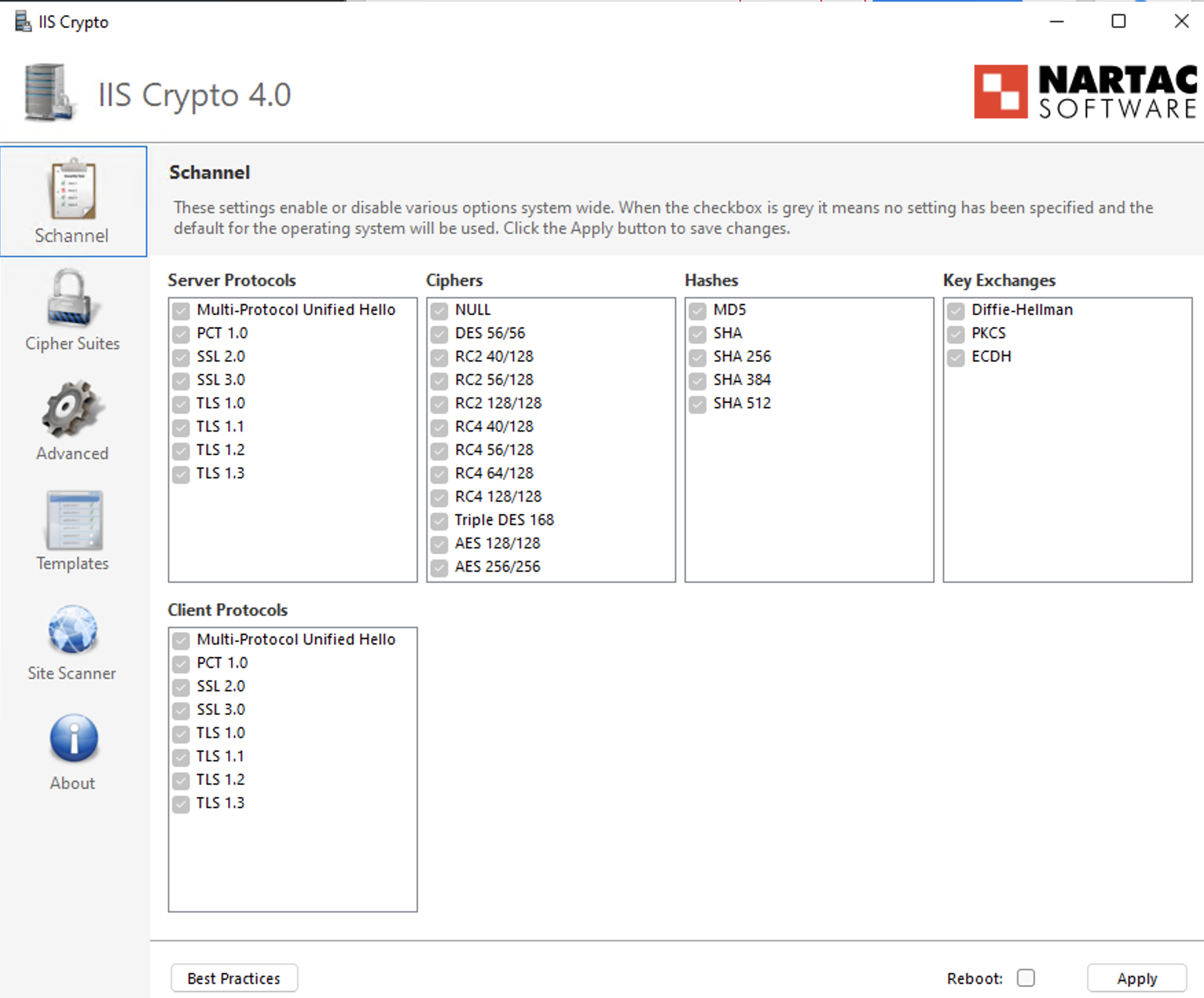
Step 3: Configure TLS Protocols

  • Open the Schannel tab.
  • Ensure TLS 1.2 is enabled (checked).
  • Verify that deprecated protocols (SSL, TLS 1.0, TLS 1.1) remain disabled in accordance with security policy.

Step 4: Prioritize Cipher Suites

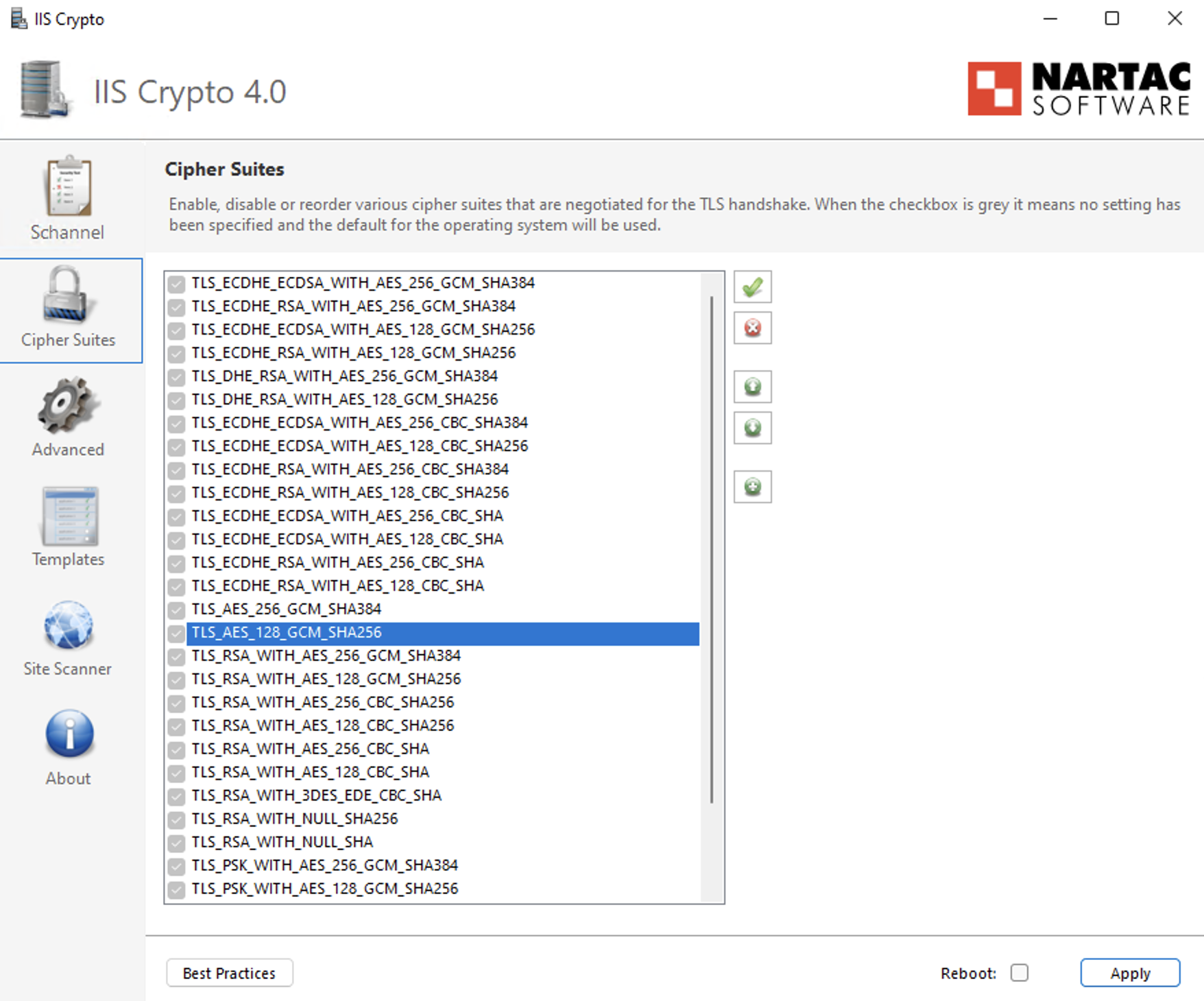
  • Navigate to the Cipher Suites list in the left-hand panel.
  • Identify the following ECDHE cipher suites:
    • TLS_ECDHE_RSA_WITH_AES_256_GCM_SHA384
    • TLS_ECDHE_RSA_WITH_AES_128_GCM_SHA256
    • TLS_ECDHE_RSA_WITH_AES_256_CBC_SHA384_P384
    • TLS_ECDHE_RSA_WITH_AES_128_CBC_SHA256_P256
    • TLS_ECDHE_RSA_WITH_AES_256_CBC_SHA_P384
    • TLS_ECDHE_RSA_WITH_AES_128_CBC_SHA_P256
  • Use the Up Arrow control to move these ECDHE cipher suites to the top of the list to ensure they are prioritized during TLS negotiation.
  • Ensure that older TLS_RSA_* cipher suites remain enabled only for backward compatibility and are positioned below the ECDHE cipher suites with the lowest priority.

Step 5: Apply Configuration

  • Click Apply to save the changes.

Step 6: Reboot

  • Restart the Windows Server to ensure the changes take effect.

Option B: Group Policy Method (Native Windows)

Step 1: Open Group Policy Editor

  • Press Win + R, type gpedit.msc, and press Enter.

Step 2: Navigate to SSL Configuration Settings

Go to: Computer ConfigurationAdministrative TemplatesNetworkSSL Configuration Settings

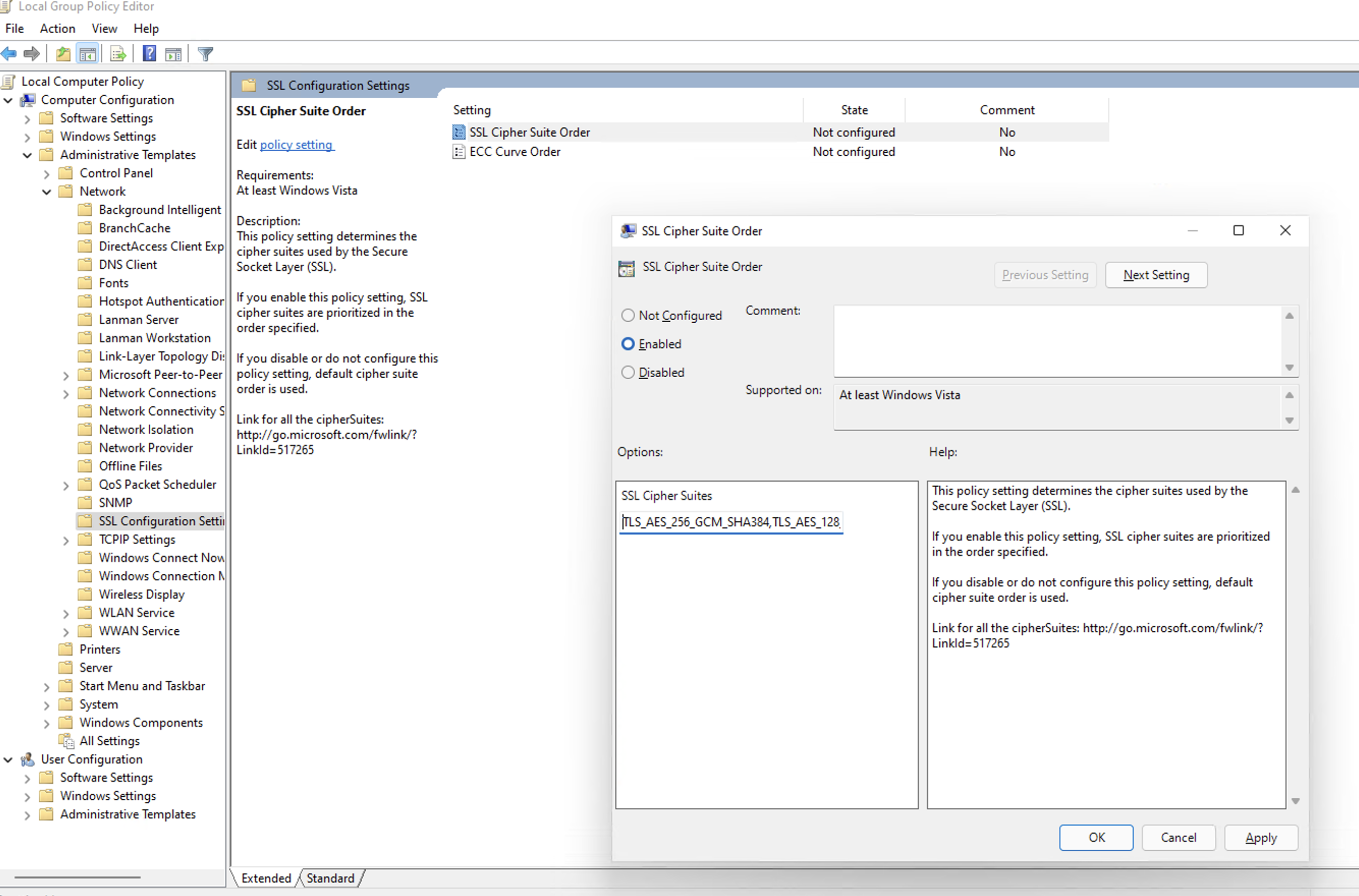
Step 3: Edit Cipher Suite Order

  • Double-click SSL Cipher Suite Order.
  • Select Enabled.

Step 4: Prepend Secure Cipher Suites (Critical Step)

  • Locate the SSL Cipher Suites text box.
  • Do not delete the existing cipher list, as this may impact legacy application compatibility.
  • Place the cursor at the very beginning (far left) of the text box.
  • Paste the following cipher list before the existing entries:
    Info
    TLS_ECDHE_RSA_WITH_AES_256_GCM_SHA384,TLS_ECDHE_RSA_WITH_AES_128_GCM_SHA256,TLS_ECDHE_RSA_WITH_AES_256_CBC_SHA384_P384,TLS_ECDHE_RSA_WITH_AES_128_CBC_SHA256_P256,TLS_ECDHE_RSA_WITH_AES_256_CBC_SHA_P384,TLS_ECDHE_RSA_WITH_AES_128_CBC_SHA_P256,
  • Ensure there is a comma separating the newly added cipher block from the existing cipher list.

Step 5: Apply Configuration

Click OK to save the policy changes.

Step 6: Reboot

Restart the Windows Server for the Group Policy changes to take effect.

Verification: How to Install & Run Nmap

To confirm the server is ready for the future update, use the network scanning tool Nmap.

Step 1: Install Nmap

For Windows Users:

  1. Download the Latest Stable Installer (.exe) from the Official Nmap Download Page.
  2. Run the installer.
  3. Critical Step: During installation, check the box for Install Npcap. This driver is required for the scan to work.
  4. Finish the installation.

For Linux Users:

  • Ubuntu/Debian: Run "sudo apt-get install nmap -y"
  • RHEL/CentOS: Run "sudo yum install nmap -y"

Step 2: Run the Scan

Open your Command Prompt (Windows) or Terminal (Linux) and run:

Infonmap --script ssl-enum-ciphers -p 1433 <YOUR_DB_IP_ADDRESS>

(Replace 1433 with your specific SQL port if different).

Step 3: Interpret Results

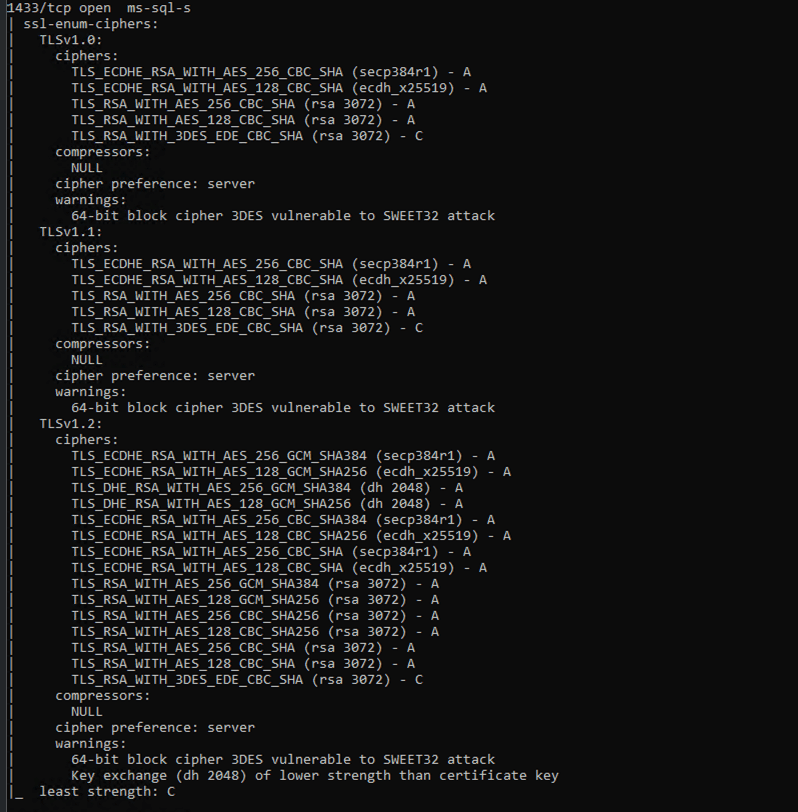
  • Look for the TLSv1.2 section in the output. Ensure TLS_ECDHE_... cipher suites appear at the top of the cipher list with Grade A.
  • TLS_RSA_... cipher suites must not be removed, but should be kept only as fallback and configured with the lowest priority to avoid regression after re-applying the update.

Example of Successful Output:

What Happens If You Skip This Configuration?

If modern ciphers are not enabled before the security update is permanently enforced:

  • Scheduled syncs will fail.
  • You won't be able to add or manage existing connections/sources/tables.

Enforcement Timeline

These security standards will be permanently enforced by the end of February 2026.

Servers that do not meet the required cipher configuration will experience connection failures once enforcement begins.

Need Assistance?

If you need help with the configuration, contact us at support@zohoanalytics.com.

To help us resolve your issue faster, include the following details in your email:

  • Windows Server version
  • SQL Server version
  • SQL port number
  • Nmap scan output (if available)
  • Screenshot of your cipher configuration (if applicable)

Providing this information upfront will help us diagnose and assist you more efficiently.


    • Sticky Posts

    • What's New in Zoho Analytics - January 2026

      Hello Users! We are starting the year with a strong lineup of updates, marking the beginning of many improvements planned to enhance your analytics experience. Explore the latest improvements built to boost performance, simplify analysis, and help you
    • What's New in Zoho Analytics - November 2025

      We're thrilled to announce a significant update focused on expanding your data connectivity, enhancing visualization capabilities, and delivering a more powerful, intuitive, and performant analytics experience. Here’s a look at what’s new. Explore What's
    • What's New in Zoho Analytics - October 2025

      Hello Users! We're are back with a fresh set of updates and enhancements to make data analysis faster and more insightful. Take a quick look at what’s new and see how these updates can power up your reports and dashboards. Explore What's New! Extreme
    • What’s New in Zoho Analytics – September 2025

      Hello Users!! In this month’s update, we’re raising the bar across multiple touchpoints, from how you bring in data, plan and track projects to how you design and brand your dashboards. We’ve added the all-new Gantt chart for project visualization, expanded
    • Announcing Agentic AI - Ask Zia!

      We are delighted to roll out the new agentic AI capabilities in Ask Zia, where every stage of the BI workflow is assisted by AI. With a human-in-the-loop approach, Ask Zia ensures that you’re in command of the decision, while AI handles the complexity.
    • Recent Topics

    • We know the company but not the contact

      We are fairly new to Zoho, part of our marketing stack is we use products like lead feeder to identify which companies are visiting our site. We are able to match this data to salesiq but cannot find a way to add a company name to the salesiq visitor
    • Sort Legend & stacked bar chart by value

      I'd love to see an option added to sort the legend of graphs by the value that is being represented. This way the items with the largest value in the graph are displayed top down in the legend. For example, let's say I have a large sales team and I create
    • Customize Calendar view in Teamspaces Settings

      Right now every customization that happens inside of the calendar view inside of CRM is only visible for the specific user. We want to be able to set up calendar views as an admin for specific roles. I would suggest to do that inside of the settings of
    • How to filter subform report based upon main form report in dashboard

      Hi Team, I am creating a dashboard in Zoho Analytics. I want to have a main form report and below I want to show subform report of main form. If I filter the main form with date then I want to show subform records based upon main form. how can I achieve
    • using the Client script I want to Hide Show the Fields

      if Related to service means some of the field like service no want to shoe and hide Amc no , purchase no how i achive this let issu = ZDK.Page.getField('Issue_Related_To').getValue(); if (issu == 'Service') { var field_obj = ZDK.Page.getField('Warranty_Cases');
    • From Zoho CRM to Paper : Design & Print Data Directly using Canvas Print View

      Hello Everyone, We are excited to announce a new addition to your Canvas in Zoho CRM - Print View. Canvas print view helps you transform your custom CRM layouts into print-ready documents, so you can bring your digital data to the physical world with
    • Ask the Expert – Zoho One Admin Track : une session dédiée aux administrateurs Zoho One

      Vous administrez Zoho One et vous vous posez des questions sur la configuration, la gestion des utilisateurs, la sécurité ou encore l’optimisation de votre back-office ? Bonne nouvelle : une session Ask the Expert – Zoho One Admin Track arrive bientôt,
    • Kanban view on Zoho CRM mobile app!

      What is Kanban? The name doesn't sound English, right? Yes, Kanban is a Japanese word which means 'Card you can see'. As per the meaning, Kanban in CRM is a type of list view in which the records will be displayed in cards and categorized under the given
    • How can Data Enrichment be automatically triggered when a new Lead is created in Zoho CRM?

      Hi, I have a pipeline where a Lead is created automatically through the Zoho API and I've been trying to look for a way to automatically apply Data Enrichment on this created lead. 1) I did not find any way to do this through the Zoho API; it seems like
    • Write-Off multiple invoices and tax calculation

      Good evening, I have many invoices which are long overdue and I do not expect them to be paid. I believe I should write them off. I did some tests and I have some questions:  - I cannot find a way to write off several invoices together. How can I do that,
    • Kaizen #210 - Answering your Questions | Event Management System using ZDK CLI

      Hello Everyone, Welcome back to yet another post in the Kaizen Series! As you already may know, for the Kaizen #200 milestone, we asked for your feedback and many of you suggested topics for us to discuss. We have been writing on these topics over the
    • vendors / customers with 2 different address and gst no

      Why can't we have option for more than one address and depending on the state option for more than 1 GST no. ? We have customers / vendors PAN india with different addresses and GST no. for different states.
    • Recurring Automated Reminders

      Hi, The reminders feature in Zoho Books is a really helpful feature to automate reminders for invoices. However, currently we can set reminders based on number of days before/after the invoice date. It would be really helpful if a recurring reminder feature
    • Fail to send Email by deluge

      Hi, today I gonna update some email include details in deluge, while this msg pops up and restrict me to save but my rules has run for one year. can you tell me how to use one of our admin account or super admin account to send the email? I tried to update
    • Transitions do not update fields until the record moves to next stage

      We have a blueprint where a couple of stages have multiple transitions. If only some of the transitions are completed, but not all, Zoho does not update any of the fields impacted by the completed transitions. Is there any way Zoho can udate the fields
    • Zoho CRM for Everyone's NextGen UI Gets an Upgrade

      Hello Everyone We've made improvements to Zoho CRM for Everyone's Nextgen UI. These changes are the result of valuable feedback from you where we’ve focused on improving usability, providing wider screen space, and making navigation smoother so everything
    • Zoho CRM - Kiosk Studio : Use action responses across your kiosks with sequential actions

      Hello Everyone, Imagine building a kiosk that gives you full control over how actions are executed in later screens in that same kiosk. What if you could use data from a previous action later in that kiosk—with no interruptions or data gaps? This is exactly
    • Ability to CC on a mass email

      Ability to CC someone on a mass email.
    • Get Cliq Meetings in my O365 calendar

      Hi, we are currently evaluating to replace the Teams Messaging and Meetings with Cliq. We currently still have all our email and calendars in O365. What i want to achieve is, to create a (ZOHO) meeting from Cliq and have this meeting added to my Outlook/O365
    • Custom Button to convert a Deal to a Custom Module?

      Hello Community I am in process of building out a custom CRM for my team and part of this is looking at building out a Custom Button or function of some sort where when a Deal is marked Closed Won the system will allow for a "Convert to Job" option to
    • Power up your Kiosk Studio with Real-Time Data Capture, Client Scripts & More!

      Hello Everyone, We’re thrilled to announce a powerful set of enhancements to Kiosk Studio in Zoho CRM. These new updates give you more flexibility, faster record handling, and real-time data capture, making your Kiosk flows smarter and more efficient
    • Emails Failing with “Relaying Issues – Mail Sending Blocked” in ZeptoMail

      Hello ZeptoMail Support Team, We are facing an email delivery issue in our ZeptoMail account where emails are failing with the status “Process failed” and the reason “Relaying issues – Mail sending blocked.” Issue Details Agent Name: mail_agent_iwwa From
    • Change eMail Template for Event-Invitations

      Hello ZOHO-CRM Team How I can change the eMail Template for Event-Invitations? I work with the German Version of the Free Version. I know how I can modify eMail alerts or Signature Templates, but where I can other eMails modify you send out? Thank you
    • Workdrive Oauth2 Token Isn't Refreshing

      I have set up oauth for a bunch of zoho apis and have never had a problem with oauth. With workdrive i am using the exact same template i usually use for the other zoho apps and it is not working. All requests will work for the first hour then stops so
    • How can I import OLM to Yandex Mail easily?

      For migrating Mac Outlook OLM data to Yandex Mail efficiently, the Aryson OLM Converter is a reliable professional tool that ensures complete data integrity throughout the process. Unlike manual methods, which can risk inconsistent formatting or missing
    • Introducing Radio Buttons and Numeric Range Sliders in Zoho CRM

      Release update: Currently out for CN, JP, AU and CA DCs (Free and standard editions). For other DCs, this will be released by mid-March. Hello everyone, We are pleased to share with you that Zoho CRM's Layout Editor now includes two new field formats—
    • Is it possible to setup bin locations WITHOUT mandating batch tracking?

      Hi fellow zoho users, I'm wondering if anyone else has a similar issue to me? I only have some products batch tracked (items with shelf life expiry dates) but I am trying to setup bin locations for my entire inventory so we can do stock counting easier.
    • Implementing Inventory Process

      I am just starting to create an inventory system through Zoho for a nonprofit. We receive in-kind donations of items for kids, and utilize them in 2 or 3 different programs. Then families come in and take the items. I'm thinking of this structure: Our
    • Best way to start zoho inventory with bulk openning stock

      We are already using zoho book since long time for cars trading company. Now to streamline more, would like to import the excel data of closing stock of inventory to zoho inventory and to start on. Since we need to track each VIN (unique vehicle id number)
    • Service Reports.

      Hello Team, I have a requirement to create multiple service reports for a single AP. That means, in one AP I have 5 service line items, and all line items are linked to assets. Once I complete the AP, I want to generate 5 individual service reports, one
    • Blueprint enhancements - Parallel and multiple transitions, and more

      Last modified on Sep 4, 2023: All Zoho CRM users can now access these enhancements. Initially, these features were available only on an early access basis and by request. However, as of August 2, 2023, they have been made available to all users in all
    • Item Bulk Edit - Allow for Reorder Level

      We're implementing a process for using the Reorder Level field for Items, and I have to go through and add this value to a huge chunk of our Items. It's driving me bonkers that I have to do this individually through the UI rather than bulk updating. It
    • Zoho CRM || Unable to Bulk Assignment of Territories for Contacts

      Dear Zoho CRM Support Team, I hope this email finds you well. We recently performed a bulk upload of Contacts into Zoho CRM using the official sample Excel template downloaded from the CRM. The upload itself was completed successfully; however, we encountered
    • What's New in Zoho Inventory | August – October 2025

      Hello customers, The last quarter has been incredibly productive! We've released a powerful slate of new features and enhancements in Zoho Inventory designed to give you better control, greater efficiency, and expanded functionality across your inventory
    • Disable Zoho Inventory Tracking / Delink Zoho Books & Inventory

      We have integrated zoho inventory with zoho books? Now after a long time, we want to disable inventory tracking and delink these 2 modules. Zoho says we cant do it. Anybody else going thru the same ? Any possibility at all? Why does zoho not allow to
    • Tracking Non-Inventory Items

      We have several business locations and currently use zoho inventory to track retail items (sales and purchase orders). We were hoping to use zoho inventory to track our non-inventory items as well (toilet paper, paper towels, etc). I understand that we
    • Price Managment

      I have been in discussions with Zoho for some time and not getting what I need. Maybe someone can help explain the logic behind this for me as I fail to understand. When creating an item, you input a sales rate and purchase rate. These rates are just
    • Set Warehouse based on Vendor

      Greetings. I would like to set automaticaly the Warehouse based on the Vendor. Context: I am working on an adaptation of a Purchase Order to be used as a Quotation. I have defined that when a user has to raise a quote the Vendor will be "PROCUREMENT" I would like to set the Warehouse to a predefined value when "PROCUREMENT" is set as Vendor. I have tried to do with the Automation feature using the Field Update option, but Warehouse does not is listed as a field. Can you help? Thanks in advance.
    • How to add interviews through API

      I'm trying to add an interview without much luck. The documentation gives examples of adding just about everything except an interview. However, the issue might be the way I'm formatting it, because the documentation is unclear to me. It seems as if the xml should be passed in the url, which seems unusual. I've tried the data as both plain and character escaped, but nothing seems to work, nor do I even get an error response. https://recruit.zoho.com/recruit/private/xml/Interviews/addRecords?authtoken=***&scope=recruitapi&version=2&xmlData=<Interviews> <row
    • Auto tagging

      Some of the articles I enter into Notebook get there when I enter them in Raindrop.io and IFTTT copies the articles in Notebook. When this happens the notes are tagged but instead of useful one word tags with topic the tag pertains to the specific article
    • Next Page