All new Address Field in Zoho CRM: maintain structured and accurate address inputs
 The address field will be available exclusively for IN DC users. We'll keep you updated on the DC-specific rollout soon.
It's currently available for all new sign-ups and for existing Zoho CRM orgs which are in the Professional edition.

Why the new address field?
- You could create separate fields—one for street, one for city, one for state, one for country, and so on. But if you wanted states to change based on the country selected, you'd have to enter all the country and state values yourself manually and then set up dependency rules.
- Or you could create a single multiline text field for the whole address. That avoided the setup work, but it came at the cost of functionality; you couldn't filter by country or state, and you couldn't use the data for quick reporting or territory-based analysis.
The new address field eliminates all of this headache by enabling you to capture all the necessary components in one structured field while still being able to view, filter, and report on them individually.
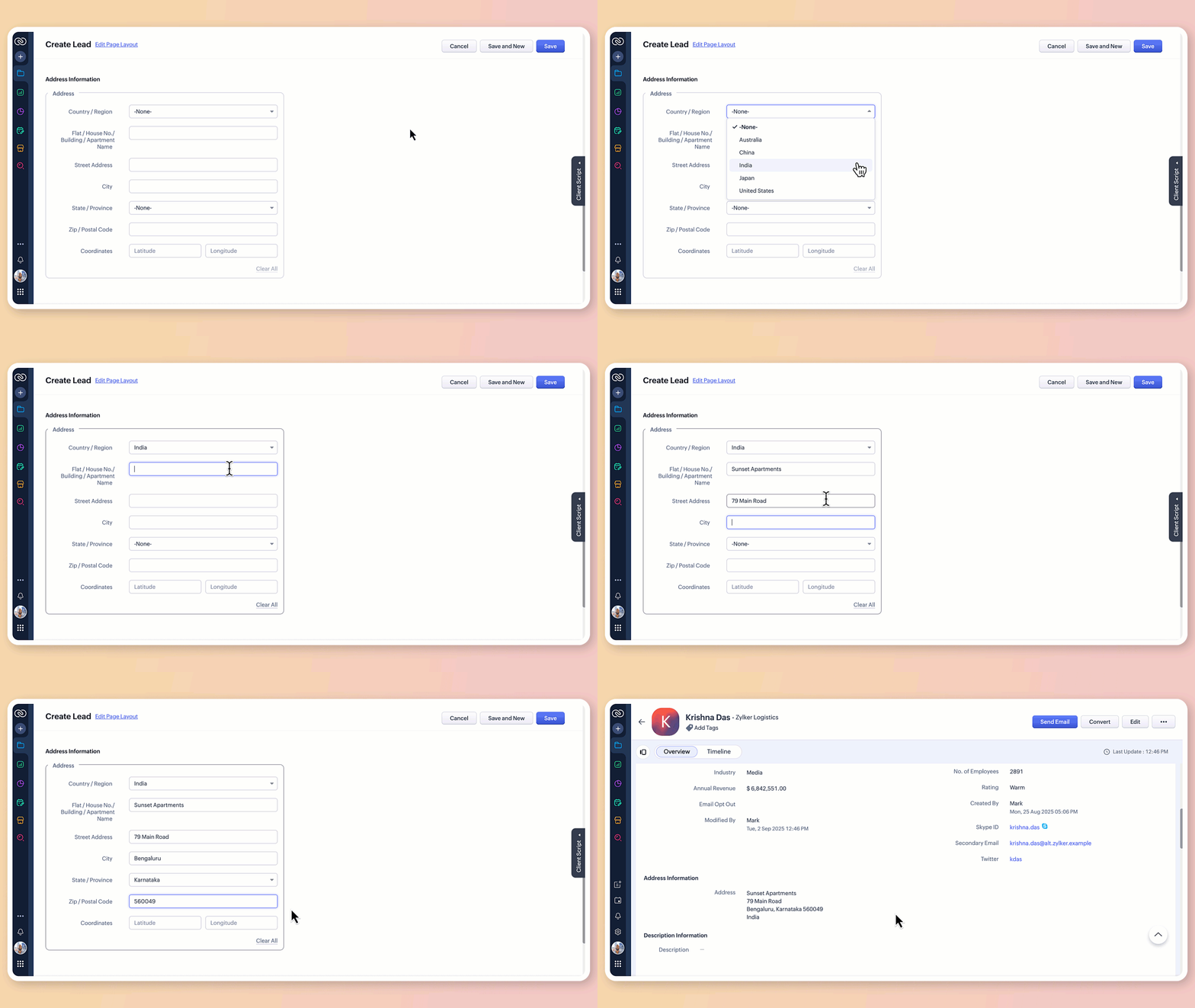
What does the new address field offer?
1. Structured address input
The all-new address field breaks down location details into clearly defined components:
Country/region
Flat/house number/building/apartment name
Street address
City
State/province
Zip/postal code
Precise geographic coordinates in latitude and longitude
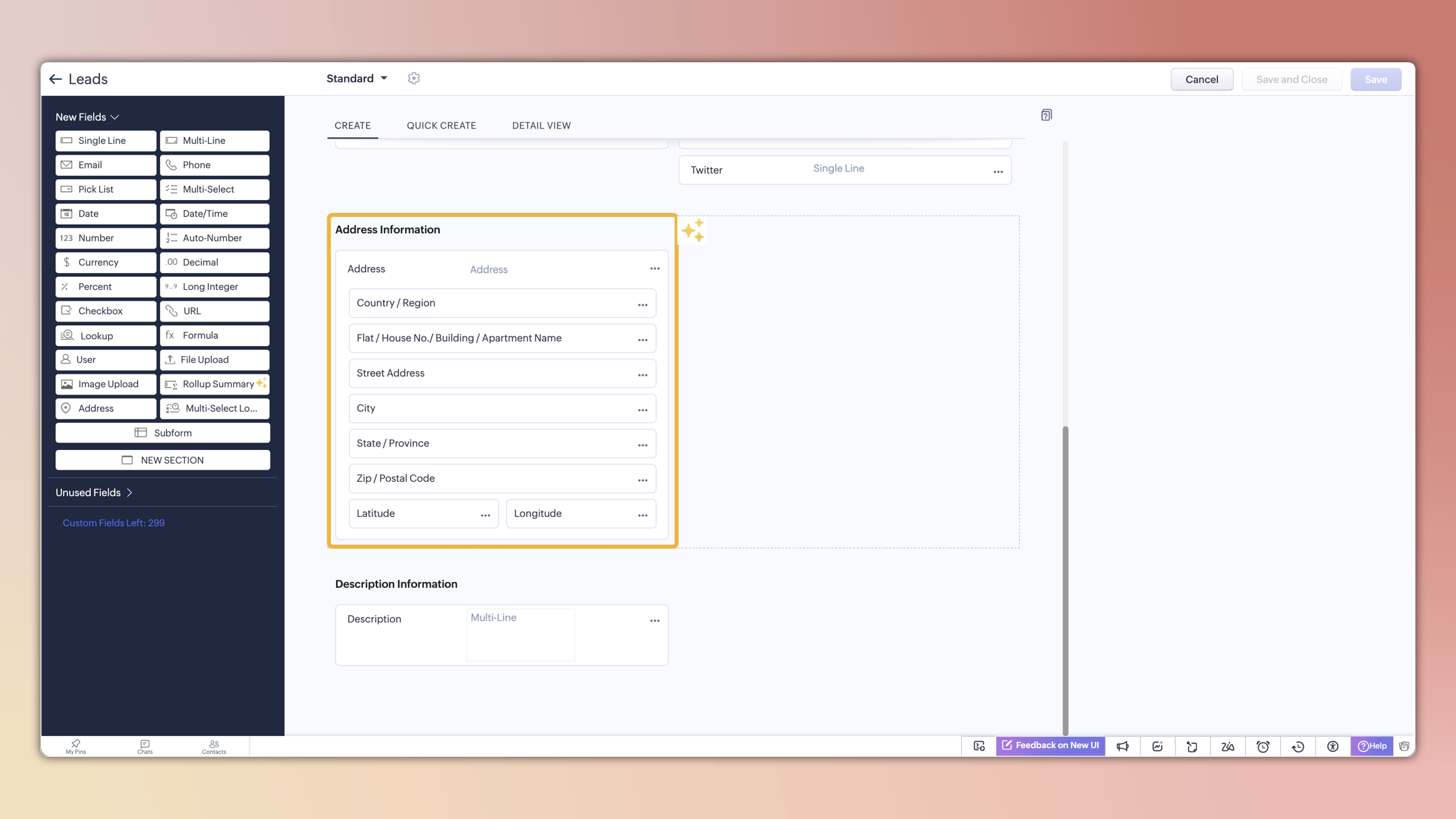
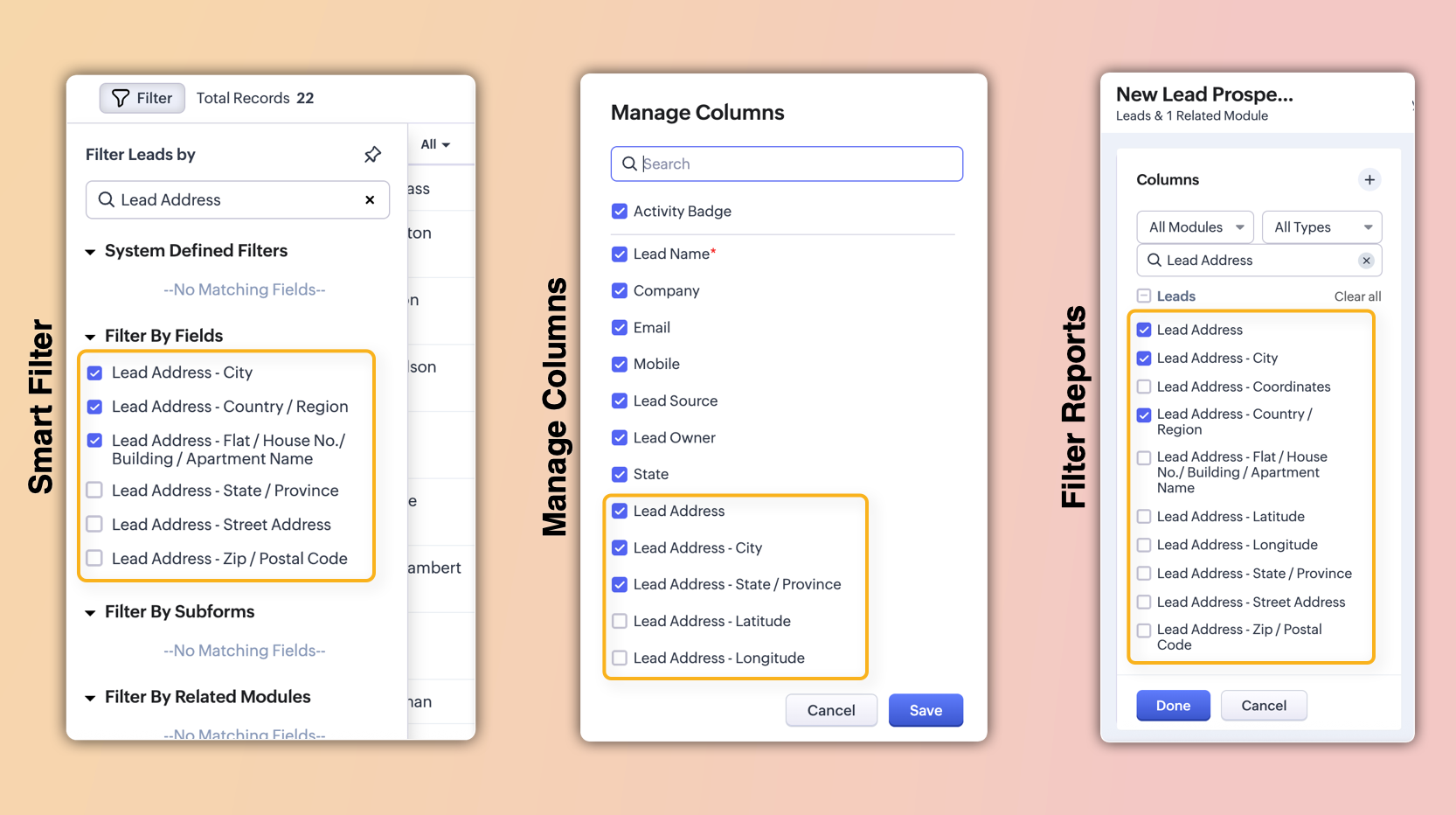
These sub-fields will also be individually available for viewing, filtering, and applying criteria. This enables users to configure, search, and report on address data with greater precision and flexibility.
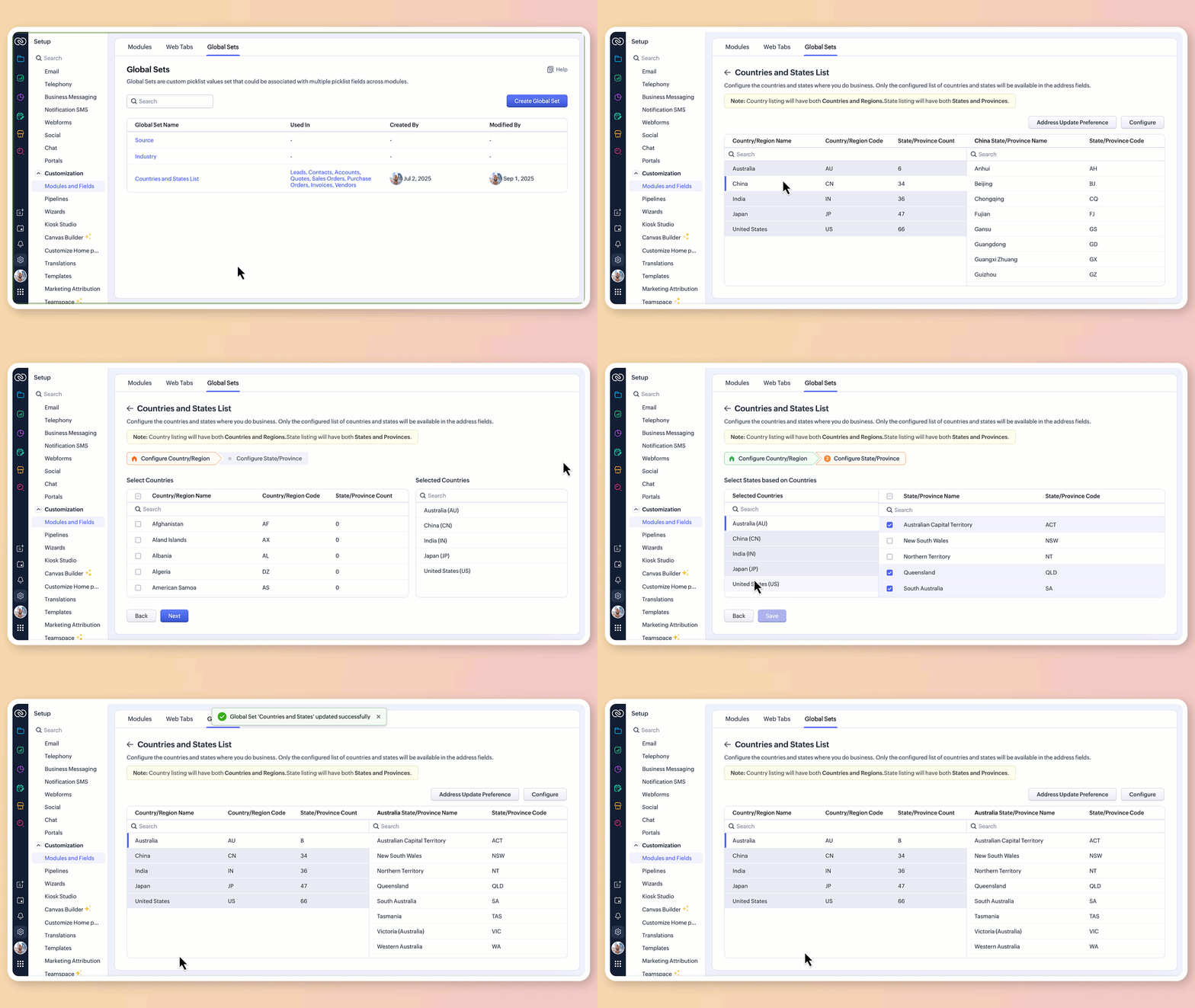
2. Global sets for countries and states
The new address field comes pre-loaded with standardized lists of countries and their respective states/provinces.
Selecting a country instantly filters the available states, so you don't have to set up dependencies manually or type them in.
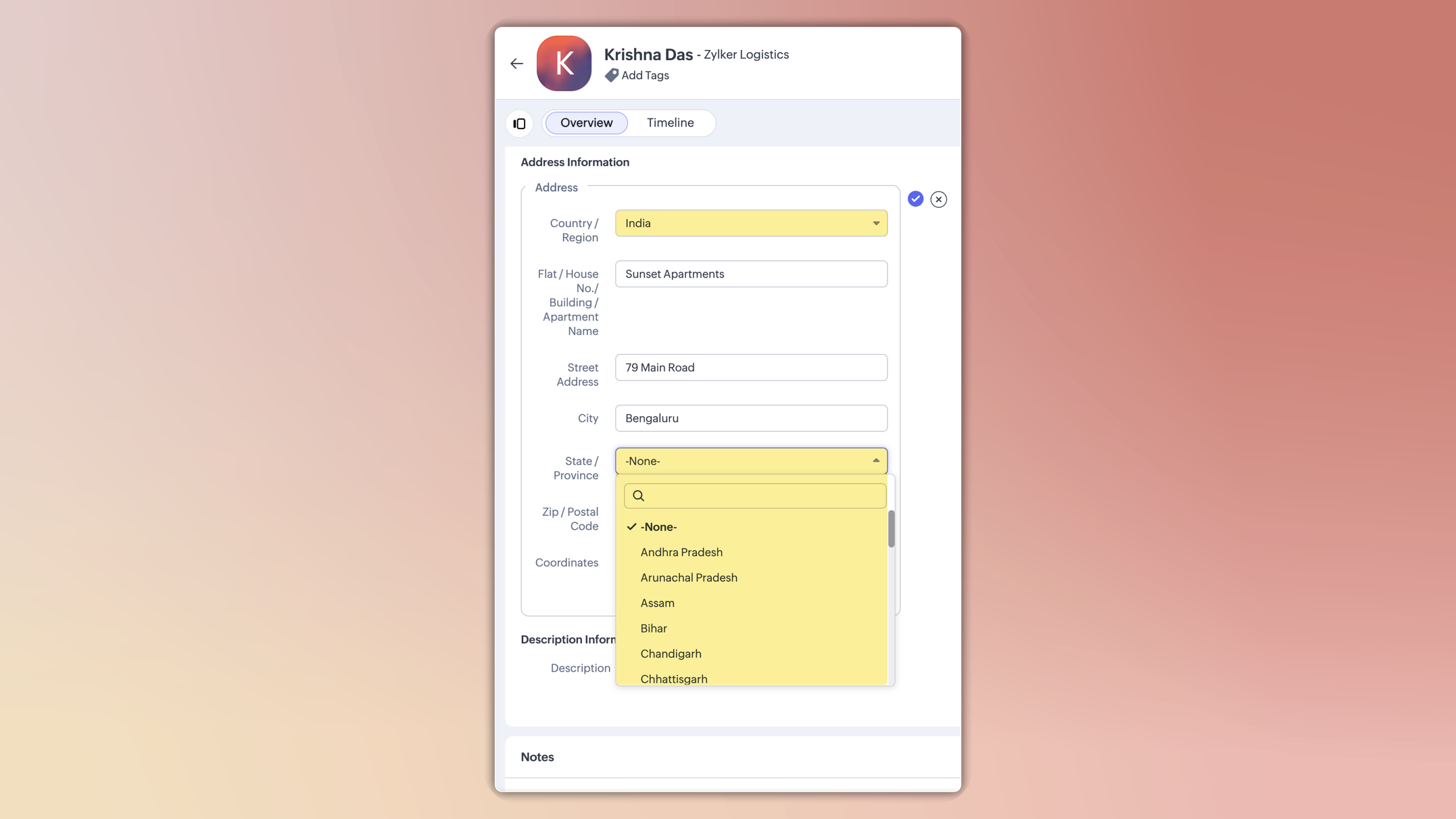
This ensures consistent spelling, eliminates typos, and keeps reporting clean.
You can also customize these lists in the Global Sets page by adding or removing values based on your business needs.
3.Maintain accuracy with address update preferences
To avoid mismatched or invalid country and state data, you can now set address update preferences in your org.
Choose to allow only configured country and state values in records, irrespective of the update source.
Choose how invalid entries are handled:
You can either skip the country/state update alone and proceed with the record creation or update, or stop the entire record creation or update altogether if an invalid value is detected.

Feature availability and limits
Editions supported: Professional, Enterprise, and Ultimate
Modules supported: All modules except user modules, linking modules, and Tasks, Calls, and Meetings modules
Limits: Up to two custom address fields per module
Points to be noted:
For new signups: The system-defined address fields will be available in the new address format for: Leads, Contacts, Accounts, Vendors, Quotes, Invoices, Sales Orders, and Purchase Orders modules.Additionally, admins can configure custom address fields for these modules if required.
Existing orgs: Admins can incorporate the new address field into their modules manually by adding it via the layout editor. The address field will be available as a custom field in the field tray.
Address field is not supported in Webforms, Field updates in Automation and Process management, Zia Enrichment. (The support for the same is in progress and will be updated shortly.)
Please share your feedback in the comments below.
Thanks,
Nizamuddin
Topic Participants
Nizamuddin Sohel SK
Andres
Haiku Technical Support
Toca Travel
Ishwarya SG
Sticky Posts
Good news! Calendar in Zoho CRM gets a face lift
Dear Customers, We are delighted to unveil the revamped calendar UI in Zoho CRM. With a complete visual overhaul aligned with CRM for Everyone, the calendar now offers a more intuitive and flexible scheduling experience. What’s new? Distinguish activitiesVoC in Zoho CRM is now data savvy: Explore response drilldown, summary components and participation in CRM criteria
VoC has all the goods when it comes to customer intelligence—which is why we're constantly enhancing it. We recently added the following: A customer drilldown component that shows you the list of prospects and customers behind a chart's attribute ExpandedWrapping up 2025 on a high note: CRM Release Highlights of the year
Dear Customers, 2025 was an eventful year for us at Zoho CRM. We’ve had releases of all sizes and impact, and we are excited to look back, break it down, and rediscover them with you! Before we rewind—we’d like to take a minute and sincerely thank youPresenting ABM for Zoho CRM: Expand and retain your customers with precision
Picture this scenario: You're a growing SaaS company ready to launch a powerful business suite, and are looking to gain traction and momentum. But as a business with a tight budget, you know acquiring new customers is slow, expensive, and often deliversCreate and populate a record in an instant: Introducing zero-shot field prompting to Zia's ICR
A couple of months ago, we upgraded our in-house AI image detection and validation tool, Zia Vision, with intelligent character recognition (ICR). By training Zia with sample images, you could create and enrich CRM records with data extracted from standard
Recent Topics
Employment Contract / HRMS Documents - Zoho People
How do I create customized HR documents for disbursal from Zoho People ? Example, say offer letters ? appointment letters ? Memos ? We want to be able to preset these in one or ther other form and issue them to employees who are in Zoho People.Live webinar: Craft and deliver impactful slides with Show’s desktop apps
If you love the comfort of working on your desktop and want a setup that keeps you focused and uninterrupted, this session is made for you. We’re excited to invite you to our upcoming live webinar: "Craft and deliver impactful slides with Show's desktopEnhancements to Bigin's forms
Greetings, I hope all of you are doing well. We're happy to announce a few recent enhancements we've made to Bigin's forms. We'll go over each one in detail. Merge field support in auto-filled forms The auto-fill option in Bigin's forms lets you predefineTable dimensions
I try changing the dimensions of the table on my computer but it doesn't change. Do I have to be a premium member or does it only work on the app?Direct link to Record Summary
Hi everyone, In one of my reports, I have built a Record Summary template to display the details of one record. I would like to be able to link directly to this Record Summary once I submit a new record, without having to go to the list of records first and click on View. Is there a possibility to do so ? Should I use the URL by passing some parameters ? Thank you very much for your help ! GuillaumeAmendment effective date
Hi everyone, I noticed that the amendment effective date mentionned in my amendment is not right. Indeed, when a contract is amended several times, it states the previous amendment and their effective date. However, the effective date stated is alwaysShow both Vendor and Customers in contact statement
Dear Sir, some companies like us working with companies as Vendor and Customers too !!! it mean we send invoice and also receive bill from them , so we need our all amount in one place , but in contact statement , is separate it as Vendor and Customer,STOCK history in zohosheets
is it possible to get historical stock value using stock function in zoho sheets? i could not see from and to period in the helper document.Auto sync Photo storage
Hello I am new to Zoho Workdrive and was wondering if the is a way of automatically syncing photos on my Android phone to my workdrive as want to move away from Google? ThanksAgent password reset
Hi Zoho support, I would like to ask if there is a way the admin can reset a password of an agent? RegardsCan receive but not send messages in Zoho Mail
Hello! I was able to configure my email client successfully in that I can receive messages just fine. However, when I send messages out, they seem to go out fine (I don't receive any errors or anything), but the recipient does NOT receive those messages.Mail is sent twice!
Been using Zoho for a while now. Installed Zoho for someone else and some weird things are happening. Mails are being sent twice. He is using Thunderbird as an email client. I already read about email being duplicated in the sent folder. But in my caseCan't login IMAP suddenly
Since this evening I'm getting the error: You are yet to enable IMAP for your account. Please contact your administrator... IMAP always been enabled in my account and was workign fine for the past 7 years. Already tried turning IMAP off and on again.Sending of username did not succeed: Mail server pop.zoho.com responded: User already specified
I am having issues receiving emails from Zoho in Thunderbird. I am getting the above error. The first error tells me Authentication failed, and prompts me to enter in my password. Then I get the above error. I can receive emails when I log in online toBug tracking
Hi, does anyone know how to track errors during picking or packing? This way I can keep track and see how to improve and prevent errors in this area.Migration of corporate mail environment from Yandex 360 to Zoho mail
I have to migrate a corporate mail environment with an existing domain from Yandex 360 to Zoho mail. It is vital to migrate all users with all the data. I have read the article on this topic using MacMister Email Backup Software just now and have someI'm unable to send mail pthrough Zoho SMTP programmatically
This has been working for years, but today it's been offline all day long. I see nothing anywhere on your site about this. I'm not the only one experiencing this. Downdetector has a spike of reports todayCan no longer send email via Django site
This was working fine as of 11/7/25. Now I am unable to send user verification emails from a Django site on a AWS lightsail sever. When a user attempts to register the following error occurs. I have also attempted to send a test email via the shell andunable to send email but able to receive email
my email address is info@securityforceservices.caLogin to server failing
When trying to retrieve my mail, I am getting this error message -- Login to server pop.zoho.com with username (my email address) failed. It gives me the option to retry, enter password, or cancel. Then I get this message -- Sending of username did notConfiguration failed: 200 response not received for POST request.
Hello, I am trying to set up a webhook to connect with an Salesforce but I receive the following error from Zoho: Configuration failed: 200 response not received for POST request I have tried testing it on webhook.site as well and receive the same errorZoho Migration Assistant not working
Hello, I am trying to use you Migration assistant to migrate emails from Rediff to Zoho. I am stuck in the first step. After downloading the migration tool, I copied the link to verify user credentials, however, after pasting the link in the browser,Contacts Missing — PeopleSync/Zoho Mail
English: In our company we use ManageEngine Mobile Device Manager (MDM), Free edition, to manage corporate mobile devices. Our usage policy does not allow personal Google accounts on these devices; therefore, Google account sync is blocked through MDM.Best way to integrate Zoho with mobile app for managing customer requests with real-time notifications?
Hello, I'm building a solution for a travel company where customers submit requests through a website, and the sales team manages these requests through a mobile app. The Requirement: Customers fill a form on the website (name, email, number of children,Kaizen #57 - Mass Update API in Zoho CRM
Hello everyone! Welcome back to yet another post in the Kaizen series. This week, we will discuss the Mass Update API in Zoho CRM. In this post, we will cover the following: 1. Introduction 2. Mass Update Records API 3. Schedule Update and Get StatusGetting Attachments in Zoho Desk via API
Is there a way to get attachments into Zoho Desk via an API? We have a process by which a zoho survey gets sent to the user as a link in a notification. The survey has several upload fields where they can upload pdf documents. I've createdPincode based Product Restriction
we have different types of products. 1) Very bulky items like plywood. 2) Too delicate items like glass These type of products we want to sell to local customers. Other products we want to supply all over India. There should be an option to restrict productsRelated Lists filter
I have Contacts showing in our Accounts module. I customized the Contacts module with an Employment Status field, with the following picklist options: "Primary Contact", "Secondary Contact", "Active Staff(not a main contact)", and "No longer employed".Standalone custom function not generating logs
Why dont't standalone custom functions generate logs when the're called from another function? I have some functions (workflow, buttons and blueprint) that have common parts, so I put that part in a standalone function which is called from the others.Add "Reset MFA" Option for Zoho Creator Client Portal Users
Hello Zoho Creator Team, We hope you are doing well. We would like to request an important enhancement related to Multi-Factor Authentication (MFA) for client portal users in Zoho Creator. Currently, Creator allows us to enforce MFA for portal users,Urgent Security Feature Request – Add MFA to Zoho Projects Client Portal Hello Zoho Projects Team,
Hello Zoho Projects Team, We hope you are doing well. We would like to submit an urgent security enhancement request regarding the Zoho Projects Client Portal. At this time, as far as we are aware, there is no Multi-Factor Authentication (MFA) availableCreator HTML page refresh
Hi, I have added around 5 different html snippets in single creator page. I understand, I can refresh the entire page from page script using Navigational URLs https://help.zoho.com/portal/en/kb/creator/developer-guide/others/url-patterns/articles/navigational-urlsZoho Desk - Custom Module Related List Columns on Tickets
I have a custom module in Zoho Desk called Asana Tasks, each task has a lookup to a Ticket. On the Ticket I want to see the columns of the Asana Tasks in the related list . Is there a way to do this? Right now it just has the name of the record and IWhat is your opinion of the new UI?
Hi Everyone, I would like to see what everyone thinks of the new Zoho One Dashboard. I don't get it, but perhaps I'm missing something. What are your thoughts?What are the OAuth scopes needed to access the Zoho MCP server?
I think I'm authenticating with the MCP server endpoint successfully using a bearer token but I can't successfully initialize an MCP session. I'm using the official MCP Python sdk (https://github.com/modelcontextprotocol/python-sdk). I get as far as here"Temporary Error" in Zoho CRM Data Source sync
I edited my setup for the Zoho CRM to Zoho Analytics Data Source Import configuration to add some new fields. After I saved the changes, I clicked the (Sync Now) link. After a few minutes I got a Sync failure error. The only reason given is "A temporaryAccount blocked for IMAP use
Hello, My email client (Evolution) can't sync mail anymore. It gives the error: "Your account is temporarily blocked for IMAP use. This may happen if you exceed the maximum number of simultaneous IMAP connections allowed. Kindly try again after some time."Is SMTP included in the free plan?
My client has a Zoho Mail Free 14 day trial that ends tomorrow. She has set up a domain email address with SMTP on a third party app and is wondering if it will continue working once her plan downgrades to the free forever plan. ThanksZoho mail issue.
I have verified my domain ohhoexpress.online by adding necessary TXT and MX records. But when I am sending email to any external email id, it is showing as zohomail.com. Also while I am sending mail to internal mail id, it is saying user not found whereasMy email is blocked from sending
I get this message when I try to send any message .. > Unable to send message, Reason 554 5.1.8 Email Outgoing Blocked We have urgent emails to send and the issue continues to persist from yesterday. Please help us with this issue as soon as possiblNext Page