Customize the ticket ID for enhanced ticket tracking
Hello everyone,
Ticket IDs in Zoho Desk are the unique reference numbers that are assigned to tickets when they're created.
Agents generally use the ticket ID to locate a particular ticket and to reference a ticket in conversations and feeds. When customers know the ID of the ticket, they can use it in follow-up discussions.
Since ticket IDs act as the chief identifiers for tickets, it is imperative to keep them easy to recall. To help you do this, we're rolling out an efficacious new feature: ticket ID customization.
You can use this feature to set the ticket ID format for your organization in your help desk.
Here's a look at how you can customize the Ticket ID format:
You can change the ticket ID number (which we call the starting number) to a number greater than that of your current maximum starting number. For example, if your current maximum ticket ID is 1064, your new ticket ID can be 5001.
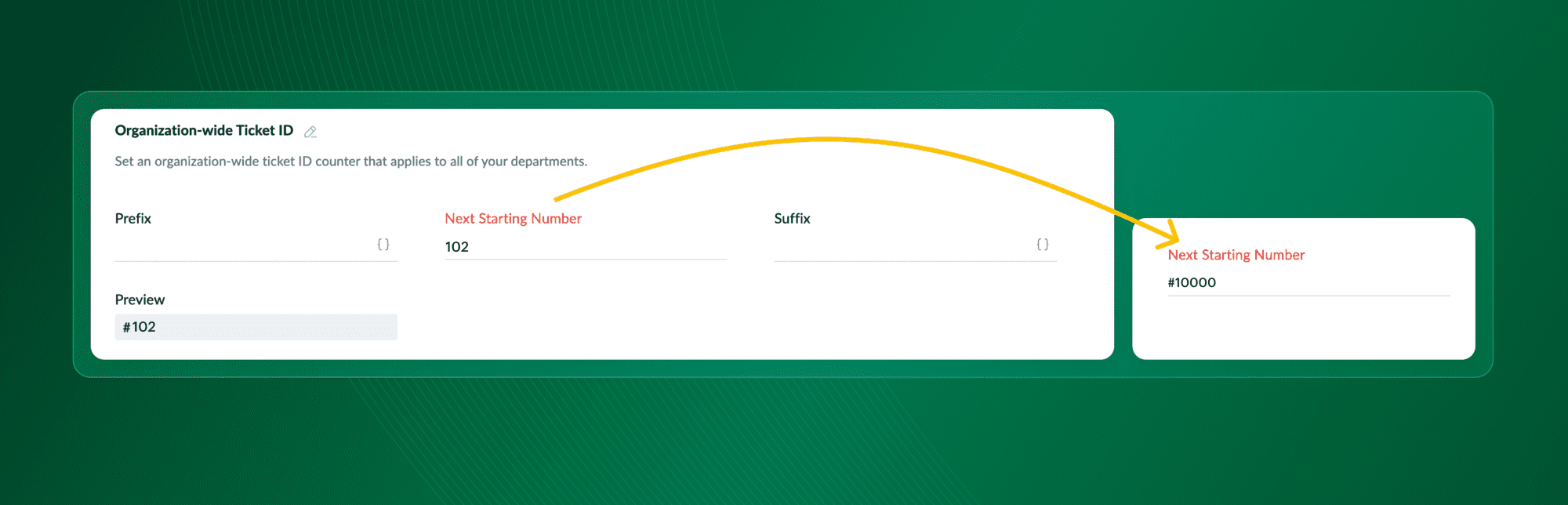
Introduce letters and symbols into the ticket ID by adding a prefix and/or suffix. Example: Reqno_5001.

Include a piece of information from the ticket in its ID using dynamic values in the prefix or suffix. Example: email_5001.

You can use the customized ticket ID format for all departments in your organization, or you can create separate ticket ID formats for each of your departments. For example, sales_5001

Here are some innovative ways in which ticket ID customization can benefit your organization:
Use it to rebrand the help desk
You can incorporate branding into the ticket ID by using your company's initials as the prefix or suffix. This will make it more recognizable to your customers.
Make ticket IDs easy to remember
Agents usually mention a ticket in a comment or feed using its ID, but when the ticket ID is just a random series of numbers it might be difficult to remember and the agent might even end up mentioning a different ticket altogether. Customizing ticket IDs with a prefix and suffix can make it easier to remember and avoid confusion.
Add more context
Using dynamic values, you can include details of the ticket, like its classification, priority, due date, and create date, in the ticket ID. Agents will be able to get pivotal information about the ticket just by looking at its ID.
Change the numbering sequence
The ticket ID of your first ticket in Zoho Desk is #101, but as you keep receiving more tickets this number will get larger. You can use ticket ID customization to change the number sequence to a simple one. The addition of a prefix and suffix ensures the Ticket ID stays unique.
Make the ticket id reflect your business processes
A department in a help desk usually contains agents who handle specific types of customer issues. For instance, agents from the sales department are responsible for sales inquiries, while agents from the tech department are responsible for service and product-related queries. You can set up department-specific ticket IDs for each of these departments, to keep these two different types of tickets separate and organized.
Besides customization, we've also brought in two new settings that let you hide or show the ticket ID in the following places:
- Subject line of outgoing email replies
- Subject line of forwarded replies
Ticket ID customization is an awesome feature that can help Zoho Desk mesh seamlessly into your business processes. Please try it out and share your feedback with us!
Regards,
Varsha P | Zoho Desk
Topic Participants
Varsha P
Kimberlyn Martinez
Shivani | Zoho Desk
Sticky Posts
2024 Email Authentication Standards: Elevating Security with Google and Yahoo
In contemporary email communication, email authentication plays a pivotal role in mitigating email fraud, spam, and phishing attacks. Brace yourself for a new level of security. Starting February 2024, Gmail and Yahoo will be implementing robust emailUsing Agent Email Address as From Address
Currently, while replying to a ticket, it is possible for agents to choose their own email addresses as 'from' addresses. Although we built this just for that little extra flexibility, in hindsight, it hasn't figured much in conventional usage. Almost all businesses prefer that responses to their customers' tickets be sent from the common support/service email address and NOT from those of individual agents. During personal interactions at events, some of you have even made passing mentions aboutEdit and Delete options in Comments
A lot of teams have been using ticket comments extensively to collaborate everyday. Notification Center further improved this experience by bringing real-time updates. As we continue to build more improvements to this experience, we've shipped a small-yet-importantWebinar 2: Supercharged customer support for growing business
Join us for this webinar and learn how to step up your support game using a real-time communication platform to generate happier, more successful customers. In this live webinar, we will will discuss the importance of SalesIQ for your support team and how it can help you: Understand your customers better and their journeys to proactively support and engage them even before they ask for help. Integrating real time conversations into Zoho Desk’s Support, providing a conversational customer serviceCustomize Colors of your Customer Self Service Portal
You asked for it. We heard you. We're happy to roll out the most sought after feature request, Customizing the Colors of your Customer Self-service Portal. Now you can set the color of your customer portal to mimic your company's web site, so that your customers visiting the portal will not feel alienated by the default theme. Go ahead and configure the color of the header, tabs, fonts and background according to your needs. You can either choose between default color themes like Blue, Grey, Green
Recent Topics
emails?
Why can't I send emails from my account anymoreErase function in Zoho PDF editor does not truly redact
Using the "erase" function in the Zoho PDF editor online does not redact the text underneath when opening the file in Adobe. When I used the erase function to whiteout the areas I didn't want to be seen, I opened the supposed redacted files in Adobe.Backorder For Composite Items
Hello If i released SO for composite item and use backorder feature of zoho inventory then it should backorder child item items of composite and not composite item.This is basic of backordering.I conveyed this to zoho call center but no solution yet.Global Constants / Variables
It would be great if there were a Global Constant feature. The idea here is for managing constants that are used in multiple Flows and Subflows, but might change over time. The idea is that the change could be made in one place and cascade to all futureDeal Activity Tracking - By Time
Hello, I am trying to figure out a way to implement a time tracking ability within the CRP that will provide a line item on the final invoice in books. Would the Cases module be of good to use in this scenario? Want to integrate into Books as well. ITime Card Tracking For Employees
Does ZOHO have an add-on or app that my employees can use to clock in & out on a daily basis. In the past we had used a third party solution, but it was hard to use and pricey. We would really like to use your time tracking feature if you have one......ifLogging time within Time Tracking
At the moment I use the call logging feature of CRM to log time spent on clients work. Its nice to be able to start, stop and pause the timer and record how many hours I need to bill the client. Any chance of implementing this in Zoho Invoice's time tracking feature The same interface as CRM would be great or a simple start/stop/pause/restart timer.3rd Party/Easy Time Tracking Integration with Zoho
We are new customers using Zoho One with Zoho Project/CRM/Desk being the 3 big applications we will use. The majority of our work is done in the field and we need accurate and easy time tracking for our workers on mobile phones. aka TSheets type functionality. but tied to Zoho. Zoho is outstanding overall so I am surprised at how laborious, inefficient and disconnected time tracking is mobile devices. Adding time to a project task on a mobile phone can be a 10+ click task and that's not an exaggeration!TrueSync for Windows 5.16+ breaks Excel save in "Shared with Me" (temp file writes fail) – workaround: pin 5.15.1
Hi all, After TrueSync for Windows auto-updated past 5.15.1, some of our users can no longer save Excel files that live under "Shared with Me". We isolated it to a client-side regression and found a workaround. Sharing in case it saves someone a few hoursPurchase Requisition in Zoho Books
I want to understand if Zoho Books is having the following workflow: PR ( Purchase Requisition ) >> PO ( Purchase order) >> GRN/SRN ( Goods/Services receipt note) >> BillEnhancement Request: Preserve Canceled Zoho Bookings Meetings in CRM
I recently worked with Zoho Support on ticket 170383788 regarding what happens in Zoho CRM when an appointment is canceled in Zoho Bookings. Support confirmed that the current behavior is intentional: when a Bookings appointment is canceled, the correspondingIntroducing the Markdown editor in Zoho Learn
Hello everyone, We're excited to announce the release of the Markdown editor in Zoho Learn. With Markdown editor, you can create and import articles as Markdown. You can write content using simple Markdown syntax and see how it looks with the built-inWhen will Bigin's latest AI features be available in Europe?
Hi, As I previously raised this question in the post “Introducing Bigin's latest AI features, built for the way you work!”, but received no response, I am bringing it up again here. It has now been five months since the announcement, and these AI featuresFunction #50: Send Mass emails to your customers
Hello everyone, and welcome back to our series! We have reached a milestone of 50 Functions, which means that we have automated 50 different tasks in Zoho Books. Every Friday, we have shared a nifty function aimed at either automating a task or streamliningTime tracking
Hi there We are looking for a simple, intuitive but powerful time track application. We bill our clients by the time we spend, and so need to link Clients<>Projects<>Tasks or Activities<> Time spent. Is there an app in Zoho we could use? Many thanks.. MorriStaff Tracking in
Hi , I would like to see what activity my staff does over Zoho CRM and over Zoho Mail . I need to know which deals in CRM haven't been touched or had an activity on by a particular staff member . Basically need to establish what work.gets done by WFHReport: avg time to visit each lead
We are on zoho one. our sales team visits leads using the ZohoCRM app. They track their hours using the zoho books timer. So the results in zoho books look like this: -total hours worked: 8 In ZohoCRM we have a custom date/time field in each lead recordCreating a Stop Start Timer for Custom Moduel
Hello, I am trying to track Maintenance of internal Assets through Zoho CRM (I have tried the FSM, Projects, Inventory apps nothing is working the way I need it to). I have it all built in the CRM where I have internal work orders where i can keep trackLogging time to a Sales Lead in CRM
Hi, Is there a way to log time against a Sales Lead / Deal in CRM before it is won and becomes a project? Our employees often do work for sales opportunities and need to log time against them at any point of the sales cycle, before it is won. Thanks, AtifHourly Billing in Zoho CRM Deals, Books, and Projects?
We bill on an hourly basis and need that time added into a client's invoice in Books. A client might have multiple deals open with us that we are working on, and billing separately, and thus need separate invoices for each. The functionality of ProjectsTime taken on a task
I notice that you can record the length of a call, but not an event or a task. When a potential progresses from beginning to end it is just a series of tasks/calls/events in a process. I have most of it automated depending on the type of sale and triggered by updating the sales cycle field. It follows that you should be able monitor the time of each of them so that you actually know how much time you spend on each potential. This gives an idea of profitability of each potential. I would think thisTimesheets from Deals
Hi Guys, new Zoho One customer here with only a few employees. I run a small software company and currently our small number of employees are creating manual timesheets in excel. There is a column for a job number (that relates to a Zoho Deal) and they just put in the time taken to perform the work. As an example, they might spend 1 hour running some barcodes for a particular client (and deal). Then they may do a support all for another client and that takes 2 hours (This client would have a yearlyTimesheet option in zoho crm
Recording a timesheet against a job is very crucial for every business because it will help them in billing the client accordingly and also it keeps a track on how much time a user is exactly taking in marking the job as cloed. Currently in crm therePortal access is now available in the Zoho CRM mobile app
Hello everyone, Zoho CRM Portals provide a secure space for sharing selected records with people outside your organization. These portal users can include customers, vendors, partners, or anyone who needs access to specific CRM data. Previously, portalMultiple locations
I have many customers (accounts) that have multiple locations, like bank branches. How can I manage them under one account?Calendar won't load
I run into this problem about once a week, where I try to open my Zoho calendar in a web browser, and it just gets stuck, waiting forever to load (see attached screenshot). I'm usually using Edge or Duck-Duck-Go browser. Sometimes it loads just fine,Tip: #14 Save words and phrases in Writer for faster writing!
As you start working with more documents everyday, you'd find yourself using certain words and phrases across documents quite often. In this week's tip, let's discuss two easy ways to train Writer to remember your commonly used words—equipping you toZoho ERP | Product updates | October 2026
Hello users, A new month, a fresh set of updates in Zoho ERP. This month brings Netting, enhancements across our verticals, and more updates to help streamline your everyday work. Explore this month’s updates and see what’s new. Compliance with RevisedZoho Forms - Feature Request - Embed iFrame or Dynaic URLs in Description fields
Hi Zoho Forms team, I'm working with a client who uses Zoho Forms internally to collect information over the phone from potential work placement candidates. At the end of the form, the candidate needs to be booked in for an induction, which we've configuredBANK FEED - MAYBANK , provider from YODLEE IS NOT WORKING
As per topic, the provider YODLEE is not working for the BANK FEED. It have been reported since 2023 Q3, and second report on 2023 Q4. now almost end of 2024 Q1, and coming to 2024 Q2. Malaysia Bank Maybank is NOT working. can anyone check on this issue?Digest Octobre - Un résumé de ce qui s'est passé le mois dernier sur Community
Bonjour chers utilisateurs, Bienvenue dans ce nouveau digest de la communauté Zoho France ! Vous y trouverez les discussions marquantes, les nouveautés produits, les conseils pratiques partagés et bien sûr les événements à venir. Le mois dernier, nousBank feeds - still a problem
I'm really frustrated that the bank feeds only "sometimes" work. I raised this problem once before and was advised that Zoho used Yodlee and feeds were only updated once a day. That's fine but it only "sometimes" seems to work. Eventually transactions appear but they sometimes seem to take days. I know of other programs (Xero) that another business I am involved with uses Yodlee and they do not have this issue. My bank feeds are active, I tried to manually refresh however Zoho tells me thatthis is getting ridiculous
My checking account bank feeds haven't worked since 6/4/21. Multiple emails to Zoho since 6/10, and all they tell me is they have re-escalated my problem to their banking service provider team. 14 days and nothing is fixed. I'm just about ready to bailNo feedback from Zoho Books regarding Yodlee feeds for Investec
I reported on 6 Feb 2025 that the Bank Feeds for Investec bank via Yodlee are not working. To date there has been no resolution. You are charging us for a suite of products where the functionality does not work. Please advise how you will refund me forongoing bank sync problems
My bank feed broke May 14th 2021 Since then I just get an endless stream of we are working on it, "Kindly bear with us for sometime" from support Multiple times I have asked to speak to managers and half the time they don't call at all. If they do callWe must admit - Yodlee is an unreliable partner!
Hello Zoho, Our Yes Bank account intergration is messed up since the beginning and the problem has not been addressed yet. With bad synchronization, poor categorization of transactions, duplicate/unknown copies of accounts, no support, geared at income/expenses,Make your PDFs clearer with shapes
Sometimes the best way to mark up a PDF is to point at it directly. Zoho PDF Editor includes shape tools that let you add circle, check and cross marks anywhere in your PDF, so you can flag content for review without extra comments. Here's what you canAdmin Logging in as another User
How can a Super Admin login as another user. For example, I have a sales rep that is having issues with their Accounts and I want to view their Zoho Account with out having to do a GTM and sharing screens. Latest Update (27th April 2026): With the earlyProject Migration
We currently have two separate Zoho organizations: A Spark Robotic organization under Zoho CRM Plus A separate Contract Manufacturing organization under Zoho One We are working with Zoho Support to consolidate the CRM Plus organization into our existingCNIL - Suivi de Pixel
Bonjour à tous, À la suite de la nouvelle recommandation de la CNIL sur les pixels de suivi dans les e-mails, savez-vous si Zoho Campaigns permet : de conditionner le suivi des ouvertures au consentement de chaque contact ; de proposer un lien permettantNext Page