Découvrons Zoho Projects 8.0 : Rapprocher les fonctionnalités et l'expérience utilisateur

La nouvelle version de Zoho Projects a été conçue avec la mission de rapprocher les fonctionnalités et l'expérience utilisateur, afin de créer une plateforme sur laquelle il est agréable de travailler. Nous croyons fortement que Zoho Projects 8.0 peut faire cela !
Zoho Projects 8.0 est doté d'une toute nouvelle interface utilisateur conviviale et intuitive . Avec une vue éditable des feuilles de travail, des modèles spécifiques à chaque secteur d'activité, une application mobile améliorée et plus encore, la 8e version a de quoi satisfaire tous les utilisateurs - existants et nouveaux, de divers secteurs d'activité, travaillant au bureau ou à distance. Découvrons les nombreux avantages de Zoho Projects 8.0.
La navigation facilitée
Que vous ajoutiez des étapes ou des tâches, que vous créiez un projet complet à partir de zéro ou que vous personnalisiez les détails d'un projet, avec les flèches de votre clavier, le travail est fait en un rien de temps. Cela signifie que vous n'avez pas besoin d'ouvrir la page des détails à chaque fois. Vous pouvez également déplacer vos tâches entre les listes de tâches et les jalons, vos sous-tâches entre les tâches, et ajouter des tâches prédécesseurs et successeurs pour les dépendances à partir de la page de détails des tâches, afin de simplifier votre organisation tout en gagnant en efficacité.
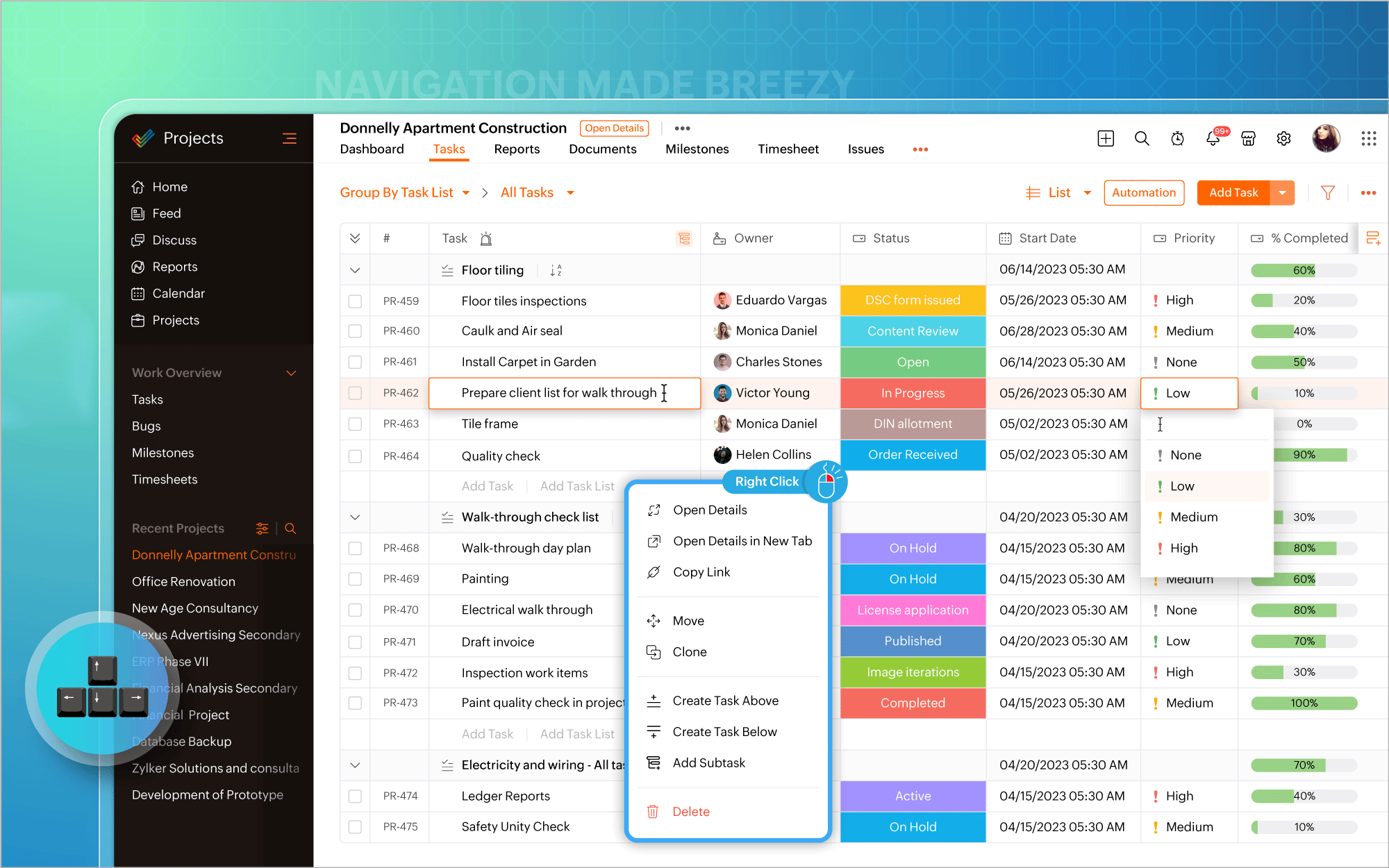
Gantt Charts
Nous avons modifié l'emplacement du diagramme de Gantt. Vous pouvez désormais y accéder directement dans la vue en liste et mettre à jour les éléments de travail en masse à partir du diagramme lui-même. Les vues quotidiennes, hebdomadaires, mensuelles, trimestrielles et annuelles de la chronologie du projet sont prises en charge, permettant de visualiser le travail depuis le point de vue qui vous intéresse, afin d'être toujours sur la bonne voie. En plus des rapports de Gantt habituels pour les tâches, vous pouvez également générer des rapports de Gantt spécifiques aux jalons et aux projets, et exporter ces données à tout moment.
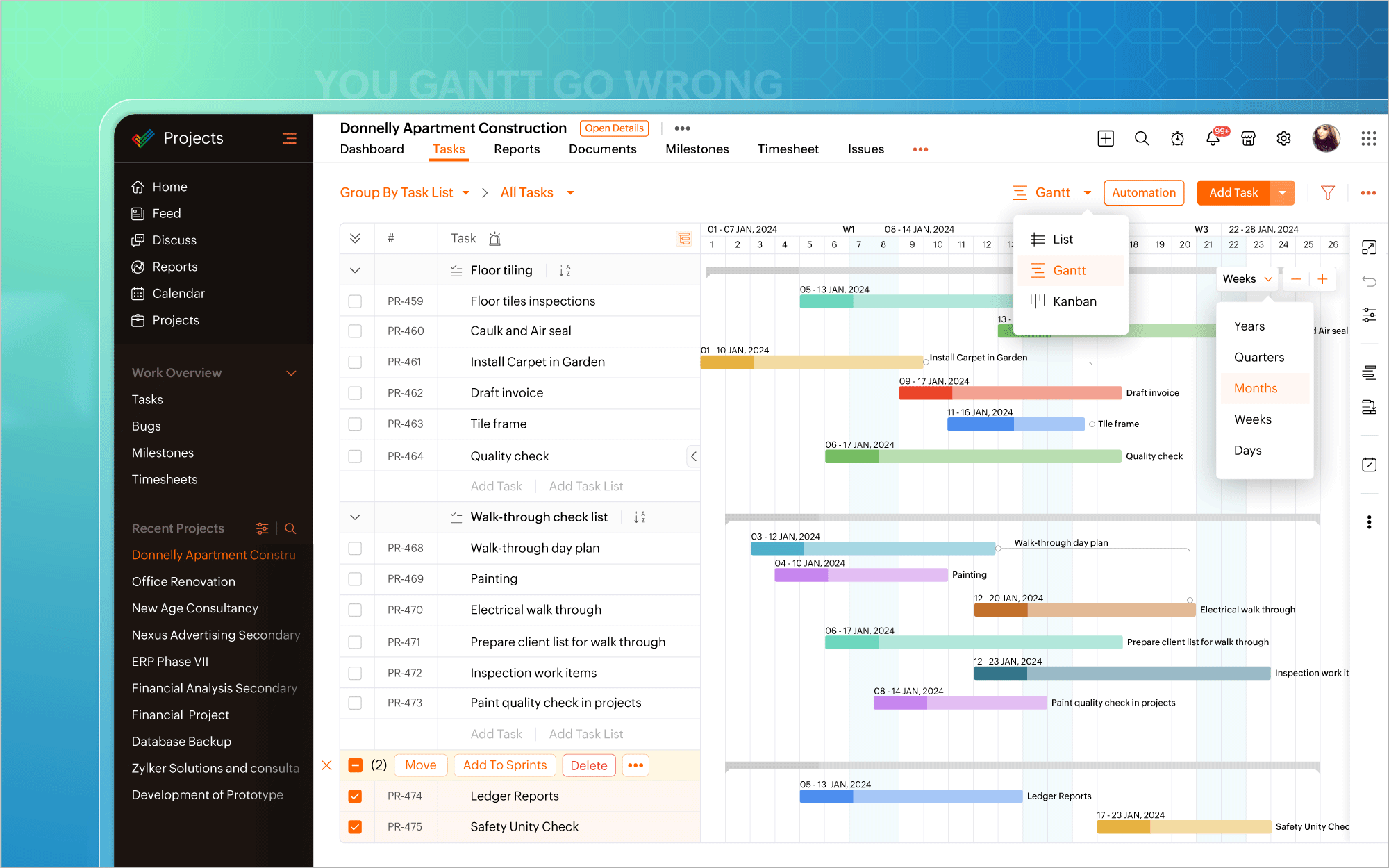
Personnaliser selon vos goûts
L'icône de personnalisation située dans le coin en haut à droite de l'écran vous permet d'ajouter facilement des champs personnalisés. Il existe également plus de 20 modèles de projets adaptés aux besoins de différents secteurs d'activité, ce qui vous permet d'éviter de créer des projets à partir de zéro. De plus, la possibilité vous est offerte de créer et de personnaliser des mises en page privées pour certains projets, tout en gardant les autres projets en l'état. Transformez chaque projet en un succès, avec une facilité accrue.
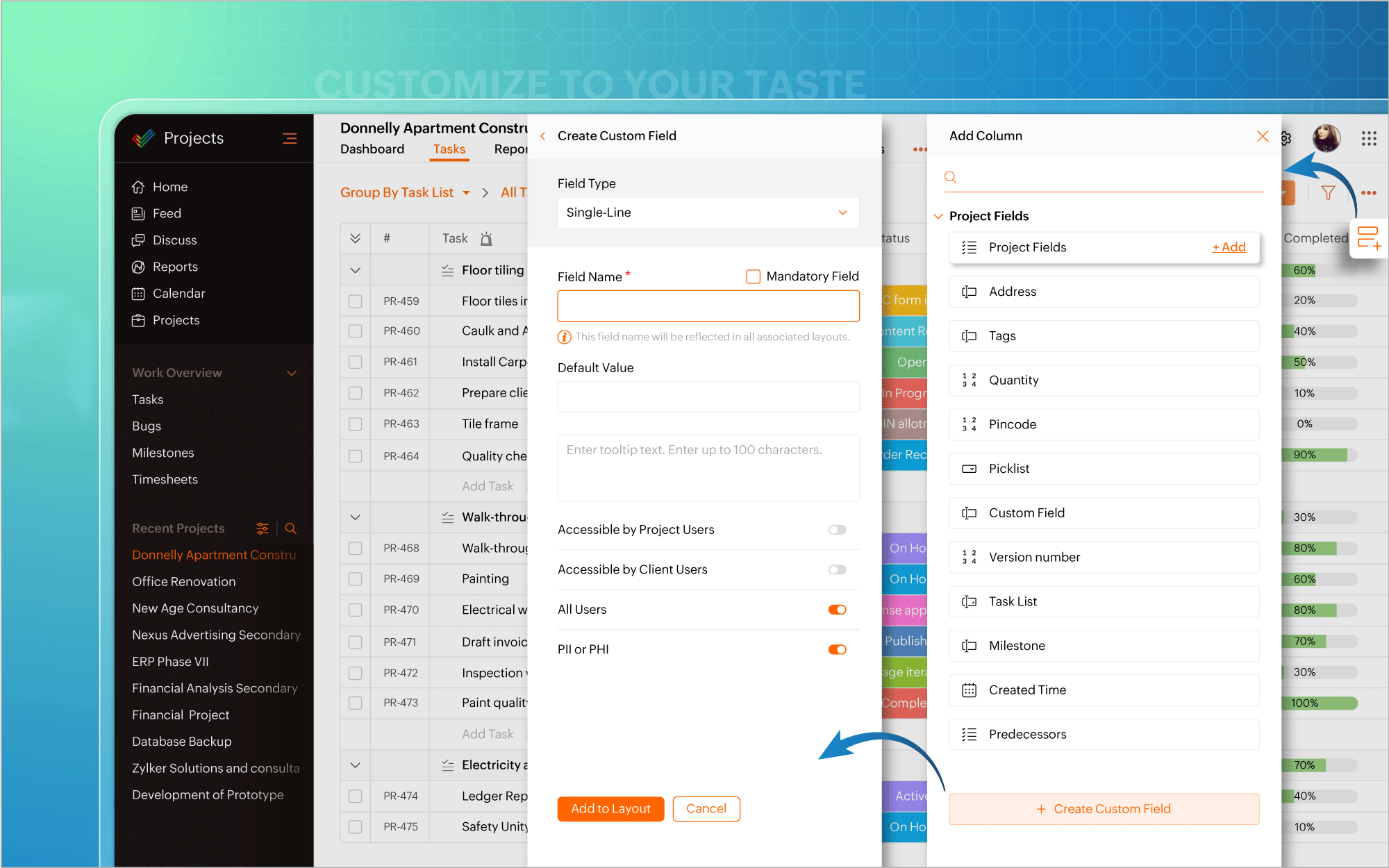
Automatiser à tout moment
Nous avons également introduit l'automatisation dans la vue en liste. Plus besoin d'aller à la page de configuration chaque fois que vous souhaitez créer des règles de flux de travail pour des projets ou des tâches. Mettez l'accent sur l'automatisation et faites en sorte que les tâches routinières fonctionnent à votre convenance.
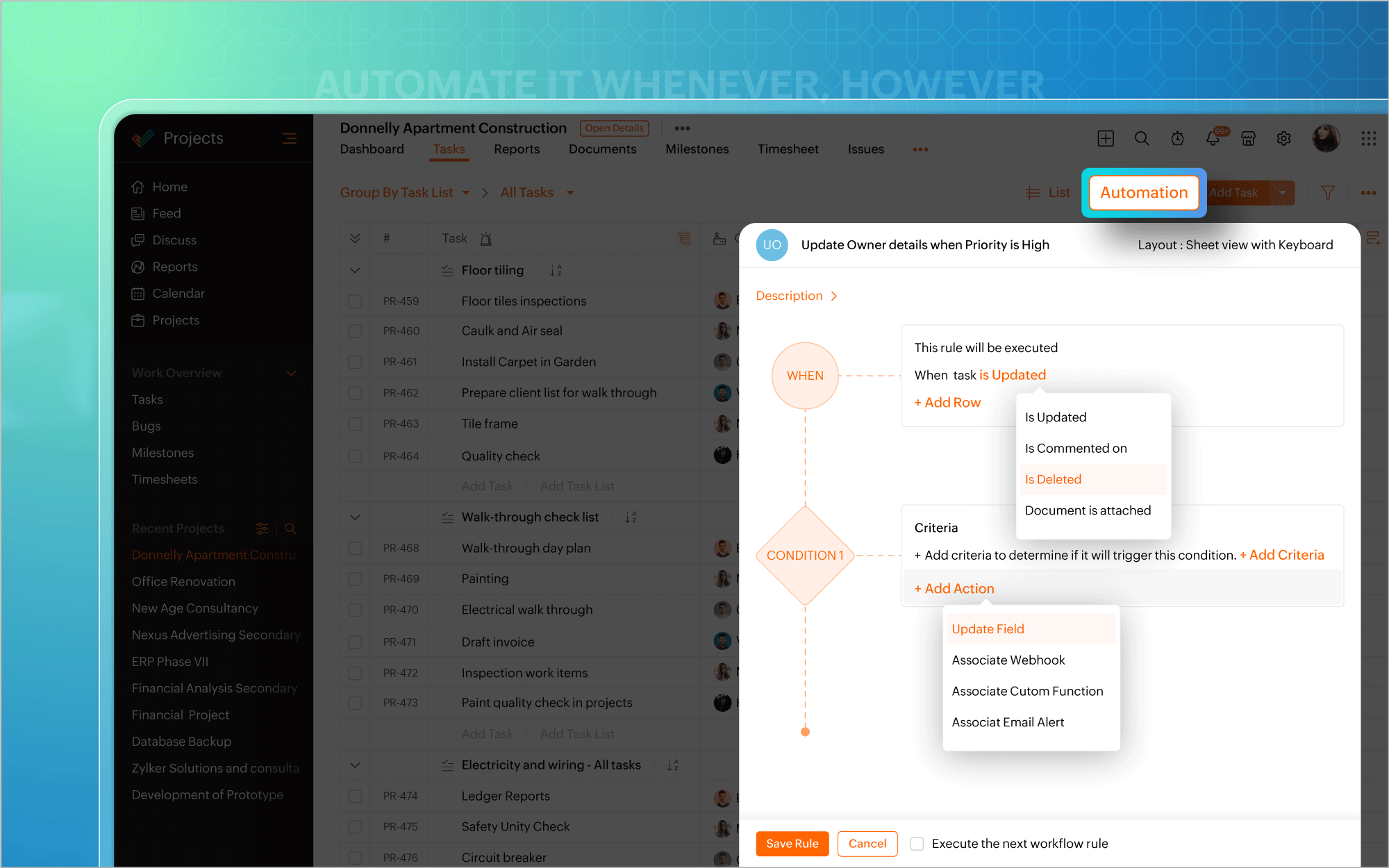
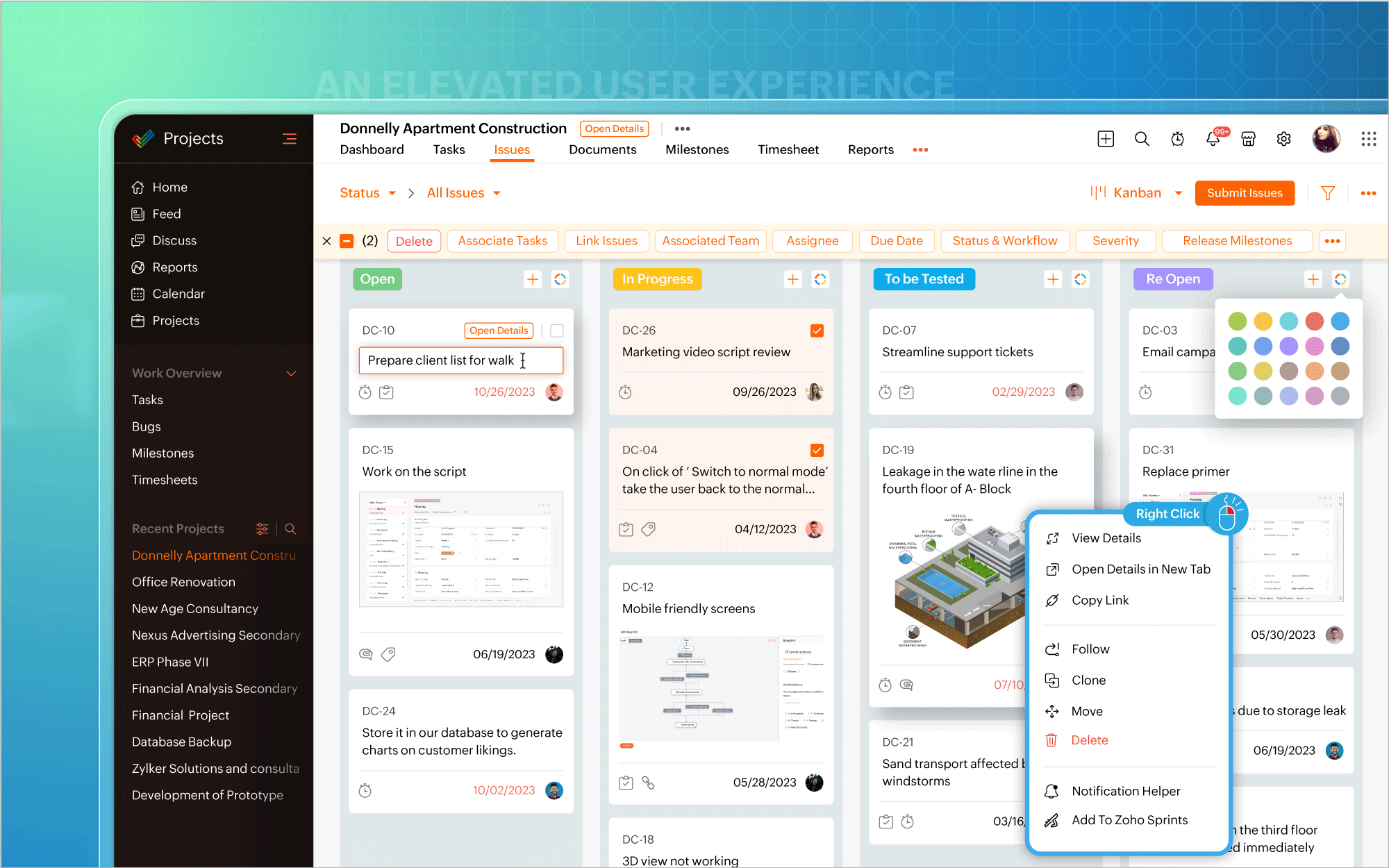
Une interface utilisateur améliorée
Vous pouvez ainsi effectuer des modifications, éditer les détails d'un projet, mettre à jour en masse des éléments de travail ou inclure des commentaires et des pièces jointes directement à partir de la vue du tableau Kanban. Un clic droit sur des modules tels que Liste, Kanban ou Gantt fait apparaître un menu contextuel qui vous permet d'effectuer des actions pertinentes, telles que consulter les détails du projet, cloner des tâches ou personnaliser les couleurs des barres de Gantt. Une page dédiée aux détails du projet s'ouvre si vous avez besoin d'informations spécifiques au projet ou si vous souhaitez apporter des modifications à votre projet.
Une expérience utilisateur améliorée sur mobile
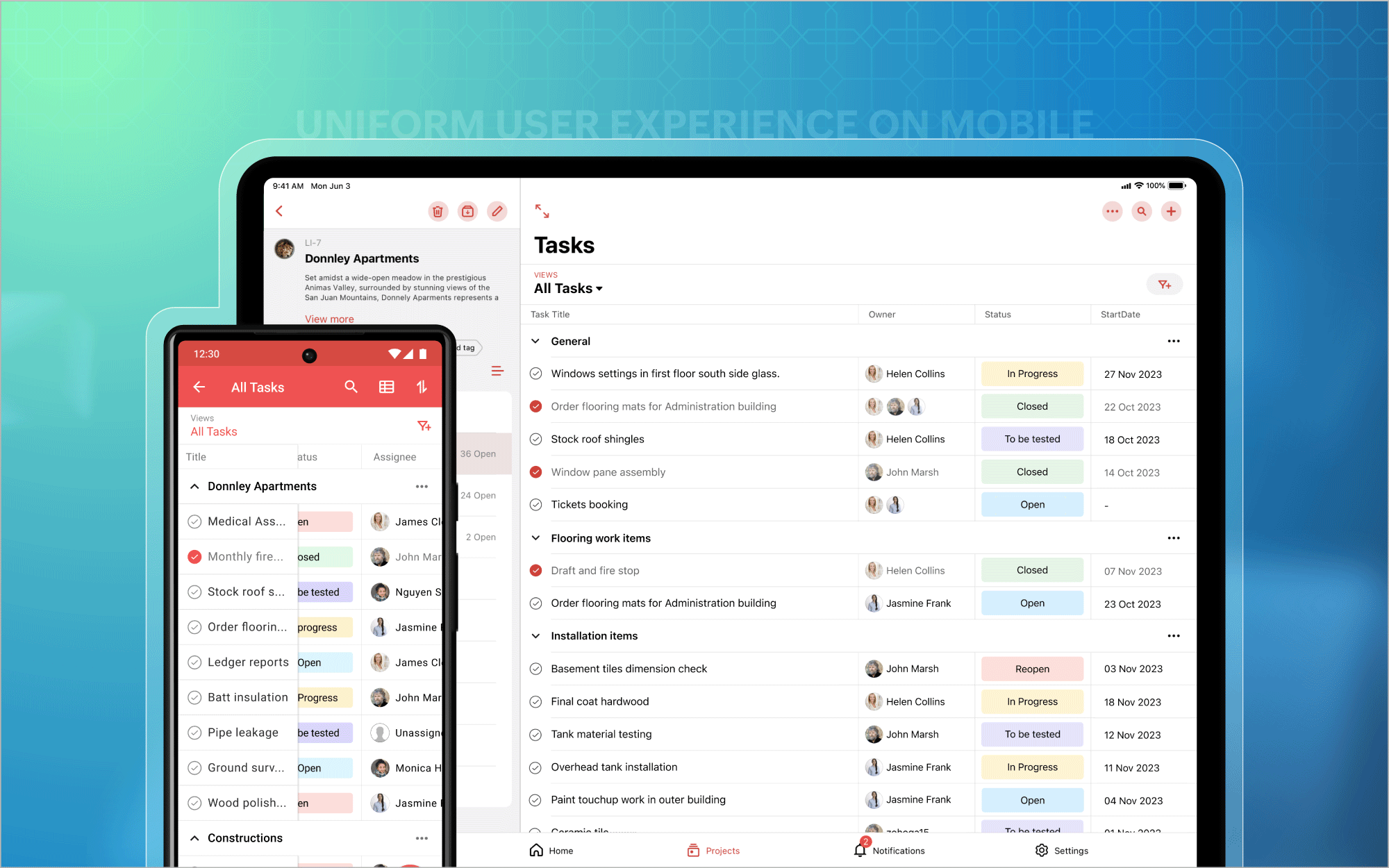
Nous avons également étendu l'affichage des listes aux appareils mobiles et aux tablettes, afin que vous puissiez profiter d'une expérience utilisateur homogène et standardisée sur toutes les plateformes. En outre, vous avez désormais accès aux tableaux de bord des projets et au module Calendrier sur les plateformes Android et iOS. Et bien plus encore est à venir !
Bon à savoir
Zoho Projects 7.0 sera inaccessible après le 31 mars 2024. Nous vous recommandons donc fortement de passer à la dernière version dès que possible. Nous avons hâte que vous l'essayiez !
N'hésitez pas à nous faire part de vos commentaires et de vos réactions sur les fonctionnalités préférées de la nouvelle version.
Plus simple, plus pratique, c'est Zoho Projects 8.0 !
Bonjour à tous, Nous avons (encore une fois) une bonne nouvelle à vous partager : nous allons enfin pouvoir nous rencontrer ! Et pas dans n'importe quel contexte, mais lors de notre conférence annuelle : les Zoholics ! Mais que sont les Zoholics me direz-vous
Bonjour à tous, L'année 2021 arrive presque à sa fin, mais nous continuons à avoir de nombreuses actualités à vous partager. En voici un résumé ! Nous avons eu notre première session "Ask The Experts" sur notre nouvelle version Zoho One 2021 et vous
Bonjour à tous, Et bonne rentrée ! Comme chaque mois voici un résumé de ce qui s'est passé sur Community et dans l'actualité de Zoho en général. La grande nouvelle de mois d'Août est l'arrivée de la fonction Canvas : le premier studio de conception pour
Bonjour à tous, Le premier mois de l'été se termine, et si certain profitent d'un repos bien mérité, sur Community on continue à en apprendre toujours plus sur nos produits Zoho. Notre série sur Zoho CRM se réinvente avec la découverte de notre fonction
Bonjour à tous, Que s'est il passé en Mai sur notre page Community France ? En plus de nos articles Trucs et Astuces, vous avez été nombreux a réagir, nous poser des questions ou encore publier vos propres conseils ! Vos les différents sujets abordés
Hi, The reminders feature in Zoho Books is a really helpful feature to automate reminders for invoices. However, currently we can set reminders based on number of days before/after the invoice date. It would be really helpful if a recurring reminder feature
Dear Zoho SalesIQ Team, We would like to request an enhancement for Zoho SalesIQ Zobot: adding an execution log / run history, similar to what already exists in Zoho Flow. Reference: Zoho Flow In Zoho Flow, every execution is recorded in the History tab,
based on selected service look up field iwant to fetch the service serial number in the serice form how i achive using client script also how i get the current date in the date field in the on load of the form
Hi, We just completed a trade show and one of the bits of information we collect is tool style. The application supplied by the show set this up as individual questions. For example, if the customer used Thick Turret and Trumpf style but not Thin Turret,
The link below is the IP address for Analytics, do you have CRM's? https://help.zoho.com/portal/ja/kb/analytics/users-guide/import-connect-to-database/cloud-database/articles/zoho-analytics%E3%81%AEip%E3%82%A2%E3%83%89%E3%83%AC%E3%82%B9 I would like to
I'm the super admin and looking at the reporting available for Zoho Vault. I can see that there is a Password Assessment report available showing the passwords/weak and security score by user. However I'm confused at the 'report generated on' value. Monitor
Hi all, I have been duplicating + editing forms for jobs regarding the same department to maintain formatting + styling. The issue I've not run into is because I've duplicated it from an existing form, the URL doesn't seem to want to update with the new
I have created the data model in Zoho CRM and I want the ability to Print this. How do we do this please? I want the diagram exported to a PDF. There doesnt appear to be an option to do this. Thanks Andrew
Hi all, I'm looking to see if someone could point me in the right direction. I'd love to make it so my customers/ end users can make tickets, see responses and respond within microsoft teams. As Admin and an Agent i've installed the zoho assist app within
People work together as a team to achieve organizational goals and objectives. In an organization, there may be situations when someone leaves unexpectedly or is no longer available. This can put their team in a difficult position, especially if there
How do we have some items that are pickup only? I have several items in my item's list that I do not ship. But they need to be on the website to be sold, and picked up in store. Need to be able to do this as one of these products is a major seller for
We would like to be able to offer a limited number of gift vouchers, of varying values, to our customers, and are looking for the best way to do this. We have looked at Coupons and Gift Certificates, but neither seem to fit the bill perfectly. Coupons:
I have a lookup field, which also pulls through the Status field from the linked record. When the lookup is first done, the Status is pulled through - this works perfectly. If that Status is later updated, the lookup field does not update as well. As
We are implementing a third-party shipping (MachShip) API integration for our Zoho Commerce store and have made significant progress. However, we need guidance on a specific technical challenge. Current Challenge: We need to get the customer input to
How can I add a second “lookup” field in Zoho? I’m trying to create another lookup that pulls from my Contacts, but the option doesn’t appear in the module customization sidebar. In many cases, a single work order involves multiple contacts. Ideally,
I see some very old posts asking about importing project records into Zoho Projects. But I can't find anything up to date about the topic. Has this functionality been added? Importing tasks is helpful. But we do have a project where importing projects
Is there a way that allocate inventory to a specific sales order? For example, let's say we have 90 items in stock. Customer 1 orders 100 items. This allocates all 90 items to their order, and they have a back order for the remaining 10 items which could
Hello all, We’re excited to introduce a major productivity boost to your CRM experience: Workqueue, a dynamic, all-in-one workspace that brings every important sales activity, approval, and follow-up right to your fingertips. What is Workqueue? Sales
Dear Zoho Inventory Community, We’re a small business using Zoho Inventory with a team of sales managers. Unfortunately, some employees occasionally overlook stock levels during order processing, leading to negative inventory issues. Is there a way to
This is a monthly series designed to help you get the best out of Desk. We take our cue from what's being discussed or asked about the most in our community. Then we find the right use cases that specifically highlight solutions, ideas and tips on optimizing
I wish remote work were permanently mandated so we could join work calls from a movie theatre or even while skydiving! But wait, it's time to wake up! The alarm has snoozed twice, and your team has already logged on for the day. Keeping tabs on attendance
Dear Zoho Desk Team, We appreciate the powerful workflow automation capabilities in Zoho Desk, particularly the ability to create and use custom functions within workflows. However, we have encountered a limitation that impacts efficiency and maintainability.
Hi, Our customer has address fields in their quote layout which should be the address of the Account. They prefill the information, adding the account name - the address data is populated as per what is in the account - great. However when they then add
Hi Zoho Commerce team, I'm comming accross more and more retail businesses who sell gift cards. As there is currently no way to manage this in Zoho Commerce, it is a blocker to addoption. This is particularly popular in Europe and North America. I recently
After a customer submits a ticket through the customer portal, they can go into the ticket and see some of the values from the questions they answered in the sidebar. Currently, a customer can edit these values even after they submitted them. This makes no sense. We ask very specific questions that we don't want customers to later change! Please disable the ability for customers to edit the values to their submission questions in the portal. Screenshot attached.
Hi All, I am reaching out today because of a big issue we have at the moment with Zoho Analytics and Zoho Invoice. Our organization relies on Zoho Analytics for most of our reporting (operationnal teams). A few days ago we observed a sync issue with the
Is there a way to make the full text of a text field appear in the list report on mobile and tablet? With custom layouts, the text is always truncated after a certain number of characters.
This is a monthly series in which we pick some common use cases that have been either discussed or most asked about in our community and explain how they can be achieved using one of the automation capabilities in Zoho Desk. Unwanted tickets spamming
This is a monthly series where we pick some common use cases that have been either discussed or most asked about in our community and explain how they can be achieved using one of the automation capabilities in Zoho Desk. Most of our customers use email
This is a monthly series designed to help you get the best out of Desk. We take our cue from what's being discussed or asked about the most in our community. Then we find the right use cases that specifically highlight solutions, ideas and tips to optimize
Hello Everyone! This month's edition brings you a custom function to consolidate your records associated with Jira integration. Jira integration enables support engineers and R&D units to collaborate seamlessly on feature development, product improvement,
Hello Everyone! This edition uncovers the option to schedule reopening a ticket automatically. Zylker Finance tracks insurance policyholder activities through Zoho Desk. For policyholders who pay monthly premiums, tickets are closed upon payment completion.
Hello Everyone! We’re excited to bring you another custom function this week. In this edition, we’ll show you how to automatically close tickets when all associated tasks are marked as completed. Let’s see how ZylkaPure, a leading water filter company,
Rockel is a top-tier client of Zylker traders. Marcus handles communications with Rockel and would like to add Terence, the CTO of Zylker traders to the email conversations. In this case, the emails coming from user address rockel.com should have Terence
I have tried to study manuals and play with Zoho CRM but haven't found a way how to apply customized Zoho CRM Home Page as a (default) home page for other CRM users.. How that can be done, if possible? - kipi Moderation Update: Currently, each user has
Hi team, We are using Customers module in Zoho Books. In the Address section, we want to understand whether the City field can show suggestions while typing using any API or built-in feature. For example, if a user types “Mum”, can the system suggest
The current integration embeds the entier projects inteface into the CRM this is confusing and allows users to get lost. For example as a user i navigate to an account and go down to the related projects list and want to get information about a specific