Solution of the Week: Financial Reports with Impactful Visuals
Finance reporting is a critical part of understanding an organization’s financial health. With Zoho Analytics, you can easily create dynamic reports such as Balance Sheets, Budget Statements, and Profit and Loss Statements.
Now, with the release of Zoho Analytics 6.0, the platform offers even more advanced tools to optimize the financial report view. While Zoho Analytics has always enabled comprehensive financial reporting (through its integration connectors for Zoho Books, QuickBooks, Xero), the latest version enhances this with powerful visual features like Data Bars, which provide clearer insights into performance trends.
This document outlines how these reports can be generated using simple drag-and-drop functionality and customizable features in Zoho Analytics.
Creating a Balance Sheet Using Finance Data
Generating a Balance Sheet in pivot using Zoho Analytics allows you to visualize your organization’s financial position in a comprehensive and structured way.
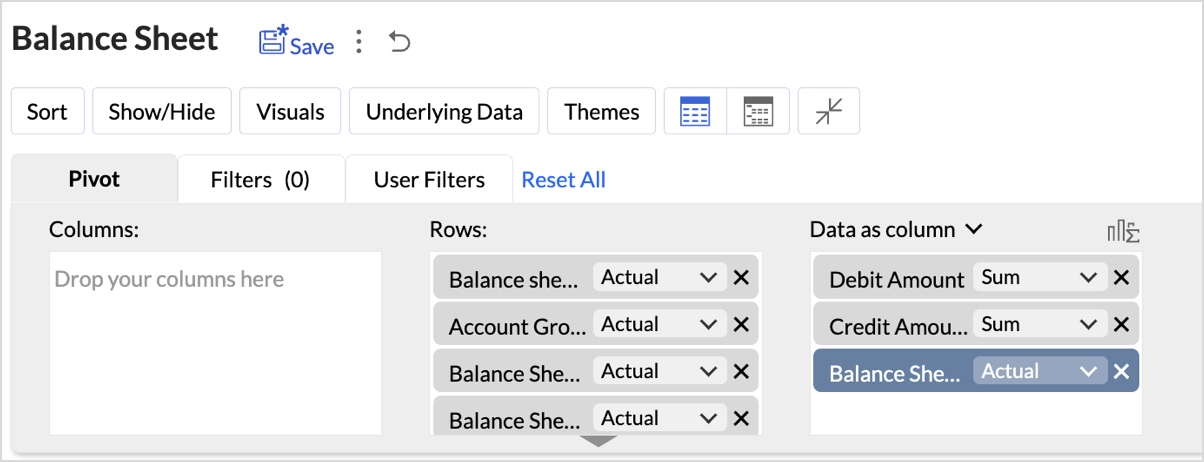
- Drag and Drop the Data: Start by selecting the Balance sheet base type, Account group, Balance Sheet Account Type, and Balance Sheet Account Name from the Accounts table and drop them into the Rows shelf. Drag and drop the Credit Amount, Debit Amount, and Balance Sheet Total from the Accrual Transactions table into the Data shelf.
- Layout Adjustments:
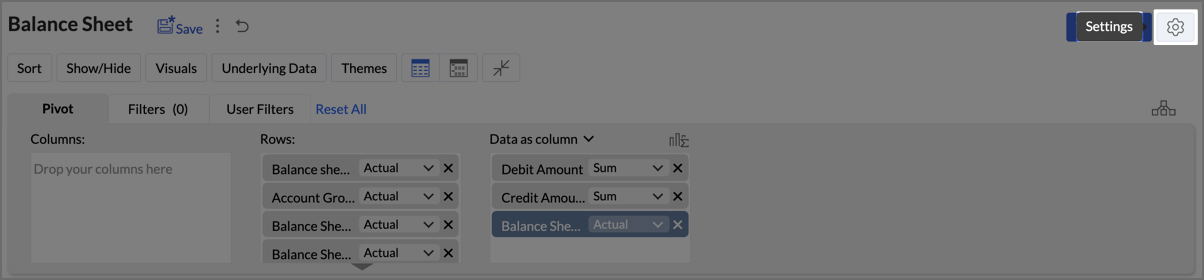
- Navigate to Settings > Layout.
- Change the Layout to Compact.
- Check Increase Font Size for each higher group in Rows.
- Uncheck Show row numbers.
- Uncheck Show vertical lines between them.
- Set Column Width to Fit to Screen.
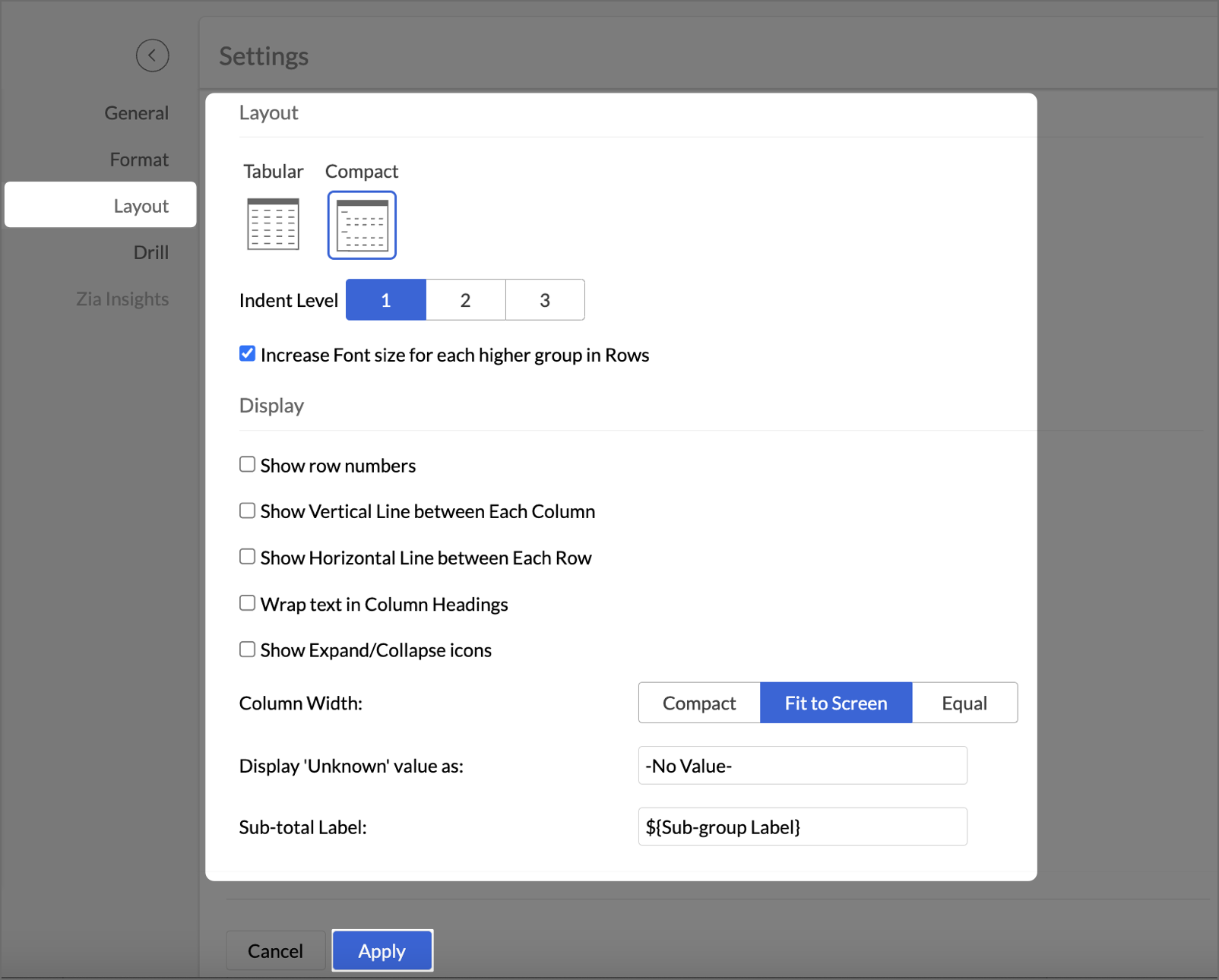
- After making layout adjustments, click Apply to finalize the formatting.
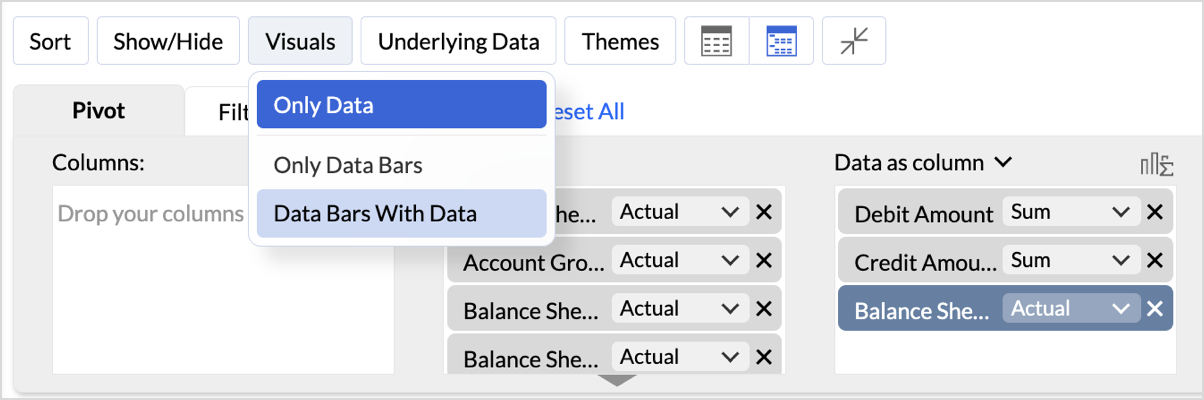
- Go to Visuals and select Data Bars With Data to improve the presentation of financial data, making it easier to interpret key insights visually.
By following these steps, you will generate a clear and structured Balance Sheet that highlights your organization's assets, liabilities, and equity.
Key Features of the Balance Sheet Report
- Increased Font Size for Key Categories
Emphasizes important financial categories like Assets, Equity, and Liabilities, improving readability and focus. - Compact Layout
Ensures a clear, organized display of financial data, enabling efficient consumption of the report. - Line Removal for Clean Aesthetics
Removal of vertical and horizontal lines results in a cleaner visual presentation, improving the user experience. - Data Bars for Quick Insights
Visual data bars provide a quick snapshot of financial status, allowing users to identify key trends at a glance. - Timeline Filter for Flexibility
Filters allow users to view financial data across different periods, making it easier to analyze financial trends over time.
In Zoho Analytics, utilizing the Timeline Filter allows users to transform static financial data into a time-based, dynamic report. The formulas used in creating this filter enable detailed insights into financial performance over a selected period. Below, we explain the key aggregate formulas and how they enable users to achieve greater flexibility and customization, going beyond the typical app potential.
- Opening Balance Formulasum_if("Accrual Transactions"."Transaction Date" < ${system.timeline.date.from},if("Accounts"."Account Base Type" in ('Asset') OR ("Accounts"."Account Base Type" in ('Equity') and "Accounts"."Account Name" in ('Drawings')),"Accrual Transactions"."Debit - Credit","Accrual Transactions"."Credit - Debit"),0)
This formula calculates the Opening Balance for a selected period by summing transactions that occurred before the specified date (timeline.date.from).
This approach allows users to view the Opening Balance as of a given date, making it highly flexible for periods that differ across user's datasets.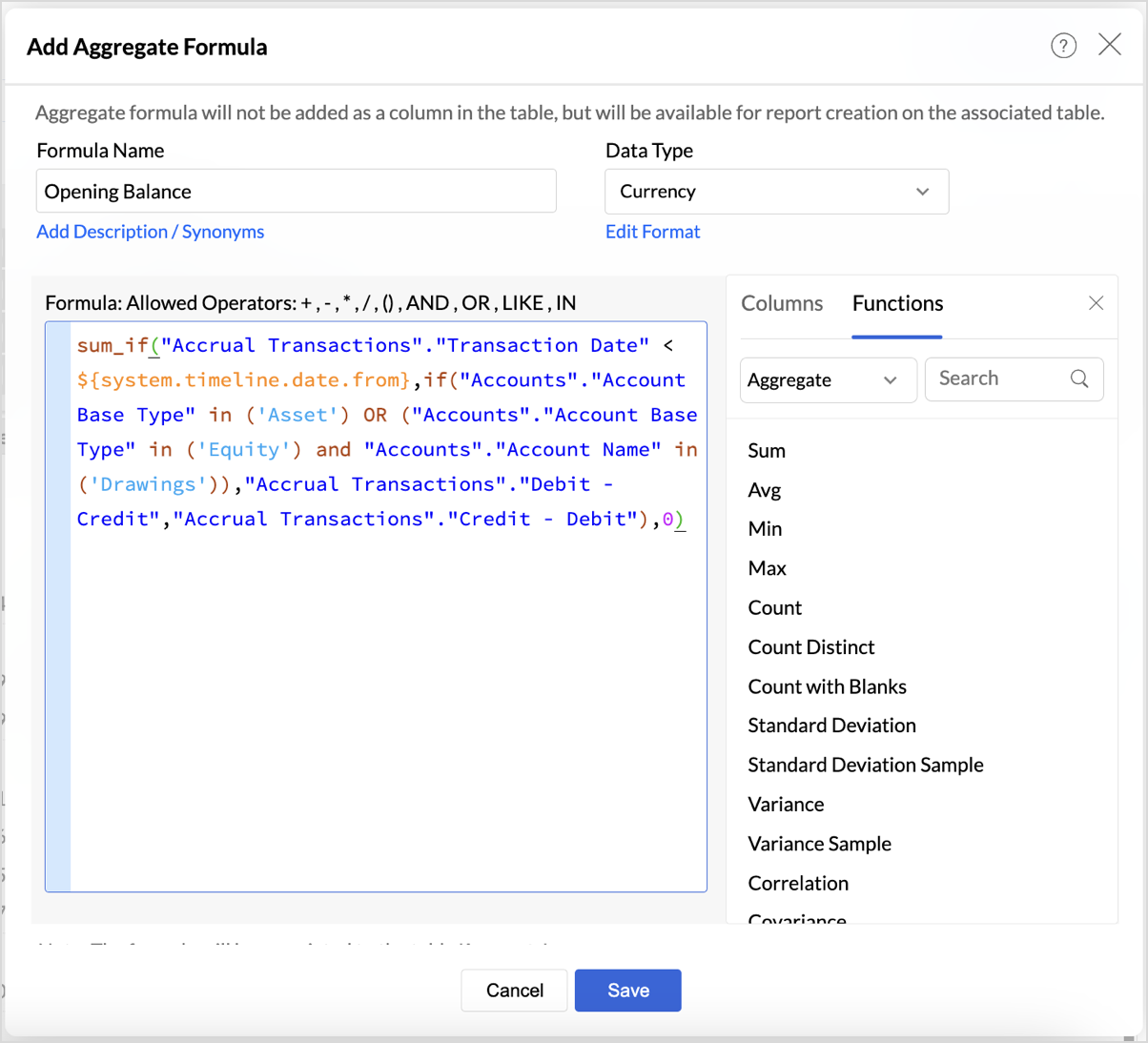
|
if("Accounts"."Account Base Type" in ('Asset') OR ("Accounts"."Account Base Type" in ('Equity') and "Accounts"."Account Name" in ('Drawings')),"Accrual Transactions"."Debit - Credit","Accrual Transactions"."Credit - Debit")
|
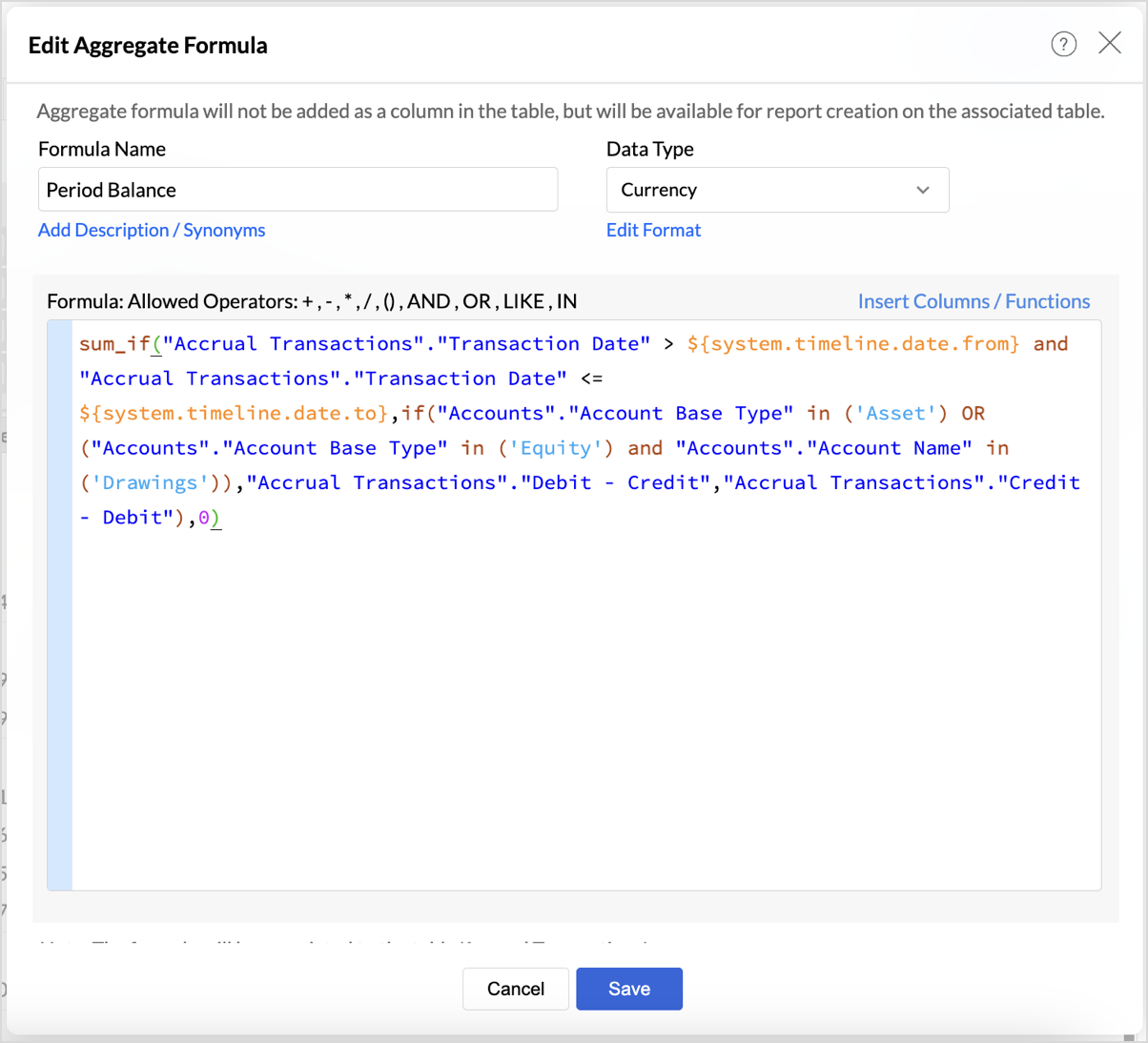
- Period Balance Formulasum_if("Accrual Transactions"."Transaction Date" > ${system.timeline.date.from} and "Accrual Transactions"."Transaction Date" <= ${system.timeline.date.to},if("Accounts"."Account Base Type" in ('Asset') OR ("Accounts"."Account Base Type" in ('Equity') and "Accounts"."Account Name" in ('Drawings')),"Accrual Transactions"."Debit - Credit","Accrual Transactions"."Credit - Debit"),0)
- Closing Balancesum_if("Accrual Transactions"."Transaction Date" <= ${system.timeline.date.to},if("Accounts"."Account Base Type" in ('Asset') OR ("Accounts"."Account Base Type" in ('Equity') and "Accounts"."Account Name" in ('Drawings')),"Accrual Transactions"."Debit - Credit","Accrual Transactions"."Credit - Debit"),0)
The Closing Balance formula calculates the final balance as of a selected date (timeline.date.to). It works by summing all transactions up until the specified date, following the same account type distinctions used in the previous formulas.
This formula is essential for determining the financial standing of an organization at the end of a reporting period, such as the end of a quarter or year.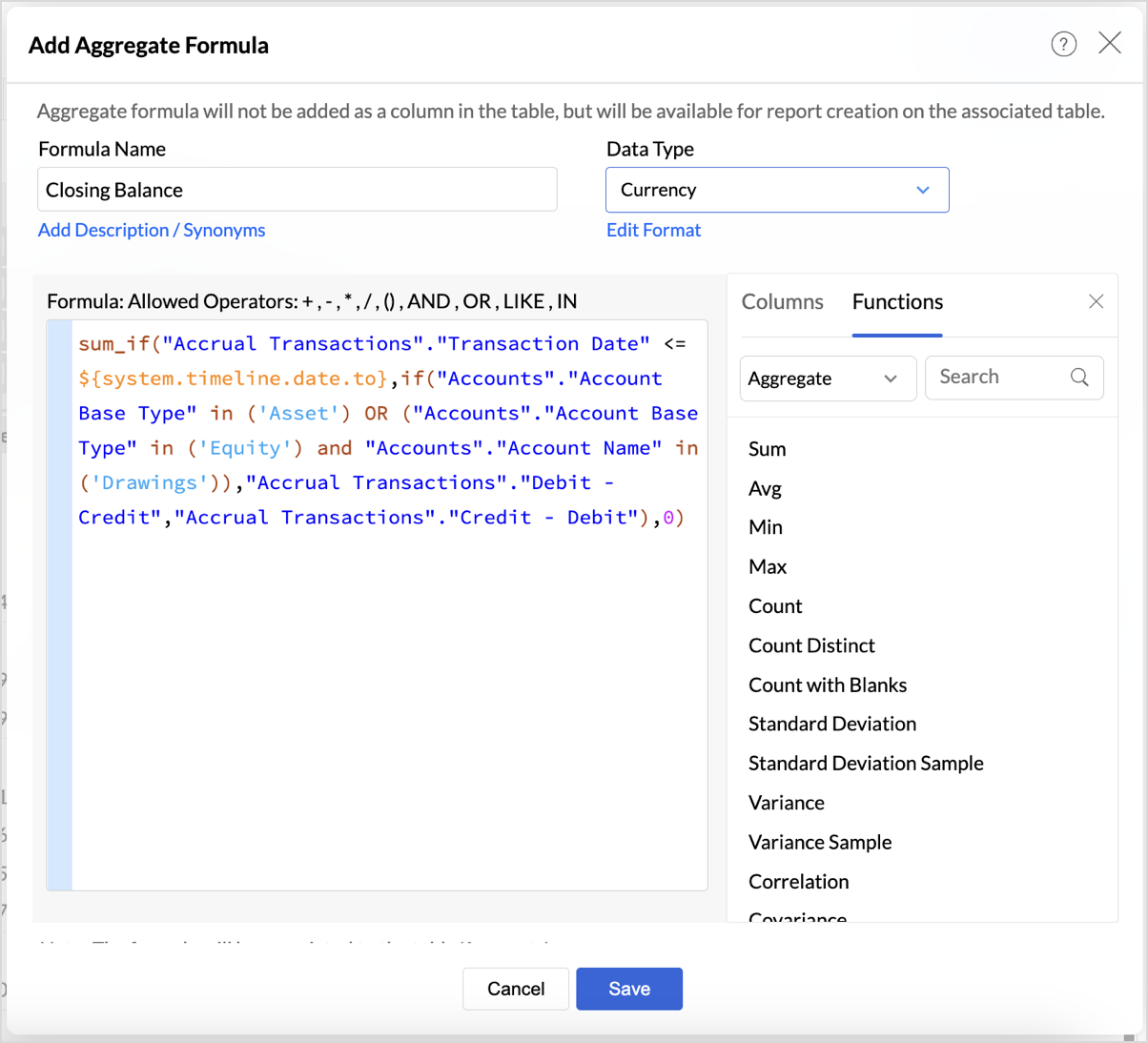
Follow the below steps to create opening and closing balances with timeline filters:
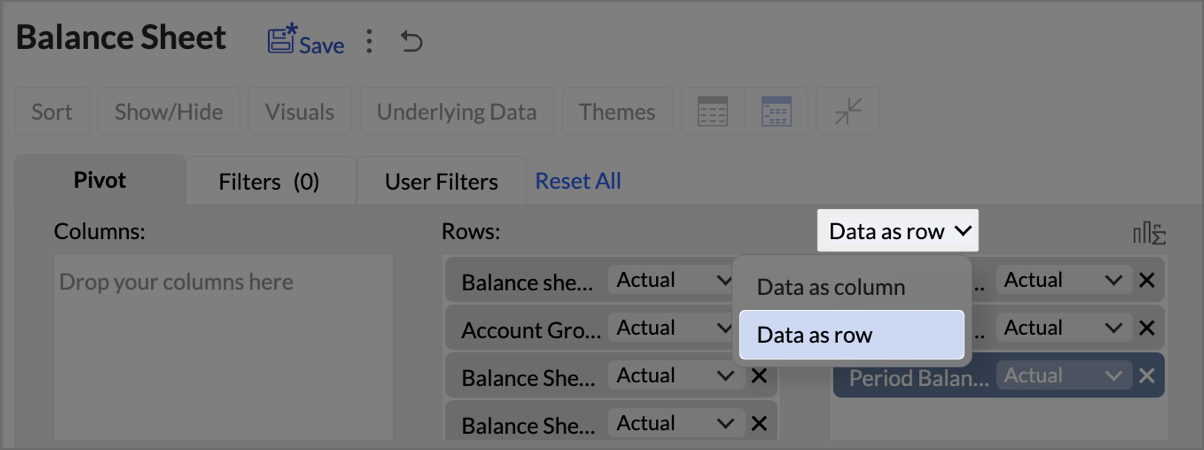
- Drag and drop the created aggregate formulas into the data shelf.
- Select Data as row from the drop-down.
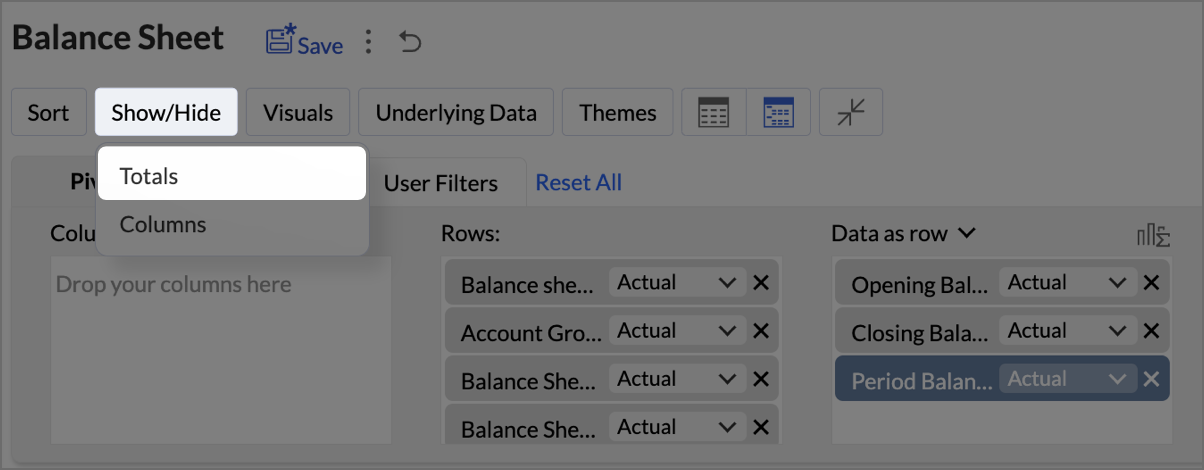
- Click on Show/Hide, then select Totals.
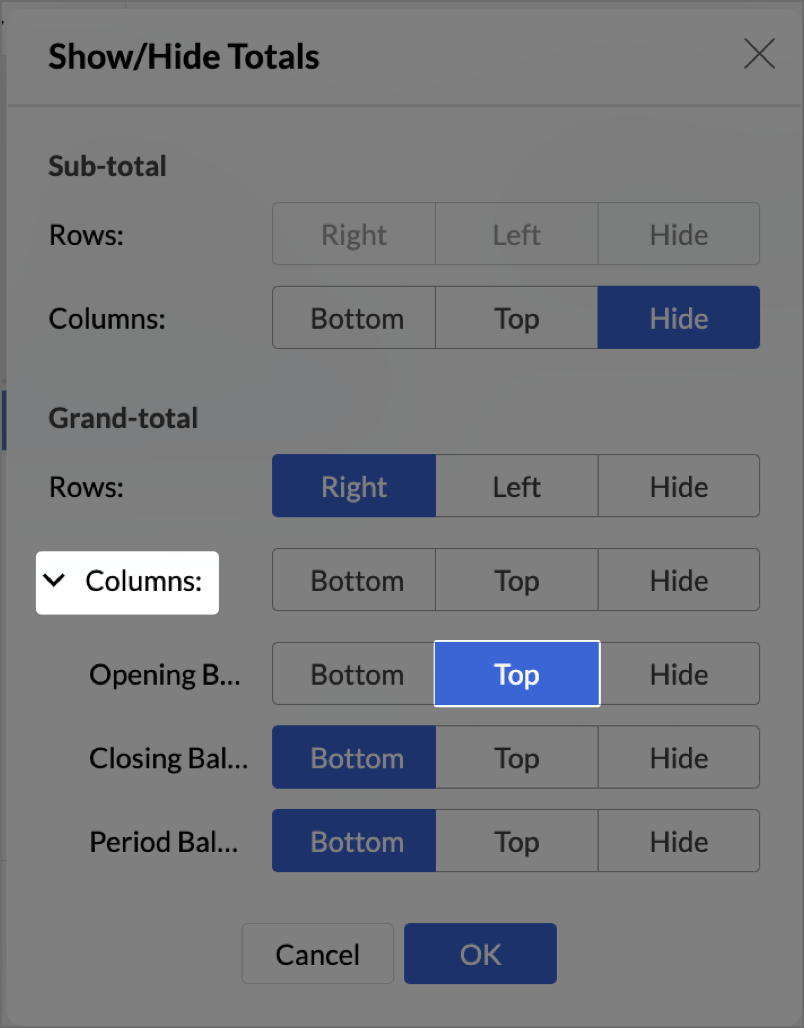
- Click on Columns drop-down, then set the Opening Balance as Top.
- Navigate to Settings > Layout and set Column Width as Equal. Provide Width value as required in px.
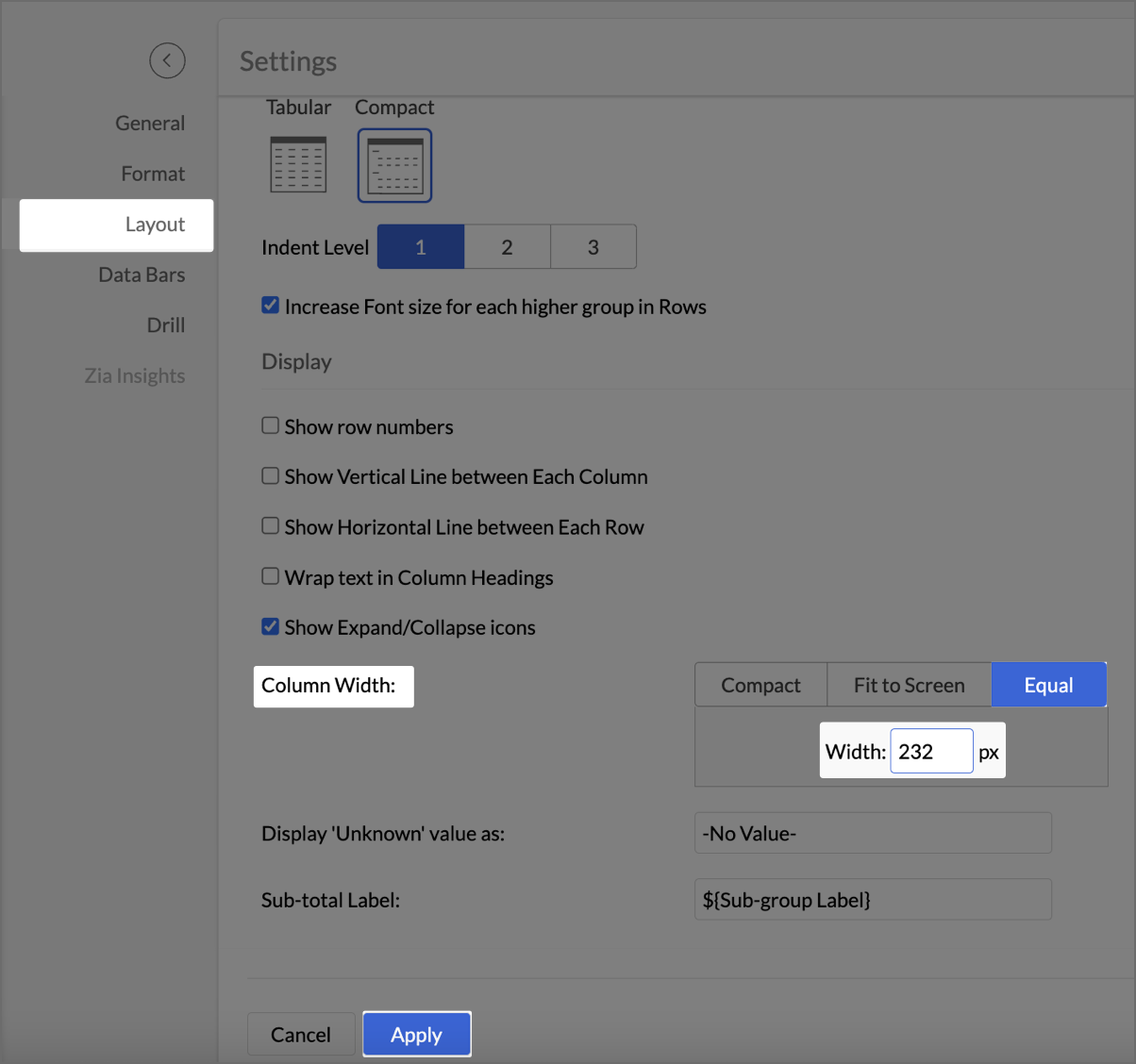
- Click Apply.
- Check Include Timeline Filter.
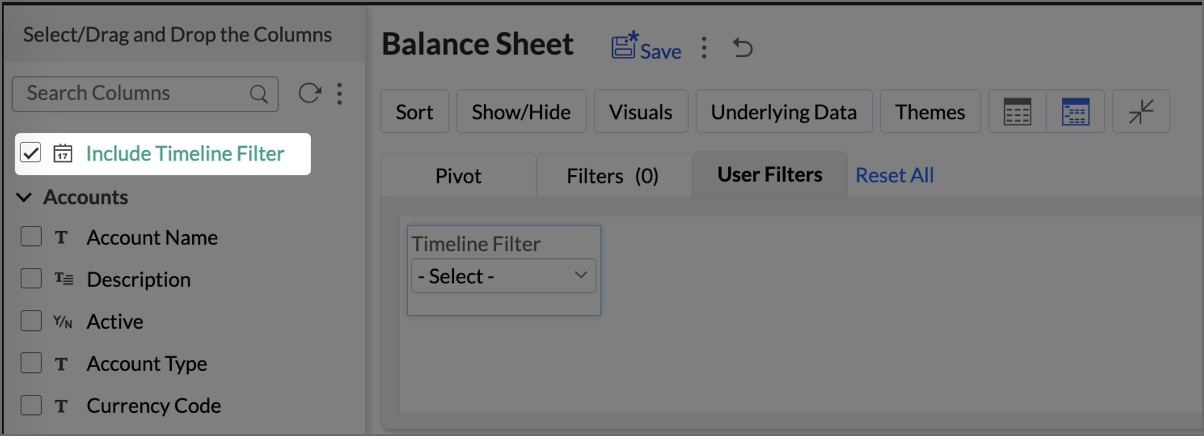
The Timeline Filter is now enabled, and users can apply time-based filters to their data.
Creating a Budget Statement
A Budget Statement helps compare actual financial performance against projected budgets, identifying variances and areas of concern. This visually enhanced report is designed to help businesses quickly assess deviations between expected and real expenditures, allowing for better budget management and financial decision-making.
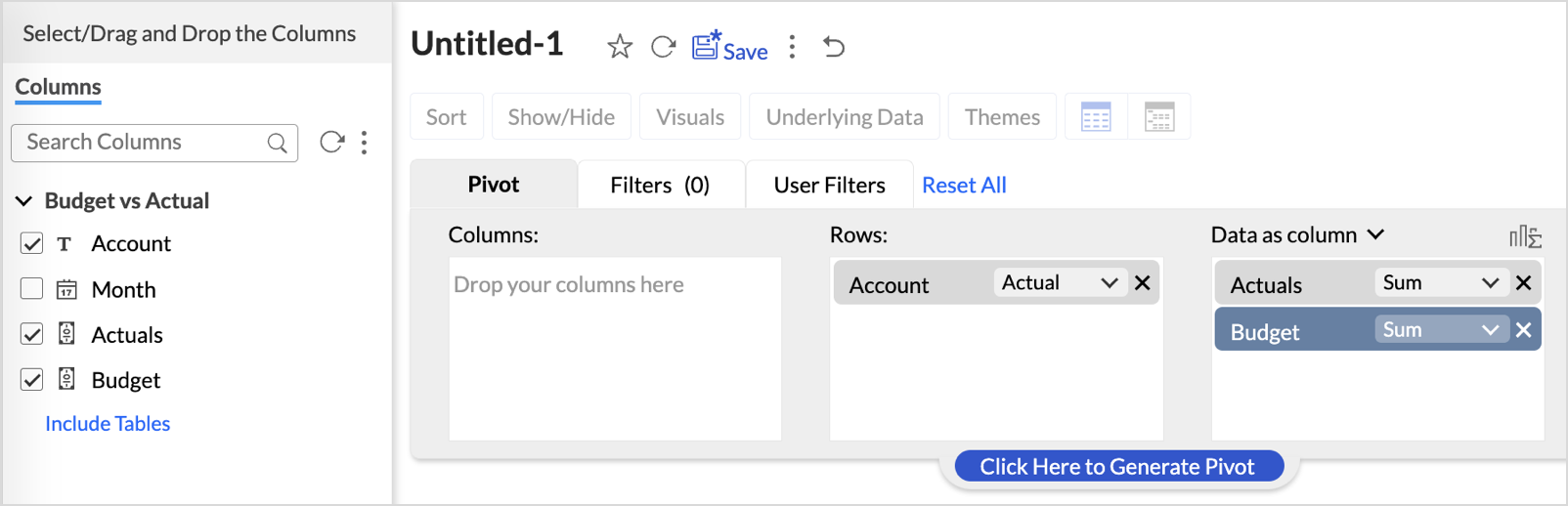
- Drag and drop Account into the Row shelf, and Actuals and Budget into the Data shelf from the Budget vs Actual table.
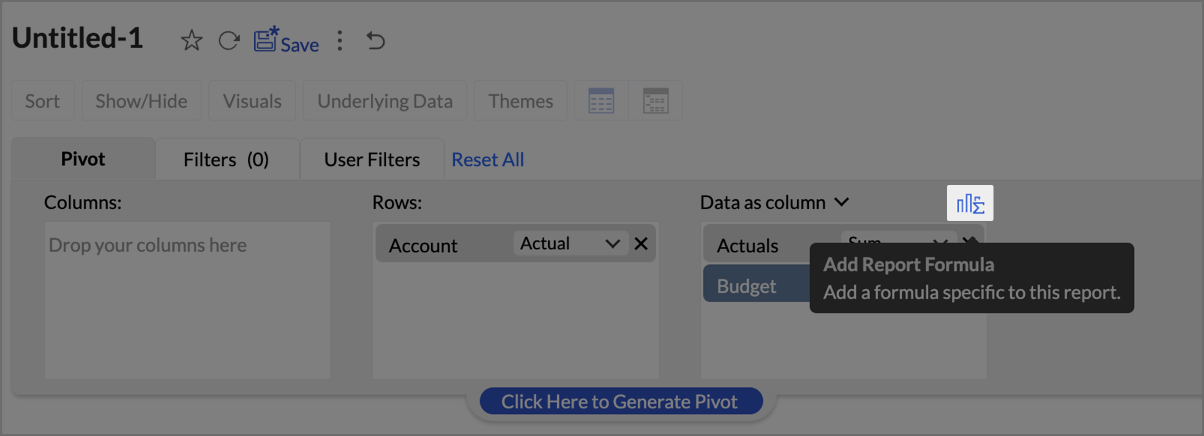
- Add Report Formula:
- Click Add Report Formula to create custom calculations.
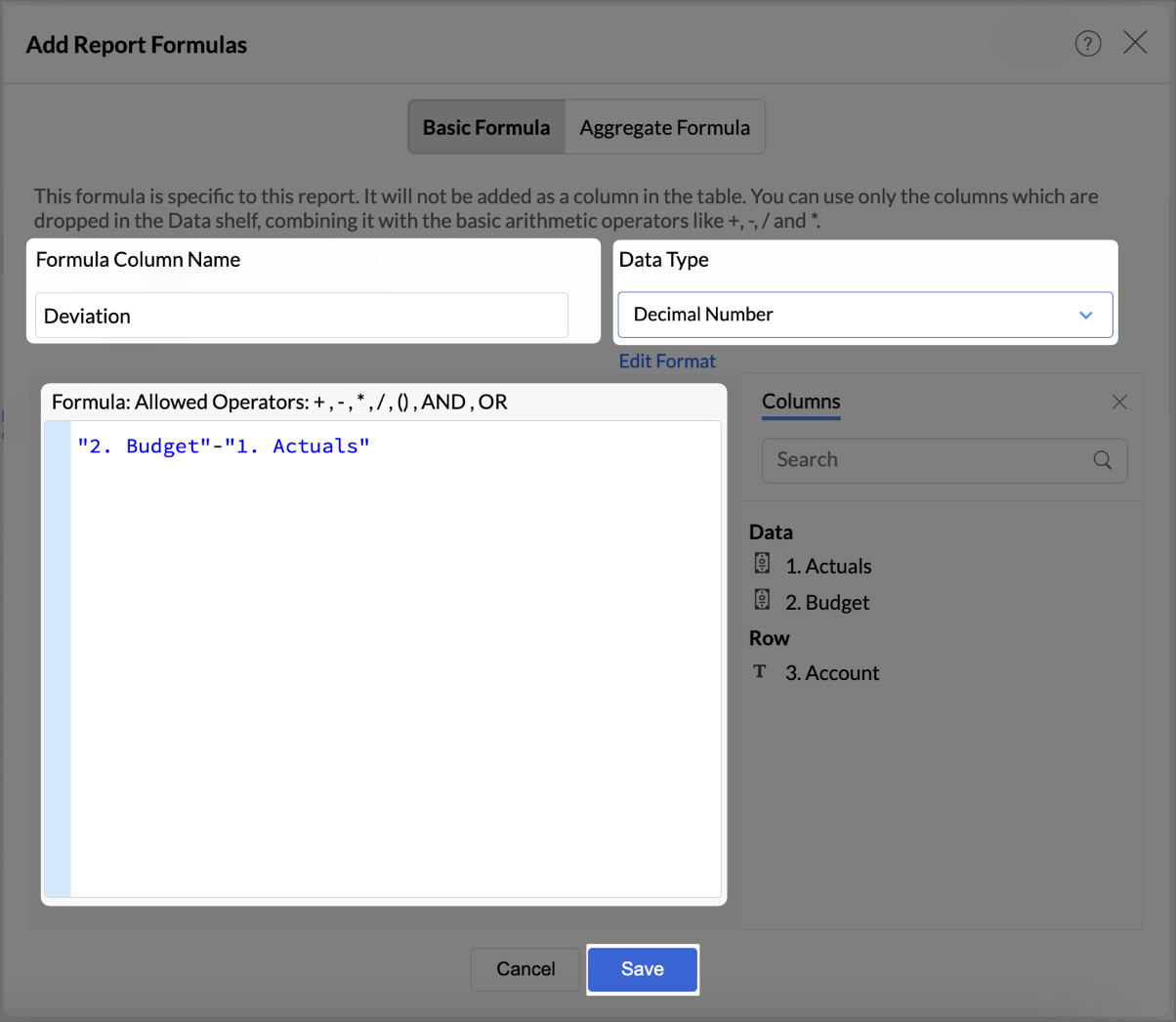
- Name the formula column appropriately (e.g., “Deviation”).
- Set Data Type as Decimal Number
- Create a formula to calculate the difference between actuals and budget as shown in the image.
- Click Save.
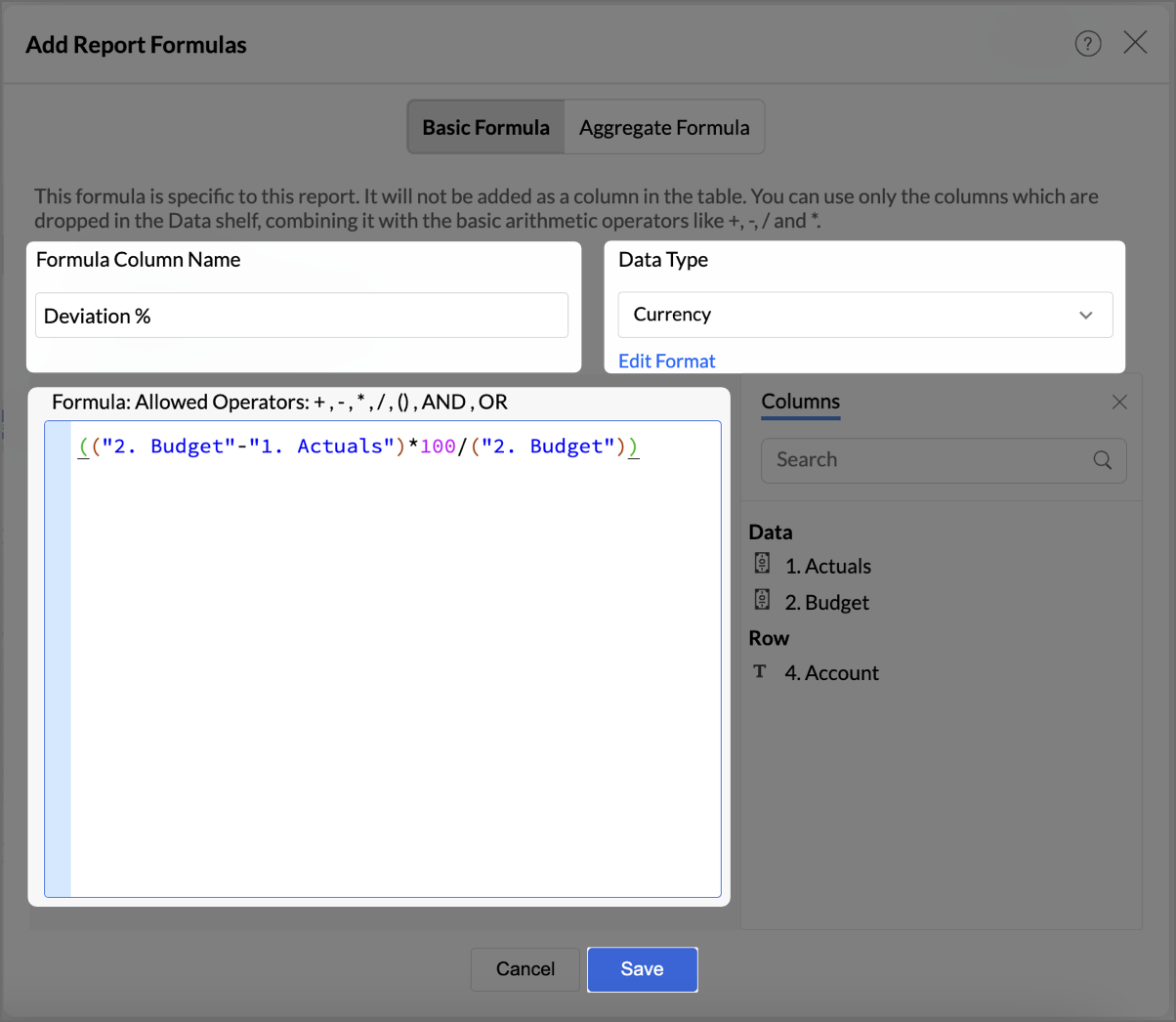
- By following the same steps mentioned above, create one more formula to calculate the percentage difference between actuals and budget as shown in the image.
- Click Save.
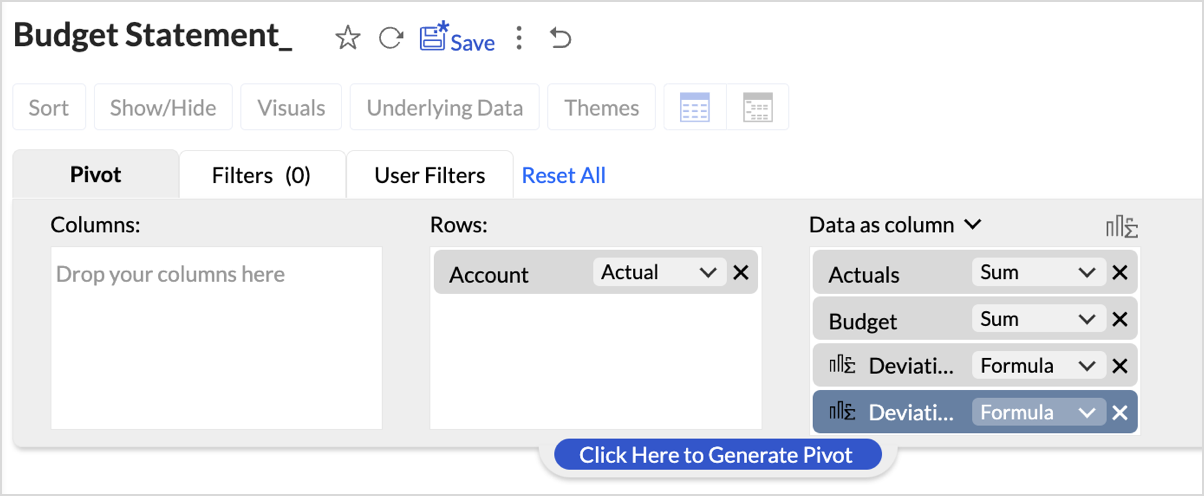
The created formulas will appear in your data shelf and columns, reflecting in the report. - Go to Visuals and choose Data Bars With Data for a more intuitive understanding of budget performance.
By following these steps, you will have a detailed Budget Statement that compares actual spending to the budget, highlighting deviations.
Report Structure and Visuals
- Account Breakdown
The report is organized by account categories, such as Bank Fees, Cost of Goods Sold, and more, showing both Budgeted and Actual amounts for each category. - Key Columns
The report includes the following key columns: - Total Budget - Displays the budget allocated for each account.
- Total Actuals - Shows the actual amount spent or earned for each account.
- Variance (Deviation) - Represents the difference between the budgeted amount and the actuals.
- Variance Percentage (Deviation %) - This column shows the percentage difference between the budgeted and actual amounts, highlighting under- or over-expenditure.
- Data Bars for Clarity
- Green Bars indicate favorable performance (within or under budget).
- Red Bars highlight overspending or budget deviations (e.g., Office Expenses or Rent).
Key Features of the Budget Statement Report
- Visual Representation of Deviations
Data bars visually indicate how spending aligns or deviates from the budget, enabling quick identification of problem areas. - Concise Overview of Financial Performance
The report provides a clear overview of actual versus budgeted performance, allowing decision-makers to assess financial health efficiently. - Enhanced Usability with Percent Deviations
Percentage-based deviation columns allow users to understand the scale of over- or under-performance relative to the budget, making it easy to identify areas that are significantly off track.
Creating Profit and Loss report
A Profit and Loss (P&L) report in Zoho Analytics helps businesses assess their revenue, expenses, and profitability over a specific period. By following these steps, you can create a detailed and visually engaging P&L report.
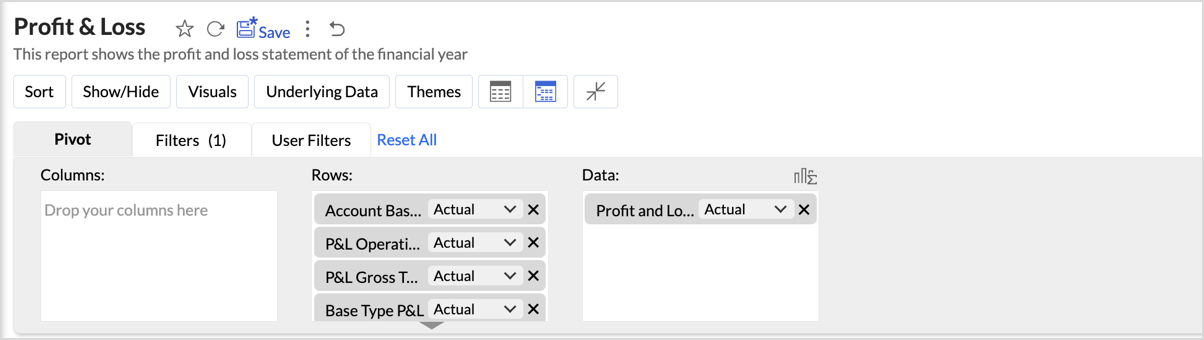
- Drag and drop Account base type, P&L Operating Profit Type, P&L Gross Type, Base type P&L, and Account Name into the Columns shelf from the Accounts table and Profit and Loss Balance into the Rows from Data shelf from the Accrual Transactions table.
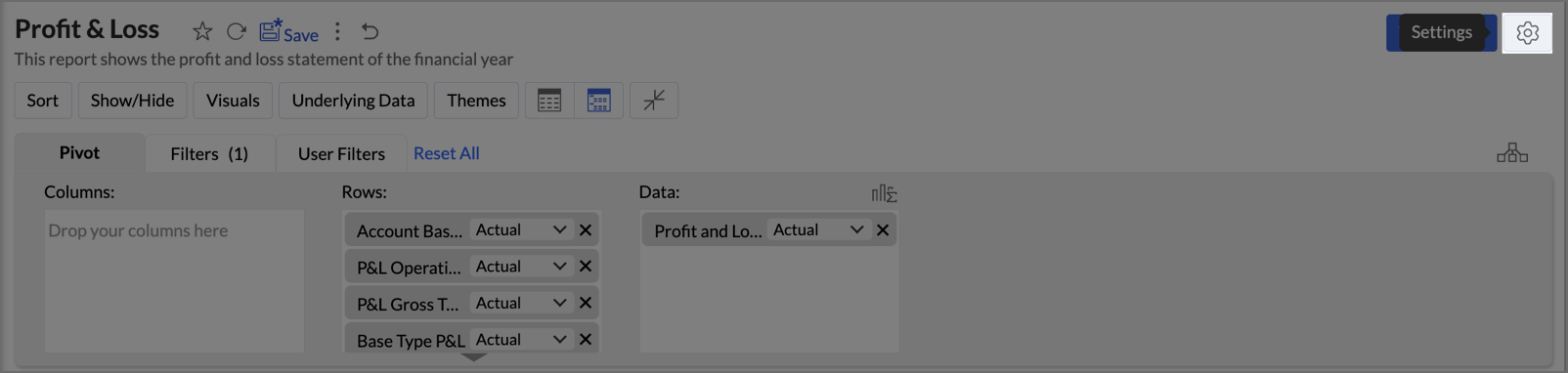
- Layout Adjustments:
- Navigate to Settings > Layout.
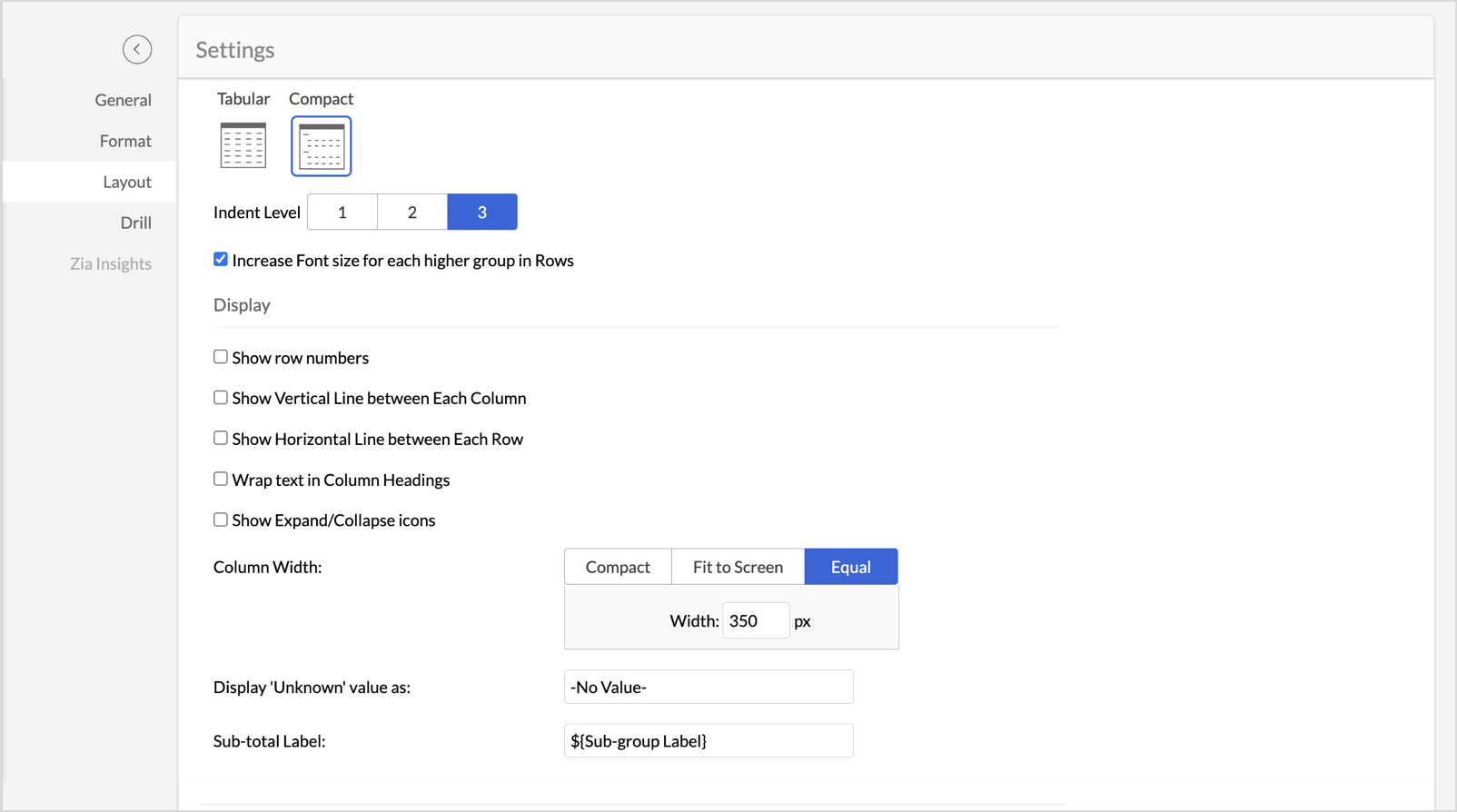
- Change the layout to Compact.
- Set Indent Level to 3.
- Check Increase Font Size for each higher group in Rows to make key categories more visible.
- Uncheck Show row numbers for a cleaner report.
- Uncheck Show Vertical Line between Each Column to streamline the visual presentation.
- Set Column Width to Equal and specify the width as required in px.
- Navigate to Settings > Layout.
- Once the layout adjustments are made, click Apply to lock in the formatting.
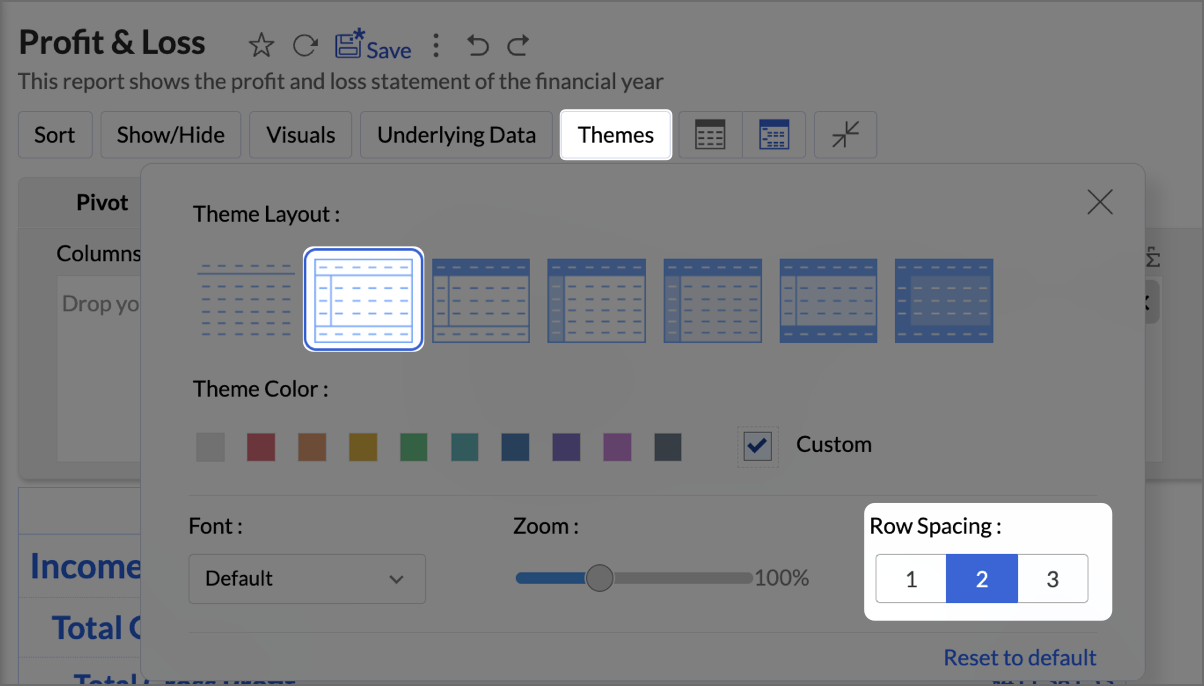
- Click Themes, and select the second theme. Set Row Spacing as 2.
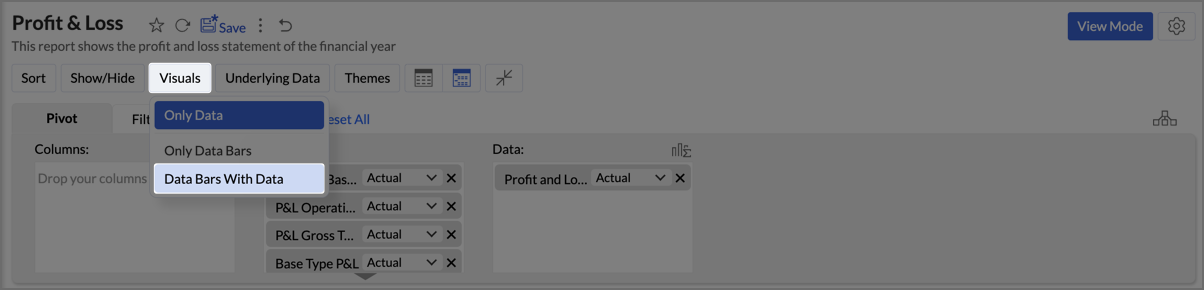
- Navigate to Visuals and select Data Bars With Data to provide a quick and clear visual representation.
By following the above steps, you will create aProfit and Loss report which provides a concise and structured view of your business’s financial performance, making it easy to track profitability over time and identify key financial trends.
Zoho Analytics provides an intuitive and customizable platform for generating comprehensive Balance Sheets, Budget Statements, and Profit & Loss reports. With its drag-and-drop functionality and powerful visual tools, Zoho Analytics transforms finance reporting into a data-driven process that improves decision-making, forecasting, and resource management.
Start leveraging Zoho Analytics today to create reports that provide actionable insights, helping your organization thrive financially!
Topic Participants
Pradeepkumar R
Storytelling BeanCounter - www.storytellingbeancounter.com
Inform
Pradeepkumar R
Sticky Posts
Tip of the Week - Spot Risky Sales with Conditional Formatting
In Zoho Analytics, small tweaks can lead to big insights. One such feature is Conditional formatting based on other columns, your key to instantly spotting where sales success is overshadowed by product returns. Our tip this week shows you how to apply
Recent Topics
Hiding / removing Currency field from Layout
Hello, I'm working on the LEAD standard layout of Zoho CRM. I like to have it as minimal as possible for our team. I could remove most of the field, but Currency is not possible. As lead, I don't quite understansd the necessity to have Currency as mandatory.Field Dependency Not Working on Detail Page in Zoho Desk
Hi Support Team, I’ve created field dependencies between two fields in Zoho Desk, and they are working correctly on the Create and Edit layouts. However, on the Detail page, the fields are not displaying according to the dependencies I’ve set — they appearTurning off the recorded welcome in Zoho Webinar
Is there a way to turn off the recorded voice that comes up at the beginning of every webinar session? It devalues the experience for attendees from feedback, interrupting their connection with our brand and delaying webinar start unnecessarily.Issue with attaching files to a task through the API
Hello! I've implemented a function that creates a task for every new bill that is created but I haven't been able to attach to the task the files which are attached to the bill. I have encountered multiple errors but the most common one is error 33003:Tip #68- Exploring technician console: Remote Audio- 'Insider Insights'
Hello Zoho Assist Community! Imagine being in the middle of a remote support session for a media production studio. The editor reports that their audio mixing software is behaving strangely, exported files sound distorted, and a persistent error toneCopy all reports in a folder
I currently have a database that I need to create multiple charts filtered by market. All of the charts are identical, I just change to of the filters and then I have the next market's set of charts. The only way I've been able to copy charts (reports)Bin Tracking with eBay integration
When trying to setup bin tracking on items that are linked to eBay listings using the built-in Zoho eBay integration, I keep getting this error: "Storage Tracking cannot be enabled for items that are manually fulfiled or for serial/batch items trackedAllow Zia Agents using Zoho One Account
When I went to try Zia Agents, it forced the creation of a new, separate account. This seems counter-intuitive to me. I don't want to manage a separate account. Plus, aren't Zoho One users the ones most likely to adopt Zia Agents most quickly? It seemsMake Camera Overlay & Recording Controls Visible in All Screen-Sharing Options
Hi Zoho WorkDrive Team, Hope you are doing well. We would like to request an improvement to the screen-recording experience in Zoho WorkDrive. Current Limitation: At the moment the recording controls are visible only inside the Zoho WorkDrive tab. WhenID:2406331
Hello, I have sent the form (ID:2406331) but no answer after two days. This is a paid subscription, I am not allowed to use the eighth paid slot of 50GB email space anymore, only 7 are being used. Is anyone going to help me please so I can use the eighth商談の特定ステージ選択時に、集計項目の入力を必須化したい
こんにちは。Zoho CRMの商談管理で以下を実現したいです。レイアウトルールでは、集計項目を条件に選択できず実現できておりません。よい方法があればご教示いただけると嬉しいです。 ■やりたいこと 商談で特定のステージに変更する場合に、特定の集計項目(同じ商談データ内の項目。以降、集計項目Aとする)を入力必須化したい。 ■概要、状況 ・集計項目Aは、別のオブジェクトで、商談に関連する月ごとの売上を集計している数値項目 ・見積を顧客に提示した際に、集計項目Aに見積金額と一致するようにデータ登録する運用をしているSetting default From address when replying to request
At the moment, if I want to reply to a request, the From field has three options, company@zohosupport.com, support@company.zohosupport.com, and support@company.com. The first two are really internal address that should never be seen by the customer andAllow Multiple Scheduled Appointments with Zoho Support
Dear Zoho Team, I hope you're doing well. First, thank you for introducing the option to schedule support calls via the Zoho CRM booking link. This has been a fantastic enhancement, eliminating the need for back-and-forth coordination when schedulingAll new Address Field in Zoho CRM: maintain structured and accurate address inputs
Availability Update: 29 September 2025: It's currently available for all new sign-ups and for existing Zoho CRM orgs which are in the Professional edition exclusively for IN DC users. 2 March 2026: Available to users in all DCs except US and EU DC. 24Share Edit while in Workflow
There are times that while a writer document is in the middle of a workflow the user that's responsible for that stage of the workflow needs to bring in other people to work on the document. Currently there is no way for the user to be able to allow other'sHow to add a custom hyperlinked button in ZohoCRM Canvas Builder?
I am building custom views in ZohoCRM Canvas builder, with one view that will be used for a client Portal. Trying to add a custom button that when clicked opens a separate window to a ZohoForm. How do I do this?Event Time Zone in meeting invites are confusing users
When sending calendar invites to internal and external users, the first section "Event Time Zone" is confusing people and they are automatically declining events. Can this section please be removed??? It already shows the correct time zone next to theHow do you create an event/meeting in a different time zone?
Does anyone know how do you create an event/meeting in a different time zone?Extend GitHub Commit Integration to Tasks in Zoho Projects
Hello Zoho Projects Team, We hope you are doing well. We would like to submit a feature request regarding the current GitHub integration in Zoho Projects, specifically the ability to link commit information. Current Limitation: As of now, Zoho ProjectsAdd Native GitHub Pull Request Creation & Management from Tasks/Bugs
Hi Zoho Projects Team, I am submitting a feature request to enhance our development lifecycle by enabling native GitHub Pull Request (PR) creation and management directly within Zoho Projects. The Current Limitation: Currently, the GitHub integrationAdd Actionable “Smart Commits” for GitHub Integration
Hi Zoho Projects Team, I am submitting a feature request to introduce Smart Commits support for the GitHub integration in Zoho Projects. The Current Limitation: Currently, Zoho Projects offers a "passive" integration. Including a Task ID in a commit messageAdd Unified Project-Wide Development & Release GitHub Dashboard
Hi Zoho Projects Team, I am writing to submit a feature request for a Unified Development & Release GitHub Dashboard that provides centralized GitHub visibility at both the Project and Milestone levels. The Vision: We need a single "Command Center" thatAdd Native “Create GitHub Branch” Action for Tasks and Bugs
Hi Zoho Projects Team, I would like to submit a feature request to enhance the GitHub integration in Zoho Projects by adding the ability to initiate a GitHub branch directly from a Task or Bug. The Current Limitation: Currently, Zoho Projects lacks aOne-click “Open in VS Code” from Zoho Tasks/Bugs with automatic branch checkout
Hi Zoho Projects Team, I am submitting a feature request to enhance the development workflow within Zoho Projects, specifically the ability to open a Task or Bug directly in VS Code and automatically check out the related branch, similar to capabilitiesHow to reduce inventory valuation when not tracking individual items?
We purchase clothing items wholesale, embroider them with a company's logo, then resell. The garment style, size, color, etc. changes according to a customer's desire, so we don't track the individual item's purchase within Zoho Inventory unless there'sMerge tag didn't work in the campaign sent to test email list
Hello, I just sent out a campaign to my list of test emails (including my personal one). The merge tag that's supposed to put a first name of the contact $[UD:FIRST_NAME||]$ didn't work. Where the first name of the contact should be displayed there'sAdd Camera Background Blur During Recording
Hi Zoho WorkDrive Team, Hope everything is well. We would like to request an enhancement to the video recording feature in Zoho WorkDrive. Currently, the camera preview displayed during a recording does not support background blur. This is an essentialSync Data from MA to CRM
Currently, it's a one-way sync of data from the CRM to MA. I believe we should have the ability to select fields to sync from MA to the CRM. The lead score is a perfect example of this. In an ideal world we would be able to impact the lead score of aHow can I transfer data from Production to Development environment?
Hi, I am using Creator V6 and would like to bring all the data in production to the Development and Testing environments? Is there an easy way of doing that or I have to export and import each table?filter on sheets mobile (iOS, iPadOS) does not work
re-posting this as a question because reporting as a problem netted zero responses... I have this issue on every spreadsheet, whether imported or created natively in Zoho Sheets. I can use on desktop without issue: but on iOS the filter dropdowns areHow to map fields from Zoho Recruit to Zoho People
I've got these fields from my Job Offer that I'm trying to map to the Work information fields in Zoho People, but they arent showing up. For example, how do I get the department name field (in the job post) to map to the work information field in ZohoMass email from Report output
Hi, I'd like to send a mass email based on a report output. The report is pulling multiple information from linked modules. Each line of the report ends up with a contact name, email and multiple field values pulled from the linked modules (some are customSalesIQ Operator Activity Reports in Zoho Analytics
I'm busy building a dashboard in Zoho Analytics and I want to include SalesIQ stats in the dashboard, but I'm unable to get the statistics mentioned in the attached image. Any idea where I can get the stats for Operator Activity?Deluge Update Function
I am struggling to get this function to work no matter what changes I make - this is the constant error (my code is 30 lines long): Data type of the argument of the function 'get' did not match the required data type of '[BIGINT]'at lineNumber 31 I amIntroducing SlyteUI : From Idea to a Working Interface in Minutes
Hello everyone! Are you spending hours building basic UIs? Does even the smallest customization feel like a major task? CRM customization should feel intuitive and straightforward, not time consuming or exhausting. SlyteUI makes this possible by simplifyingAdd Comprehensive Accessibility Features to Zoho Writer
Hello Zoho Writer Team, We hope you are doing well. We would like to submit a feature request to enhance Zoho Writer with a full set of accessibility tools, similar to the accessibility options already available in the Zoho Desk agent interface. 🚧 CurrentHow to see Tickets that require a response
When an agent checks his work he should be able to see a list of tickets that he has to reply to. Currently he can only see if the ticket is closed or open. However the ticket might be open but we are waiting for the customers reply, so there is nothingZoho Books' 2025 Wrapped
Before we turn the page to a new year, it’s time to revisit the updates that made financial management simpler and more intuitive. This annual roundup brings together the most impactful features and enhancements we delivered in 2025, offering a clear[Free webinar] Integrations in Zoho Creator - Creator Tech Connect
Hello everyone, We’re excited to invite you to another edition of the Creator Tech Connect webinar. About Creator Tech Connect The Creator Tech Connect series is a free monthly webinar featuring in-depth technical sessions designed for developers, administrators,Trigger workflows from SLA escalations in Zoho Desk?
Hey everyone, I’m currently working with SLA escalation rules in Zoho Desk and ran into a limitation that I’m hoping someone here has solved more elegantly. As far as I can tell, SLA escalations only support fairly limited actions (like changing the ticketNext Page