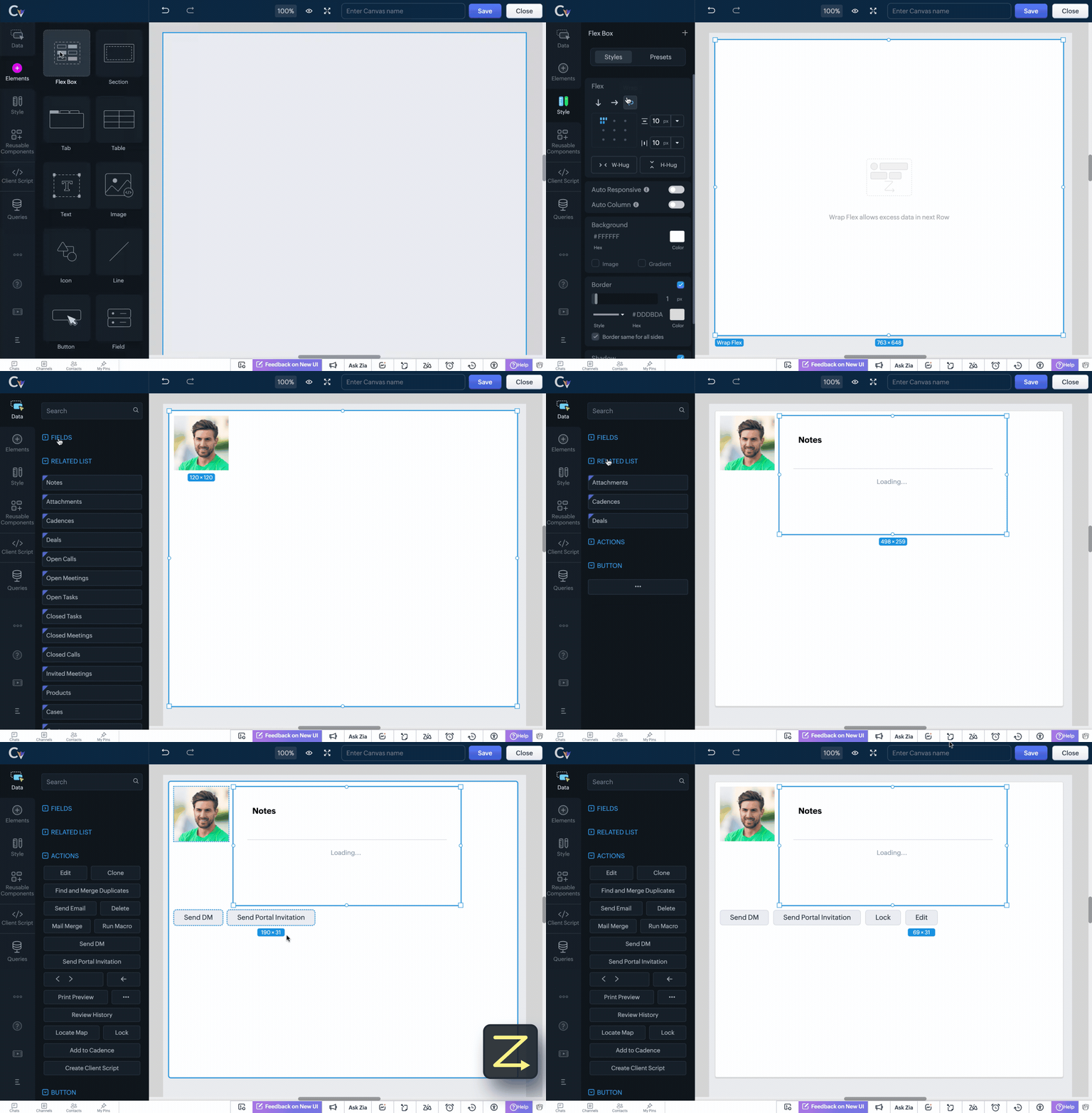
Flex Your Creativity – A New component to Canvas in Zoho CRM

Flex Your Creativity – A New component to Canvas in Zoho CRM

Hello Everyone

We’re excited to introduce Flex, a new component for Canvas in Zoho CRM! Flex is here to give you greater control over how your data is displayed in your layouts. This component enables responsive layouts that adapt across different screen sizes and devices, thus enhancing the end user's experience.

What can you do with Flex?

Adding the Flex component to your layout helps you create customizable and adaptive designs and improves data visualization and user interaction.

This component ensures that your canvas is designed optimally no matter the screen size.

Use a flex component when you want a layout that is :

  • Responsive : easily adapts to different screen sizes

  • Flexible : allows items to grow, shrink, or align dynamically

  • Centred : helps centre elements vertically or horizontally

  • Evenly Spaced : distributes items evenly within a component

  • Requires Row or Column layouts : makes arranging elements on rows or columns easy

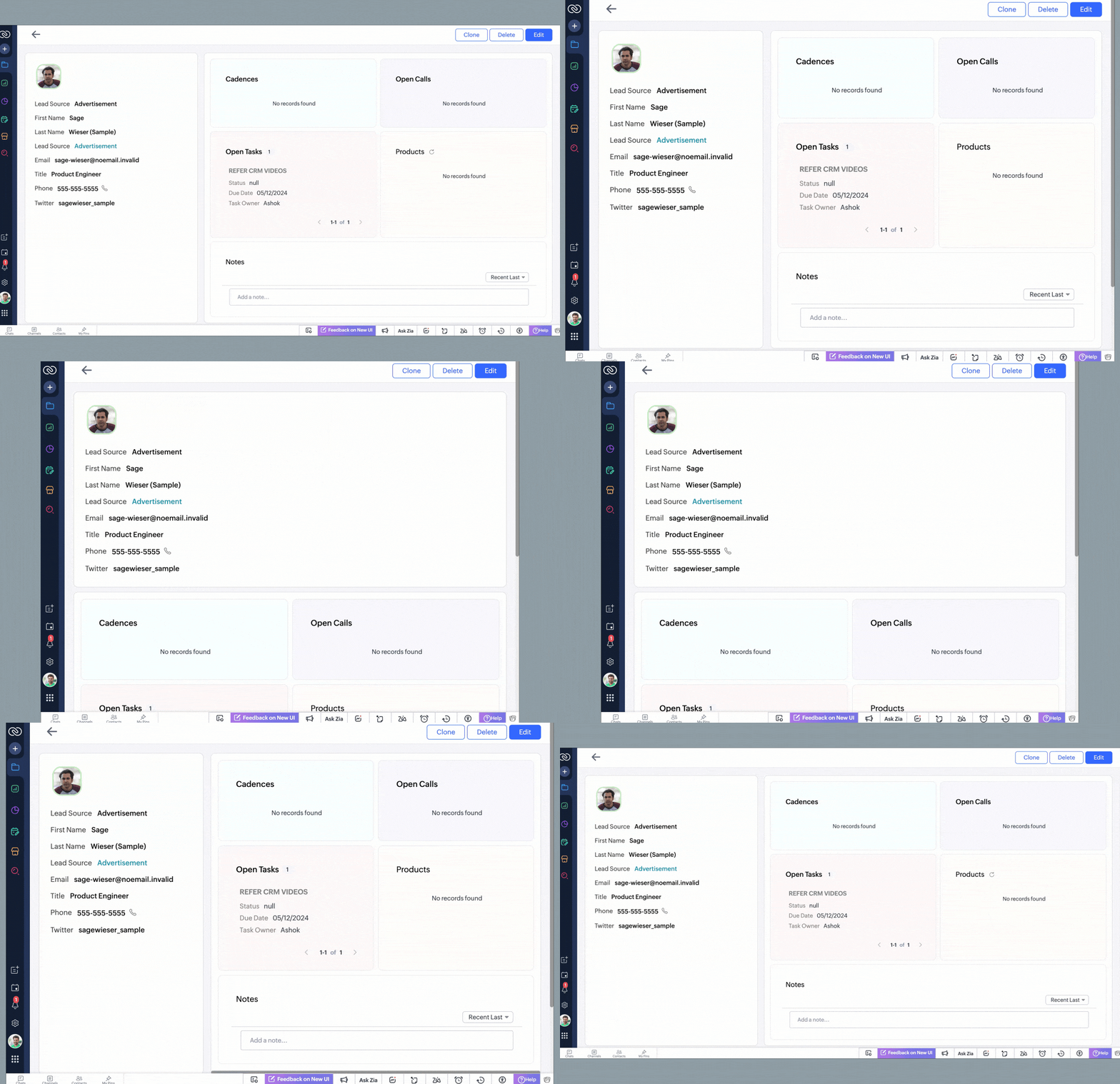
See below to understand how a record looks after using a canvas layout created with flex components that will automatically adjust as information is added to the interface.

Types of Flex components

There are three types of flex components that you can choose from to create your canvas layout depending on your requirement.

Vertical Flex 

Allow items to appear vertically (across columns) in the element. Use this flex to organize information sequentially, such as business cards or customer profiles. 


Horizontal Flex 

Allow items to appear horizontally (across rows) in the element. Use this flex for comparisons like performance metrics or sales pipeline.


Wrap Flex 

Let items be wrapped into the next line when the number of children items exceeds the parent flex element's width. Use this flex to create space-efficient layouts such as product catalogs or event listings.


How does Flex help achieve responsive layouts?

The Flex Component brings in essential tools that automatically adjust elements of a layout, ensuring a seamless user experience. These include:

Auto Responsive 

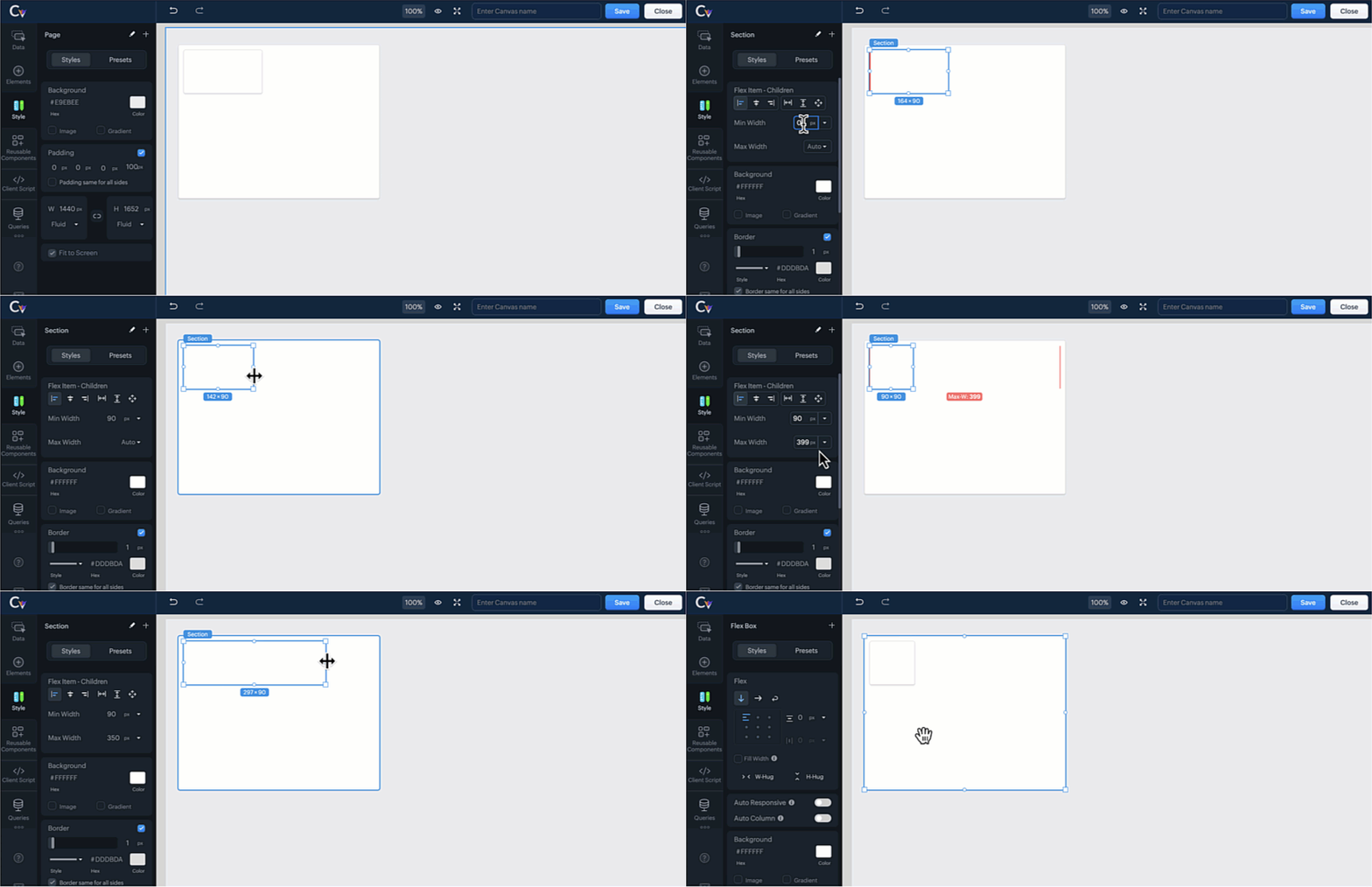
This tool can be used so that the flex component automatically adjusts horizontally or is stretched vertically based on the component size. This means that items within the component will reposition or resize, maintaining a default minimum width for all items in the component.


Auto Column 

With this tool, the flex component arranges items into rows based on column count. This prevents overlapping without the need for manual adjustments.


Minimum & Maximum Width for Items 

Control how elements expand or shrink within the layout, ensuring that important details remain visible and accessible.


NotesNote : You cannot select both auto responsive and auto columns tools for the selected component at the same time. Doing so will automatically deselect one of the options.

Advanced Flex Tools for Customization

Take full control over your CRM interface with these additional Flex Tools:

  • Flex Item Alignment - Align elements precisely within the layout for a polished and professional appearance.

  • Flex Item Gaps - Maintain consistency by adding uniform spacing between flex items, improving readability.

  • Flex Item Hug - Allow an element to shrink or expand based on content size, optimizing space usage.

  • Child Flex Items - Control how nested items behave within a flex component, improving adaptability.

  • Fill Width - Stretch components to occupy the full width of the vertical flex component for a seamless design.

  • Convert to Flex - Easily convert multiple elements into a flex component and save time and effort creating from scratch.

  • Replace with Section / Replace with Flex - Replace a flex component with a section or replace a section element with a flex component easily from the canvas builder without disrupting the layout's design.


This update empowers you to design seamless, engaging layouts that match your customers' unique needs. Try it out today and elevate your Canvas experience!

For more details, please comment below, and we will get back to you at the earliest.


    • Recent Topics

    • How to Migrate from MDaemon to Zoho Mail Account?

      Hi there, Zoho Mail is one of the most popular as well as leading competitor for several cloud email service providers. It is It provide cloud email service as well as desktop based email client. In recent years people are migrating from third party cloud servers to Zoho Mail. The reasons are plenty, i.e. the user interface, security, high performance and many countless amazing features. On the other hand MDaemon Mail (aka WorldClient) is also popular among cloud email servers. But there are some
    • Ask the Experts: A Live Q&A Session

      We’re back with another exciting edition of the Ask the Experts series, this time exclusively for our Zoho Recruit users from the USA & Canada regions! Whether you're trying to configure your account better, have questions about customization, or want
    • Tip #7: Customize the appointment confirmation page

      A confirmation page plays a crucial role in creating the first impression, as that's where customers land when booking with you. It shows your brand identity, engages your audience, and drives more conversions. Yet, this section is often overlooked when
    • Add Image Upload Field to Zoho Bookings Registration Form

      Hi, We would like to request the addition of an image upload field to the Zoho Bookings registration form. Currently, Zoho Bookings only supports text-based fields (e.g., Single Line, Multi-Line, Email, Checkbox, Dropdown, Radio Button, and Date), but
    • Meeting integration with Otter.ai

      Would love for an integration with an AI transcription service like Otter.ai to be integrated with Zoho Meeting. Thanks
    • [Free webinar] AI agents in Zoho Creator - Creator Tech Connect

      Hello everyone, We’re excited to invite you to another edition of the Creator Tech Connect webinar. About Creator Tech Connect The Creator Tech Connect series is a free monthly webinar featuring in-depth technical sessions designed for developers, administrators,
    • プロフェッショナルプランで、見積作成時に原価と利益率を確認する代替案について

      現在、Zoho CRMのプロフェッショナルプランを利用しています。 海外から輸入した商品を販売しており、商品ごとに原価が異なるため、見積書を作成する際(または保存直後)に、その見積の原価合計と利益率を確認したいと考えています。 しかし、現在のプランではDeluge(関数)が使えず、見積書の「商品詳細」の項目をカスタマイズすることもできません。 1,見積作成画面で商品の原価を参照できるような、標準機能での工夫はありますか? 2,レポート機能を使って、見積単位での原価・利益を算出する方法はありますか?
    • Announcing Zoho Sheet desktop app for macOS and Windows (Beta)

      Hello Sheet users, We know you’ve been waiting for this one. It has always been the top priority on our roadmap to provide a single native desktop app for macOS and Windows that works both online and offline. Today, we are excited to announce that the
    • Pasting Images in Zoho Desk ignores cursor location

      My team has reported an issue which started recently where when we paste an image into a new or existing reply or comment, the pasted image seems to ignore the current cursor location instead paste itself at the last character present in the reply/comment,
    • How to create a directory report from one-to-many relationship

      Hi all, Newbie here. I'm converting an Access DB to Creator. I've learned Forms are tables and Reports are used to edit table rows, not Forms. I've got the data loaded and can maintain it with the Reports already done. I've done filtering and sorting,
    • SalesIQ Email Delivery Issues to Microsoft

      Is anyone else having delivery issues to Hotmail, Outlook, and Live inboxes when sending transcripts and replies via email from SalesIQ? We’ve detected that emails sent from SalesIQ to these accounts aren't arriving—they don’t even bounce back; they simply
    • No Ability to Rename Record Template PDFs in SendMail Task

      As highlighted previously in this post, we still have to deal with the limitation of not being able to rename a record template when sent as a PDF using the SendMail Task. This creates unnecessary complexity for what should be a simple operation, and
    • Moving Project Task to other parent not possible

      We are trying to move an existing Zoho Projects task to a different parent task via API. Example: Task ID: 289214000001385113 Current parent: 289214000001281044 New parent: 289214000001281045 We tested updating the task with: taskParam.put("parent_task_id",
    • Best sales insights for target accounts?

      Question for all the sales power-users out there: I would like to gain insights from Zoho CRM for a rotating list of target accounts. Each Outside Salesperson has 5 target accounts, and they can change these targets quarterly with management approval.
    • Remove or hide default views

      I'm looking to only have the views pertinent to my organization. Is there a way to show only my custom views (or separate them to a different area or something)? If not, this should be a feature as switching from Zendesk we had this option...
    • Insert Template not inserting

      I have been using the "Insert Template" feature for years and I use it every single working day. Yesterday it was working fine. Today, on two different browsers (Chrome and Edge), I can select "Insert Template", select the template I want to insert, but
    • Add more than 7 sender addresses in campaigns

      I need to add at least 15 sender email addresses but am currently limited to 7. Please can you increase. Thank you
    • Email sent to Hotmail arrives to Spam

      I'm sending email tests to my Hotmail account and they arrives to the Spam folder all the time. My domain has been verified correctly. How can I fix it?
    • Hotmail

      I am sending an email to a hotmail, and this guy does not receive the email, either in his SPAM nor inbox. Can you help me? thanks!
    • Let’s Talk Recruit: Your pipeline is full. So why aren’t roles closing?

      Welcome back to Let’s Talk Recruit, where we break down hiring workflows into simple, actionable insights for recruiters. The focus this month is on what slows down your pipeline even when everything looks like it’s working. Picture this. You log in to
    • Search through email contents

      Is there a way to search through the email history of a lead? Meaning if among the 50 emails to a lead about different topics I want to find all the ones with the word "pizza" in the body of the email, is that possible? Thanks for your help, Hanan
    • Marketing Tip #9: Track your traffic sources

      Not all marketing channels work equally well. Knowing whether your visitors come from Google, Instagram, or email helps you focus on what actually drives sales. Try this today: Check your Zoho Commerce reports or connect Zoho PageSense to see your top
    • It Really Can Be This Simple

      Let's be honest.... Running a business already comes with enough moving parts. Invoices, payments, follow-ups, reminders, tracking who paid and who disappeared. It can slowly turn into a full-time admin job on its own, especially when you are a Sole Proprietor,
    • Huge confusion in zoho crm and zoho analytics

      Context => We have reporting based hierarchy in zoho crm and basically there will be one sales head and couple sales managers and 10 pre sales excutives divided between 2 sales managers we have maintained that in zoho crm and there is complex reporting
    • Zoho Books | Product updates | May 2026

      Hello users, We're back with the latest updates and enhancements we've rolled out in Zoho Books. From sales tax automation to scanning receipts for free, explore the updates designed to upgrade your bookkeeping experience. Sales Tax Automation [US & Canada
    • Update: [Issue fixed] Temporary access issue on Android and iOS devices

      Hello, Zoho Sheet users! We're aware that some of you are currently unable to open spreadsheet files from your Android and iOS devices. We extend our sincere apologies for the inconvenience caused. We're working on fixing the issue with highest priority
    • Action Required: Migrate Your SQL Server Connection

      Dear Users, Following our earlier communication on the upcoming Zoho Analytics security updates affecting Microsoft SQL Server connections, we have revised our recommended approach. The previously shared cipher suite configuration is no longer the recommended
    • Currency Change for Companies

      Hello FSM Team, We would like your assistance in changing the company currency for our UAE organization from AED to USD. Currently, all customers and users are configured with AED currency settings, and we would like to standardize the organization currency
    • Accrual Data - Zoho Books API

      Hi Team, When we integrate Zoho Books with Zoho Analytics, we usually receive a consolidated dataset called “Accrual Transactions,” which contains all types of transaction data. Could you please confirm whether it is possible to retrieve this same data
    • Bank Fees - Allow User to Choose Expense Account

      Bank fees from Customer Payments can only be debited against the system Bank Fees account due to hard-coding. The user should be able to select which expense account those fees are debited against. The use case is pretty straightforward. A business like
    • Showing Cost Price and Profit Margin in PDF

      Hi there, We use two different types of quotes in our company. One is a version for our clients that does not include cost or profit margin information, and the other is for our internal team that includes profit margin and cost. We are running into an
    • Side bar menu

      It would be great if you could stop the auto collapse of expanded menus when selecting a different module. It would save a lot of mouse clicks for a lot of users that frequently switch between sales & purchases as we do, it's easier to collapse them manually when not required !
    • Syncing zoho books into zoho crm

      I was wondering how I can use zoho books in crm as I have been using them separately and would like to sync the two. Is this possible and if so, how? Thanks
    • Remove horizontal scroll bar

      Is there any way to remove or hide the horizontal scroll bars on the iframe reports? I removed columns, but it still stays there.
    • Rich Text Type Format for Notes Field

      Has it been discussed or is there a way to insert a table in the notes field? We sometimes receive information in a table format, and it would be beneficial to have it in the same format as a note on a record. Moderation Update (12-May-26): We are working
    • Multiple Blueprints on different fields at the same time.

      It looks only 1 Blueprint can run at the same time, it makes sense for many Blueprints on the same field (Eg. Stage). But what about multiple Blueprints on "different" fields? the multiple options must be available. (Eg. Stage, Documents Status, Contract
    • Updating Sales orders on hold

      Surely updating irrelevant fields such as shipping date should be allowed when sales orders are awaiting back orders? Maybe the PO is going to be late arriving so we have to change the shipment date of the Sales order ! Not even allowed through the api - {"code":36014,"message":"Sales orders that have been shipped or on hold cannot be updated."}
    • sales IQ issue on website

      i integrated the zoho sales IQ code on the website but it is comming in distroted form i am sharing the screenshot below the website is bulit in wix platform
    • Contract to payment flow

      Hi everyone, I’m trying to set up a contract-to-payment flow and want to avoid duplicating invoices or customers in Zoho Books. The flow should be: contract generated from CRM, sent via Zoho Sign, client signs, deposit is paid, and the invoice should
    • Automated entries past the current month in a calendar report

      Hi all, I have an automation problem. I have a form which on successfull entry adds either 5 or 10 more of these entries with a slight change so our customers can see it throug a calendar report on the webiste. The entry put in manually shows up perfectly
    • Next Page