Integrating Custom Zia Agents with Bigin

Integrating Custom Zia Agents with Bigin

Hello Biginners!

With the introduction of Zoho's Zia Agents, automation in Bigin has moved beyond predefined rules into something much more dynamic and intelligent. Instead of building rigid workflows, you can now create custom Zia Agents that understand context, process instructions, and perform actions across your applications.

Using Agent Studio, you can construct these custom Zia agents to handle specific business needs such as responding to leads, updating CRM records, or executing communication workflows on behalf of Bigin users.

What You'll Learn in This Post 

In this post, we'll cover:
  1. Real-world scenario
  2. Deploying a custom Zia Agent
  3. Understanding the Agent API
  4. Triggering the agent using Zoho Flow
  5. Setting up required connections in Flow
  6. Implementing a custom function for Agent API
  7. Understanding the function workflow
  8. Integrating Bigin with the agent via Flow
  9. Testing the integration flow

How the Custom Zia Agent Integration Works

Before we begin, here’s a simple flow diagram showing how a custom Zia Agent connects with Bigin through Zoho Flow to automatically handle new contacts and send personalized welcome emails.

Real-world Scenario

To understand how this works in implementation, let's consider a common use case in Bigin:

Let's say you use Agent Studio to build a custom Zia Agent called Auto-Reply Agent for Leads. This agent is set up to generate and send a personalized email automatically whenever a new lead (contact) is created.

Info
For detailed instructions on how to create and configure agents, refer to the Creating Agents guide.


In most sales workflows, when a new contact is created, the next step is to acknowledge the lead with a quick response—something that's often done manually or through predefined workflows using generic email messages.

With Auto-Reply Agent for Leads, we can now take this a step further by integrating it with Bigin so that the entire process happens automatically with personalized email messages.

Now that the Auto-Reply Agent is ready, the next step is to deploy the agent and make it available for integration.

Watch the Integration in Action 

Before we begin the implementation, here's a quick demo of the complete configuration in action. It covers from deploying a custom Zia agent to generating and sending a personalized welcome email.

Deploying a Custom Zia Agent 

Zia's Agent Studio provides two ways to deploy a Zia Agent, depending on how you want to use it. One way is to deploy it as a digital employee, which allows the agent to act as in-app assistant within Zoho apps. The other way is to deploy it as a connection, where the agent is exposed via an API endpoint.

In this scenario, we deploy the agent as a connection because we want it to be triggered automatically whenever a new contact is created in Bigin. By deploying it as a connection, we can use the agent's API and integrate it with Zoho Flow to handle the automation seamlessly.

To deploy the agent, navigate to the Deploy dropdown button in Zia's Agent Studio configuration page and select Deploy using connection.

In the Tools Param Mapping sliding panel, review the configured parameters. Modify these settings if required, and then click Next to proceed.

Next, choose an existing connection from the dropdown or click New to create a new connection for the required service.


Follow the prompts to authorize the connection. Once completed, the agent will be successfully deployed and ready to be triggered via its API.

Understanding the Agent API

Let's now review the Agent API details by navigating to Integrate > Agent API. These details are essential for integrating the agent with your automation.


The deployed agent exposes an Agent API endpoint that allows you to send instructions along with contextual data.

Endpoint:
  • https://agents.zoho.com/ziaagents/api/v1/agents/3989000000030001/trigger
Method: POST

Authentication: OAuth

Headers:
  • {
          "X-ZIAAGENTS-ORG": "903723720",
          "X-ZIAAGENTS-AGENT-SESSION-ID": "",
          "Authorization": "Zoho-oauthtoken <token>"
    }
Request body:
  • {
          "query": "",
          "reasoning": false,
          "attachments": [
                ""
          ],
          "systemArgs": {}
    }
At a higher level, this API works like this:
  1. We send a prompt as a query, which tells the agent what to do.
  2. We pass the contact ID through systemArgs, so the agent can fetch full details from Bigin.
  3. The agent processes the request and performs the action.
In our use case, the action is generating and sending a personalized welcome email.

To ensure the request is routed correctly and securely, the Agent API provides the following headers:
  1. X-ZIAAGENTS-ORG - Identifies the Zia Agent Organization.
  2. X-ZIAAGENTS-AGENT-SESSION-ID - Helps track execution sessions.
  3. Authorization - Provides OAuth token for secure access.
Optionally, we can also use X-ZIAAGENTS-AGENT-ID to specify which agent to trigger.

Triggering the agent using Zoho Flow 

Now that the agent is deployed, the next step is to trigger it automatically whenever a new contact is created in Bigin.

To achieve this, we use Zoho Flow to build the automation.

Setting up the connections

Before building the flow, we need to configure the required connections to ensure that data can be fetched from Bigin and the Zia Agent can be triggered securely.

The Bigin connection is used to fetch details of the newly created contact. Since Bigin is available as a default server in Zoho Flow, this connection can be created directly while configuring the trigger.

To set up a Bigin connection, go to Settings > Connections in Zoho Flow. Click on Create Connection, then select Bigin from the list. Provide a name of your choice for the connection and click Authorize to complete the setup.

Ensure the connection has the Contact Created trigger access while authorizing the connection:


This allows the flow to access contact data and pass it to the custom function.

The Zia Agent is not available as a default service in Zoho Flow, so we must create a custom connection using an Auth Profile.

This connection is used to authenticate and trigger the agent via its API.

To configure this, we create an OAuth2-based Auth Profile using client credentials obtained from the Zoho API console.

First, navigate to the Zoho API Console and register a server-side application. While registering, use the redirect URI:

https://flow.zoho.com/oAuth/callback

Once the client is created, you'll receive the Client ID and Client Secret, which are required to set up the Auth Profile in Zoho Flow.


In Zoho Flow, go to Settings > Auth Profiles and click Create to add a new authentication profile. Choose OAuth v2 as the authentication method, then enter a name of your choice for the auth profile.

Once done, do the following:
  1. Provide the Client ID and Client Secret from the Zoho API Console.
  2. Provide the Authorization URL, Access Token URL, and Refresh Token URL. For details, refer to the Zoho Accounts API documentation.
  3. Set the scope as: ZiaAgents.agents.TRIGGER.
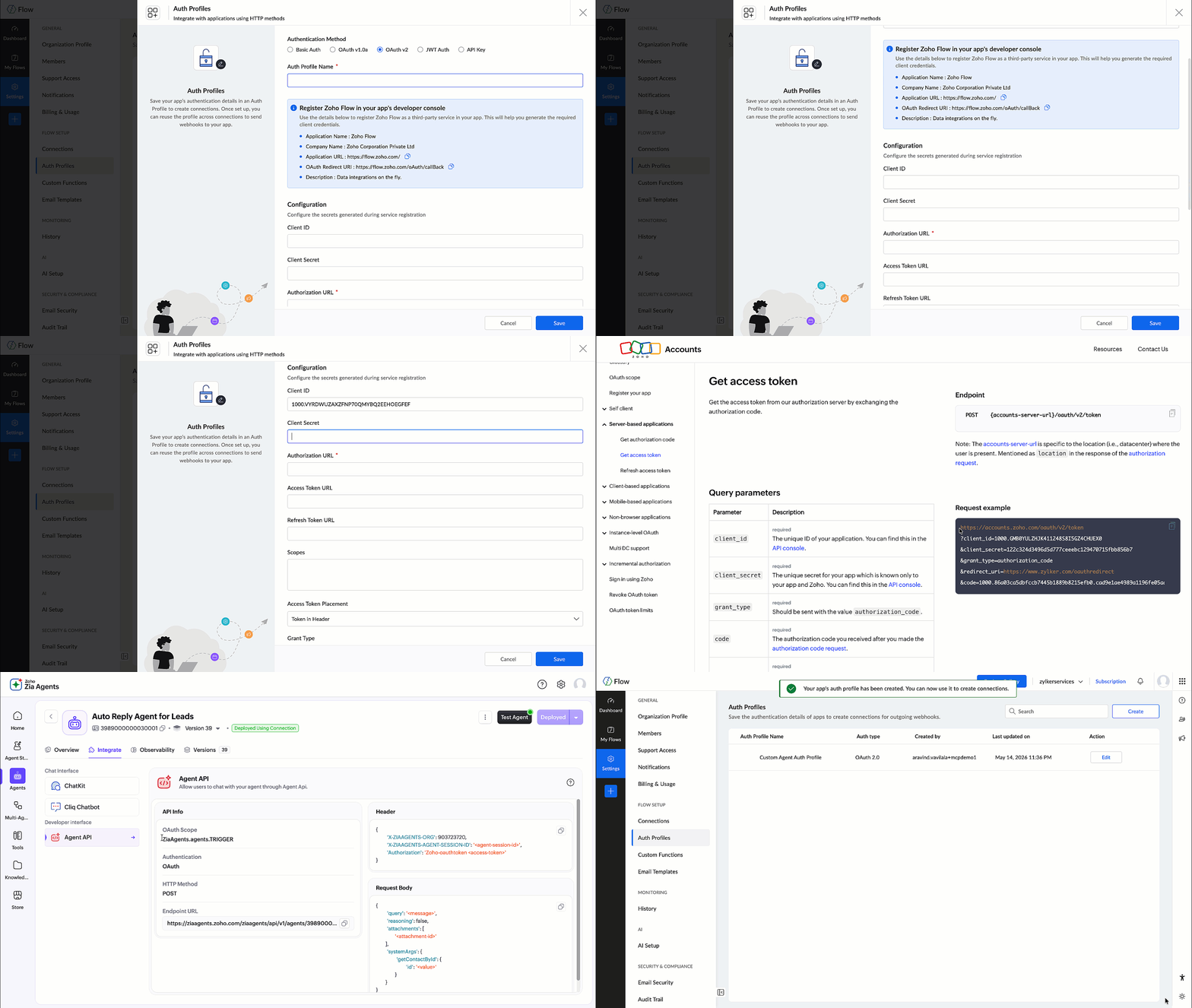

Using OAuth ensures that the connection remains active and secure, without relying on access tokens that expire frequently.

This Auth Profile is then used to create the Zia Agent connection.


Once the connection is created, it's used in the custom function during the API call:
  • connection:"ziaagentconnection"
This allows the function to invoke the Zia Agent API securely.

Implementing the custom function

In Zoho Flow, navigate to Settings > Custom Functions and click Create Custom Function.

Provide a function name and set the return type as void, since this function is only used to trigger the agent. Add an input parameter named id with the type string, which represents the contact ID from Bigin.


Once created, the Deluge editor will open where you can define the function logic as shown below:

  • void trigger_lead_auto_reply(string id)
    {

          // Instruct the agent to fetch contact and send welcome email
          query = "New lead added. Send a short, friendly welcome email to the newly created contact based on auto-reply-agent-skill instructions.";

          // Build request body
          body = Map();
          body.put("query",query);
          body.put("reasoning",false);
          body.put("attachments",List());

          // Pass the contact ID nested under the tool name — required for agent to extract it
          recordInfo = Map();
          recordInfo.put("id",id);
          sysArgs = Map();
          sysArgs.put("ContactId",recordInfo);
          body.put("systemArgs",sysArgs);

          // Headers
          headers = Map();
          headers.put("X-ZIAAGENTS-ORG","111860686");
          headers.put("X-ZIAAGENTS-AGENT-ID","2307000000029001");
          headers.put("X-ZIAAGENTS-AGENT-SESSION-ID","10000");
          headers.put("Content-Type","application/json");
          
          // Trigger the agent — fire and forget, no return needed
          response = invokeurl
          [
                url :"https://agents.zoho.com/ziaagents/api/v1/agents/2307000000029001/trigger"
                type :POST
                body:body.toString()
                headers:headers
                connection:"ziaagentconnection1"
          ];
          info response;
    }

How this custom function works

This function acts as the bridge between Bigin and the Zia Agent API, constructs the API request, sends it to the agent, and triggers the required action.

Let's understand how it works step by step.

A. Defining the instruction (query)
  • query = "New lead added. Send a short, friendly welcome email ..."
This is the instruction sent to the agent. It tells the agent what action needs to be performed and how the response should be generated.

B. Building the request body
  • body = Map();
    body.put("query",query);
    body.put("reasoning",false);
    body.put("attachments",List())
Here we construct the request body based on the Agent API format:
  1. query: defines the task
  2. reasoning: disabled to keep the response concise
  3. attachments: not used in this scenario 
C. Passing contact context using systemArgs
  • recordInfo = Map();
    recordInfo.put("id",id);
    sysArgs = Map();
    sysArgs.put("ContactId",recordInfo);
    body.put("systemArgs",sysArgs)
Instead of passing all contact details, we pass only the contact ID.

The agent uses this ID to fetch complete contact information from Bigin. This ensures that the agent works with latest data without increasing the request payload.
 
D. Setting headers
  • headers = Map();
    headers.put("X-ZIAAGENTS-ORG","111860686");
    headers.put("X-ZIAAGENTS-AGENT-ID","2307000000029001");
    headers.put("X-ZIAAGENTS-AGENT-SESSION-ID","10000");
    headers.put("Content-Type","application/json");
These headers help identify the organization and the specific agent being triggered.

X-ZIAAGENTS-AGENT-ID is the agent's unique identifier. You can find it on the agent's overview page in Agent Studio.

X-ZIAAGENTS-AGENT-SESSION-ID is the session ID, which you can define per your preference.
 
Authentication is handled through the configured connection in the function.
 
E. Triggering the Agent API
response = invokeurl
  • [
          url :"https://agents.zoho.com/ziaagents/api/v1/agents/2307000000029001/trigger"
          type :POST
          body:body.toString()
          headers:headers
          connection:"ziaagentconnection1"
    ];
This is where the API call is made.

At this stage:
  1. The request is sent to the Zia Agent.
  2. The agent processes the query.
  3. It fetches the contact details using the provided ID.
  4. It generates and sends the personalized welcome email.

Integrating Bigin with Custom Function 

Once the connections and custom function is set up, the next step is to configure the flow.

Create a new flow in Zoho Flow and define the following:
  1. Trigger: Select Bigin and choose the event Contact Created.
  2. Action: Add the Custom Function created earlier.
Map the required input parameter:
  1. Pass the Contact ID from the Bigin trigger to the function input parameter id.
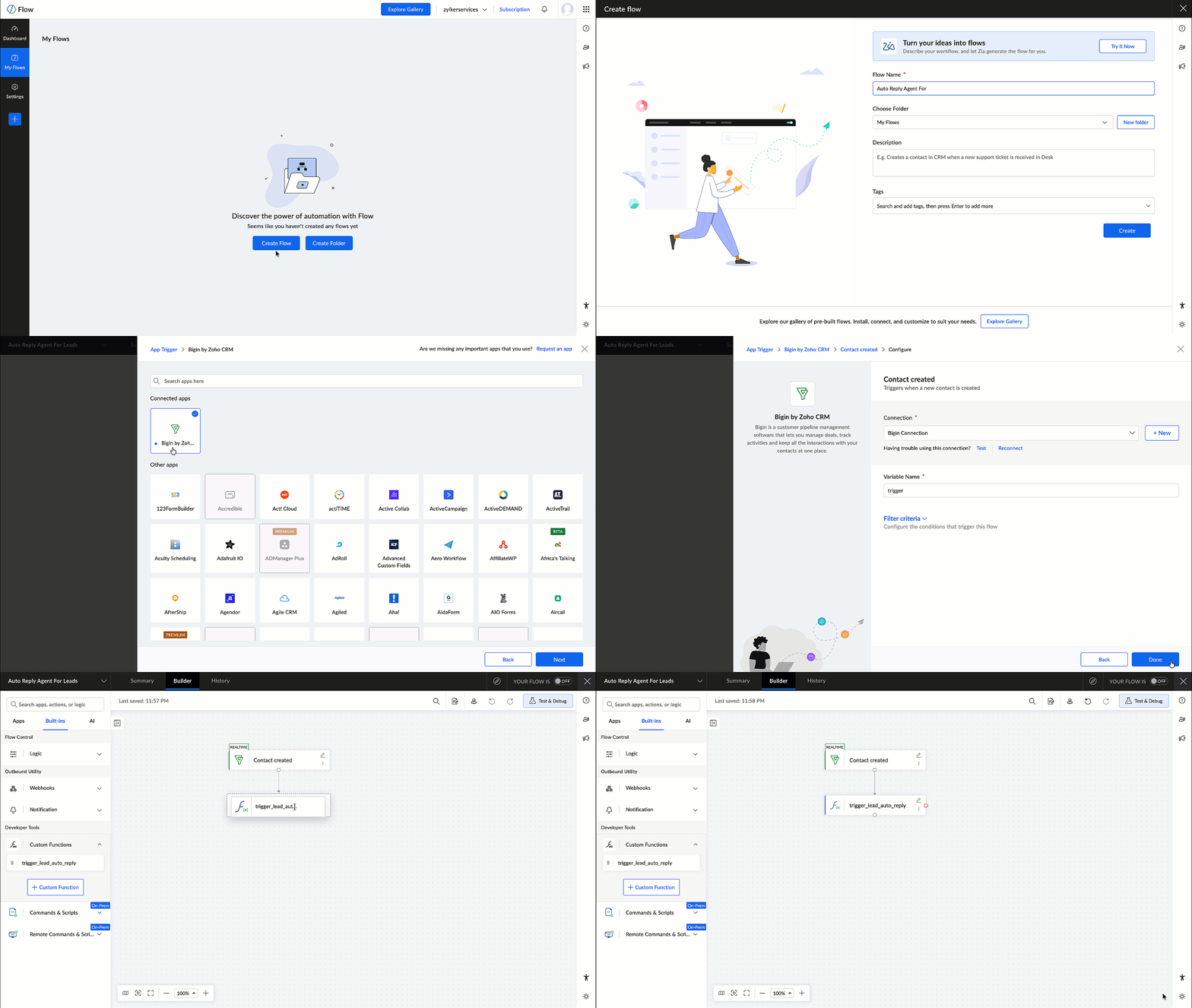

This ensures that wherever a new contact is created in Bigin, the flow is triggered and the contact ID is passed to the custom function, which in turn invokes the Zia Agent.

Testing the Flow

After configuring the flow, it's important to test the setup to ensure everything works as expected.

Create a test contact in Bigin and verify the following:
  1. The flow is triggered successfully.
  2. The custom function is executed.
  3. The Zia Agent is invoked.
  4. A welcome email is generated and sent to the contact.
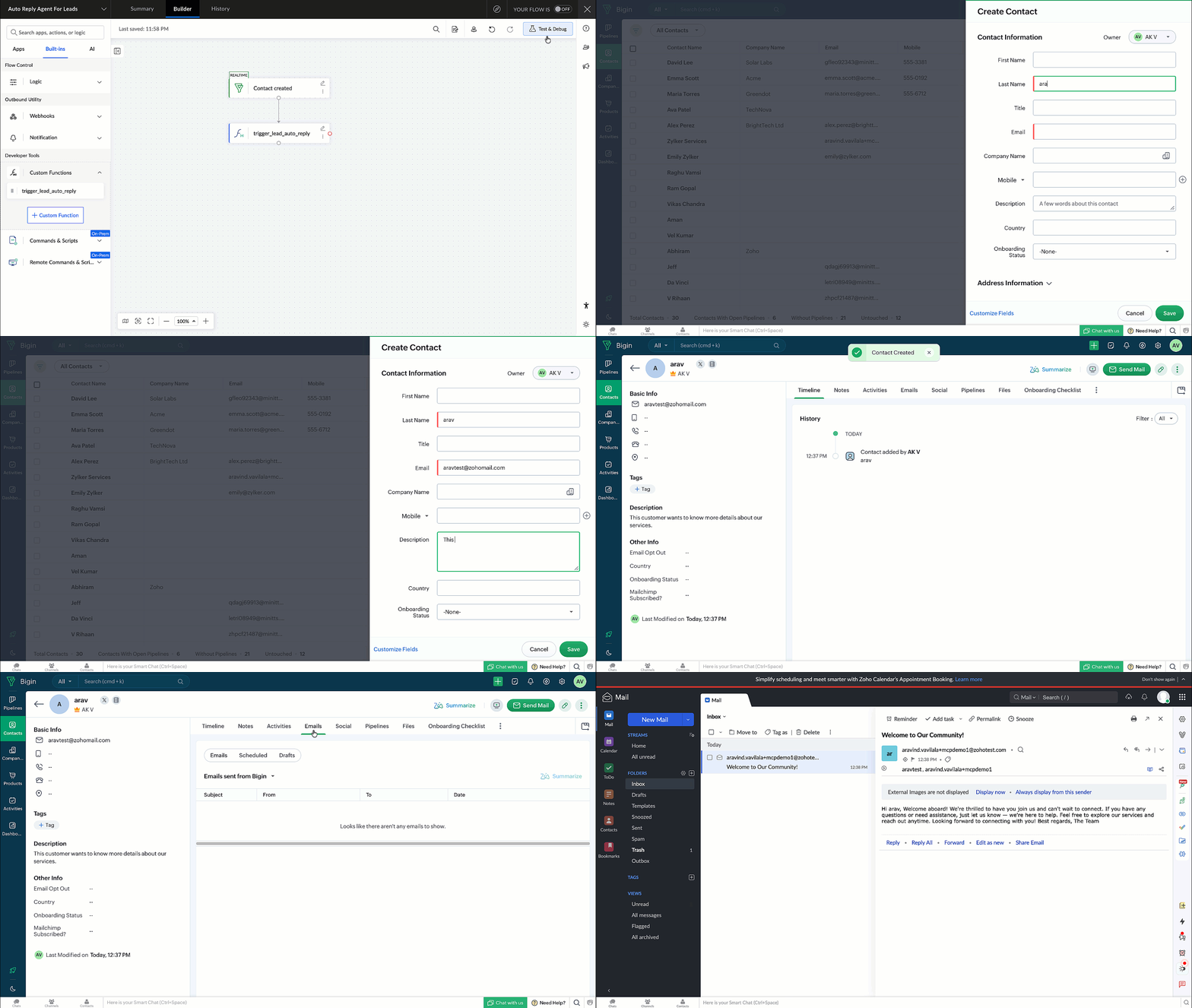

Once verified, the flow can be enabled for real-time execution.

In this post, we explored how to deploy and integrate a custom Zia Agent with Bigin using Zoho Flow.

This approach enables you to move beyond predefined workflows and build intelligent, automated communication systems using Zia Agents.

    • Recent Topics

    • #12 Never Leave a Billable Hour Behind

      A client approves a website redesign project. The estimated effort? 40 hours. The project is going well. A few additional review meetings are scheduled. Several rounds of content changes are requested. A few "quick fixes" get added along the way. The
    • Close task on Completion Date entry

      This discussion is similar to my issue: "backdated-task-completion-date" discussion Scenario: A bunch of tasks have been completed. But, they have not been closed. Time goes by You finally get around to closing those tasks Projects assigns the date the
    • Can I add Conditional merge tags on my Templates?

      Hi I was wondering if I can use Conditional Mail Merge tags inside my Email templates/Quotes etc within the CRM? In spanish and in our business we use gender and academic degree salutations , ie: Dr., Dra., Sr., Srta., so the beginning of an email / letter
    • Records from ATE 29: Knowledge Base, Community, and AI for smarter User Education

      Hi Everyone, "Ask the Experts 29" was an engaging session, where we explored how to utilize the Knowledge Base for customers and internal teams, as well as emphasizing the importance of our Community. This post highlights the questions and use cases discussed,
    • Deleted User Emails

      I need to delete a user as I need to re-use their license, but I'd like to keep all their emails that are attached to various contacts in the CRM. Their emails are hosted externally on an M365 license. Anyone any idea how best to engineer this? TIA
    • Its 2022, can our customers log into CRM on their mobiles? Zoho Response: Maybe Later

      I am a long time Zoho CRM user. I have just started using the client portal feature. On the plus side I have found it very fast and very easy (for someone used to the CRM config) to set up a subset of module views that make a potentially extremely useful
    • Zoho CRM upload files error

      Since today, we have been experiencing issues with uploading photos to opportunities. The message indicates that the storage is full, but as far as I can see, there is still plenty of space available. Could there be an issue or a bug?
    • Kaizen #246 - Incoming Lead Email Intent Detection using Zia Assistant API in Zoho CRM

      Hello all! Welcome back to a fresh Kaizen week. In this post, we will explore how Zia detects positive intent from incoming emails in the Leads module using the Zia Assistant API along with Workflow Rules and Custom Functions in Zoho CRM. Use Case Problem
    • Smart URL Determination

      I would like to see Vault implement some sort of "smart" URL determination. When one starts to add a new username-password combination from a new site, Vault brings in the exact URL of the page from which this is happening. All too often, it looks something
    • Removing To or CC Addresses from Desk Ticket

      I was hoping i could find a way to remove unnecessary email addresses from tickets submitted via email. For example, a customer may email the support address AND others who are in the helpdesk notification group, in either the TO or CC address. This results
    • Tip #76- Exploring Technician Console: Quick Launch- 'Insider Insights'

      Hello Zoho Assist Community! Welcome back to our Technician Console series. Last time we explored Power Options, and this time we are turning the spotlight on a feature that quietly saves you dozens of clicks in every session by getting you exactly where
    • Partner with HDFC And Sbi Bank.

      Hdfc and sbi both are very popular bank if zoho books become partner with this banks then many of the zoho books users will benefit premium features of partnered banks.
    • Multi-Book Accounting Support in Zoho Books

      Currently, businesses that operate multiple entities, regions, or divisions need to maintain separate Zoho Books instances or resort to manual consolidation processes. This creates significant operational friction and increases the risk of errors. PROBLEM:
    • Automated Multi-Subsidiary Consolidation Engine in Zoho Books

      For organizations managing multiple subsidiaries across different geographies or business units, consolidation is a quarterly/annual nightmare. Zoho Books lacks native consolidation tools, forcing companies to export data, manipulate it in Excel, and
    • Zoho Books | Product updates | April 2026

      Hello users, Welcome to our April 2026 product updates roundup! Highlights include profit margin for sales transactions, insights in reports, recording deposits from undeposited funds in banking, and faster production workflows with improved assembly
    • Unable to charge GST on shipping/packing & Forwarding charges in INDIA

      Currently, tax rates only apply to items. It does not apply tax to any shipping or packing & forwarding charges that may be on the order as well. However, these charges are taxable under GST in India. Please add the ability to apply tax to these charges.
    • How to add packing & forwarding charge in purchase order & quotation???

      Hello Zoho Team I have just started using Zoho for my company and I wanted to make purchase order. My supplier charges fix 2% as packing & forwarding on Total amount of material and then they charge me tax. For example, Material 1 = 100 Rs Material 2
    • How to book GST paid in zoho books

      hi, i am a new user to Zoho books and not able to book GST paid in books, kindly suggest how i can book it in books. thanks, siddharth
    • [Bug] WebAuthn passkey registration blocked on rpIds with TLDs longer than 6 characters (.accountant, .technology, etc.) — isValidDomain regex too strict

      Hi, Filing on behalf of an enterprise customer where Zoho Vault is deployed across the company. The Chrome extension blocks WebAuthn passkey registration on legitimate sites whose Relying Party ID (rpId) has a TLD longer than 6 letters. This affects every
    • Zoho Payroll: Product Updates - H1, 2026

      Over the last few months, Zoho Payroll has added updates that make payroll easier to process, review, explain, and manage for businesses. The most important improvements focus on payroll flexibility, gratuity tracking, employee self-service, reporting,
    • Pushover Notification Module

      Hello, it would be good if there would be a "Pushover" (https://pushover.net/) module besides the standard SMS module. Pushover is now very well known, especially in IT, and is becoming more and more popular. The biggest advantage are the customizable
    • E-Mail Blacklist via GUI

      Hello, It would be helpful if the GUI included an option to block specific email addresses (both incoming and outgoing). I want a setting where I can completely block certain email addresses. This means that no tickets can be opened from those addresses,
    • How to migrate cpanel mail to new zoho mail?

      Hi, I have a client whose email (for his website domain) is currently on "cpanel mail". Now client wants to move to Zoho Mail. I checked migration docs and its mentioned that I can migrate using IMAP or POP but I am not getting exactly what steps should I follow in order to achieve this. As soon I will add clients domain and setup MX Records and SPF for that, I will lose access to currently setup email (cpanel mail) and without adding domain in zoho mail, I can't setup email for that. Sorry if I
    • SalesIQ Integration with LINE: API Rate Limit Issue and Pre-Chat Flow Concerns

      Hello SalesIQ Developer Team. I have investigated the issue and found that the LINE Rate Limit is being consumed unusually quickly. LINE API free usage limit: 300 messages per month per brand. This limit will be reached within the first few days. 1. LINE
    • What's New in Zoho Inventory | April & May 2026

      Hello users, We're excited to roll out the latest Zoho Inventory updates for April and May 2026. These enhancements are designed to make your daily operations smoother and more efficient, from advanced inventory management and flexible pricing to automated
    • How to Backup Zoho to PST?

      I'm looking for a simple way to backup Zoho Mail emails to PST format. I tried the IMAP method with Outlook, but it seems slow and complicated for large mailboxes. I need a solution that can: Export Zoho emails to PST Preserve attachments and folder hierarchy
    • Warehouse -> Locations Transition Causing Errors

      After saying "okay" to the transition from 'warehouses' to 'locations', I've now got shipped Sales Orders that I cannot invoice. How does one proceed?
    • Zoho CRM Community Digest - May 2026 | Part 1

      Hello Everyone! This edition introduces the new centralized Zoho Announcements Hub, a single dashboard designed to let you track and filter live product roll-outs from across the Zoho ecosystem. Alongside the Announcements Hub, this month also features
    • SalesIQ : How to disable markdown autoformatting?

      Hello Is there setting to disable "Markdown Text" this feature and enter raw markdown in plain text only format it after you send the message? Thanks
    • Converting XML to JSON

      Hi! I need to convert a variable in XML to JSON. Can i do it without using an API on deluge? I looked into the documentation but couldn't get any answers to this. Thank you in advance!
    • 元問い合わせメールに返信したときの統合処理

      ワークフロー作成したので備忘録です。 Zoho Desk で作成したメールアドレス宛てに既存のメールアドレスにきた問合せ先メールを転送してチケット作成を行っています。 元の問い合わせメールに返信、転送した際にRe,RE,re,Fw,FW,fwが件名の頭に付くため、その度に新規起票が乱立します。 メールの頭にRe,RE,re,Fw,FW,fwがある時それを除いた件名と同じ件名が既にチケット作成されていれば統合するワークフローを作成しました。 条件が緩いので既存チケットの検索で完了済みや5日以上前に作成したものは除いてもいいとは思います。
    • Marketing Automation Demo Video

      I would like to see a video demo for Marketing Automation.  Do you have one statashed away somewhere?
    • is it possible to add more than one Whatsapp Phone Number to be integrated to Zoho CRM?

      so I have successfully added one Whatsapp number like this from this User Interface it seems I can't add a new Whatsapp Number. I need to add a new Whatsapp Number so I can control the lead assignment if a chat sent to Whatsapp Phone Number 1 then assign
    • Supervisor Rules --> Custom Function

      Hello, currently I can't add a custom function to a supervise rule. Is there a reason for this? Background: We have BluePrint managed tickets and actually we have a Supervise rule which should set the ticket to "closed" after 168 hours since the last
    • Automate Backups

      This is a feature request. Consider adding an auto backup feature. Where when you turn it on, it will auto backup on the 15-day schedule. For additional consideration, allow for the export of module data via API calls. Thank you for your consideration.
    • How to record GST amount for Value of Service on Inward remittance charged by bank

      Hi please advice I have a situation.    1. I have HDFC bank account 2. I have a customer who has done inward remittance for purcahses from overseas. 3. HDFC is showing Value of Service say $100 and GST @ 18%. 4. Value of Service is not charged. But  CGST
    • Sort by Project Name?

      How the heck do you sort by project name in the task list views??? Seems like this should be a no-brainer?
    • Project Statuses

      Hi All, We have projects that sometimes may not make it through to completion. As such, they were being marked as "Cancelled". I noticed that these projects still show as "Active" though which seems counter intuitive. In fact, the only way I can get them
    • I have a requirement to integrate Zoho Books with Zoho Projects at both project and task levels.

      Currently, when i create transactions in Zoho Books (Expenses, Invoices, Bills), we can only map them at the project level. However, our requirement is to: Map records at both project and task levels Sync these transactions back to Zoho Projects under
    • What’s New in Zoho Inventory — Latest Features, Integrations & Updates | December 2025

      Zoho Inventory has evolved significantly over the past months, bringing you smarter, faster, and more connected tools to streamline your operations. Whether you’re managing multichannel sales, complex fulfillment workflows, or fast-moving stock, our newest
    • Next Page