Introducing Configure, Price, Quote (CPQ) in Zoho CRM | Public early access 2023

Introducing Configure, Price, Quote (CPQ) in Zoho CRM | Public early access 2023

Greetings Customers!

We're excited to announce that the CPQ feature will soon be available in Zoho CRM and accessible to all accounts using the Professional, Enterprise, and Ultimate editions. We've opened this feature to select customers, and it'll be available to all within a week. As we move ahead, you can expect further enhancements and added functionalities.

Please note that while the CPQ feature will be enabled to all customers, one of its components, called Guided Selling, will be available upon request. Guided Selling is a holistic way of filtering the product selection to meet the customer's requirements. It presents a series of product-specific questions and narrows down a list of products based on the user's responses. 

-------------EDIT As on 17/10/2023--------
Guided Selling in CPQ, which was available on Request-based Early Access, has now been released to all eligible users across DCs. Guided Selling is as accessible as other features in CPQ. Please learn more about Guided Selling from here: https://help.zoho.com/portal/en/kb/crm/cpq/articles/guided-selling
-------------------------------------------------------

What is Configure, Price, Quote (CPQ)?

CPQ is a sales tool that helps you share customized and accurate quotes with customers in just a few clicks. Pre-configure product combinations and price rules and create bespoke quotes, along with applicable taxes and discounts. This is a transformative tool for businesses with multiple product lines. Please note that currently, the CPQ feature only supports Zoho CRM's native inventory modules.

How to access CPQ in Zoho CRM

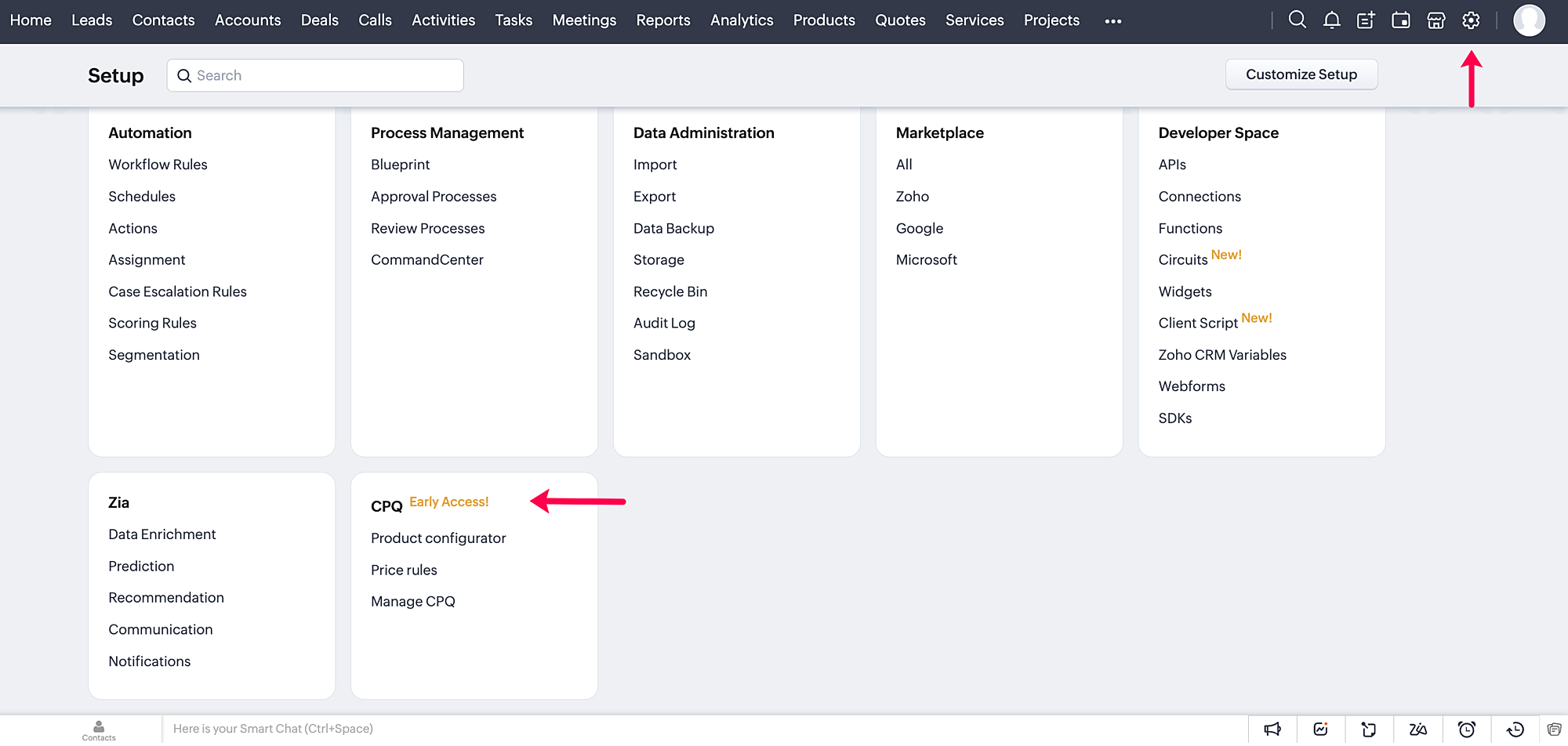
Click on the gear icon in the top-right corner of your Zoho CRM account. On the Setup page, you can access your CPQ settings and configure your product and price rules.

How does CPQ in Zoho CRM work?

CPQ centralizes the pricing and product inclusions in quotes salespeople generate, allowing them to sell more quickly and efficiently. In addition to Zoho CRM's built-in inventory management, CPQ expedites quote creation and enhances the customer's purchase journey. The two building blocks of the CPQ solution are the Product Configurator and Price Rules.
 
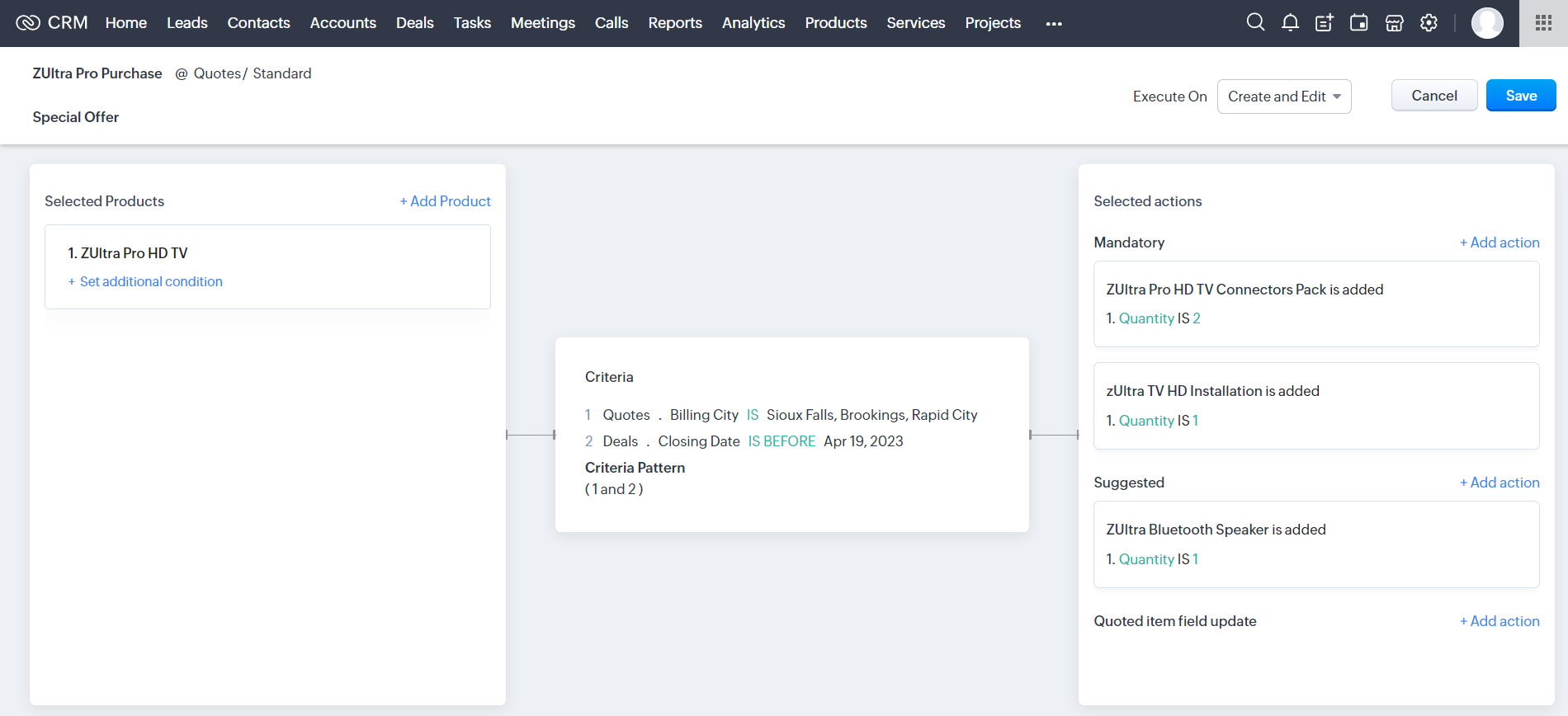
The Product Configurator enables you to pre-define automated actions like product additions, suggestions, and field updates for a single product or a combination of products. You can set multiple criteria to qualify these product rules across various modules in CRM. This cross-module capability enables salespeople to customize quote generation by including different record types, such as deal amount, region, vendors, and so on.


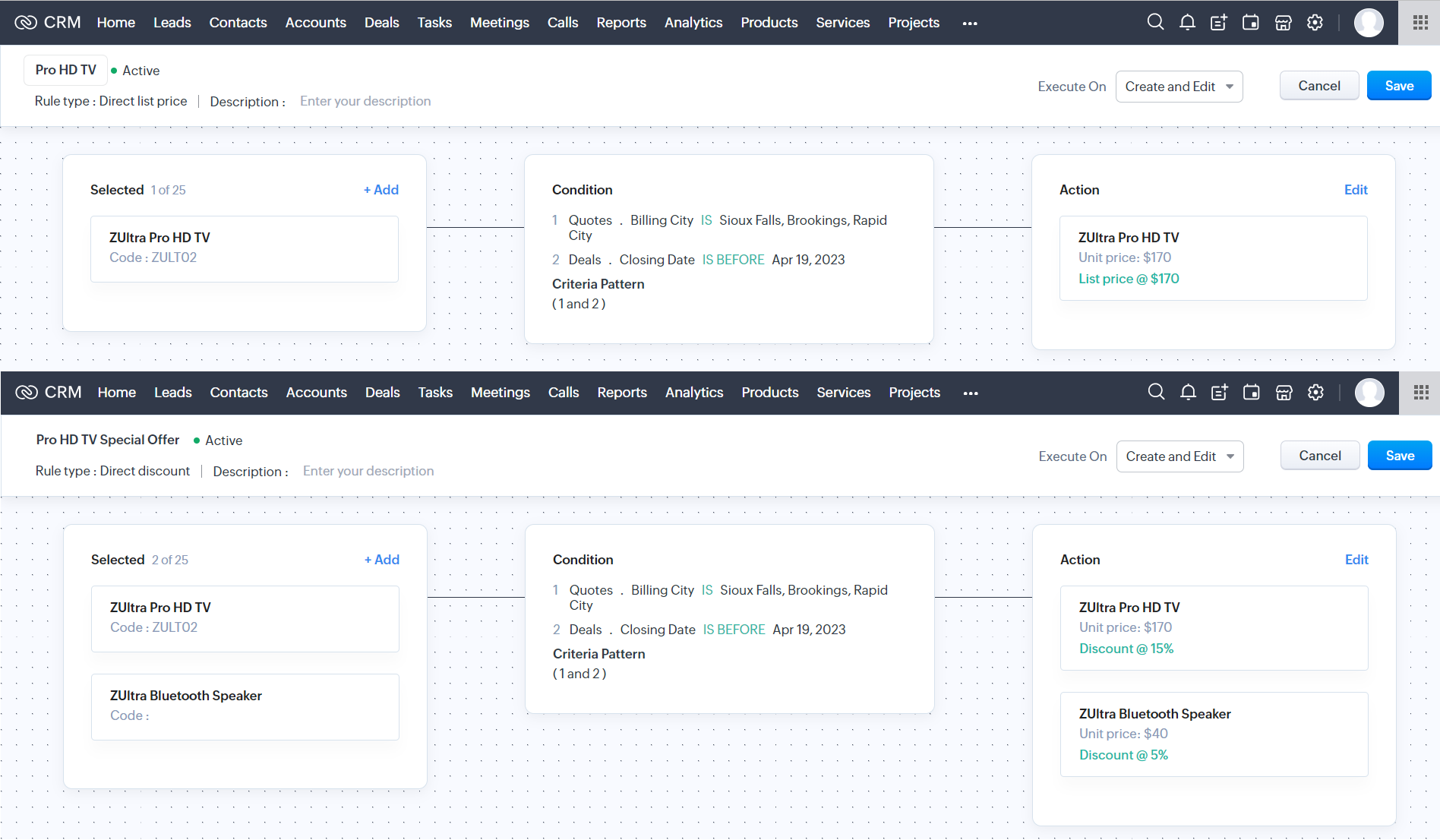
Price Rules help to accommodate conditional pricing; i.e., you can pre-set list prices and discounts for products that meet specific conditions. It can also qualify price rules according to cross-module conditions.


After you configure your rules in CPQ, the pre-defined actions are executed automatically when your salespeople create quotes in Zoho CRM. Watch this video for a quick overview of CPQ:


Guided Selling

Guided selling in CPQ quickly refines the results from the product catalogue based on the customer's requirements. For this, you just have to create a series of sequential questions and map the input answers to appropriate fields across various CRM modules—namely, the Contacts, Accounts, Deals, and Products modules. So during quote creation, salespeople just have to specify the product requirements, and the Guided Selling functionality in CPQ suggests the right product. 


How can you benefit from a CPQ solution?

It's essential for businesses today to keep up with prospects' evolving needs and offer solutions quickly before they move on to other alternatives. One aspect of sales conversion is sending a customized quote to your prospect while making necessary modifications when required. And relying on outdated legacy systems and manual effort can only lead to more errors and delays. A CPQ solution ensures your salespeople can generate customized quotes quickly and thereby enhance the purchase experience.
  • A CPQ solution, along with Zoho CRM's built-in inventory management functionalities, enables you to build a more comprehensive sales cycle.
  • It expedites your quote management process, enabling your salespeople to save time and effort.
  • It minimizes the risk of errors due to misinformation or typos during quote calculation.

Watch our recorded webinar to get an overview of Zoho CRM's CPQ feature and how it works.


Resources: Help docs


    • Recent Topics

    • Passing Info from Function to Client Script

      Hello, I have recently started making use of client script for buttons, allowing me to give the user information or warnings before they proceed. This is great. However, I have never quite managed to pass back any extra information from the function to
    • ZOHO Payroll Canada

      Any plans on the roadmap for Canada?
    • What's New in Zoho Billing | January 2026

      Excited about the latest enhancements in Zoho Billing? Our January updates bring an intelligent AI assistant, smarter subscription management, and improved tax compliance, saving you time and reducing manual work. Dive into the details below to see how
    • Zoho Books Sandbox environment

      Hello. Is there a free sandbox environment for the developers using Zoho Books API? I am working on the Zoho Books add-on and currently not ready to buy a premium service - maybe later when my add-on will start to bring money. Right now I just need a
    • Multi-currency and Products

      One of the main reasons I have gone down the Zoho route is because I need multi-currency support. However, I find that products can only be priced in the home currency, We sell to the US and UK. However, we maintain different price lists for each. There
    • Cliq iOS can't see shared screen

      Hello, I had this morning a video call with a colleague. She is using Cliq Desktop MacOS and wanted to share her screen with me. I'm on iPad. I noticed, while she shared her screen, I could only see her video, but not the shared screen... Does Cliq iOS is able to display shared screen, or is it somewhere else to be found ? Regards
    • COQL API in JS Widget only pulling 200 records

      Hello! We've been building a custom homepage widget using the Zoho JS SDK, and it seems that this https://help.zwidgets.com/help/latest/ZOHO.CRM.API.html#.coql only allows 200 records. I thought the limit was 2000 for COQL queries, but am I mistaken?
    • Passing the CRM

      Hi, I am hoping someone can help. I have a zoho form that has a CRM lookup field. I was hoping to send this to my publicly to clients via a text message and the form then attaches the signed form back to the custom module. This work absolutely fine when
    • Paid Support Plans with Automated Billing

      We (like many others, I'm sure) are designing or have paid support plans. Our design involves a given number of support hours in each plan. Here are my questions: 1) Are there any plans to add time-based plans in the Zoho Desk Support Plans feature? The
    • Merge Fields that previously worked are now giving an Error!

      Saving a URL Link button on the Deal module. The below fields used to save without issue at all, but now produce an error of "URL contains unsupported merge field!" ${Contacts.Mailing Street} ${Contacts.Mailing City} ${Contacts.Mailing State} ${Contacts.Mailing
    • Do buttons and vba msgbox work on mobile, specifially the iPhone zoho sheets app?

      In Zoho sheets on the web, I inserted a button and assigned a VBA macro to it. It pops up a msgbox with some text. When I go onto the iPhone mobile zoho sheets app, the button is there. When I click on that button, the spinning asterisk appears for a
    • Different form submission results for submitter and internal users

      I'm looking for suggestions on how to show an external submitter a few results while sending internal users all the results from the answers provided by the external user. The final page of our form has a section with detailed results and a section with
    • Column letter from number

      Hello, I am trying to select a cell and i have the column number. How do i do this or is there a way of getting the letter from the number? Thank you
    • Help Desk Services Solution

      I am here looking for Help Desk services solution for organization. I also searched this on many different website and found many solutions. We are bit confused to which one to choose. One of my friend suggest me this platform, and i am hoping i will
    • Facing Issues with Sites Mobile font sizes

      my page renediaz.com is facing issues mobile view, when i try to lower font sizes in home page, instead of changing the size, it changes the line space
    • Remove 'This is an automated mail from Zoho Sign' in footer

      Hi there, Is it possible to remove or change the text under the e-mail templates? I can't figure out how to do that: Would love to hear from you. Kind regards, Tristan
    • Formatting and slow

      Creating campaigns are difficult.  I'm fairly computer literate but some of the way Zoho Campaigns formatting works is painful.  Images fail to upload or are very slow. To top it off, syncing the contacts is a pain as well as temperamental links to create Segments. At this rate I'm afraid we might need to migrate back to Mailchimp.
    • Default Ticket View - Table?

      Guys, We mostly use the table view to queue tickets. Maybe I am missing it - but how can I set that view as 'default" for all our agents? Thanks JV
    • Boost your Zoho Desk's performance by archiving tickets!

      The longer your help desk operations are, the more likely it is to accumulate tickets that are no longer relevant. For example, ticket records from a year ago are typically less relevant than currently open tickets. Such old tickets may eventually lead
    • Paste emails to create segment

      We are moving over from Mailchimp to ZOHO. However Mailchimp allows me to create a segment by pasting in emails from excel (or importing a .csv) can I do the same in Mailchimp?
    • Getting the Record ID of a form once it is submitted - so that form can be edited later

      In Zoho Forms, where can I access the record ID of a form once the form is submitted? - Record ID is not available in webhook payloads - It is not available to form fields, including in formulas - It is not available as a parameter in a thankyou page
    • Auto-Generate Line Numbers in Item Table Using HTML & CSS Counters (Zoho Books & Zoho Inventory Custom Templates)

      <div> <style> /* Start counter from 0 inside tbody */ tbody#lineitem { counter-reset: rowNumber; } /* Increment counter for each row */ tbody#lineitem tr { counter-increment: rowNumber; } /* Show counter value in first column */ tbody#lineitem tr td:first-child::before
    • Possible to define default font and size in Zoho Campaigns?

      Is it possible to define a default font (font, size and colour) for the text, H1 and H2 in Zoho Campaigns? For example: In a campaign, I add a text block, and the text is automatically century gothic, size 11, grey (6f6f6e) by default? Thank you!
    • Zoho Sites - General Feedback

      Hi Everyone-- Quick question for discussion: is it me or is working with Zoho Sites like entering the Twilight Zone? I've built many sites over the years, but this platform seems impossible. I've spent an entire day and a half trying to get a simple one-color
    • File Upload field not showing in workflow

      Hi, I have added a field on Zoho CRM. I want to use it in a workflow where that particular field is updated based on another field, however it is not showing up in the field list to select it in the workflow. Why is this please?
    • You cannot send this email campaign as it doesn't have any eligible contacts in the selected mailing list. You can try adding contacts or choose other mailing lists.

      please help
    • Strengthening the capabilities of CommandCenter in Zoho CRM Plus

      When you look at the prospect-to-customer journey in most businesses 10 to 15 years ago, it was relatively straightforward. Many of us remember walking into a store, sharing our requirements with a sales associate, reviewing a few options, and making
    • World date & time format

      Hello, Is there a timeline to get the worldwide used date and time format ? I mean not the american one... I mean day month year, and 24 hours clock. Regards
    • How can Data Enrichment be automatically triggered when a new Lead is created in Zoho CRM?

      Hi, I have a pipeline where a Lead is created automatically through the Zoho API and I've been trying to look for a way to automatically apply Data Enrichment on this created lead. 1) I did not find any way to do this through the Zoho API; it seems like
    • Announcing Kiosk 1.1 - Customize screen titles, configure new fields & actions, use values from your Kiosk to update fields, and more.

      Hello all We are back again with more enhancements to Kiosk. So what's new? Enhancements made to the Components Add titles for your Kiosk screens and adjust its width to suit your viewing preferences. Three new fields can be added to your screen: Percentage,
    • Any recommendations for Australian Telephony Integration providers?

      HI,  I am looking for some advice on phone providers as we are looking to upgrade our phone system, does anybody have experience with any of the Australian providers that integrate with CRM Telephony? So far we are looking at RingCentral and Amazon Connect, and would love to hear feedback on any of the other providers you might have tried.  Thank you
    • CRM Cadences recognise auto-responses

      I have leads in a Cadence. I get an auto-responder reply "I'm out of the office..." Normally Cadences seems to know that isn't a real reply and keeps the lead enrolled in the cadence. However, today, Cadences has UNENROLLED a Lead who sent an auto-reponse
    • Zoho Campaigns Workspaces

      Hi, I’m currently working on a Zoho CRM + Zoho Campaigns setup for a franchisee-based organization, where each franchise must only see and use its own contacts. At the moment, franchisees cannot properly access their contact lists in Zoho Campaigns unless
    • Limited System because of Limited Number of Fields for Car Dealership

      Dear Zoho Support, we want to have all the information about a car inside of a car record. We want to have Zoho CRM as our single source of truth for our data, but the limited number of fields are not allowing that. The data consist of: technical data
    • Automatically Update Form Attachment Service with Newly added Fields

      Hi, When I have a Form Setup and connected to a 3rd Party Service such as OneDrive for Form Attachments, when I later add a new Upload Field I have to remove and redo the entire 3rd Party Setup from scratch. This needs to be improved, such as when new
    • Zoho CRM for Everyone's NextGen UI Gets an Upgrade

      Hello Everyone We've made improvements to Zoho CRM for Everyone's Nextgen UI. These changes are the result of valuable feedback from you where we’ve focused on improving usability, providing wider screen space, and making navigation smoother so everything
    • Newsletter in multiple languages

      Hi We are planning on starting to use Zoho Campaigns for our newsletters. Since we send our newsletters in three languages, I would need the "unsubscribe page" and other pages related to the NL (Thank you page and so on) to be available in different languages
    • Fixed assets in Zoho One?

      Hi, We use Zoho Books and have the fixed asset option in it. I started a trial for Zoho One and I do not see that as an option. Is the books that is part of zoho one equivalent to Zoho Books Elite subscription or is it a lesser version? Thanks, Matt
    • Set Default Status of Assembly to "Assembled" When Entered in UI

      I've just discovered the new "confirmed" status of Assemblies within Inventory. While I understand the intent of this (allowing for manufacturing planning and raw material stock allocation), it was initially confusing to me when manually entering some
    • I need to Record Vatable amount and non vatable amount separately in zoho books in a single line

      I need to Record Vatable amount and non vatable amount separately in zoho books in a single line give me the customisation option and in invoice copy to customer the total amount should be inclusive 5%vat and no need to show the vatable and non vatable
    • Next Page