Introducing parent-child ticketing in Zoho Desk [Early access]

Introducing parent-child ticketing in Zoho Desk [Early access]

Hello Zoho Desk users!

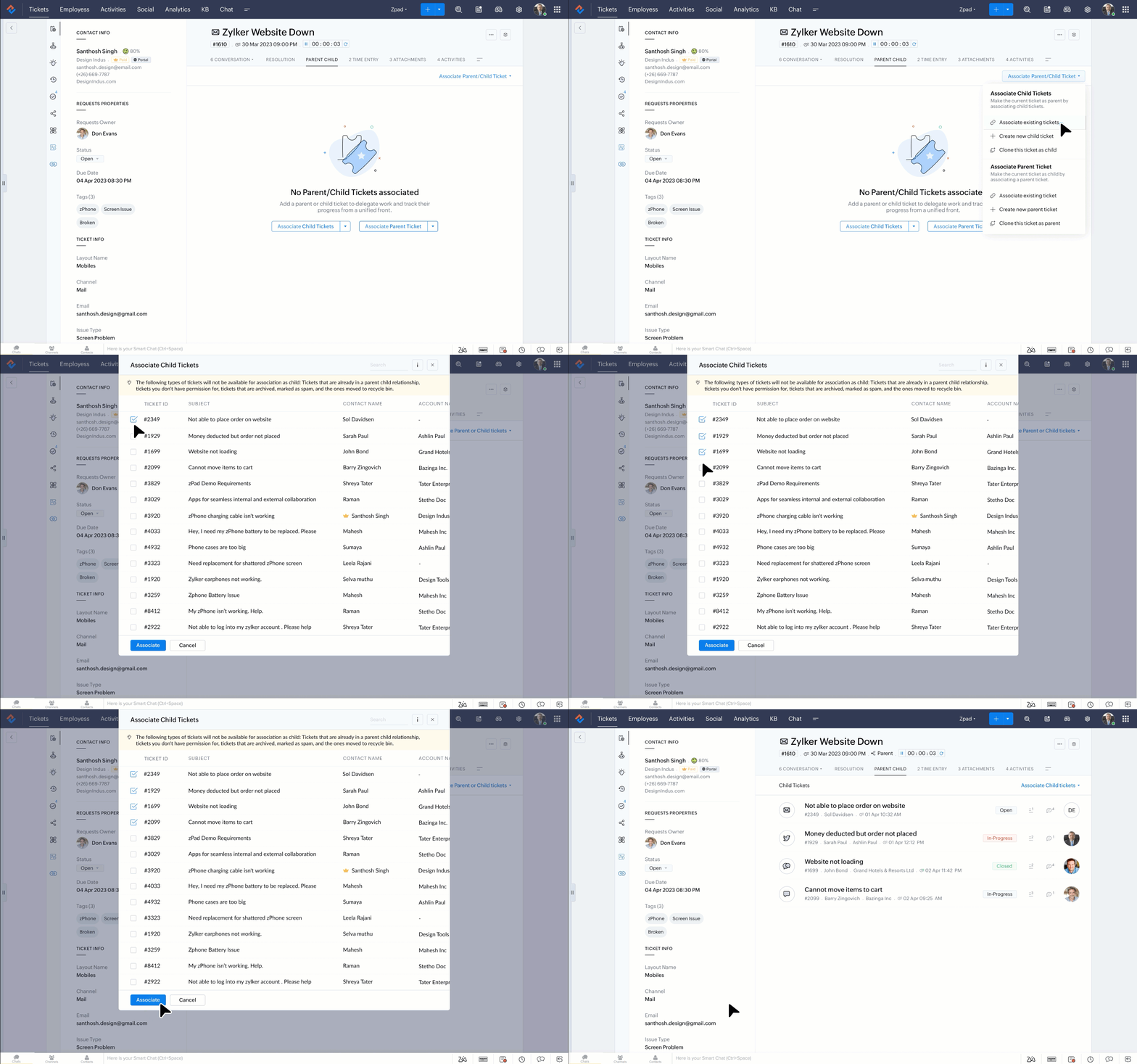
We have introduced the parent-child ticketing system to help customer service teams ensure efficient resolution of issues involving multiple, related tickets. You can now combine repetitive and interconnected tickets into parent-child units, work on them in parallel and offer resolution faster, as a team.

This helps your agents handle numerous customer issues simultaneously without becoming overwhelmed and losing productivity. Linking the tickets through the parent-child feature helps synchronize these conversations and minimize the resolution time. 

Why do you need parent-child ticketing?

In scenarios where there are repetitive tickets on similar topics from multiple customers or when there are several sub-tickets for one master ticket for a single customer, it will be easier to categorize and solve them simultaneously. Parent-child ticketing is the new way to offload such tickets more efficiently.

Your teams can:

1) Offer faster resolution

2) Save time on related tickets and can focus on critical tasks

3) Can co-ordinate better within team members


How will parent-child ticketing boost the team's productivity?

Work smarter and faster

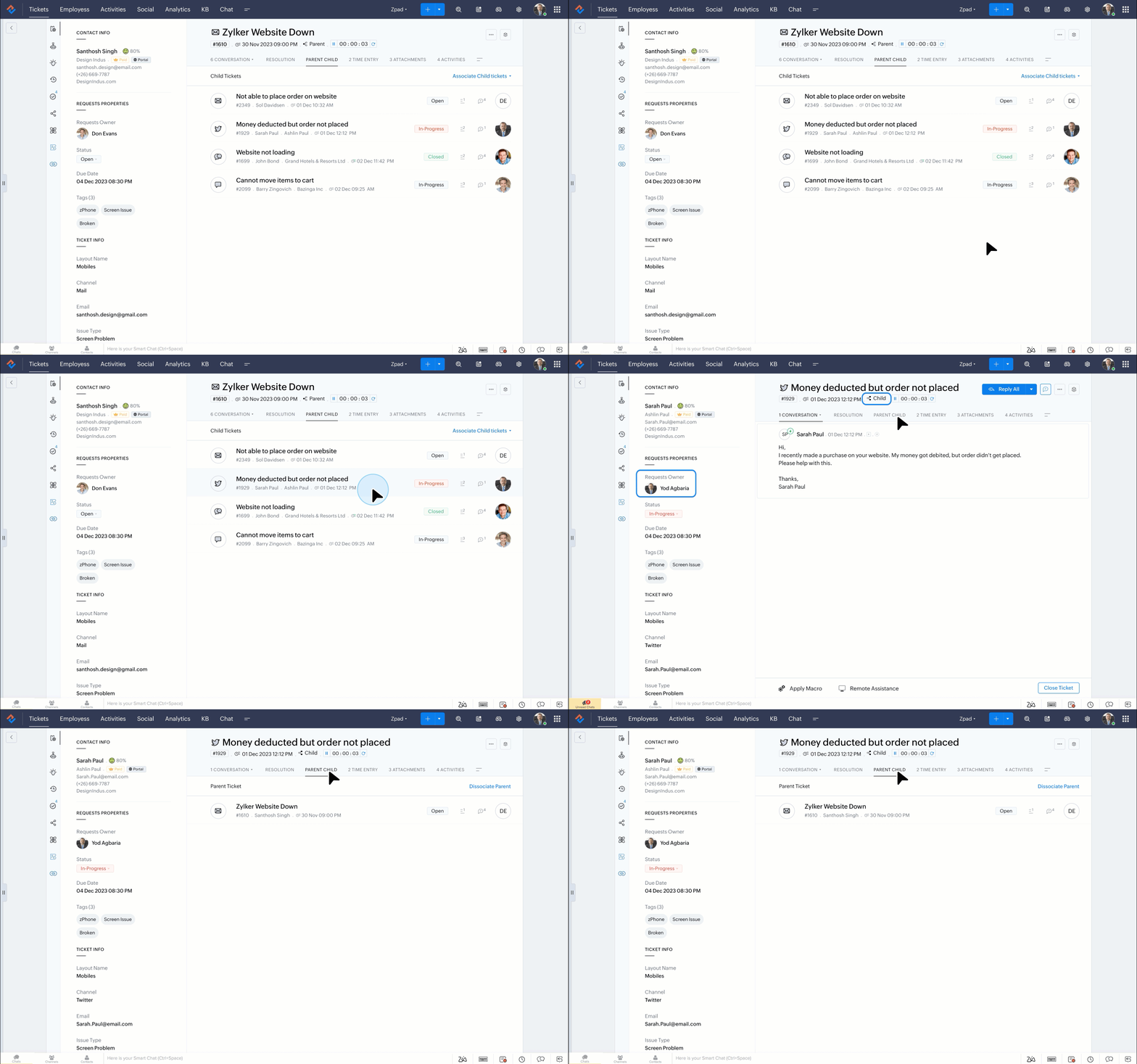
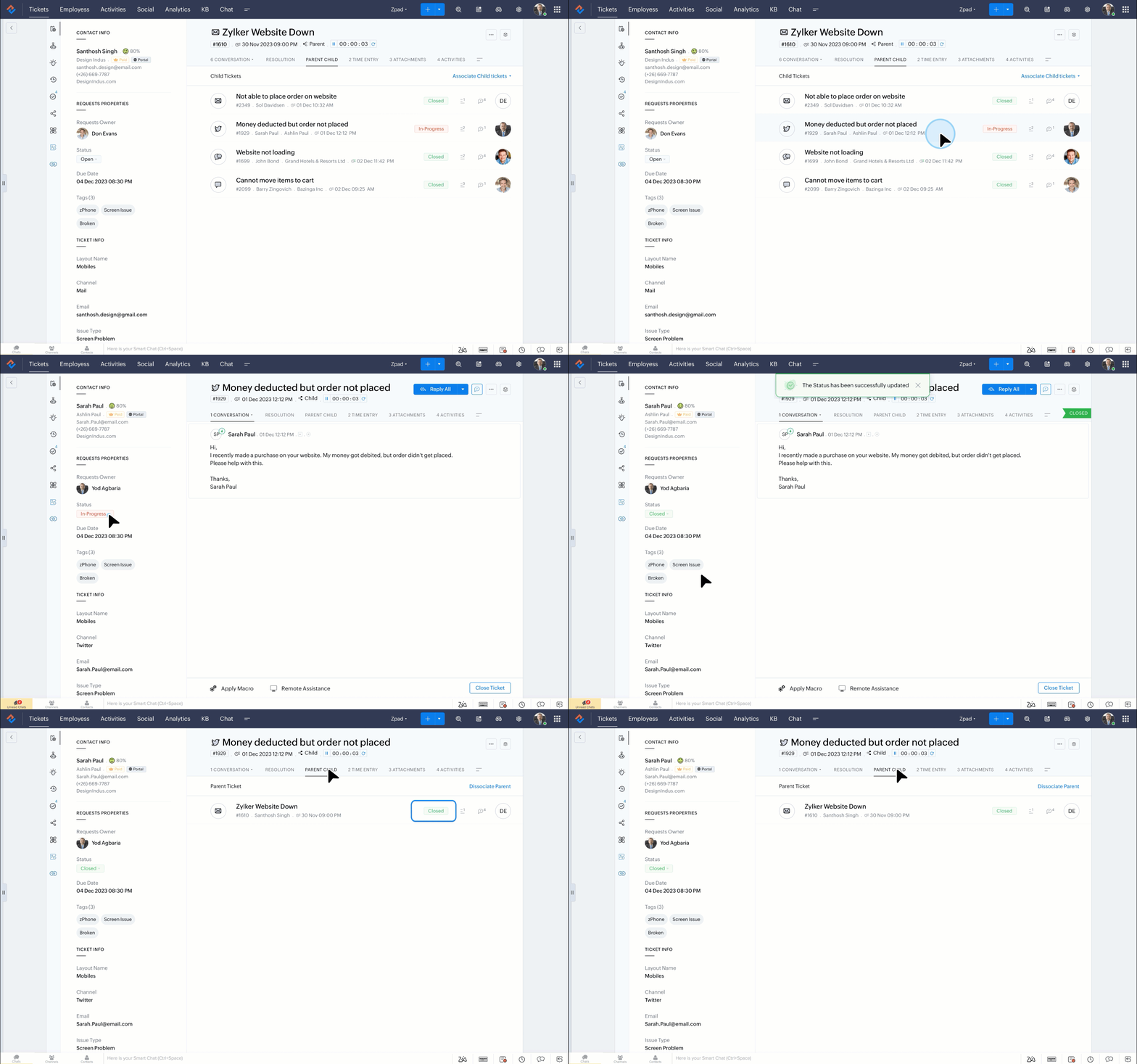
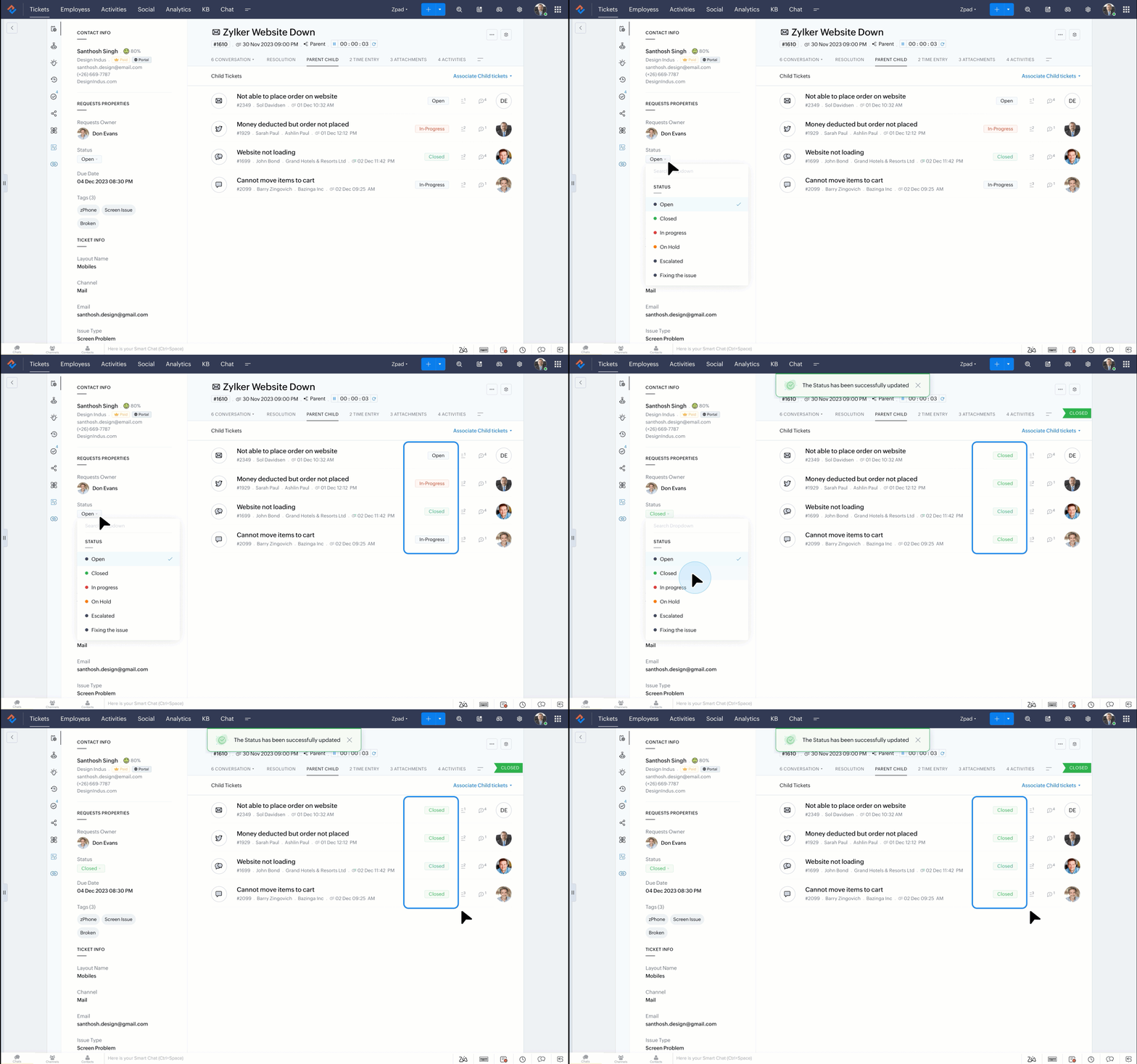
Agents working on multiple tickets related to the same issue can use the parent-child feature to group those conversations for easier organization. Once the problem has been resolved, an agent can close the parent ticket, and all associated child tickets will automatically be closed. This will help your teams resolve tickets faster and more efficiently.


Collaborate with context
All related tickets can be categorized as a parent or child. This will help agents break tickets down into groups that share the same context and resolve those related issues efficiently. This will ensure that no ticket gets missed and all the requests are closed systematically.


Maximize efficiency
Since tickets can be grouped and closed together, agents can save time and attend to more customer requests. This will improve the productivity and overall efficiency of customer service teams.


Example: Ecommerce business

It is common for online sellers to receive multiple tickets from a customer related to a single product or order. For example, imagine that a customer places an order for three items. First, they submit a request to check on the shipping timeline. Then, they receive the products but find that one of the items is defective and needs to be returned for a refund, while another needs to be exchanged for a different option.


The customer might submit a fresh ticket for each issue, but they should all be dealt with together for an efficient resolution. These requests can be linked through parent-child ticketing to ensure that any agents who work on the matter have all the context and approach the situation in an appropriate way.


The support team can address and close the child tickets one by one, and the parent ticket will automatically be closed once all the child tickets are resolved. Grouping related tickets helps prevent inadvertent delays, simplify the resolution process, and ensure that all tickets are closed at the right time.

Resolving parent-child tickets:

  • Closing a parent ticket will also resolve all associated child tickets.

  • A parent ticket will also be closed automatically if all the associated child tickets are resolved. This helps save time while ensuring tickets are closed appropriately.

          Read the help document on parent-child ticketing to learn more.

Notes
Note: 

1) The feature is available in the Professional and Enterprise editions of Zoho Desk and will be available for customers with early access upon request.

2) Parent-child ticketing is available in all DCs.

                                 Click on the link below to raise a request to tryout the new feature.

                                                                 Request access 

For further information and assistance from the team, you can comment on this announcement or send an email to support@zohodesk.com

Hope you like the new feature! Let us know your feedback in the comments.

@Anonymous User @Anonymous User @Zohodesk

Thank you, 
Zoho Desk team.


    • Recent Topics

    • Data Export is forcing Creation/Modified date just like reports

      The data export now forces you to select a created or modified date. There is not an All-Time option. This severely cripples the whole function of data export for audit purposes. If the data export (or reports for that matter), requires a date, there
    • HR Helpdesk Cases

      We have Zoho One Enterprise. I'm trying to find HR Helpdesk Cases, but my UI does not match the documentation. I'm not sure how to move forward.
    • Zoho Books Placeholder: Inventory Counts

      I was hoping to figure out how to find the placeholders for inventory counts by item. We use Location based inventory tracking, so I dont know if that affects things. I want my PDF and Printed PICK LISTS to show the Quantity Available to Pick. I have
    • Undocumented Books API error message - 1000 - The requested action could not be completed. Please try again. | Unexpected error

      This code sometimes throws this error 1000 - The requested action could not be completed. Please try again. | Unexpected error What does it mean? result = zoho.books.updateRecord("salesorders",organization.get("organization_id"),salesorder_id,sales_
    • Reporting Tags and COGS

      Is there any way to get COGS recorded against reporting tags? The use cases seems very straightforward to me. If I'm running a P/L report against a specific reporting tag (I use mine for customer type, but it could be used for regions, etc.), the revenue
    • Please critique my CRM design

      I run a disability healthcare business with 2 business units. We run on Zoho One and are re-designing our CRM. We have developed the design concept ourselves, and I am hoping to get some critical feedback: 1) Noting that this is an early design of the
    • CRM x WorkDrive: We're rolling out the WorkDrive-powered file storage experience for existing users

      Release plan: Gradual rollout to customers without file storage add-ons, in this order: 1. Standalone CRM 2. CRM Plus and Zoho One DCs: All | Editions: All Available now for: - Standalone CRM accounts in Free and Standard editions without file storage
    • Error in Batch Details Stock Reportt

      I am a new user of zoho inventory. When extracting batch details stock report as of dec 2025, the report takes into account transactions that happen this year. Thus causing discrepancies when comparing with Stock Report. Is this a global error? Can zoho
    • Data Export is forcing Creation/Modified date just like reports

      The data export now forces you to select a created or modified date. There is not an All-Time option. This severely cripples the whole function of data export for audit purposes. If the data export (or reports for that matter), requires a date, there
    • Invoice template, how to change the text under "Notes" and "Terms and Conditions"

      In "Invoice templates", there are two text/info sections at the bottom:"Notes" and "Terms and Conditions". It is possible to change the names of these two headings, but how is it possible to change/alter the text under it. As a standard it says "Thank you for your business" under Notes - I need to change it into something different- How? Thank you.
    • Zoho Commerce B2B

      Hello, I have signed up for a Zoho Commerce B2B product demo but it's not clear to me how the B2B experience would look for my customers, in a couple of ways. 1) Some of my customers are on terms and some pay upfront with credit card. How do I hide/show
    • Need complete Zoho Commerce theme ZIP example and safe staging workflow

      I want to build a complete custom Zoho Commerce storefront through Edit Code, including: • Global header and footer • Responsive homepage • Category, search and filter pages • Product cards and product-detail pages • Cart and checkout wrapper • Mobile
    • Conflict with Google Sheets

      While I was working on a google sheet in Firefox, I suddenly started getting an error dialog in Google sheets: "Loading issue. Troubleshoot this issue by clearing application resources". It then says to clear cookes etc. etc. which didn't help. Disabling
    • What is a realistic turnaround time for account review for ZeptoMail?

      On signing up it said 2-3 business days. I am on business-day 6 and have had zero contact of any kind. No follow-up questions, no approval or decline. Attempts to "leave a message" or use the "Contact Us" form have just vanished without a trace. It still
    • Add the Zoom Option to the Camera

      Hi, I use the ZOHO Forms Camera so I can manage metadata, compression, etc. but this doesnt have the zoom parameter activated, so when we have photos in a tight space and want to use 0.5 for example, we can't, can this be enabled please. Thanks Dan
    • Add Large Lists to Choice-Based Field Rules

      Hi, The new Large List is good, but you can't then use the Choice-Based Field Rules with it to limit the Group Choices or Choices? Thanks Dan
    • Auto-fill from logged-in user's profile for Name Fields in Subforms

      Hi, The Name field is great, but I see you can't tick the Initial Value option of "Auto-fill from logged-in user's profile" when it is on a Subform, why not? Thanks Dan
    • [Free webinar] Creator Tech Connect – Creator product updates (Part 1), August 2026

      Hello everyone, We are excited to invite you to another edition of the Creator Tech Connect webinar. About Creator Tech Connect The Creator Tech Connect series is a free monthly webinar comprised of pure technical sessions, where we dive deep into the
    • What's New in Zoho Invoice | April – June 2026

      Hello everyone! We're back with the latest updates and enhancements we've rolled out in Zoho Invoice from April to June 2026. Here's what's new this quarter: Connect Zoho Invoice to AI Using Zoho MCP Customize Accessibility Preferences Attach Annexure
    • Is there a way to show contact emails in the Account?

      I know I can see the emails I have sent and received on a Contact detail view, but I want to be able to see all the emails that have been sent and received between all an Accounts Contacts on the Account Detail view. That way when I see the Account detail
    • The Social Wall: July 2026

      Hello everyone! We're halfway through the year, and we bring to you three new updates designed to help you experiment with your content, discover your top-performing posts, and automate your engagement workflow. Instagram Trial Reels Instagram trial reels
    • Mail Id’s backup

      Dear Zoho Team, Kindly share the backup of my all mail id’s associated with Zoho account. Thanks, Saurabh Sharma +91 8851066915
    • Recurring Events Not Appearing in "My Events" and therefore not syncing with Google Apps

      We use the Google Sync functionality for our events, and it appears to have been working fine except: I've created a set of recurring events that I noticed were missing from my Google Apps calendar. Upon further research, it appears this is occurring
    • Stock Based Sort-by option in Category Pages

      In a category page product with In-Stock should come in the top of the categories product list rather than out-of-stock products. No having this option is extremely disappointing, I made the initial request about 7 months ago but still not even an update
    • Stock based sort-by option

      I have more than 300 products in a category with out of stock items count of 150. The out of stock items are coming on top of the category product page list, is there a way to show the in-stock items on top of the list & move the out -of stock items in
    • Out of Stock items showing in Commerce

      I have over 6000 items and most are not in stock, but all items are showing up in Commerce whether they are inventory or not. What option or feature can you use to hide items in Commerce at zero or negative quantities? I currently am using Commerce for
    • Creating Email template that attaches file uploaded in specific field.

      If there's a way to do this using Zoho CRM's built-in features, then this has eluded me! I'm looking to create a workflow that automatically sends an email upon execution, and that email includes an attachment uploaded in a specific field. Email templates
    • What's New in Zoho Billing | July 2026

      July brings a new set of updates to Zoho Billing to make your billing operations more efficient. These include a redesigned checkout experience, expanded Hosted Payment Page capabilities, compliance improvements, enhanced reporting, and more. Enhancements
    • Zoho CRM Community Digest - July 2026 | Part 1

      Hello everyone, July is here! The first two weeks brought six CRM updates ranging from privacy-ready webforms to a significantly more powerful Layout Rules engine, two community wins worth a look (a dashboard workaround for spotting leads with no activities,
    • Zoho CRM - Email/Message icon for Deal List View

      Hi Team, My idea is to include a message icon at the start of the row of Deals when an unread message has been received. This would really help highlight the Deals where urgent action is required. Thanks for considering this request. Regards, Ashley
    • Email notification for followers

      Is there a way to enable email notification for followers of a support ticket? ie: Ticket #123 is owned by Agent#1, Agent#2 adds themselves as a follower. Whenever ticket #123 receives an email from the customer, Agent#1 receives an email. Agent#2 would
    • Introducing parent-child ticketing in Zoho Desk [Early access]

      Hello Zoho Desk users! We have introduced the parent-child ticketing system to help customer service teams ensure efficient resolution of issues involving multiple, related tickets. You can now combine repetitive and interconnected tickets into parent-child
    • Desk Contact Name > split to First and Last name

      I am new to Zoho and while setting up the Desk and Help Center, I saw that new tickets created or submitted from the Help Center used the Contact Name field. This would create a new Contact but put the person's name in the Last Name field only. The First
    • Vendor payment unexpectedly routed through Prepaid Expenses instead of Accounts Payable

      Hello, We are investigating an unexpected accounting behavior in Zoho Books. We created vendor bills and vendor payments for two suppliers using what appears to be the same workflow, but the journal entries are different. Vendor 1 – UZ Store (works correctly)
    • LinkedIn RSC is now live in Zoho Recruit

      LinkedIn Recruiter System Connect (RSC) is here. Your Zoho Recruit data (candidates, jobs, notes, stage updates, resume attachments, and more) now syncs with LinkedIn in real time. Note: LinkedIn RSC is included with your LinkedIn Recruiter Corporate
    • Managing Shopify Payout Balances in Zoho Books

      I am recording my Shopify orders as Invoices and once Shopify credits my bank account I reconcile the payout to the specific invoices and create a new transaction to account for the Shopify Merchant Fee. That is fairly straightforward to me. How should
    • Charging for WhatsApp replies starting in October 2026

      Meta has announced that it will charge for reply messages on WhatsApp starting October 1, 2026, and the free 24-hour window will no longer exist. How will Zoho SalesIQ handle this billing? https://developers.facebook.com/documentation/business-messa
    • Upcoming Change: Increased character limits for module and field labels

      To provide greater flexibility in customizing your CRM, we are increasing the maximum character limits for module labels and field labels in Zoho CRM. What's changing? Label Current Limit New Limit Module Label 25 characters 50 characters Subform Module
    • Change of Blog Author

      Hi, I am creating the blog post on behalf of my colleague. When I publish the post, it is showing my name as author of the post which is not intended and needs to be changed to my colleague's name. How can I change the name of the author in the blogs?? Thanks, Ramanan
    • SPAM (and some other) folders missing on three of my Zoho Mail accounts

      I have four email accounts with Zoho Mail. Three days ago, the Spam folder on three of these accounts vanished. It is gone on the Windows and Linux desktops as well as the web-based and Android versions, and I have tried it on multiple machines. The only
    • Next Page