Create static subforms in Zoho CRM: streamline data entry with pre-defined values

Last modified on (9 July, 2025):
- This feature was available in early access and is currently being rolled out to customers in phases.
- Currently available for users in the the AU, CA, and SA DCs.
- It will be enabled for the remaining DCs in the next couple of weeks.

Update (26th September 2025):
This feature is now enabled for all the users in the US DC.
Hello everyone,
Traditionally, Zoho CRM's subform capabilities have enabled users to dynamically add, edit, and manage additional data linked to their main records. However, until now, all subform fields were subject to data entry or updates, both on the record's page and through the API.
What's new?
We're excited to introduce the static subform option, designed to offer a more controlled and consistent approach to data entry in Zoho CRM. Administrators can now pre-define certain fields and the exact number of rows in a subform.
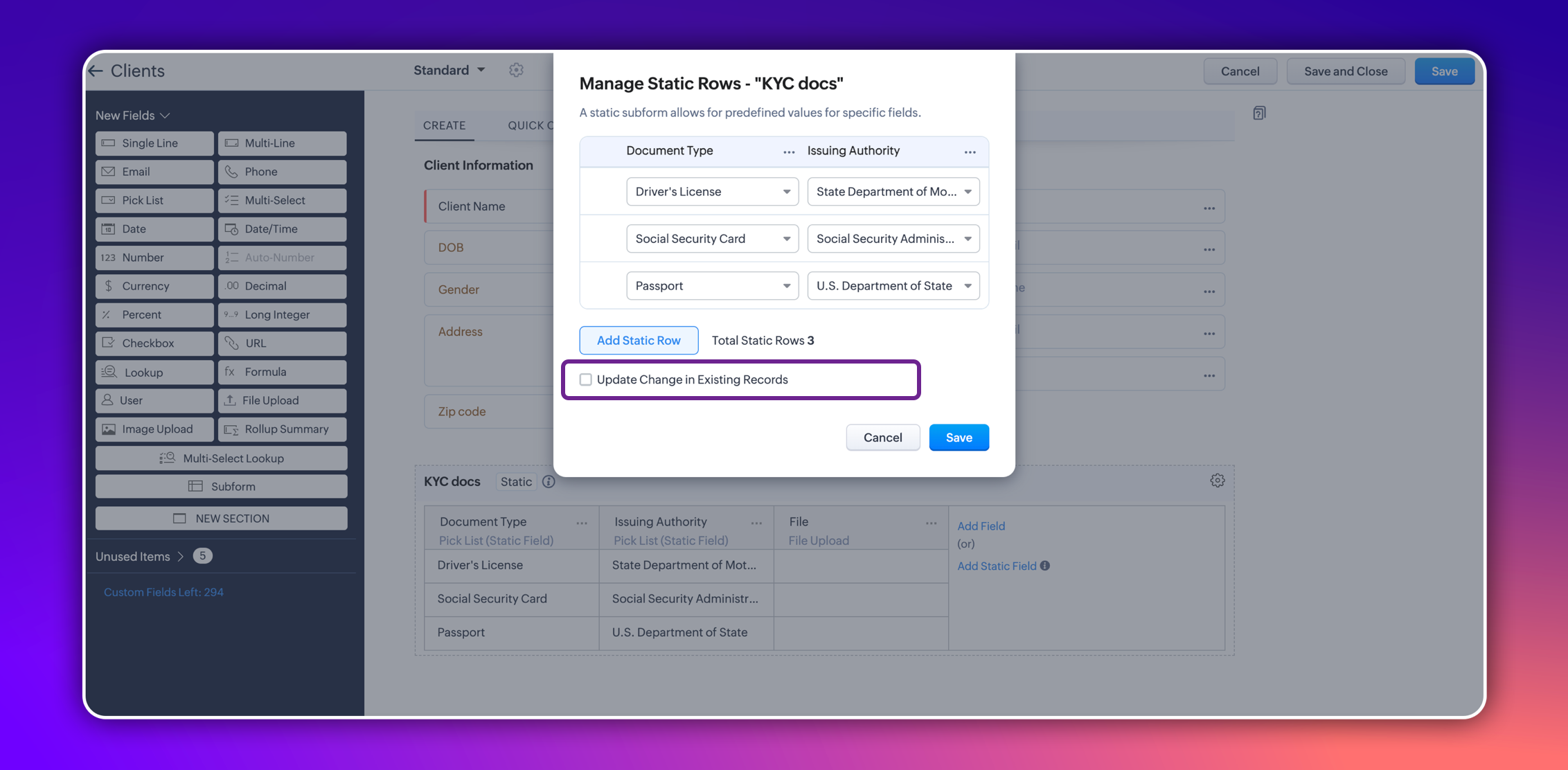
In certain scenarios, a subform should maintain a fixed number of rows with fixed values across all records. For example, a subform could be set up to include specific columns consistently, such as "Document Type" and "Issuing Authority." The rows for these columns could remain constant and feature values like "Driver's License," "Social Security Card," and "Passport" for "Document Type," and "State Department of Motor Vehicles," "Social Security Administration," and "U.S. Department of State" for "Issuing Authority." Unlike a standard subform, where users can dynamically add or remove rows, a static subform ensures these rows are consistent across all records.

This ensures consistency and eliminates the need for users to manually enter or maintain these rows in each record, thereby saving time.
How does static subform address this need?
Static subforms enable administrators to define specific fields and a fixed number of rows within a subform.
For example, consider the aforementioned use case of a client's details in KYC records, which might always consist of documents like a driver's license, passport, and social security card. Other fields within the subform may vary, which allows for customization as needed when creating or editing records.
Consider job applications, for example. With static subforms, HR departments can standardize the collection of essential documents such as resumes/CVs, educational certificates, and proofs of residence. This ensures that every applicant's profile is complete and consistent, making the data management process more efficient and reliable.

This approach not only streamlines the application process but also ensures companies receive thorough and consistent candidate profiles.
Key highlights
- Administrators can easily set up a static subforms by configuring rows with static values.
- Admins have the option to automatically update all existing record entries with static values while mapping the static values in the configuration pop-up.
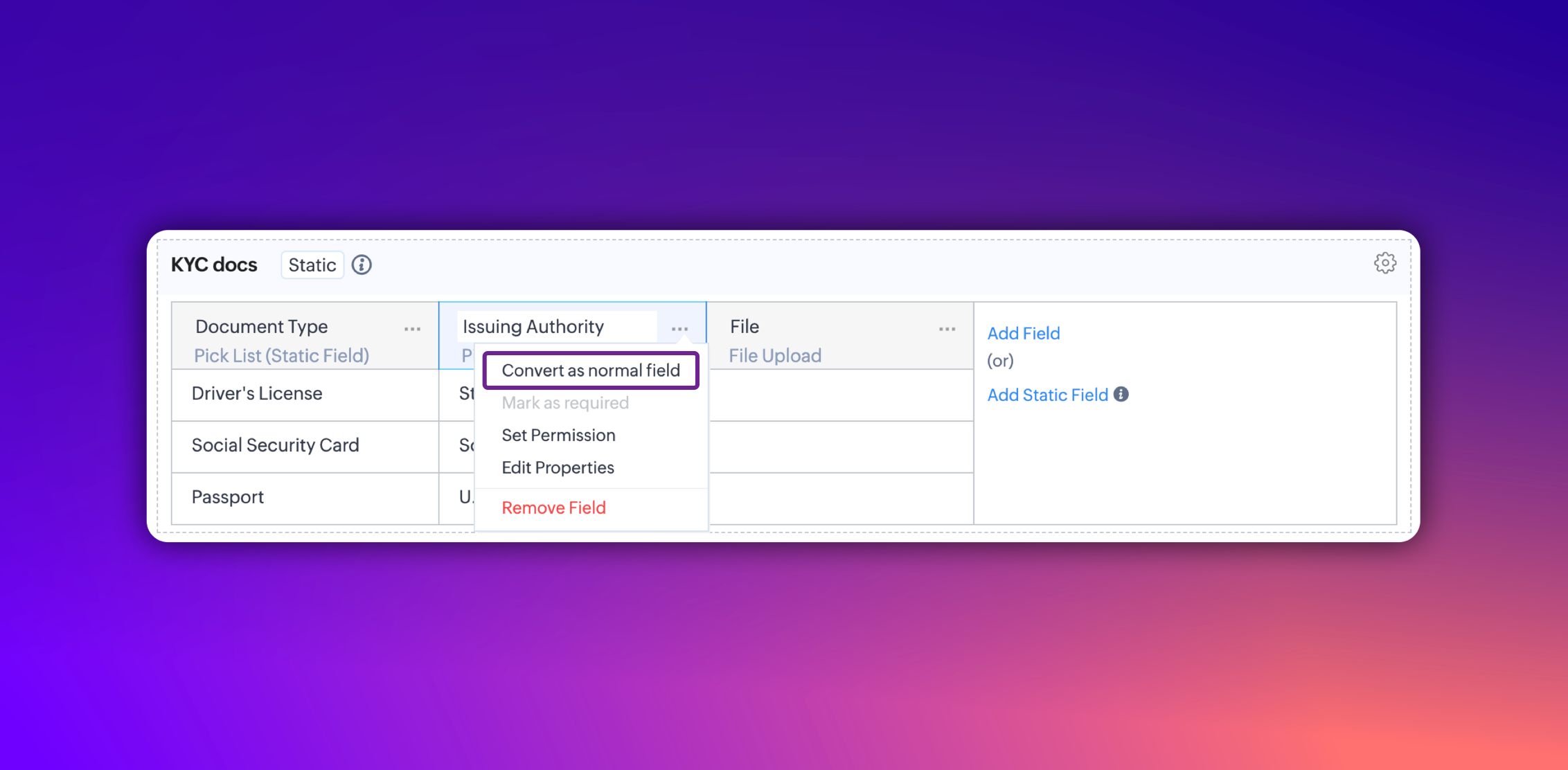
- Additionally, you can convert a static subform field into a normal field at any point. However, it's not possible to convert a normal subform into static subform.

Notes:
- These fields are static across all the layouts in a module and synced across all associated records.
- Changes will be applied to all existing records only if the admin checks the option to update existing records in the static value mapping pop-up.
- Transforming regular subform fields into static fields is not possible.
- Once a subform is designated as static, its type cannot be changed.
- Static subform feature is currently available only in web. They're unavailable on mobile devices and for API versions below 5.1.
Thanks,
Nizamuddin
Topic Participants
Nizamuddin Sohel SK
Haiku Technical Support
Andres
yosi grinwald
Ivan Staykov
Sticky Posts
Enhancement to ICR’s field prompting: Preferred data extraction using advanced field prompting
Dear Customers, We hope you’re well A quick background Intelligent Character Recognition (ICR) comes as part of Zia’s optical recognition capability called Zia Vision. When we introduced it last April, the data extraction was training-based and was applicableGood news! Calendar in Zoho CRM gets a face lift
Dear Customers, We are delighted to unveil the revamped calendar UI in Zoho CRM. With a complete visual overhaul aligned with CRM for Everyone, the calendar now offers a more intuitive and flexible scheduling experience. What’s new? Distinguish activitiesAccessibility in Zoho CRM: Not just a feature—a way to empower
For instructions on setting up these controls, please check this help document: Configuring accessibility controls. Hello everyone, Today (December 3, 2024), on the International Day of Persons with Disabilities, we begin our journey towards a CRM thatScaling the customer journey: What's new in CommandCenter
Dear Customers, The last time we connected about CommandCenter, it was about the tool's new controls and revamped UI. Personally, the overhaul of the UI from the last update, still excites me. Today, we're here with news about its scalability and addedZoho CRM's sales trend and sales follow-up trend dashboards are now customizable
Dear Customers, We're here with good news! Sales trend and sales follow-up trend are two system-defined dashboards that help you understand trends and anomalies in your sales outreach and conversion efforts. They use Zia's intelligence to identify patterns
Recent Topics
How do I sync multiple Google calendars?
I'm brand new to Zoho and I figured out how to sync my business Google calendar but I would also like to sync my personal Google calendar. How can I do this so that, at the very least, when I have personal engagements like doctor's appointments, I canDomain already exists
Hi, I tried to add my domain creativecolumnist.com but its showing as Domain already exist. Please release if it has already been associated with Zoho, I am the real owner of that domain.Select forwarding
For Zoho mail online on PC in web browser: I had forwarding enabled in section "Mail accounts / Forwards", and I also have some filters that send emails from some unwanted senders to Archive. But it doesn't work as intended, it forwards everything (obviouslysystem not picking my default custom service report template
Can you tell me why when we create a service report always pick the (standard old) template? Even when I have a custom service report selected as Default.Restrict Appointment Booking to Approved Clients
Dear Zoho Bookings Support Team, We'd like to propose a feature enhancement for managing appointments within Zoho Bookings. This feature would ensure only pre-approved clients can schedule meetings. Desired Functionality: We propose the introduction ofAutomate Credit Card Surcharge
Is there a way to create an automation that will add a 3.0% credit card surcharge to a subscription whenever a customer pays via credit card?I have the item field and Quantity field in the sub form , on the submit of the form if the quantity is grater than inventory means show alert on submit validation only for item type goods ,
I have the item field and Quantity field in the sub form , on the submit of the form if the quantity is grater than inventory means show alert on submit validation . Stock Check Validation only for item type goods , not for item type service . For theDisappearance of all articles in the knowledge base
Hi there! It seems like all of our articles have disappeared from the knowledge base: However, the names still appear in the "sort articles" section:Logic for sending to a non-primary email address
Hi, I have a scenario where contacts are able to sign up for emails with 2 different email addresses (example: work, personal). I've mapped both to Campaigns from Zoho CRM, but when I go to target an email only the primary email addresses are pulling in. How can I update this to look at both of the email addresses - or specifically the secondary email address in Campaigns? Thanks, JennyAdd "Reset MFA" Option for Zoho Creator Client Portal Users
Hello Zoho Creator Team, We hope you are doing well. We would like to request an important enhancement related to Multi-Factor Authentication (MFA) for client portal users in Zoho Creator. Currently, Creator allows us to enforce MFA for portal users,Tables for Europe Datacenter customers?
It's been over a year now for the launch of Zoho Tables - and still not available für EU DC customers. When will it be available?NOTAS INVISIBLES
Siempre que abro mis notas salen invisibles, muchas no resaltan las *negritas* en la vista previa hasta que te metes en ellas y modificas algo. Pero omg con el equipo de Zoho. Les dije que las usaba mucho precisamente por la VISTA PREVIA y encontrar lasDoes Zoho has chatroom/chatbot url feature?
Hi Zoho community! I’m looking for a quick "Yes/No" answer for my dev team regarding Zoho’s capabilities. We currently use Zoho Desk for our Service Team and Zoho CRM for our Marketing Team to bring both functions under one platform. Our question: DoesOne Support Email Managed By Multiple Departments
Hello, We use one support email (support@company.com). Incoming emails come to the "Support Department" and based on what the customer is asking, we route that ticket to different departments (billing, technical support, etc.). When users in these differentIs it Possible to Modify Standard Report Urls
Is there a way to permanently modify standard report Urls? Use case: Suppose I have a Products report. Showing list as timeline, calendar, or kanban doesn't make sense. Want to hide that from users by adding #Report:Products?zc_ShowAs=false&zc_Print=falseUpdated font library: New font styles and custom font options in Zoho Sheet
Zoho Sheet's font library now supports 500+ font styles in 60+ languages! The updated font library is stacked with new font styles, and some of the previously available font styles have been replaced with equivalent options. There are two ways you canscope for phonebridge in CRM and phonebridge API documentation
Hi I cannot find the scope to be used for phonebridge in CRM API V2 calls. I am getting OAUTH_SCOPE_MISMATCH for scope group ZohoCRM.modules.ALL,ZohoCRM.setttings.ALL Also I am not able to locate the documentation for the same, All I have is phonebridgeJob Alerts for Candidates
hi All, I have 2 questions relating to sharing job details with candidates. 1. is there a way to notify candidates that meet certain criteria of current jobs available? eg. I run a candidate search, and identify 50 candidates that might be suitable. CanZoho Wiki or new Zoho Learn
We are currently evaluating if we should move off confluence. At present in Confluence we have multiple levels within our documentation but with learn it looks like you can only have Space - Manual - Chapter Is it possible to have levels below Chapter? Also the same question for the existing wiki, can I have more sub-levels?Fix image at bottom of a page fot automatic proposal creation
I'm working on a proposal document to automate our proposal creation process. So far it works fine, but I experience some problems with an image I want to have fixed at the bottom of the page AND above the footer. This section of the document consistsCan't scroll the page down unless I refresh the page
Hello, This issue has been going on with me and a lot of other users in my organization, we can't scroll down! the scrolling side bar doesn't appear and scrolling down through mouse or keyboard keys doesn't work, it seems that the page just ends in thePrice List
II want to restrict the items to display in sales, quote, etc for which custom rates are added in price list. How I can do the same in Zoho booksLet’s Talk Recruit: Still switching tabs to source?
Welcome back to the Let’s Talk Recruit series. Let’s talk about how you actually source talent. Do you open multiple job boards every single time a role opens? Run the same keyword searches you ran yesterday? Download, upload, rename, and then do it againKaizen #231 - Embedding Zoho Desk Tickets in Zoho CRM
Hello, CRM Wizards! This week, let us enhance cross-team visibility between Zoho CRM and Zoho Desk. We will use the Zoho Request Client inside a Related List widget to display open Zoho Desk tickets directly within the Contact record in Zoho CRM. ThisIntroducing Job Alerts
Keeping candidates engaged beyond their first application is one of the most consistent hiring challenges. Many interested candidates simply do not revisit career sites regularly, which can result in missed opportunities and reduced re-applications. ToTask status - completed - other options
I have a dumb question I know i can make custom statuses for the tasks - but is there anyway to make additional "completed" statuses like for instance if i have a task "call back customer" and i leave a vm for them to call back marking it "completed -Bank feed integration First Abu Dhabi Bank (FAB) to Zoho? (UAE)
Hello everyone, Is First Abu Dhabi Bank in the list of banks available for bank feed integration with Zoho Books? Thank you.How to Export Filtered List of Contacts?
This seems like it should be simple, but I'm stymied. I'm trying to export a filtered list of my Contacts for analysis in a spreadsheet. The use case is that I'm an ecom business based in the US. The bulk of our customers are individuals stored as Contacts.Quick Create needs Client Script support
As per the title. We need client scripts to apply at a Quick Create level. We enforce logic on the form to ensure data quality, automate field values, etc. However, all this is lost when a user attempts a "Quick Create". It is disappointing because, fromcan we add product images in Zoho CRM Quote PDF template?
I want to create a quotation format in Zoho CRM similar to the attached PDF, where each product is displayed in a table with rpoduct image I need the product image to appear inside the line items section of the quote. However, while checking the QuoteDoes Zoho Writer have Dropdowns
I want to add a drop down field in Zoho writer. Is this possible?Facturation électronique 2026 - obligation dès le 1er septembre 2026
Bonjour, Je me permets de réagir à divers posts publiés ici et là concernant le projet de E-Invoicing, dans le cadre de la facturation électronique prévue très prochainement. Dans le cadre du passage à la facturation électronique pour les entreprises,Users Lookup
It would be extremely convenient to have a lookup field whose type is Users. There are many instances where we need to relate certain actions to users. Furthermore, in our company the candidate sourcer might not be the one who's creating the profile (done by an admin). Please do consider adding this essential feature in the future. Thank youConnecting Multiple WooCommerce Stores to a Single Zoho Marketing Automation Account
Is it possible to connect multiple WooCommerce stores to a single Zoho Marketing Automation account?Service Title in Service Report Template Builder
I am currently working on the Service Report Template Builder in Zoho FSM. I have created three separate service report templates for different workflows: Preventive Maintenance Report Requested Service Report Installation Report My issue is that I cannotUpdate: New Security Admin Role
Hello Zoho Directory Admins! This post is to highlight the recent role and permission changes introduced as part of the security enhancements. Previously, Helpdesk Admins had the security permissions and were responsible for managing the security configurationsClient Script | Update #14 - Client Script Support for Quick Create
Hello Everyone! We are back with another exciting and highly awaited update in Client Script! Over the past months, many of you shared your insights and requests, asking for the power to extend Client Script functionality to Quick Create forms. This capabilityI'd like to suggest a feature enhancement for SalesIQ that would greatly improve the user experience across different channels.
Hello Zoho Team, Current Limitation: When I enable the pre-chat form under Brands > Flow Controls to collect the visitor’s name and email, it gets applied globally across all channels, including WhatsApp, Messenger, and Instagram. This doesn't quite alignThe Social Playbook - February edition: Why moment marketing works (and how brands use it)
Imagine the final season of your favorite series is about to drop. Your entire feed is talking about it. Trailers everywhere. Fan theories. Hype at 100%. Now your go-to burger place launches a limited-edition meal box themed around that series—customPDF Attachment Option for Service Reports
Hello Team, I would like to check with you all if there is an option to attach PDF documents to the service reports. When I try to attach a file, the system only allows the following formats: JPEG, JPG, and PNG. Could you please confirm whether PDF attachmentsNext Page