Introducing Zia AI in Zoho Show

Introducing Zia AI in Zoho Show


AI is no longer a distant concept. It’s one of our everyday tools, from answering casual questions to generating critical business documents. And presentations are one area where AI can be especially helpful.

At Zoho Show, we’ve been deliberate in how we integrate AI. Our goal wasn’t to replace your creativity, but to enhance it. We wanted to build an assistant who collaborates with you, not one who takes over.

Today, we’re excited to introduce you to Zia, your smart presentation assistant in Zoho Show. In this post, we’ll walk you through everything it can do for you.

Get a head start by generating presentations 

You no longer have to begin your presentations from scratch. Zia can instantly generate presentations based on your visual style and content tone. It will also give you a solid framework that you can build on later.


Add more slides to existing presentation

Once you’ve created a few slides, you can generate additional ones that align with your existing content and add them right away.
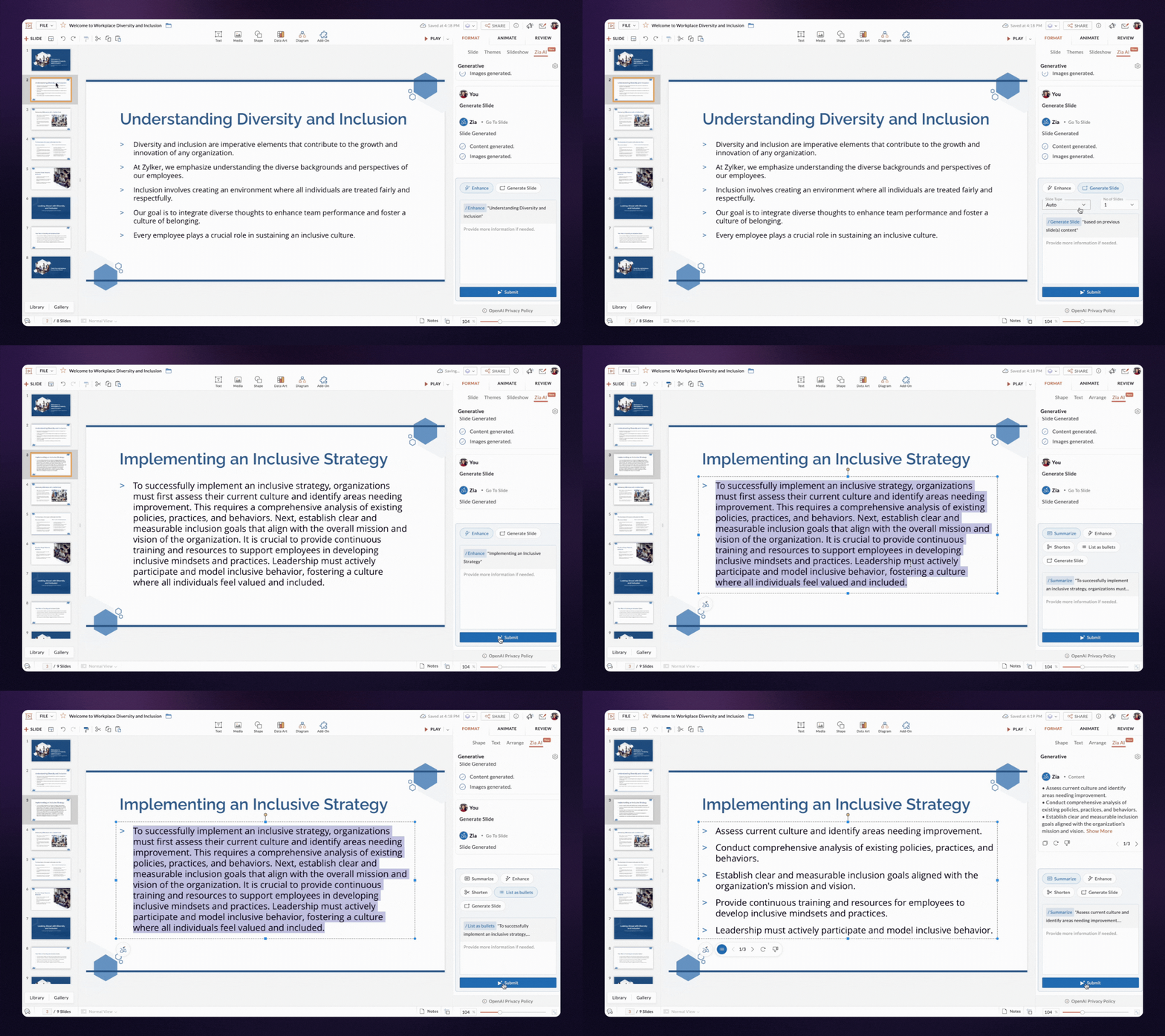


Bring life to images and content

With Zia, you can generate both content and visuals for a slide based on its title. The text and images are designed to align well with your layout, reducing the need for manual adjustments.


Enhance slide content

If your content feels unclear or incomplete, Zia can help refine and enhance it, while keeping your original message intact.

Shorten and summarize your content

You can shorten content to maintain balance in your design. If you want to make your content crisp, try the summarizing option—Zia will read the content, analyze it, and give you the key points.

Turn huge paragraphs into lists

Bulleted lists are easier to read than long paragraphs. Zia can quickly break down your content and convert it into easy-to-digest bullet points.

That's not the end! We’re continuously enhancing and extending these capabilities to assist you through out your presentation journey.
If you use the Zoho Show mobile app, we’ve got good news! Zia AI features are in development for both Android and iOS and will be available to you soon.

We can't wait for you to try out AI in Zoho Show. Let us know your experience in the comments below.

If you have any suggestions or queries, feel free to reach out to us at support@zohoshow.com.

    • Sticky Posts

    • Introducing Zoho Show extension in Your Chrome Browser

      Hi everyone, Over the years, Chrome's feature-rich support extensions have grown to offer additional ways to easily access your favorite tools from anywhere. Today, Zoho Show is excited to announce our integration with Google Chrome as an extension app to help build and access presentations directly from your browser.   Zoho Show for Google Chrome is a free extension that allows you to dive straight into drafting your presentation material. Simply install the Show extension from the Chrome Web Store
    • Take your presentations anywhere with the Zoho Show app for iOS

      We're excited to announce the launch of the Show app for iOS. Our new presentation app gives you the power to view and present slideshows on your iPhone and iPad devices wherever and whenever you want.   The Show iOS app has a host of features that will make your presentations engaging and dynamic: Access all your presentations with a single tap Sign in to your Zoho Show account to view your slides and deliver presentations on-the-go. The app stores all the presentations you've created in the My
    • Introducing All New Zoho Show - Create and Design Stunning Presentations.

      Hello,   Whether you're a first-time presenter or an expert looking to make a lasting impression, Zoho Show is the tool for you. Whatever your expertise, the All New Zoho Show's contextual user interface lets you create all kinds of slides, from plain text on a simple background to complex presentations with animations, tweets, charts, media files, and lots more.   The UI doesn't leave you to figure everything out yourself, but presents something you can easily use. It's clear, obvious, and intuitive.
    • Three smart ways to share your presentation with Zoho Show.

      "What is the best way to share a presentation?", a lingering question that is asked after every live session or a meeting. Sharing presentations can be time consuming. It can be done, either by attaching the file to an email or by saving it in a pen drive. But what happens when your file size is large or your team is spread across the globe? Zoho Show lets you share your presentations both internally and externally without worrying about the file size. You can share your slides as a link and decide
    • Convey Your Ideas and Convince Your Audience with Zoho Show

      Visual presentations are highly impactful and it is a no-brainer that your audience gets attracted to them. The use of images and videos help you reach your objectives by emphasizing your ideas more effectively.  According to the psychologist Jerome Bruner of New York University, "people only remember 10% of what they hear and 20% of what they read, but about 80% of what they see and do." For example, if the above data on its own, was presented visually, there is an 80% chance that the information
    • Recent Topics

    • Tax/Vat Number Field As Standard - Customer & Vendor

      Hello, when are you'll going to have the customer & vendor tax/vat number as a standard field under the relevant profile pages? I find it strange that after 6 years of using Zoho Inventory that I still have to use a custom field for a tax/vat number,
    • Is there a way to sync Tags between CRM and Campaigns/Marketing Hub?

      I wonder if there is a way to synch the tags between CRM and Marketing-Hub / Campaigns?
    • Restricting coupon codes and plans to specific customers

      Having the ability to restrict coupon codes, plans and add ons to specific customers (new or existing) e.g. sending an invite link out to a certain customer or allowing a certain group of customers the ability to use a certain promo code or sign up to
    • Coupon Management Lacks functionality

      Hey Zoho Team, Let me start of by saying I'm a huge fan of the entire Zoho suite. I have a couple of thoughts about the way coupons are handled and believe there they are in need of some improvement. There are a couple of key issues: 1. Coupons need to
    • Free Webinar Alert! Zoho Mail + Zoho CRM: Turn inbox replies into CRM deals

      Hello Zoho Community! Are your sales conversations happening in Zoho Mail while your customer data lives in Zoho CRM? Join our upcoming webinar to learn how integrating the two can help you automate follow-ups, capture leads faster, and keep every customer
    • Assign account to a ticket created with WebToCase

      We use Zoho Desk. Our large client uses WebToCase form to submit tickets. I have two workflow rules: When a contact is created and its email ends with example.com, it runs a custom function, which assigns the new contact the right account Example with
    • Introducing the Employee Portal for internal job posting

      Employee referrals and internal applications are one of the most trusted hiring channels. But in many organizations, employees only hear about openings through messages, word of mouth, or after the role has already been open for a while. When employees
    • Marketing Tip #42: Keep policy pages updated and accessible

      Policy pages may not be the most exciting part of your store, but they play a big role in building trust. Before buying, many customers look for information on shipping, returns, refunds, privacy, and terms. If these pages are missing, outdated, or hard
    • Extend the Image Choice Field

      Hi, The New Yes/No field is great for what it does, and the Image Choice Field is good but could be better with some functions from the Yes/No field. Take an example, rather than just Yes/No you want Yes/No/Maybe (Or more than 3 choices), but unlike the
    • Migrate from Zoho Mail to G Suite

      I am unable to find any documentation on how one can migrate from Zoho Mail to another platform, like G Suite or Office 365. Please point me to the right documentation. Thank you.
    • The All New Attendee App | Zoho Backstage

      The Zoho Backstage attendee app is the primary touchpoint for attendees, speakers, exhibitors, and sponsors during an event. It helps participants access event information, manage their schedules, connect with other participants, engage with exhibitors
    • Department Customization Copy/Paste

      Hello! I love the new customization of the layouts, rules and templates! However, we have several "departments" that operate similar and as I'm updating either ticket layout or workflow rules, I'm finding that I have to do it in each department. I would
    • Ticket status does not update upon layout change

      Hi team, I'm encountering an issue with ticket layouts and Blueprints in Zoho Desk and would like to understand whether this is expected behavior or a bug. Scenario I have two ticket layouts: Helpdesk Integration The Integration layout has its default
    • The 3.1 biggest problems with Kiosk right now

      I can see a lot of promise in Kiosk, but it currently has limited functionality that makes it a bit of an ugly duckling. It's great at some things, but woeful at others, meaning people must rely on multiple tools within CRM for their business processes.
    • Uploaded Videos not processing

      We are unable to attach videos. When the file is uploaded, it gets stuck at 100% and the ATTACH button is not clickable. My assistant in the Philippines experienced the same issue. I am in California.
    • Zia Agents looks promising, but I still cannot deploy my first agent or connect WhatsApp after weeks of support tickets

      Hi Everyone, I am posting here because I am stuck and need practical help from someone who has successfully deployed a Zia Agent with WhatsApp. Zia Agents looks like a very promising product. I have watched the platform expand quickly, and I have noticed
    • Application-Level Save copy of sent emails

      It would be really helpful to be able to turn on/off the Save copy of sent emails at a per application level, so some applications can save in the sent folder and others don't.
    • Net ##th Terms (e.g. due on the following 15th)

      I have a client who pays me twice monthly per our contract. It would be helpful to have terms on my invoices where the invoice is due on the 15th or the 30th of the same or the following month.
    • Don't send customer email when creating a ticket

      Hi Is there an easy way to stop the system sending an email to the customer when we manually create ticket.
    • You do not have sufficient permissions to perform this operation. Contact your administrator.

      When I attempt to log a call I initiate the +New Call and Start Calling and I click Answered Call in the popup dialog box that follows. Any attempt to save or close this dialog box results in "You do not have sufficient permissions to perform this operation. Contact your administrator." The only way I can get the popup to disappear is to refresh the page and it will go away. I have found others reporting this issue when they attempt to run reports.  Any suggestions? Thank you in advance for taking
    • Zoho CRM Layout Rules: Nine New Actions, Profile-Based Execution, and Interactive Preview

      Hello everyone, Availability: This feature is now available for customers in the JP and SA DCs. It is planned to be released for other customers in soon. We’re excited to announce powerful new enhancements to Layout Rules in Zoho CRM - a feature built
    • Zia Agents: quando a Inteligência Artificial do Zoho para de sugerir e passa a agir

      Decidi criar um artigo com um panorama prático sobre o que são os agentes do Zia Agents, como funcionam de verdade dentro do ecossistema Zoho e o que aprendi implementando um agente de qualificação de leads em produção. De onde veio a idéia do artigo?
    • Zoho Desk Android app update: Manage Custom Module records, View Record Counts for Sub Modules.

      Hello everyone! We have introduced an option to add, edit and delete Custom Module records within the Zoho Desk Android app. Now, you can also view the record counts for sub modules (Time Entry, Attachments, Activities) in the ticket details screen. Please
    • Automating CRM backup storage?

      Hi there, We've recently set up automatic backups for our Zoho CRM account. We were hoping that the backup functionality would not require any manual work on our end, but it seems that we are always required to download the backups ourselves, store them,
    • How to preserve Lead Creation Date, UTM parameters, and custom fields during Lead Conversion?

      We are optimizing our MQL journey. When converting leads to contacts/deals, we need to ensure that the original system Lead Creation Date and UTM tracking parameters (Source, Medium, Campaign) are not lost or archived, as our teams require them for accurate
    • Problem with currency field in Zoho CRM

      Hi Guys Zoho Books has a feature in currency fields that automatically converts decimal numbers with commas ( , ) to period format ( . ) when pasting them. For example: R$ 2,50 --> R$ 2.50 Is this behavior available in Zoho CRM? I couldn't find any configuration
    • Sub-projects

      Hi,  Can we create a sub-project.   Client1 1. project1     1.1 sub-project1    1.2 sub-project2 2. project2    2.1 sub-project1    2.2  sub-project2
    • Using Items from Books as product/plan Add-Ons

      Hey, It'll be great to use Items from Books as product/plan Add-Ons. Ed
    • Inspection Table

      Hello Latha, We created a job sheet that includes the new table (Inspection Table) which was introduced recently. However, agents are not able to see the rows in the inspection table. Could you please investigate this issue and get back to us? Please
    • Custom Button Creation from Layout Editor in Zoho CRM

      Hello All, Buttons in Zoho CRM act as triggers that perform a specific action when clicked. Zoho CRM includes a set of system buttons that help you carry out common actions with a single click. Beyond these, your organization can create custom buttons
    • Automatic login options for customer portal

      The customer portal is nice for zoho subscriptions, but there are no options to automatically login to it, so if a user is logged into their account inside of my product, I can't create a link that will let them login to their dashboard. Could we have
    • Filing GST 3B Through Zoho

      I am unable to record/Mark as filed the GSTR-3B for January 2026 in Zoho Books. Although GSTR-3B has already been filed on the GST Portal filed through GST portal but need to mark as filed in Zoho Books so I will be allowed to filed the next returns,
    • Square Payments for Subscriptions

      I'd love to be able to use Square Payments for Subscriptions with my customers. I already use it for Zoho Books Please have this considered. It would really help my business
    • Admin Logging in as another User

      How can a Super Admin login as another user. For example, I have a sales rep that is having issues with their Accounts and I want to view their Zoho Account with out having to do a GTM and sharing screens. Latest Update (27th April 2026): With the early
    • Add a MATRIX field to the forms creation

      Same as Zoho forms, we need a Matrix field in Zoho Creator forms, is very usefull
    • Discount Per Line Item

      We are a phone company. Sometimes, when we sign up customers, our sales team would like to provide recurring discounts on certain addons. Presently, we have no way of doing this so when we provide discounts, we are forced to simply reduce the price of
    • Introducing template migration: Move your Docusign templates to Zoho Sign in minutes

      Moving to a new e-signature tool usually comes with a catch: recreating every template from scratch. For teams that rely on dozens of carefully built templates—each with the right recipient roles, fields, and placements—that manual rework is often the
    • Error Code 2945 , PATTERN_NOT_MATCHED

      Hi, I am trying out Zoho Creator API.  However, I always get the following <response>     <code>2945</code>     <message>PATTERN_NOT_MATCHED</message> </response> However, error code list error as Invalid Ticket. I do not know what is wrong. 
    • Create a list of products and automatically associate them with new deals

      Hello, I have a store with WooCommerce, and I want to import orders into my pipeline. But I haven't found a way to import the order with the associated products. So, do I have to create the deals and then manually add the products to them? That's double
    • List of Mail Merge Templates via Deluge

      Hello, Is it possible to get a list of the mail merge templates I've created in CRM within a custom function? I want to retrieve them and put them in a dropdown list but all I get is a scopes error! Can anyone see where I'm going wrong? Is this even possible?
    • Next Page