Kaizen #111 : Set default values based on Page Layouts using Client Script
Hello everyone!
Welcome back to another interesting Kaizen post.
In this post, let us discuss how to set default values for fields based on different layouts using Client Script.
In this Kaizen post,
- What are Page Layouts?
- Client Script is specific for each layout
- Use Case
- Solution
- Summary
- Related Links
1. What are Page Layouts?
Page layouts in Zoho CRM enables you to manage the organization and display of fields, sections, and associated details on a record's page. These page layouts are instrumental in personalizing the user interface and optimizing the data entry process to align with your organization's unique requirements. You can assign layouts to user profiles based on your business requirements.
2. Client Script is specific for each layout
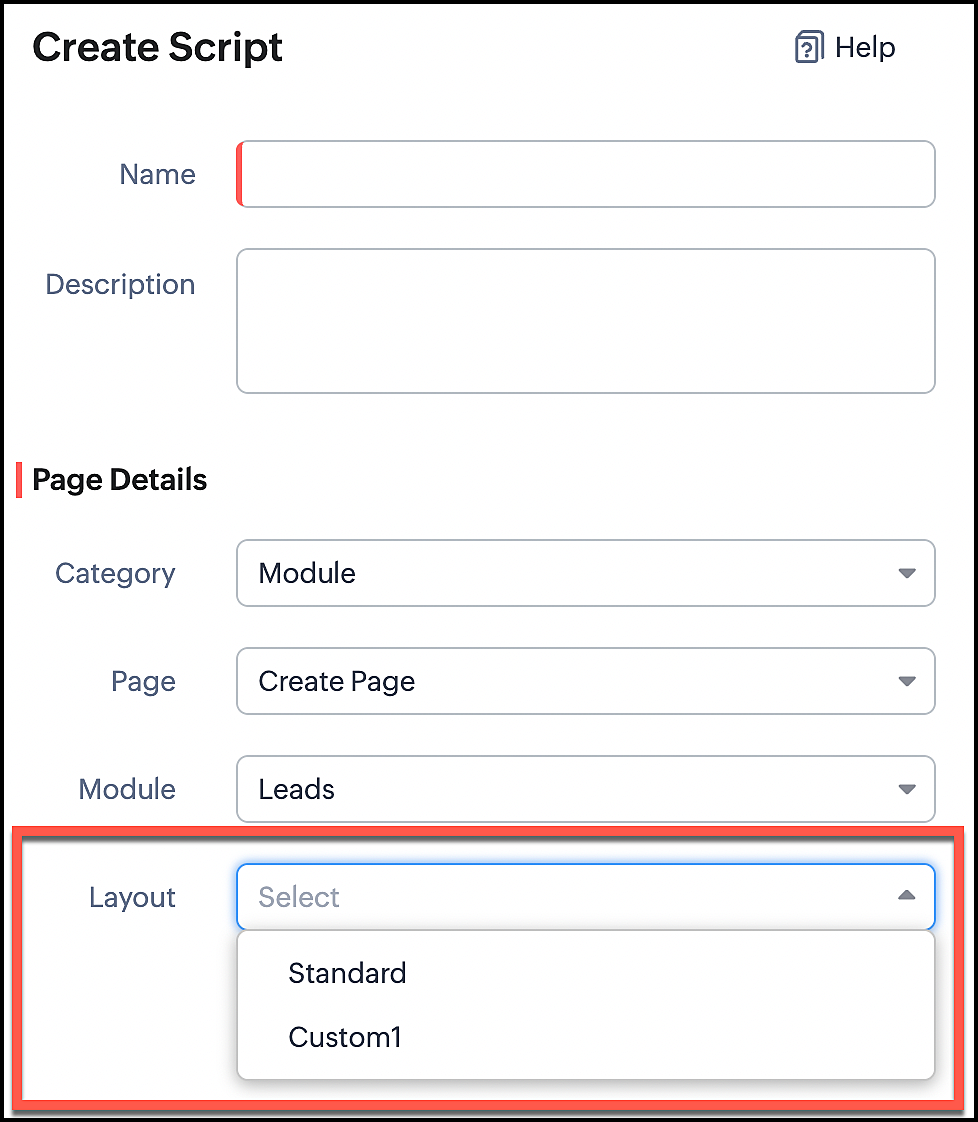
Whenever you create a Client Script, you should mention the layout for which the Client Script should work. So whenever you want to perform actions specific to a particular layout, you can easily accomplish it using Client Script.
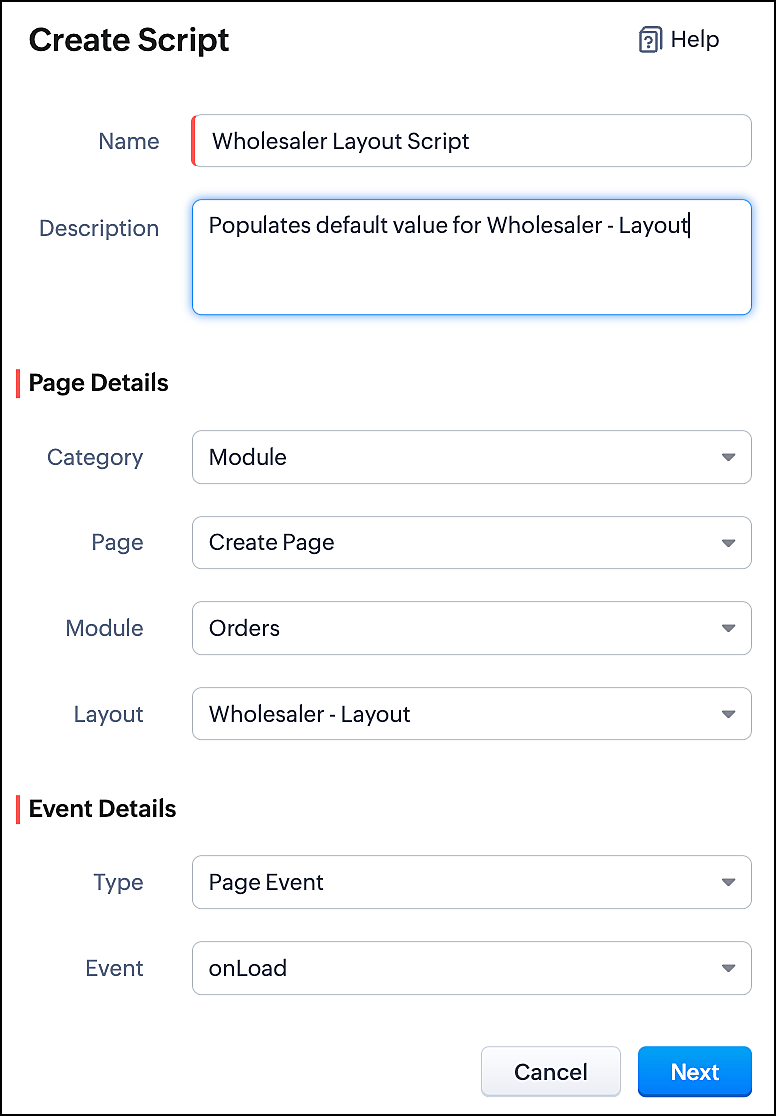
In the image below, you can observe that selecting a layout name is a necessary step for configuring a Client Script.
3. Use Case
Consider that Zylker is a manufacturing Company. The customers include both Wholesalers and Retailers. For this purpose, Zylker has two Page Layouts in a custom module named as Orders. One is the Wholesaler-layout and the other is the Retailer-layout. The Wholesaler-layout is assigned to the wholesaler profile and the Retailer-layout is assigned to the retailer profile.
1. Whenever a customer with retailer profile creates an order, the read-only field Account Type should be auto-populated as Retailer. In the Create page of the Orders module, when the value entered in the field "Number of pieces" is more than 100, then the Payment Method should get populated as Prepaid and should be read-only.
2. Whenever the customer with wholesaler profile creates an order, the read-only field Account Type should be auto-populated as Wholesaler and the Payment Method should be populated as Prepaid and should be read-only.
4. Solution
For a particular module, the number of Client Scripts to be created differs based on
The page for which you want the script to work.
The events that should trigger the script.
The layouts for which you want the script to work.
To accomplish this requirement, you need to create three Client Scripts, one for each layout.
- Client Script for Retailer Layout with onLoad Page event
- Client Script for Retailer Layout with onChange Field event
- Client Script for Wholesaler Layout with onLoad Page event
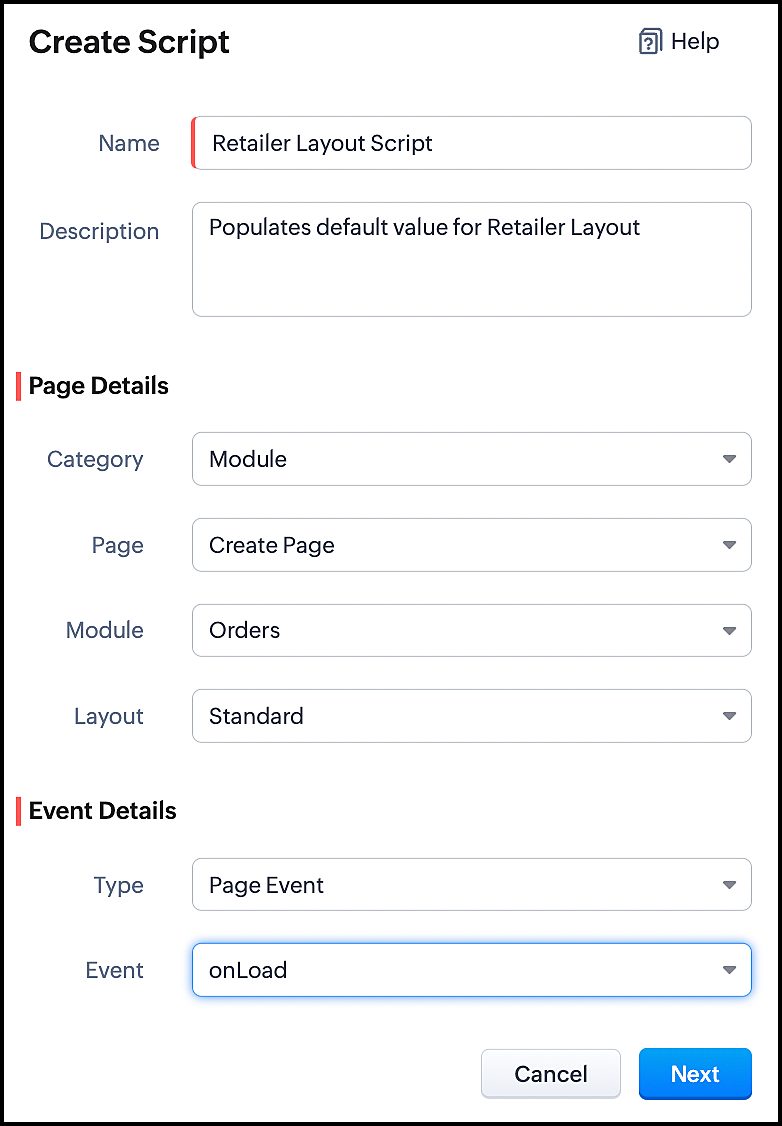
1. Client Script for Retailer Layout with onLoad Page event
- Go to Setup > Developer Space > Client Script. Click +New Script.
- Specify the details to create a script and click Next.
- Enter the following script and click save.
//To populate default value for Account Type var acc_type = ZDK.Page.getField("Account_Type"); acc_type.setValue("Retailer"); // To make the field "Account Type" read-only acc_type.setReadOnly(true); |
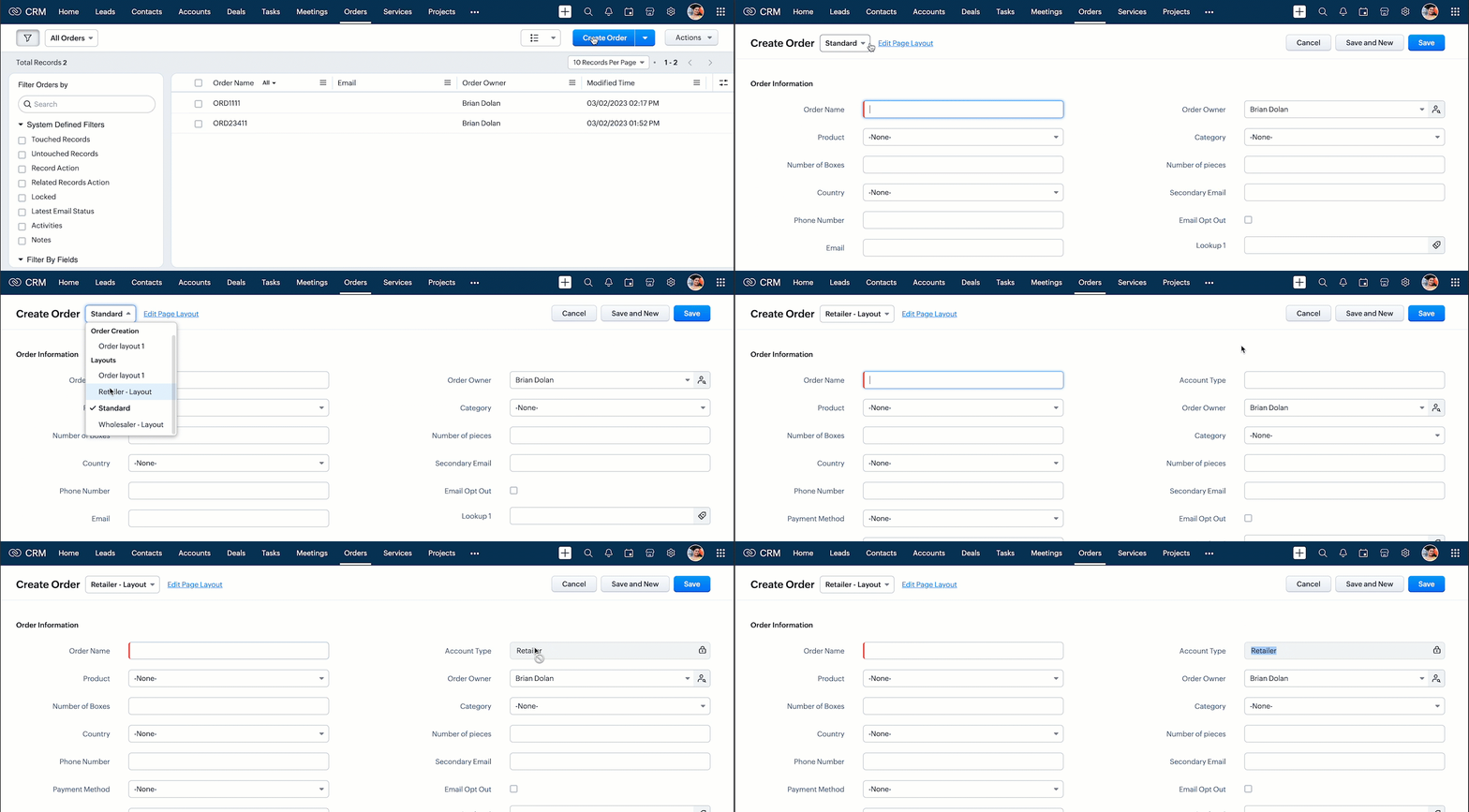
- This script gets executed whenever the Retailer - Layout, Create Page of Orders module gets loaded. The getField ZDK fetches the object details about the field Account Type. The value, Retailer can be populated to this field using setvalue(). You can make Account Type field read-only using setReadOnly().
- Here is how this Client Script works.
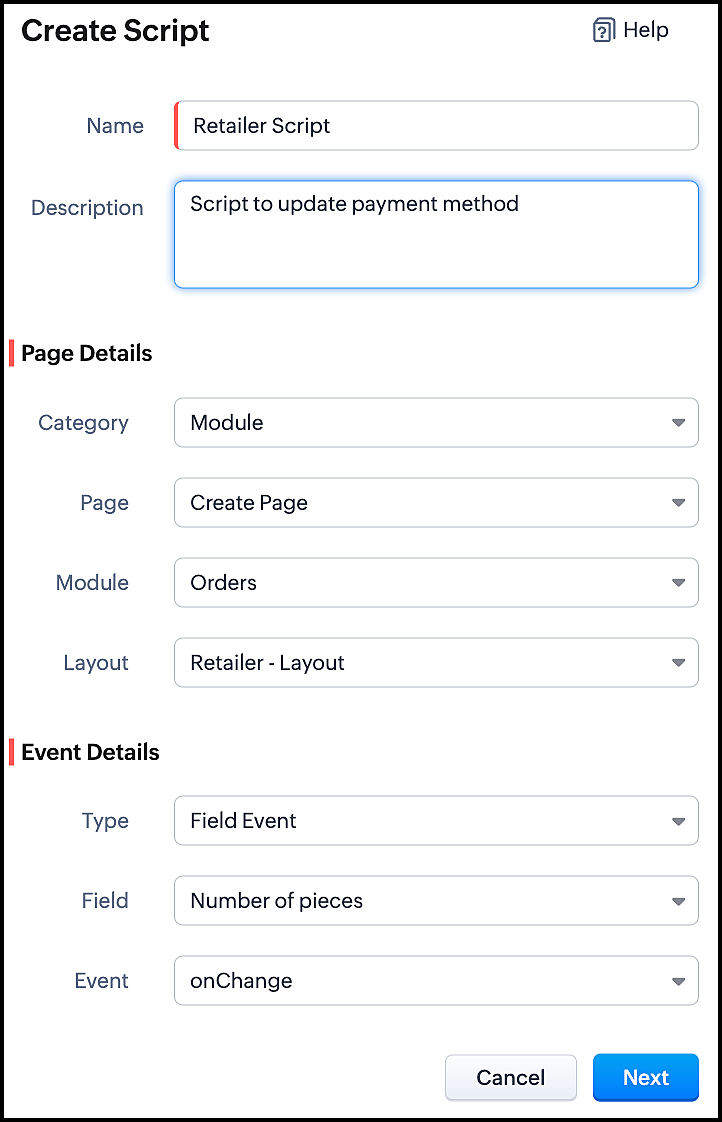
2. Client Script for Retailer Layout with onChange Field event
- Go to Setup > Developer Space > Client Script. Click +New Script.
- Specify the details to create a script and click Next.
- Enter the following script and click save.
//To populate Payment Method when the quantity is more than 100 var no_of_pieces = ZDK.Page.getField("Number_of_pieces"); var payment_method = ZDK.Page.getField("Payment_Method"); if (no_of_pieces.getValue() > 100) { payment_method.setValue("Prepaid"); // To make the field "Payment Method" read-only payment_method.setReadOnly(true); } |
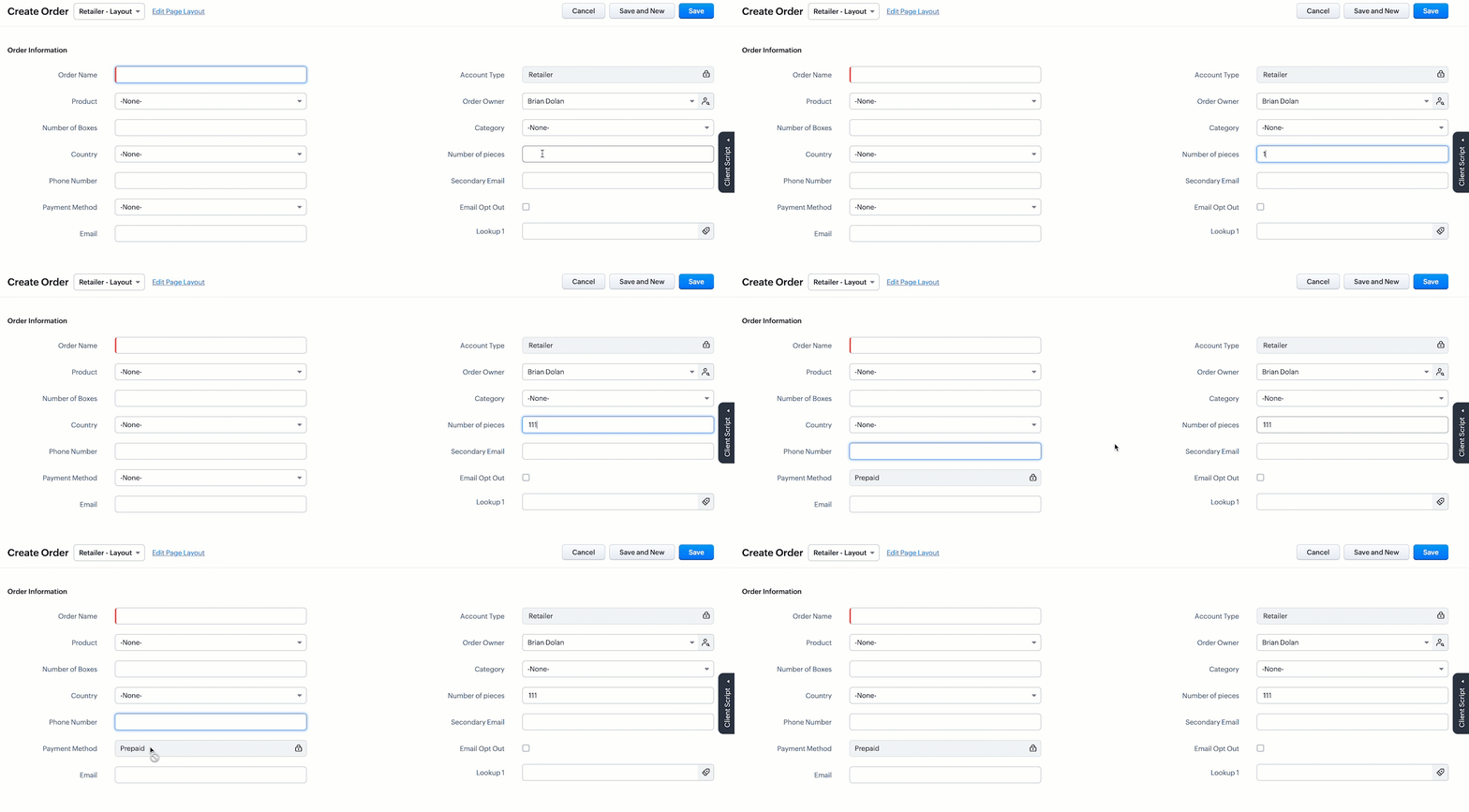
- This script gets executed whenever the user enters a value in the Number of Pieces field in the Retailer - Layout's Create Page of Orders module. The getField ZDK fetches the object details about the fields Number of Pieces and Payment Method. The value, Prepaid will be populated to Payment Method using setvalue(), whenever the value entered in the Number of Pieces is more than 100. You can use getvalue() to get the value entered in a field. You can make this field read-only using setReadOnly().
- Here is how this Client Script works.
3. Client Script for Wholesaler Layout with onLoad Page event
- Go to Setup > Developer Space > Client Script. Click +New Script.
- Specify the details to create a script and click Next.
- Enter the following script and click save.
//To populate default value for Account Type var acc_type = ZDK.Page.getField("Account_Type"); acc_type.setValue("Wholesaler"); // To make the fiels "Account Type" read-only acc_type.setReadOnly(true); //To populate default value for Payment Method var payment_method = ZDK.Page.getField("Payment_Method"); payment_method.setValue("Prepaid"); // To make the fiels "Payment Method" read-only payment_method.setReadOnly(true); |
- This script gets executed whenever the Wholesaler - Layout, Create Page of Orders module gets loaded. The getField ZDK fetches the object details about the fields Account Type and Payment Method. The value, Wholesaler and Prepaid can be populated to the corresponding fields using setvalue(). You can make Payment Method field read-only using setReadOnly().
- Here is how this Client Script works.
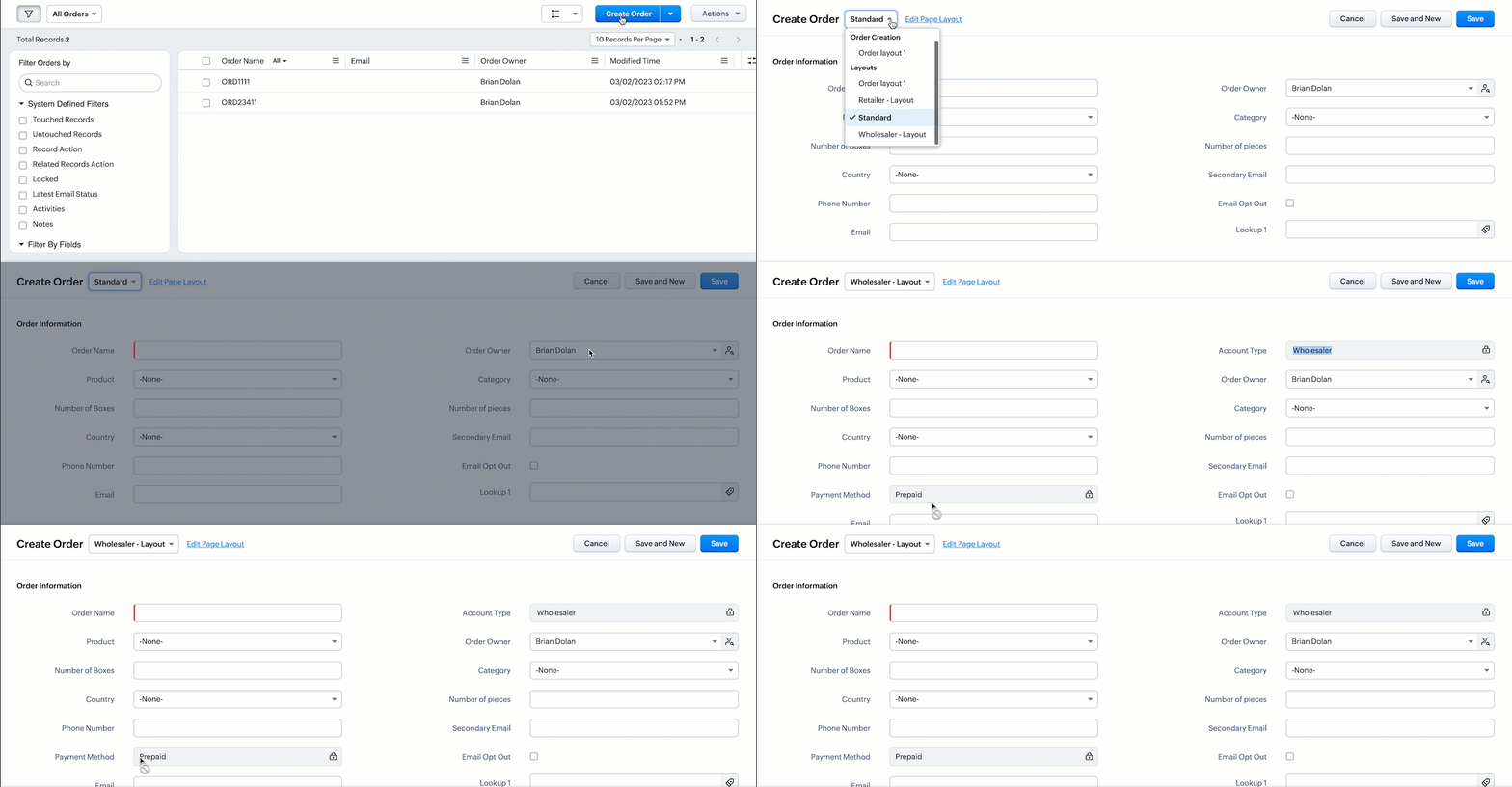
- Thus using Client Script, you can populate different default values for the same fields located in different page layouts, based on custom conditions.

Note :
Alternatively, you can achieve this using workflow rules. However, if you want instant actions i.e., before updating or saving a record, or if you have exceeded the workflow limit, you can implement this using Client Script.
5. Summary
In this post, we have discussed,
1. Configuring Client Script based on Layout.
2. Choosing the type of Event for a requirement.
3. Using setValue & setReadOnly for the ZDK.Page.getField().
We hope you found this post useful. We will meet you next week with another interesting topic!
If you have any questions let us know in the comment section.
Click here for more details on Client Script in Zoho CRM.
6. Related Links
Please take a look at our Kaizen collection here.
Cheers!
Previous Kaizen - Kaizen #110 Record Locking APIs in Zoho CRM
Topic Participants
Maadhari M
Vigneshwaran K
varun
Anamika Prasanth
Ishwarya SG
Sticky Posts
Kaizen #198: Using Client Script for Custom Validation in Blueprint
Nearing 200th Kaizen Post – 1 More to the Big Two-Oh-Oh! Do you have any questions, suggestions, or topics you would like us to cover in future posts? Your insights and suggestions help us shape future content and make this series better for everyone.Kaizen #226: Using ZRC in Client Script
Hello everyone! Welcome to another week of Kaizen. In today's post, lets see what is ZRC (Zoho Request Client) and how we can use ZRC methods in Client Script to get inputs from a Salesperson and update the Lead status with a single button click. In thisKaizen #222 - Client Script Support for Notes Related List
Hello everyone! Welcome to another week of Kaizen. The final Kaizen post of the year 2025 is here! With the new Client Script support for the Notes Related List, you can validate, enrich, and manage notes across modules. In this post, we’ll explore howKaizen #217 - Actions APIs : Tasks
Welcome to another week of Kaizen! In last week's post we discussed Email Notifications APIs which act as the link between your Workflow automations and you. We have discussed how Zylker Cloud Services uses Email Notifications API in their custom dashboard.Kaizen #216 - Actions APIs : Email Notifications
Welcome to another week of Kaizen! For the last three weeks, we have been discussing Zylker's workflows. We successfully updated a dormant workflow, built a new one from the ground up and more. But our work is not finished—these automated processes are
Recent Topics
【Zoho CRM】商談タブへのデータインポート
Zoho使用前にエクセルで管理していた商談情報を、Zoho一括管理のため、商談タブにインポートしたいのですが、お客さまの氏名だけが紐づけられませんでした。 「Zoho CRMにインポートする項目を関連付ける」のところが画像のようになっています。 (弊社では、「姓」を「★個人データ名」という項目名に変更し、フルネームを入れて使用しています。) どのようにしたら氏名をインポートできるかご存じの方がいらっしゃいましたら、ご教示いただきたく、よろしくお願いいたします。 (投稿先が間違っていましたらご指CRM Cadences recognise auto-responses
I have leads in a Cadence. I get an auto-responder reply "I'm out of the office..." Normally Cadences seems to know that isn't a real reply and keeps the lead enrolled in the cadence. However, today, Cadences has UNENROLLED a Lead who sent an auto-reponseSalesIQ Chat Notifications
I am the admin of our salesIQ implementation. About two weeks ago, I started hearing/seeing notification for ALL chats messages from monitored agents/chat participants. I don't need to see these, we have a manager who deals with this. I can't stop theHow to Create a Fixed Sliding Time Window (D-45 to D-15) in Zoho Analytics ?
Hello, I would like to create a report in Zoho Analytics based on a sliding time window between D-45 and D-15, with a fixed snapshot of that specific period. The data displayed should strictly reflect activity recorded between D-45 and D-15 only, withoutExport Zoho Books to another accounting package?
Is an export feature to Quickbooks or Accpac available (or a form that is easily imported by them)? My reasons: 1) my accountant, who prepares my corporate tax return, prefers to work with their own accounting system. If I can convert Zoho books a form that is easily importable into Quickbooks or an Accpac format, this process would be easy. 2) I don't want to keep my data in a proprietary format on the cloud somewhere without a way to easily extract it to a format that can be read my a well establishedAnchor Links in Dashboards
Hello, Our dashboards frequently have multiple sections that would be more easily skipped between using anchor links. Please consider adding an anchor link feature to the text widget? This could be done by adding an anchor link option to the text widget next to the "remove" option (see screenshot). The option would assign an ID to the <div> containing the text widget in the live dashboard. Then, the chosen ID could be linked using a traditional <a href="#link_id"> in the html section of the textIntroducing Auto-trigger for Screening Bot
Still manually sending screening tests after every application? Not anymore. With Auto-trigger for Screening Bot, screening now begins automatically. When a candidate applies for a job that has an attached assessment, Recruit checks whether the test hasImporting into Multiselect Picklist
Hi, We just completed a trade show and one of the bits of information we collect is tool style. The application supplied by the show set this up as individual questions. For example, if the customer used Thick Turret and Trumpf style but not Thin Turret,Add line item numbers to sales order/invoice creation page
It would be really helpful if there were line numbers visible as we are creating a sales order and/or invoice. There are line numbers visible in the PDF once the sales order is created. I would like to be able to see the line numbers as I am buildingAPI to Apply Retainer invoice payment to Invoice
Hi Team, I could not find API to apply the Retainer invoice payment to existing Invoice. Can you please help ? Attaching the screenshotReconciling a month with no transactions
I'm treasurer for a small non profit cemetery association and I'm trying to reconcile a bank statement for a month that did not have any transactions. Do I skip the month entirely and go a month with transactions?Customize your Booking page using Zia
We’re excited to introduce an AI-based enhancement that automatically customizes your booking page effortlessly. By simply providing your business website URL, Zoho Bookings can automatically design a booking page that matches or complements your brandMultiple header in the quote table???
Hello, Is it possible in Zoho CRM to add multiple headers or sections within the Quote product table, so that when the quote is printed it shows separate sections (for example “Products” and “Services”)? To clarify, I’m asking because: This does not appearZoho mail to contacts and leads, but not to accounts?
We use the accounts tab a lot for our business because they can be linked to the sales orders. Now we want to use the mail add on to link communication of our emails to our accounts. However this is only possible for contacts and leads? It would be convenientAPI keys not showing in ZeptoMail dashboard
Hi there, I'm hoping someone can provide some assistance as support isn't replying. I am trying to configure my transactional emails, but the dashboard doesn't show any of my API details - the `div` is there but it's emtpy. Every time I click "GenerateReading from and writing to Zoho Projects Custom Module with Deluge
Does anyone know if there is a way to read from and write to the Custom Modules that Zoho now supports. I would love to be able to loop through a set of data and create the entities I need to for this new custom module I'm looking to put together.How Does Knowledge Base Search and Article Recommendation Work?
Hello, I would like to understand how the Knowledge Base search engine works. Specifically, does it search based on: The article title only? The full article content? Both, the article and the content? Keywords? Tags? Also, how does the system determineZoho Books/Inventory - Restrict Items With Pricebook
Hi Zoho Team, I'm trying to address as use case where a client needs to restrict which products certain customers can purchase. I have been able to find a way to do this based on the current Zoho Books or Zoho Inventory configuation. My feature requestBest Way to Integrate Zoho Campaigns with Amazon SES Without Third-Party Tools
I am looking for the most seamless and efficient method to integrate Zoho Campaigns with Amazon SES. My goal is to avoid using any third-party automation tools like Zapier, Make, or Pabbly, and instead, leverage Zoho's native capabilities for this integration.How to charge Convenience fee OR payment gateway charges to the end client who is paying the invoice?
Hello, I am creating this topic after having discussions with various sets of users and have understood that with people moving more and more to digital payments, it is important for the client to enable the "Convenience fee" kind of scenario. I haveCard payment surcharge?
Hi, I would like to offer my customers the ability to pay invoices by card (using the PayPal integration). However, PayPal charges me around 5% to receive a card payment, and I would like to pass on this cost to my customer by way of a card payment surcharge. Is there any way for Zoho Invoice to be set up to automatically add a defined "card processing fee", say 5% of the invoice total, if the customer elects to pay by card? I don't want to add this on to invoice manually, since most of my clientsJavascript Error
I don't know how this happened but I'm constantly getting popup windows with Javascript coming from Notebook. I have no idea why this is happening. Screen shot attached. Thanks, Joe BerryZoho POS App Hanging Issue – Sales Becoming Difficult
The Zoho POS app frequently hangs and becomes unresponsive during billing, making it very difficult to complete sales smoothly. This commonly happens while adding items, during checkout, or at payment time, especially during peak hours. These issues causeTip #62- Exploring Technician Console: Send Ctrl + Alt + Del- 'Insider Insights'
Hello Zoho Assist Community! This week, we’ll be exploring the Send Ctrl + Alt + Del option in the Technician Console. Let’s jump right in. System administrators often rely on Ctrl + Alt + Del when managing remote devices that have unresponsive applicationsDisappearing Mouse cursor in Zoho Mail / Windows 11 (Chrome + Edge)
I'm seeing an issue when writing mails with the light theme with the mouse cursor being white and the document area also being white - making it nearly impossible to see the mouse cursor. I see the problem on Windows 11 under Chrome and Edge. (Yet toTemporarily rate limited due to IP reputation.
We have suddenly started receiving the following Mail Delivery Status Notification: Diagnostic-Code: 4.7.650 The mail server [136.143.184.12] has been temporarily rate limited due to IP reputation. For e-mail delivery information, see https://aka.ms/postmasterSKUs for Invoices, POs, etc.
It doesn't appear that one can enable SKU display on invoices, POs, etc. This is problematic, and I don't see a good reason why this shouldn't be an option. Some of our vendors and customers use this in their system. Every other identifier code is availablehow to avoid duplicate customer
How can i avoid to create a duplicate customer. I charged a same customer with two different plans and it showed up twice in my customer list and subsequently in Zoho books contacts. It creates confusion to have a same customer appears multiple times in customer or contact list. How can i avoid it.Tags with spaces
I imported notes from Evernote where tags can have spaces in them (for example "House Expenses" or "House Improvements". The import worked fine. Now I want to add a new note and assign it a tag. As soon as I type "House" followed by the space I get aRSC Connectivity Linkedin Recruiter RPS
It seems there's a bit of a push from Linkedin Talent Solutions to keep integrations moving. My Account Manager confirmed that Zoho Recruit is a Certified Linkedin Linkedin Partner but does not have RSC as of yet., (we knew that :-) She encouraged meim facing issue on generate the Estimate price
i couldn't understand what is the issue , i cant generate Estimate price where is the issuecannot be able to add user
Dear team I tried to add a new user for sales team, but after entering the OTP its showing error message cannot add nowChanging an existing item to different accounts & inventory-tracked
Hi everyone, I have an item in Zoho Books that was originally set up as a non-inventory item. Over time, I associated it with different sales and purchase accounts, and I now have many invoices, bills, and reports that use this item. My business processHow do I edit the Calendar Invite notifications for Interviews in Recruit?
I'm setting up the Zoho Recruit Interview Calendar system but there's some notifications I don't have any control over. I've turned off all Workflows and Automations related to the Calendar Scheduling and it seems that it's the notification that is sentbig 5 accounts
how do you find what accounts are listed as Big 5 ?Zoho recruit's blueprint configuration is not functioning as mapped
Current Status: Zoho Blueprint is not functioning as configured. Issue: We are moving a Candidate status in Zoho Recruit "for active file" but we encountered: "Status cannot be changed for records involved in Blueprint." This happens to various clientActual vs Minimum
Hi all, I am sure I am not the only one having this need. We are implementing billing on a 30-minute increment, with a minimum of 30 minutes per ticket. My question is, is there a way to create a formula or function to track both the minimum bill vs theDelay in rendering Zoho Recruit - Careers in the ZappyWorks
I click on the Careers link (https://zappyworks.zohorecruit.com/jobs/Careers) on the ZappyWorks website expecting to see the job openings. The site redirects me to Zoho Recruit, but after the redirect, the page just stays blank for several seconds. I'mfavorites no longer listed
Hello, I can no longer navigate to my Favorites from the pulldown at the top of my grid view (see attached screenshot). I wasn't able to find it anywhere! Please help me display my Favorites. Thank you!How to add interviews through API
I'm trying to add an interview without much luck. The documentation gives examples of adding just about everything except an interview. However, the issue might be the way I'm formatting it, because the documentation is unclear to me. It seems as if the xml should be passed in the url, which seems unusual. I've tried the data as both plain and character escaped, but nothing seems to work, nor do I even get an error response. https://recruit.zoho.com/recruit/private/xml/Interviews/addRecords?authtoken=***&scope=recruitapi&version=2&xmlData=<Interviews> <rowNext Page