Kaizen #202 - Answering Your Questions | Testing and Using REST APIs in Widgets

Kaizen #202 - Answering Your Questions | Testing and Using REST APIs in Widgets


Hello Developers!

Welcome back to a fresh week of Kaizen! 

Thank you for your active participation in sharing feedback and queries for the 200th milestone. This week, we will look at the following queries related to widget:
  • Widget Testing 
  • Using REST API in Canvas Widgets: Make HTTP calls in widgets (e.g., to external tax or product APIs)
Here are the queries that we have already answered for you from this milestone:
  1. Kaizen #200 - Answering Your Questions | Token generation using the Python SDK
  2. Kaizen #201 - Answering Your Questions | Webhooks, Functions, and Schedules

Widget Testing

One of the queries we received was simply stated
Quote
Widget Testing
 without any specific context. Since the user has not provided detailed input, we are assuming this is about how to test a widget during development.

You can test your Zoho CRM widget locally using the Zoho CLI. Run the following command from the root directory of your widget project:

zet run

This launches the widget on a local server where you can validate the UI and functionality before pushing it live.
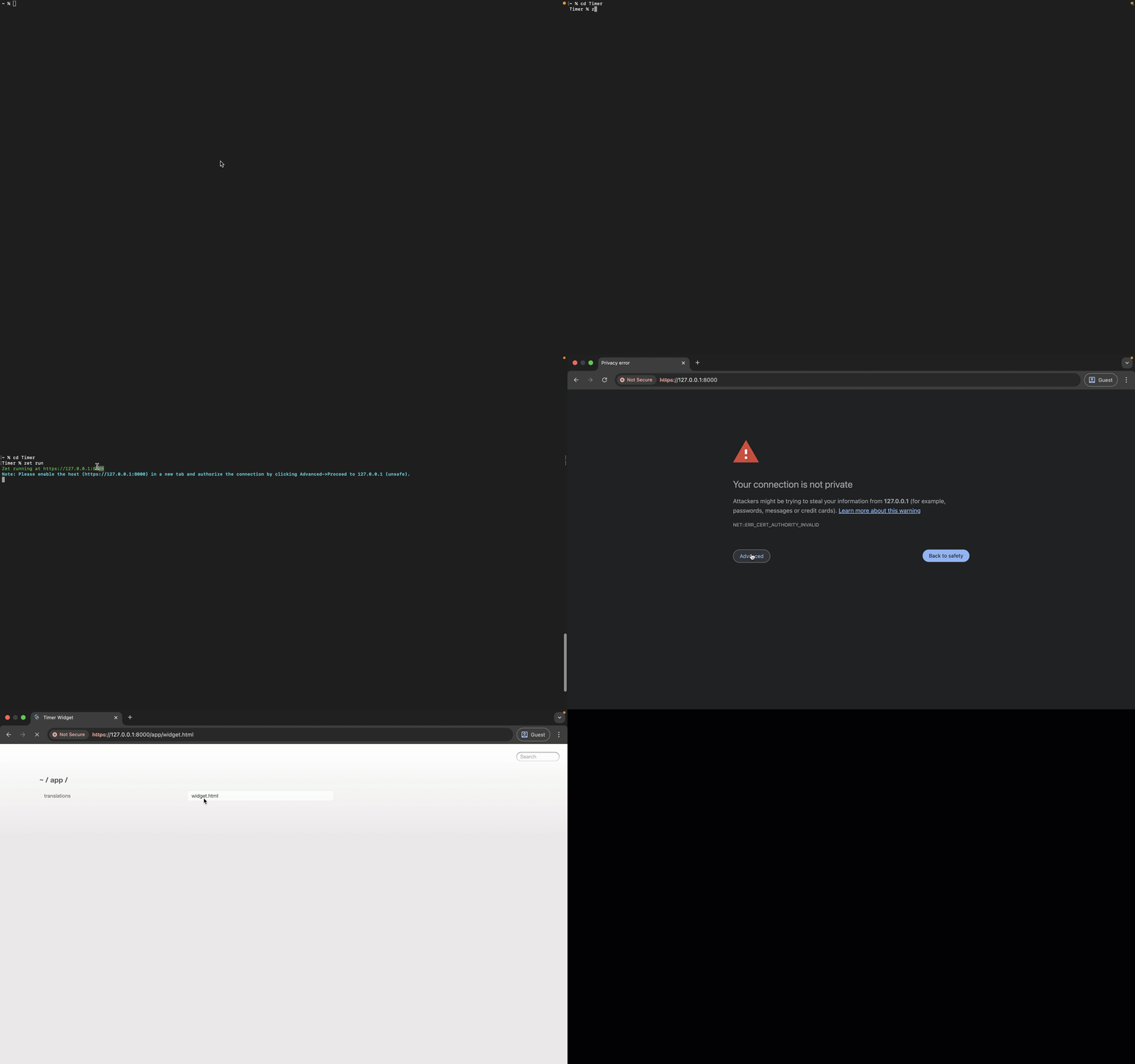

Since the localhost connection opens in a new tab and is not private, you will need to manually authorize it. 

Click Advanced, then choose Proceed to 127.0.0.1 (unsafe) to continue. 

Notes
Note

If your widget needs to access data from your Zoho CRM organization, such as fetching or updating records, it must be deployed within a Zoho CRM iframe. To do this, you should upload the widget through the Zoho CRM Widgets setup page.

We recommend using the sandbox environment in such cases before deploying the widget to your production environment.

Making HTTP Calls from Widget

Following is a query we received from a user:
Quote
Using REST API in Canvas Widgets: Make HTTP calls in widgets (e.g., to external tax or product APIs)
Yes. You can make HTTP requests to external services from any type of Zoho CRM widget using the ZOHO.CRM.HTTP object from the Widget JS SDK.

Canvas Widget - What's Supported? 

Though full widget support within Canvas is on our roadmap, currently, you can invoke widgets from a Canvas view using Client Script. This lets you render widgets inside fly-outs or pop-ups. Here is a quick start guide on how you can achieve it:

Create a Widget

1. Create a widget project and code your logic using Zoho CLI as explained in our widget help page.

2. In Zoho CRM Developer Hub, create a new widget and set the type as Button.


Create a Client Script

3. Navigate to Client Scripts in Developer Hub and click New Script.

4. You can create your script either in the Modules or Commands category based on your use case. 

For assistance, refer to the step-by-step guide on Creating Client Script and Commands.


In the Category Details section, ensure to select Canvas as the page type. Canvas views are supported in the following page contexts: List, Detail, Create, and Clone. 

Choose the one that aligns with where your widget needs to appear.


5. Here is the sample script to render widget in a pop-up

ZDK.Client.openPopup({
api_name: 'Canvas_Widget',
type: 'widget',
animation_type: 4, 
height: '450px',
width: '450px',
},
{
data: 'sample data to be passed to "PageLoad" event of widget'
}); 

Here is the sample script to render widget in a fly-out

ZDK.Client.createFlyout('myFlyout', { 
animation_type: 4, 
height: '600px', 
width: '500px'
}
);
ZDK.Client.getFlyout('myFlyout').open({ api_name: 'Canvas_Widget', type: 'widget' });

For detailed guidance, check out our Client API documentation on Pop-up and Fly-out.

You can also check out the Kaizen #99 on Rendering Widgets using Client Script for a detailed guide based on a real-time use case. 

Using REST APIs from External Applications

The ZOHO.CRM.HTTP object enables you to make secure API calls directly from the Zoho CRM widget. It acts as a proxy, routing requests through Zoho servers, which eliminates the need for external applications to support CORS.

While this SDK is primarily used for integrating third-party services, it also supports Zoho CRM API calls. This provides you with greater flexibility to:
  • Customize header and parameter structures
  • Maintain a consistent calling pattern for both internal and external APIs within the widget.
Here is a basic syntax of the SDK:

ZOHO.CRM.HTTP.<method>({
  url: "<request-url>",
  headers: {
       // Request headers as Key-value pairs
    "Authorization": "Bearer <token>" // example
  },
  params: {
    // Request params as Key-value pairs

   "ids": "1234567890" // example
  },
  body: "<stringified JSON>", // Required for POST, PUT and PATCH
})
.then(function(response) {
  console.log("Response:", response);
});

Supported Methods
  • ZOHO.CRM.HTTP.get({ ... })
  • ZOHO.CRM.HTTP.post({ ... })
  • ZOHO.CRM.HTTP.put({ ... })
  • ZOHO.CRM.HTTP.patch({ ... })
  • ZOHO.CRM.HTTP.delete({ ... })
For more detail check out the HTTP method section of JS SDK help page.

Samples using Zoho CRM Contact Roles API

Let us explore a complete CRUD (Create, Read, Update, Delete) example using Zoho CRM’s Contact Roles API.

These structures have to be used within the JS function where you are executing your code logic. 

POST Contact Roles


// Prepare the API request
        var request = {
          url: "https://www.zohoapis.com/crm/v8/Contacts/roles",
          headers: {
            Authorization: "Zoho-oauthtoken 1000.XXXXXXXXXXXXXXXXXXX265bcf20e4"
          },
          body: {
            "contact_roles": [
              {
                "name": "Sales Lead",
                "sequence_number": 1
              }
            ]
          }
        };
         // Make API call 
        ZOHO.CRM.HTTP.post(request).then(function(data) {
          console.log(data);
 })

GET Contact Roles


// Prepare the API request
var request = {
          url: "https://www.zohoapis.com/crm/v8/Contacts/roles",
          headers: {
            Authorization: "Zoho-oauthtoken 1000.XXXXXXXXXXXXXXXXXXX265bcf20e4"
          }
        };
        // Make API call 
        ZOHO.CRM.HTTP.get(request)
          .then(function(response) {
 console.log(response);
})

UPDATE Contact Roles

// Prepare the API request
        var request = {
          headers: {
            Authorization: "Zoho-oauthtoken 1000.XXXXXXXXXXXXXXXXXXX265bcf20e4"
          },
          body: {
            "contact_roles": [
              {
                "name": "Evaluator",
                "id": "5545974000000006871"
              }
            ]
          }
        };
        // Make API call 
        ZOHO.CRM.HTTP.put(request).then(function(data) {
          console.log(data);
 })

DELETE Contact Roles


// Prepare the API request
        var request = {
          params: {
            ids: "5545974000002617002"
          },
          headers: {
            Authorization: "Zoho-oauthtoken 1000.XXXXXXXXXXXXXXXXXXX265bcf20e4"
          }
        };
        // Make API call 
        ZOHO.CRM.HTTP.delete(request).then(function(data) {
          console.log(data);
 })

We hope you found this post useful. 

Let us know if you have any questions in the comments or drop us an email at support@zohocrm.com.

Cheers!

------------------------------------------------------------------------------------------------------------------------

Related Reading


------------------------------------------------------------------------------------------------------------------------
    • Sticky Posts

    • Kaizen #198: Using Client Script for Custom Validation in Blueprint

      Nearing 200th Kaizen Post – 1 More to the Big Two-Oh-Oh! Do you have any questions, suggestions, or topics you would like us to cover in future posts? Your insights and suggestions help us shape future content and make this series better for everyone.
    • Kaizen #226: Using ZRC in Client Script

      Hello everyone! Welcome to another week of Kaizen. In today's post, lets see what is ZRC (Zoho Request Client) and how we can use ZRC methods in Client Script to get inputs from a Salesperson and update the Lead status with a single button click. In this
    • Kaizen #222 - Client Script Support for Notes Related List

      Hello everyone! Welcome to another week of Kaizen. The final Kaizen post of the year 2025 is here! With the new Client Script support for the Notes Related List, you can validate, enrich, and manage notes across modules. In this post, we’ll explore how
    • Kaizen #217 - Actions APIs : Tasks

      Welcome to another week of Kaizen! In last week's post we discussed Email Notifications APIs which act as the link between your Workflow automations and you. We have discussed how Zylker Cloud Services uses Email Notifications API in their custom dashboard.
    • Kaizen #216 - Actions APIs : Email Notifications

      Welcome to another week of Kaizen! For the last three weeks, we have been discussing Zylker's workflows. We successfully updated a dormant workflow, built a new one from the ground up and more. But our work is not finished—these automated processes are
    • Recent Topics

    • Full Context of Zoho CRM Records for Zia in Zoho Desk for efficient AI Usage

      Hello everyone, I have a question regarding the use of Zia in Zoho Desk in combination with CRM data. Is it possible to automatically feed the complete context of a CRM record into Zia, so that it can generate automated and highly accurate responses for
    • Ability to assign Invoice Ownership through Deluge in FSM

      Hi, As part of our process, when a service appointment is completed, we automated the creation of the invoice based on a specific business logic using Deluge. When we do that, the "Owner" of the invoice in Zoho FSM is defaulted to the SuperAdmin. This
    • Zoho CRM for Everyone's NextGen UI Gets an Upgrade

      Hello Everyone We've made improvements to Zoho CRM for Everyone's Nextgen UI. These changes are the result of valuable feedback from you where we’ve focused on improving usability, providing wider screen space, and making navigation smoother so everything
    • Reply to Email for SO/PO

      Hello, We are new to Zoho Books and running into an issue. Our support@ email is our integration user. When our team is sending out PO/SO's we are updating the sender email, but for some reason many of our responses are coming back to our support@ email
    • How to Convert NSF to PST Format Effortlessly? - SYSessential

      It is highly recommended to obtain the error-free solution of the SYSessential NSF to PST converter to convert NSF files from Lotus Notes. Using this professional software, it becomes easier to convert all NSF database items, including emails, journals,
    • Zoho Commerce - Poor Features Set for Blogging

      Hi Zoho Commerce team, I'm sure you will have noticed that I have been asking many questions about the Blogs feature in Commerce. I thought that it would be useful if I share my feedback in a constructive way, to highlight the areas which I feel need
    • Pass shipping info to payment gateway Zoho Books to Authorize.net

      For some reason the integration from Zoho books to Authorize.net does not pass the shipping address. Authorize.net is ready to receive it, but zoho books does not send it
    • Massive Zoho Books failure

      We have not received any communication or notification from Zoho, but we have detected that Zoho Books is not working for all our users. We cannot access or use Zoho Books. This is critical. We are trying to contact Zoho on the Spain telephone number,
    • Does the Customer “Company Name” field appear anywhere in the Zoho Books UI outside of PDFs?

      Hi everyone, I’m trying to understand how the Company Name field is actually used in Zoho Books. There is a Company Name field on the customer record, but when viewing transactions like a Sales Order in the normal UI (non-PDF view), that field doesn’t
    • Email outbox is now available in the sandbox

      Hello all! Testing emails without visibility has always been a blind spot in the sandbox. With the new Outbox, that gap is closed. You can now view and verify every email triggered from your sandbox, whether it’s through workflows, approvals, or mass
    • Zoho Desk blank screen

      opened a ticket from my email, zoho desk comes up blank, nothing loads. our receptionist also gets the same thing under her login on her computer. our sales rep also gets same thing on zoho desk at his home on a different computer. I tried clearing cache/history/cookies,
    • Subform edits don't appear in parent record timeline?

      Is it possible to have subform edits (like add row/delete row) appear in the Timeline for parent records? A user can edit a record, only edit the subform, and it doesn't appear in the timeline. Is there a workaround or way that we can show when a user
    • Looking For Recruit Developer

      Hi everyone, I am looking for a Zoho Certified Developer to assist with a development project for MetalXpert. We are building a software system designed to bridge the gap between a candidate mobile app and an employer web portal using Zoho Recruit as
    • sales IQ issue on website

      i integrated the zoho sales IQ code on the website but it is comming in distroted form i am sharing the screenshot below the website is bulit in wix platform
    • Multi-currency and Products

      One of the main reasons I have gone down the Zoho route is because I need multi-currency support. However, I find that products can only be priced in the home currency, We sell to the US and UK. However, we maintain different price lists for each. There
    • Deprecation of the Zoho OAuth connector

      Hello everyone, At Zoho, we continuously evaluate our integrations to ensure they meet the highest standards of security, reliability, and compliance. As part of these ongoing efforts, we've made the decision to deprecate the Zoho OAuth default connector
    • I need to know the IP address of ZOHO CRM.

      The link below is the IP address for Analytics, do you have CRM's? IP address for Analytics I would like to know the IP address of ZOHO CRM to allow communication as the API server I am developing is also run from CRM. Moderation Update: The post below
    • Important Update: Google Ads & YouTube Ads API Migration

      To maintain platform performance and align with Google's newest requirements, we are updating the Google Ads and YouTube Ads integrations by migrating from API v19 to the newer v22, before the official deprecation of v19 on February 11, 2026. Reference:
    • Importing into the 'file upload' field

      Can you import attachments into the file upload field. I would expect it to work the same way as attachments do, But can't seem to get it to work.
    • Zoho recruit's blueprint configuration is not functioning as mapped

      Current Status: Zoho Blueprint is not functioning as configured. Issue: We are moving a Candidate status in Zoho Recruit "for active file" but we encountered: "Status cannot be changed for records involved in Blueprint." This happens to various client
    • Super Admin Logging in as another User

      How can a Super Admin login as another user. For example, I have a sales rep that is having issues with their Accounts and I want to view their Zoho Account with out having to do a GTM and sharing screens. Moderation Update (8th Aug 2025): We are working
    • Blocklist candidates in Zoho Recruit

      We’re introducing Block Candidate, which helps recruiters to permanently restrict a candidate from applying to current/future job openings. Once the candidate is blocked, they will no longer be able to participate in the recruitment process. This will
    • Layout Rules Don't Apply To Blueprints

      Hi Zoho the conditional layout rules for fields and making fields required don't work well with with Blueprints if those same fields are called DURING a Blueprint. Example. I have field A that is used in layout rule. If value of field A is "1" it is supposed to show and make required field B. If the value to field A is "2" it is supposed to show and make required field C. Now I have a Blueprint that says when last stage moves to "Closed," during the transition, the agent must fill out field A. Now
    • From Zoho CRM to Paper : Design & Print Data Directly using Canvas Print View

      Hello Everyone, We are excited to announce a new addition to your Canvas in Zoho CRM - Print View. Canvas print view helps you transform your custom CRM layouts into print-ready documents, so you can bring your digital data to the physical world with
    • Admin asked me for Backend Details when I wanted to verify my ZeptoMail Account

      Please provide the backend details where you will be adding the SMTP/API information of ZeptoMail Who knows what this means?
    • Zoho Desk - Upsert Ticket

      Hi Desk Team, It is common to request more information from end-users. Using forms is a great way to ensure all the required information is collected. It would be great if there were an "upsert" option on the Zoho Form -> Zoho Desk integration which would
    • All new Address Field in Zoho CRM: maintain structured and accurate address inputs

      The address field will be available exclusively for IN DC users. We'll keep you updated on the DC-specific rollout soon. It's currently available for all new sign-ups and for existing Zoho CRM orgs which are in the Professional edition. Latest update
    • Client Side Scripts for Meetings Module

      Will zoho please add client side scripting support to the meetings module? Our workflow requires most meeting details have a specific format to work with other software we have. So we rely on a custom function to auto fill certain things. We currently
    • Introducing Multiple Sandbox Types and Support for Module's Data Population

      Register here for the upcoming Focus Group webinar on Multiple Sandbox | Help documentation to learn more about the new enhancements Hello everyone,  Sandbox in CRM is a testing environment for users to create and test new configurations like workflow
    • CRM x WorkDrive: File storage for new CRM signups is now powered by WorkDrive

      Availability Editions: All DCs: All Release plan: Released for new signups in all DCs. It will be enabled for existing users in a phased manner in the upcoming months. Help documentation: Documents in Zoho CRM Manage folders in Documents tab Manage files
    • Creator Offline

      We had online access setup and working on our iphones. We have just set it up on an 'Android Tablet' and it is not downloading all the images? We use it to show customers our catalogue. Any ideas. Offline components all setup on both devices
    • Drag 'n' Drop Fields to a Sub-Form and "Move Field To" Option

      Hi, I would like to be able to move fields from the Main Page to a Sub-Form or from a Sub-Form to either the Main Page or another Sub-Form. Today if you change the design you have to delete and recreate every field, not just move them. Would be nice to
    • Enable or disable any Field Rule!

      Hello Zoho Forms Community, We are excited to announce a powerful new enhancement to Field Rules that gives you greater control and flexibility in managing your form logic! Previously, if you wanted to temporarily deactivate a field rule, you had two
    • Marketing Tip #20: Increase traffic with strong meta titles and descriptions

      Meta titles and descriptions are what people see first on search results before they ever click through to your website. If your pages use generic titles or basic descriptions, you miss the chance to stand out, and search engines may not know which page
    • Different form submission results for submitter and internal users

      I'm looking for suggestions on how to show an external submitter a few results while sending internal users all the results from the answers provided by the external user. The final page of our form has a section with detailed results and a section with
    • Kanban view on Zoho CRM mobile app!

      What is Kanban? The name doesn't sound English, right? Yes, Kanban is a Japanese word which means 'Card you can see'. As per the meaning, Kanban in CRM is a type of list view in which the records will be displayed in cards and categorized under the given
    • Not able to delete a QC nor able to revert or create a cycle of manufacturing for QC failed Jobs

      Not able to delete a QC nor able to revert or create a cycle of manufacturing for QC failed Jobs
    • Dheeraj Sudan and Meenu Hinduja-How do I customize Zoho apps to suit my needs?

      Hi Everyone, I'm Meenu Hinduja and my husband Dheeraj Sudan, run a business. I’m looking to tweak a few things to fit my needs, and I’d love to hear what customizations others have done. Any tips or examples would be super helpful! Regards Dheeraj Sudan
    • is there any way to change the "chat with us now" to custom message?

      is there any way to change the "chat with us now" to custom message? I want to change this text
    • Deprecation Notice: OpenAI Assistants API will be shut down on August 26, 2026

      I recieved this email from openAI what does it means for us that are using the integration and what should we do? Earlier this year, we shared our plan to deprecate the Assistants API once the Responses API reached feature parity. With the launch of Conversations,
    • Next Page