Kaizen 225 - Making Query-based Custom Related Lists Actionable with Lookups and Links

Kaizen 225 - Making Query-based Custom Related Lists Actionable with Lookups and Links


Hello everyone!
Welcome back to another post in the Kaizen series!

This week, we will discuss an exciting enhancement in Queries in Zoho CRM.

In Kaizen #190, we discussed how Queries bridge gaps where native related lists fall short and power custom related lists to present relevant and contextual information right alongside the CRM records. With Queries in related lists, you can dynamically fetch data from other modules, external services, or custom integrations, at runtime!

To take it up a notch, you can now use Queries and make custom related lists actionable with lookups and links!
This is super helpful when a record needs context across multiple related modules and the user experience must still remain intuitive and navigable.

This Kaizen explains a practical use case built using a Module-type Query, and explains how the serializer’s lookup and href support turns a static list into an actionable workspace.

Use case

Fetch Deals related to a Contact that are actively in negotiation or proposal stages, with account context preserved.

Business problem

Zoho CRM’s native related lists already provide a strong baseline experience.
For example, in the Deals related list on a Contact record, both Deal Name and Account Name are rendered as clickable lookups, but they show all related records, apply minimal filtering, and offer limited control over actions and presentation.

However, with Queries, you can precisely control which records appear, decide how navigation should work, introduce contextual actions alongside native navigation.

So, here's the requirement we will try to solve today.
From a Contact record, I want to see
  1. Only active Deals whose Stage is Proposal/Price Quote or Review/Negotiation.
  2. With Deal navigation preserved
  3. With intentional account-level actions, not just navigation

In short, I want the query to show me the Deals in these stages that this Contact is currently involved with and let me quickly research the associated Account externally.

Why a Module-type query?

This scenario requires
  1. Filtering Deals by Stage
  2. Selecting a focused set of fields
  3. Embedding the result as a related list on Contacts

Query configuration

Follow the steps in the help document to create a module-type query.
The following image offers a glimpse of the query.

Serializer - where the difference happens

The serializer is not used to recreate native behavior, but to redefine intent of displaying the Deal as an explicit lookup and the Account as a contextual action.
Here is the serializer code used in this example.
return result.map(record => ({
...record,
Deal_Name: {
id: record.id,
name: record.Deal_Name,
module: "Deals"
},
"Account_Name.Account_Name": {
id: record.id,
name: record["Account_Name.Account_Name"],
module: "Accounts"
},
Link: {
label: "Search Account on Google",
}
}));

Follow the steps in this Kaizen post to create a custom related list and associate it with a query.

The output
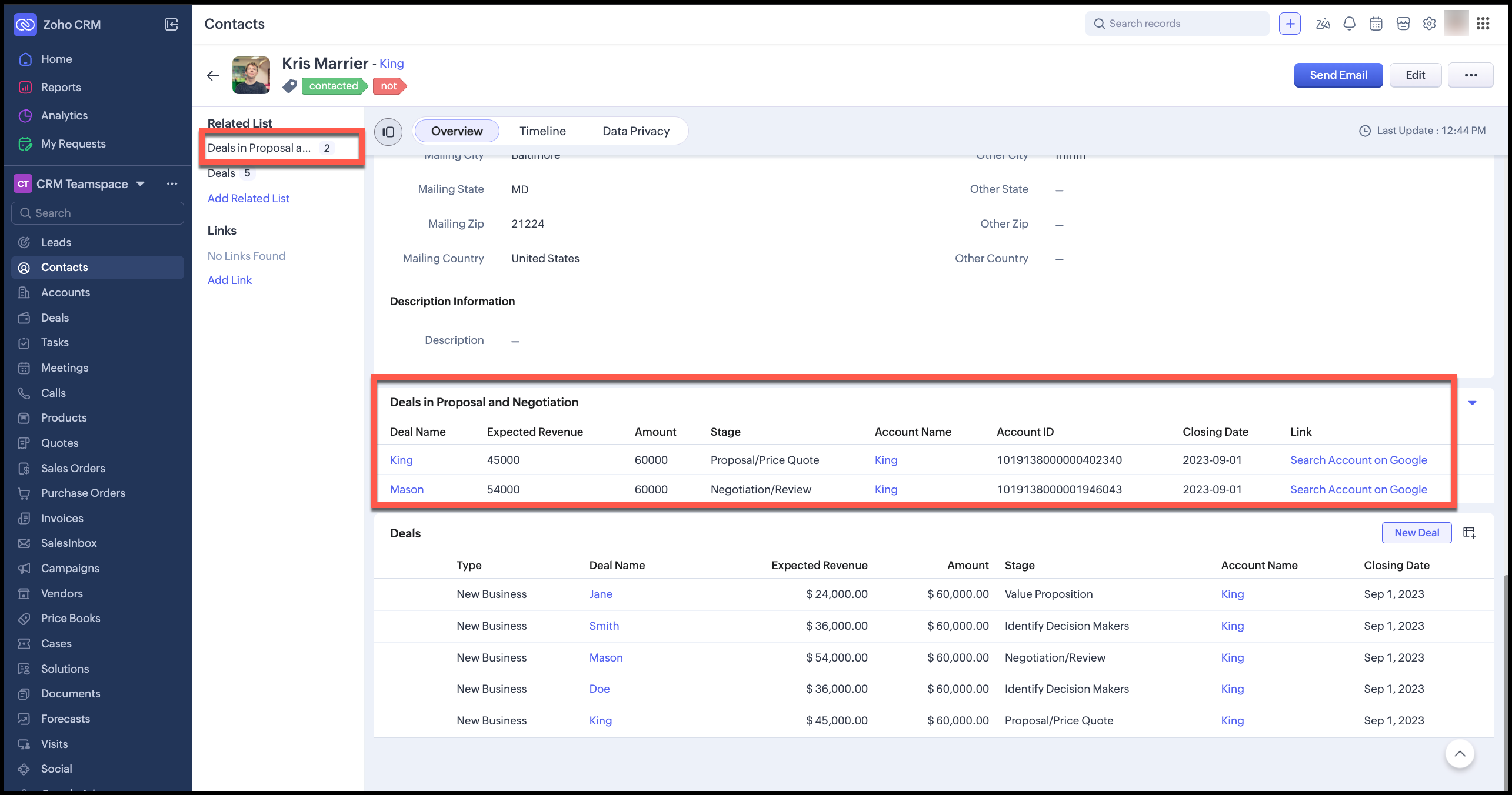

You can see that the related list Deals in Proposal and Negotiation has clickable Deal and Account lookups, and a link to search by the Account Name on Google, while the default Deals related list includes all Deals associated with this contact.

This approach is especially useful when you need filtered or curated views, introduce non-CRM actions, reduce click depth, and want the UI to guide user behavior subtly without peeling them away from the interface they are used to.

The design rule is to

  1. Use lookups when the destination is inside CRM
  2. Use href when the action is external or exploratory. Eg: open external systems, launch contextual research, pass params to external tools, etc.

Summary

By combining module-type queries for precise data selection, serializer lookups for native navigation, and serializer links for contextual actions, you can create related lists that are purpose-built, not generic.

That distinction is what makes Queries and serializers a powerful extension point in Zoho CRM.


We hope you found this post useful. Let us know your thoughts in comments or at support@zohocrm.com.
See you next week!

Cheers!

===============================================================================


    • Sticky Posts

    • Kaizen #198: Using Client Script for Custom Validation in Blueprint

      Nearing 200th Kaizen Post – 1 More to the Big Two-Oh-Oh! Do you have any questions, suggestions, or topics you would like us to cover in future posts? Your insights and suggestions help us shape future content and make this series better for everyone.
    • Kaizen #226: Using ZRC in Client Script

      Hello everyone! Welcome to another week of Kaizen. In today's post, lets see what is ZRC (Zoho Request Client) and how we can use ZRC methods in Client Script to get inputs from a Salesperson and update the Lead status with a single button click. In this
    • Kaizen #222 - Client Script Support for Notes Related List

      Hello everyone! Welcome to another week of Kaizen. The final Kaizen post of the year 2025 is here! With the new Client Script support for the Notes Related List, you can validate, enrich, and manage notes across modules. In this post, we’ll explore how
    • Kaizen #217 - Actions APIs : Tasks

      Welcome to another week of Kaizen! In last week's post we discussed Email Notifications APIs which act as the link between your Workflow automations and you. We have discussed how Zylker Cloud Services uses Email Notifications API in their custom dashboard.
    • Kaizen #216 - Actions APIs : Email Notifications

      Welcome to another week of Kaizen! For the last three weeks, we have been discussing Zylker's workflows. We successfully updated a dormant workflow, built a new one from the ground up and more. But our work is not finished—these automated processes are
    • Recent Topics

    • Sync Enable issue Between Zoho FSM and Invoice

      Hello Latha, I hope you are doing well. I am trying to enable synchronization between Zoho FSM (Org ID: 170000078905) and Zoho Invoice (Org ID: 170000079301). However, when I attempt to do so, I receive an “Internal error” message. Could you please assist
    • Super Admin Logging in as another User

      How can a Super Admin login as another user. For example, I have a sales rep that is having issues with their Accounts and I want to view their Zoho Account with out having to do a GTM and sharing screens. Moderation Update (8th Aug 2025): We are working
    • Check out in Meetings

      Why there is no check out in Meetings of Zoho CRM, very difficult to track
    • WO Completion Status Not Updating Automatically

      Hello Latha, Hope you are doing well. Over the past few days, we have been facing an issue with WO completion. When an AP is marked as complete, the work order status is not automatically updating to “Completed,” and we have to mark it manually. Could
    • Query on Tracking Visitor Activity with Zoho Forms & SalesIQ

      I have a query regarding Zoho Forms, Zoho SalesIQ, and Zoho CRM. I have embedded a Zoho Forms form on my website, and I’m trying to understand if it’s possible to capture a user’s website activity (such as pages visited, visit count, etc.) when they submit
    • Canvas templates can now be shared with different CRM organizations

      Moderated on 14th February, 2023: Dear all, This feature is now open for all users in all DCs. To learn more about importing and exporting canvas templates, read our help doc -Customizing Record Detail Page Using Canvas Dear All, We hope you're well!
    • CRM to Desk Contact Sync Issues?

      Hello, I noticed none of the contact changes in CRM are being transferred over to Desk. Anyone else experiencing this? I checked the sync history in desk and it confirms it - it doesn't show "X Contacts Synced" like it normally does.
    • Microsoft Teams integration in Zoho Apptics

      Good app monitoring is not just about collecting data. It is about making sure important updates reach the team in time to act on them. When an app crashes or a user shares feedback from within the app, teams should be able to see it promptly without
    • Able to change project on timelog entries

      Ability to move the timesheet entry from one project to another. When a user adds a wrong entry a manager can change/update the timesheet entry to the correct project.
    • Marketing Tip #28: Increase buyer confidence with visible social media links

      Your social media pages are often where customers go to “double-check” your brand before buying. When visitors can easily find your Instagram, Facebook, YouTube, or LinkedIn from your store, it builds trust and makes your business feel more real and active.
    • [Webinar] Solving business challenges: One tool for documents, forms, PDFs, e-signatures, and more

      Hi Zoho Writer users, Most businesses rely on multiple tools, such as a word processor, form builder, e-signature provider, and PDF editor, for their document workflows. Managing multiple subscriptions, switching between tools, and moving data across
    • Customer Message Edit/Delete Function & Backend Visibility Inquiry

      目前客服已发送的对话支持编辑和删除功能,请问在 Zoho 系统后台,是否可以查看客服具体发送了什么内容,以及删除或修改了哪些信息?如果无法查看,这个功能是否可以通过设置关闭客服的编辑和删除权限?如可以,请告知具体设置路径。 Currently, customer service agents are able to edit and delete messages after sending them. In the Zoho system backend, is it possible to view
    • Google Drive API 403 PERMISSION_DENIED from Deluge custom function - OAuth connection not recognised

      Hi all, I've built a custom Deluge function to route Zoho CRM Account attachments into specific Google Drive subfolders based on filename prefix. The CRM API steps all work correctly, however our first Google Drive API call (listing subfolders via drive/v3/files)
    • Supercharge Your Zoho Billing Workflows with AI Using Zoho MCP

      What is MCP and how does it connect to Zoho Billing? If you've ever wished you could just tell your billing software what to do without clicking through menus, running reports manually, or switching tabs every five minutes, that's exactly what the Zoho
    • What's new in Zoho Social - Q1 recap

      Hello everyone, We’ve rolled out a bunch of updates in Q1, and we’re excited to walk you through them. To help you explore these features in detail, we’re hosting a Q1 recap webinar where we’ll show you how to make the most of each update. Q1 recap webinar
    • Introducing Auto-trigger for Screening Bot

      Still manually sending screening tests after every application? Not anymore. With Auto-trigger for Screening Bot, screening now begins automatically. When a candidate applies for a job that has an attached assessment, Recruit checks whether the test has
    • Trying to validate user's age through DoB

      We have a form where a user enters their birthdate. We'd like a rule that counts whether the user is over or under 25 years of age. This amounts to 9125 days elapsed between today and an easy way to do this would be to use conditional rule Is Before [x]
    • Automation Series: Notify Admin When User Accepts an Invitation

      In Zoho Projects, a portal is an organisational-level workspace where user can manage multiple projects. To join a portal, a user will have to accept the portal invitation. However, it is important for admins to be in the loop when a user accepts the
    • Introducing SlyteUI : From Idea to a Working Interface in Minutes

      Hello everyone! Are you spending hours building basic UIs? Does even the smallest customization feel like a major task? CRM customization should feel intuitive and straightforward, not time consuming or exhausting. SlyteUI makes this possible by simplifying
    • Api Version 2 Refresh Token invalid_code

      While Refresh token i am always getting Error {     "error": "invalid_code" } i am trying to pass all parameter as per this https://www.zoho.com/crm/developer/docs/api/refresh.html still non of things working any one have idea whats the reason for same ... please help due to this i stuck since last one week
    • Knowledgebase SEO

      We have a custom-domain mapped help center that is not restricted via login. I have some questions: a) will a robots.txt file still allow us to control indexing? b) do we have the ability to edit the sitemap? c) do category URLs get indexed by search
    • Mail Merge preview won't load

      Hello! One of our users has not been able to use mail merge templates in CRM as the preview screen does not load. We have many templates for one of our custom modules and the users are used to this feature and have been using it for years without any
    • mask Customer phone number and agents cant see customer phone number

      Is there any way we can integrate Zoom Phone with Zoho CRM while ensuring that customer phone numbers remain masked? We need a solution where agents can make outbound calls but cannot see customer phone numbers. Please let us know if there is any solution
    • Issue with Zoho Sheets

      Edit: Small Error of Opening doc and losing entire formatting while downloading to *.xlsx format. Also my formulas don't work while opening a document downloaded from Zoho sheets, since the colors aren't matched to the correct data. Even though the data
    • Record-Level Cliq Conversations Inside Zoho CRM

      It would be extremely useful to bring the Zoho Projects + Cliq conversation experience into Zoho CRM records. Today, in Zoho Projects, each project or task can have its own related chat conversation through Cliq, allowing team members to discuss that
    • Introducing note actions and dynamic visibility in Kiosk Studio

      Hello all, We are introducing enhancements to Kiosk Studio that will improve the product scope and meet your custom needs more precisely. What's new? Add notes as Actions: You can add notes to CRM records as kiosk Actions, as well as insert merge fields
    • Logging Calls not working

      For some reason, logging calls is not working anymore. Description of problem: On a Lead's record, in the "Open Activities" block, clicked on "Add New" Clicked on "Call", clicked on "Log a call" Nothing happens. If I click on "Schedule a call" nothings
    • How do I filter contacts by account parameters?

      Need to filter a contact view according to account parameter, eg account type. Without this filter users are overwhelmed with irrelevant contacts. Workaround is to create a custom 'Contact Type' field but this unbearable duplicity as the information already
    • Data Import into Zoho Forms

      Hi everyone, I am migrating several Google Forms into Zoho Forms. I can recreate the forms, but I also need to bring over historical response data currently stored in Google Sheets. I want to keep using that data inside Zoho for analysis, reporting, and
    • Best practice to handle 50+ invokeurl calls in a loop without hitting the 30-second timeout?

      Hi everyone, I am working on a custom Deluge function where I have a Map containing around 50+ key-value pairs. I need to iterate through this Map using a for each loop and make a GET API call (invokeurl) for each item. The Problem: Because of the 50+
    • How Can I Clear Deleted Members and Free Up Their Storage?

      Can we remove these deleted members and free up their storage?
    • Cliq iOS can't see shared screen

      Hello, I had this morning a video call with a colleague. She is using Cliq Desktop MacOS and wanted to share her screen with me. I'm on iPad. I noticed, while she shared her screen, I could only see her video, but not the shared screen... Does Cliq iOS is able to display shared screen, or is it somewhere else to be found ? Regards
    • Zoho Desk - Event Calendar View

      Hi Desk team, Are there any plans to introduce a calendar or timeline view for Events in Zoho Desk? It would be very helpful if we could see Events visually in a calendar and/or timeline. This is very helpful when desk side support activities need to
    • Pro rata holiday allowance for variable part time employees

      We have some part time staff who work variable hours and their holiday allowance is based on pro rata system. In Zoho people is there any way to calculate their holiday allowance based on actual hours worked? I.e. worker is entitled to a pro-rata amount of 5.6 weeks holiday, which is equivalent to 12.07% of hours worked over a year. So part time staff's holiday is accrued at a rate of 12.07% per hour worked. Thanks
    • Zoho Bookings - Provide Appointment System ID in Zoho Flow Variable

      Hi Bookings Team, It would be great if you could provide the system record ID for appointments as a variable in Zoho Flow trigger outputs and Fetch Appointments action. This would allow us to create a dymanic URL which can be clicked by a staff user to
    • Invoice date is incorrect

      I'm trying to pull a report of Sales Orders and filter by Invoice Date. (ex: all of 2025) Unfortunately, the filter still returns lots of SO's from other years including 2026 which would be impossible to have an invoice in 2025 from a 2026 order. It's
    • Zoho Forms sheet prefil

      I've been using zoho sheet prefill for a week and it was working perfectly, as soon as i deleted the particular sheet and replaced it with another one no matter what I do it cant find the record and i get this message. Could you please assist me to resolve
    • Understanding tasks

      So we have a module linked to contacts called Equipment and that in turn has a related module called service calls. Often on a service call we want add a task but we are not able. I think it needs a link to the contact. WE therefore tried to add tasks
    • How to transfer files from Creator file upload fields to CRM file upload fields

      This article describes how to transfer files from Zoho Creator file upload fields to Zoho CRM file upload fields. I'm posting it here because the current documentation does not fully and accurately describe how to do this with certain file types (PDF,
    • Add Comprehensive Accessibility Features to Zoho Writer

      Hello Zoho Writer Team, We hope you are doing well. We would like to submit a feature request to enhance Zoho Writer with a full set of accessibility tools, similar to the accessibility options already available in the Zoho Desk agent interface. 🚧 Current
    • Next Page