Client Script Support in Quick Create

Welcome to another post in the Kaizen Series!
In this Kaizen post,
- What is the Quick Create Form?
- Supported Client Script Events
- Use Case
- Solution
- Summary
- Related Links
1. What is the Quick Create Form?
The Quick Create form is a lightweight popup in Zoho CRM that allows users to create a new record on the fly, without navigating away from the page they are currently on. With Client Script support, Quick Create can be further enhanced to automate actions such as auto populating fields, validating data, and executing logic based on the record context. This enables a faster, more efficient, and context aware record creation experience.
2. Supported Client Script Events
The following are the events supported by Client Script for Quick Create Form.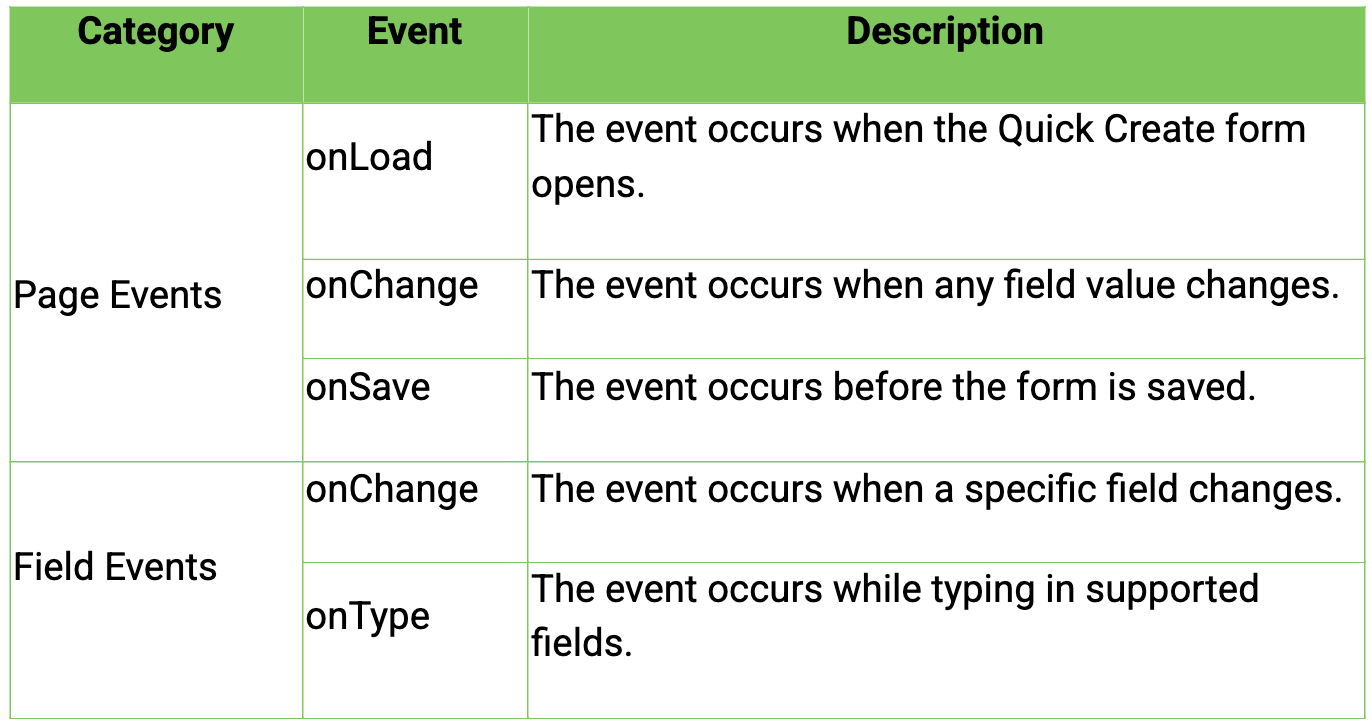
Refer to the Client Script Events documentation for more details about the events.
3. Use Case
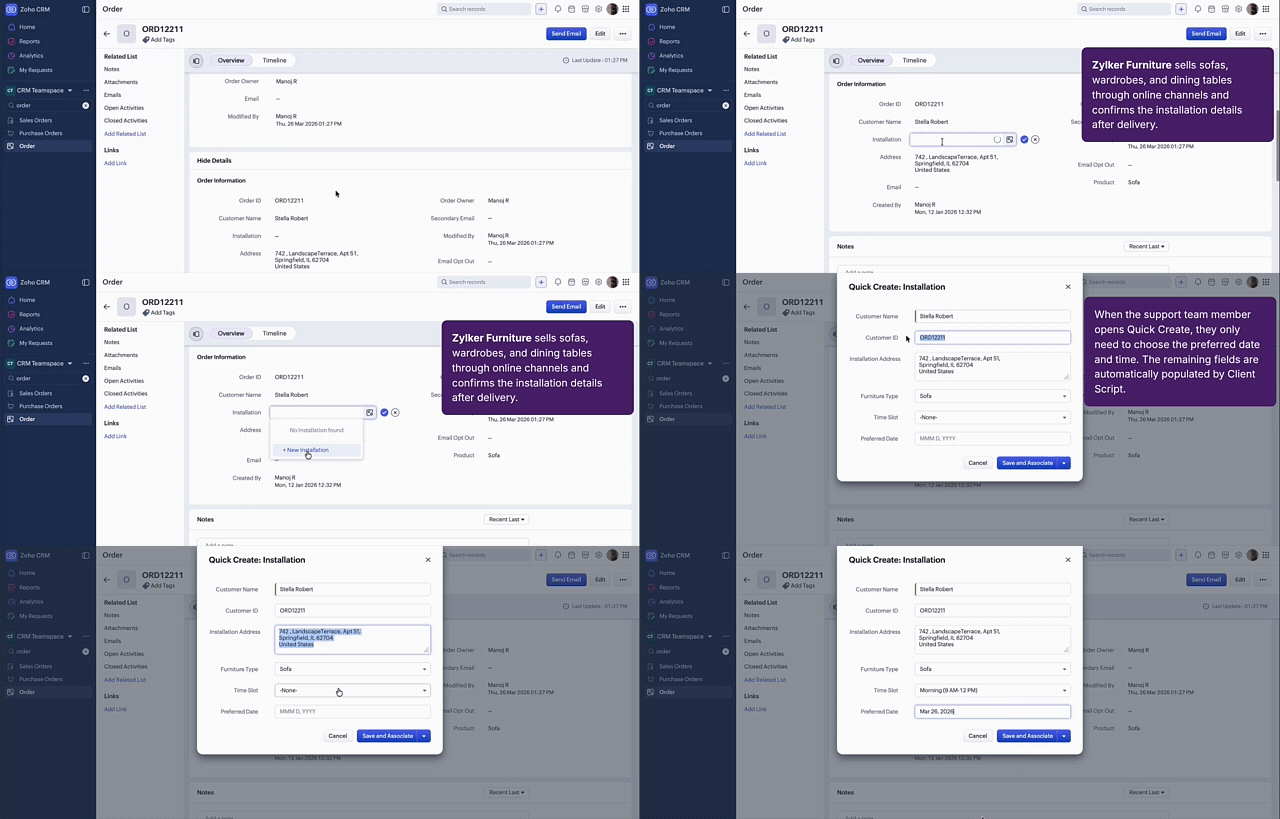
Zylker Furniture sells sofas, wardrobes, and dining tables through online channels. After delivery, the sales representative uses Quick Create to schedule the installation. In this process, the sales representative needs to select only the preferred date and time, while all other details are auto-filled ensuring data is auto populated accurately, reducing manual entry during installation scheduling and save time of sales representatives.
-
Go to Setup > Developer Space > Client Script. Click +New Script.
-
Specify the details to create a script and click Next.
- Enter the following script and click Save.
- / --------------------------------------------------
- // Fetch source fields from root context
- // --------------------------------------------------
- var sourceCustomerId = $Client.rootContext.getField('Name');
- var sourceCustomerName = $Client.rootContext.getField('Customer_Name');
- var sourceAddress = $Client.rootContext.getField('Address');
- var sourceDeviceType = $Client.rootContext.getField('Product');
-
- // --------------------------------------------------
- // Fetch destination fields from the current page
- // --------------------------------------------------
- var targetCustomerId = ZDK.Page.getField('Customer_ID');
- var targetName = ZDK.Page.getField('Name');
- var targetInstallAddress = ZDK.Page.getField('Installation_Address');
- var targetDeviceType = ZDK.Page.getField('Furniture_Type');
-
- // --------------------------------------------------
- // Assign values with safety checks
- // --------------------------------------------------
- if (sourceCustomerId && targetCustomerId) {
- targetCustomerId.setValue(sourceCustomerId.getValue());
- }
-
- if (sourceCustomerName && targetName) {
- targetName.setValue(sourceCustomerName.getValue());
- }
-
- if (sourceAddress && targetInstallAddress) {
- targetInstallAddress.setValue(sourceAddress.getValue());
- }
-
- if (sourceDeviceType && targetDeviceType) {
- targetDeviceType.setValue(sourceDeviceType.getValue());
- }
-
In this code, getField() is used to fetch the Name, Customer_Name, Address, and Product fields from the current record context.
-
ZDK.Page.getField() is used to fetch the Customer_ID, Name, Installation_Address, and Furniture_Type fields from the Quick Create form.
-
Conditional checks are used to validate that both the source and corresponding target fields exist before assigning values.
-
getValue() is used to retrieve values from the source fields.
-
setValue() is used to populate the Quick Create fields with the retrieved values.
-
$Client.rootContext is used to access the parent record from which the Quick Create form is launched. It enables the script to fetch source field values such as Name, Customer_Name, Address, and Product from the original page. These values are then transferred to the corresponding fields in the Quick Create form using ZDK.Page.getField(), ensuring that relevant details are automatically populated.
Here is how the Client Script works.
5. SummaryIn this post, we have seen,
-
The role of $Client.rootContext
-
How to automate field population in Quick Create Form
-
Client Script events supported in Quick Create form
6. Related Links
-