Kaizen 238 Fetching Employee Data from Microsoft SQL Server into Zoho CRM Using Queries

Hello everyone!
Welcome back to the Kaizen series!
Many organizations manage workforce data such as employee designations, contact details, salary bands, and joining dates in an HRMS backed by Microsoft SQL Server, while their sales teams work in Zoho CRM. When a deal needs an assigned pre-sales engineer or a CSM hand off, reps must leave CRM, open the HR portal, and manually look up the right person.
This post shows how to use the Queries feature in Zoho CRM to connect to a Microsoft SQL Server database, fetch employee records with a parameterized SQL query, and display them directly on a Deal Canvas without leaving CRM. We will cover source creation, SSL and Read-Only configuration, writing the query, serializing the response, and a brief overview of how the same query can be reused across Canvas, Custom Related List, and Kiosk.
Prerequisites
- Zoho CRM Enterprise or Ultimate edition (SQL sources require Enterprise or above)
- A running Microsoft SQL Server instance with a database user that has SELECT privileges on the EMPLOYEE table
- The SQL Server instance must be reachable from Zoho CRM either publicly or Zoho CRM IP ranges must be whitelisted in the firewall rules
- The SQL Server hostname must be added to Trusted Domains in Zoho CRM (Setup > Developer Hub > Trusted Domains) if using a DNS hostname
- Developer role or System Administrator access in Zoho CRM
- A custom "Employee ID" field (Single Line) on the relevant CRM module (e.g., Deals or Contacts) to store the external employee reference if passing a single employee ID as a variable. Not required if the query fetches the full list (no variable).
Use Case
Sales reps at a professional services firm need to assign internal team members (solutions engineers, CSMs) to deals, but employee contact and designation data lives only in a Microsoft SQL Server HRMS requiring a manual lookup outside CRM every time.
Solution
Connect Zoho CRM Queries to the HRMS database. A parameterized SELECT on the EMPLOYEE table filtered by {{EMP_ID}}, resolved from a custom field on the Deal record, fetches the assigned employee's profile and displays it on the Deal Canvas in real time.
Follow the steps to implement this solution.
Step 1: Whitelist Zoho CRM IPs in SQL Server Firewall
Before creating the source in Zoho CRM, ensure the SQL Server instance can accept inbound connections from Zoho CRM's servers.
- The SQL Server instance must be accessible over the internet on port 1433 (SQL Server default).
- Zoho CRM's IP ranges must be whitelisted in the firewall rules governing the SQL Server. Refer to the Zoho CRM IP Whitelist guide for the full list of IP ranges for your data center.
- Ensure SQL Server Browser service is running and TCP/IP is enabled in SQL Server Configuration Manager.
- If the SQL Server uses a DNS hostname, also add it to Setup > Developer Hub > Trusted Domains in Zoho CRM.
Step 2: Create a Dedicated Read-Only SQL Server Login
On your SQL Server instance, create a login with the minimum permissions needed.
Do not use 'sa' (SQL Server's built-in System Administrator login) or any admin account. 'System Administrator login has unrestricted access to all databases and server settings.
Step 3: Add Microsoft SQL Server as a Database Source
- In Zoho CRM, go to Setup > Developer Hub > Queries.
- Click the Sources tab.
- Click Add Source.
- From the list of source types, select Database.
- From the available database options, choose MicrosoftSQL.
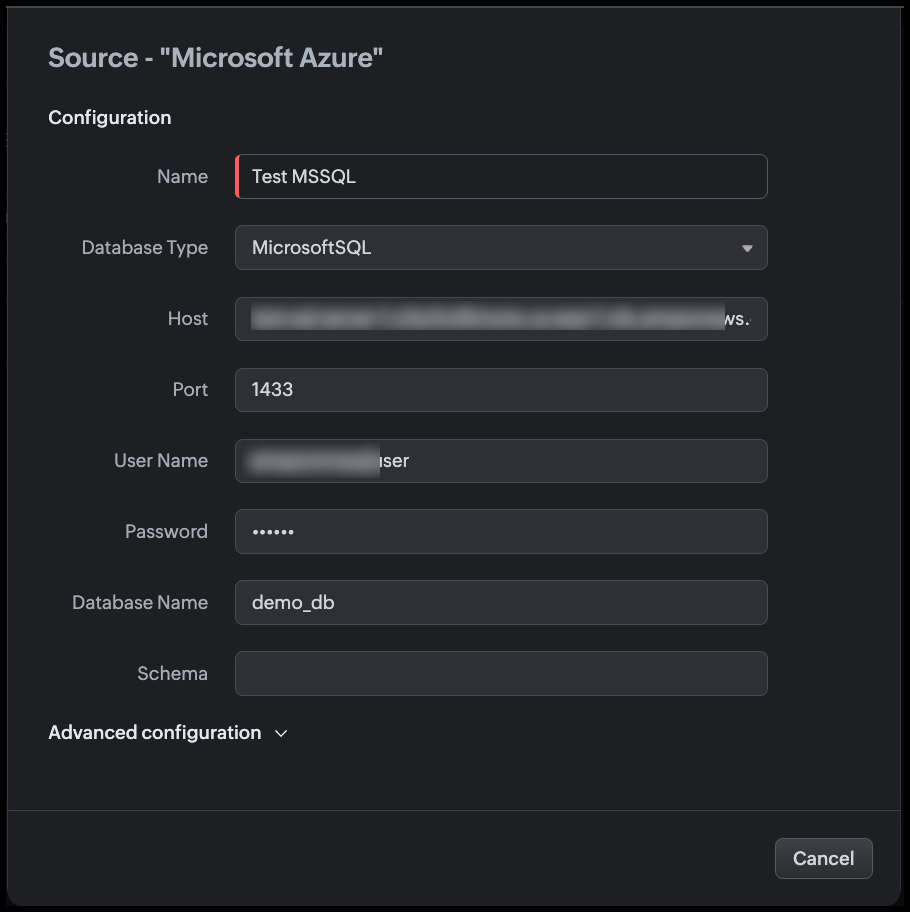
- Fill in the source configuration as shown in the following image.
Step 4: Configure Advanced Settings
Expand the Advanced configuration section before saving.
Use SSL
Enable the Use SSL toggle. This action,
- Encrypts the connection between Zoho CRM and SQL Server using TLS.
- When a DNS hostname is used, the system also validates the server certificate and hostname match before establishing the connection.
- SQL Server supports SSL/TLS natively. Ensure the SQL Server instance has a valid TLS certificate configured or that the certificate is trusted by the host.

Note
- The SSL setting is IMMUTABLE after the source is successfully created. If your SSL configuration needs to change, you must delete and recreate the source.
- If you add the hostname to Trusted Domains, the system bypasses certificate and hostname verification. Only add genuinely trusted hosts.
Read Only
Enable the Read Only toggle. This action,
- Restricts this source to only SELECT operations at the Zoho CRM level.
- Blocks INSERT, UPDATE, and DELETE queries even if the zoho_crm_reader SQL login is later granted write permissions at the database level.
Since this source is used purely to display employee information in CRM views, you must enable Read-Only.
You can change this setting after the source is created, unlike SSL.
Time Zone
Set Time Zone to match the time zone of your SQL Server instance (e.g., UTC, or the server's local time zone).
The DATE_OF_JOIN and MODIFIED_ON columns are stored as DATETIME in SQL Server (without time zone information). Setting the correct source time zone allows Zoho CRM to convert these values to each viewing user's local time zone for accurate display.
Example: If the server stores MODIFIED_ON = 2026-04-15T18:30:00 in IST, a user in UTC will see 2026-04-15 13:00.
Connection Timeout
Set Connection timeout to 10 seconds. This action defines how long Zoho CRM waits for the SQL Server to accept the connection before giving up.
10 seconds accommodates typical network latency while preventing the CRM UI from hanging indefinitely during server downtime or network issues.

Click Validate and Save.
Zoho CRM tests the connection. On success, the source is saved and available for queries.
Step 5: Create the Query
- Go to Setup > Developer Hub > Queries.
- Click Create Query.
- In the dialog box enter the name of the query.
- Click Next.
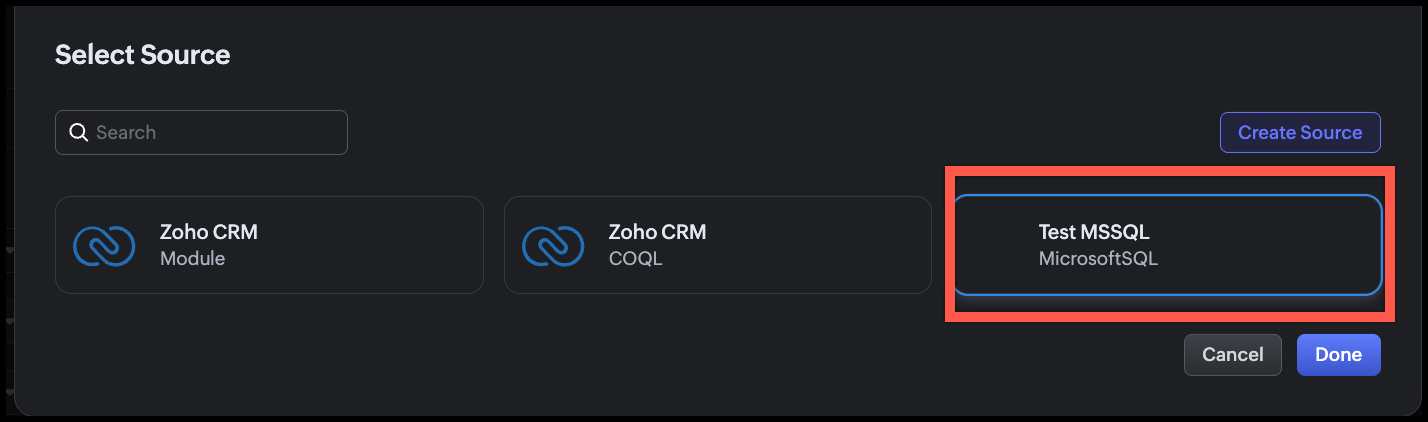
- Under Configuration, click Change and select the source we added.
- Click Done.
Step 6: Write the SQL Query
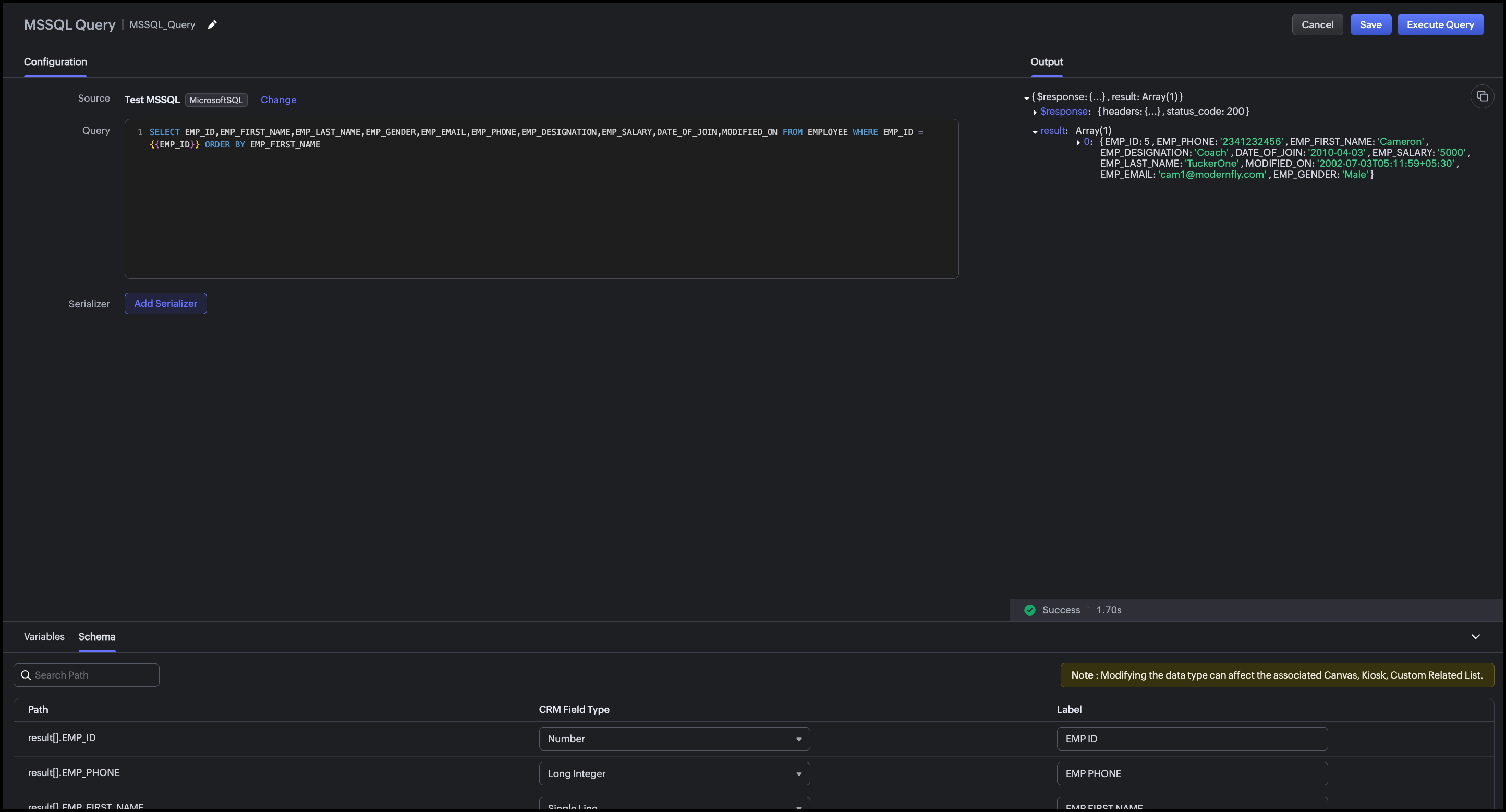
In the query editor, enter the following query.
SELECT EMP_ID,EMP_FIRST_NAME,EMP_LAST_NAME,EMP_GENDER,EMP_EMAIL,EMP_PHONE,EMP_DESIGNATION,EMP_SALARY,DATE_OF_JOIN,MODIFIED_ON FROM EMPLOYEE WHERE EMP_ID = {{EMP_ID}} ORDER BY EMP_FIRST_NAME |
Zoho CRM automatically detects {{EMP_ID}} as a query variable. At runtime, the value of the "Employee ID" custom field on the Deal record is passed to this variable.
Step 7: Execute and Validate the Query
- Click Execute Query.
- Enter a valid employee ID from your SQL Server database.
- Click Next.
- Review the raw response.
- Review the Schema panel and verify CRM Field Type mapping.
Step 8: Add a Serializer
The serializer combines the first and last name, formats dates, and computes the employee's tenure.
- Click Add Serializer.
- Enter the following JavaScript.return result.map(record => {// Compute tenure in years from DATE_OF_JOINconst joinDate = new Date(record.DATE_OF_JOIN);const today = new Date();const tenureYears = Math.floor((today - joinDate) / (1000 * 60 * 60 * 24 * 365));return {emp_id: record.EMP_ID,full_name: record.EMP_FIRST_NAME + " " + record.EMP_LAST_NAME,gender: record.EMP_GENDER,email: record.EMP_EMAIL,phone: record.EMP_PHONE,designation: record.EMP_DESIGNATION,date_of_join: record.DATE_OF_JOIN? String(record.DATE_OF_JOIN).split("T")[0]: "N/A",tenure: tenureYears + (tenureYears === 1 ? " year" : " years"),last_modified: record.MODIFIED_ON? String(record.MODIFIED_ON).split("T")[0] + " " + String(record.MODIFIED_ON).split("T")[1].slice(0, 5): "N/A"};});
This serializer:
- Combines EMP_FIRST_NAME and EMP_LAST_NAME into a single full_name field
- Computes tenure in years from DATE_OF_JOIN to today, a derived field not stored in the database
- Formats date_of_join as YYYY-MM-DD (strips the time component)
- Formats last_modified as YYYY-MM-DD HH:MM.
Click Execute Query again to preview the serialized output.

Click Save to save the query.
Conclusion
The Queries feature in Zoho CRM makes it straightforward to surface employee records from an external Microsoft SQL Server HRMS directly within CRM without any middleware, scheduled sync, or manual copy-paste. The advanced configuration options (SSL, Read-Only, Time Zone, Connection Timeout) ensure the connection is secure, non-destructive, and accurate across time zones.
With a single parameterized query and a lightweight serializer, sales reps can see the full profile of an assigned employee such as designation, contact info, tenure etc., right on the Deal Canvas when they need it most. The same query can be reused across multiple CRM UI components for different team workflows.
This approach is best suited when:
- The employee data is authoritative in an external HRMS and should not be duplicated into CRM fields.
- Real-time accuracy matters (recently onboarded or transferred employees are immediately visible).
- The organization wants to avoid building and maintaining a custom sync integration.
Associating the query with CRM's UI components
You can associate a query with multiple UI components such as Canvas, Kiosk, Custom Related Lists based on the workflow.
Canvas List View
Associate the query with the Canvas List View of the Deals (or Contacts) module.
Map {{EMP_ID}} to the "Employee ID" custom field on the record. When a sales rep opens a Deal, the assigned employee's full profile, including name, designation, phone, email, tenure etc., appears as an "Assigned Employee" panel on the canvas. Refer to our Kaizen post for associating a query with Canvas List View.
Kiosk
Associate the query with a Kiosk Decision component to build an internal lookup screen, say a self-service screen, where a sales rep types an Employee ID, and the Kiosk fetches and displays that employee's profile from the HRMS. The Decision component evaluates the query response (e.g., checking if EMP_DESIGNATION matches a required role) and branches the Kiosk flow accordingly.
Map {{EMP_ID}} to a Kiosk input variable collected in a preceding Screen component.
For more details, refer to our Kaizen post on Handling Query variables in Zoho CRM and associating it in Kiosk.
Custom Related List
Use a modified version of the query (filtered by ACCOUNT_ID instead of EMP_ID) to display a related list of all employees assigned to a given account on the Account record. This is useful when multiple internal team members like solutions engineers, CSMs, support contacts, are mapped to an account in the HRMS.
Map {{ACCOUNT_ID}} to the Account record's identifier during association, and the related list will show all employees assigned to that account, updated automatically as the HRMS changes.
For step-by-step instructions on associating a query with a Custom Related List, refer to this Kaizen post.
We hope you found this post useful.
Cheers!
=================================================================================

See Also
Topic Participants
Shylaja S
Sticky Posts
Announcing the new SKILL.md for Zoho CRM and the updated OAS repository!
We are introducing a new zoho-crm skill to make working with Zoho CRM Developer tools (like APIs, functions, widgets, client scripts, queries etc) easier and faster, with the help of AI in your preferred AI harness like Claude Code, Codex, Cursor, VSCodeKaizen #261 : Using Zoho CRM Skill to generate complex COQL queries
Hello everyone, In the previous Kaizen posts, we introduced the zoho-crm SKILL.md and discussed how it can help you when you are working with Zoho CRM APIs and Client Script. In this Kaizen, we will focus on using the Zoho CRM `SKILL.md` with GitHub CopilotKaizen #256 - Build an Arrival Readiness Web Tab in Zoho CRM
Hi everyone! Welcome back to the Kaizen series! In the post, we discuss a use case in hospitality industry: how an Arrival Readiness web tab widget can be used to let reception staff identify and resolve issues before arrival of guests. Use case In theKaizen #198: Using Client Script for Custom Validation in Blueprint
Nearing 200th Kaizen Post – 1 More to the Big Two-Oh-Oh! Do you have any questions, suggestions, or topics you would like us to cover in future posts? Your insights and suggestions help us shape future content and make this series better for everyone.Kaizen #226: Using ZRC in Client Script
Hello everyone! Welcome to another week of Kaizen. In today's post, lets see what is ZRC (Zoho Request Client) and how we can use ZRC methods in Client Script to get inputs from a Salesperson and update the Lead status with a single button click. In this
Recent Topics
Passing the CRM
Hi, I am hoping someone can help. I have a zoho form that has a CRM lookup field. I was hoping to send this to my publicly to clients via a text message and the form then attaches the signed form back to the custom module. This work absolutely fine whenI want to test some payment subscription with a test credit card from stripe
I have a test customer and place https://stripe.com/docs/testing#international-cards test credit card number to the Add New Card in subscription.zoho customer page. After I added, the test card was declined. Am I missing something?This user is not allowed to add in Zoho. Please contact support-as@zohocorp.com for further details
Hello, Just signed up to ZOHO on a friend's recommendation. Got the TXT part (verified my domain), but whenever I try to add ANY user, I get the error: This user is not allowed to add in Zoho. Please contact support-as@zohocorp.com for further details I have emailed as well and writing here as well because when I searched, I saw many people faced the same issue and instead of email, they got a faster response here. My domain is: raisingreaderspk . com Hope this can be resolved. Thank youStrengthen your account security with Password Policy
Still using the same password for all your accounts? Or perhaps your password is easy to guess or follows a predictable pattern? If so, your account could be at risk. Once someone gets hold of a password that you reuse, they could potentially gain accessExpanding sales, marketing, and support capabilities in Zoho CRM Plus 3.0
Hey everyone, It's been more than 10 years since we launched Zoho CRM Plus back in 2014. This is quite a milestone, and we've come a long way in empowering you with everything you need to offer an exceptional customer experience. On that note, we expandedIntroducing PRM: Build, manage, and scale your partner ecosystem
Growing a partner ecosystem is a good problem to have. What starts as a handful of partners can quickly turn into a maze of spreadsheets, emails, and disconnected processes. More partners mean more opportunities, greater reach, and new ways to growLive connection to DS files in Zoho Creator / ChatGPT
As an idea, we are using ChatGPT to build with Zoho Creator (outside of Zia), which is works brilliantly to assist write deluge, provide test suggesitons etc. Currently we are uploading the DS files which are very point in time, it would be great to haveZoho Forms - Feature Request - Embed iFrame or Dynaic URLs in Description fields
Hi Zoho Forms team, I'm working with a client who uses Zoho Forms internally to collect information over the phone from potential work placement candidates. At the end of the form, the candidate needs to be booked in for an induction, which we've configuredNew in Office Integrator: Add text, diagrams, and drawings to your spreadsheet
Hi users, We are pleased to introduce the Shapes feature in Zoho Office Integrator's spreadsheet editor. It lets users create visual elements; including simple shapes, text boxes, freehand drawings, and structured diagrams; directly within the spreadsheet.Highlight what matters, erase what doesn’t in PDFs
When reviewing PDFs or preparing them for sharing, two things often come up: you want to draw attention to what’s important, and you want to hide what isn’t. Zoho PDF Editor gives you both capabilities in one place with its highlight and erase tools.WorkDrive Desktop Sync Is Being Deprecated: Move to WorkDrive TrueSync for a Smarter Experience
Hi everyone, We are excited to share a better, smarter way to access and manage your files directly from your computer! We’re transitioning from our legacy Desktop Sync app to WorkDrive TrueSync, designed to give you faster performance,greater flexibility,Set connection link name from variable in invokeurl
Hi, guys. How to set in parameter "connection" a variable, instead of a string. connectionLinkName = manager.get('connectionLinkName').toString(); response = invokeurl [ url :"https://www.googleapis.com/calendar/v3/freeBusy" type :POST parameters:requestParams.toString()Introducing the Zoho Campaigns MCP server
Hello everyone, We are pleased to announce that Zoho Campaigns is now available in Zoho MCP. You can now connect your Zoho Campaigns organization to AI tools such as Claude, ChatGPT, GitHub Copilot in VS Code, and Cursor, and manage your email marketingSubForm Custom Sort - Deluge Workflows
I have been experimenting with the Custom Order function of Subforms, it works beautifully within the subform itself and retains the sorting order. However, I need to be able to iterate through the records in Deluge using the sort order (The usage caseBank feeds automation is broken - requires manual intervention and authentication
Yodlee supports Australian Open Banking CDR protocols natively, but Zoho Books' implementation is still triggering legacy screen-scraping MFA blocks on CBA and other business banking accounts. When will Zoho update its Australian bank feed pipeline toCannot Access Subform Display Order in Deluge
As highlighted in this community post, we still have to deal with the significant limitation of not being able to access the user-sorted order of subform rows through Deluge. This creates a major disconnect between the UI capabilities and backend automation,Process FOR loop for subform items in the order of the manual sorting
Hi Guys, I have searched everywhere and tried everything, but I still not able to resolve one particular challenge. I have a subform in my Invoice with rows for each item. I made it so that we can change the order of the items manually. I need to be ableAugmenting subform capabilities
Greetings, everyone! Finally, the day has come for us to announce some of the most anticipated, requested, and exciting updates to subforms in Zoho Creator. As you're aware, subforms are an integral part of Creator forms, as they help in establishingBuild appointment scheduling into your vibe-coded apps with Zoho Bookings
Exploring vibe coding? Wondering how an app built with AI can handle appointment scheduling? Join our upcoming live webinar to discover how Zoho Bookings APIs can help connect applications to scheduling capabilities. Here's what we'll explore: • ShowIs there a way to make Reason For Loss field mandatory at Closed Lost stage?
Hi guys, Reason For Loss system picklist appears on Verify Details page but it is not mandatory so as a result, AEs tend to omit it (leave at default value -None-). Is there a way to make it mandatory at Closed Lost? I tried layout rule but this fieldHow to customize the displayed name of contacts in Trident?
Hello, For work purposes, I sort different customers into different folders, and I also change their display names in Contacts so I can easily recognize them later. However, Trident doesn’t seem to support this. Even after I edit a contact’s name in Contacts,User and mailbox reports in Zoho Mail: Review account status, storage, and login activity of users
Administrators often need answers to questions such as which users have never logged in, whose storage is almost full, or which mailboxes are accessed through POP or IMAP. The User and Mailbox reports in the Zoho Mail Admin Console provide these detailsZOHO CRM APP - SALESINBOX
Is it possible to access SALESINBOX in the CRM MOBILE APPUnbundle feature for composite items
We receive composite items from our vendors and sell them either individually or create other composite items out of them. So, there is a lot of bundling and unbundling involved with our composite items. Previously, this feature was supported in formZoho mail always free not showing up for me
Im in the Australian data centre regionTip #96 – See more of the remote screen with Virtual Monitor – 'Insider Insights'
Hello Zoho Assist Community! Say you're supporting a device that has no monitor attached, like a server in a closet or a kiosk PC. You connect, and the screen is tiny, blurry, or distorted. Text overlaps and windows end up in odd places. TroubleshootingUnderstanding transactional channels in Zoho CPaaS
Every interaction with a business creates an opportunity to communicate.Whether it's welcoming a new user, confirming a payment, sharing an order update, or verifying a login, timely communication keeps users informed and connected. But how do businessesAutoscan Settings
I saw that autoscan is now included in my plan which is great however when I import pdf invoices from my main supplier which contain inventory lines and some also include shipping charges the autoscan doesn't match any of the items and also misses theHow to resubscribe to email after using unsubscribe link in Zoho
I was testing the unsubscribe link feature from our contacts module in ZohoCRM and I sent my personal email a version of an email template with the default embedded unsubscribe link to see if it would utilize the "Email Opt Out" field to track un-subscription.WhatsApp Calling Integration via Zoho Desk
Dear Zoho Desk Team, I would like to request a feature that allows users to call WhatsApp numbers directly via Zoho Desk. This integration would enable sending and receiving calls to and from WhatsApp numbers over the internet, without the need for traditional[ZohoDesk] Improve Status View with a new editeble kanban view
A kanban view with more information about the ticket and the contact who created the ticket would be valueble. I would like to edit the fields with the ones i like to see at one glance. Like in CRM where you can edit the canvas view, i would like to editNo access to contact categories in Zoho Mail Apps
I have set up a number of contact categories for my organization. When I compose an email using a web browser these categories are visible. When I compose an email using your Android or iOS Apps no contact categories are visible. Is this expected? IfZoho Plug In
Is there anyone out there who is able to use it? I have seen lots of problems posted, unable to get any satisfactory suppport at the moment! I would be really appreciate hearing from users that have it installed and working, my team are loosing belief it will ever work. Be great to hear from those that have a more positive experienceOutlook to Zoho sync
I am the admin for our company and I have (1) single user that is having difficulties with her emails syncing. I have found where the problem is, but I don't know 100% if what is happening is how the plug-in works or if it's a setup issue. My boss createdCant' find the CRM plug in for outlook
I want to be able to tag emails that I have received into accounts. But I can't find the plug in for out look in the other apps section. Where can I download it from?Problems with Zoho CRM Microsoft Outlook Plug-In (Add-On)
I am having problems with the Zoho CRM Microsoft Outlook Plug-In. I was able to install and setup the Plug-In correctly I believe in Microsoft Outlook, but contacts are now being created in Zoho CRM when an email is sent from MS Outlook. A contact is created and appears under Contacts in Zoho CRM but no other information is populated in the fields; for instance only the name is there (for instance "rfairley" ) which matches the beginning of their email address; but no phone numbers. Also, otherzoho for outlook
it would be woderfull to be able to add an email to a case, just as it is possible to add an email to a potential VincentMail Addon issue
Hi, I am trying to make the mail add on feature work without clutter. The issues is that all emails from the contact are being listed in every opportunity that contact is involved in/ linked to. I want to filter out the emails that are not relevant to the opportunity. It is ok to have all the mails of a contact under in the contact module. But under the opportunity it shall show only the relevant emails. Is there a way i could do this? Atleast if I could manually assign or amend the listed emailsEliminate duplicate tickets in one department using Email Deduplication
Hello everyone, A department can have multiple email addresses designed for different purposes for example, support@zpad.com and help@zpad.com. When a customer sends an email or thread response to both addresses, or includes both in the To, CC, or BCC"Pinning" a Note
It would be really helpful to have a way to "Pin" a note to the top of the notes section. This is really important when you have something important about someone and do not want the note to get buried farther and farther down the note stream. For instance:Next Page