Keep Sensitive Customer Data Private with Field Masking in Zoho CRM
Hello CRM community,
Customer records in your CRM are often accessible across multiple teams, but not every team needs visibility into every field. A non-sales team, for instance, has no real need to see a contact's mobile number, and a support agent verifying a caller's identity does not need to see it in full either. With field masking, a user can restrict this, displaying values as asterisks instead of actual data, or showing only partial values such as a mobile number like 9******8621.
What's New
Field Masking gives you granular control over who sees sensitive data in your CRM, and what happens to it when it leaves.
Full or partial masking: Fields can be completely hidden or partially masked, such as showing only the last few digits of a phone number or email Id.
Profile-based access to masked data: Choose which profiles, system-defined or custom, can view the unmasked value. Access can be granted according to need, ensuring only the right people see sensitive data.
Control over masked data shared outside CRM: When exporting data or sharing it through integrations and APIs, you decide whether masked fields go out as masked, unmasked, or restricted entirely.
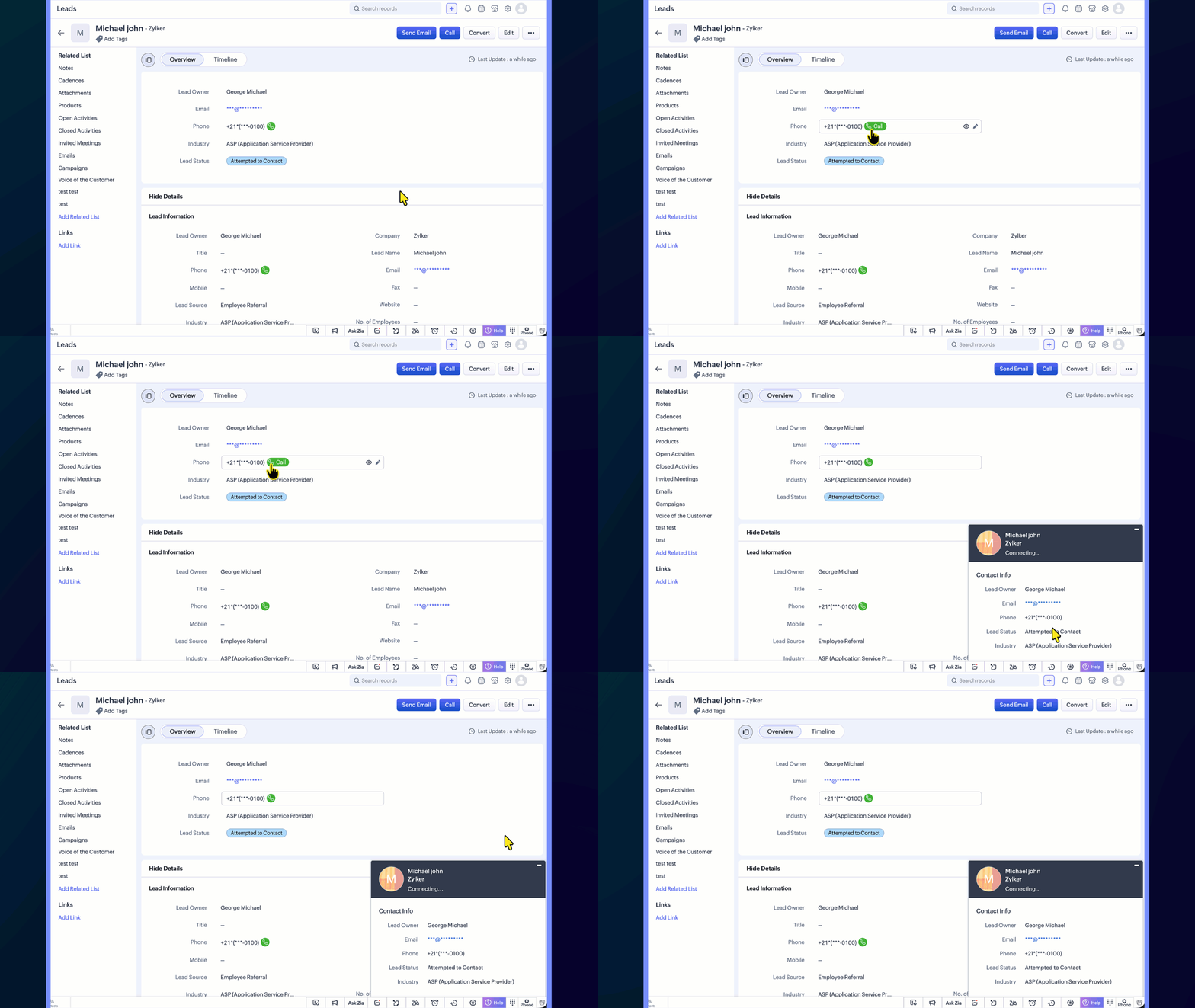
Uninterrupted workflows: Even when a phone number is masked, users can still place calls directly by clicking the call icon, so day-to-day operations are not affected.
Template-level control: In email and other templates, you can choose whether a masked field appears in its masked or unmasked form, giving you flexibility in customer-facing communication.
Report-level control: When viewing or sharing reports, you can choose whether masked field values appear in their masked or unmasked form.
Use Case
Consider a typical support call where the agent needs to confirm the caller's identity without seeing the complete phone number or policy ID. With field masking:
Sensitive fields like phone numbers, account numbers, or policy IDs are masked by default
Agents see only partial values such as the last 4 digits
They can ask, "Can you confirm the last 4 digits of your registered number?" and proceed with verification
Even with the number masked, agents can still place a call directly by clicking the phone icon next to the field, so day-to-day calling workflows remain unaffected
This balances security with usability, ensuring sensitive data stays protected without slowing down day-to-day operations.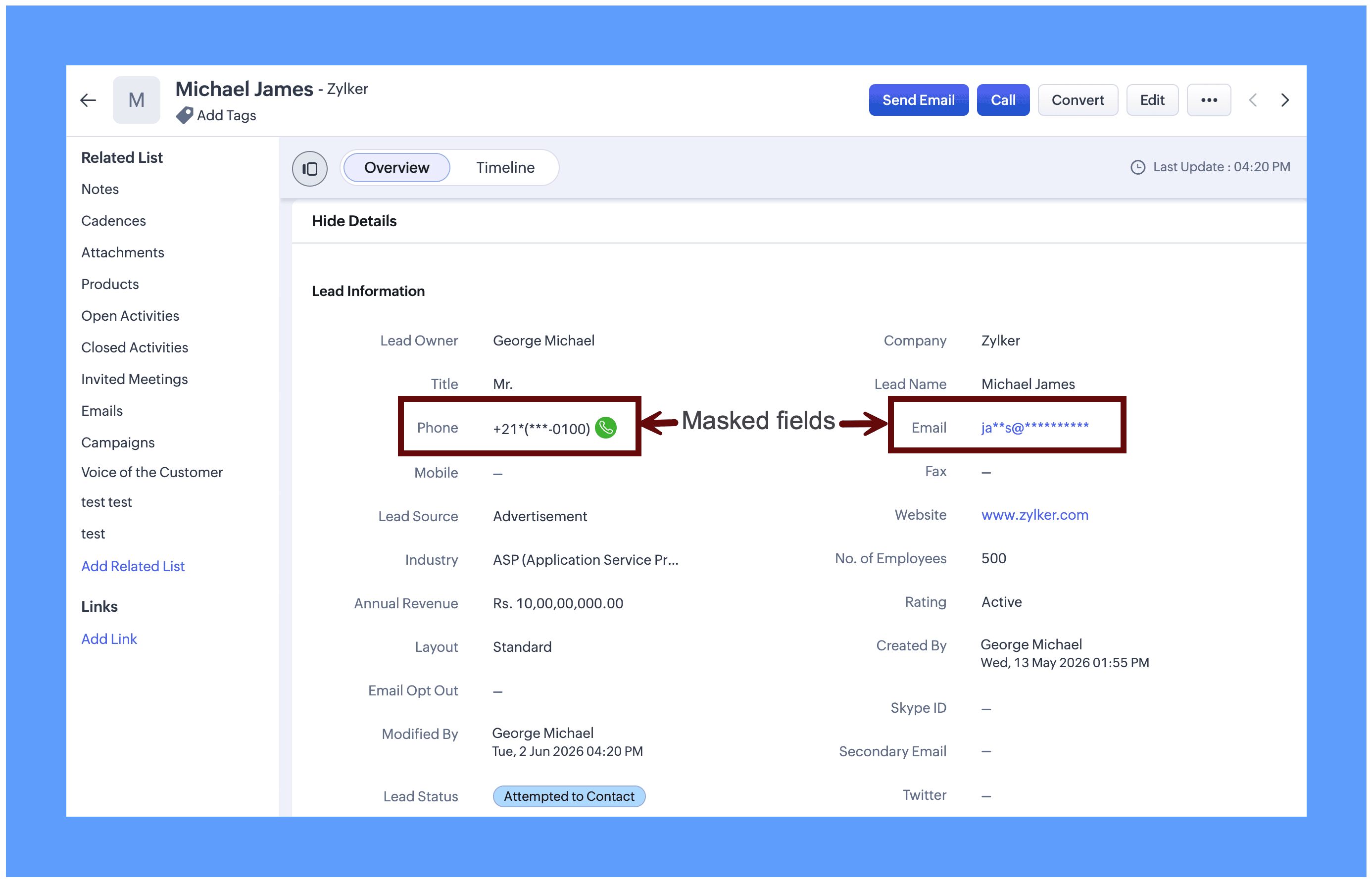
Field masking is equally useful for protecting sensitive data across a range of real-world scenarios: Aadhaar numbers, social security numbers, email addresses, policy numbers, and similar fields. It can be applied to both system-defined fields and custom fields, giving you the flexibility to protect exactly the data that matters to your organization.
Enabling Field masking
Field Masking is enabled in two stages: First you turn the feature on and then you choose which individual fields to mask.
Step 1: After field masking is enabled, you can configure how masked fields behave when data leaves CRM through integrations, APIs, or exports.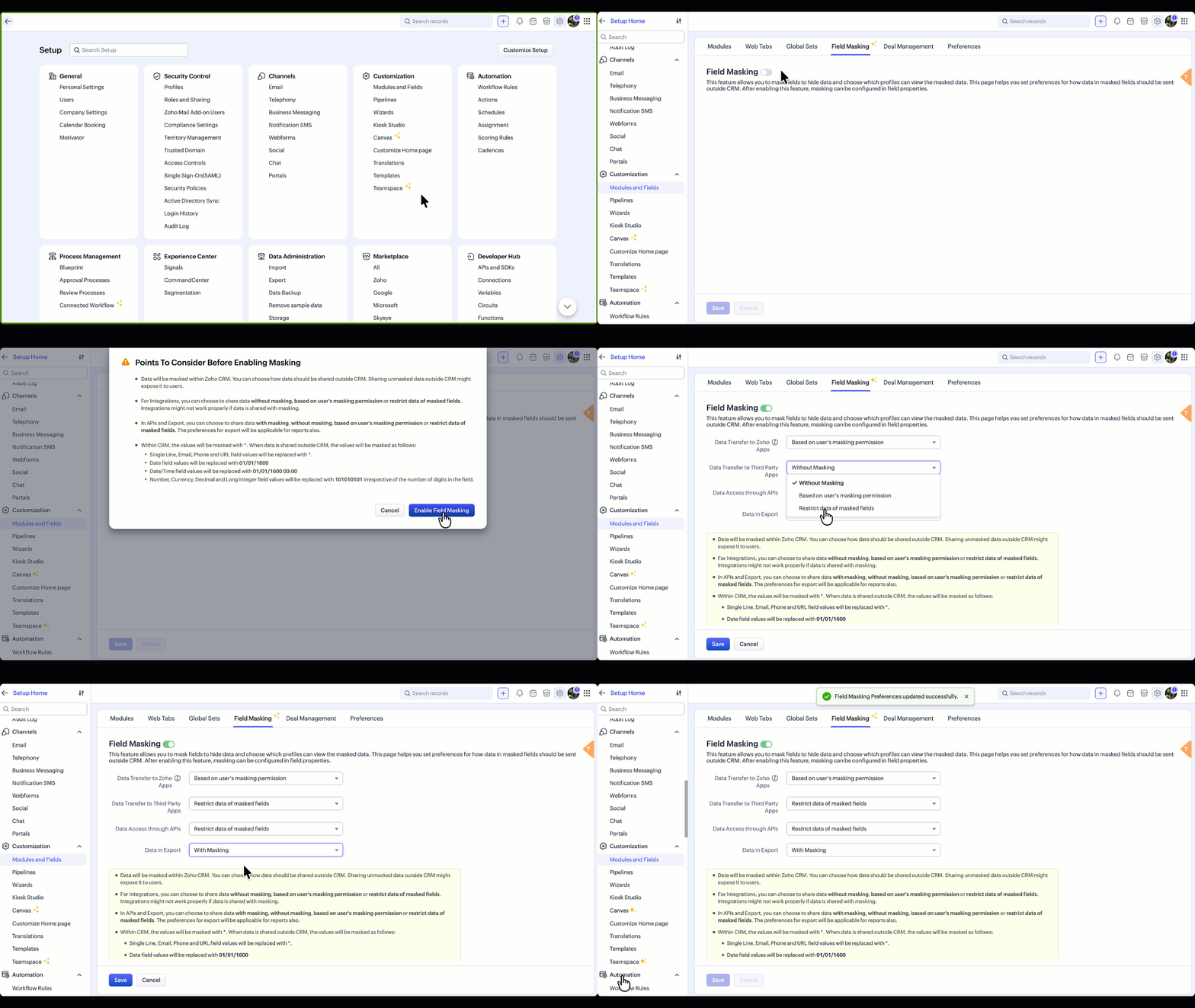
You can update your data sharing preferences anytime from the Field Masking page.
Note: Field Masking can also be enabled in the field properties, which is an alternative way to enable it.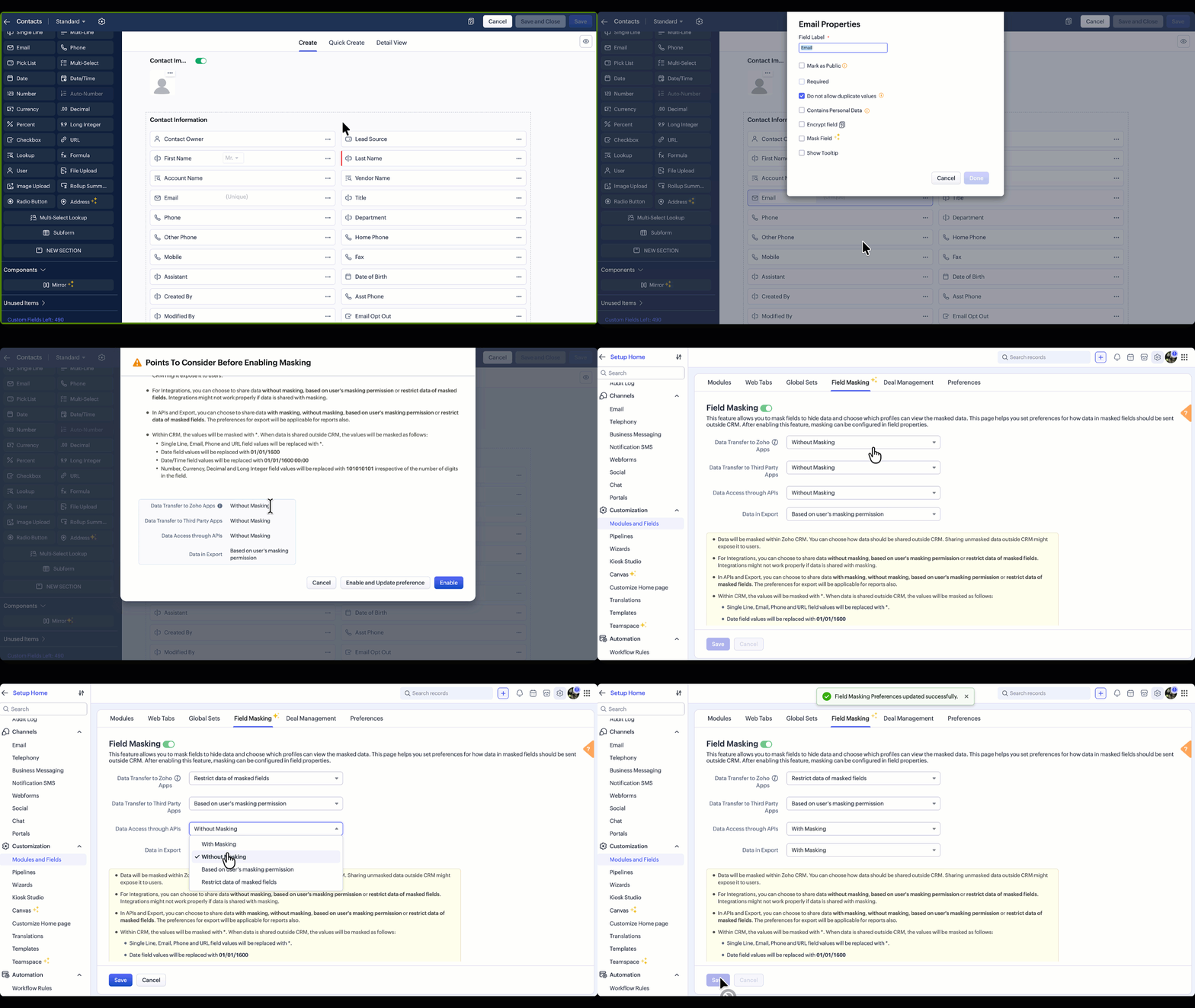
Points to Consider Before Enabling Field Masking
Once enabled, data will be masked within Zoho CRM. However, every time data leaves CRM, whether through an integration, an API call, or an export, you control how masked fields behave at that exit point. For any of these scenarios, three options are available:
Without Masking: The original value is shared as-is. Suitable when the receiving system or user is trusted and needs the complete data.
Based on User's Masking Permission: The masked or unmasked value is shared depending on what that user is allowed to see within CRM. A user who cannot view a phone number in CRM will not receive it in an export or API response either.
Restrict Masked Fields: The field is excluded entirely from the transfer. Useful when there is no legitimate reason for sensitive data to leave CRM at all.
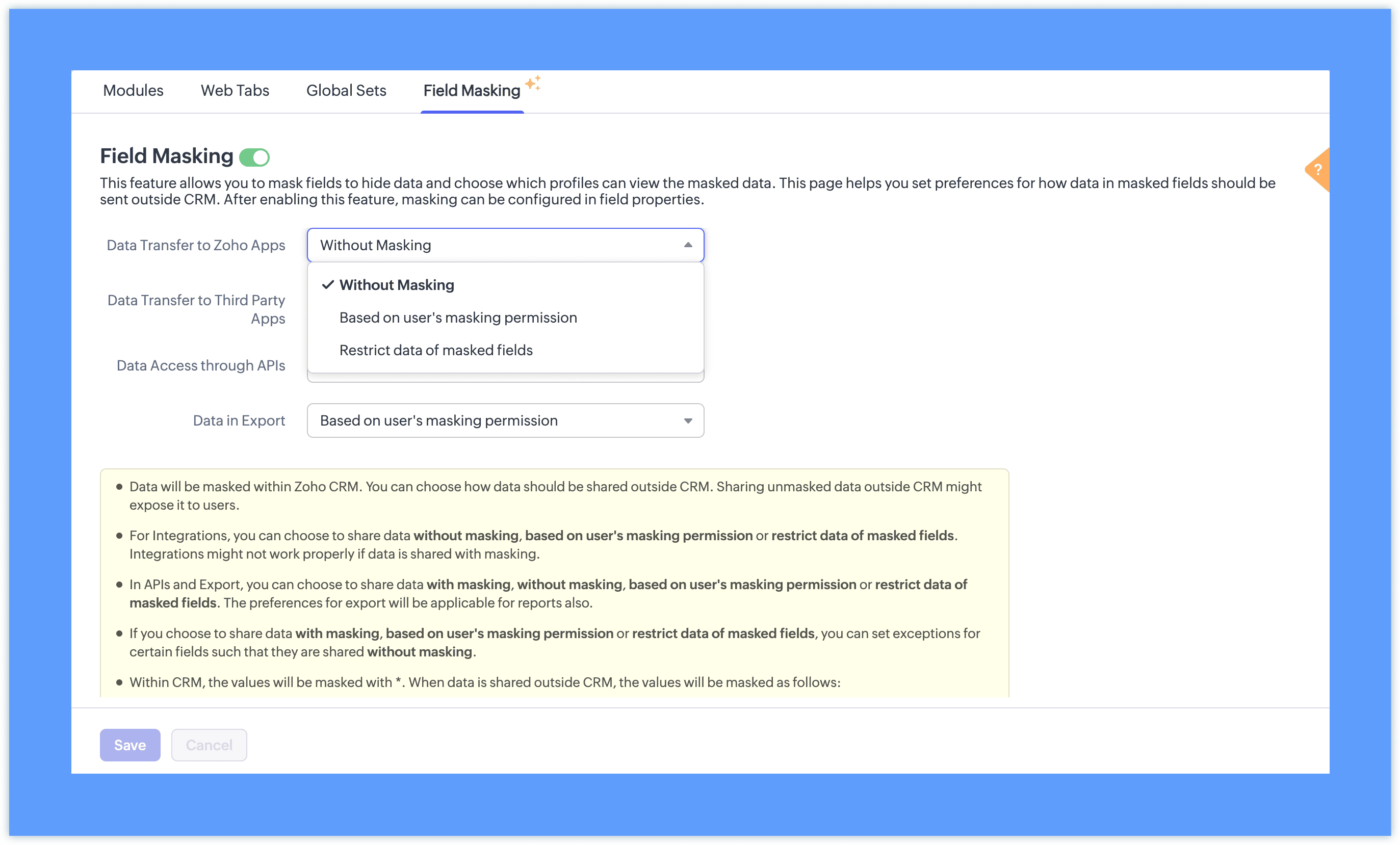
With masking: The masked format (such as 98******21) appears instead of the original value. This option is available only for APIs and Exports, and is useful when sharing data with teams who need to reference records without seeing the underlying values. This is particularly useful when sharing reports with teams who need to reference records without seeing the underlying data.
Note: Setting exceptions for these preferences for specific fields is planned in the future updates.
Step 2: Once field masking is enabled, fields can be masked fully or partially based on your requirements. You can also define which profiles have access to view the unmasked value.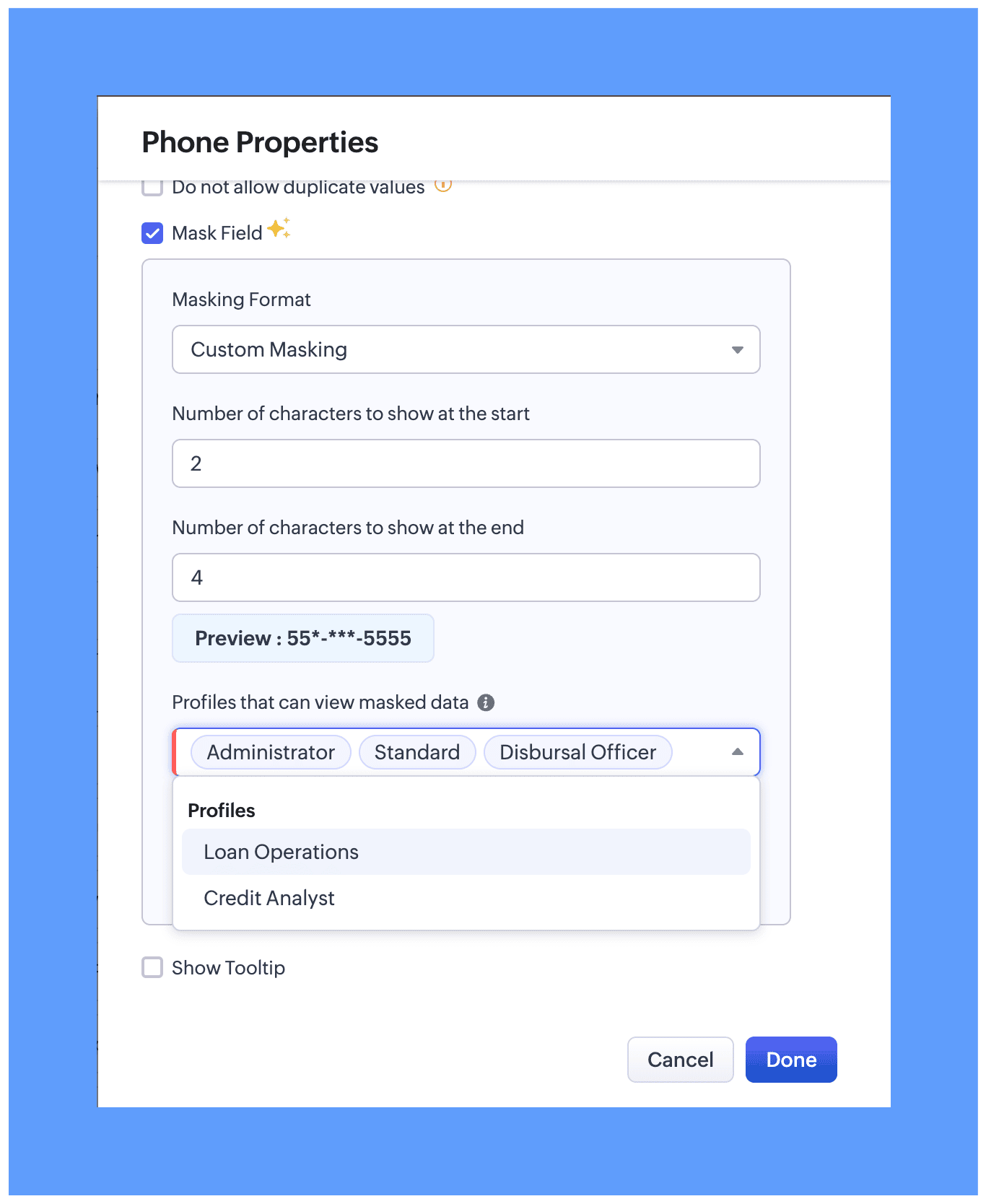
In module layout while editing properties for the preferred field. Two masking types are available:
Full Masking: The entire field value is hidden, for example ********.
Custom Masking: You can choose to mask only the first few characters or only the last few characters of the field value.

While configuring field masking, you can define which users can view the actual unmasked data. All profile types, whether system-defined or custom, are available for selection and will be able to view the unmasked data based on your preference.
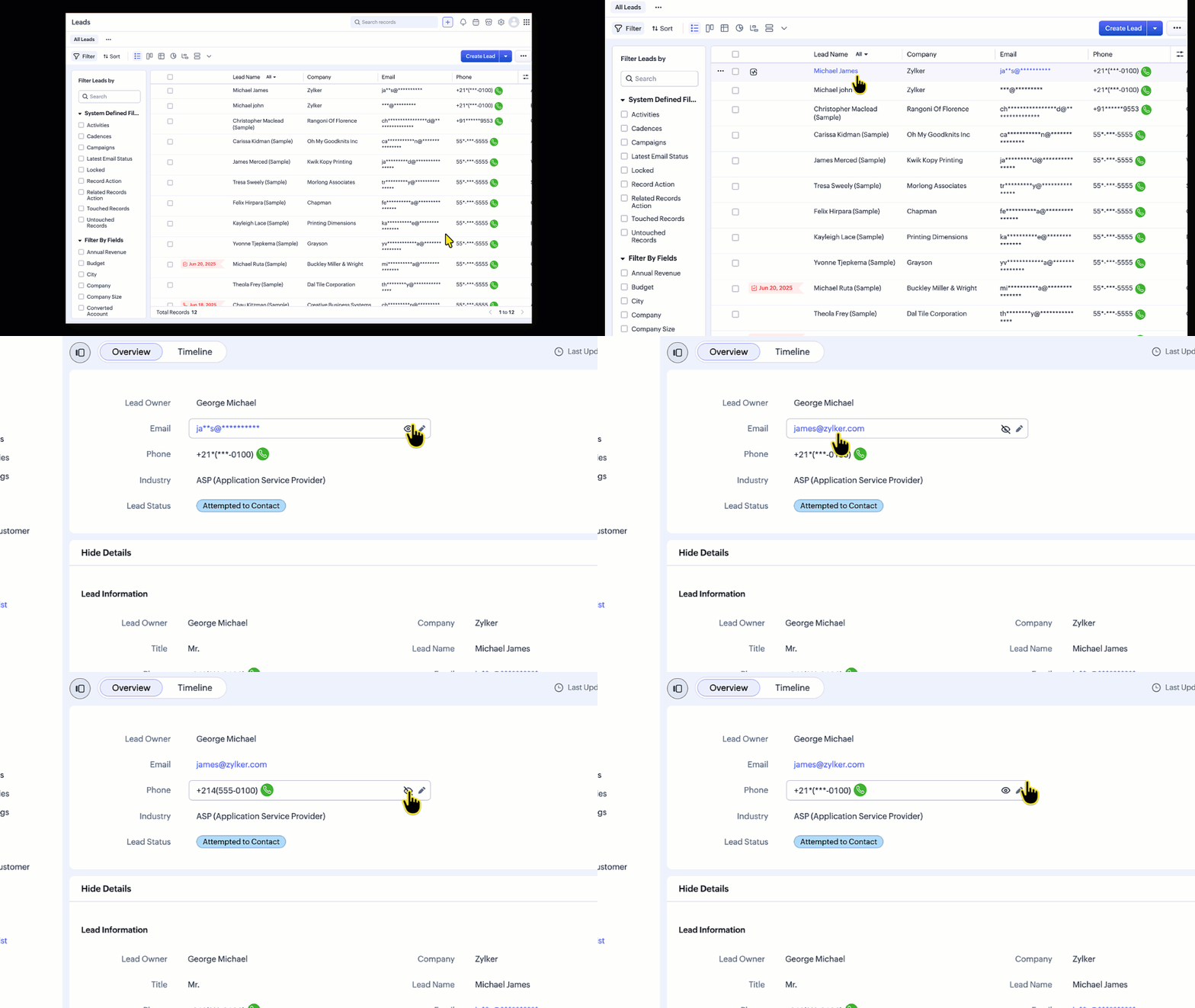
For users with permission to view masked data:
An eye icon (👁️) will be displayed next to the field.
Clicking this icon reveals the actual value.
Can place a call directly even without able to view the masked phone number
List Views
In list views, the data can be unmasked from the hamburger icon available in the column header.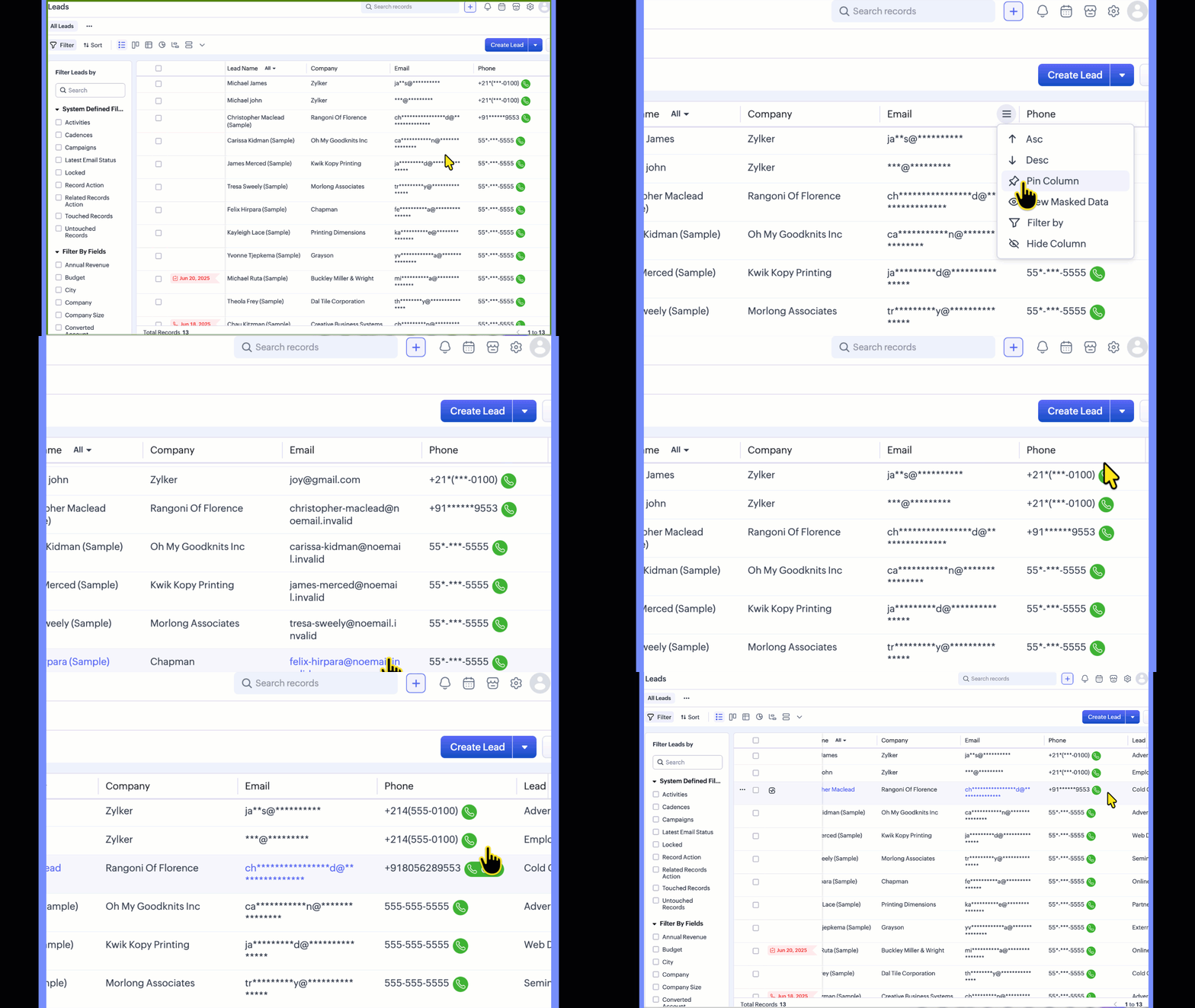
Templates
In templates, the Mail data with Masking preference lets you control how merge field data is shared when mails are sent using the template. This preference applies to all masked fields, regardless of profile permissions.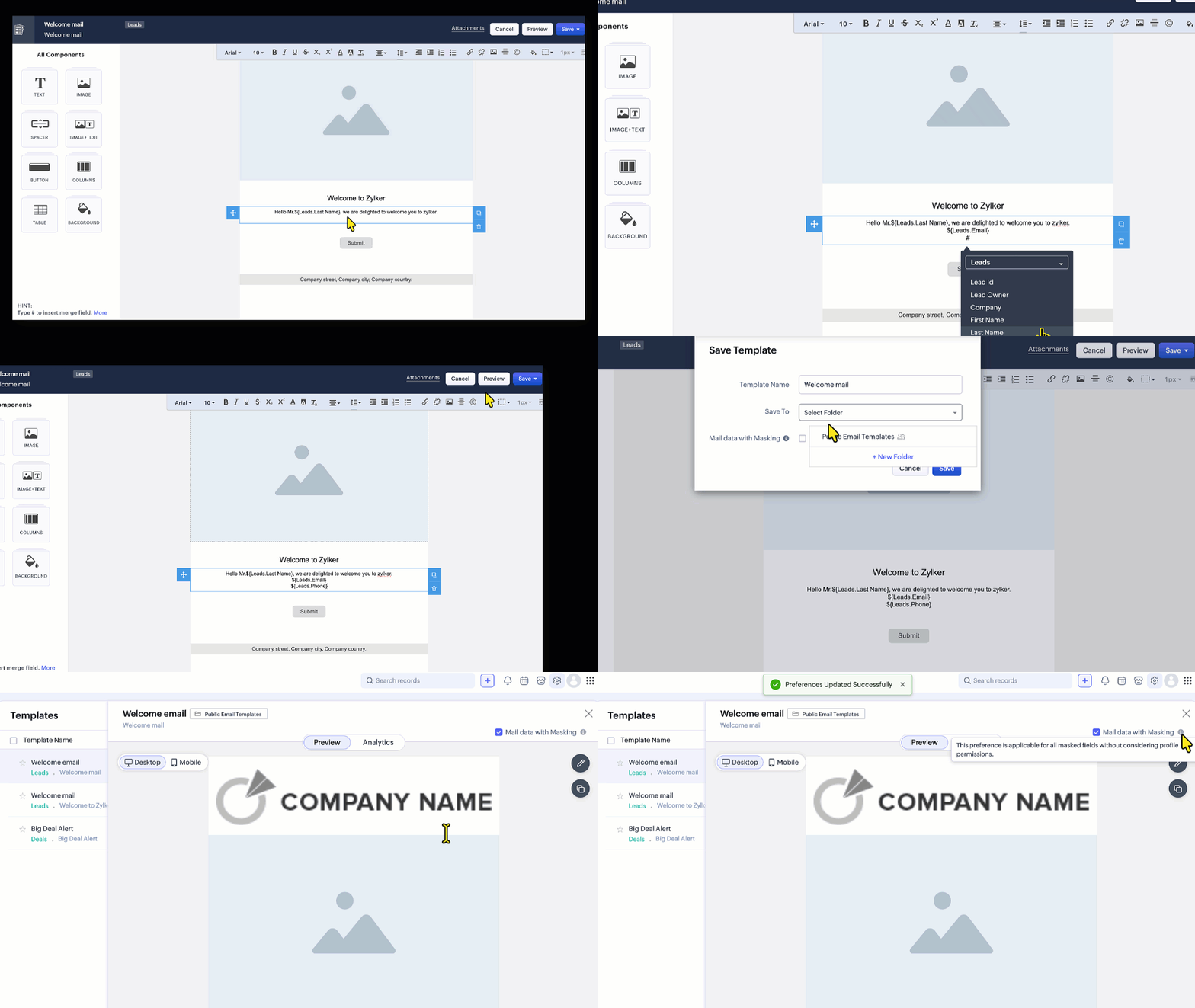
Reports:
When viewing or sharing reports, you can choose whether masked field values appear in their masked or unmasked form.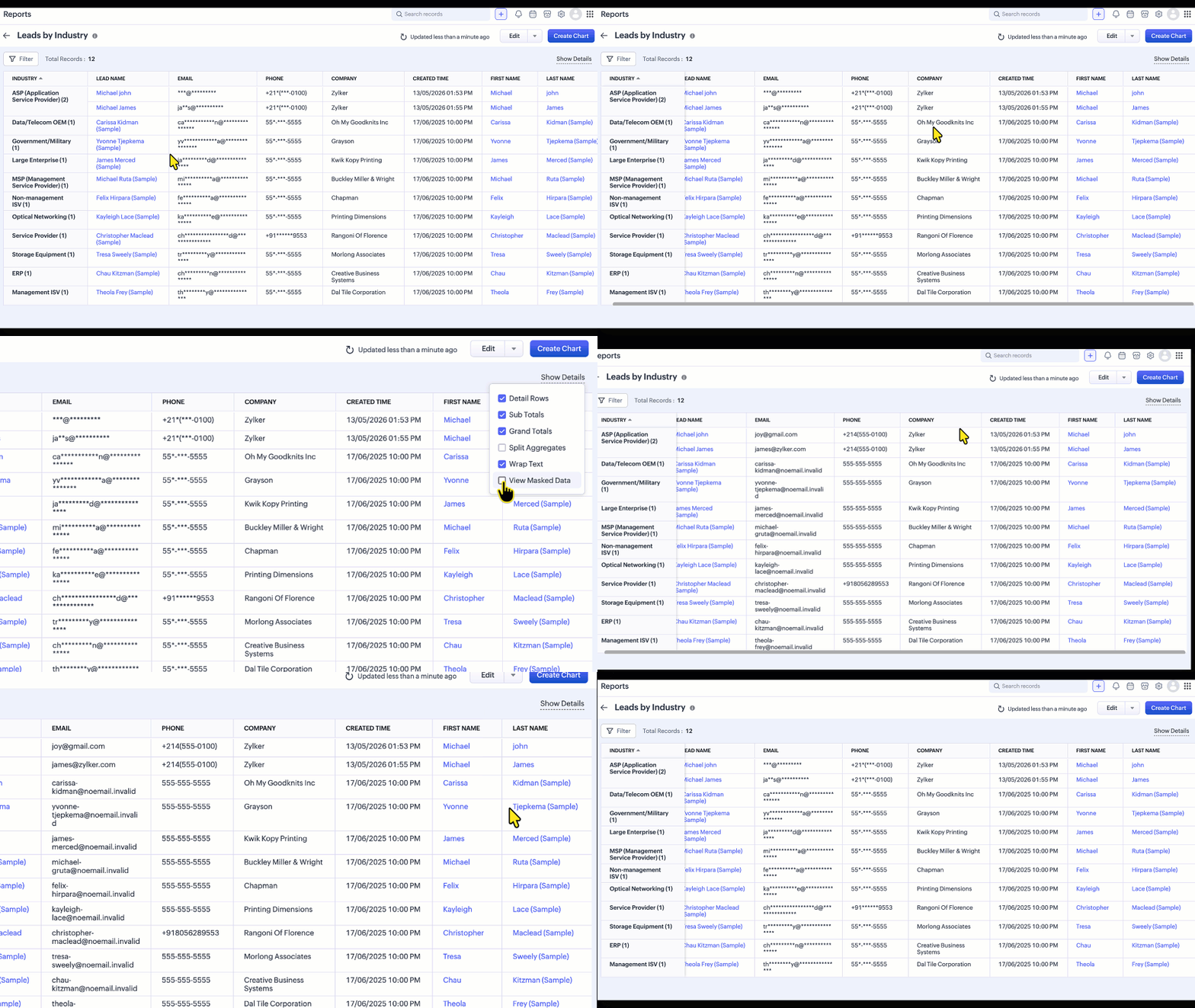
Supported field types
Field Masking can be applied to the following field types:
Single Line, Email, Phone, Date, Date/Time, Number, Currency, Decimal, Long Integer, URL
 Note: Custom Masking is supported for Single Line, Email, and Phone fields.
Limitations
The following are the current limitations of Field Masking, including areas where masking is not yet supported (masking is exposed):
Email Views - Emails Related List,Conversation View, SalesInbox, Mail Magnet, Email Reports, Mass Mail Delivery Stats and record preview in composer.
If the From/To field in the Calls module is masked but the number is not associated with a record, the number will be visible when the call is placed.
Signal notification
Zia Features
Note:
Once this feature is enabled for your org, the phone number is not shown in the call subject in calls module, whether or not Field Masking is enabled.**
If masked fields are used in Layout Rules, Validation Rules, Canvas Rules, or Wizard Conditional Rules, the rules may not execute as expected, because they rely on client-side data. A fix that prevents masked fields from being used in these rules is tentatively expected to go live within a week.
Feature Availability
Edition Supported: Enterprise and Ultimate editions of Zoho CRM,
Limits: Up to 10 masked fields per module in the Enterprise edition and up to 20 masked fields per module in the Ultimate edition.
Note: Field Masking is available across all modules except the Users module.
Topic Participants
Jayant Nath Vatsa
Sticky Posts
Introducing Incentives for Zoho CRM: Build, automate, and track sales commissions
Dear Customers, We are here with an amazing news! We built a direct solution to help manage your commission provisioning activity in your business. From creating commission plans to issuing payouts, this application leverages your sales reps’ performancePresenting ABM for Zoho CRM: Expand and retain your customers with precision
Picture this scenario: You're a growing SaaS company ready to launch a powerful business suite, and are looking to gain traction and momentum. But as a business with a tight budget, you know acquiring new customers is slow, expensive, and often deliversEnhancement in Zoho CRM: Introducing New Return Types for String Fields Based on Character Length
Dear Customers, We hope you’re well! In Zoho CRM, formula field with string return type is used in various scenarios where text is involved like concatenating customers’ first and last names, trimming characters from texts, performing find and replaceTransform your line of items into line items: ICR can now record your table values as subform values
Enhancement in Zoho CRM Dear Customers, We hope you're well! Zia Vision’s ICR capability can now recognize, extract, and store tabulated values in your subforms. An ideal example is a university application form. It has printed fields and handwrittenApprove records efficiently: Useful enhancements to My Jobs module and Approval process in Zoho CRM
Dear Customers, As you might know, approval process is a process automation tool that allows you to automate approvals in your organization and My Jobs is where you approve requests from a single point of view. Here's how you'd go about it: You’d add
Recent Topics
Rebrand your CRM with the all-new custom domain mapping setup
UPDATES TO THIS FEATURE! 19th Jan, 2024 — Custom domain mapping has been made available for portal users in Zoho One and CRM Plus. 23rd June, 2023 — Custom domain mapping has been made available for all users, in all DCs. Hello everyone! We are elatedDécouvrez le nouveau Zoho Analytics : l’analytique agentique pour toutes les entreprises
Nous sommes ravis de vous annoncer le lancement du tout nouveau Zoho Analytics ! Cette nouvelle version marque un tournant majeur dans l’évolution de la plateforme. Initialement conçue comme une solution de BI en libre-service permettant de créer desZia Agents in Zoho CRM: a better way to set up digital employees
Hello everyone, If you've been using Zia Agents in Zoho CRM, so far using Connections was the only deployment method you're familiar with. You create an agent in Zia Agents (define its objective, write instructions, use tools, add knowledge base) andKeeping phone number text format exporting from Books to Sheet
We have a custom function that copies data from our customers in Books to Sheets. In the process the customers' phone numbers (unless they contain a space) get treated as numeric values, so leading zeros get stripped off, and in some cases scientificDuplicate Record Creation
Hello Team, I would like to check whether there are any options available in Zoho FSM to prevent duplicate record creation in the following modules: Assets Companies Contacts Ideally, we would like the system to check for existing records before allowingAdmin Logging in as another User
How can a Super Admin login as another user. For example, I have a sales rep that is having issues with their Accounts and I want to view their Zoho Account with out having to do a GTM and sharing screens. Latest Update (27th April 2026): With the earlyKB Articles - Can't See Content or Trigger Immediate Sync
Once a file has been submitted to the KB, there's no way to check what it actually contains. There's also no way to force an immediate sync with the source document. These are issues when one is developing and testing an agent. It makes troubleshootingTool Parameter UI - Freeze Header
When one has a number of tools with a number of parameters, scrolling down hides the heading information, forcing one to scroll back up to get confirmation which radio button is which: Seems like simply freezing the header would eliminate that issue.Cannot replace custom tools
This is so incredibly frustrating. Create a tool group. Add your custom schema to create your custom tools. Attach to an Agent. Now you need to update your schema to make an adjustment? You can't edit the schema or even re-upload a new schema. It blocksTesting Tools - Can't View Response
When adding a custom tool and trying to test it, one can see whether or not the test has a successful http response, but the actual payload cannot be viewed to verify the tool's performance. I thought that's what the little hover link was for, but mousingmore native app support for linux
Dear zoho,pls build additional apps like zoho valt,zoho sheets,zoho show,zoho authenticator apps for linux ,because more and more people are increasing switching to linux this days,Unbundle feature for composite items
We receive composite items from our vendors and sell them either individually or create other composite items out of them. So, there is a lot of bundling and unbundling involved with our composite items. Previously, this feature was supported in formQuick Reference Guide on join.zoho.com
Joining a remote session can be difficult for the people who need it the most. Please add a quick reference guide and better documentation that my Grandma can read on the join.zoho.com site. It's not uncommon to spend 10minutes or longer in a sessionZoho Projects - Auto Populate Project on Project Invoices
Hi Projects team, I noticed that when creating an invoice from a Project in Zoho Projects, the project is not selected on the invoice. Is this something which you would consider as a feature request? It seems silly that when you create an invoice fromTimes prepopulating in Date/Time field on deal records
Support tells me that there is no workaround to having the time auto-fill on a date/time field in our deal records -- that is HUGELY inconvenient and creates massive opportunity for error. Our deals involve several parts over various days/times, noneEmail-Data Synchronization with Zoho Analytics
Hello, Enterprise Support Community! We're excited to announce the availability of Email Data Synchronization with Zoho Analytics! This highly requested enhancement allows you to sync email data from Zoho CRM into Zoho Analytics, making it easier to analyzeMulti-Day Installations
We schedule technicians on multi-day installations. A single appointment from Monday 8 AM through Friday 5 PM counts as 105 working hours, causing false overbooking. We need one appointment spanning five days but only 40 hours counted toward technicianMaking shared forms available offline
Hi, We used to be able to have our forms available offline even if it was a shared form. now we can't. Is this a new bug?Zoho Forms API
Is there any way to get all form entry list using API? Looking forward to hear from youDocuments greater than 40MB Preview
hello, Documents bigger than 40 MB cannot be previewed in WorkDrive Web App or Mobile App. would it be resolved in future?Calendar Booking - Related Deal
Is it possible to automatically associate a Calendar Booking with an existing Deal in Zoho CRM? We're trying to use the native Calendar Booking feature. Our goal is to send a booking link to a customer from an existing Deal record, so that when the customerApproval Process configuration is now more flexible and fully customizable
Hello everyone! Approval Process is back with a better user experience that makes it easier to add rules to your processes. This enhancement includes some UI updates that help you create highly structured approval stages—and more. Let's look at the enhancementsKaizen #268: Using Zoho MCP to Build and Configure Zoho CRM Cadences
Hi everyone! Welcome back to the Kaizen series! In the previous Kaizen posts, Kaizen #265 and Kaizen #266, we explored how Zoho MCP can be used to work with Zoho CRM records, retrieve metadata, customize CRM, configure automation, and even coordinateDeliverability Update: Impact of the Ongoing Microsoft 365 Service Disruption on Email Delivery
Zoho Campaigns is operating normally. Microsoft is still recovering from a global incident that affects multiple Microsoft 365 services, including Exchange Online and Outlook. If your mailing lists include Microsoft-hosted addresses (@outlook.com, @hotmail.com,Trigger a Workflow Function if an Attachment (Related List) has been added
Hello, I have a Case Module with a related list which is Attachment. I want to trigger a workflow if I added an attachment. I've seen some topics about this in zoho community that was posted few months ago and based on the answers, there is no triggerZoho Inventory - Imporoved Order Fulfillment Reporting
Hi Inventory Team, i've tried to contact you through support@eu.zohoinventory.com but haven't received a response. I am contacting you on behalf of a client. Our client is a car parts wholesale business and we set them up on Zoho Inventory earlier thisSay Hello to Telephony in Zoho FSM
Zoho FSM now brings complete telephony support so your team can manage inbound and outbound calls without switching tabs. Faster responses, smarter routing, and total call visibility—all in one place. Choose the telephony setup that works for you Zoho’sIncreasing API Credits
Hello everyone! Organizations consume Zoho CRM APIs for various business needs, and it's a show-stopper when you exhaust your API credits before the 24-hour rolling window replenishes your credits. To meet your growing needs and help you keep your business[Online Training] Zoho RPA masterclass: Fundamentals, SAP® automation, & AI workflows
Hello everyone! Greetings from the Zoho RPA Training Team! We're excited to announce our upcoming Online Training on Zoho RPA. Manual, repetitive tasks like entering data, updating spreadsheets, managing files, and extracting information from documentsZoho Inventory | Can't uncheck/turn off Advance Tracking
Hi, I wanted to know if there's a way to turn off Advanced Tracking (such as Serial Number or Batch Tracking) for an item in Zoho Inventory. I’ve read that you might need to delete associated transactions and clear the opening stock to disable these features.CNIL - Suivi de Pixel
Bonjour à tous, À la suite de la nouvelle recommandation de la CNIL sur les pixels de suivi dans les e-mails, savez-vous si Zoho Campaigns permet : de conditionner le suivi des ouvertures au consentement de chaque contact ; de proposer un lien permettantJoin Zoho Meeting only via Web browser and not with Zoho Meeting App
Dear Zoho team, according to the documentation [1], Zoho Meeting only offers web view for Chrome and Firefox on a desktop. For other browsers and devices, participants can only join a Zoho Meaning with the Zoho Meeting App installed. This is a big hurdleGetting an error when trying to use the Zoho Desk Resources with our Zobot chat
Hello, When I try to set our Zobot AI Card Training to Zoho Desk resources I get an error when testing it and it bypasses the bot completely. When I try to switch it to the Zoho SalesIQ resources option in there it will list some articles but not giveKB Articles from Zoho Learn - Import as .md
I love the concept of being able to use articles from Zoho Learn as knowledge base articles for Zia Agents. This will absolutely help with proper documentation and organization of company processes and SOPs. This was a great concept. However, even whenRequest for Zoho Desk Version and Module Details
Kindly help us confirm the version of Zoho Desk currently being used in our portal, along with the module/edition name. We require this information urgently for our internal documentation.Cannot reorder fields in Page Layout in Expenses and Purchase Requests
It is very inconvenient that the custom fields in Page Layout cannot be re-ordered. The only way is to remove the fields and re-create them; however, it is impractical. This would affect the reports and dashboards we are having. Not able to re-order thePurchase Requisition in Zoho Books
I want to understand if Zoho Books is having the following workflow: PR ( Purchase Requisition ) >> PO ( Purchase order) >> GRN/SRN ( Goods/Services receipt note) >> BillTips & Tricks #8 | Zoho Mail: Seguridad, privacidad y control para tu empresa
El correo electrónico sigue siendo una herramienta fundamental para cualquier organización. Por él circulan comunicaciones internas, información de clientes, documentos confidenciales y datos esenciales para el negocio. Por eso, elegir un proveedor dePersonalize Email Campaigns using CRM Data
Recently, few of our CRM users wanted to send an email campaign with personalized sender details and signature so that recipients can instantly recognize the sender. We are happy to announce the new enhancement in campaign creation through which you can personalize your email campaign using CRM Contact/Lead Owner's data. Let’s see how we can use those data to send emails. Personalize sender details Using Zoho Campaigns, you can send an email campaign with a personalized sender name and email address集めて終わりにしない。― Zoho FormsからCRMへデータをつなぐ
ユーザーの皆さま、こんにちは。ゾーホージャパンの友田です。 Zoho Formsで問い合わせや資料請求を受け付けた後、その情報をどうしていますか? 例えば、 フォームから届いた氏名や会社名、メールアドレスを確認して、Zoho CRMにも同じ情報を入力している。 そんな作業が発生している場合、FormsとCRMをつなぐことで、その手間を減らせるかもしれません。 Formsに入力された情報をCRMへ Zoho Formsは、Zoho CRMと連携できます。 例えば、Webサイトから資料請求を受け付ける場合、Next Page