Launching AI-backed product recommendations for ecommerce stores

Launching AI-backed product recommendations for ecommerce stores

As Zoho Campaigns steps into its 11th year, we're taking our first step towards artificial intelligence as part of our ecommerce module. Your emails—be they regular or automated— are equipped to carry unique and targeted product recommendations based on the store interactions and purchase history of your customers.


This update is available to all the users who've integrated their Shopify, WooCommerce, or Zoho Commerce stores with Zoho Campaigns.
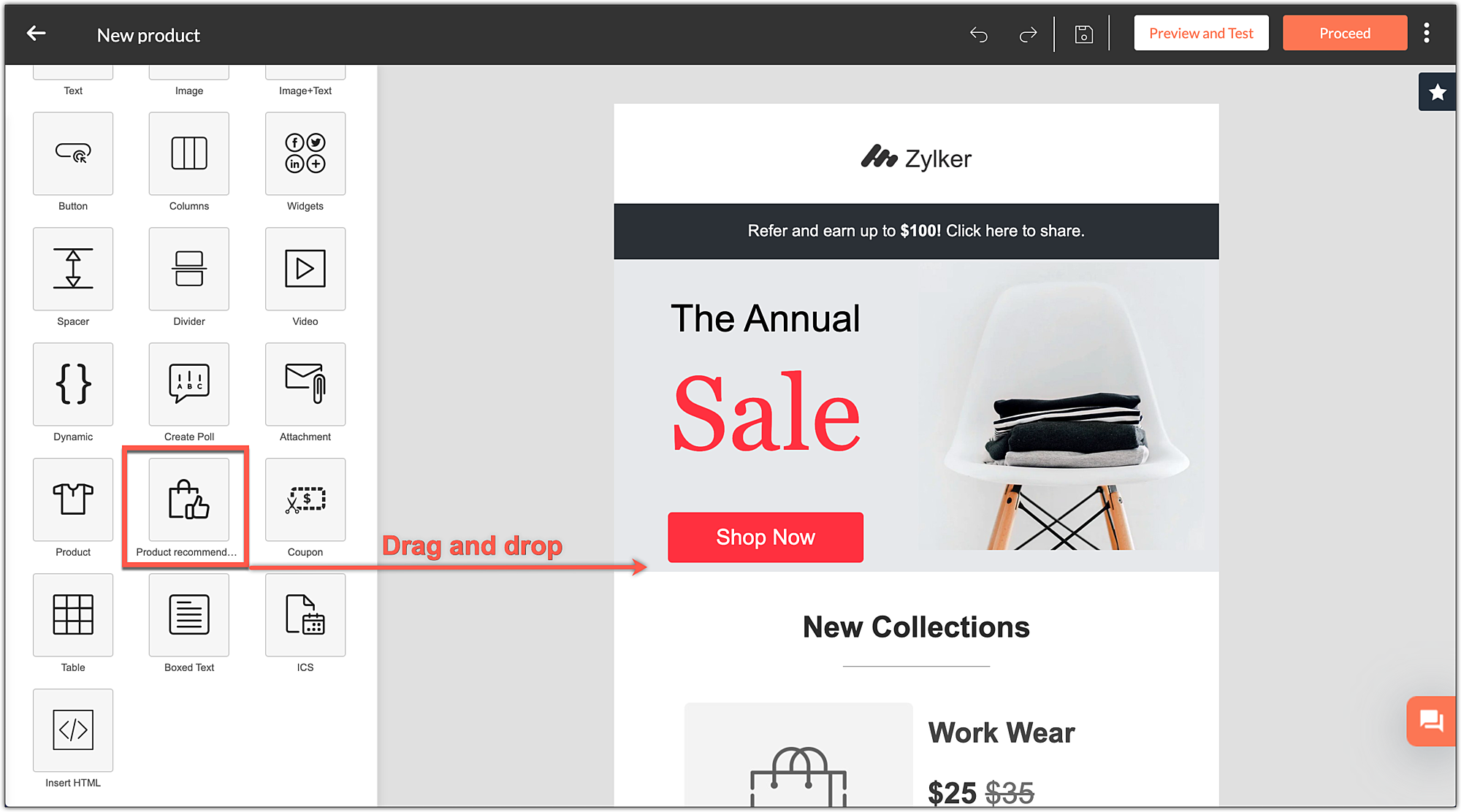
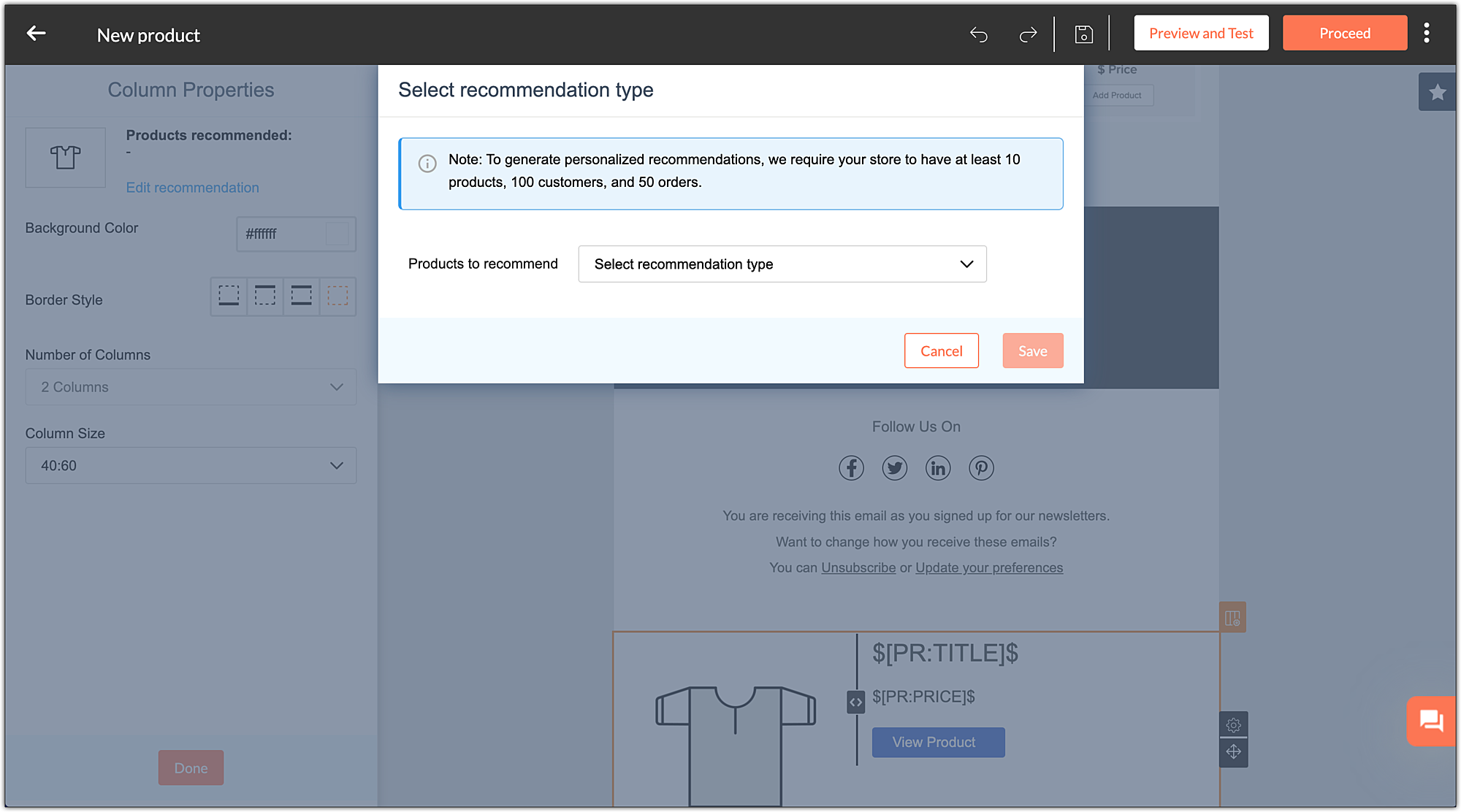
 

How does it work?  
Simply drag and drop this component from the editor onto the email you're crafting.


Next, select the type of recommendation you want to use. The system automatically pulls in and displays relevant product recommendations to individual customers. Additional information about the products like tags, descriptions, categories, and more increase the relevancy of the recommendations.


Types of recommendations   

We've classified the recommendations into two types:

  1. Basic 
  2. Advanced 
Basic  

Top selling products  
Promotes products with maximum purchases to the prospective buyers.  


Recently added  

Spotlights your store's newly added products and drive sales.


Advanced  

It's important to note that you'll be able to use advanced recommendations only if your store has 10 products,100 customers, and completed 50 orders.


Similar products  

This recommendation comes in handy when you want to send upsell emails. It shows your customers the products similar to the ones they've purchased. For example, the system recommends running shoes from different brands to those who purchased one from another brand.


Frequently bought together  

This recommendation is suitable for both cross-sell and purchase follow-up emails.


Let's say you want to send out a cross-sell campaign to those who've purchased mobile phones. Just add this component to the email, and our system will automatically recommend products that are bought in tandem like tempered glass, covers, and more.


When it comes to automated purchase follow-up emails, the system understands and suggests products that are related and bought in tandem with the product purchased by that customer.


 People who bought this also  

The system understands the sensibilities of a particular customer based on their entire shopping history, compares it with the rest of them for a match in pattern, and offers relevant recommendations. This helps you send targeted cross-sell and purchase follow-up emails.


 Recommendation reports  
The current version allows you to track and compare the revenue generated from Zoho Campaigns (both via regular and automated emails) with your store's overall revenue.


With this update, you'll see an additional section that helps you understand the conversions via the recommendations.
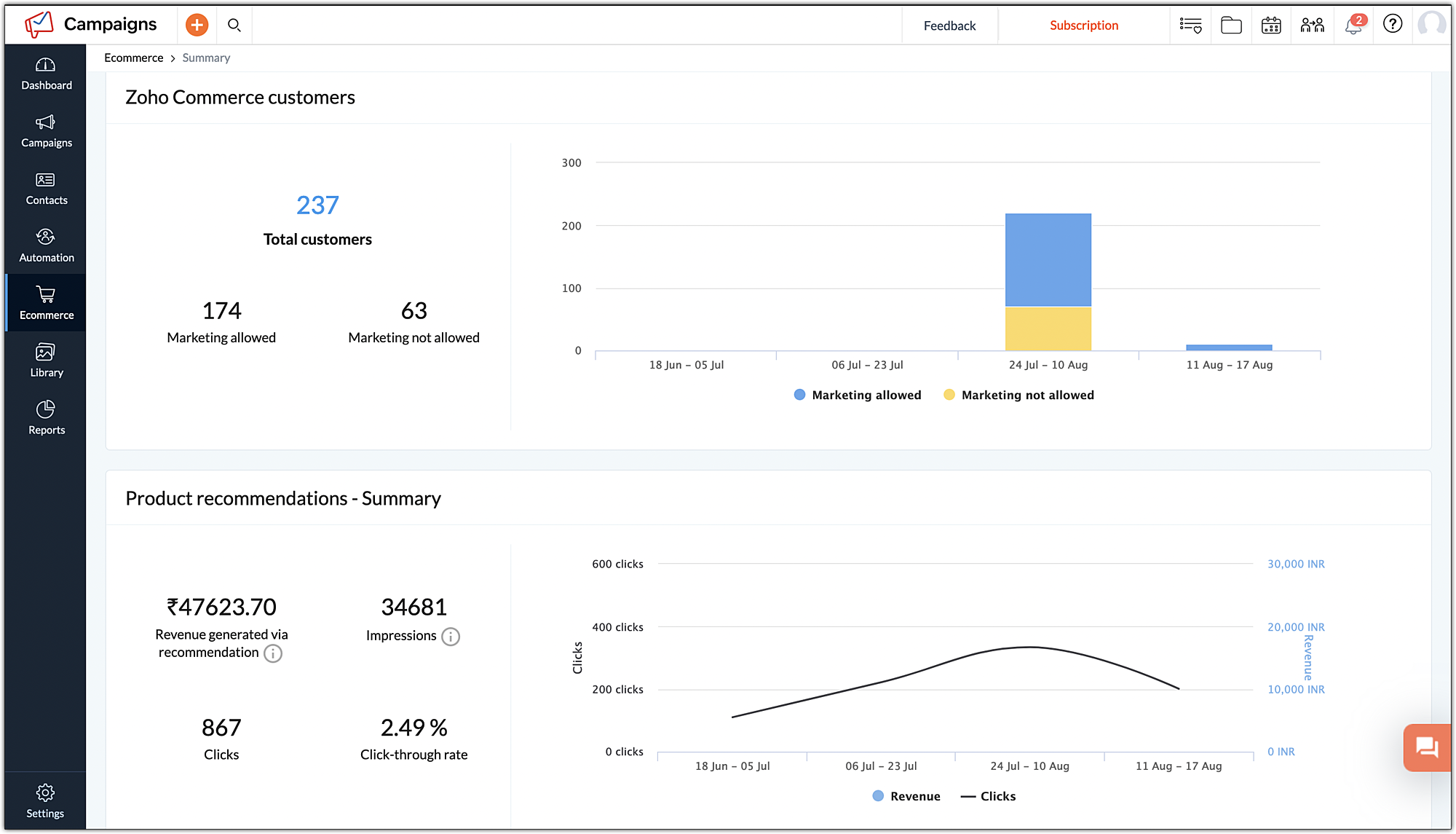
 

Recommendation reports                        
Final words 


We hope this update helps you drive more conversions via email marketing. Give it a try and share your feedback in the comments below.


    • Sticky Posts

    • Marketer's Space: Proven tips to improve open rates – Part II

      Hello Marketers! Welcome back to another post in Marketer's Space! We're continuing from where we left off a fortnight ago. We ended the previous post discussing the subject line, and we'll continue from there. Let's dive right in. Pre-header Pre-header
    • Tip of the week 03 - Sending emails in batches

      Today's marketers not only want their email marketing to be efficient, but also smart. For an email campaign, you may think you have all the essential elements for lead conversion—a big mailing list, an attractive template design, and the most-engaging message content, but after hitting the ‘send’ button, you may not get the expected conversions. Wondering why? Here’s one of the major reasons. Many marketers miss out on sending the email campaign the right way. Did you know that you should not be
    • Tip of the week 04 - Know about your recipients' 'prime open time.'

      In today's market, the importance of customer behavior is astounding, with a vast amount of research and resources going into finding how customers make decisions. The process of persuading your customers to open your email and click on your call-to-action becomes easy when you understand the psychology behind their behavioral traits. Time to turn into a psychologist! Let's get to the basics—you want your emails to resonate well with your recipients. So, what's the primary thing involved here? It's
    • Zoho Campaigns Expert Diaries on SoundCloud, Spotify, Apple Podcasts, and YouTube

      Hi email champs,  As email marketers, we find great lessons in each other's works—be it the subject lines that worked good, the design that was received well, or the CTA that had the maximum clicks. Email marketing encompasses a wide variety of topics spanning everything from creation and design to development and deliverability.  Here's when we from the Zoho Campaigns team found the need to build an email marketing community comprising of seasoned marketers and email geeks who can help each other
    • Email Deliverability Tip #3: Seal the deal with the preheader

      In the last post, we learned about the subject line. Today we'll be learning about the preheader. A preheader is the short text that follows the subject line in an email. The preheader is designed to hint at what your email message is all about. A good preheader should act as a second subject line and convince your contacts to open the email. Now, let's learn the best way to craft a preheader. Your subject line and preheader should work together and accurately convey the gist of your email. Keep
    • Recent Topics

    • Whatsapp Connection Status still "Pending" after migration

      Hello, I migrated my WhatsApp API to Zoho from another provider a day ago. So far the connection status is still “Pending”. There is a problem? How long does it usually take?
    • Zoho Books Sandbox environment

      Hello. Is there a free sandbox environment for the developers using Zoho Books API? I am working on the Zoho Books add-on and currently not ready to buy a premium service - maybe later when my add-on will start to bring money. Right now I just need a
    • Plug Sample #15 - Enable Human-Like, Contextual Interactions in SalesIQ with Zia Agents

      Zia Agents are conversational AI assistants designed to understand user intent and respond intelligently, helping businesses automate conversations and offer personalized support at scale. While Zia Agents are yet to be publicly released, access is currently
    • Simple Callback Notifications Needed

      My team are terrible at remembering their CRM callbacks, often due to how long in the future they are set for. Is there a way i can set an e-mail notification for when a callback is due? For example we set it for 9am one day and five minutes before they
    • Customer ticket creation via Microsoft Teams

      Hi all, I'm looking to see if someone could point me in the right direction. I'd love to make it so my customers/ end users can make tickets, see responses and respond within microsoft teams. As Admin and an Agent i've installed the zoho assist app within
    • Best way to schedule bill payments to vendors

      I've integrated Forte so that I can convert POs to bills and make payments to my vendors all through Books. Is there a way to schedule the bill payments as some of my vendors are net 30, net 60 and even net 90 days. If I can't get this to work, I'll have
    • Seamless Round-Trip Navigation for Related Blocks (Detail View)

      As highlighted previously in this post (and here, here, here, and here), we still lack a fundamental capability for seamless navigation in Related Blocks. The popup that appears when adding a related record doesn't exist for viewing/editing existing records,
    • Service and Parts Line Item Limitations

      Hi FSM Team, We work with clients who deliver large-scale field service projects. In many cases, a single work order can contain 200+ service and parts line items. Currently, Zoho FSM limits work orders to 30 service and parts line items. While this works
    • Social Profile Logo Format

      Hello, I'm using Zoho Sites and am attempting to add a couple of social media accounts to my profile that aren't included in the default platforms that are available. What format is the logo required to be in? I have tried .png and .jpg with no success.
    • How to create Sepa Direct Debit XML file: solution and code

      Even though Books provides a payment integration for Stripe and Gocardless (in Europe) there are customers that want to use the Sepa services of their own bank. Mainly because Stripe and Gocardless are quite expensive. In that case they would need a Sepa
    • Traditional Spreadsheet vs Zoho Tables

      Hello everyone, This article explains the differences between Spreadsheet applications and no-code databases, such as Zoho Tables. While both tools belong to the "grid" family, the core difference lies in their purpose. A spreadsheet (such as Zoho Sheet,
    • RFQ MODEL

      A Request for quotation model is used for Purchase Inquiries to multiple vendors. The Item is Created and then selected to send it to various vendors , once the Prices are received , a comparative chart is made for the user. this will help Zoho books
    • Delegate Access - Mobile iOS/iPad

      We’re over the moon that delegate access is now available in Zoho Mail as we were nearly ready to switch platforms because of it! Is there a timeline on when delegate mailboxes will be accessible from the iOS and iPad OS applications? Thanks, Jake
    • Request For Quotation (RFQ) module

      Hello, Do you have any plans to implement a RFQ module in to ZOHO Inventory? I would like to chose items that I require a price for, select a number of different suppliers to e-mail and have them submit there pricing online. I would then like to see a
    • Unable to change Lookup field from Multi Select to Single Select

      I am trying to change a Lookup field in my Zoho Creator form from Multi Select to Single Select, but I am unable to find any option to do this.
    • Support for Developing Zoho Recruit Extensions via Zoho Sigma

      Hi, I’m interested in building an extension for Zoho Recruit using Zoho Sigma. However, when I navigate to Sigma and attempt to create a new extension (via the "New Extension" option), Zoho Recruit does not appear as a listed service—only options like
    • Can I re-send the Customer Satisfaction Survey after a ticket closure?

      Hello, Some customers does not answer the survey right after closure, is it possible to re-send after a few days or weeks? Best Regards!
    • FOLDER DISAPPEARED

      Hello Zoho Community. I recently found a problem with no explanation: a folder in Zoho Analytics just disappeared, but the tables and SQL sentences still existed, the folder was not deleted. The solution for me in this case was to create a new folder,
    • How to create estimates/Invoices with sub-totals

      Every other accounting package can create estimates and invoices with Sub-totals. How can I do that in ZohoBooks?
    • Deluge scripts

      Why is there not a search function to make it easier to find the script of interest when modifications are required.
    • Social media simplified with Zoho Social: Why should brands have a Threads profile?

      Just over a year ago, Instagram launched Threads, the all new social media app primarily focusing on sharing text online. It was welcomed by people worldwide with more than 10 million users in just seven hours, and it currently has over 175 million active
    • Auto tracking URL generation based on Carrier

      Hi, While creating a shipment order for a package in Zoho Books, I have a requirement that for example, if the carrier is Delhivery and tracking number is 1234, then can automatically the tracking link/URL be generated as www.delhivery.com/1234. Similary,
    • New Beginnings with Zoho Desk mobile app best practices: Part 3

      In focus: Scaling consistency, intelligence, and customization In our third installment, we'd like to share tips to help you elevate your customer experience as you handle support operations seamlessly on mobile. Let's reconnect with Omniserve, the field
    • Develop and publish a Zoho Recruit extension on the marketplace

      Hi, I'd like to develop a new extension for Zoho Recruit. I've started to use Zoho Developers creating a Zoho CRM extension. But when I try to create a new extension here https://sigma.zoho.com/workspace/testtesttestest/apps/new I d'ont see the option of Zoho Recruit (only CRM, Desk, Projects...). I do see extensions for Zoho Recruit in the marketplace. How would I go about to create one if the option is not available in sigma ? Cheers, Rémi.
    • Highlights of 2025: Milestones and moments

      Hey everyone! As we step into 2026, it’s a great time to look back at everything 2025 brought to Zoho Social. This year was big, packed with powerful new features, smart enhancements, exciting events, and a major milestone: a whole decade of Zoho Social.
    • Override Auto Number field?

      We are preparing to migrate from Salesforce. In Salesforce, we auto-generate a unique number on our Opportunities (Potentials). If the Opportunity results in a contract, we use that unique number as the Contract number. There are some situations where
    • Introducing the sandbox environment in Zoho Sign

      Hey there! Customer and partners across the globe have been requesting a testing environment—also called a sandbox—for quite some time. Sandboxes help you try out document workflows before using them in your production setup. This new year, we are excited
    • Zoho CRM for Everyone's NextGen UI Gets an Upgrade

      Hello Everyone We've made improvements to Zoho CRM for Everyone's Nextgen UI. These changes are the result of valuable feedback from you where we’ve focused on improving usability, providing wider screen space, and making navigation smoother so everything
    • CRM x WorkDrive: File storage for new CRM signups is now powered by WorkDrive

      Availability Editions: All DCs: All Release plan: Released for new signups in all DCs. It will be enabled for existing users in a phased manner in the upcoming months. Help documentation: Documents in Zoho CRM Manage folders in Documents tab Manage files
    • Zoho Desk - Zoho FSM Integration issue on Mobile and iPad

      Hello Team, I am trying to create a Work Order (WO) using the Zoho FSM integration (Add-on Service) that is integrated with Zoho Desk. The issue is that the integration is not working on mobile devices and iPads. While I am able to create the WO, Request,
    • Can I share the drive with another Windows user?

      We use the WorkDrive Sync application on a server with several remote desktop users. Our question is: Can the drive created by WorkDrive Sync be shared from one of these remote users with the other users so they can access the files, or do we need to
    • Syncing Bills in Zoho Books to Zoho CRM

      Is there any way to sync the Bills in Zoho Books in Zoho CRM
    • Zoho Books Items Categorisation/Grouping/Folder

      Is there a way to do items categorisation? a folder structure? Product Type A - Option 1/2/3 Product Type B - Option 1/2/3 Current problem : I have more than 50 items on the list, its hard for team to navigate.
    • Auto CheckOut Based On Shift.

      This Deluge script runs on a scheduled basis to automatically set the 'Actual_Check_Out' time for employees who haven't manually checked out. If the current time is past their scheduled 'Shift_End_Time', the script updates the check-out time to match
    • Formula working in MS Excel , is not working in Zoho Sheets, Filter fuction which is working in MS sheets per the attached workbook / Daily update.

      Filter function , which is working in MS Excel is not working in Zoho sheets. Please help on function of filter of particular class sheets and extract students name who has more than 3.5 hours of study hours on particular day depending on date in D7 cell.
    • CRM gets location smart with the all new Map View: visualize records, locate records within any radius, and more

      Hello all, We've introduced a new way to work with location data in Zoho CRM: the Map View. Instead of scrolling through endless lists, your records now appear as pins on a map. Built on top of the all-new address field and powered by Mappls (MapMyIndia),
    • Problem using Zoho Desk API

      Goodmorning, I am trying to use the Zoho Desk API to create a dashboard in Grafana, but I am having a problem. Following the instructions in the API documentation, I created the API Console application (server-based application). Then I created the string
    • ERROR: Product type cannot be changed for Items having transactions.

      I have mistakenly added a product type as goods for an item that was a digital service. Now when HSN/SAC became mandatory, this brought my attention to this error I did. So I tried changing the product type but it displayed this error message Product
    • Automate pushing Zoho CRM backups into Zoho WorkDrive

      Through our Zoho One subscription we have both Zoho CRM and Zoho WorkDrive. We have regular backups setup in Zoho CRM. Once the backup is created, we are notified. Since we want to keep these backups for more than 7 days, we manually download them. They
    • Boost your CRM accuracy with smart Data Enrichment

      Hello all! In this post let's look at data enrichment from a holistic perspective to gain more clarity on how you can use it. So, here's a quick recap of what data enrichment is and how you set it up it to enhance your existing module data! What is data
    • Next Page