Never miss a sprint meeting | Get instant Zoho Sprints meeting notifications in Zoho Cliq
Never miss a sprint meeting | Get instant Zoho Sprints meeting notifications in Zoho Cliq


Tired of forgetting your sprint meetings? Let's set up automatic notifications from Zoho Sprints to Zoho Cliq.

What is Zoho Sprints?
Zoho Sprints is an Agile project management software that helps dynamic teams plan, track, iterate, and deliver their fast-paced projects with ease.

What You'll Achieve
By the end of this guide, you'll have a system that sends a message to your Zoho Cliq channel whenever a new meeting is scheduled in Zoho Sprints so everyone's updated right in any discussion channel or a bot.


Instructions:

  • Set Up in Zoho Sprints

  1. Go to https://sprints.zoho.com -

  2. Navigate to Settings → Automation → Custom Functions → Create

  3. Fill in these details:

    1. Display name: Choose something memorable

    2. Function name: A technical name for your function

    3. Category: Automation

    4. Module: Meeting

    5. Event: Meeting Create


  • Add Meeting Details

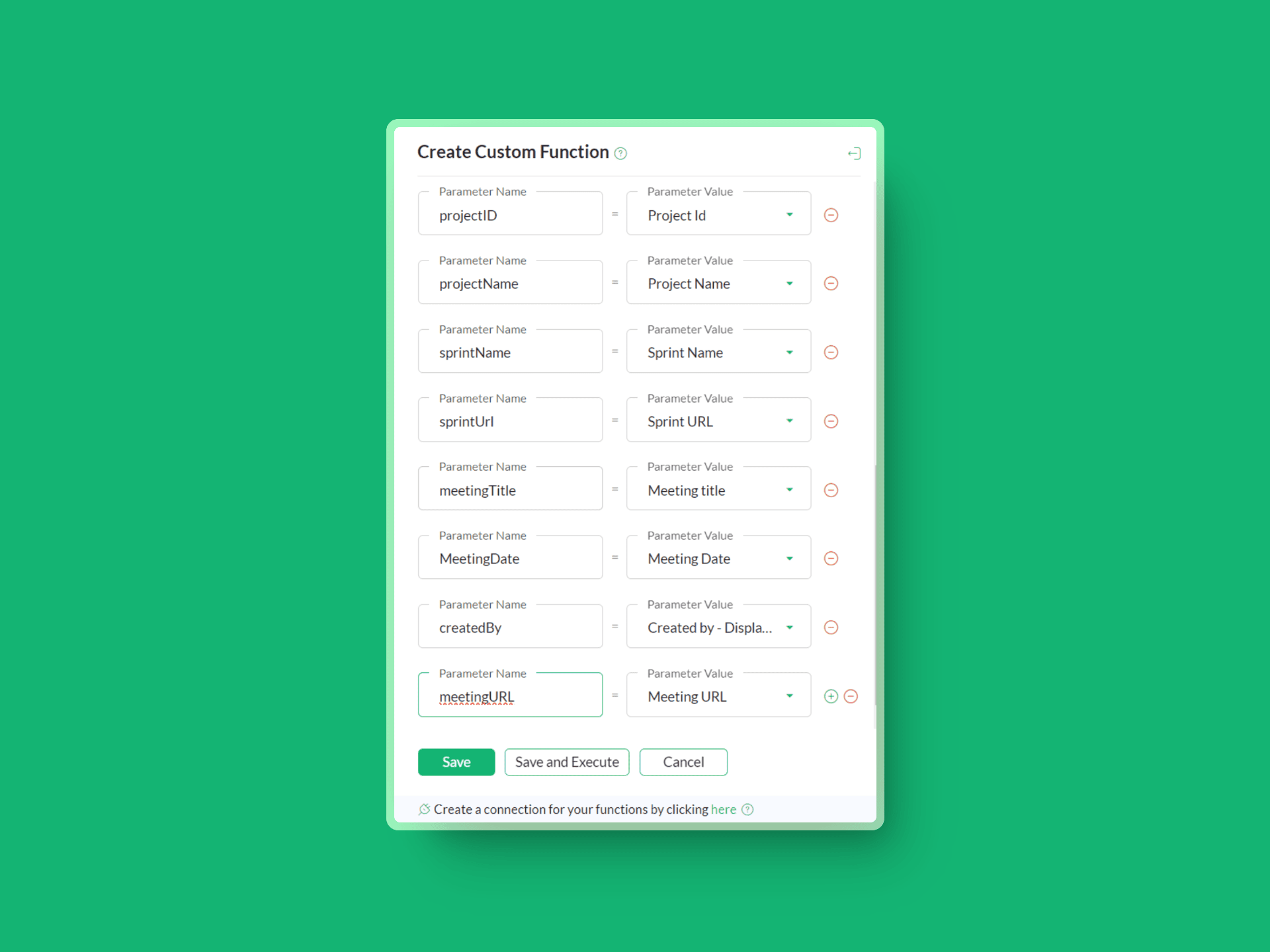
  1. Now, add the required parameters like project ID, Meeting ID, Project Name, Meeting Title, Sprint Name, Sprint URL, and so on.

  • Create Your Notification message card

Navigate to the custom function editor and construct the message card.(ⓘMessage builder) Use this sample code in the custom function editor:

  1. dataList = list();
  2. dataList.add({"Project name": projectName});
  3. dataList.add({"Sprint name":"["+sprintName+"]("+sprintUrl+")"});
  4. dataList.add({"Meeting title": meetingTitle});
  5. dataList.add({"Meeting link": "[Link]("+meetingURL+")"});
  6. postMessage = {"text":"### New meeting has been scheduled by " + createdBy,"slides":[{"type":"label","data":dataList}]};
  7. channelUniqueName = "CHANNEL_UNIQUE_NAME";
  8. info zoho.cliq.postToChannel(channelUniqueName, postMessage, "CONNECTION_LINK_NAME") ;
  • Connect Zoho Services

  1. Create a connection with Zoho OAuth service and select the scope ZohoCliq.Webhooks.CREATE and disable the use credentials of the login user check box and authorize the connection.

  • Personalize Your Setup

          6. Replace CHANNEL_UNIQUE_NAME  with your Cliq channel's unique name
              Replace CONNECTION_LINK_NAME with your OAuth connection name.  

Where to get the channel unique name?
Open the channel and click on Actions → Channel Info → Connectors

You'll find the Channel Unique Name under API Parameters. 
Replace the channel unique name in line no. 07. 

(📎 Check out the attached video for more clarity)
  1. Output:


Need a Hand?
If you get stuck or have questions, don't worry — reach out to support@zohocliq.com. We're ready to help you out.

Best,
Zoho Cliq 💚

    • Sticky Posts

    • Automating Employee Birthday Notifications in Zoho Cliq

      Have you ever missed a birthday and felt like the office Grinch? Fear not, the Cliq Developer Platform has got your back! With Zoho Cliq's Schedulers, you can be the office party-cipant who never forgets a single cake, balloon, or awkward rendition of
    • Customer payment alerts in Zoho Cliq

      For businesses that depend on cash flow, payment updates are essential for operational decision-making and go beyond simple accounting entries. The sales team needs to be notified when invoices are cleared so that upcoming orders can be released. In contrast,
    • Accelerate Github code reviews with Zoho Cliq Platform's link handlers

      Code reviews are critical, and they can get buried in conversations or lost when using multiple tools. With the Cliq Platform's link handlers, let's transform shared Github pull request links into interactive, real-time code reviews on channels. Share
    • App Spotlight : PagerDuty for Zoho Cliq

      App Spotlight brings you hand-picked apps to enhance the power of your Zoho apps and tools. Visit the Zoho Marketplace to explore all of our apps, integrations, and extensions. In today's fast-paced world, seizing every moment is essential for operational
    • Automate your status with Cliq Schedulers

      Imagine enjoying your favorite homemade meal during a peaceful lunch break, when suddenly there's a PING! A notification pops up and ruins your moment of zen. Even worse, you might be in a vital product development sprint, only to be derailed by a "quick