Refer Zoho CRM Plus to your friends and earn rewards!

Refer Zoho CRM Plus to your friends and earn rewards!

Hey everyone,
 
We'd like to thank you from the bottom of our hearts for continuing to be our esteemed customers. Now you have the opportunity to refer Zoho CRM Plus to your friends or family members who are looking for a suitable solution to enhance the customer experience. This comes with some great rewards.

How it works

  • Refer your friends and once they start using Zoho CRM Plus, you'll receive 15% of their subscription payment in wallet credits. You can use these credits to purchase new Zoho products, renew your existing subscriptions, add user licenses, and more.
  • Your referrals earn $100 instantly when they sign up, which they can use to subscribe to a new Zoho app.
  • There's no limit to how many people you can refer.
  • Your referral reward will be credited to your Zoho Wallet account after your friend completes 90 days with Zoho as a paying customer.

How can I refer?

  1. Click the profile icon () from the top right corner of the window.
  2. Go to the Refer and Earn section and click Learn more.
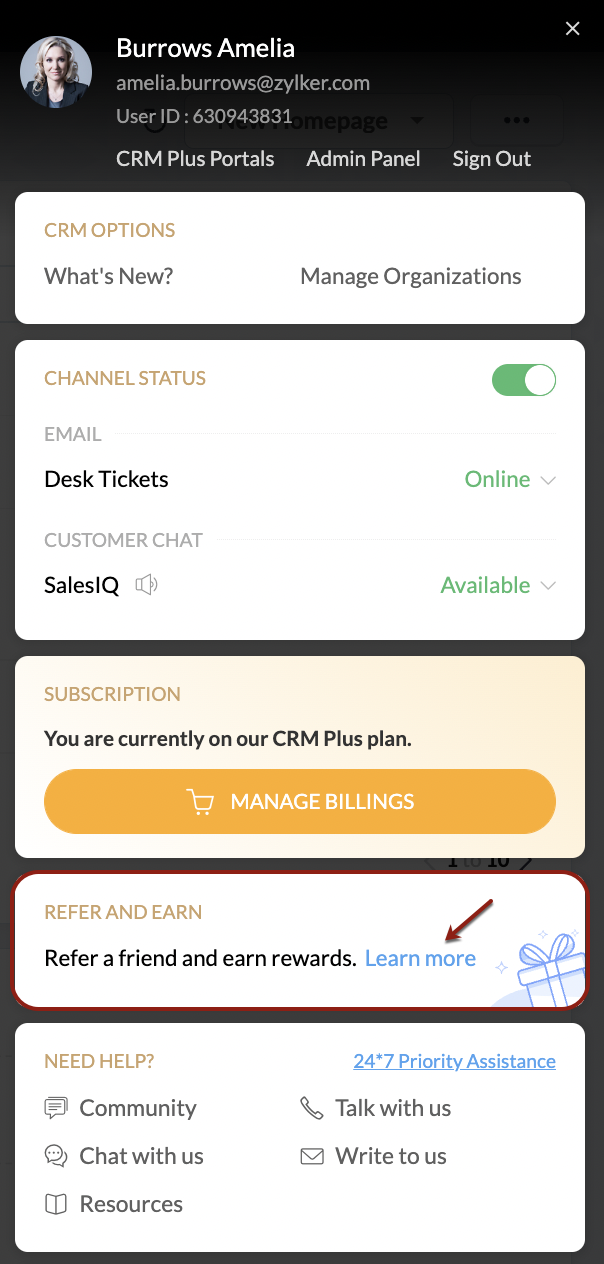
  3. Click Refer and Earn.
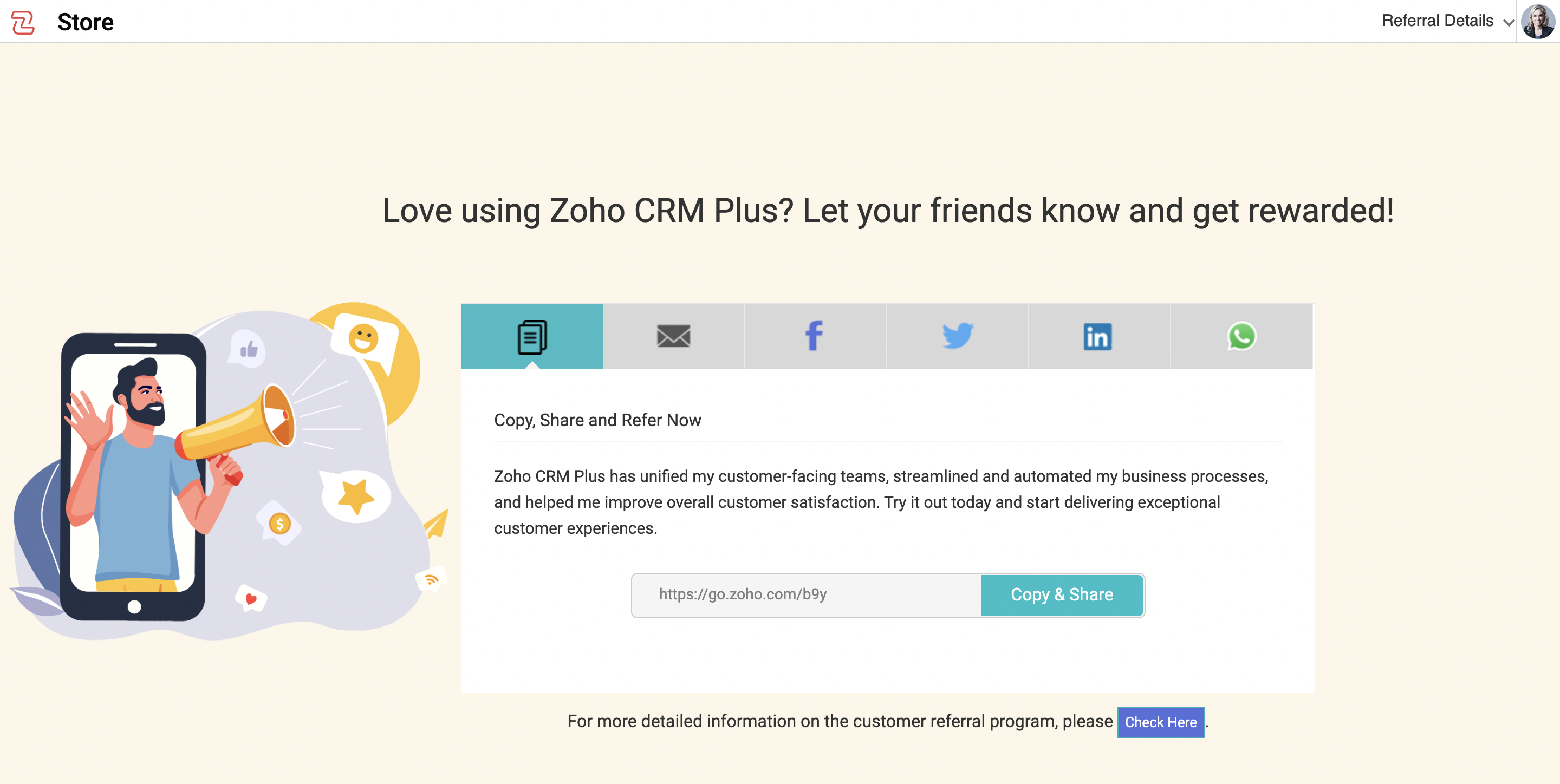
    You will be redirected to a web page where you can copy the URL and share it with your friends, or share it via email, Facebook, Twitter, LinkedIn, and WhatsApp. 
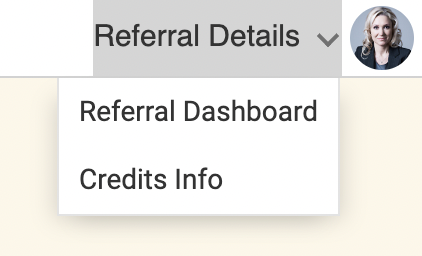
Where can I view my wallet credits?

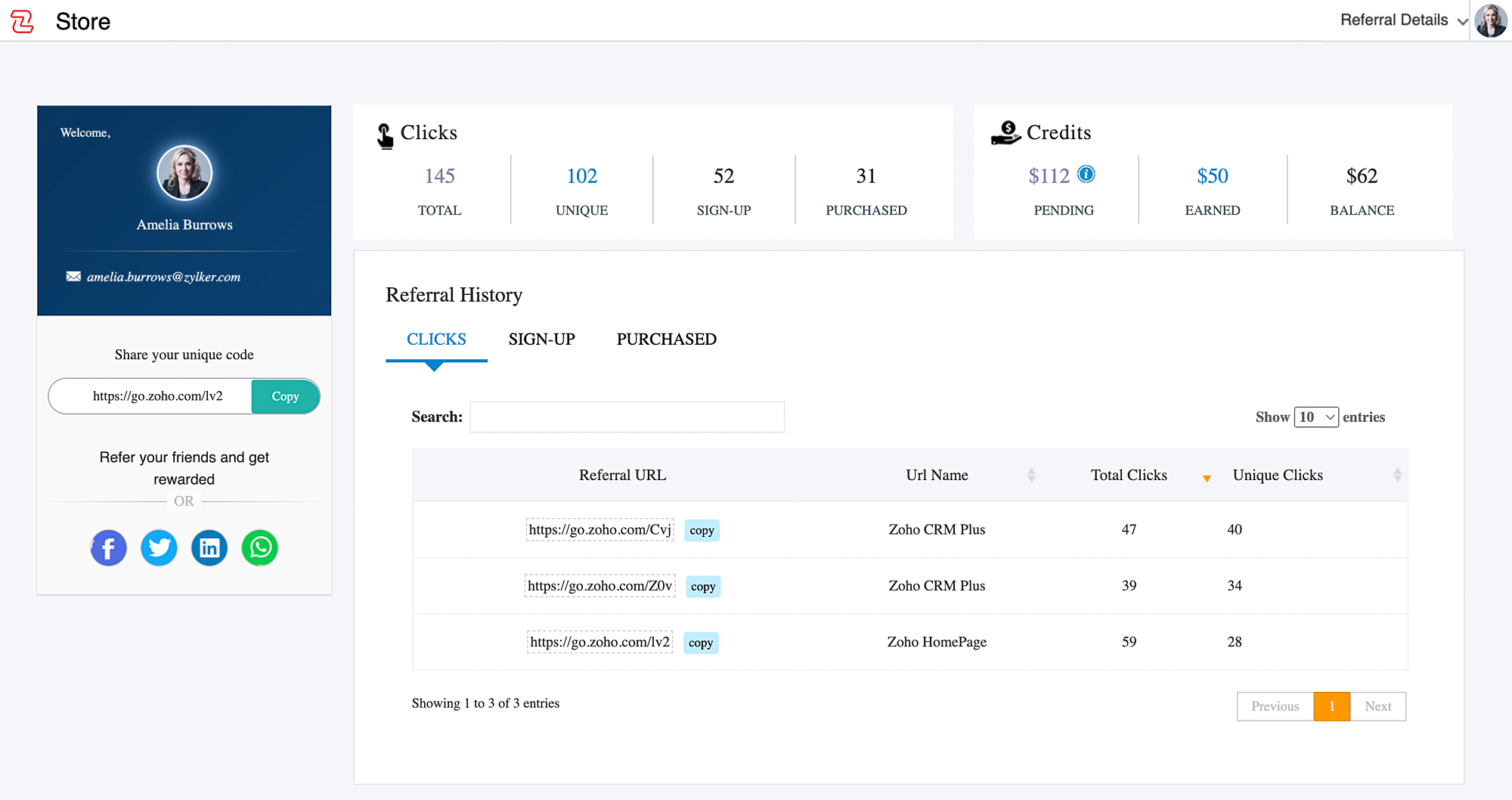
Your wallet credits can be viewed from the Referral Dashboard in the refer and earn webpage.
You can also view the total number of clicks, unique clicks, number of users who signed up, and the number of users who purchased the product.
We hope to see a lot of your friends and family members make the best use of Zoho CRM Plus.
 
Kind regards,
Zoho CRM Plus Team

    • Sticky Posts

    • Zoho CRM Plus in 2023: Let's rewind

      Hey everyone, There's something about December that makes us want to sit back and remember all the wonderful moments, as we get ready for the New Year, 2024! (Psst! We are also turning 10—yay!) This year, CRM Plus had a lot of wonderful updates, taking
    • The CX Workshops are back in 2023!

      Hello, can you see my screen? Can you hear me? This is a phrase we've all been saying more often than "good morning" over the last couple of years. Well, now it's time to re-connect in person. We're excited to invite you all to the CX Workshops we've
    • Refer Zoho CRM Plus to your friends and earn rewards!

      Hey everyone,   We'd like to thank you from the bottom of our hearts for continuing to be our esteemed customers. Now you have the opportunity to refer Zoho CRM Plus to your friends or family members who are looking for a suitable solution to enhance
    • Social in CRM Plus now supports TikTok, Instagram Stories and Reels, and YouTube Shorts

      Hey everyone,   We are excited to inform you that Social in CRM Plus now allows you to publish on TikTok! We've also updated it to let you create Instagram Stories and Reels, as well as YouTube Shorts. Here's a brief about the updates.  Publishing on
    • Unified telephony in Zoho CRM Plus

      In any business, managing calls with the prospects or customers is an integral part of a salesperson or a support agent's daily life. They have access to information about the customers within Zoho CRM, and they also use a suitable PBX service to communicate
    • Recent Topics

    • Export Zoho Books Invoice - PDF API

      How to Download Zoho Books PDF Files Using Zoho Books API -------------------------------------------------------------------------------------- Hello everyone! If you are looking for a way to download Zoho Books PDF files using the Zoho Books API, you've
    • OAuth integration issues

      I'm experiencing persistent OAuth errors when trying to connect Make with Zoho API. I've tried multiple approaches but keep encountering the following issues: First error: 'Invalid Redirect Uri - Redirect URI passed does not match with the one configured'
    • Marketing Automation/Campaigns confusion questions and integrations

      ​I am pulling my hair out yet AGAIN due to the lack of true integration between zoho apps - Why can't we use Campaigns and Marketing Automation at the same time? if they are truely seperate apps, then we should be able to use both for what they were intended,
    • Tip #75- Exploring Technician Console: Power Options- 'Insider Insights'

      Hello Zoho Assist Community! Welcome to the very first community post of June, and we are kicking things off with a feature that gives technicians complete control over a remote machine without ever leaving their session: Power Options. What are Power
    • Windows agent 2026_M07 release notes

      Agent Version: 2026.4.15.0 Release date: 1 June, 2026 Issue fix: Streamlined overall process flow and fixed bugs that delayed or prevented proper functioning of Task Scheduler feature. Enhancements to Multi Monitor view under varying network load scenarios.
    • Show Categories Directly When Clicking the Knowledge Base Button in SalesIQ Chat Widget

      Hi Zoho SalesIQ Team, I would like to submit a feature request regarding the behavior of the Knowledge Base button in the SalesIQ chat widget. Current Behavior: When a visitor clicks the Knowledge Base (KB) button in the chat widget, they are first taken
    • What is MCP and How Does It Connect to Zoho Invoice?

      If you've ever wished you could just tell your invoicing software what to do, without clicking through menus, pulling up reports manually, or switching tabs every five minutes, that's exactly what the Zoho MCP server is built for. MCP stands for Model
    • Facebook won't connect

      Good morning, Whilst I'm sure its something I've done wrong along the line I'm trying to connect a Facebook account to Zoho Social Upon entering the username and password the 'Connect Facebook' button appears to do some work then stops without any connection being established I've checked the business integrations on Facebook and Zoho is not appearing at all Can you help me with this at all? Kind Regards Daniel Evans Home Inventories
    • Empowered Custom Views: Cross-Module Criteria Now Supported in Zoho CRM

      Hello everyone, We’re excited to introduce cross-module criteria support in custom views! Custom views provide personalized perspectives on your data and that you can save for future use. You can share these views with all users or specific individuals
    • How to publish Zoho form

      I have created zoho form with various fields. I now want to publish the same and share the link so that I can start collecting response. Please guide me for the same.
    • Cliq iOS can't see shared screen

      Hello, I had this morning a video call with a colleague. She is using Cliq Desktop MacOS and wanted to share her screen with me. I'm on iPad. I noticed, while she shared her screen, I could only see her video, but not the shared screen... Does Cliq iOS is able to display shared screen, or is it somewhere else to be found ? Regards
    • Tabular View Report | Scale To Fit Screen

      Please add the option to scale Tabular View reports to fit the screen. I constantly have to adjust the column size of Tabular View reports to fit various screen sizes and it just looks messy. You can see in the screenshot below there is a blank gap after
    • What's New in Zoho POS - May 2026

      Hello everyone, Welcome to Zoho POS’s monthly update, where we share our latest feature updates, enhancements, events, and more. Let’s take a look at how May went. Introducing the new Settings page with enhanced search The Settings page has been revamped
    • Mapbox map embed in Zoho webpage

      The mapbox map is not showing in Zoho webpage. the code was running fine other webpage.
    • DYK 6 - Task Assignment from the Workload Report

      Did You Know tasks can be assigned from the Workload Report? As projects evolve, tasks pile up and distributing them equally among team members becomes a balancing act. Identifying over-allocated and underutilised members gets complicated when task assignment
    • Mise à jour de Zoho Books – France

      Chers clients, Merci pour votre patience et votre soutien continu. Avec les évolutions réglementaires à venir en France nous introduisons de nouvelles fonctionnalités dans Zoho Books pour les clients français. Ces mises à jour ont été conçues pour répondre
    • Building extensions #3: Zoho Sprints developer platform features and capabilities

      Hello all! We're thrilled to connect with you in another post in our Building extensions series. We've explored concepts in building, testing, publishing, and sharing extensions for Zoho Sprints. If you missed any of this, take a look at our other posts.
    • How do create a validation rule / function to check datetime field is within Business Hours?

      I've got a field called Scheduled_Time. People keep accidently inputting 2am when they mean 2pm. Realistically this field is never going to be before 7am or after 9pm. I'd like to add validation rule to the field (which is a datetime field). Using the
    • What's New in Zoho Inventory | April & May 2026

      Hello users, We're excited to roll out the latest Zoho Inventory updates for April and May 2026. These enhancements are designed to make your daily operations smoother and more efficient, from advanced inventory management and flexible pricing to automated
    • Experience effortless record management in CRM For Everyone with the all-new Grid View!

      Hello Everyone, Hope you are well! As part of our ongoing series of feature announcements for Zoho CRM For Everyone, we’re excited to bring you another type of module view : Grid View. In addition to Kanban view, List view, Canvas view, Chart view and
    • Schedule from AI with Zoho Bookings MCP Server

      Greetings from the Zoho Bookings team! We’re excited to introduce the Zoho Bookings MCP (Model Context Protocol) Server integration, a powerful new way to bring AI-driven automation into your scheduling workflows. With MCP, you can connect Zoho Bookings
    • Zoho Projects > Zoho Analytics - where are 'Work Hours' ?

      I'm trying to replicate the forecasting calculations and need to find 'Work Hours' as a key component. Such as: Planned Cost - The product of work hours and its cost per hour I've been able to track Work Hours to the Task screen and when you expand it
    • Automate pushing Zoho CRM backups into Zoho WorkDrive

      Through our Zoho One subscription we have both Zoho CRM and Zoho WorkDrive. We have regular backups setup in Zoho CRM. Once the backup is created, we are notified. Since we want to keep these backups for more than 7 days, we manually download them. They
    • Free Webinar Alert! Cliq in Zoho Workplace: Collaborate and Communicate Smarter

      Hello Zoho Community! Looking for a better way to keep your teams connected and conversations organized? We’ve got a webinar you won’t want to miss. Join our webinar on "Zoho Cliq in Zoho Workplace" and discover how smarter communication can improve collaboration
    • Upcoming webinar: Getting started with Zoho LandingPage

      Building your first landing page? We’ll help you get started. A landing page is more than just a place to send your visitors—it’s where your campaigns generate leads, drive actions, and create meaningful customer interactions. Join our monthly Getting
    • Native QuickBooks integration for Zoho CRM: Connecting sales and finance

      Greetings, I hope all of you are doing well. We're excited to announce Zoho CRM's integration with QuickBooks Web, which is designed to synchronize your CRM data with your QuickBooks accounting records and bridge the gap between sales and finance. This
    • Create Tasklist with Tasklist Template using API v3

      In the old API, we could mention the parameter 'task_template_id' when creating a tasklist via API to apply a tasklist template: https://www.zoho.com/projects/help/rest-api/tasklists-api.html#create-tasklist In API v3 there does not seem to be a way to
    • Restoring deleted files

      Hi I have been using zoho writer app personal account from last 7 months and made number of documents for educational purposes. I deleted the writer app by mistake and I lost all the documents.I reinstalled the app but the documents are not restored even
    • Unable to mass update a specific field

      Hi there, I want to mass update a field on zoho crm but im not able to as it doesnt show up. procurement list is a lookup field
    • Introducing Databridge | Securely connect your private systems with Creator apps

      Hello everyone, Enterprises today rely on a mix of privately hosted databases and cloud applications to run their everyday operations. But connecting these two worlds has always been a challenge - one that often forces teams to choose between accessibility
    • Folders for CRM Dashboards

      Implement ability to create folders to store dashboards within. Example useful for case such as individual sales persons dashboards grouped by year into folders.
    • [Webinar] Solving business challenges: Customizing Writer for your business requirements

      Hi Zoho Writer users, Every organization has unique branding, formatting standards, and workflow requirements. Yet most teams work with default settings, manually applying fonts, recreating templates, and adjusting preferences for every document—wasting
    • Latest updates to Zia in Office Integrator

      Hello Zoho Office Integrator users! We’re pleased to share exciting updates to the proofing capabilities of Zia, our AI-driven writing assistant, in Office Integrator. With these updates, you can now get spell and grammar check in Brazilian Portuguese,
    • The latest enhancements to Bigin

      Greetings, I hope all of you are doing well. We're happy to announce three recent enhancements we've made to Bigin. We'll go over each one in detail. Bigin integration with Zoho LandingPage You now have the ability to connect Bigin with Zoho LandingPage.
    • What’s New in Zoho Inventory — Latest Features, Integrations & Updates | December 2025

      Zoho Inventory has evolved significantly over the past months, bringing you smarter, faster, and more connected tools to streamline your operations. Whether you’re managing multichannel sales, complex fulfillment workflows, or fast-moving stock, our newest
    • Best practice for tracking the sending of samples or catalogues

      Hi,  My company sells leather and fabric for interiors- sofas, chairs, curtains etc. Our clients are all interior designers, architects or furniture manufacturers. What is the best way to track what samples/catalogues we have sent? If the project is fairly certain, for example, for a specific hotel renovation, then we'll track this as an opportunity, as the project has a definite date, budget and is sure to happen (we may of course lose the project, but we want to bid for it). If the designer just
    • AIRPORT TRANSFER BOOKING SYSTHEM

      Hi guys i just start using zoho creator to manage my transportation booking management company. I have built two booking forms, one that i'll embeded in the website and one for the registered companies. 1st problem: don't know how to auto fill corporate customers details from contacts list to the booking companies booking form . need help!!
    • Marketer's Space: Re-engage your Audience with WhatsApp Journeys

      Hello Marketers, Welcome back to another post in Marketers' Space! We’re continuing our WhatsApp Journeys series, diving into strategies that ensure your marketing efforts don’t go unnoticed. So, you drafted an email with personalization, a compelling
    • Using assigned value from a dropdown list to populate a field

      Hello, I use a dropdown with a global list that has assigned values. The value is a name, the assigned value is the corresponding email. When selecting my name from the drop down, I want the "Save for later" template to use the assigned email as recipient.
    • Inventory Barcode Creation - Add Picture of Item

      Hi I am trying to set up bar code labels and include a picture of the item on the label - any idea on how to add that field to the barcode generator?
    • Next Page